ListKit vs QuickEmailVerification: Which Tool Do You Need in 2026?
ListKit sells you leads. QuickEmailVerification checks whether the emails you already have are real. Here's how they compare on price and fit, and why many teams end up needing both jobs done.
TL;DR
- ListKit is a B2B lead database. You filter by title, industry and company size, then export contacts with emails that ListKit has already verified. Paid plans start around $83/mo (billed yearly) for 24,000 credits.
- QuickEmailVerification (QEV) only verifies email lists. You upload addresses you already have and it tells you which ones are valid, invalid, catch-all or unknown. It costs $4 for 500 credits, and the free tier gives you 100 checks per day.
- These tools answer different questions. ListKit answers "who should I email?" QEV answers "will this email bounce?"
- Choose ListKit if your list is empty. Choose QEV if you already have a list that has gone stale.
- If you want to find and verify emails in one place, look at a combined finder-plus-verifier such as Tomba. It's covered at the end.
What is the real difference between ListKit and QuickEmailVerification?#
Most "ListKit vs QuickEmailVerification" searches come from people who think the two tools compete. They mostly don't. They sit at two different points in the outbound workflow.
Think of a grocery store and a food inspector. ListKit is the store: you walk in and leave with ingredients, meaning contacts. QuickEmailVerification is the inspector: you give it food you already bought, and it tells you what's gone off.
ListKit (listkit.io) is a prospecting database. It says it has 731M+ B2B contacts and markets its emails as "triple-verified" before you export them. It also offers AI company search, intent data, enrichment and CRM integrations on every plan, including the free tier.
QuickEmailVerification (quickemailverification.com) is a standalone verification service. It doesn't give you any new contacts. It checks syntax, domain and MX records and does an SMTP-level mailbox check, flags disposable and role-based addresses, and detects catch-all ("accept-all") domains. You can use it through a web upload, a REST API or integrations with email platforms.
So which one wins depends on the job you need done.
How do ListKit and QuickEmailVerification compare feature by feature?#
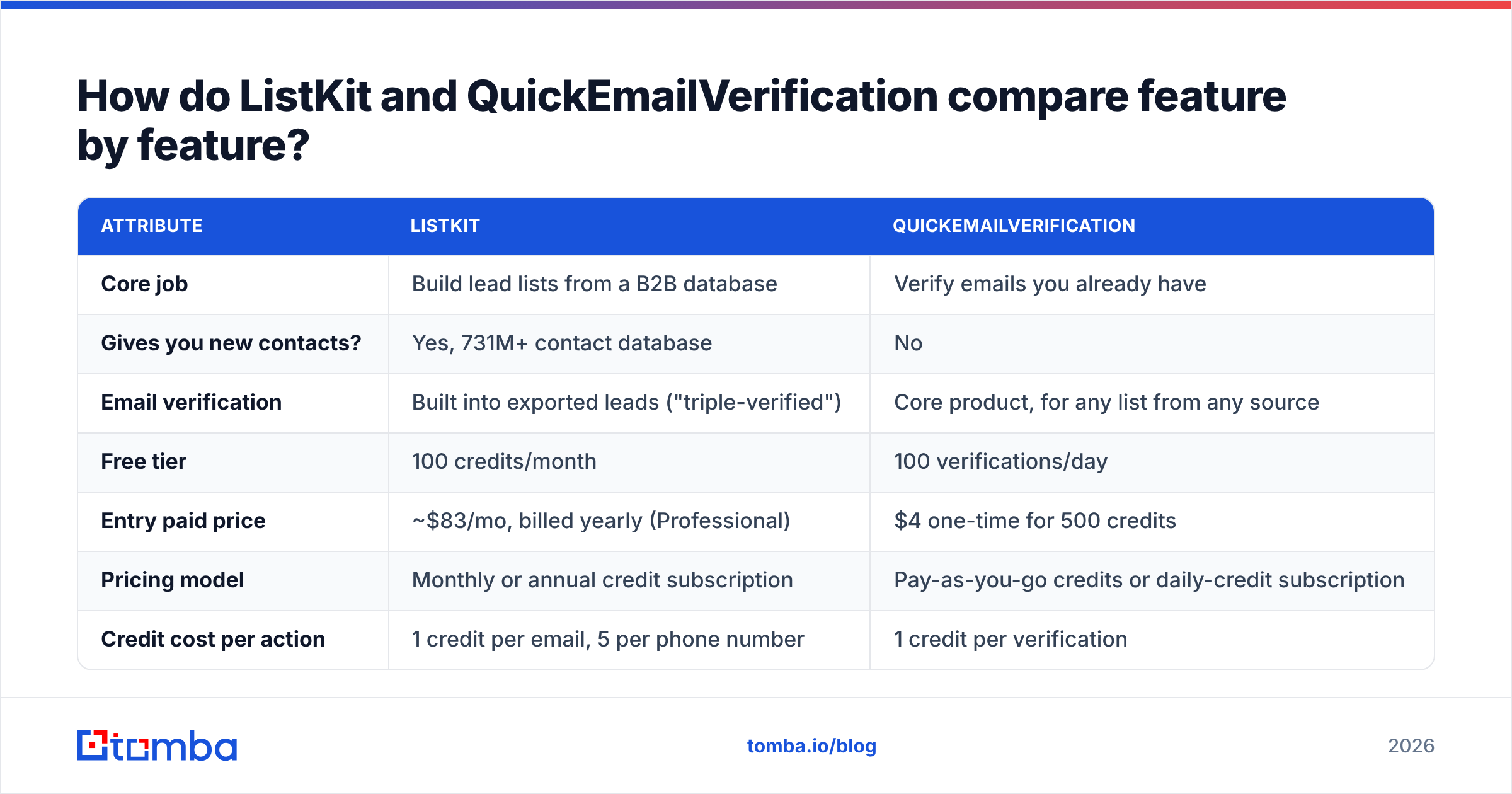
| Attribute | ListKit | QuickEmailVerification |
|---|---|---|
| Core job | Build lead lists from a B2B database | Verify emails you already have |
| Gives you new contacts? | Yes, 731M+ contact database | No |
| Email verification | Built into exported leads ("triple-verified") | Core product, for any list from any source |
| Free tier | 100 credits/month | 100 verifications/day |
| Entry paid price | ~$83/mo, billed yearly (Professional) | $4 one-time for 500 credits |
| Pricing model | Monthly or annual credit subscription | Pay-as-you-go credits or daily-credit subscription |
| Credit cost per action | 1 credit per email, 5 per phone number | 1 credit per verification |
| Phone numbers | Yes | No |
| Intent / company data | Yes | No |
| API | Yes | Yes |
| Best fit | Outbound teams starting from zero | Teams with existing CRM, event or inbound lists |
What the table shows: ListKit's features all feed one outcome, getting you new pipeline. QEV's features all feed a different one, protecting your sender reputation.
How much do ListKit and QuickEmailVerification actually cost?#
On a monthly bill, QEV is almost always cheaper. That's because it does less.
ListKit pricing (from its public pricing page, as summarised by review sites in 2026):
- Free: 100 credits/month.
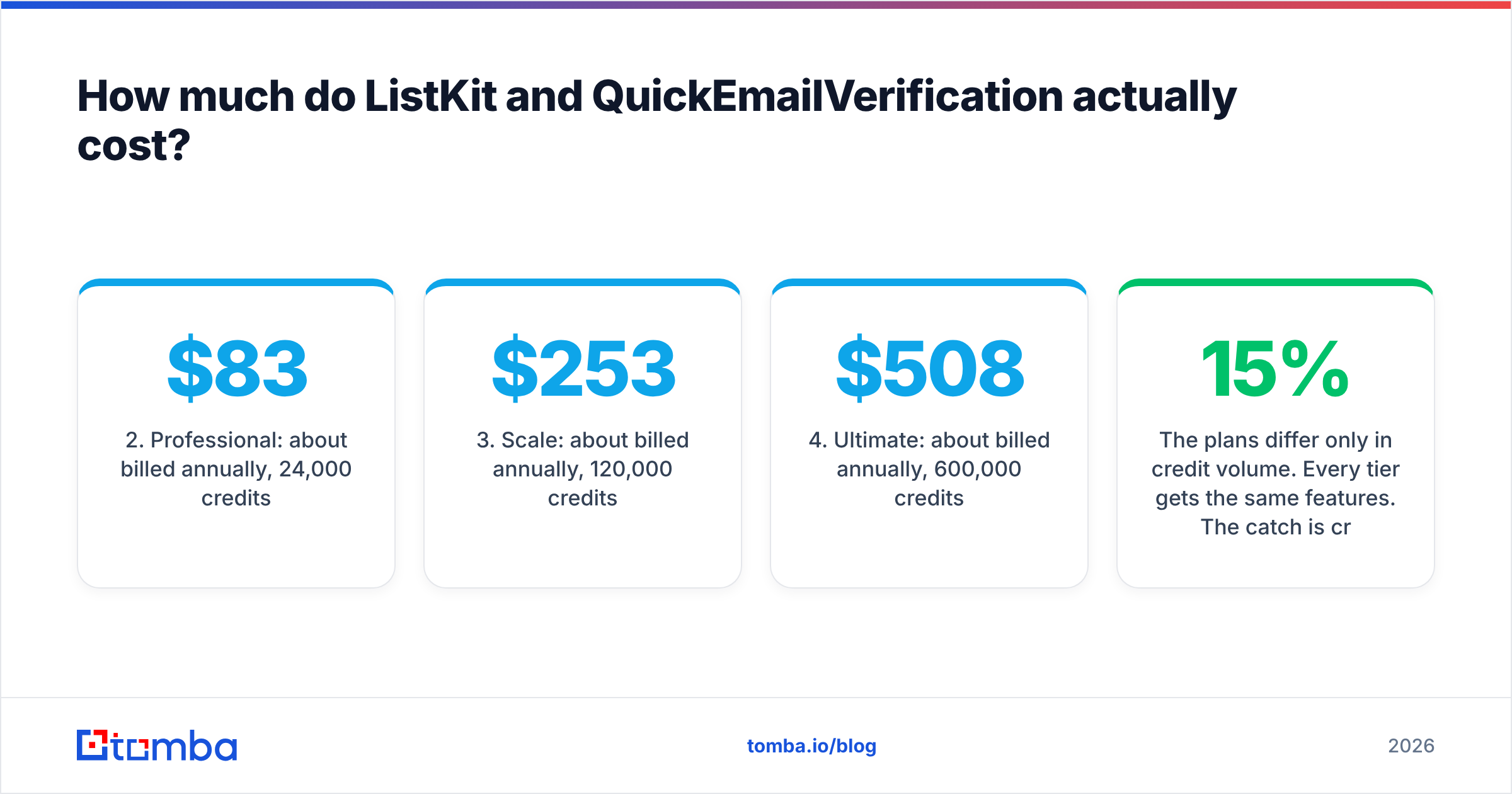
- Professional: about $83/mo billed annually, 24,000 credits/month.
- Scale: about $253/mo billed annually, 120,000 credits/month.
- Ultimate: about $508/mo billed annually, 600,000 credits/month.
- Enterprise: custom pricing.
The plans differ only in credit volume. Every tier gets the same features. The catch is credit burn. An email costs 1 credit, but a phone number costs 5, and a fully enriched contact can use up to 10. If you want phone numbers on every record, 24,000 credits can shrink to a few thousand usable leads. Monthly billing costs roughly 15% more than annual.
QuickEmailVerification pricing:
- Free: 100 verifications per day, no credit card required.
- Pay-as-you-go: from $4 for 500 credits, which works out to $0.008 per check at the smallest pack. You can buy volume packs up to millions of credits, and the unit price drops as you buy more. One-time credits don't expire.
- Monthly subscription: from about $25/month for 500 credits per day. The daily credits reset, so this plan suits steady API traffic, such as checking addresses at a signup form.
Cost per usable contact: a worked example#
Say you need 2,000 verified prospects this month.
- With ListKit Professional: export 2,000 contacts with emails only, and you spend 2,000 of your 24,000 credits. The effective cost is well under $10 of your subscription. If you pull phone numbers too, the burn goes up quickly.
- With QEV alone: you can't do it. QEV has no contacts to give you. You need a source first, whether a scraper, a database or a manual export from LinkedIn, and then about $16–$20 of QEV credits to verify those 2,000 addresses at small-pack rates.
The two price tags don't measure the same thing. ListKit's price covers finding and verifying. QEV's covers verifying only.

How accurate is each tool's verification?#
Both tools give you a sensible verification result. Neither can promise zero bounces, and any vendor that says otherwise is overselling.
ListKit checks emails before you export them. It markets this as triple verification, meaning each address is run through several checks. That helps, but it has a limit: the check happens when the record is verified, not when you hit send. B2B data decays fast because people change jobs, companies rebrand and domains move. A lead verified 60 days ago in someone's saved list is not the same as a lead verified today.
QuickEmailVerification checks at the moment you run it, which is the whole value of a standalone verifier. Its result categories are the usual ones:
- Valid: the mailbox exists and accepts mail.
- Invalid: bad syntax, no MX record, or the mailbox was rejected.
- Accept-all / catch-all: the domain accepts every address, so the specific mailbox can't be confirmed.
- Unknown: the server timed out or used greylisting.
- Disposable / role-based: flagged so you can suppress them.
Catch-all is where both tools, like nearly every verifier on the market, give you a "risky" label instead of a clear answer. If a big share of your target accounts are enterprises on Microsoft 365 or Proofpoint gateways, expect a real chunk of results to land there. Specialist tools such as a catch-all verifier try to resolve that bucket further.
On reviews, both products score well on G2. QEV users mostly praise its simplicity and price, and ListKit users mostly praise data volume and ease of export. Neither has a pattern of accuracy complaints serious enough to rule it out.
Which workflows suit ListKit best?#
Pick ListKit when your problem is "I don't have enough people to email."
- Net-new outbound campaigns. Filter by job title, headcount, industry and location, then export straight into your sequencer.
- Agencies running many client campaigns. Unlimited users on every plan means you don't pay per seat.
- Account-based lists with intent signals. You can prioritise accounts that show buying activity instead of building a flat list.
- Phone plus email outreach. You can pull phone numbers in the same export, at a higher credit cost.
- Founders doing their own outbound. It's quicker than piecing contacts together by hand from LinkedIn.
Where ListKit is weaker: you're limited to its database's coverage. Niche verticals, very small companies and regions outside North America and Western Europe often have thinner coverage in any large B2B database, and ListKit is no exception.
Which workflows suit QuickEmailVerification best?#
Pick QEV when your problem is "I have emails but I don't trust them."
- CRM cleanup. Run your 18-month-old HubSpot or Salesforce export before a re-engagement campaign.
- Event and webinar lists. Attendee emails typed by hand are full of typos and personal addresses.
- Inbound form validation. Use the API to reject fake signups as they come in.
- Checking data from other vendors. Whatever your lead source claims, re-verify right before you send.
- Low-volume, occasional use. 100 free checks a day and credits that never expire suit teams that verify in bursts.
Where QEV is weaker: it only verifies. It won't find a missing email, enrich a record or tell you who the VP of Sales is at your target account.
Is ListKit better than QuickEmailVerification?#
ListKit is better if you need leads. QuickEmailVerification is better if you need clean lists. Beyond that, a straight "better" verdict doesn't make sense, because the tools don't overlap enough.
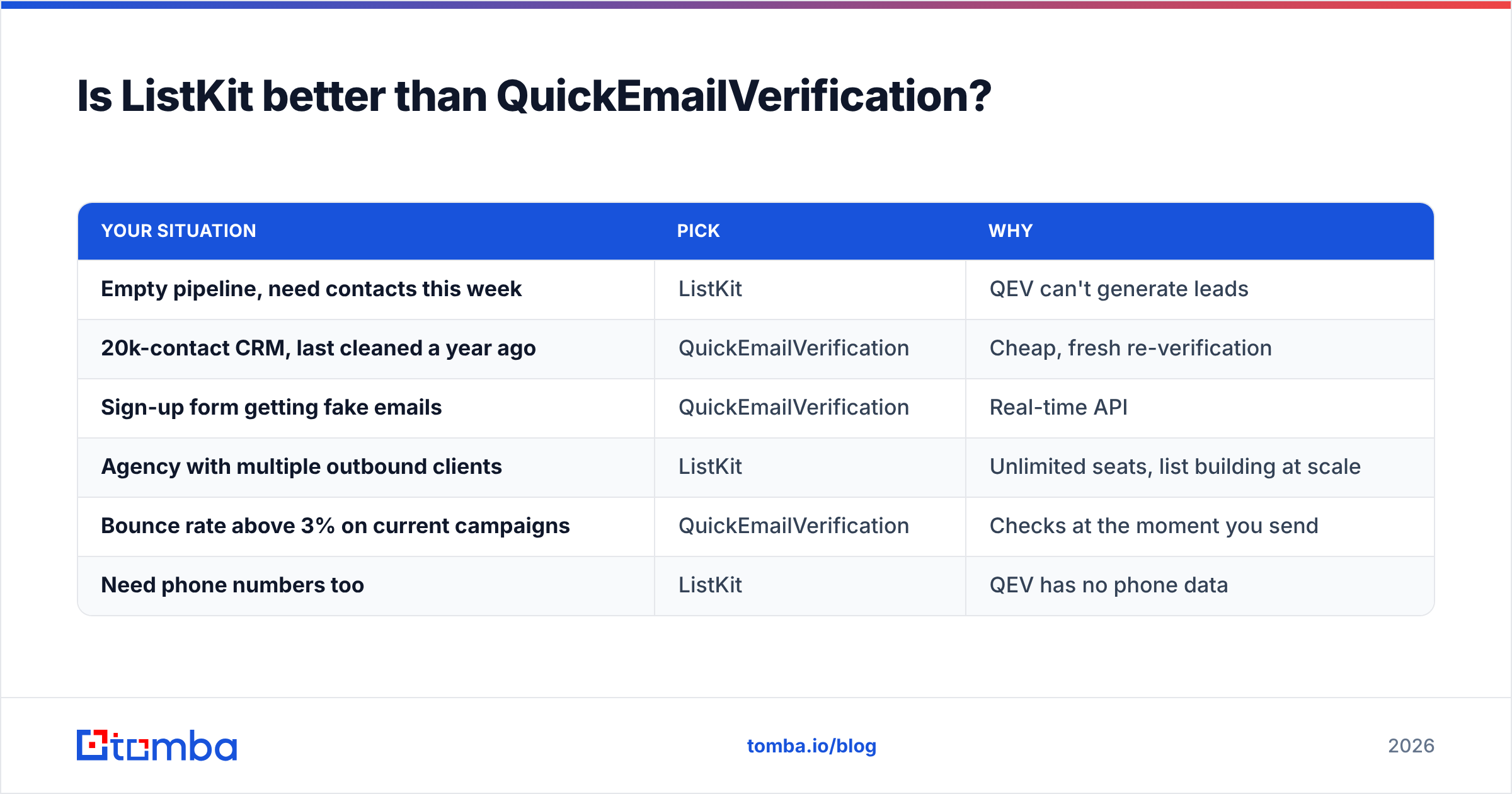
Here is a practical way to decide:
| Your situation | Pick | Why |
|---|---|---|
| Empty pipeline, need contacts this week | ListKit | QEV can't generate leads |
| 20k-contact CRM, last cleaned a year ago | QuickEmailVerification | Cheap, fresh re-verification |
| Sign-up form getting fake emails | QuickEmailVerification | Real-time API |
| Agency with multiple outbound clients | ListKit | Unlimited seats, list building at scale |
| Bounce rate above 3% on current campaigns | QuickEmailVerification | Checks at the moment you send |
| Need phone numbers too | ListKit | QEV has no phone data |
The teams that get burned are the ones that expect one tool to cover both jobs. ListKit's pre-verification doesn't replace re-checking a list that has sat around for months. QEV's verification doesn't help if you have nobody worth emailing.

What does a clean outbound stack look like in 2026?#
Mailbox providers have raised the bar. Google and Yahoo's bulk-sender rules made spam-complaint and bounce thresholds real consequences instead of loose best practices, and every hard bounce still counts against your sender reputation. The practical flow looks like this:
- Source: build or enrich your list. This is ListKit's job, or an email finder that looks up addresses by name and domain.
- Verify at send time: re-check anything older than 30 days. This is QEV's job, or any email verifier.
- Handle catch-alls separately: send to them at lower volume, or run a dedicated catch-all check first.
- Suppress: drop invalid, disposable and role-based addresses before they reach your sequencer.
- Monitor: watch bounce and complaint rates in your sending platform. HubSpot's deliverability guidance is a solid baseline if you're setting this up for the first time.
Running two vendors for steps 1 and 2 is fine. It does mean two bills, two sets of credits and an extra CSV export and import between them. That handoff is where lists get stale again.
Are there tools that combine finding and verifying?#
Yes. If running two tools sounds like more admin than you want, a few platforms handle both in one place.
Tomba is one of them. Its core product finds emails from a name plus company or domain, and verification runs as part of the same workflow instead of in a separate tool. It also includes domain search, catch-all verification, phone finding and enrichment. It's a different model from ListKit's filter-a-database approach: you usually start with a named account or person, not a broad industry filter. That makes it a good fit for account-based outreach and for filling gaps in lists you already have.
For reference, Tomba pricing runs from a free tier (25 searches/month) to Starter at $49/mo, Growth at $99/mo, Pro at $249/mo and custom Enterprise plans. If you only need bulk verification, QEV's pay-as-you-go packs will usually be cheaper. If you only need huge filter-based list builds, ListKit's credit volumes are hard to beat. The combined approach is worth it when you would otherwise be paying for and switching between two tools every week.
Final verdict: ListKit vs QuickEmailVerification#
- Choose ListKit if your constraint is lead volume. It's a strong database with verification built in, generous credits on paid tiers and no per-seat pricing.
- Choose QuickEmailVerification if your constraint is list hygiene. It's cheap, simple and pay-as-you-go, with a free tier generous enough for small teams.
- Use both if you run high-volume outbound. Source with ListKit, then re-verify with QEV before any list that has sat for a few weeks gets sent.
- Consolidate if you mostly prospect named accounts and want finding and verifying in one step.
If that last option sounds like your team, try Tomba Email Finder. Enter a name and company domain and you get a professional email address with a verification status attached, so there's no separate cleanup pass before you hit send. The free tier covers 25 searches a month, which is enough to test it against your current stack on a real target list.
Related guides#
// get started
Find, verify and enrich your first contacts today
Start on the free plan with 25 searches a month, then scale when your team is ready.
Free plan · No credit card required · GDPR & CCPA
// about the author