ListKit vs Scrubby: Lead Database or Catch-All Verifier in 2026?
ListKit sells triple-verified B2B leads. Scrubby rescues the catch-all emails other verifiers give up on. Here's how to tell which one your outbound stack is actually missing.
- ListKit and Scrubby do different jobs. ListKit is a B2B lead database that hands you contacts with emails it has already verified. Scrubby is a verifier for "risky" and catch-all emails that other tools can't confirm.
- Pricing at a glance (at time of writing): ListKit's paid plans start around $97/mo for 2,000 credits, and those credits expire every month. Scrubby starts at $27/mo for 1,000 validation credits, and unused credits roll over.
- Speed is the main trade-off. ListKit gives you leads right away. Scrubby's Quick Verification takes minutes, but its Deep Verification sends real test emails and can take up to 72 hours.
- Plenty of teams use both: they build a list in ListKit (or another finder) and send only the catch-all leftovers to Scrubby.
- If you want finding and verification in one place, a combined tool like Tomba handles lookup, verification, and catch-all checks from one account.
What is the real difference between ListKit and Scrubby?#
The "ListKit vs Scrubby" search is a bit misleading, because the two tools aren't really competitors. They sit at opposite ends of the same pipeline.
Think of a restaurant. ListKit is the supplier who delivers ingredients that have already been inspected. Scrubby is the food-safety lab you send the doubtful items to, like the unlabeled crate or the batch that smells a little off. Most restaurants need a supplier. Only some need a lab, and the ones that do use it for a small share of their stock.
Here's the technical version:
- ListKit is a prospecting database. You filter by title, industry, headcount, location, and tech stack, then export contacts. ListKit markets its emails as "triple-verified," meaning each address goes through several verification passes before you pay for it. It also sells phone numbers and a done-for-you email infrastructure service (domains, inboxes, warmup) as add-ons.
- Scrubby is a verification tool built for one narrow problem: addresses on catch-all (accept-all) domains and other "unknown" or "risky" results. Standard SMTP checks can't confirm these because the mail server says "yes" to every address. Scrubby doesn't find anyone. You bring it a list, usually the risky leftovers from a verifier like ZeroBounce, NeverBounce, or your finder's own check, and it tells you which addresses really exist.
So the real question isn't which tool is better. It's which part of your pipeline is broken: getting leads, or confirming the hard-to-verify ones.
How do ListKit and Scrubby compare feature by feature?#
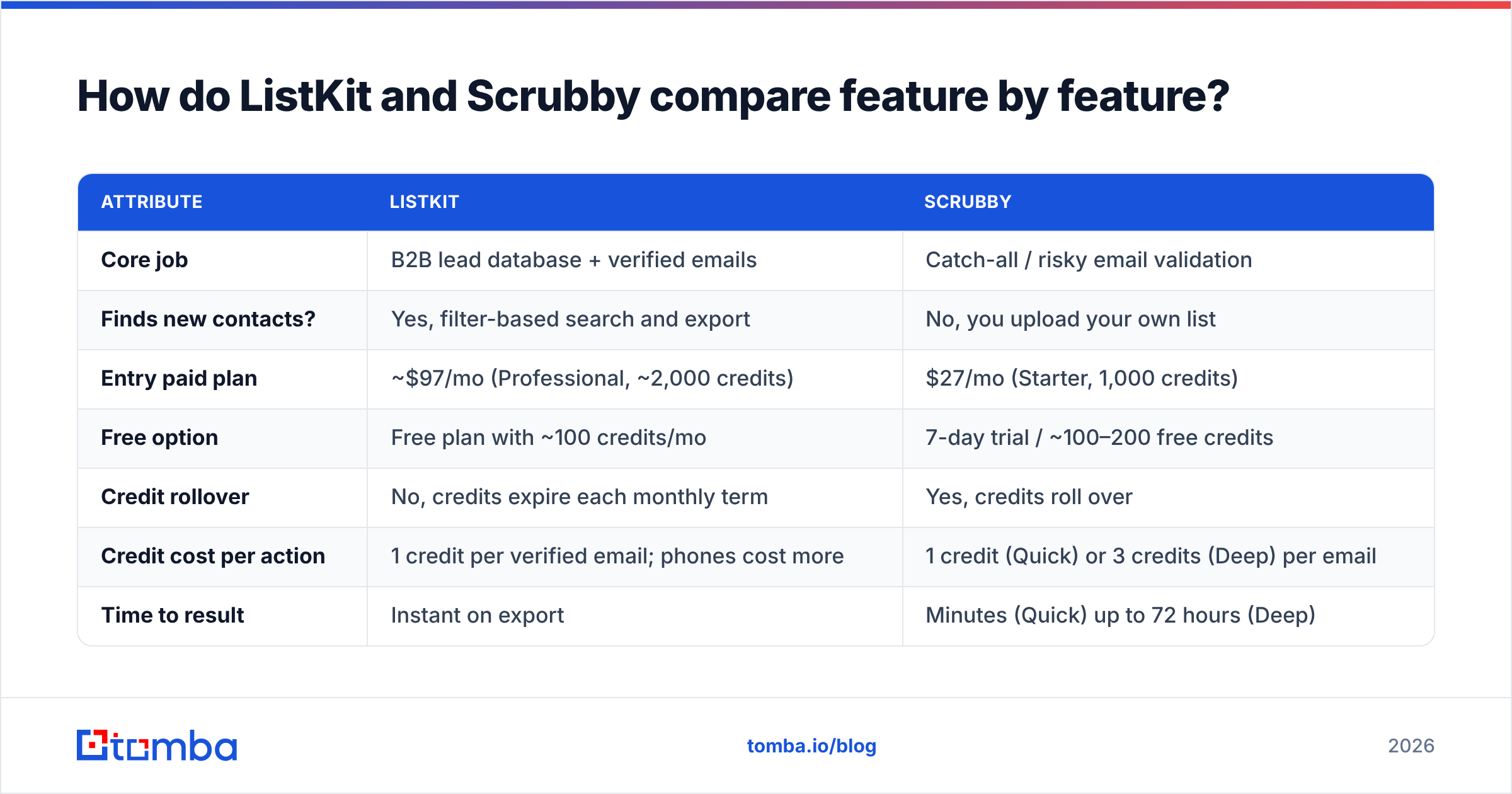
Here's how they line up on the attributes that matter when you're budgeting outbound. Prices come from each vendor's public pricing pages and third-party reviews at the time of writing, so confirm them on the vendor sites before you buy.
| Attribute | ListKit | Scrubby |
|---|---|---|
| Core job | B2B lead database + verified emails | Catch-all / risky email validation |
| Finds new contacts? | Yes, filter-based search and export | No, you upload your own list |
| Entry paid plan | ~$97/mo (Professional, ~2,000 credits) | $27/mo (Starter, 1,000 credits) |
| Free option | Free plan with ~100 credits/mo | 7-day trial / ~100–200 free credits |
| Credit rollover | No, credits expire each monthly term | Yes, credits roll over |
| Credit cost per action | 1 credit per verified email; phones cost more | 1 credit (Quick) or 3 credits (Deep) per email |
| Time to result | Instant on export | Minutes (Quick) up to 72 hours (Deep) |
| Catch-all handling | Filtered out or flagged before delivery | Its core strength: tests real mailbox behavior |
| Phone numbers | Yes (add-on credits) | No |
| API access | Yes on paid tiers | Yes, included from Starter |
| Best for | Agencies and SDR teams that need fresh lists | Teams whose lists are 20%+ catch-all |
Two rows in that table explain most of the difference.
Credit rollover. ListKit's credits expire at the end of each 30-day term. If your prospecting is lumpy (heavy in Q1, quiet in August), you'll lose some of what you pay for. Scrubby's credits roll over, which suits the usual use case: you clean a batch now and another one six weeks later.
Time to result. ListKit is built for "export and send today." Scrubby's Deep Verification is deliberately slow. It sends real emails and watches how the receiving server reacts over up to 72 hours. That's the method that makes its catch-all verdicts more reliable than a plain SMTP handshake, and it's also why you can't use it for real-time form validation.

Why do catch-all emails matter so much?#
This is the question that decides whether Scrubby is worth paying for at all.
A catch-all domain accepts mail for any address, so anything@company.com returns "accepted" at the SMTP level. Standard verifiers can't tell whether jane.doe@ really exists, so they return "accept-all," "unknown," or "risky." Depending on your ICP, that bucket can be large. Mid-market and enterprise companies running Microsoft 365 or Google Workspace behind secure email gateways (Mimecast, Proofpoint, Barracuda) often show up as catch-all or unverifiable.
You have three options for that bucket:
- Drop it. This is the safest for sender reputation, but you throw away real prospects. Those are often the bigger accounts you most want to reach.
- Send anyway. Some addresses will be real. Others will bounce later or disappear quietly, and a high share of bounces hurts domain health quickly.
- Verify it with a specialist. This is where Scrubby, or a dedicated catch-all verifier, comes in.
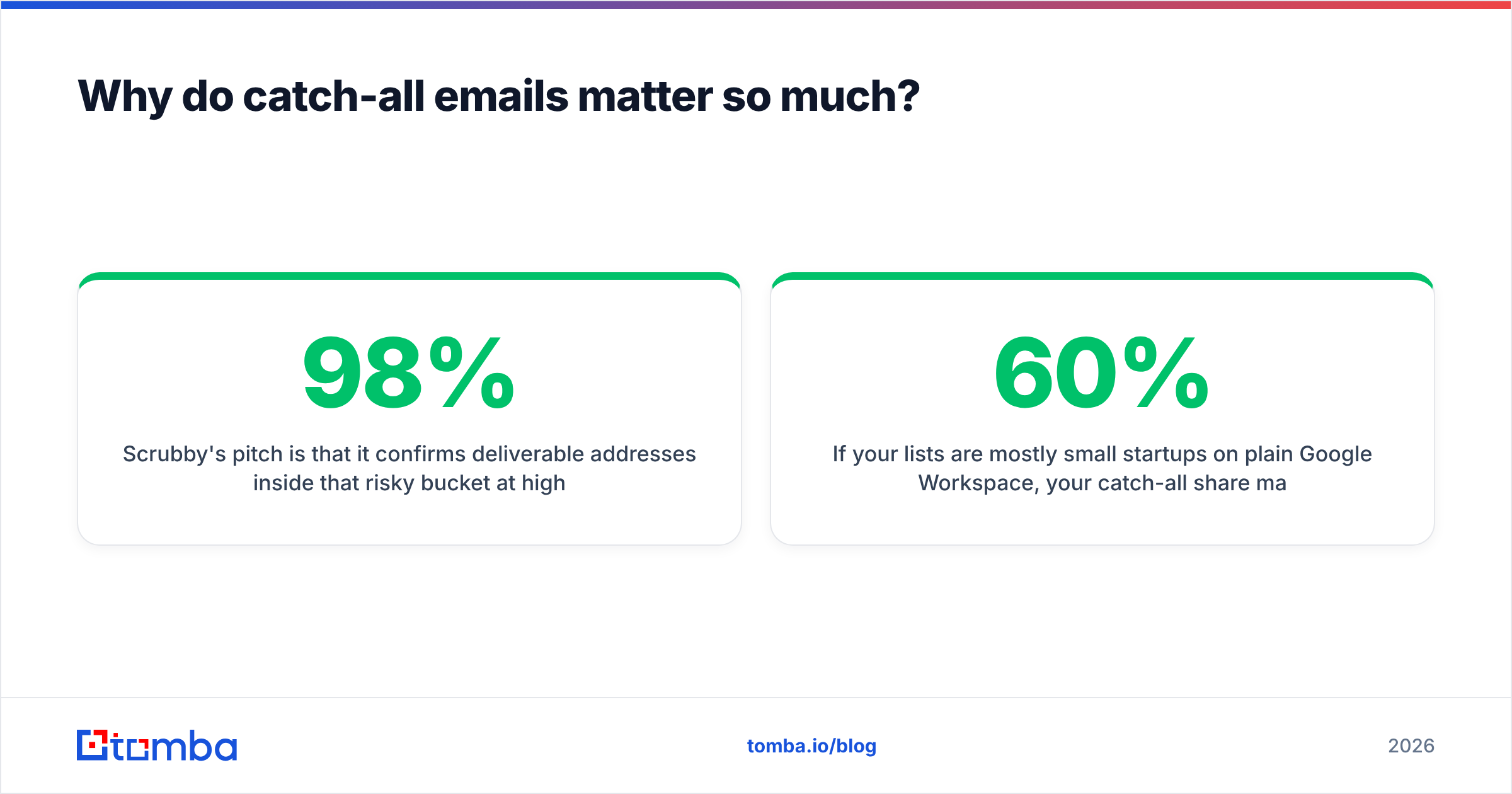
Scrubby's pitch is that it confirms deliverable addresses inside that risky bucket at high accuracy (it advertises 98%). Its How It Works page describes two modes:
- Quick Verification (1 credit): results in minutes, and it covers standard, catch-all, and SEG-protected domains.
- Deep Verification (3 credits): sends real emails and watches server behavior over 72 hours, with first results in about 24 hours.
If your lists are mostly small startups on plain Google Workspace, your catch-all share may be in the single digits and Scrubby won't pay off. If you sell into enterprise, it can be the difference between reaching 60% of your target accounts and reaching 85%.
Does ListKit already solve the catch-all problem?#
Partly. ListKit's triple-verification step means it doesn't knowingly sell you addresses that failed verification, and it lets you exclude risky results from exports. That protects your bounce rate.
What it doesn't do is recover the contacts it couldn't confirm. If ListKit can't validate an address on a catch-all domain, you either don't get it or you get it flagged. In both cases the prospect is effectively missing from your campaign.
So the usual pairing looks like this:
- Build the list in ListKit using ICP filters.
- Send confirmed-valid contacts straight to your sequencer.
- Export the catch-all / risky remainder into Scrubby.
- Merge Scrubby's "valid" results back into the campaign 1–3 days later.
- Suppress anything Scrubby marks invalid so it never reaches an inbox.
That workflow is sound, but it costs you two subscriptions, two credit systems, a CSV round-trip, and a delay of up to three days on part of your list. Whether that's acceptable depends on volume and on how much each recovered enterprise contact is worth to you.
How much does each tool really cost per usable contact?#
Sticker price is only part of it. What you actually pay per contact you can email depends on how much of each plan you use and how many results turn out to be sendable.
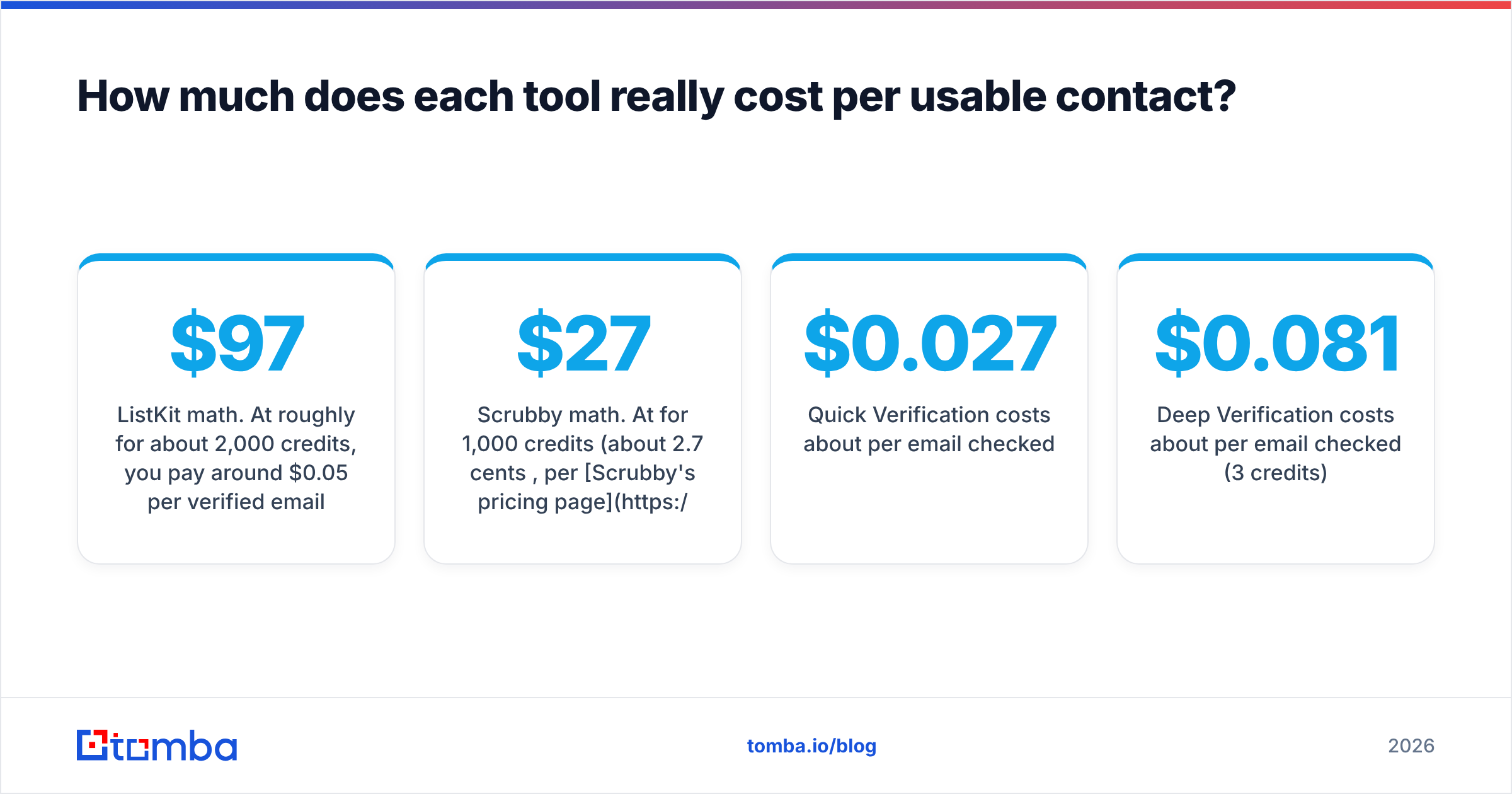
ListKit math. At roughly $97 for about 2,000 credits, you pay around $0.05 per verified email if you use every credit that month. Unused credits expire, so a team that only uses 1,200 credits actually pays about $0.08 per email. Direct-dial phone numbers use more credits per record, so a mixed email-and-phone workflow drains the balance faster. Third-party reviews also note that ListKit has cut its credit prices in 2026, so check the live pricing page before you commit.
Scrubby math. At $27 for 1,000 credits (about 2.7 cents per credit, per Scrubby's pricing page):
- Quick Verification costs about $0.027 per email checked.
- Deep Verification costs about $0.081 per email checked (3 credits).
- You pay per email checked, not per email confirmed. If you deep-verify 1,000 catch-alls and 55% come back valid, each recovered contact costs about $0.15.
That last number is the one to compare against your average deal value. For enterprise outbound, $0.15 per recovered decision-maker is cheap. For high-volume SMB outreach where a list costs $0.03 per contact, it's hard to justify.
Which tool is better for your team?#
Here's a decision guide by situation:
- Agency running outbound for several clients. Start with ListKit, or another database, for list-building. Add Scrubby only for clients whose ICP is enterprise-heavy.
- Solo founder or early SDR team. You probably need leads more than catch-all recovery. A database or finder comes first. Scrubby is a later optimization.
- You already have a large CRM or event list. Scrubby, or any verifier with good catch-all handling, is the more useful buy, because you already have the contacts and don't need a database.
- Enterprise-focused sales team. You'll probably benefit from both. You could also look at a single platform that finds, verifies, and checks catch-alls so you don't have to manage two tools.
- Anyone doing real-time validation (signup forms, product-led funnels). Neither is ideal. Scrubby's deep mode is too slow for that, and ListKit isn't a form validator. Use an API-based email verifier with instant responses.
What are the pros and cons of each?#
ListKit: pros
- Fast path from ICP filters to a sendable list
- Emails are verified before you pay for them
- Phone numbers and email infrastructure available under the same vendor
- Free plan useful for testing data quality in your niche
ListKit: cons
- Credits expire monthly, which penalizes uneven usage
- Doesn't recover catch-all contacts it can't confirm
- Coverage outside North America and English-speaking markets varies, so test your region first
- The higher tiers get expensive for small teams
Scrubby: pros
- Purpose-built for the catch-all problem most verifiers skip
- Credits roll over
- Low entry price ($27/mo)
- Works on top of any list source or verifier
Scrubby: cons
- Doesn't find contacts, so you still need a database or finder
- Deep Verification takes up to 72 hours
- Paying per check rather than per valid result makes costs unpredictable on low-quality lists
- One more tool, login, and CSV round-trip in your stack

Is there a simpler way to find and verify in one stack?#
If the two-tool workflow above looks like too much overhead, it's worth pricing a combined option. The case for consolidating is mostly about operations, not features: one credit balance, one API, and no waiting days to re-merge CSVs.
Tomba is one example of the combined approach. Its email finder looks up addresses by name plus domain or company, and verification runs as part of the lookup. For the risky bucket, a separate catch-all verifier checks accept-all domains instead of leaving them as "unknown." Plans start with a free tier of 25 searches per month, then Starter at $49/mo, Growth at $99/mo, and Pro at $249/mo (see Tomba pricing for credit amounts).
To be fair about the trade-offs: a combined platform won't match a dedicated database's ICP filtering depth for every niche. A specialist like Scrubby that watches real delivery behavior for 72 hours may also squeeze a little more out of a list that is almost all catch-all. What you get from consolidating is speed and simplicity, and for most SDR teams that matters more than those last few percentage points.
A quick way to choose:
| Your bottleneck | Best fit |
|---|---|
| "I don't have enough leads" | ListKit or another B2B database |
| "Half my list comes back catch-all" | Scrubby or a catch-all verifier |
| "I'm juggling too many tools and CSVs" | A combined finder + verifier |
| "I need instant validation via API" | An API-first verifier |
If you want independent user feedback before deciding, G2's email verification category is useful for checking recent reviews, especially complaints about coverage in your region.
What's the verdict on ListKit vs Scrubby?#
Don't choose between them as if they were rivals. ListKit solves "who should I email?" Scrubby solves "is this hard-to-verify address real?"
- Pick ListKit if your main problem is building targeted lists quickly and you'll use most of your credits every month.
- Pick Scrubby if you already have contacts and a large share of them come back catch-all or unknown, especially for enterprise targets.
- Pick both if you sell into enterprise at volume and can accept a 1–3 day delay on part of your list.
- Pick a combined finder-plus-verifier if you'd rather have one tool, one balance, and results in seconds.
Whichever way you go, measure the right number: cost per deliverable contact, not cost per credit.
If you want to test the single-tool route before you commit to two subscriptions, try the Tomba Email Finder. Run a sample of your real target accounts through the free tier, look at how many come back verified and how many are flagged catch-all, and compare that against what you'd pay for ListKit plus Scrubby. You'll see within an afternoon whether your stack needs a second tool.
Related guides#
// get started
Find, verify and enrich your first contacts today
Start on the free plan with 25 searches a month, then scale when your team is ready.
Free plan · No credit card required · GDPR & CCPA
// about the author