Listkit vs Span Global Services: Which B2B Data Source Wins?
One is a self-serve lead database you can search tonight. The other is a managed data vendor that builds custom lists to order. Here's how Listkit and Span Global Services compare, and which one fits your pipeline.
TL;DR
- Listkit is a self-serve B2B lead database. You log in, filter, and export verified contacts on a credit-based subscription. It suits outbound teams and agencies that build lists every week.
- Span Global Services is a managed data vendor. You request a custom list (by industry, job role, technology installed, or healthcare specialty) and receive a delivered file on a quote basis. It suits one-off campaigns, niche verticals, and data append projects.
- Want speed and control? Pick Listkit. Want someone else to source a hard-to-find segment, or to append data onto records you already have? Talk to Span Global.
- Neither one fixes data decay for you. B2B contact data goes stale at roughly 2% a month, so plan to re-verify either source before you send.
- If what you actually need is to find and verify specific people's emails on demand, a dedicated email finder is usually cheaper than buying a whole list.
What is the real difference between Listkit and Span Global Services?#
"Listkit vs Span Global Services" gets compared like two products in the same category. They aren't. They're two different ways of buying B2B data.
Listkit (listkit.io) is a software product. You get a searchable database of B2B contacts and companies, filters for title, seniority, industry, headcount and location, and a credit balance. Every export spends credits. Listkit's marketing focuses on verified emails for cold outbound, and it targets agencies and SDR teams that run high-volume sequences.
Span Global Services (spanglobalservices.com) is a data services company. Its catalogue covers pre-segmented and custom mailing lists (technology users, healthcare professionals, C-level executives, industry lists) plus services like email append, data cleansing and enrichment. You describe the audience you want, you get a count and a quote, and they deliver a file.
The analogy is a supermarket versus a caterer. At the supermarket (Listkit) you walk the aisles, pick exactly what you want, and pay at the till. The caterer (Span Global) sources ingredients you'd struggle to find yourself and delivers a finished tray, but you order ahead and you pay whatever the quote says.
Which one is better depends on how often you need data, how niche your audience is, and whether you already have records that need fixing.
How do Listkit and Span Global Services compare side by side?#
This is the quickest way to see the tradeoffs. Pricing moves around, so treat the figures as orientation and check each vendor's current page before you buy.
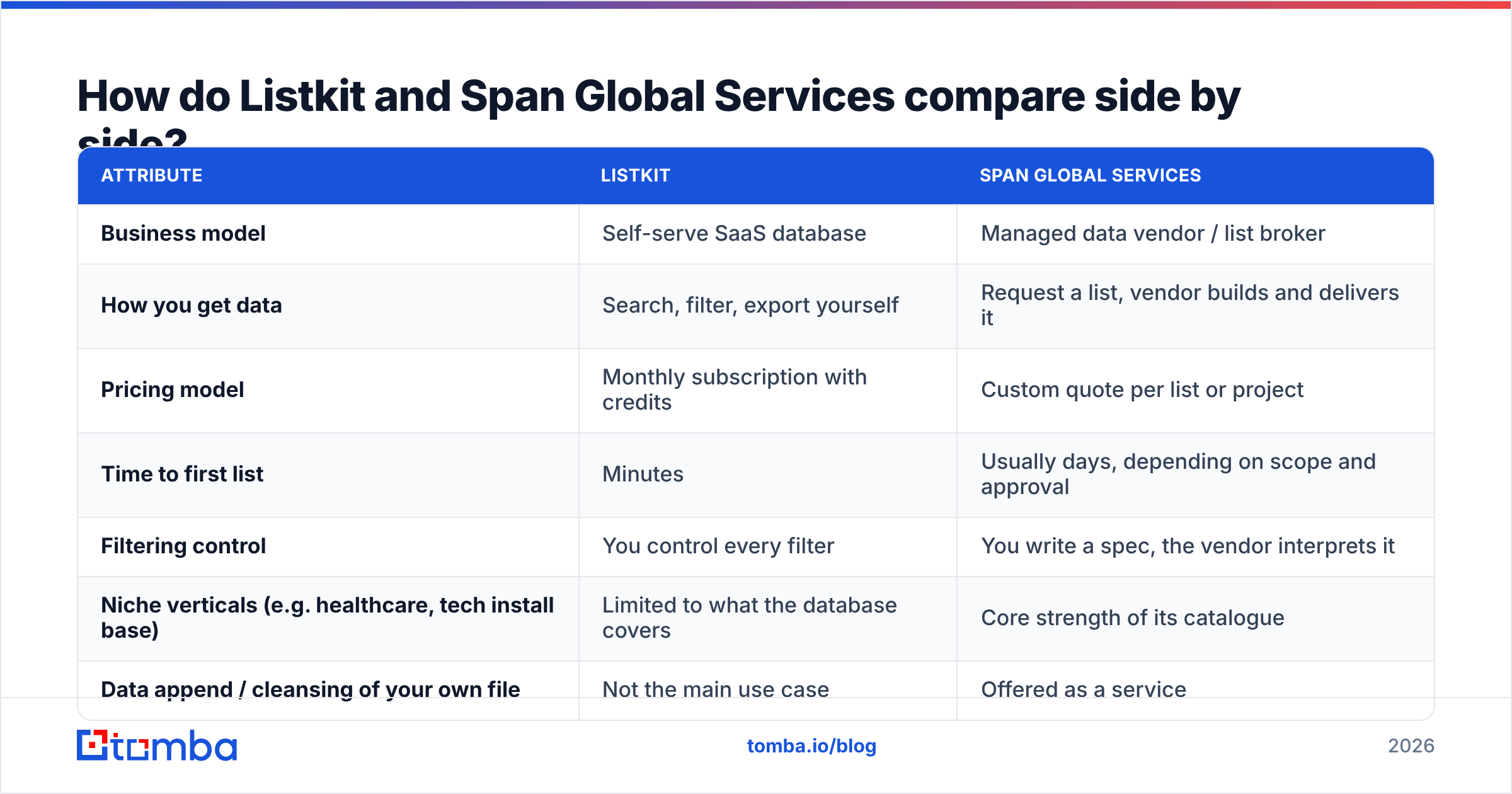
| Attribute | Listkit | Span Global Services |
|---|---|---|
| Business model | Self-serve SaaS database | Managed data vendor / list broker |
| How you get data | Search, filter, export yourself | Request a list, vendor builds and delivers it |
| Pricing model | Monthly subscription with credits | Custom quote per list or project |
| Time to first list | Minutes | Usually days, depending on scope and approval |
| Filtering control | You control every filter | You write a spec, the vendor interprets it |
| Niche verticals (e.g. healthcare, tech install base) | Limited to what the database covers | Core strength of its catalogue |
| Data append / cleansing of your own file | Not the main use case | Offered as a service |
| Refresh cadence for you | Pull fresh exports any time | New order or refresh contract |
| Best for | Outbound agencies, SDR teams, weekly prospecting | One-off campaigns, niche segments, CRM hygiene projects |
| Main risk | Credit burn on broad or poorly filtered searches | Paying for a static file that decays after delivery |
If you only read one row, read "How you get data." Everything else follows from it.
Is Listkit better than Span Global Services for cold email?#
For most cold email teams, yes, and speed is the main reason.
Cold outbound is iterative. You test an ICP, watch replies, tighten the persona, and pull a new segment. With Listkit that loop takes an afternoon. With a managed vendor, every change to your targeting is a new request and another wait. When you're running ten sequences across three verticals, that lag adds up fast.
Listkit also fits the standard outbound stack. You export a CSV, drop it into your sequencer, and go. You don't have to negotiate usage terms or map fields from a vendor's delivery format.
Where Listkit is weaker:
- Coverage outside mainstream B2B. Self-serve databases are deepest in tech, SaaS, agencies and professional services in North America and Western Europe. If your buyer is a regional hospital's director of nursing or a plant manager in a specific SIC code, expect thinner results.
- Credit discipline. A broad filter can burn a month of credits on contacts you'll never email. Build tight segments first and export second.
- Verification is point-in-time. "Verified" means verified when the check ran. A contact that was fine in March can bounce in September.

When does Span Global Services make more sense?#
Span Global earns its place in three situations where self-serve tools struggle.
1. Hard-to-reach verticals. Span Global has long sold specialised healthcare lists (physicians, nurses, hospital executives, by specialty) and technology install base lists (companies using a specific ERP, CRM or cloud platform). Rebuilding those segments yourself in a general database is slow and often incomplete.
2. Data append on records you already own. Say you have 40,000 accounts in your CRM with names and companies but missing emails or phone numbers. An append service matches and fills those gaps in bulk. That's a different job from prospecting, and a list vendor is set up for it.
3. One-off or seasonal campaigns. If you run one big direct-mail-plus-email push per quarter, a year-round subscription can cost more than a single custom list. Paying per project can come out ahead.
The tradeoffs:
- Opacity. Quote-based pricing makes it hard to compare cost per contact before you commit. Ask for the per-record rate, the verification date, and the replacement policy for bounces, in writing.
- Static delivery. You get a snapshot. The moment it lands, it starts decaying.
- Less iteration. Changing the spec means another round-trip.
Before you buy any list, read independent reviews on G2 and ask for a sample file. A 500-record sample tells you more about match quality than any sales deck.
How should you evaluate data accuracy from either vendor?#
Both vendors will tell you their data is accurate. Don't take their word for it. Run your own test, the same way for both:
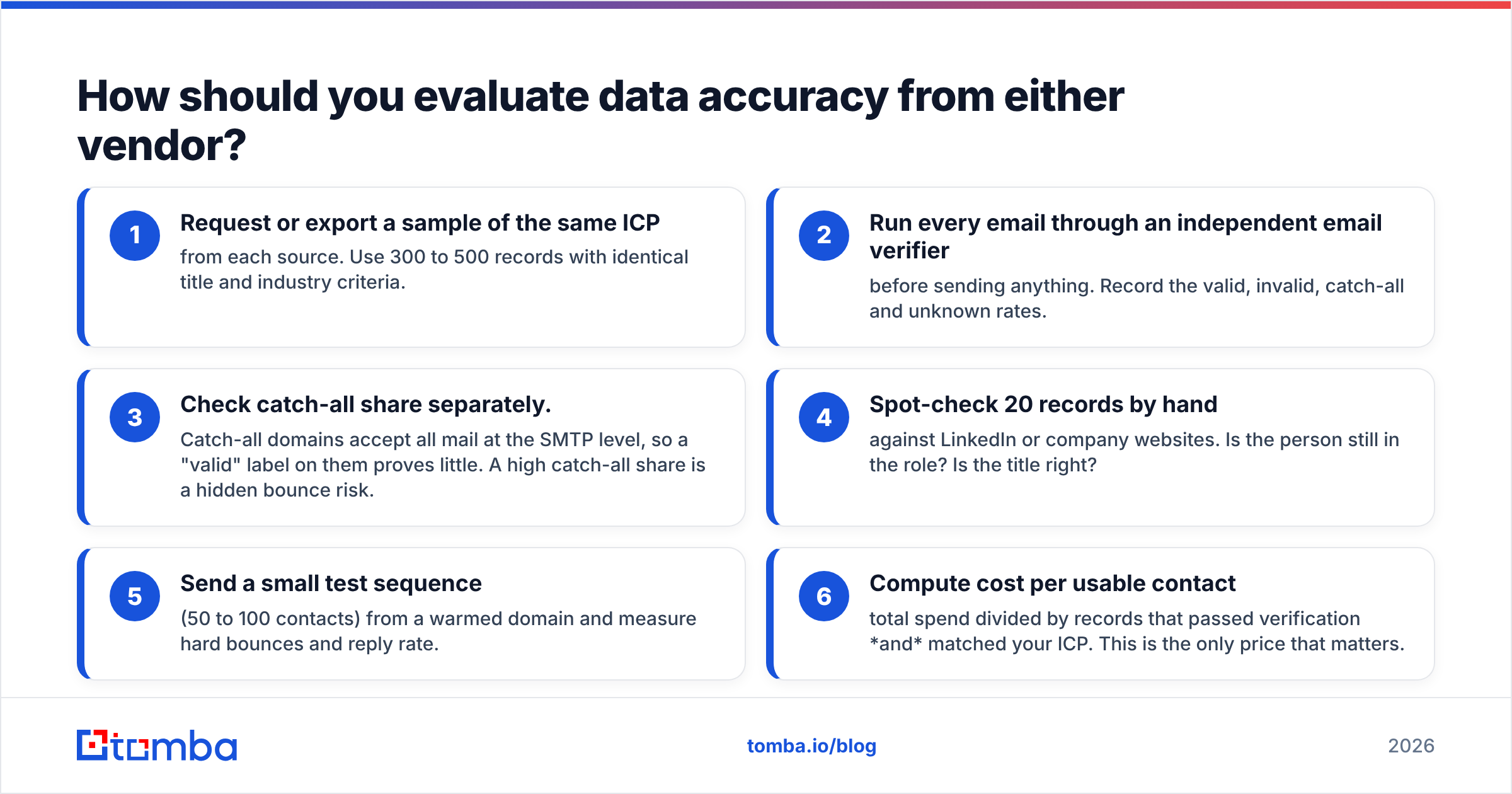
- Request or export a sample of the same ICP from each source. Use 300 to 500 records with identical title and industry criteria.
- Run every email through an independent email verifier before sending anything. Record the valid, invalid, catch-all and unknown rates.
- Check catch-all share separately. Catch-all domains accept all mail at the SMTP level, so a "valid" label on them proves little. A high catch-all share is a hidden bounce risk.
- Spot-check 20 records by hand against LinkedIn or company websites. Is the person still in the role? Is the title right?
- Send a small test sequence (50 to 100 contacts) from a warmed domain and measure hard bounces and reply rate.
- Compute cost per usable contact: total spend divided by records that passed verification and matched your ICP. This is the only price that matters.
Most buyers skip step 6. A cheap list with a 60% usable rate often costs more per real prospect than a pricier one at 90%.
What does each option really cost?#
Here's the honest version.
Listkit uses a subscription with a monthly credit allowance, and higher tiers cost less per credit. Check listkit.io for current tiers, because credit bundles change. Your real cost depends on how disciplined your filtering is. Teams that export only tightly scoped segments get good unit economics. Teams that export first and qualify later burn through credits.
Span Global Services is quoted per project. Expect price to depend on segment rarity (healthcare specialists and tech install base lists cost more than general business contacts), the fields you want (email + phone + direct dial costs more than email alone), volume, and licensing terms (single-use versus multi-use). Always ask whether the license allows unlimited use or a fixed number of sends.
The hidden cost on both sides is what happens after delivery. Industry estimates, including the data decay figures HubSpot has published on B2B database degradation, put annual decay in the 20 to 30% range. A list you bought in January is materially worse by July, whoever sold it to you.
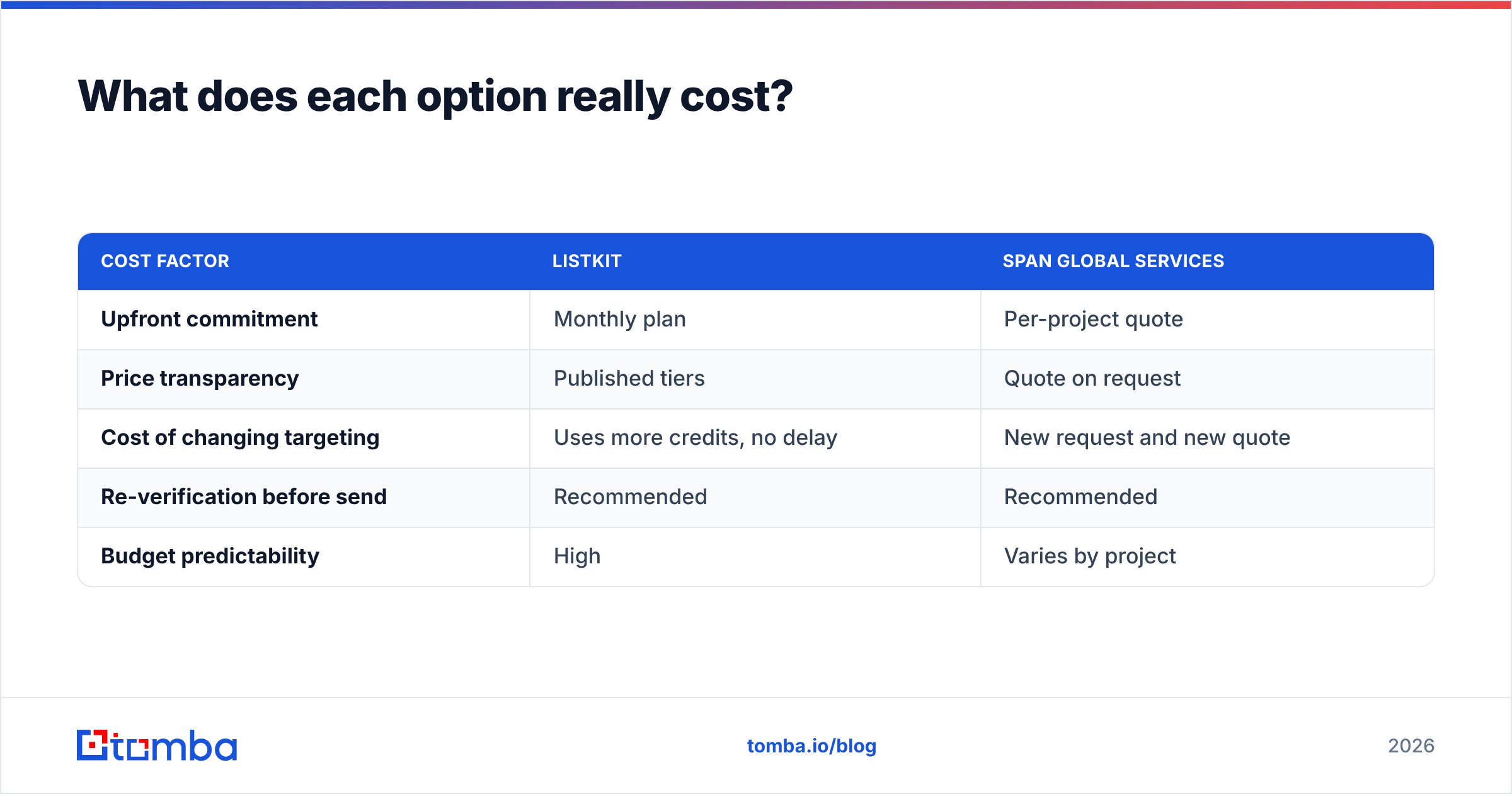
| Cost factor | Listkit | Span Global Services |
|---|---|---|
| Upfront commitment | Monthly plan | Per-project quote |
| Price transparency | Published tiers | Quote on request |
| Cost of changing targeting | Uses more credits, no delay | New request and new quote |
| Re-verification before send | Recommended | Recommended |
| Budget predictability | High | Varies by project |
Which one should you choose?#
Use this as a decision shortcut:
- Choose Listkit if you run outbound every week, your ICP sits in mainstream B2B segments, you want to iterate quickly, and you'd rather control filters yourself.
- Choose Span Global Services if your audience is a specialised vertical (healthcare, a specific technology install base), you need a one-off campaign list, or you need to append missing fields onto an existing CRM file.
- Use both if you're a larger team: a self-serve database for daily prospecting, and a managed vendor for quarterly niche pushes or CRM hygiene.
Some teams need neither. If your process is account-based (you already know the 200 companies you want and just need the right people's emails), buying a whole list is overkill. You'll pay for thousands of records you never touch.
Is there a cheaper way to get verified contacts than buying lists?#
For targeted prospecting, often yes. Instead of buying a pre-built list, you find emails on demand for the exact accounts and people you've already picked.
That's how email finder tools work. You give it a name and a company domain, or run a domain search to see every public professional address at a company, and it returns the address with a confidence score and verification status. You pay for the contacts you actually want, not the ones a filter happened to catch.
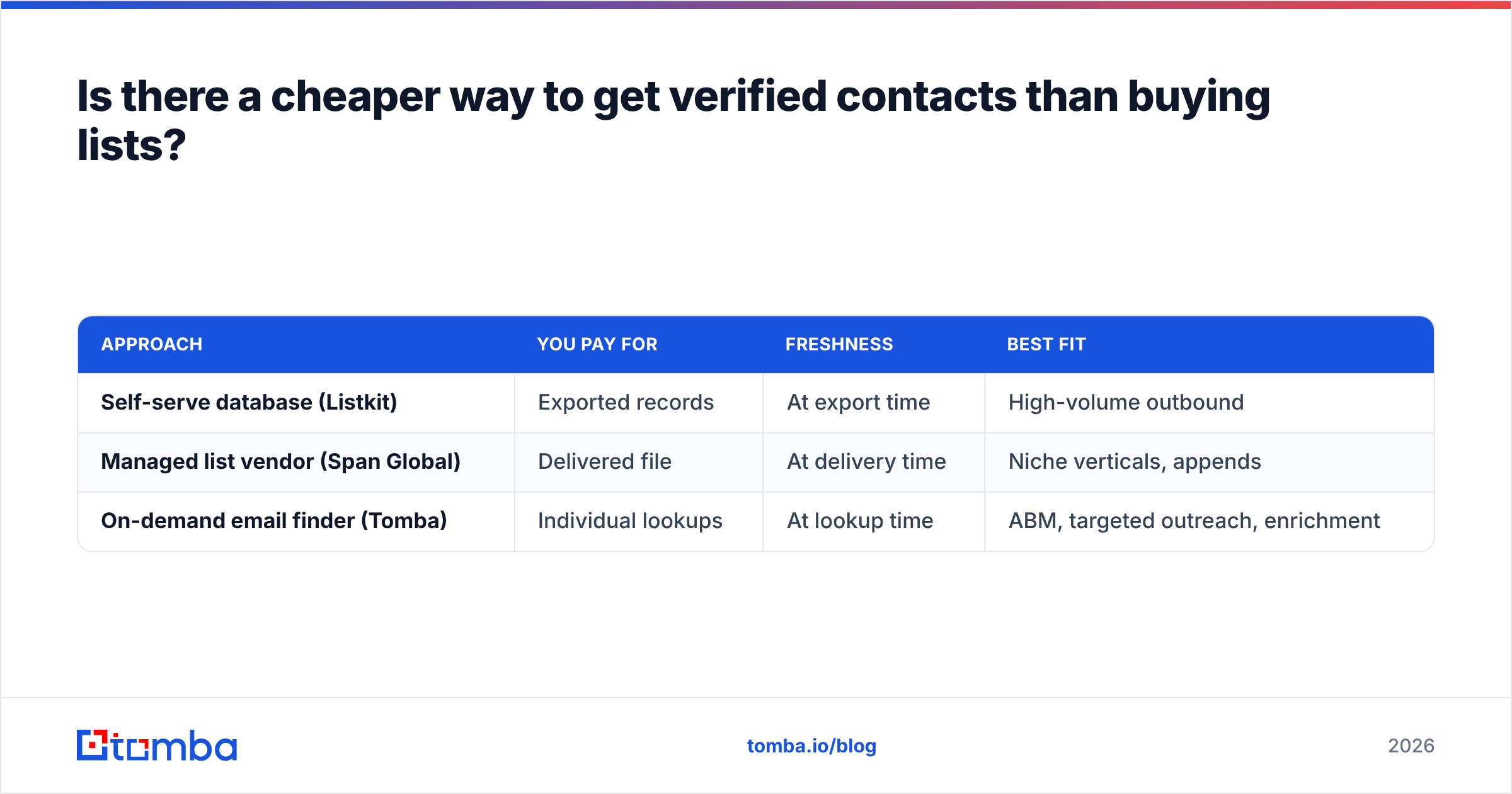
Here's how the three approaches compare:
| Approach | You pay for | Freshness | Best fit |
|---|---|---|---|
| Self-serve database (Listkit) | Exported records | At export time | High-volume outbound |
| Managed list vendor (Span Global) | Delivered file | At delivery time | Niche verticals, appends |
| On-demand email finder (Tomba) | Individual lookups | At lookup time | ABM, targeted outreach, enrichment |
The lookup-time freshness matters more than it sounds. A contact found and verified the day you send is much less likely to bounce than one exported three months earlier. It also protects your sender reputation, since hard bounces are one of the fastest ways to get a domain throttled.
Pricing is simpler too. Tomba has a free tier with 25 searches a month for testing, and paid plans start at $49/mo (Starter), then $99/mo (Growth) and $249/mo (Pro). See Tomba pricing for credit allowances. If you already have a CRM export with names and companies, data enrichment fills in missing emails without buying a new list.

How do you protect deliverability whichever source you pick?#
Whether your contacts come from Listkit, Span Global Services or anywhere else, run the same pre-send routine:
- Re-verify within 7 days of sending. Any list older than a few weeks should go back through verification.
- Suppress catch-alls or send to them separately. Put them in a lower-volume sequence so a bounce spike doesn't hit your main domain.
- Deduplicate against your CRM. Paying for, and then emailing, contacts you already have is wasted spend and annoys prospects.
- Warm new domains before you scale. Clean data won't save a cold domain sending 500 emails on day one.
- Watch bounce rate per source. Tag every contact with its origin so you know which vendor's data performs. After a quarter you'll have real numbers instead of sales claims.
That last habit is the one that settles the Listkit vs Span Global Services question for your team. Vendor comparisons, this one included, are a starting point. Your own bounce and reply rates by source are the final answer.
Final verdict: Listkit or Span Global Services?#
Neither vendor is objectively better. They're built for different jobs.
Listkit wins for speed, control and weekly outbound. If your team lives in a sequencer and needs fresh segments on demand, a self-serve database is the practical choice.
Span Global Services wins for niche verticals and data services. If you need healthcare professionals, a technology install base, or a bulk append on your CRM, a managed vendor gets you there faster than building it yourself.
Either way, treat any purchased data as a starting point that needs verification, not something ready to send.
If your outreach is targeted (a known account list, a named buying committee, or a CRM full of gaps), you may not need a list at all. Tomba Email Finder finds professional email addresses by name, domain or company, verifies them at lookup time, and charges only for the contacts you actually want. Start on the free plan with 25 searches, run it against the same ICP sample you'd test with Listkit or Span Global, and compare cost per usable contact yourself.
Related guides#
// get started
Find, verify and enrich your first contacts today
Start on the free plan with 25 searches a month, then scale when your team is ready.
Free plan · No credit card required · GDPR & CCPA
// about the author