ListKit vs VerifyEmailAddress.com: Lead Database or Free Checker?
ListKit sells triple-verified lead lists. VerifyEmailAddress.com checks addresses you already have. They solve different problems, so here is how to tell which one your outbound stack is missing.
TL;DR
- ListKit is a B2B lead database. You build lists by filter and export contacts that are already triple-verified. Paid plans start at $97/mo, and a free tier gives you 100 credits.
- VerifyEmailAddress.com is a free, lightweight checker for addresses you already have. It tests syntax and the domain's mail server (MX) and offers a bulk option. There's no prospecting database and no CRM integrations.
- They aren't really rivals. ListKit replaces your sourcing step. VerifyEmailAddress.com is a quick sanity check on a list you already own.
- If you send more than a few hundred cold emails a week, a syntax + MX check alone won't protect your bounce rate. You need mailbox-level (SMTP) and catch-all handling.
- Our pick: use ListKit if you need fresh leads and want verification included. Use VerifyEmailAddress.com for one-off spot checks. If you need finding plus deep verification at a lower entry price, look at a combined finder and verifier.
What is the real difference between ListKit and VerifyEmailAddress.com?#
The real difference is the job each tool does. ListKit is a place to get contacts. VerifyEmailAddress.com is a place to check contacts. Think of a grocery store versus a kitchen thermometer. One sells you the ingredients, and the other tells you whether something is safe to serve. You wouldn't compare them on price per item.
ListKit (listkit.io) is aimed at cold-email agencies and outbound teams. You filter a database of 500M+ contacts by job title, industry, headcount, location and technology, then export leads. Every business email in the export has gone through ListKit's "triple verification" before it reaches your CSV. The company claims around 98% deliverability on those exports.
VerifyEmailAddress.com (verifyemailaddress.com) is a single-purpose web utility. You paste an address and it tells you whether the format is valid and whether the domain has a working mail server. A bulk verifier handles larger lists and the site says it can check more than a thousand emails per minute. You don't need an account for single checks, and the site says it doesn't store the data you enter.
So the useful question isn't "which tool is better?" It's "which part of my workflow is broken?"
How do ListKit and VerifyEmailAddress.com compare feature by feature?#
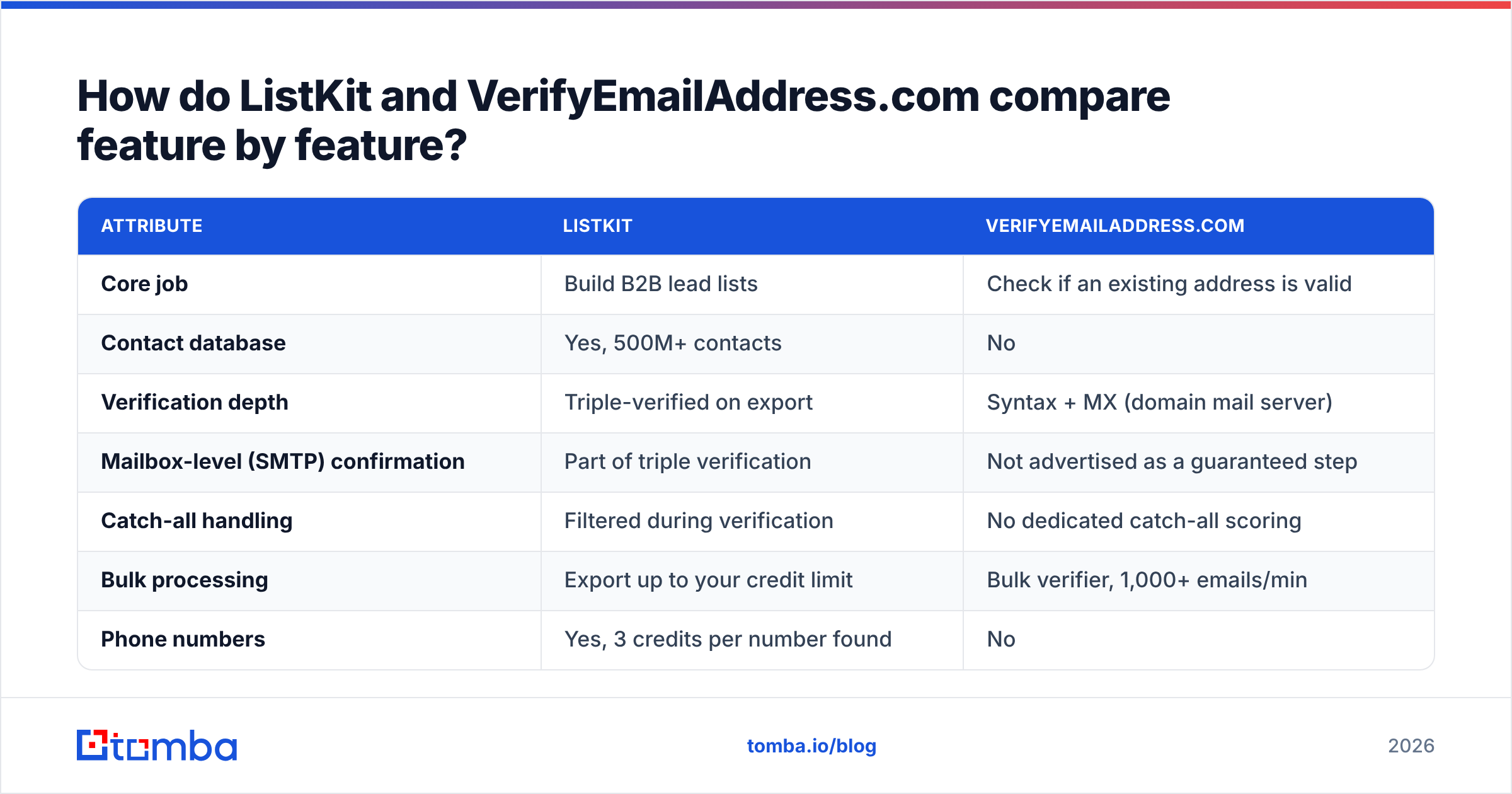
Here is the side-by-side, based on each vendor's public site and documentation as of 2026.
| Attribute | ListKit | VerifyEmailAddress.com |
|---|---|---|
| Core job | Build B2B lead lists | Check if an existing address is valid |
| Contact database | Yes, 500M+ contacts | No |
| Verification depth | Triple-verified on export | Syntax + MX (domain mail server) |
| Mailbox-level (SMTP) confirmation | Part of triple verification | Not advertised as a guaranteed step |
| Catch-all handling | Filtered during verification | No dedicated catch-all scoring |
| Bulk processing | Export up to your credit limit | Bulk verifier, 1,000+ emails/min |
| Phone numbers | Yes, 3 credits per number found | No |
| Free option | 100 credits | Free single checks |
| Entry paid plan | $97/mo (Professional) | Free for single checks; check the site for current bulk pricing |
| API / integrations | Yes (plus cold-email tool exports) | Not a focus |
| Seats | Unlimited users on all plans | No accounts needed |
| Best for | Agencies and SDR teams sourcing net-new leads | Solo senders spot-checking a few addresses |
The key row is verification depth. A syntax + MX check tells you the domain can receive email. It doesn't tell you whether jane.doe@ exists on that domain. Most cold-email bounces come from mailboxes that don't exist on real domains, so that gap matters.
How much does ListKit cost compared with VerifyEmailAddress.com?#
ListKit costs real money, and single checks on VerifyEmailAddress.com cost nothing. Here's what you get for each.
ListKit pricing (2026, per ListKit's credit documentation and public plan pages):
- Free — 100 credits to test the data.
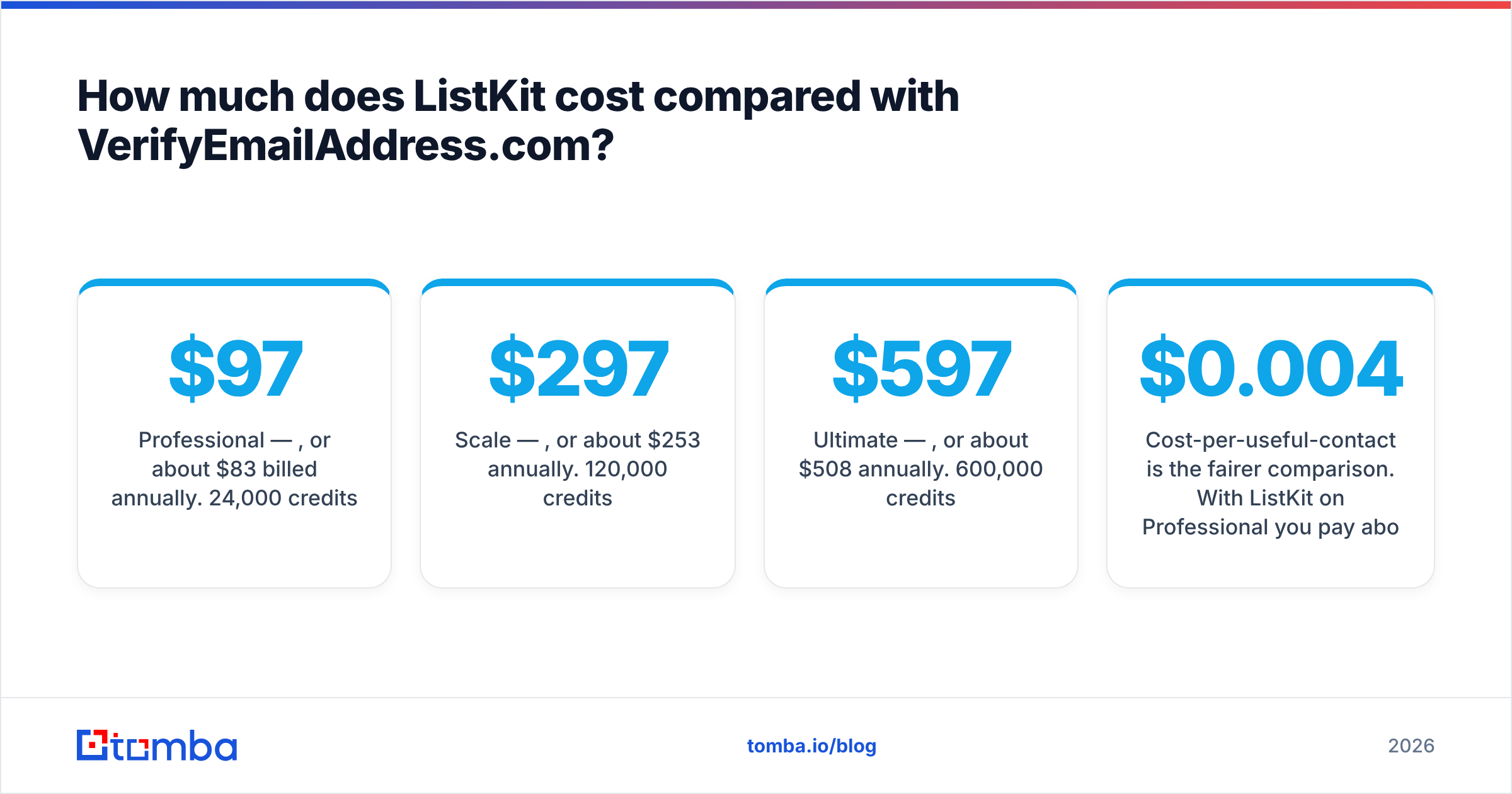
- Professional — $97/mo, or about $83/mo billed annually. 24,000 credits/year.
- Scale — $297/mo, or about $253/mo annually. 120,000 credits/year.
- Ultimate — $597/mo, or about $508/mo annually. 600,000 credits/year.
- Enterprise — custom.
Credits break down roughly like this: a business email costs 1 credit, a personal email costs 2, and a phone number costs 3 but only when a number is found. Credits don't roll over month to month. If you buy Scale and only prospect for two weeks a month, you lose part of what you paid for.
VerifyEmailAddress.com pricing: single-address checks are free and don't need a login. For big lists, check the site for current bulk terms before you commit, because simple verifiers change pricing and limits without much notice.
Cost-per-useful-contact is the fairer comparison. With ListKit on Professional you pay about $0.004 per verified business email, and the tool found the lead for you. With VerifyEmailAddress.com you pay nothing to check. But you still had to get the address from somewhere, whether that's another database, a scraper or manual research, and that sourcing step has its own cost.
How accurate is each tool's email verification?#
ListKit verifies more deeply, and VerifyEmailAddress.com is faster and simpler. How much accuracy you need depends on what's at stake.
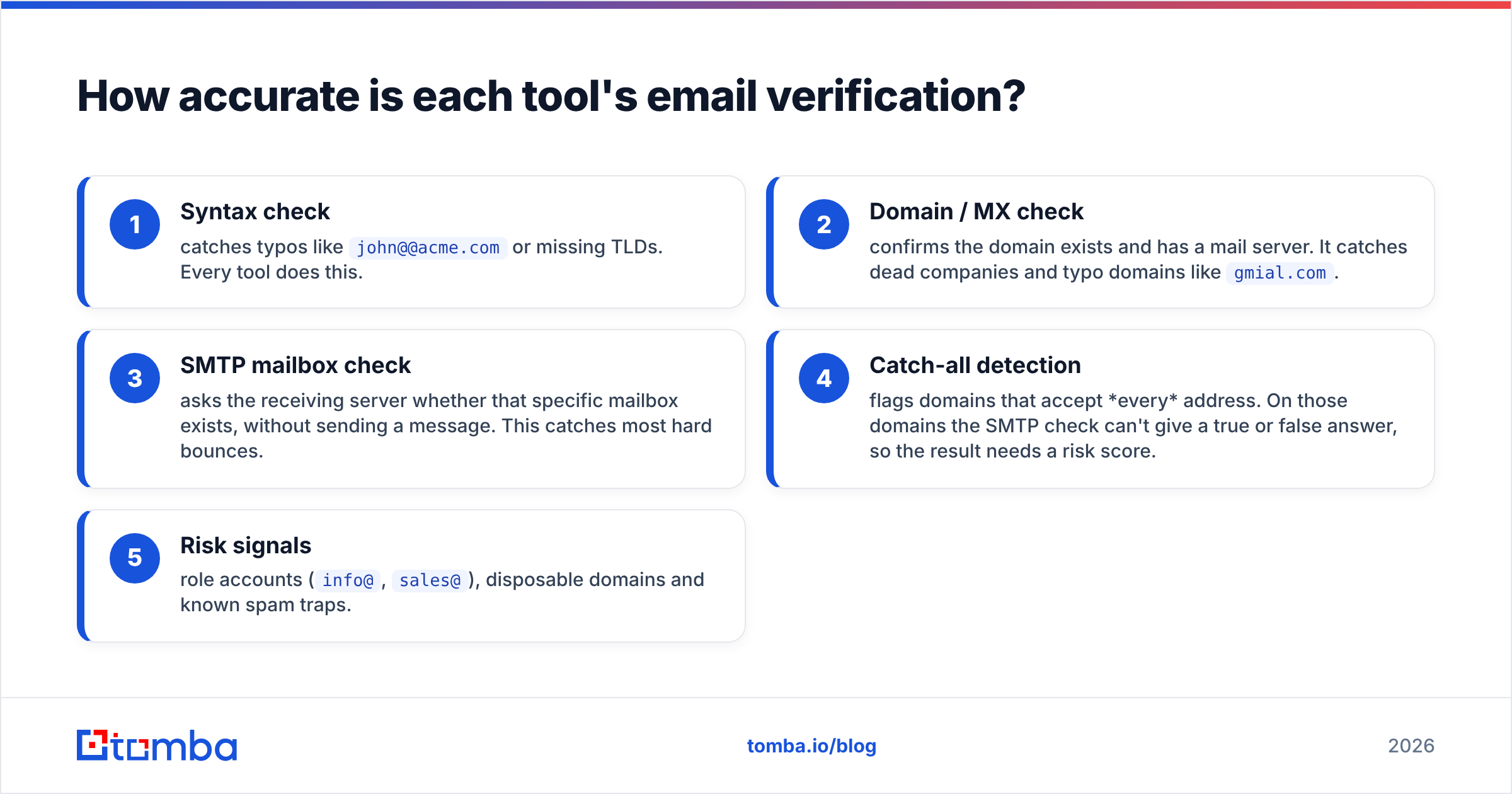
Email verification happens in layers. Each layer catches a different kind of bad address:
- Syntax check — catches typos like
john@@acme.comor missing TLDs. Every tool does this. - Domain / MX check — confirms the domain exists and has a mail server. It catches dead companies and typo domains like
gmial.com. - SMTP mailbox check — asks the receiving server whether that specific mailbox exists, without sending a message. This catches most hard bounces.
- Catch-all detection — flags domains that accept every address. On those domains the SMTP check can't give a true or false answer, so the result needs a risk score.
- Risk signals — role accounts (
info@,sales@), disposable domains and known spam traps.
VerifyEmailAddress.com's own documentation focuses on layers 1 and 2. Its FAQ also says some providers, Yahoo Mail for example, will always report an address as valid, so you have to use your own judgment on those. That's an honest caveat, and it shows the limit of a lightweight checker. When a mailbox provider won't give a straight answer, a simple tool can only report "looks fine."
ListKit's triple verification runs contacts through several verification passes before export. The goal is to remove invalid and risky addresses before you load them into a sequencer. Independent reviewers generally find that the roughly 98% deliverability claim holds up for US business contacts. Coverage and accuracy get thinner outside North America and in smaller-company segments, which is true of most databases.
The practical rule:
- Sending under ~50 emails, one-off: a free syntax + MX check is usually enough.
- Sending cold outreach at volume: you need layers 3 and 4. A bounce rate above about 2% starts to hurt your sender reputation, and that damage follows your domain long after one campaign ends.
- Lists with many catch-all domains (common in mid-market and enterprise): you need a dedicated catch-all verifier. Otherwise you'll either throw away good leads or keep risky ones.
Who should choose ListKit?#
Choose ListKit if your bottleneck is finding enough of the right people and you want verification included with the data.
ListKit fits best if you:
- Run a cold-email agency and need fresh, segmented lists for several clients every month. Unlimited seats help here.
- Send through Instantly, Smartlead or similar tools and want clean CSVs that go straight into a campaign with no separate verification step.
- Target US-based B2B buyers in segments where the database is deepest.
- Prospect at a steady monthly volume, so expiring credits don't cost you much.
Watch out for:
- Credit expiry. Uneven usage wastes money.
- Data reuse. A shared database means competitors can pull the same leads. Personalization matters more when the list isn't unique to you.
- You still need verification for everything else. Inbound signups, event lists and CRM records you didn't export from ListKit don't get the triple-verification treatment.
Who should choose VerifyEmailAddress.com?#
Choose VerifyEmailAddress.com if you already have the addresses and want a quick, free, no-account check.
It fits best if you:
- Want to check one or two addresses before sending an important one-to-one email, like a partnership pitch or an investor follow-up.
- Want to clean obvious junk (typos, dead domains) out of a small list you collected yourself.
- Care about privacy on quick checks. The site says it doesn't store what you enter, and you don't hand over an email address to sign up.
Watch out for:
- Syntax + MX is not mailbox verification. An address can pass both checks and still hard-bounce.
- Provider quirks. As the site's own FAQ notes, some mail systems report every address as valid.
- No workflow integrations. Moving CSVs in and out by hand gets old once you verify weekly.
Can you use ListKit and VerifyEmailAddress.com together?#
Yes, but the overlap is small. ListKit exports are already verified, so running them through a syntax + MX checker adds almost nothing. The combination only makes sense when you mix sources:
- Pull net-new leads from ListKit, already verified.
- Add inbound or event contacts that came from elsewhere.
- Spot-check the non-ListKit addresses with VerifyEmailAddress.com if the list is tiny, or with a full email verifier if it's larger.
- Re-verify before each new campaign. B2B data decays by roughly 2–3% a month as people change jobs, so a list that was clean in January is noticeably worse by June.
Many teams end up with two separate subscriptions: a database for sourcing and a verifier for everything else. That works, but it means two bills, two sets of credits and two CSV round-trips per campaign.
Is there a middle option between a lead database and a free checker?#
Yes. A combined email finder + verifier sits between the two. It finds the address for a specific person or company, as a database does, and runs full SMTP and catch-all verification on it and on any list you upload.
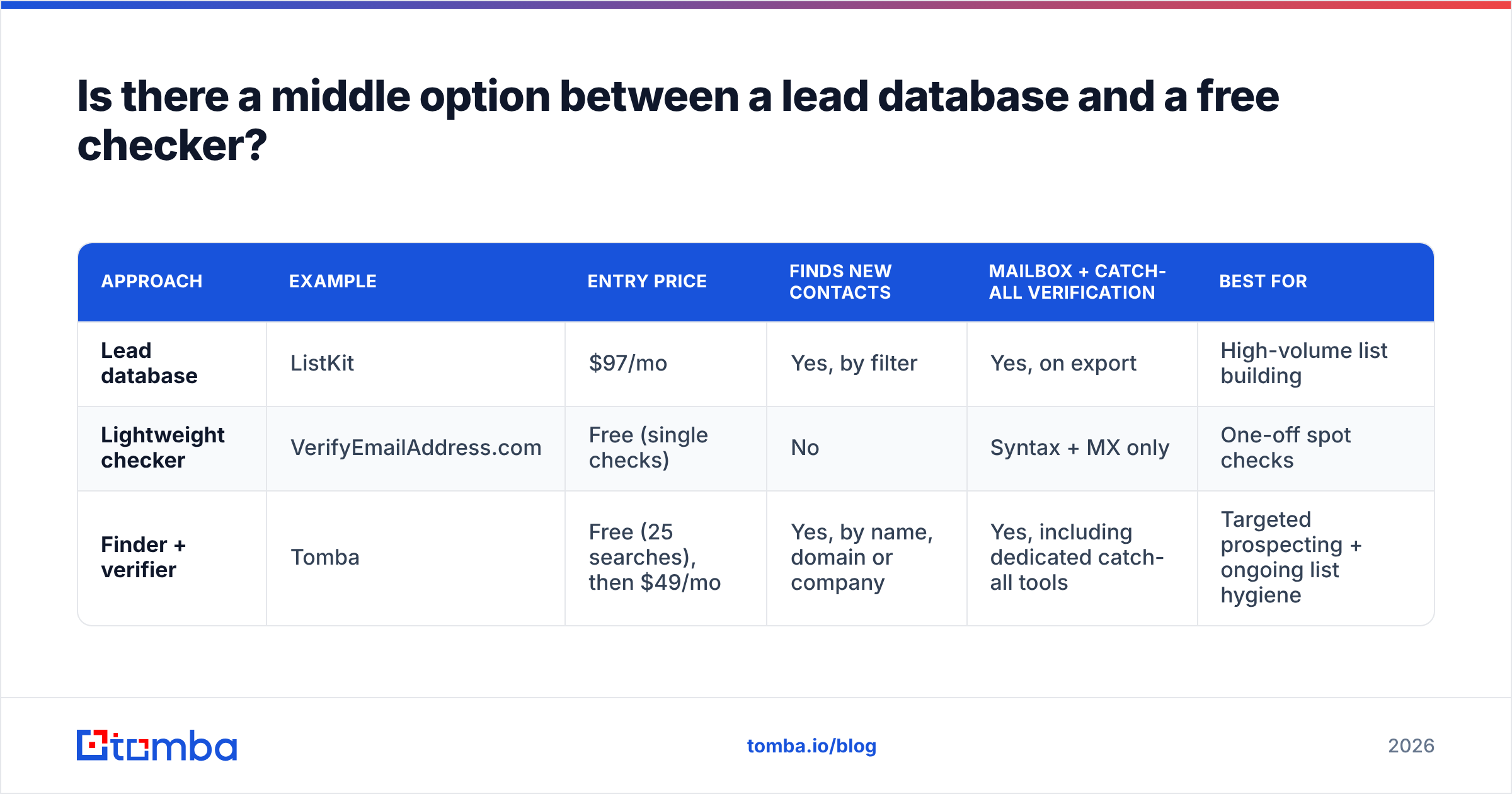
Here's how the three approaches compare:
| Approach | Example | Entry price | Finds new contacts | Mailbox + catch-all verification | Best for |
|---|---|---|---|---|---|
| Lead database | ListKit | $97/mo | Yes, by filter | Yes, on export | High-volume list building |
| Lightweight checker | VerifyEmailAddress.com | Free (single checks) | No | Syntax + MX only | One-off spot checks |
| Finder + verifier | Tomba | Free (25 searches), then $49/mo | Yes, by name, domain or company | Yes, including dedicated catch-all tools | Targeted prospecting + ongoing list hygiene |
The finder-and-verifier route makes sense when you already know which accounts you want and don't need a filter-built list of 20,000 leads. Account-based outbound, recruiting, partnership outreach and PR all work this way. You run a domain search on a target company, find the right people, verify them, and push the results to your CRM. Tomba pricing starts with a free tier of 25 searches a month. Paid plans are Starter at $49/mo, Growth at $99/mo and Pro at $249/mo, with Enterprise on custom terms.
To be fair, this isn't a ListKit replacement if your whole business is exporting large filtered lists for agency clients every month. A database built for that job is the better fit there.
Which should you pick: ListKit or VerifyEmailAddress.com?#
Base the choice on the problem you're trying to fix:
- "I don't have enough leads." Go with ListKit. You get the database and the verification together, and the $97/mo entry point is fair for agencies and SDR teams sending steadily.
- "I have a few addresses and want to know if they're real." Use VerifyEmailAddress.com. It's free and fast, and it's enough for low-stakes, low-volume checks.
- "I have a list and my bounce rate is creeping up." Neither tool is ideal. You need SMTP-level and catch-all verification on your existing data, for example with a bulk verify workflow.
- "I know my target accounts and need the right contact at each." A finder + verifier is the tighter fit.
Before sending, check your bounce rate, your catch-all exposure and how old your data is. Those three numbers will show you which gap to fill, and the verdict follows from there.
Ready to find and verify contacts in one step?#
If you're sourcing contacts account by account and want every address checked at the mailbox level before it touches your sequencer, try the Tomba Email Finder. Enter a name and company or a domain, get the professional email with a verification status, and push it to your CRM or outreach tool. The free tier includes 25 searches a month, so you can test it on your own target accounts before choosing a plan.
Related guides#
// get started
Find, verify and enrich your first contacts today
Start on the free plan with 25 searches a month, then scale when your team is ready.
Free plan · No credit card required · GDPR & CCPA
// about the author