ListKit vs Warpleads: Pricing, Data Quality and Which to Choose
ListKit charges per credit and verifies every email three times. Warpleads sells near-unlimited exports at a flat price and leaves verification to you. Here is how to decide which one fits your outbound volume.
TL;DR
- ListKit is a credit-based B2B lead list builder. It has a large profile database (the vendor says 731M+), AI company search, and triple email verification. It costs more per lead, and fewer of those leads bounce.
- Warpleads is a lower-cost database of about 100M records. Its main selling point is high-volume or unlimited exports at a flat price. You have to verify every email yourself before you send.
- Choose ListKit if your sending domains are fragile, your team is small, or you want leads you can use right away with little cleanup.
- Choose Warpleads if you send at high volume, already pay for an email verifier, and care most about the lowest cost per raw record.
- Either way, run your final list through a separate verification step. Even data that was verified at export time goes stale within weeks.
What are ListKit and Warpleads?#
Both tools answer the same question: where do my next 5,000 prospects come from? They get there in different ways.
ListKit is a lead list builder for outbound agencies and SDR teams. You filter by title, industry, headcount, technology, and intent signals, and then you export contacts that ListKit has already put through three layers of email verification. Pricing is based on credits. A business email costs one credit, a phone number costs more, and a fully enriched contact can use up to 10.
Warpleads is closer to a raw lead database. It has roughly 100 million B2B records with standard filters (job title, location, company size, industry, technology), a Chrome extension, and an API. It is known for its export model: large or unlimited exports at a fixed monthly price. It sits in the Salesforge ecosystem, and Salesforge's own help article on Warpleads exports says plainly that you need to verify downloaded emails before you send.
That difference drives most of this comparison. ListKit sells you cleaned leads. Warpleads sells you volume and expects you to do the cleaning.
How do ListKit and Warpleads compare feature by feature?#
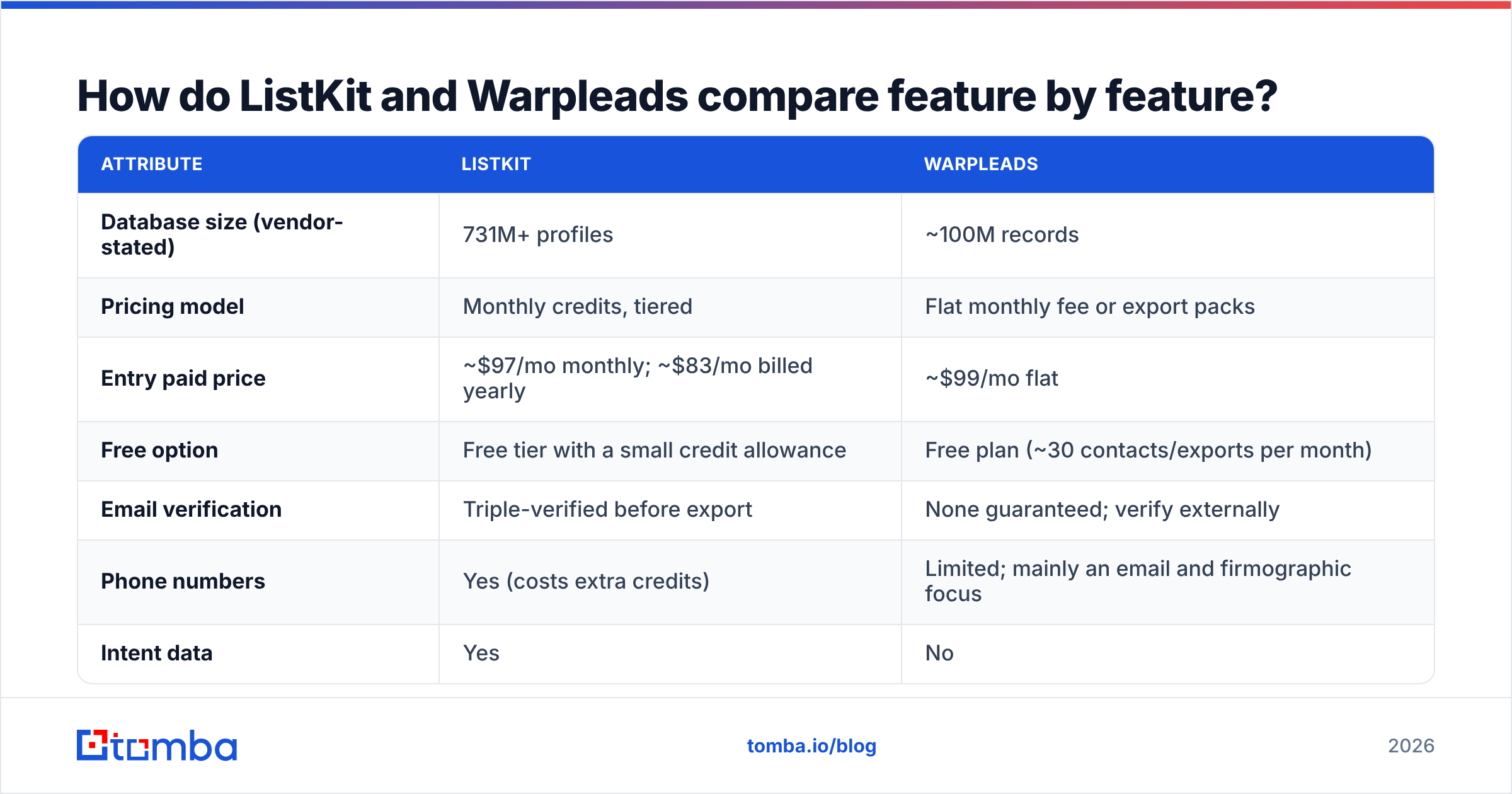
Here is a side-by-side view based on public pricing pages and third-party reviews at the time of writing. Both vendors have changed their plans before, so check live pricing before you buy.
| Attribute | ListKit | Warpleads |
|---|---|---|
| Database size (vendor-stated) | 731M+ profiles | ~100M records |
| Pricing model | Monthly credits, tiered | Flat monthly fee or export packs |
| Entry paid price | ~$97/mo monthly; ~$83/mo billed yearly | ~$99/mo flat |
| Free option | Free tier with a small credit allowance | Free plan (~30 contacts/exports per month) |
| Email verification | Triple-verified before export | None guaranteed; verify externally |
| Phone numbers | Yes (costs extra credits) | Limited; mainly an email and firmographic focus |
| Intent data | Yes | No |
| Credit rollover | No, credits expire monthly | N/A on the flat plan |
| Users | Unlimited users on every plan | Per account |
| Best for | Agencies and teams protecting deliverability | High-volume senders with their own verification stack |
These two tools aren't aiming at the same buyer. ListKit charges for the whole pipeline from filter to verified CSV. Warpleads charges for the filter and the CSV and leaves verification to you.
How much does ListKit cost compared to Warpleads?#
On sticker price, the entry plans are within a few dollars of each other. What you get for that money is very different.
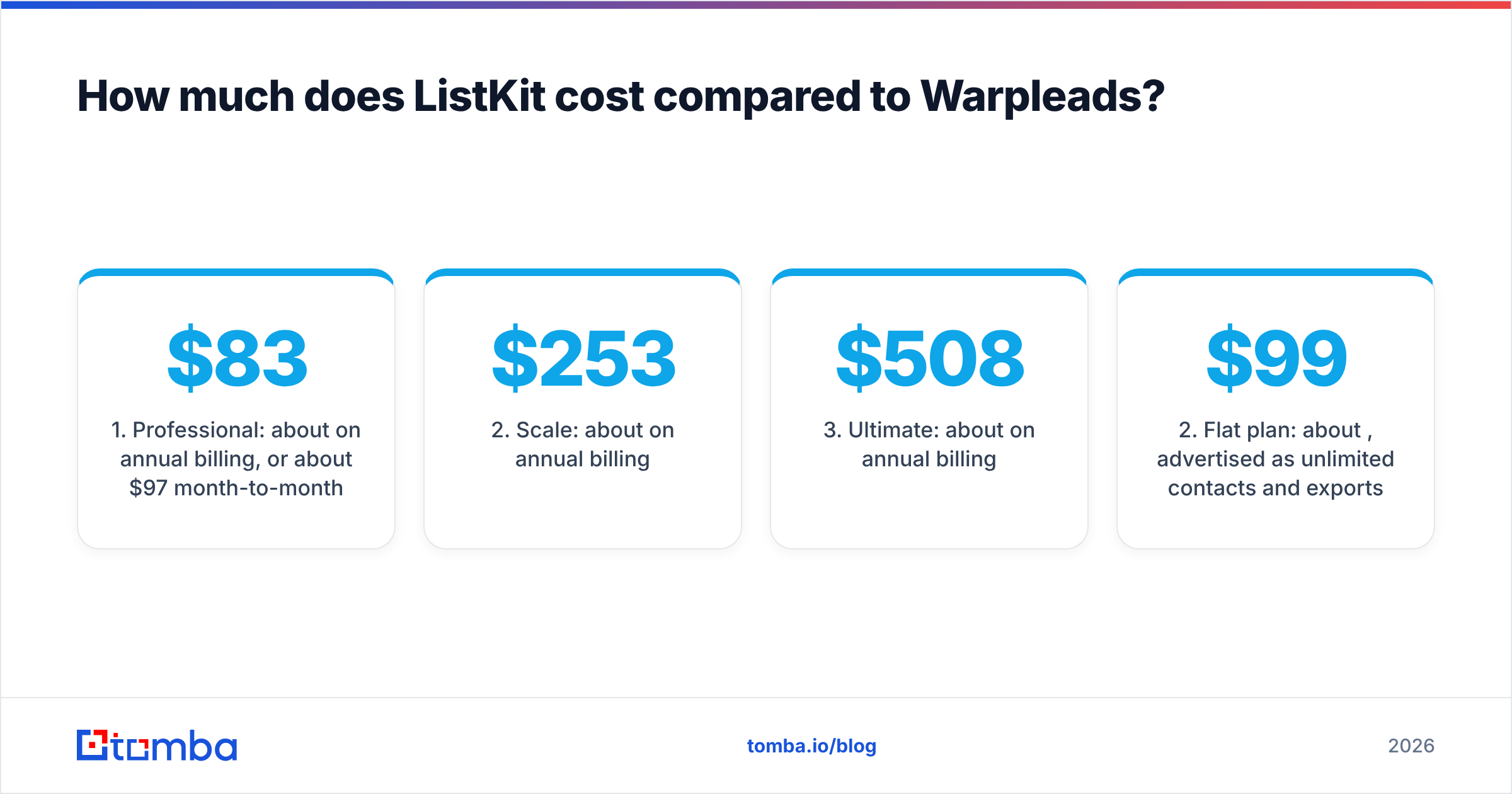
ListKit pricing, in outline:
- Professional: about $83/mo on annual billing, or about $97/mo month-to-month.
- Scale: about $253/mo on annual billing.
- Ultimate: about $508/mo on annual billing.
- Every tier includes the same features (unlimited users, AI company search, triple verification, intent data, enrichment, CRM integrations). The only thing that changes is credit volume.
The catch is that credits expire every month and don't roll over. A contact with a phone number and full enrichment can use 5 to 10 credits, so your "2,000 credits" can turn into a few hundred usable leads if you want phone numbers too. The Saleshandy breakdown of ListKit pricing goes through this credit math in detail.
Warpleads pricing, in outline:
- Free plan: roughly 30 contacts and 30 exports per month, enough to test the filters and nothing more.
- Flat plan: about $99/mo, advertised as unlimited contacts and exports.
- Export packs: tiered bundles that start around $40/mo for 5,000 exports and go up to very large volumes for agencies.
If you export 20,000 contacts in a month on the flat plan, the raw data costs you about half a cent per record. No credit-based tool gets close to that.
The real cost comparison needs one more line item: verification. Warpleads data has to go through a verifier, and that verifier charges per email. Once you add that cost and the records you throw away as invalid, Warpleads usually still comes out cheaper per record at high volume. It stops looking as cheap per deliverable contact. That is the number that matters.

Which tool has better data quality?#
ListKit has the stronger claim to data quality, and there's a structural reason for it.
Verification. ListKit runs every email through three verification passes before you can export it. You get addresses that were valid at the moment you pulled them. Warpleads does not make that promise. The Salesforge team, which works closely with Warpleads, tells users to verify all exported emails before sending.
Freshness. B2B contact data decays at roughly 2 to 3% a month, because people change jobs, companies rebrand, and domains lapse. A 100M-record database with unlimited exports is fine for reach, but you have no easy way to know which records were last refreshed six months ago. ListKit's verification at export time catches a large share of that decay.
Coverage. ListKit says it has several times more profiles. Raw database size is a vanity number, though. What matters is match rate inside your ICP. If you sell to US SaaS companies with 50 to 500 employees, both tools will cover most of your market. If you sell into DACH manufacturing or Southeast Asian logistics, run the same 200-account test list through both and compare.
Catch-all domains. Neither tool fully solves this. Many mid-market and enterprise domains accept all mail, so a standard verifier can't confirm the mailbox exists. ListKit marks these more clearly. With Warpleads, you'll find them yourself during verification. If catch-all domains make up a large share of your audience, look at a dedicated catch-all check in your stack.
How does each tool fit into an outbound workflow?#
Think of ListKit as a grocery delivery service that washes and chops your vegetables. Think of Warpleads as a wholesale market where you buy in bulk and do the prep yourself. Neither is wrong. It depends how much kitchen time you have.
A typical ListKit workflow:
- Build the list: filter by ICP and intent, or use AI company search to find lookalike accounts.
- Export verified contacts: emails come back already triple-verified.
- Push to your sequencer or CRM: ListKit connects to common CRMs and cold-email tools.
- Optional re-check: if a list sits for a few weeks before launch, verify it again.
A typical Warpleads workflow:
- Build the list: use title, location, industry, headcount, and technology filters.
- Export at volume: pull a large list without worrying about credits.
- Verify every email: run the whole file through an external verifier and remove invalid, risky, and unknown results.
- Deduplicate and enrich: fill gaps, such as missing emails for important accounts, with a separate email finder.
- Push to Salesforge or your sequencer: Warpleads fits naturally into the Salesforge stack.
The Warpleads workflow has two extra steps. For an agency with a RevOps person and scripted pipelines, that's a small cost. For a founder doing their own outbound, it's where bounced emails and burned domains come from.
Is ListKit better than Warpleads for cold email deliverability?#
Yes, by default. Warpleads can match it if you add a verifier.
Mailbox providers now score senders on bounce rate. Google and Yahoo's bulk-sender rules made spam-complaint and bounce thresholds much stricter, and a campaign with a 5 to 8% hard-bounce rate can damage a new sending domain in days. Because ListKit's data arrives already verified, a busy team is much less likely to skip verification by accident.
With Warpleads, the risk isn't the data itself. It's the chance of someone uploading an unverified CSV straight into a sequencer at 11pm to hit a quota. If your team is disciplined and verification is built into your pipeline, the gap in deliverability mostly disappears.
Whichever tool you pick, do a last-mile check with a standalone email verifier before any list goes live. It costs little and protects your sending domains.

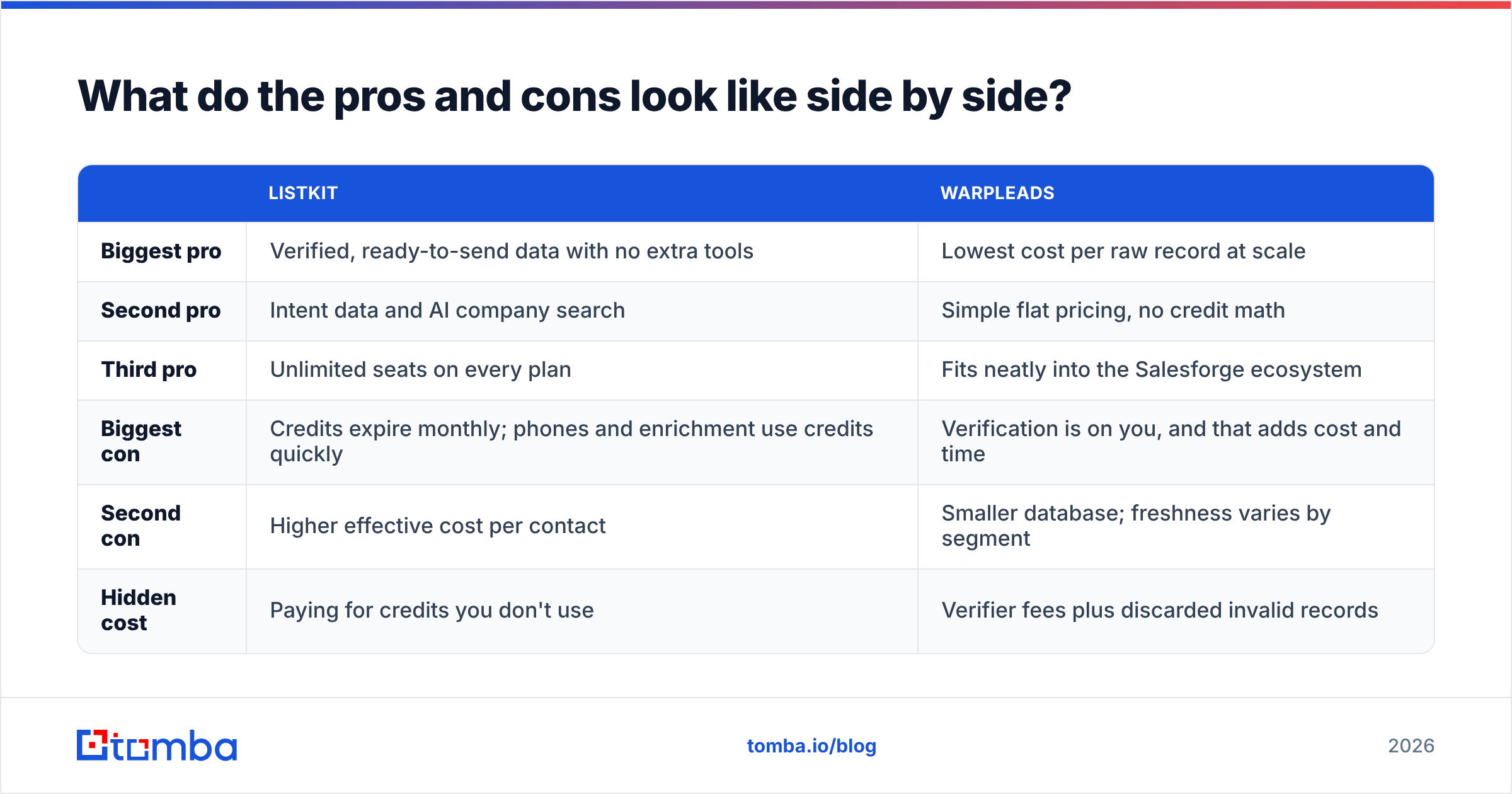
What do the pros and cons look like side by side?#
| ListKit | Warpleads | |
|---|---|---|
| Biggest pro | Verified, ready-to-send data with no extra tools | Lowest cost per raw record at scale |
| Second pro | Intent data and AI company search | Simple flat pricing, no credit math |
| Third pro | Unlimited seats on every plan | Fits neatly into the Salesforge ecosystem |
| Biggest con | Credits expire monthly; phones and enrichment use credits quickly | Verification is on you, and that adds cost and time |
| Second con | Higher effective cost per contact | Smaller database; freshness varies by segment |
| Hidden cost | Paying for credits you don't use | Verifier fees plus discarded invalid records |
Which should you choose: ListKit or Warpleads?#
Choose based on your volume and how much operational work you can take on, not on database size.
Choose ListKit if:
- You send fewer than about 10,000 new contacts a month and want each one ready to use.
- You're a small team or a solo founder without a verification pipeline.
- Intent signals and lookalike company search matter to your targeting.
- Your sending domains are new or have been burned before.
Choose Warpleads if:
- You send tens of thousands of contacts a month and the cost per record decides the budget.
- You already pay for bulk verification and have it scripted.
- You run outbound through Salesforge or a similar high-volume stack.
- You're fine trading some freshness and coverage for cheap reach.
Consider running both if you're an agency. Warpleads can supply wide top-of-funnel lists, and ListKit can cover the priority accounts where every bounce hurts.
Where does a dedicated email finder fit in?#
Both tools are list builders. They work when you start from filters: "give me VPs of Marketing at fintech companies with 200 to 1,000 employees." They don't work as well when you start from a named account list or a specific person, such as the 40 target accounts sales leadership gave you or the conference speaker you want to reach.
That's where a dedicated email finder comes in. You put in a name and a domain and get back a verified address, and you can run domain-level searches to map every public contact at a target company. Many teams build lists in a database like ListKit or Warpleads and then use an email finder to fill the gaps: records with missing emails, contacts who changed jobs, and high-value accounts the database doesn't cover well.
If you need to do this at volume, a bulk email finder handles CSV uploads, so you don't have to look up hundreds of contacts one at a time. Tomba's pricing works differently from both tools here. There's a free tier with 25 searches a month, and paid plans start at $49/mo for Starter, with Growth at $99/mo and Pro at $249/mo. See the pricing details for credit counts per tier.
Frequently asked questions#
Is Warpleads really unlimited? The flat plan has been marketed as unlimited contacts and exports. Warpleads also sells tiered export packs, so check the current plan page and fair-use terms before you commit to a volume forecast.
Do ListKit credits roll over? No. Credits reset every month, so buy a tier that matches what you actually use each month, not your busiest month.
Can I use Warpleads without an email verifier? Technically yes. In practice, you shouldn't. Unverified bulk exports are the fastest way to push your bounce rate past mailbox-provider limits.
Which has phone numbers? ListKit offers phone numbers at a higher credit cost. Warpleads mostly focuses on emails and firmographics. For direct dials, add a phone-specific enrichment tool.
What is the final verdict on ListKit vs Warpleads?#
For most teams, ListKit is the safer default. You pay more per contact, and in return you get verification, intent data, and fewer ways for a list to go wrong. Warpleads is the better choice for experienced high-volume senders who already have verification in their pipeline and treat data as a commodity input. Neither is strictly better. They're aimed at different operating models.
Whichever database you choose, you'll still hit gaps: named accounts it doesn't cover, contacts who changed roles last quarter, and people you only know by name and company. Tomba Email Finder fills those gaps. You enter a name and domain and get back a verified professional email, and bulk uploads work for bigger lists. Start on the free tier and test it against the contacts your list builder missed.
Related guides#
// get started
Find, verify and enrich your first contacts today
Start on the free plan with 25 searches a month, then scale when your team is ready.
Free plan · No credit card required · GDPR & CCPA
// about the author