Listmint vs SalesQL (2026): Catch-All Verifier or LinkedIn Finder?
Listmint and SalesQL rarely do the same job. One checks the catch-all emails you already have, and the other pulls new contacts from LinkedIn. Here's which one fits your workflow, what each costs, and when you need both.
TL;DR
- Listmint and SalesQL do different jobs. Listmint is mainly an email verification tool, and its specialty is resolving catch-all addresses. SalesQL is a LinkedIn-first tool that finds contacts, returning emails and phone numbers for profiles you're looking at.
- Buy Listmint if you already have lists and a large share of them come back as "catch-all" or "unknown" from your current verifier.
- Buy SalesQL if your prospecting starts on LinkedIn or Sales Navigator and you need contact data for people you don't have yet.
- On price: SalesQL starts at $39/mo for 2,000 credits (monthly billing). Listmint's Starter plan is $99/mo and includes 20,000 standard and 5,000 catch-all credits.
- If you're weighing both, look at whether one platform that finds and verifies (including catch-all) is cheaper than paying for two tools.
People usually search "Listmint vs SalesQL" because both show up on the same shortlists for "cleaner B2B contact data." They don't solve the same problem, though. If you pick the wrong one, you'll pay for a tool that handles a part of your workflow that wasn't broken.
This breakdown is neutral. It covers what each tool does, how pricing works, where each one struggles, and which kind of team should buy which.
What is Listmint?#
Listmint is an email verification platform built for B2B lists. Its main differentiator is how it handles catch-all domains. A catch-all domain accepts mail for any address, so a standard SMTP check can't tell whether jane.doe@company.com really exists.
Most verifiers flag these addresses as "catch-all" or "accept-all" and leave the decision to you. Listmint runs a separate verification process on them and returns one of two verdicts:
catch_all_valid: likely a real inbox, safe to send tocatch_all_invalid: likely to bounce or go nowhere
Listmint says it has verified more than 250M addresses and claims 99%+ accuracy across SMTP and catch-all checks. It also reports that on typical B2B lists, 30–40% of addresses come back as catch-all, and that it confirms up to 84% of those as valid. Treat those as vendor figures and test them on your own data. The underlying problem is real, though. Enterprise and mid-market domains often run catch-all configurations, and those are the accounts outbound teams care about most.
The pricing model follows from this. Listmint sells two types of credits:
- Standard credits for normal SMTP verification
- Catch-all credits for the heavier catch-all resolution process, priced higher
That split means you don't pay catch-all rates for addresses that pass a simple SMTP check.
What is SalesQL?#
SalesQL is a prospecting and contact-data tool built around LinkedIn. You install the Chrome extension, open a LinkedIn or Sales Navigator profile or search result, and SalesQL returns the person's work email, personal email where available, phone numbers, and enriched profile data.
It's a data source, not a list-cleaning tool. One SalesQL credit unlocks the contact data for one prospect, and you can spend credits across:
- LinkedIn and Sales Navigator prospecting (single profile or bulk from search results)
- SalesQL's own contact database
- CSV enrichment of existing lists
- Email verification
- API-based enrichment
SalesQL is useful for recruiters, founders, and SDRs who build lists by hand from LinkedIn and want to skip the "now go find their email" step.
How do Listmint and SalesQL compare side by side?#
The table below compares the attributes that matter when you're choosing between them.
| Attribute | Listmint | SalesQL |
|---|---|---|
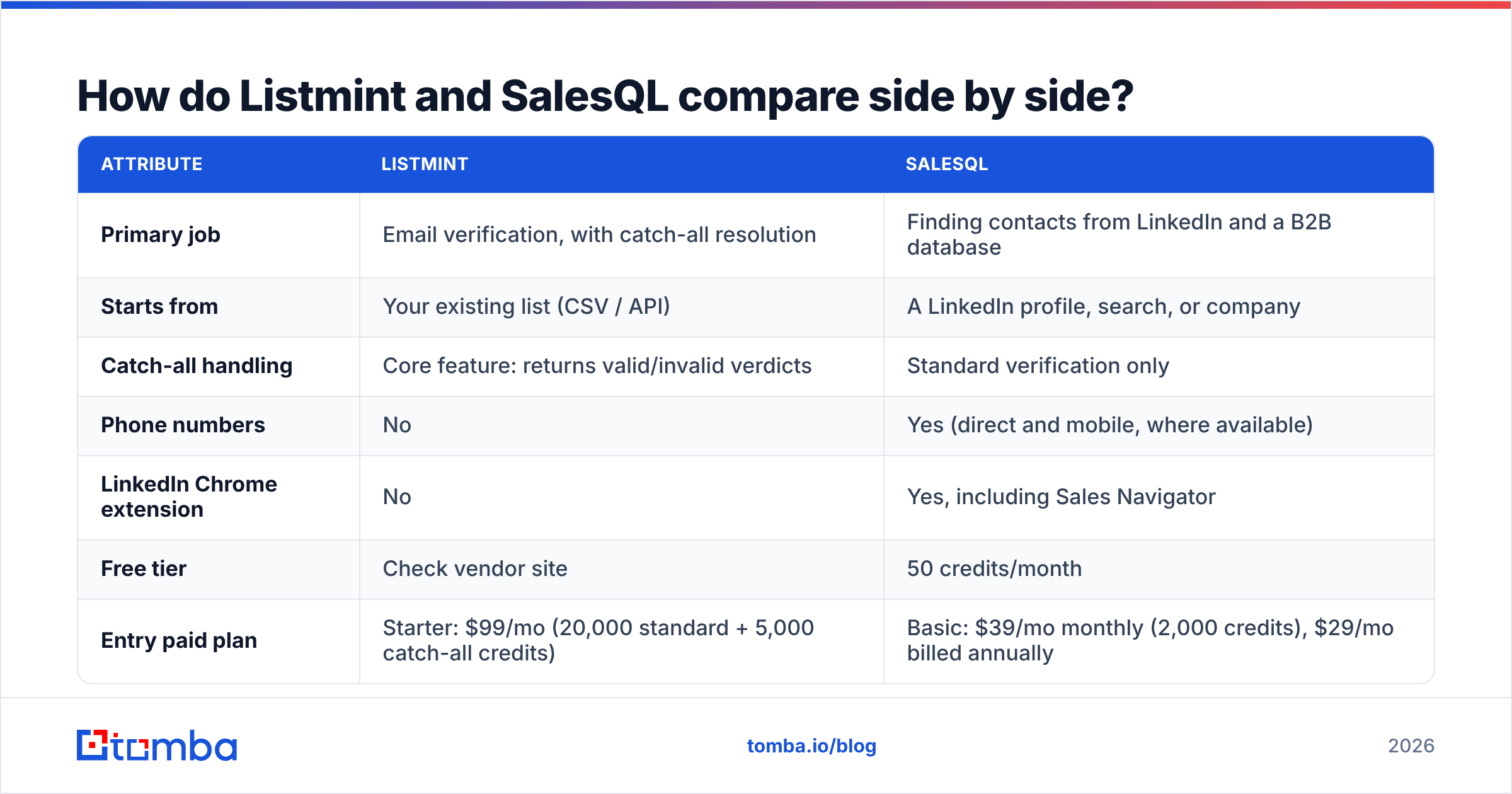
| Primary job | Email verification, with catch-all resolution | Finding contacts from LinkedIn and a B2B database |
| Starts from | Your existing list (CSV / API) | A LinkedIn profile, search, or company |
| Catch-all handling | Core feature: returns valid/invalid verdicts | Standard verification only |
| Phone numbers | No | Yes (direct and mobile, where available) |
| LinkedIn Chrome extension | No | Yes, including Sales Navigator |
| Free tier | Check vendor site | 50 credits/month |
| Entry paid plan | Starter: $99/mo (20,000 standard + 5,000 catch-all credits) | Basic: $39/mo monthly (2,000 credits), $29/mo billed annually |
| Mid-tier plan | Agency: from $187/mo (50,000 standard + 10,000 catch-all credits) | Professional: $79/mo monthly (5,000 credits, 3 seats), $59/mo annually |
| Top tier | Custom / higher volume | Organization: 12,000 credits/mo, from $89/mo annually |
| Credit model | Two credit types (standard vs catch-all) | One credit = one prospect's contact data |
| Best for | Cold email teams, agencies, list cleaners | Recruiters, SDRs, founders prospecting on LinkedIn |
| Main limitation | Doesn't generate new contacts | Weak for large list-cleaning jobs and catch-all-heavy lists |
Pricing reflects publicly listed plans at the time of writing. Check each vendor's pricing page before you buy, because SalesQL in particular issues credits differently on annual and monthly billing.
Is Listmint better than SalesQL for email accuracy?#
For verification accuracy on lists you already have, especially lists heavy on catch-all addresses, Listmint is the stronger specialist. Resolving catch-all addresses is the whole product, and the separate catch-all credit pool shows that it runs a deeper check than a standard SMTP handshake.
SalesQL's accuracy question is a different one: is the email it found for this LinkedIn profile correct? SalesQL verifies emails before returning them. On catch-all domains, though, no vendor can confirm an address with a basic SMTP check. Any finder will return some share of "risky" or "accept-all" results on those domains.
In practice:
- Scenario A: You bought or scraped 40,000 leads and your verifier says 35% are "unknown." Listmint was built for this.
- Scenario B: You have 200 target accounts and need the VP of Sales at each one. SalesQL (or any LinkedIn email finder) was built for this.
- Scenario C: You find contacts in SalesQL and then check the catch-all ones before a big send. Some teams run SalesQL and Listmint in sequence for this. It works, but you're maintaining two subscriptions and two credit balances.

If you're considering scenario C, compare costs honestly. A tool that finds emails and verifies catch-alls in one workflow, such as a catch-all verifier attached to an email finder, can be cheaper than two separate products.
How does pricing actually work for each tool?#
On paper, SalesQL is cheaper to start with and Listmint gives you more credits per dollar. Those numbers aren't comparable, because the credits buy different things.
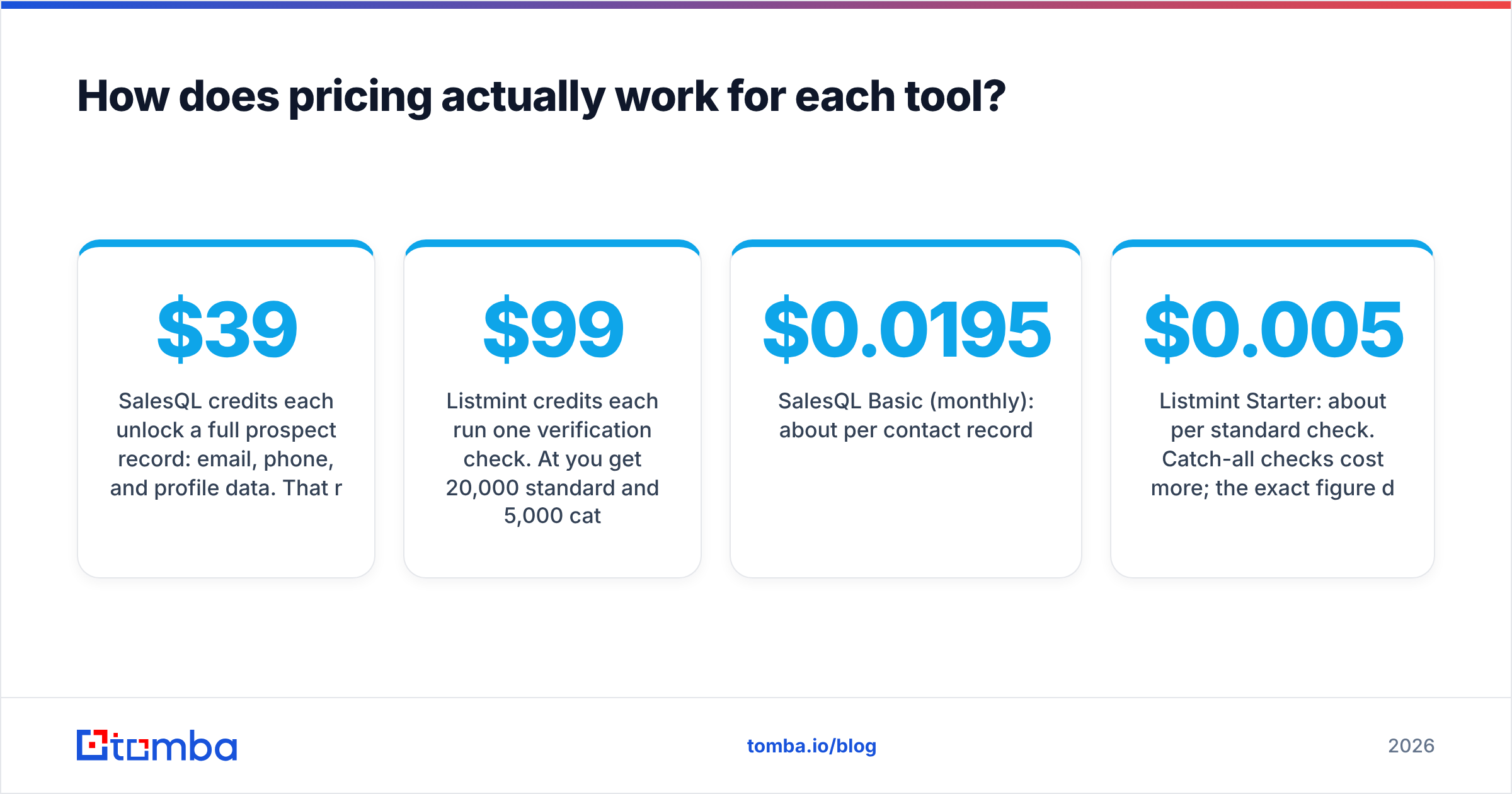
SalesQL credits each unlock a full prospect record: email, phone, and profile data. That record is worth more than one verification check, so $39 for 2,000 contacts is reasonable if you'd otherwise research each person by hand. The billing detail to watch is annual plans. According to G2-style third-party breakdowns and SalesQL's own pricing page, annual billing issues the full year's credits upfront. That's useful if your team is bursty, and you're committing to a year either way.
Listmint credits each run one verification check. At $99/mo you get 20,000 standard and 5,000 catch-all checks. If you already have the data, that's efficient. If you don't have data yet, the credits aren't useful.
Some rough unit costs at list price:
- SalesQL Basic (monthly): about $0.0195 per contact record
- Listmint Starter: about $0.005 per standard check. Catch-all checks cost more; the exact figure depends on how you split usage within the bundle.
Unit cost matters less than whether you're paying for the job you need done. A cheap verification credit doesn't help if your real bottleneck is not having emails at all.
What are the pros and cons of Listmint?#
Pros
- Resolves catch-all addresses instead of leaving them as "unknown," which recovers leads most verifiers write off
- Two credit types, so you only pay catch-all rates when you need them
- Agency-friendly volume on the higher tier
- Clear focus: it's a verifier and does that job
Cons
- Doesn't find contacts. You need a separate source for leads
- No phone data and no LinkedIn workflow
- Higher entry price than lightweight verifiers if your lists are mostly clean
- Accuracy claims are vendor-reported, so run a controlled test first (see the checklist below)
What are the pros and cons of SalesQL?#
Pros
- Quick LinkedIn workflow. Open a profile and get the contact data
- Emails and phone numbers in one credit
- Low entry price and a free tier (50 credits/month) to test data quality
- Bulk extraction from Sales Navigator searches
- CSV enrichment and API access for teams that outgrow the extension
Cons
- Depends on LinkedIn. If your prospecting doesn't start there, you'll use a fraction of the product
- Not built for cleaning large lists you got elsewhere
- Catch-all addresses stay a gray area, as with most finders
- Annual vs monthly credit mechanics can confuse buyers, so read the plan terms
Which tool should you choose for your workflow?#
Use these five questions. The answer usually becomes clear by question three.
- Do you already have the leads? Yes → lean Listmint. No → lean SalesQL.
- Does your prospecting start on LinkedIn? If yes, SalesQL fits the workflow. If you start from domains, company lists, or intent data, it's less of a fit.
- What share of your list comes back "catch-all"? Under 10%: a standard verifier is enough, and Listmint's specialty is wasted. Over 25%: Listmint is worth evaluating.
- Do you need phone numbers? Only SalesQL gives you those.
- How many tools do you want to pay for? If you need both finding and catch-all verification, compare a two-tool setup against one platform that covers both.

Whichever tool you choose, verify before a large send. Bounces from unverified catch-all addresses hurt your sender reputation, and that damage outlasts a single campaign.
How should you test Listmint or SalesQL before buying?#
Don't trust any vendor's accuracy number, including the ones above. Run this test in an afternoon:
- Build a control list of 200 contacts where you know the true status: recent replies (confirmed valid) and recent hard bounces (confirmed invalid). Make sure at least 50 are on catch-all domains.
- For Listmint: upload the list and measure how many known-valid catch-alls it marks
catch_all_validand how many known-bounces it marks invalid. False "valid" results cost you the most. - For SalesQL: pick 50 LinkedIn profiles of people whose emails you already know. Check how many it finds, how many are correct, and how many come back as risky.
- Compare against your current stack on the same list, since you only care about improvement over what you already use.
- Track cost per usable contact, not cost per credit.
Are there alternatives that cover both jobs?#
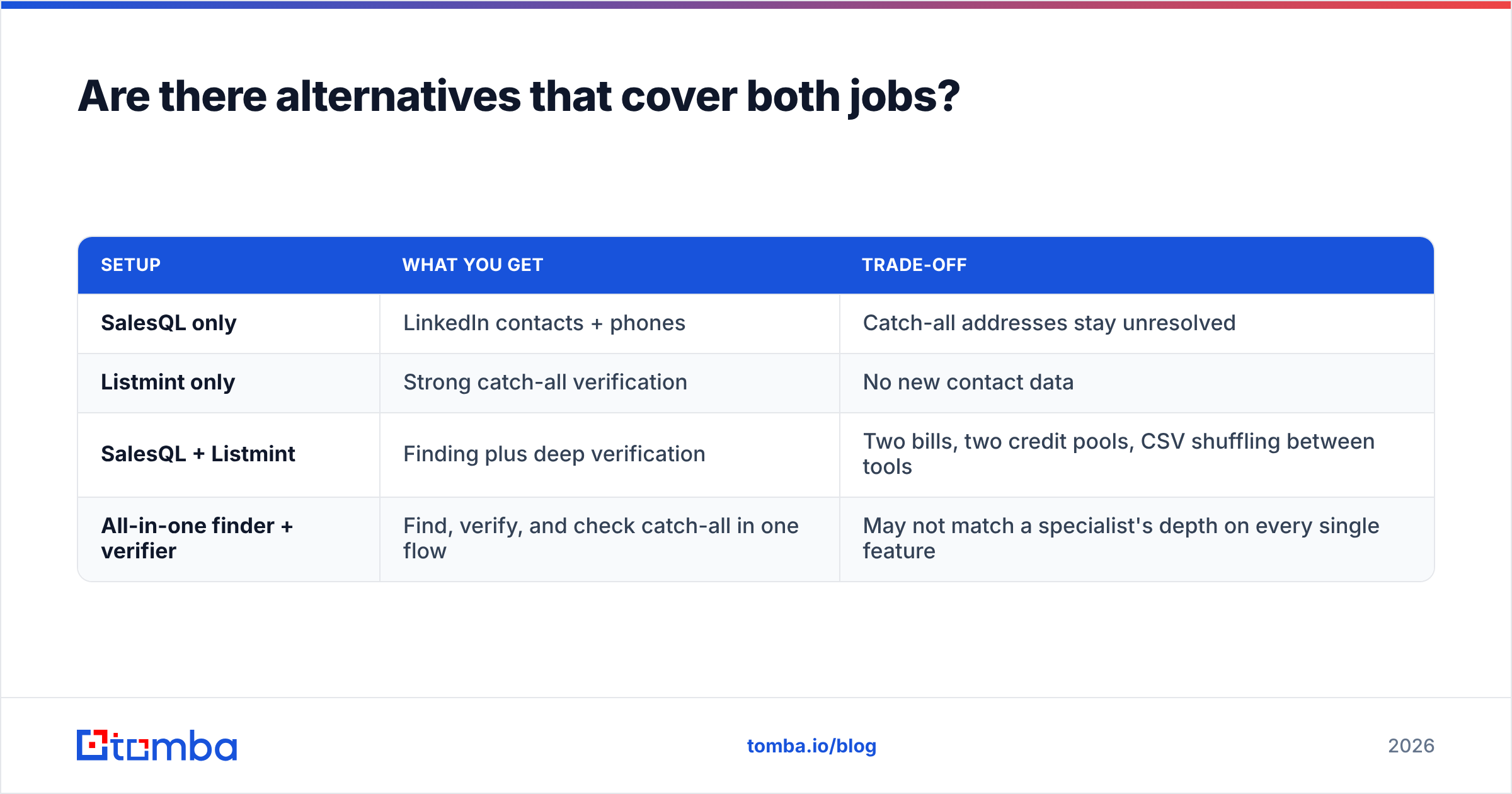
Yes. The real decision often isn't Listmint versus SalesQL. It's between one specialist, a stack of specialists, or a platform that handles finding and verification together.
Here are the three setups in general terms:
| Setup | What you get | Trade-off |
|---|---|---|
| SalesQL only | LinkedIn contacts + phones | Catch-all addresses stay unresolved |
| Listmint only | Strong catch-all verification | No new contact data |
| SalesQL + Listmint | Finding plus deep verification | Two bills, two credit pools, CSV shuffling between tools |
| All-in-one finder + verifier | Find, verify, and check catch-all in one flow | May not match a specialist's depth on every single feature |
Tomba falls into the fourth category. It's an email finder at its core, with an email verifier, a catch-all verifier, a LinkedIn finder, and a phone finder on the same account. Plans start with a free tier (25 searches/month), then Starter at $49/mo, Growth at $99/mo, and Pro at $249/mo. Full breakdown on Tomba pricing. It won't replace SalesQL for someone who lives in Sales Navigator all day, or Listmint for an agency scrubbing millions of catch-alls a month. For teams that need both jobs done at moderate volume, one tool is usually simpler and cheaper.
So, Listmint vs SalesQL: which wins?#
It depends on what's broken in your pipeline:
- Your lists bounce or sit unused as "unknown" → Listmint. It's the specialist for catch-all verification.
- You don't have the contacts yet and you prospect on LinkedIn → SalesQL. It's fast, affordable to start, and includes phone numbers.
- You need both, and don't want two subscriptions → look at a combined finder-plus-verifier.
Neither tool is a bad buy. People regret them when they buy the verifier while their real problem is finding contacts, or buy the LinkedIn finder when their bounces come from catch-all domains.
If you want finding and verification in one place, try the Tomba Email Finder. Search by name and domain, company, or LinkedIn profile, then run the results through Tomba's verifier and catch-all check before they reach your sequencer. The free tier gives you 25 searches a month, which is enough to run the 200-contact test above on a smaller sample and compare the numbers against Listmint or SalesQL before you pay for anything.
Related guides#
// get started
Find, verify and enrich your first contacts today
Start on the free plan with 25 searches a month, then scale when your team is ready.
Free plan · No credit card required · GDPR & CCPA
// about the author