Local Scraper Pricing, Reviews, Pros and Cons: 2026 Verdict
Local Scraper costs $15.99 to $19.99 a month for unlimited scraping of Google Maps and directory data. Here's what reviewers say, what it doesn't include, and when the flat fee is actually a good deal.
TL;DR
- Local Scraper is a desktop app for Windows and Mac. It pulls business listings from Google Maps and six other directory sites. You pay $19.99/month month to month, or $15.99/month if you commit to six months.
- The flat fee has no result limits, no credits and no API fees. For heavy local-lead scraping, that is one of the cheapest options available.
- Public review volume is small. The few reviews on Capterra and similar sites praise how simple it is and the support team. Reviews tell you little about how accurate the data is at scale.
- Most of the cost isn't the subscription. You also pay for proxies, machine time, and cleaning up generic
info@emails before you can send cold outreach. - It's a good fit for agencies and local-service sellers. It's a poor fit if you need named decision-makers at mid-market or enterprise companies.
What is Local Scraper?#
Local Scraper is installed software, not a cloud service. It runs on your computer and scrapes business directories. The vendor calls it a "7 in 1" scraper: seven supported sites and 11 scrapers, with Google Maps as the main one and Bing Maps, Yelp and Yellow Pages-style directories alongside it. You type a keyword ("roofing contractor") and a location ("Austin, TX"). The tool then collects business name, address, phone, website, rating, category and, where it can, public emails and social profiles from the listing's website.
It has been around for about a decade, which is a long time in this category. It was built for agencies, SEO consultants and anyone selling to local businesses. It's less suited to SaaS sales teams, who need a VP of Operations rather than a front-desk inbox.
Before you look at the numbers, it helps to know how it differs from cloud tools like Outscraper or Apify:
- Runs locally. Scraping uses your CPU, your bandwidth and your IP address, or proxies you pay for.
- Flat subscription. You don't pay per record, so a 50,000-row export costs the same as a 50-row one.
- Business-level data. You get company contact points, not a directory of employees.
- Export-first. Results go to CSV or Excel. It doesn't sync natively to a CRM.
How much does Local Scraper cost in 2026?#
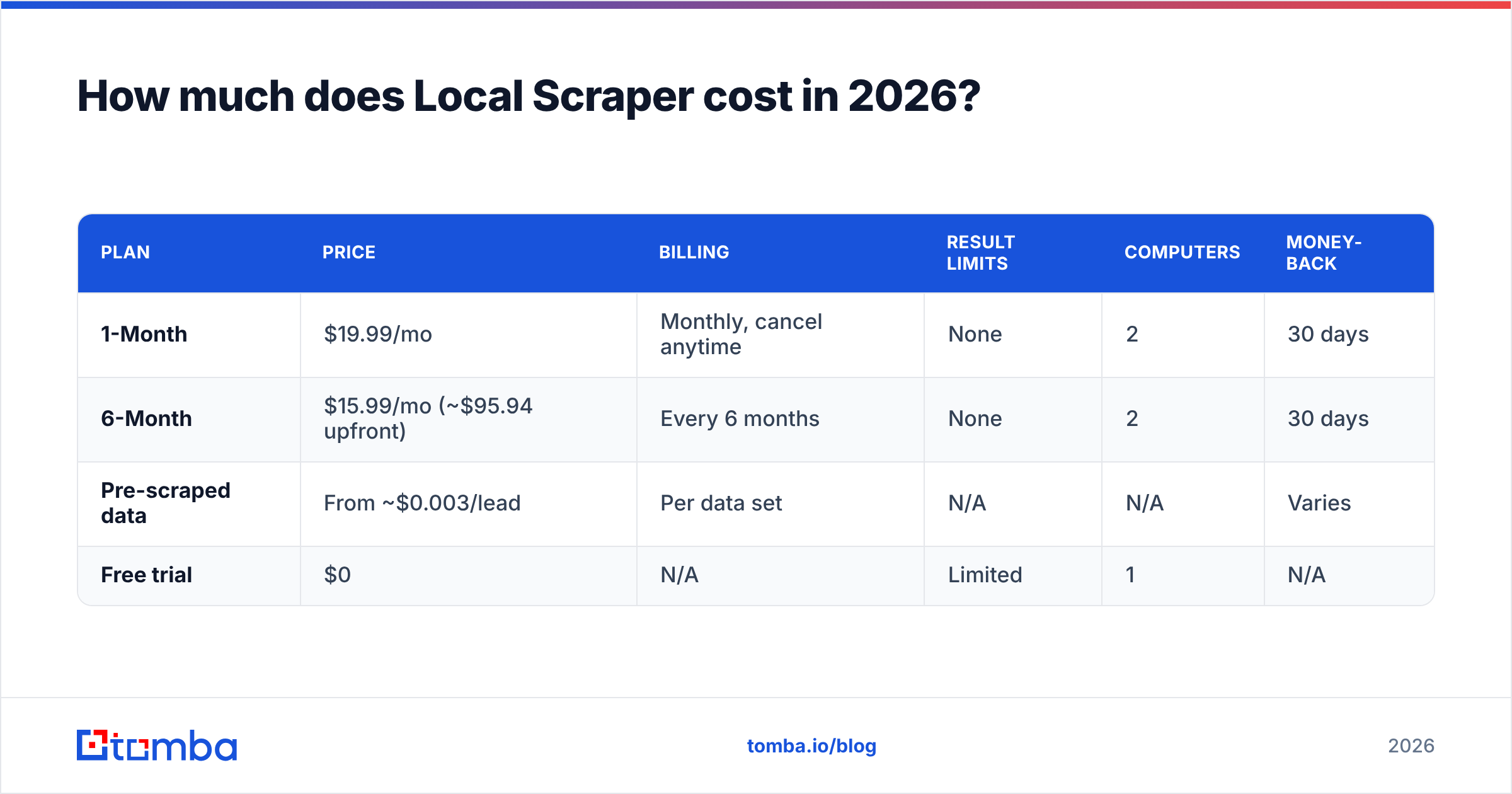
Local Scraper has two subscription plans. Both unlock the same features. The only difference is how long you commit for. It also sells pre-scraped data sets separately, starting at about $0.003 per lead.
| Plan | Price | Billing | Result limits | Computers | Money-back |
|---|---|---|---|---|---|
| 1-Month | $19.99/mo | Monthly, cancel anytime | None | 2 | 30 days |
| 6-Month | $15.99/mo (~$95.94 upfront) | Every 6 months | None | 2 | 30 days |
| Pre-scraped data | From ~$0.003/lead | Per data set | N/A | N/A | Varies |
| Free trial | $0 | N/A | Limited | 1 | N/A |
The vendor's pitch is "no extra fees, no APIs, no silly credit systems." That's accurate for the software itself. You can check current prices on the vendor's G2 pricing page and its Capterra listing. Confirm at checkout before you pay, because promotional prices change.
Is the 6-month plan worth it? Only if you already know you'll scrape every month. The saving is $4/month, or $24 over six months. That's too small to justify locking in if you're still testing whether local leads convert for your offer. Start with the monthly plan, run two or three campaigns, then switch.
What does Local Scraper really cost beyond the subscription?#
The $19.99 price is real, but it isn't your full cost. Here's what flat-fee desktop scrapers don't mention on the pricing page.
1. Proxies. Google Maps rate-limits aggressive scraping. If you run large jobs from one home or office IP, you'll hit captchas or temporary blocks. Local Scraper supports proxies and VPNs, but you pay the proxy provider separately. For regular high-volume scraping, a decent rotating residential proxy plan can easily cost more than the software.
2. Machine time. Scraping runs on your hardware. A big multi-city job can keep a laptop busy for hours. Many agencies end up running it on a spare machine or a cloud VM, which adds another monthly bill.
3. Data cleanup. Directory data is messy. You'll get duplicates across categories, closed businesses that are still listed, and phone numbers that go to call centres. Expect to spend real time on deduplication. A free tool to remove duplicates helps, but you still have to do the pass.
4. The email gap. This one matters most. When Local Scraper finds an email, it's usually whatever is published on the business website: info@, contact@, sales@. Those role inboxes have lower reply rates, and many spam filters score them more harshly in cold campaigns. If your plan is outbound email, you'll need a second step to find the owner's or manager's address and check that it delivers.
Add those up and a realistic monthly cost for an active agency user often lands at two to five times the sticker price. That's still cheap for local lead generation. It just isn't $19.99.
What do Local Scraper reviews actually say?#
There aren't many public reviews, so treat any star rating carefully. On Capterra, Local Scraper has a 5.0/5 rating, but from a very small number of reviewers. The same review appears on GetApp and Software Advice, which share Capterra's database. Reviews on SourceForge, Slashdot and AppSumo are also few.
These themes come up in reviews and AppSumo Q&A threads:
- Ease of use. Reviewers say they were scraping within minutes. The interface is basic but clear.
- Support. Several people mention quick, personal replies from the team, which fits a small, founder-led vendor.
- Value. "Unlimited for under $20" is the most common reason people give for choosing it over pay-per-record tools.
- Complaints. People ask about update cadence when Google changes its layout, Mac performance, and how complete the email data is. When Google Maps changes its front end, desktop scrapers can break for a few days until a patch comes out.
What you won't find is an independent audit of accuracy: how many scraped emails bounce, or how many listings are stale. For that, you have to test it yourself on a sample. Take 200 rows from your target niche and run the emails through an email verifier before you commit to a full campaign.
What are the pros and cons of Local Scraper?#
Here's how it balances out after the reviews and the hidden costs.
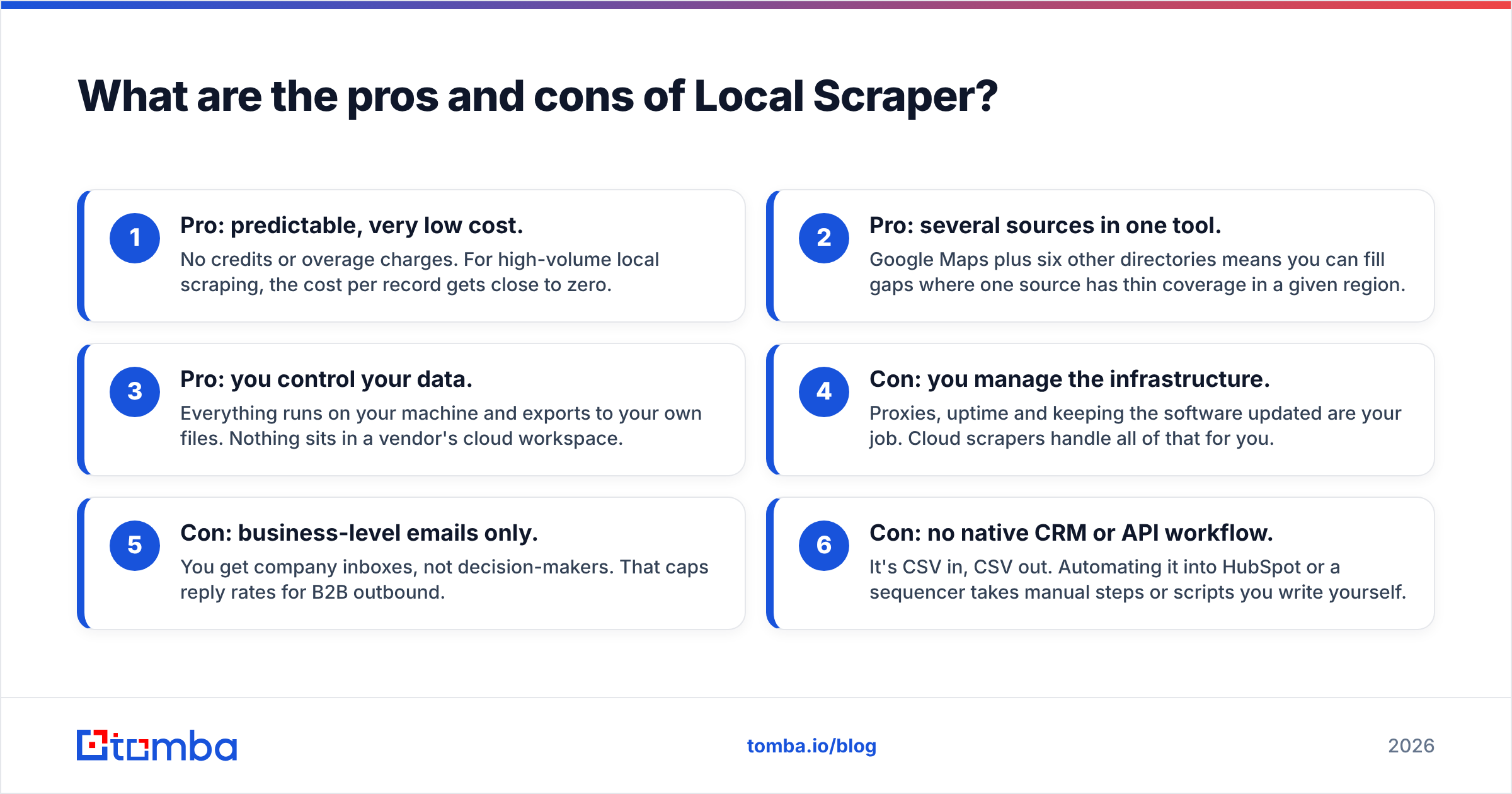
- Pro: predictable, very low cost. No credits or overage charges. For high-volume local scraping, the cost per record gets close to zero.
- Pro: several sources in one tool. Google Maps plus six other directories means you can fill gaps where one source has thin coverage in a given region.
- Pro: you control your data. Everything runs on your machine and exports to your own files. Nothing sits in a vendor's cloud workspace.
- Con: you manage the infrastructure. Proxies, uptime and keeping the software updated are your job. Cloud scrapers handle all of that for you.
- Con: business-level emails only. You get company inboxes, not decision-makers. That caps reply rates for B2B outbound.
- Con: no native CRM or API workflow. It's CSV in, CSV out. Automating it into HubSpot or a sequencer takes manual steps or scripts you write yourself.
How does Local Scraper compare with cloud scrapers and email finders?#
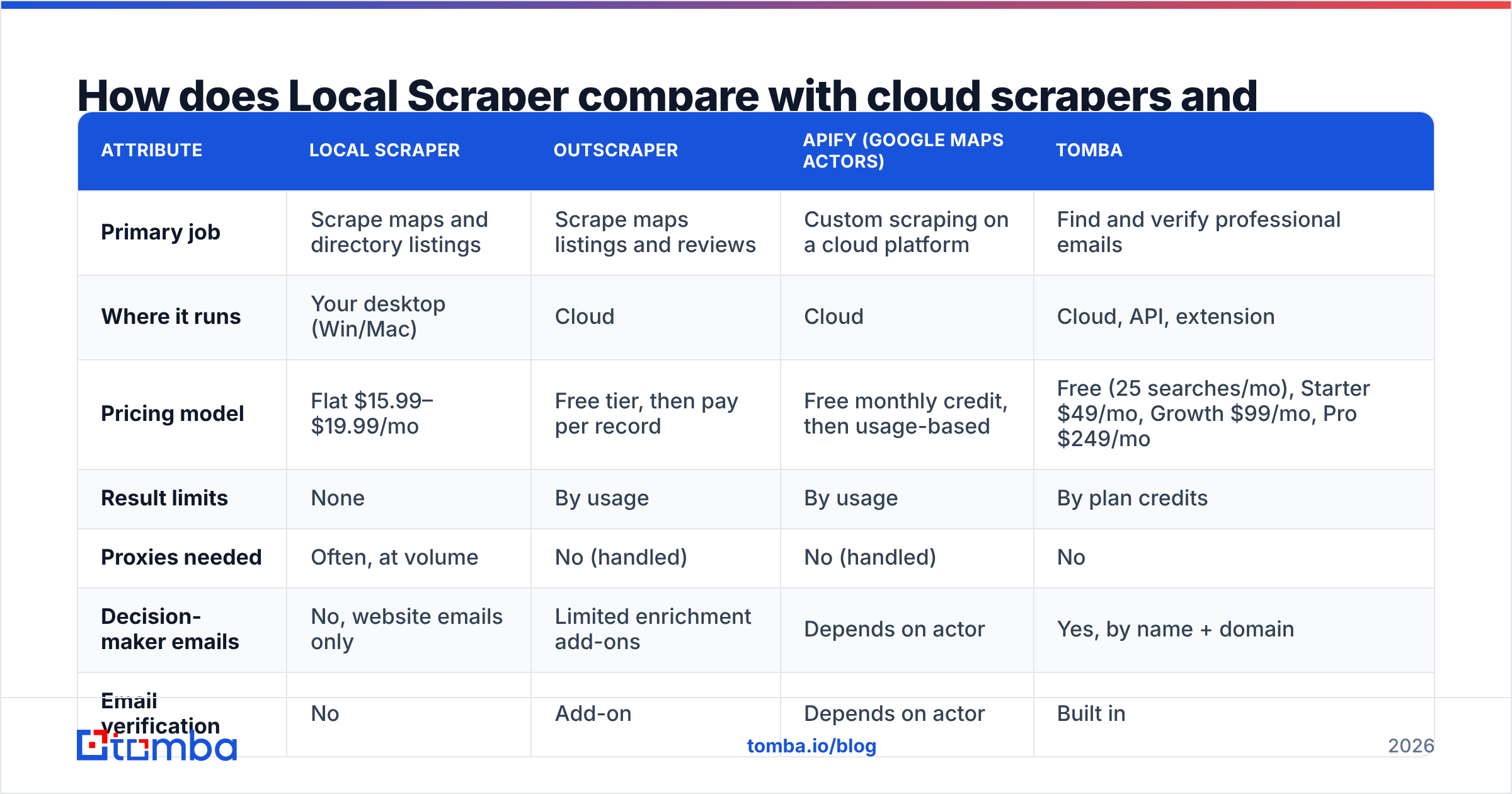
This category mixes tools that do different jobs. Local Scraper and cloud scrapers like Outscraper and Apify's Google Maps actors extract listings. An email finder like Tomba finds and verifies people's addresses at a known company. Most serious local-outbound stacks use one of each.
| Attribute | Local Scraper | Outscraper | Apify (Google Maps actors) | Tomba |
|---|---|---|---|---|
| Primary job | Scrape maps and directory listings | Scrape maps listings and reviews | Custom scraping on a cloud platform | Find and verify professional emails |
| Where it runs | Your desktop (Win/Mac) | Cloud | Cloud | Cloud, API, extension |
| Pricing model | Flat $15.99–$19.99/mo | Free tier, then pay per record | Free monthly credit, then usage-based | Free (25 searches/mo), Starter $49/mo, Growth $99/mo, Pro $249/mo |
| Result limits | None | By usage | By usage | By plan credits |
| Proxies needed | Often, at volume | No (handled) | No (handled) | No |
| Decision-maker emails | No, website emails only | Limited enrichment add-ons | Depends on actor | Yes, by name + domain |
| Email verification | No | Add-on | Depends on actor | Built in |
| Best for | High-volume local lists on a budget | Hands-off maps scraping | Developers who want flexibility | Turning company lists into named contacts |
Outscraper and Apify change their per-record rates often, so check their current pricing pages before you compare. The pattern holds, though. Cloud tools cost more per record but take infrastructure off your plate. Local Scraper is cheaper per record but costs you more hands-on time.
If you're comparing broader B2B data providers too, the same trade-off applies. Directory scrapers give you breadth. Curated databases and email finders give you contacts you can actually reach. BookYourData, for example, is a solid option if you'd rather buy pre-built, verified B2B lists than scrape and clean them yourself.
Is scraping Google Maps legal and safe to use for outreach?#
In most places, collecting publicly listed business information is generally tolerated. It isn't unconditionally safe, though. Keep three things in mind:
- Platform terms. Google's terms of service restrict automated scraping. The usual risk is IP blocks, not lawsuits against individual users, but you should know the risk exists.
- Privacy law. Business emails of sole traders and small firms can count as personal data under GDPR in the EU and UK. You need a lawful basis, such as legitimate interest, a clear opt-out and a record of where the data came from.
- Anti-spam rules. CAN-SPAM in the US and PECR in the UK apply to how you send, not how you collect. Accurate sender details and working unsubscribe links are required.
None of this is legal advice. If you run outbound at scale, have counsel review your data-handling process once.
Who should buy Local Scraper, and who shouldn't?#
Buy it if:
- You sell to local businesses: restaurants, clinics, trades, salons, real estate.
- You're an agency building lists for clients every week and want a fixed monthly cost.
- Phone and address data matter as much as email, for cold calling or direct mail.
- You're comfortable managing proxies and a CSV workflow.
Skip it (or pair it) if:
- Your buyers are directors and VPs at companies with 50+ employees. Maps listings won't surface them.
- You need CRM sync, API access or team collaboration out of the box.
- You want deliverability-safe email lists without a separate verification step.
How do you turn a Local Scraper export into an outbound-ready list?#
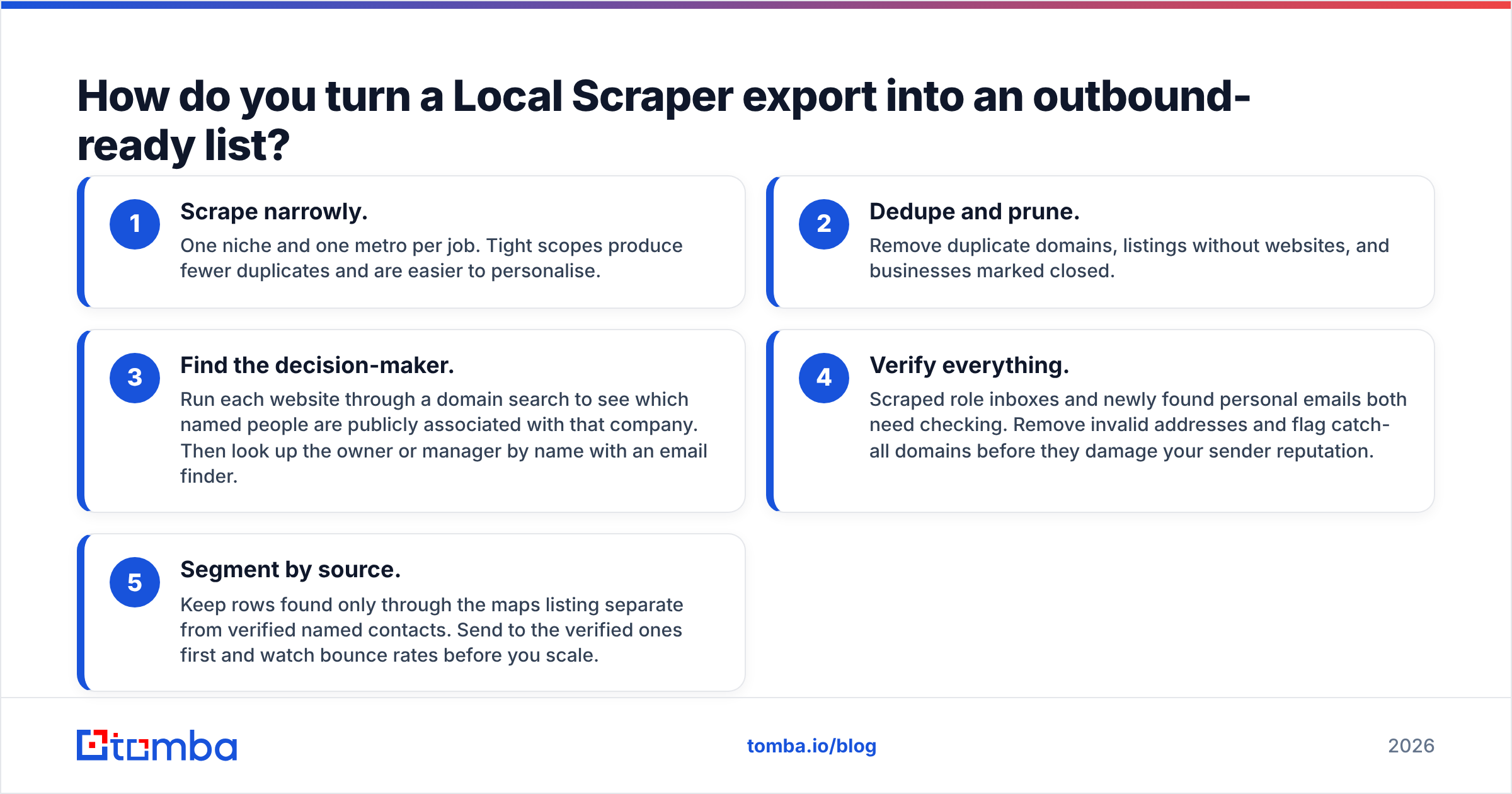
If you do buy it, this workflow gets you from raw listings to contacts you can send to:
- Scrape narrowly. One niche and one metro per job. Tight scopes produce fewer duplicates and are easier to personalise.
- Dedupe and prune. Remove duplicate domains, listings without websites, and businesses marked closed.
- Find the decision-maker. Run each website through a domain search to see which named people are publicly associated with that company. Then look up the owner or manager by name with an email finder.
- Verify everything. Scraped role inboxes and newly found personal emails both need checking. Remove invalid addresses and flag catch-all domains before they damage your sender reputation.
- Segment by source. Keep rows found only through the maps listing separate from verified named contacts. Send to the verified ones first and watch bounce rates before you scale.
Step 3 is where the flat-fee price of the scraper stops mattering. A cheap list of 5,000 info@ addresses usually gets fewer replies than 800 verified owner emails.
Frequently asked questions#
Does Local Scraper have a free plan?#
No. There's a free trial with limited output, but ongoing use needs the $19.99 monthly or $15.99/month six-month plan.
Does Local Scraper charge per lead?#
Not for the software. Subscriptions have unlimited results. Only its separate pre-scraped data sets are priced per lead.
Can Local Scraper find decision-maker emails?#
Not directly. It collects emails published on listings and business websites, which are mostly generic role inboxes. To reach named owners or managers, you need an email finder.
Is Local Scraper better than Outscraper?#
It's cheaper at high volume. Outscraper is easier to run because it's cloud-based and handles proxies for you. Pick based on whether your budget is tighter than your time.
What's the bottom line?#
Local Scraper's pricing is honest: under $20 a month for unlimited local business data is hard to beat, and the few reviews out there back up its simplicity and support. The catch is what the export contains. It gives you businesses, not the people you need to email. Budget for proxies and cleanup, and plan a second step for contacts.
For that second step, Tomba Email Finder takes the domains from your Local Scraper export and returns verified, named professional emails for the owners and managers behind each listing. You can start on the free tier with 25 searches a month to test a sample of your list. Then compare Tomba plans once you know how many contacts your campaigns need.
Related guides#
// get started
Find, verify and enrich your first contacts today
Start on the free plan with 25 searches a month, then scale when your team is ready.
Free plan · No credit card required · GDPR & CCPA
// about the author