Logvalid vs Zintlr (2026): Email Verifier or Prospecting Database?
Logvalid cleans email lists. Zintlr finds prospects and profiles their personalities. They solve different problems, so here's how to tell which one your outbound stack actually needs, what each costs, and when it makes sense to run both.
TL;DR
- Logvalid is an email verification tool. It checks lists you already have and removes invalid, disposable, and spam-trap addresses. It doesn't find new contacts.
- Zintlr is a prospecting platform. It combines a B2B contact database (500M+ contacts and 75M+ companies, by its own count) with DISC and OCEAN personality profiles and meeting insights.
- Pricing works in different ways. Logvalid charges by usage, and its Capterra listing shows a free version. Zintlr sells subscriptions, with Lite at $49/mo and Plus at $170/mo.
- Choose by the problem you have. If your bounce rate is too high, start with Logvalid. If you don't have enough good leads, Zintlr fits better.
- Some teams need to find and verify in one tool. An email finder with a built-in verifier, like Tomba, handles both jobs without extra CSV exports between tools.
Searches for "Logvalid vs Zintlr" usually come from teams building their first outbound stack who want to know which tool to pay for. The two products aren't direct competitors. They sit at opposite ends of the same pipeline, and the rest of this comparison explains why that matters for your budget.
What is Logvalid?#
Logvalid is an email verification service. You give it a list of addresses, one at a time through the API or in bulk, and it tells you which ones are safe to send to. According to its Capterra listing, its main features are:
- Real-time validation: checks syntax, domain, and mailbox deliverability as addresses come in
- Disposable and fake email detection: removes throwaway inboxes and junk sign-ups
- Spam trap detection: flags addresses that can hurt your sender reputation
- API integration: lets you verify inside sign-up forms, CRMs, or your own apps
- List health reports: summarizes how clean an uploaded list is
Logvalid is a quality-control step. It helps whether your list came from a trade show, a webinar, a purchased file, or a scrape that's six months old. It can't add contacts that aren't already in your spreadsheet.
Pricing is usage-based. Capterra lists a free version and a free trial, with an entry point of about $1. Check Logvalid's current credit packs before you budget, because verification pricing usually drops per email as volume goes up.
What is Zintlr?#
Zintlr is a sales intelligence and prospecting platform. Its main product is a searchable B2B database that you filter by job title, company size, location, revenue, and tech stack. On top of that it adds what it calls Personality Intelligence: profiles of individual buyers built on the DISC and OCEAN (Big Five) frameworks, which help you adjust tone and messaging.
Its Capterra listing lists these features:
- B2B database: 500M+ contacts and 75M+ companies, with advanced filters
- LinkedIn email finder and Chrome extension: shows contact and company data on LinkedIn, Google, and company websites
- Personality Intel: DISC and OCEAN profiles to guide how you open, pitch, and follow up
- Meeting / Calendar Intel: briefings before scheduled calls
- Buyer Committee mapping: finds the other stakeholders involved in a deal
Zintlr is a top-of-funnel tool. It answers "who should I contact, and how should I talk to them?"
How do Logvalid and Zintlr differ at the core?#
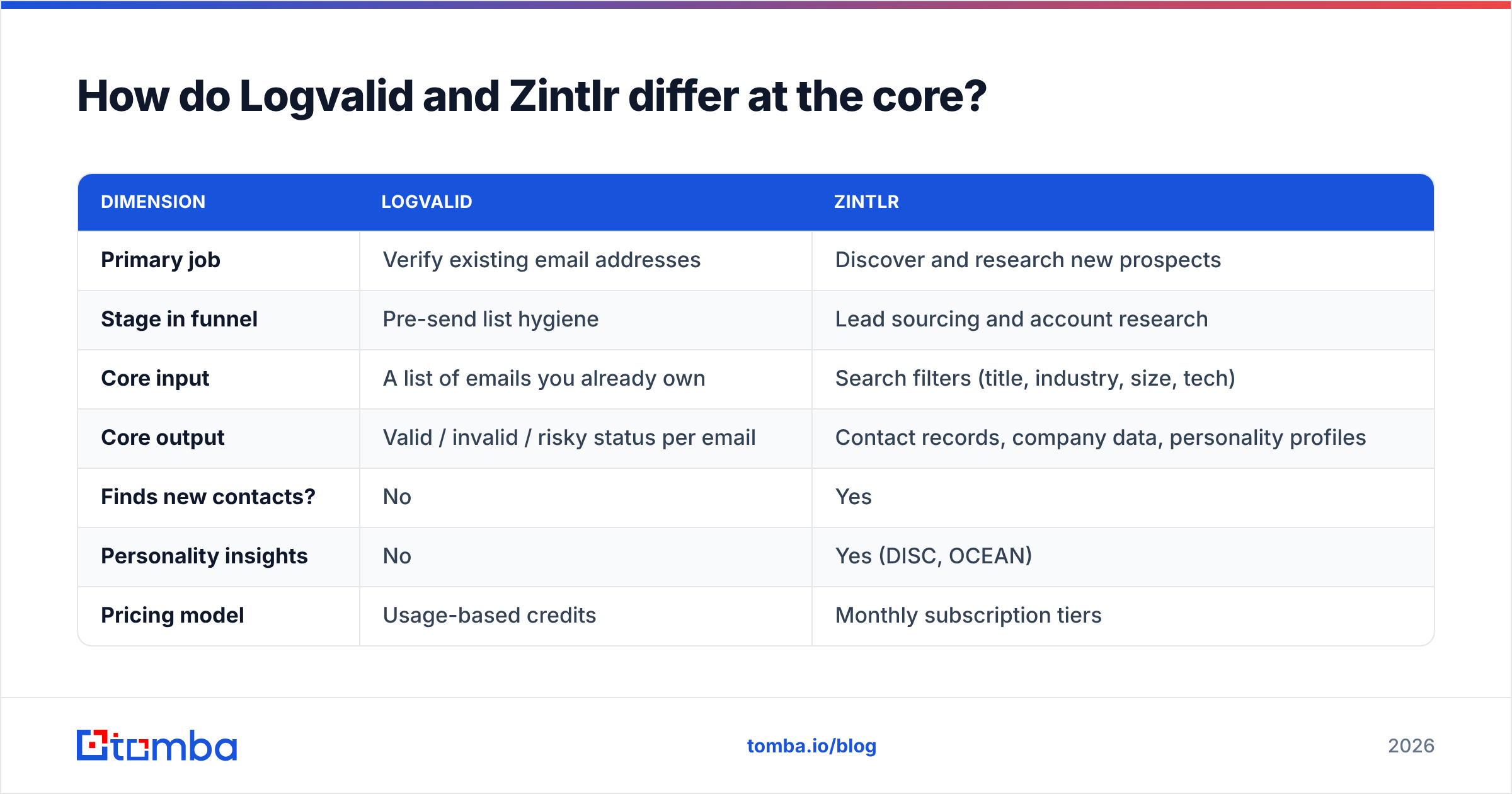
The simplest way to compare them is by the job each one does in an outbound workflow.
| Dimension | Logvalid | Zintlr |
|---|---|---|
| Primary job | Verify existing email addresses | Discover and research new prospects |
| Stage in funnel | Pre-send list hygiene | Lead sourcing and account research |
| Core input | A list of emails you already own | Search filters (title, industry, size, tech) |
| Core output | Valid / invalid / risky status per email | Contact records, company data, personality profiles |
| Finds new contacts? | No | Yes |
| Personality insights | No | Yes (DISC, OCEAN) |
| Pricing model | Usage-based credits | Monthly subscription tiers |
| Best buyer | Marketers and ops teams with existing lists | SDRs, AEs, and founders doing outbound |
The table shows the main point. A team that picks Zintlr "instead of" Logvalid, or the other way around, usually ends up with a gap in its stack. The real question is which gap costs you more right now.
Logvalid vs Zintlr pricing: which costs less?#
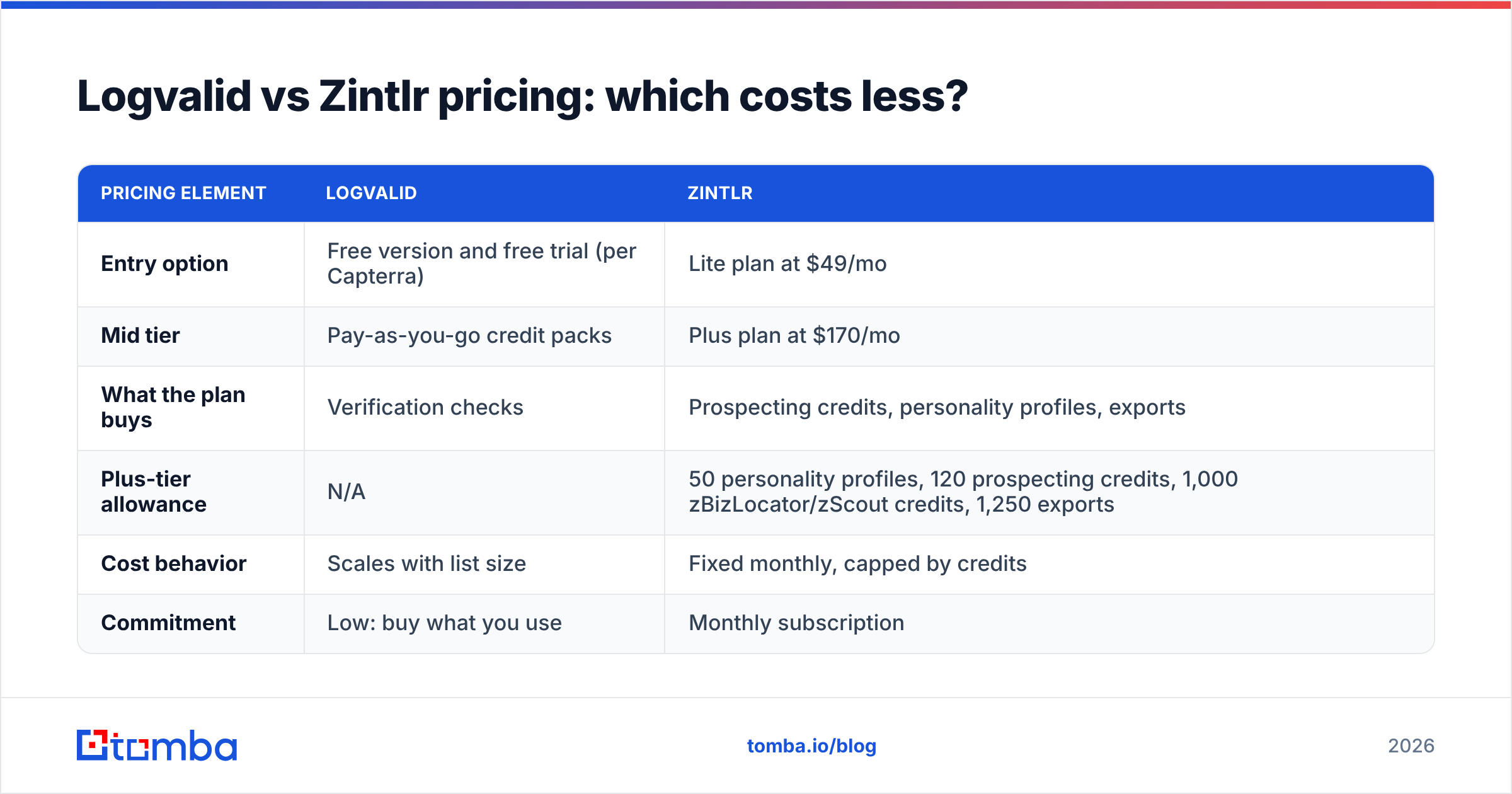
The pricing models are different enough that "cheaper" depends on how many emails you process each month.
| Pricing element | Logvalid | Zintlr |
|---|---|---|
| Entry option | Free version and free trial (per Capterra) | Lite plan at $49/mo |
| Mid tier | Pay-as-you-go credit packs | Plus plan at $170/mo |
| What the plan buys | Verification checks | Prospecting credits, personality profiles, exports |
| Plus-tier allowance | N/A | 50 personality profiles, 120 prospecting credits, 1,000 zBizLocator/zScout credits, 1,250 exports |
| Cost behavior | Scales with list size | Fixed monthly, capped by credits |
| Commitment | Low: buy what you use | Monthly subscription |
For a team that verifies a few thousand emails a quarter, Logvalid's usage model is probably the cheaper option. You pay when you clean a list and nothing when you don't.
For a team that needs fresh leads every week, the comparison doesn't apply, because Logvalid won't produce any leads. What matters there is Zintlr's cost per usable contact. At the Plus tier, 120 prospecting credits for $170 is about $1.42 per credit before you count the personality profiles. That's reasonable if the personality data improves your reply rates. It's expensive if you only want a name and an email.

Which tool gives you more accurate data?#
The two tools measure different things, so "accuracy" means something different for each.
For Logvalid, accuracy means how well it separates deliverable from undeliverable addresses. The hard cases are the same for every verifier:
- Catch-all domains: the server accepts every address, so an SMTP check can't tell a real mailbox from a fake one
- Greylisting and rate limits: some mail servers slow down or temporarily reject verification pings
- Role accounts: addresses like info@ or sales@ may be deliverable but rarely reach a buyer
Before you trust any verifier's headline accuracy number, ask how it labels catch-all results. A tool that marks every catch-all address as "valid" will look accurate in a demo and cause bounces in your campaigns.
For Zintlr, accuracy means how fresh and correct the database records are. People change jobs, companies rebrand, and email formats change. Any large contact database decays over time, which is why most experienced outbound teams run database exports through a verifier before sending. Zintlr says its data is regularly updated and compliant with privacy laws. Test a sample from your own ideal customer profile before you buy an annual plan. Pull 100 contacts, verify them, and count how many pass.
That test is also a practical reason the two products can work together.
When should you choose Logvalid?#
Logvalid is the better fit if these apply to you:
- You already have the contacts. CRM exports, event lists, inbound sign-ups, or partner-shared lists need cleaning, not more records.
- Bounces are hurting your deliverability. A bounce rate above 2% on cold campaigns is a warning sign. A verifier is the quickest fix.
- You want to verify at signup. Real-time API checks keep fake and disposable addresses out of your database in the first place.
- Your budget is tight and your volume changes. Usage-based pricing means you don't pay a subscription in months when you aren't sending.
It's the wrong choice if your main problem is that you don't know who to email.
When should you choose Zintlr?#
Zintlr is the better fit if these apply to you:
- You need new pipeline. You have an ICP but no list, and you need filters to build one.
- Your deal sizes justify research. In enterprise or high-ACV sales, a DISC profile that tells you to lead with data instead of rapport can change how a call goes.
- You sell to buying committees. Buyer Committee mapping and company insights help you multi-thread into an account.
- Your reps live on LinkedIn. The Chrome extension shows contact data where your SDRs already work.
It's probably too much if you run high-volume, low-touch campaigns where personality insight on each contact won't change your template. In that case you're paying for features you won't use.
Can you use Logvalid and Zintlr together?#
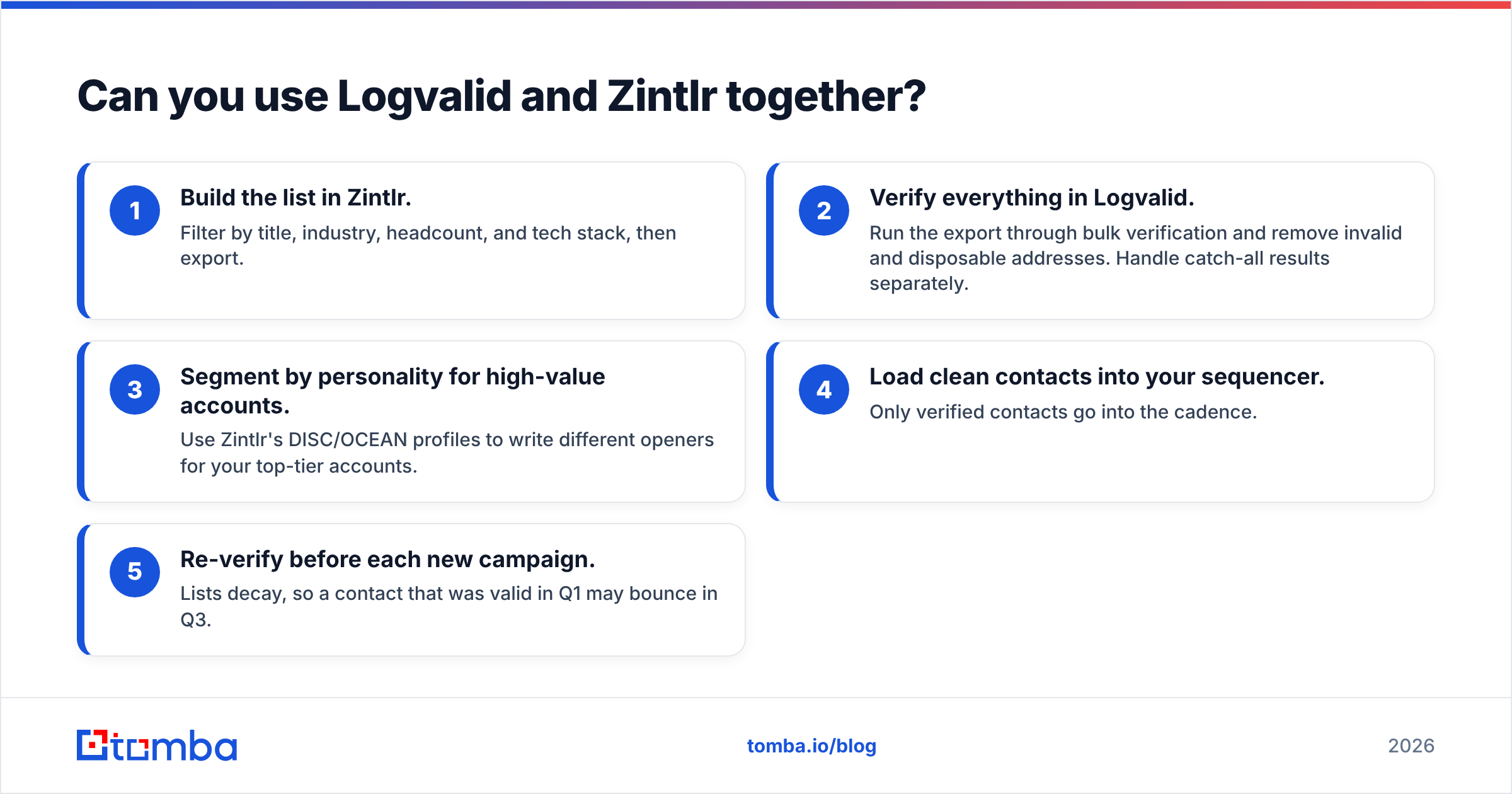
Yes, and plenty of teams with both problems do. A typical workflow looks like this:
- Build the list in Zintlr. Filter by title, industry, headcount, and tech stack, then export.
- Verify everything in Logvalid. Run the export through bulk verification and remove invalid and disposable addresses. Handle catch-all results separately.
- Segment by personality for high-value accounts. Use Zintlr's DISC/OCEAN profiles to write different openers for your top-tier accounts.
- Load clean contacts into your sequencer. Only verified contacts go into the cadence.
- Re-verify before each new campaign. Lists decay, so a contact that was valid in Q1 may bounce in Q3.
The downside is overhead. You manage two vendors, two billing cycles, two credit balances, and a CSV export at every handoff. For a solo founder or a two-person SDR team, that friction adds up quickly.

Is there a simpler option that finds and verifies in one place?#
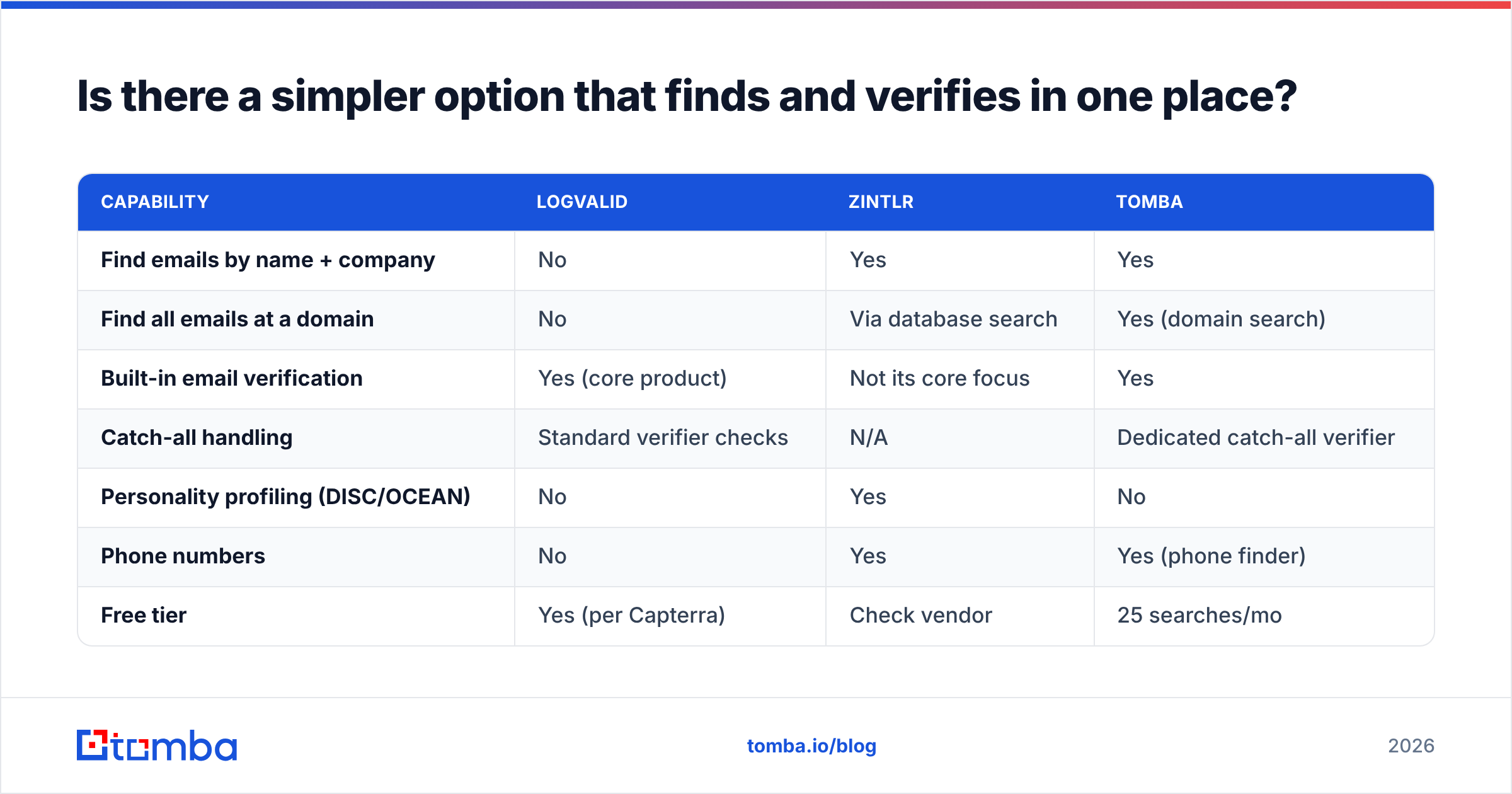
If you mainly need accurate emails for named people or target companies, and don't need personality profiling, an all-in-one email finder may save you from running two tools. This is where Tomba fits. Here's how the three compare on the features most outbound teams use:
| Capability | Logvalid | Zintlr | Tomba |
|---|---|---|---|
| Find emails by name + company | No | Yes | Yes |
| Find all emails at a domain | No | Via database search | Yes (domain search) |
| Built-in email verification | Yes (core product) | Not its core focus | Yes |
| Catch-all handling | Standard verifier checks | N/A | Dedicated catch-all verifier |
| Personality profiling (DISC/OCEAN) | No | Yes | No |
| Phone numbers | No | Yes | Yes (phone finder) |
| Free tier | Yes (per Capterra) | Check vendor | 25 searches/mo |
| Paid entry point | Usage-based | $49/mo (Lite) | $49/mo (Starter) |
To keep this fair: Tomba doesn't replace Zintlr's personality intelligence. If DISC-based messaging is part of how your team sells, that's a real differentiator and Tomba doesn't offer it. Tomba also isn't a better pure verifier for someone who only cleans lists and never prospects. In that case, a usage-based tool like Logvalid is simple and cheap.
Where Tomba fits well is the common middle case. You know the accounts you want to reach, you need the right person's address, and you want it verified before it reaches your sequencer. The email finder and email verifier share one credit pool and one login. The bulk email finder handles list-sized jobs without exporting to a second tool. Plans run from a free tier through Starter ($49/mo), Growth ($99/mo), and Pro ($249/mo). The full breakdown is on the Tomba pricing page.
Frequently asked questions#
Is Logvalid a Zintlr alternative?#
Not directly. Logvalid verifies emails you already have, while Zintlr helps you find new prospects. They complement each other more than they compete.
Does Zintlr verify emails?#
Zintlr offers email finding as part of its database and LinkedIn tooling, but verification isn't its main product. Most teams still run a dedicated verification pass on exported lists before a cold send.
Which is better for a startup doing its first outbound?#
If you're starting with no list, you need a prospecting or finding tool first, such as Zintlr or an email finder. If you already have leads from your network or inbound, start with a verifier like Logvalid to protect your sending domain.
What does the DISC profile in Zintlr actually do?#
It estimates a prospect's communication style: dominant, influential, steady, or conscientious. You can then adjust your message length, tone, and call structure. It's most useful for high-value, low-volume selling.
How often should I re-verify a list?#
Before every major campaign, and at least quarterly for lists you keep. B2B contact data decays as people change roles, so a list verified six months ago will contain addresses that bounce today.
So, Logvalid or Zintlr?#
Choose Logvalid if you already have contacts and your problem is bounces, fake sign-ups, or sender reputation. It's lightweight, usage-priced, and focused on one job.
Choose Zintlr if you need new, researched prospects and your sales motion benefits from personality-level insight into each buyer. The $49 Lite and $170 Plus tiers make sense when deal sizes justify the research.
Use both if you prospect heavily and your deliverability can't afford dirty exports. Just plan for the overhead of managing two tools.
If what you really need is "find the right person's email and make sure it won't bounce," try Tomba Email Finder. Search by name, company, or domain, and every result is checked by the built-in verifier before it goes into your sequence. The free tier includes 25 searches a month, so you can test it on your own target accounts before paying.
Related guides#
// get started
Find, verify and enrich your first contacts today
Start on the free plan with 25 searches a month, then scale when your team is ready.
Free plan · No credit card required · GDPR & CCPA
// about the author