Loom vs Vidyard: Which Video Tool Wins for Sales in 2026?
Loom is easier to record with and costs less. Vidyard shows you which prospect watched and when. Here's how to pick between them for outbound, demos and deal follow-up.
TL;DR
- Loom is the better pick for internal async communication, product walkthroughs and teams that want fast, cheap recording. Business costs about $15 per creator per month on annual billing, or $18 month-to-month.
- Vidyard is built for sellers. It gives you viewer-level analytics, CRM and sales engagement integrations, and prospecting video workflows. Paid plans cost a lot more per user, and pricing moved during 2026.
- If you send more than 20 prospecting videos a week and log activity in HubSpot or Salesforce, Vidyard's tracking usually pays for itself. If you mostly record demos, onboarding or internal updates, Loom wins.
- Neither tool fixes a bad contact list. A personalized video sent to a bounced address gets zero views, so verify your emails before you record.
What is the real difference between Loom and Vidyard?#
Loom is an async communication tool that sales teams also happen to use. Vidyard is a sales video platform that other teams also happen to use. That one difference explains most of the comparison.
Loom started as a quick way to record your screen and camera and share a link. Atlassian bought it in 2023, and it now sits next to Confluence and Jira in a lot of companies. Its roadmap favors internal workflows: meeting notes, documentation, bug reports, and AI summaries that turn a video into a written doc.
Vidyard started as a video hosting and marketing platform. Over the last several years it moved hard into sales, adding prospecting tools, AI-generated video avatars, and deep hooks into sales engagement platforms. Its roadmap favors outbound: who watched, how much they watched, and what the rep should do next.
If you remember one line from this post, make it this one. Loom is optimized for the sender. Vidyard is optimized for tracking the receiver.
How do Loom and Vidyard compare feature by feature?#
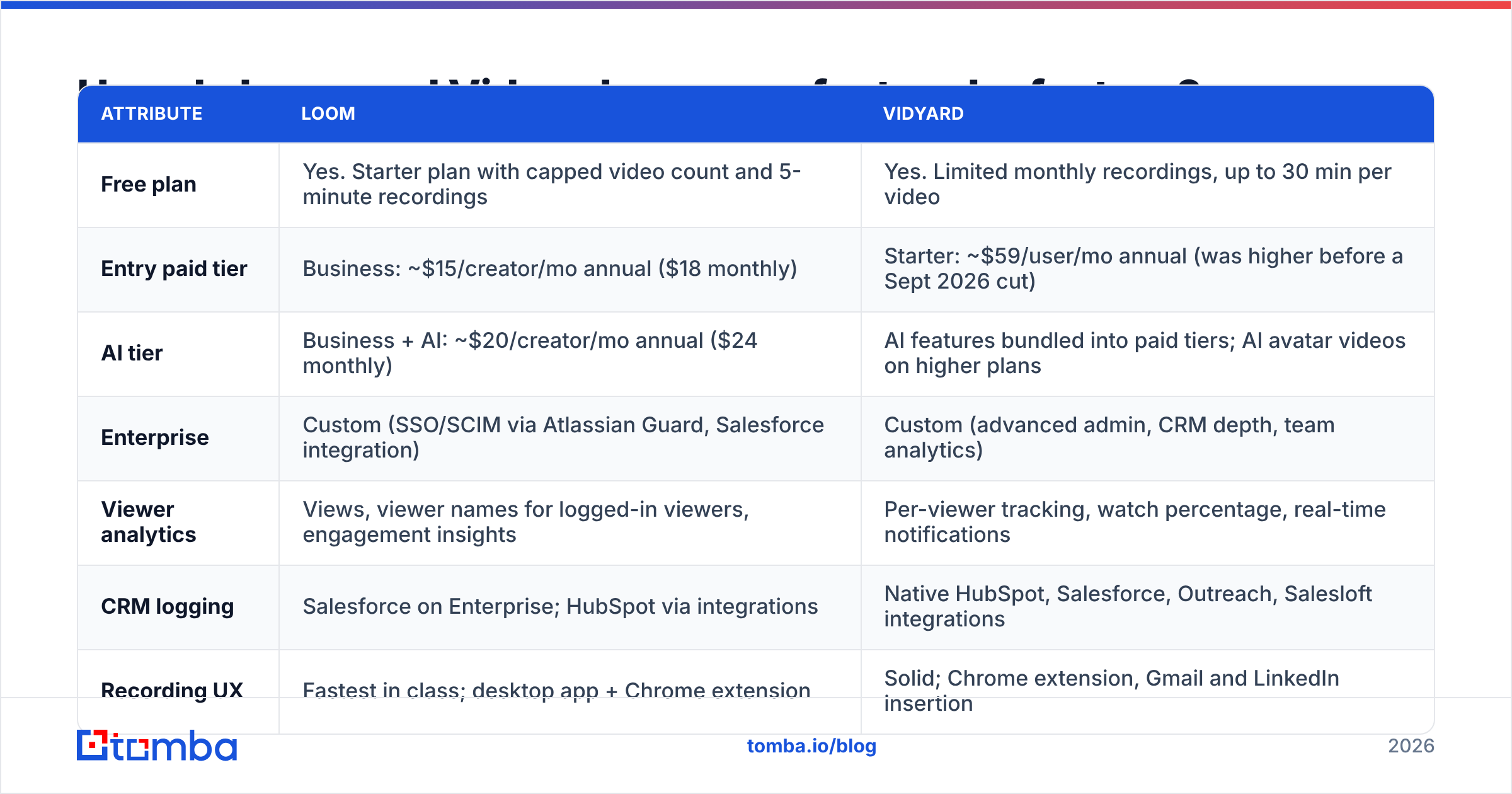
Here's how the two tools stack up for a typical B2B sales team. Pricing reflects public list prices as of 2026. Vidyard in particular has changed its plan names and prices several times, so confirm current numbers on Vidyard's pricing page before you buy.
| Attribute | Loom | Vidyard |
|---|---|---|
| Free plan | Yes. Starter plan with capped video count and 5-minute recordings | Yes. Limited monthly recordings, up to 30 min per video |
| Entry paid tier | Business: ~$15/creator/mo annual ($18 monthly) | Starter: ~$59/user/mo annual (was higher before a Sept 2026 cut) |
| AI tier | Business + AI: ~$20/creator/mo annual ($24 monthly) | AI features bundled into paid tiers; AI avatar videos on higher plans |
| Enterprise | Custom (SSO/SCIM via Atlassian Guard, Salesforce integration) | Custom (advanced admin, CRM depth, team analytics) |
| Viewer analytics | Views, viewer names for logged-in viewers, engagement insights | Per-viewer tracking, watch percentage, real-time notifications |
| CRM logging | Salesforce on Enterprise; HubSpot via integrations | Native HubSpot, Salesforce, Outreach, Salesloft integrations |
| Recording UX | Fastest in class; desktop app + Chrome extension | Solid; Chrome extension, Gmail and LinkedIn insertion |
| Internal docs / wiki fit | Strong (Atlassian ecosystem, Confluence, Jira) | Weak; not the focus |
| Best for | Demos, onboarding, async updates, support | Prospecting, deal follow-up, sales enablement |
The table hides one important point. Vidyard costs much more per seat, but you're paying for analytics and sales-stack plumbing, not for recording. If your reps never look at viewer data, you're paying for features nobody uses.
Which one is better for cold outbound and prospecting?#
For pure prospecting, Vidyard is the stronger tool. Three things drive that.
- Per-viewer notifications. When a prospect opens your video, Vidyard can ping the rep in real time. That's the moment a call has the best chance of connecting. Loom tells you someone watched, but its alerts are built for "your teammate saw your update," not "your champion is watching the pricing section right now."
- Sales engagement integrations. Vidyard plugs directly into Outreach, Salesloft and HubSpot sequences, so video becomes a sequence step instead of a manual copy-paste. Watch data also flows back into activity timelines.
- Personalized thumbnails and GIF previews. Vidyard's email embeds are designed to get clicks in a cold inbox: an animated thumbnail with the prospect's name or website in frame. Loom does GIF thumbnails too, but Vidyard's prospecting templates go further.

Loom is still perfectly usable for outbound. Plenty of SDRs send Loom videos with good results, especially at startups where nobody wants another $59+ seat. The gap shows up at scale. Once you have ten reps each sending 30 videos a week, you want watch data in the CRM automatically, and that's Vidyard territory.
A practical warning applies to both tools. A video costs you 2–5 minutes to record, compared with about 30 seconds for a text email. That time only pays off if the email lands in a real inbox. Before anyone records, run the list through an email verifier so reps don't burn an afternoon on addresses that bounce. A few hard bounces also drag down your sender reputation, which hurts every video you send afterwards.
Which one is better for demos, onboarding and internal communication?#
Loom wins this one easily.
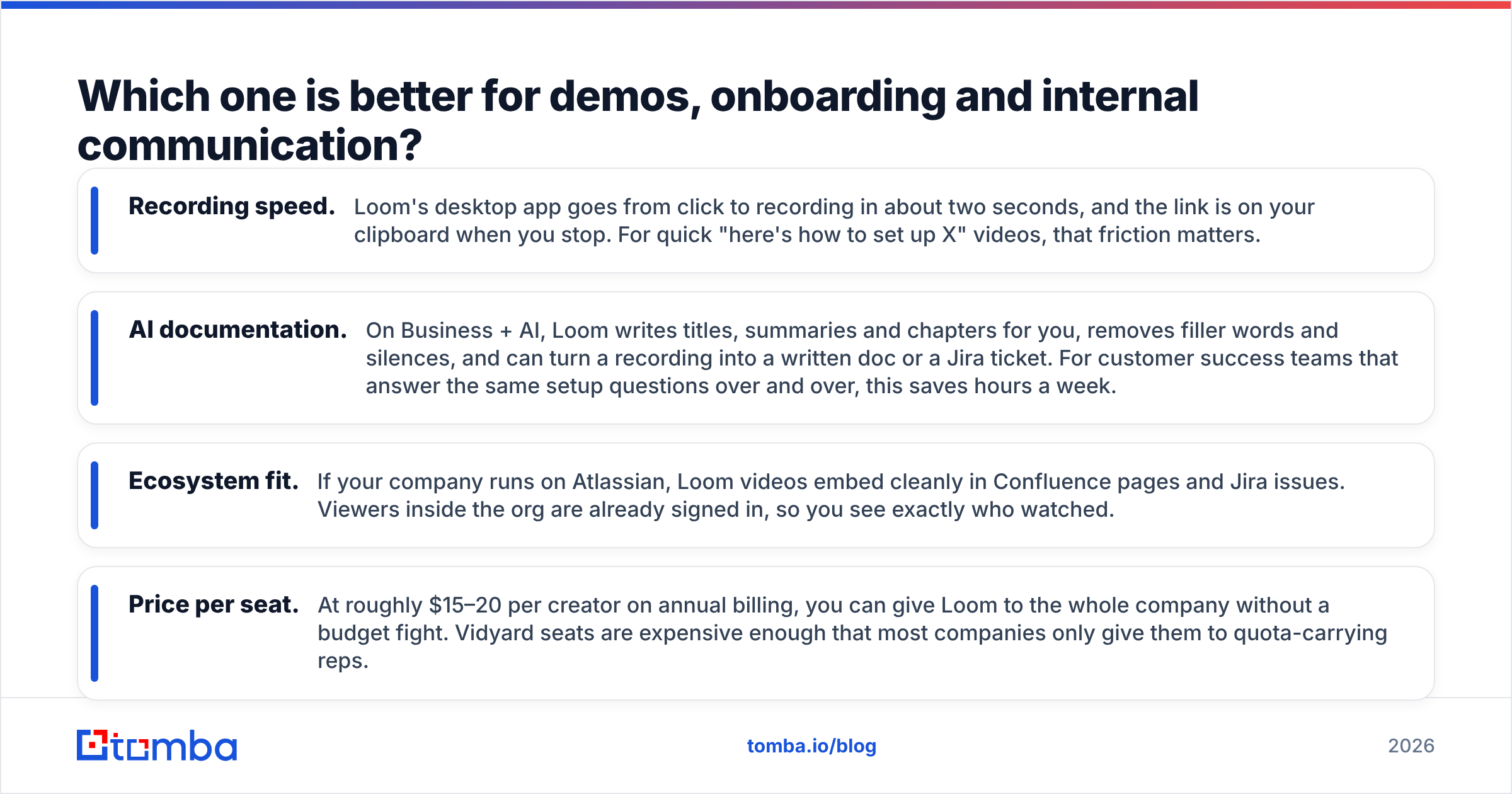
- Recording speed. Loom's desktop app goes from click to recording in about two seconds, and the link is on your clipboard when you stop. For quick "here's how to set up X" videos, that friction matters.
- AI documentation. On Business + AI, Loom writes titles, summaries and chapters for you, removes filler words and silences, and can turn a recording into a written doc or a Jira ticket. For customer success teams that answer the same setup questions over and over, this saves hours a week.
- Ecosystem fit. If your company runs on Atlassian, Loom videos embed cleanly in Confluence pages and Jira issues. Viewers inside the org are already signed in, so you see exactly who watched.
- Price per seat. At roughly $15–20 per creator on annual billing, you can give Loom to the whole company without a budget fight. Vidyard seats are expensive enough that most companies only give them to quota-carrying reps.
Vidyard can host demos and onboarding videos, and its hosting and marketing features are solid. It just isn't built for the "record five quick internal videos a day" habit that Loom users form.
How do pricing and total cost of ownership compare?#
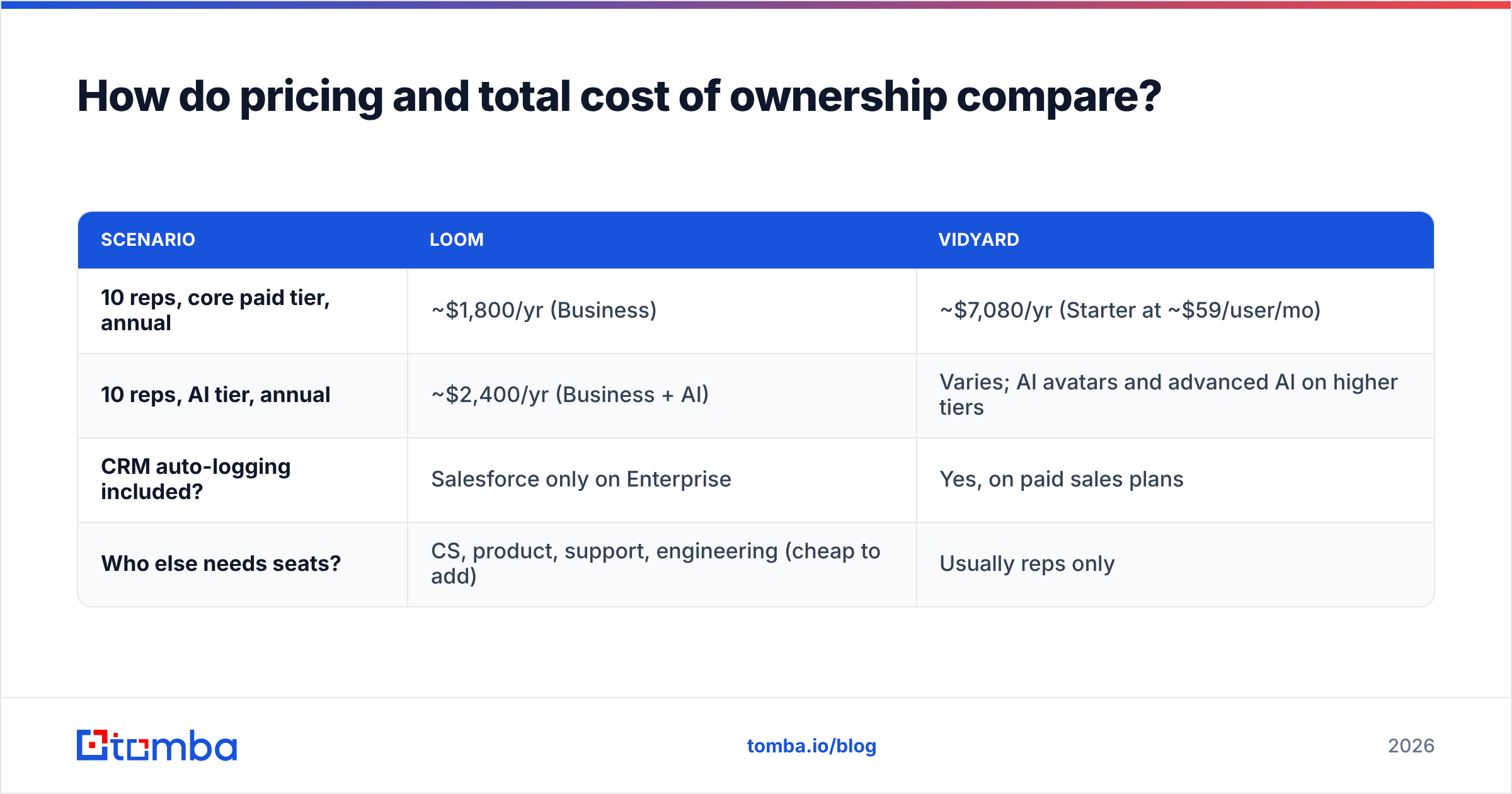
List price is only part of the cost. Here's what a 10-person sales team would realistically pay per year, based on public list prices. Negotiated deals will vary.
| Scenario | Loom | Vidyard |
|---|---|---|
| 10 reps, core paid tier, annual | ~$1,800/yr (Business) | ~$7,080/yr (Starter at ~$59/user/mo) |
| 10 reps, AI tier, annual | ~$2,400/yr (Business + AI) | Varies; AI avatars and advanced AI on higher tiers |
| CRM auto-logging included? | Salesforce only on Enterprise | Yes, on paid sales plans |
| Who else needs seats? | CS, product, support, engineering (cheap to add) | Usually reps only |
Loom is about a quarter of the price for the same headcount. The question is whether Vidyard's analytics change rep behavior enough to justify the difference. If one extra booked meeting per rep per quarter comes from a "they're watching now" alert, most B2B deal sizes cover the gap. If your reps ignore notifications, they don't.
Vendor review sites help here. Check recent G2 reviews for Loom alongside Vidyard's and filter by company size. Enterprise sales teams and 20-person startups report very different experiences with both products.
What about AI features: avatars, summaries and auto-editing?#
Both vendors are betting heavily on AI, but in different directions.
Loom's AI is editing and documentation AI. It cleans up your recording (filler-word and silence removal, edit by transcript), labels it (auto titles, chapters, summaries), and repurposes it (turn a video into a doc, a message or a task). It makes your real video better and more reusable.
Vidyard's AI leans toward generation and prospecting. It includes AI avatar videos that can produce personalized-looking clips without the rep recording each one, AI-written scripts, and AI-assisted prospecting messages. It makes more videos with less rep time.
Think about which problem you actually have. If reps record fine but videos are messy and nobody can find them later, Loom's AI solves that. If reps won't record at all because the volume is too high, Vidyard's generation tools are the more direct answer, as long as you're comfortable with prospects possibly spotting AI-generated video. Some buyers do, and a noticeably synthetic video can hurt trust more than a plain-text email.
Is Vidyard better than Loom for teams using HubSpot or Salesforce?#
Usually yes, especially below the enterprise tier.
Vidyard's CRM integrations are a core product feature. Video views, watch duration and engagement show up on the contact and deal record, and you can trigger workflows from them, like creating a task when a prospect watches more than 75%. That turns video from a nice touch into a measurable pipeline signal your RevOps team can report on.
Loom's Salesforce integration is gated to Enterprise, and HubSpot connections generally run through third-party integrations or manual logging. For a 15-rep team on Loom Business, video engagement often lives outside the CRM, and attribution stays anecdotal.
If CRM hygiene matters to you, also think about the data going in. Video engagement logged against a contact with a stale email or the wrong company doesn't help anyone. Tools like the Tomba HubSpot integration can enrich and verify contacts before they enter a sequence, so the engagement data Vidyard or Loom writes back attaches to accurate records.
Where does video fit in an outbound workflow?#
Video works best as one step in a sequence, not as the whole strategy. A workflow that works for most teams with either tool:
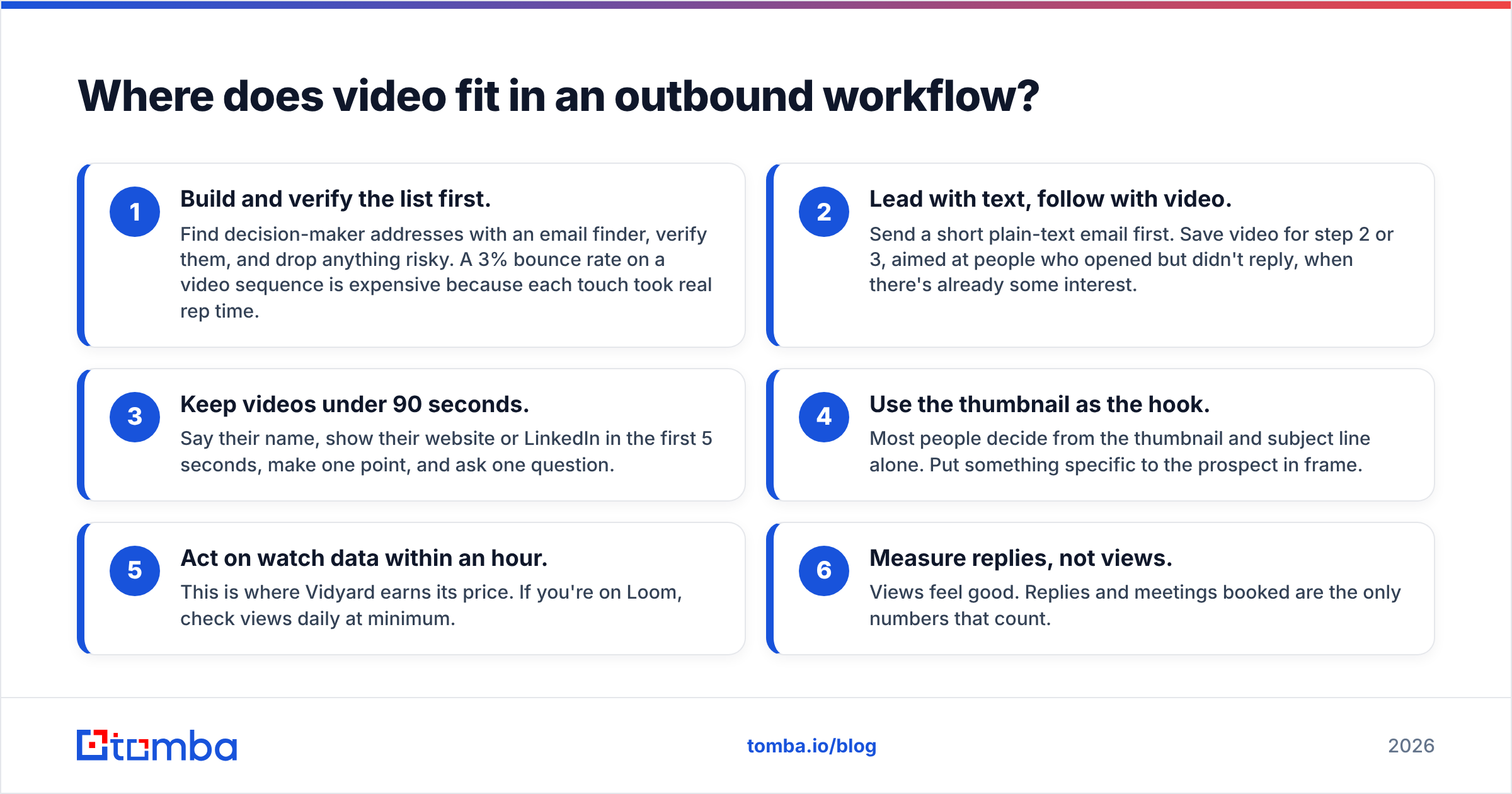
- Build and verify the list first. Find decision-maker addresses with an email finder, verify them, and drop anything risky. A 3% bounce rate on a video sequence is expensive because each touch took real rep time.
- Lead with text, follow with video. Send a short plain-text email first. Save video for step 2 or 3, aimed at people who opened but didn't reply, when there's already some interest.
- Keep videos under 90 seconds. Say their name, show their website or LinkedIn in the first 5 seconds, make one point, and ask one question.
- Use the thumbnail as the hook. Most people decide from the thumbnail and subject line alone. Put something specific to the prospect in frame.
- Act on watch data within an hour. This is where Vidyard earns its price. If you're on Loom, check views daily at minimum.
- Measure replies, not views. Views feel good. Replies and meetings booked are the only numbers that count.

The uncomfortable truth in most "video prospecting didn't work for us" stories is that the video was fine and the list was bad. The addresses were guessed, half the contacts had left the company, or the domain was catch-all and nobody checked. Fix the list and the same videos start getting watched.
Which should you choose: Loom or Vidyard?#
Choose Loom if:
- Your main use cases are demos, onboarding, support and internal async updates
- You want to give video to the whole company, not just sales
- You're on Atlassian tools, or you care most about AI summaries and editing
- Budget is tight and your outbound video volume is modest
Choose Vidyard if:
- Your reps send video in outbound sequences every week
- You need view data logged automatically in HubSpot, Salesforce, Outreach or Salesloft
- You want real-time "prospect is watching" alerts to time follow-up calls
- You're willing to pay several times more per seat for sales-specific analytics
Use both if: you're a mid-size company where CS and product live in Loom and the outbound team needs Vidyard's tracking. This setup is common and works fine. Just give Vidyard seats only to the reps who will use the analytics.
Our pick: for a dedicated outbound team that measures pipeline, Vidyard is the better sales tool. For everyone else, including most early-stage startups where founders do the selling, Loom is enough at a fraction of the cost. You can upgrade later once video is clearly generating meetings.
What's the bottom line?#
Loom and Vidyard are both good products solving slightly different problems. Loom makes recording and sharing fast and cheap. Vidyard turns video into a trackable, CRM-connected sales channel. Pick based on how many videos your reps send and whether anyone will act on the viewer data.
Both tools depend on the same thing: getting the video to a real person's inbox. A video sent to a wrong or invalid address gets zero views, and too many bounces damage the domain your reps depend on. Before your team records its next batch, use Tomba Email Finder to find the right decision-maker's email by name, domain or company, and verify it in the same workflow. It's free to start with 25 searches a month, and paid plans begin at $49/month, so your video tool's cost goes toward people who can actually watch.
Related guides#
// get started
Find, verify and enrich your first contacts today
Start on the free plan with 25 searches a month, then scale when your team is ready.
Free plan · No credit card required · GDPR & CCPA
// about the author