Luru Pricing, Reviews, Pros and Cons: An Honest 2026 Breakdown
Luru started as a Slack-native CRM helper and now also sells an AI SDR with monthly fees in the hundreds. Here is what each version costs, what reviewers praise, where it falls short, and who should buy it.
TL;DR
- Luru is really two products. One is a Slack-native CRM companion for Salesforce and HubSpot, with a free tier and per-seat paid plans that third-party reviewers put at about $15–$25/user/month. The other is a newer AI SDR product with reported flat monthly tiers from about $500 to $1,500.
- Reviews are strongly positive. On G2, the AI SDR listing averages about 4.8/5, but that comes from a few dozen reviews, not thousands. Reviewers mostly praise ease of setup, support and CRM integrations.
- The main drawbacks are unclear public pricing, a small review sample, and an AI SDR price that is hard to justify for teams sending fewer than a few thousand emails a month.
- Luru only works as well as the contact data you give it. If your emails bounce, no amount of Slack automation or AI sequencing will fix your pipeline.
- Verdict: the Slack companion is good value for Salesforce or HubSpot teams that hate updating the CRM. The AI SDR is worth testing only if you already have clean, verified lead lists and enough volume to use your contact allowance.
What is Luru, and why are there two price lists?#
If you search for Luru pricing and find numbers that don't match, the reason is simple. Luru has two products.
The original product is a CRM companion that works inside Slack. Reps update Salesforce or HubSpot deals, log notes, get deal-hygiene alerts ("this opportunity has no next step," "close date is in the past") and review pipeline without opening the CRM. It's meant for the rep who treats the CRM as a chore. Instead of fighting that habit, Luru brings the CRM into the tool the rep already uses all day.
The newer product is sold as Luru AI SDR. It's an AI agent that researches prospects, writes personalised outreach and runs sequences at a contracted monthly contact volume. That puts it in the same category as other AI SDR tools, so it's priced per agent rather than per seat.
The two products are priced for different buyers:
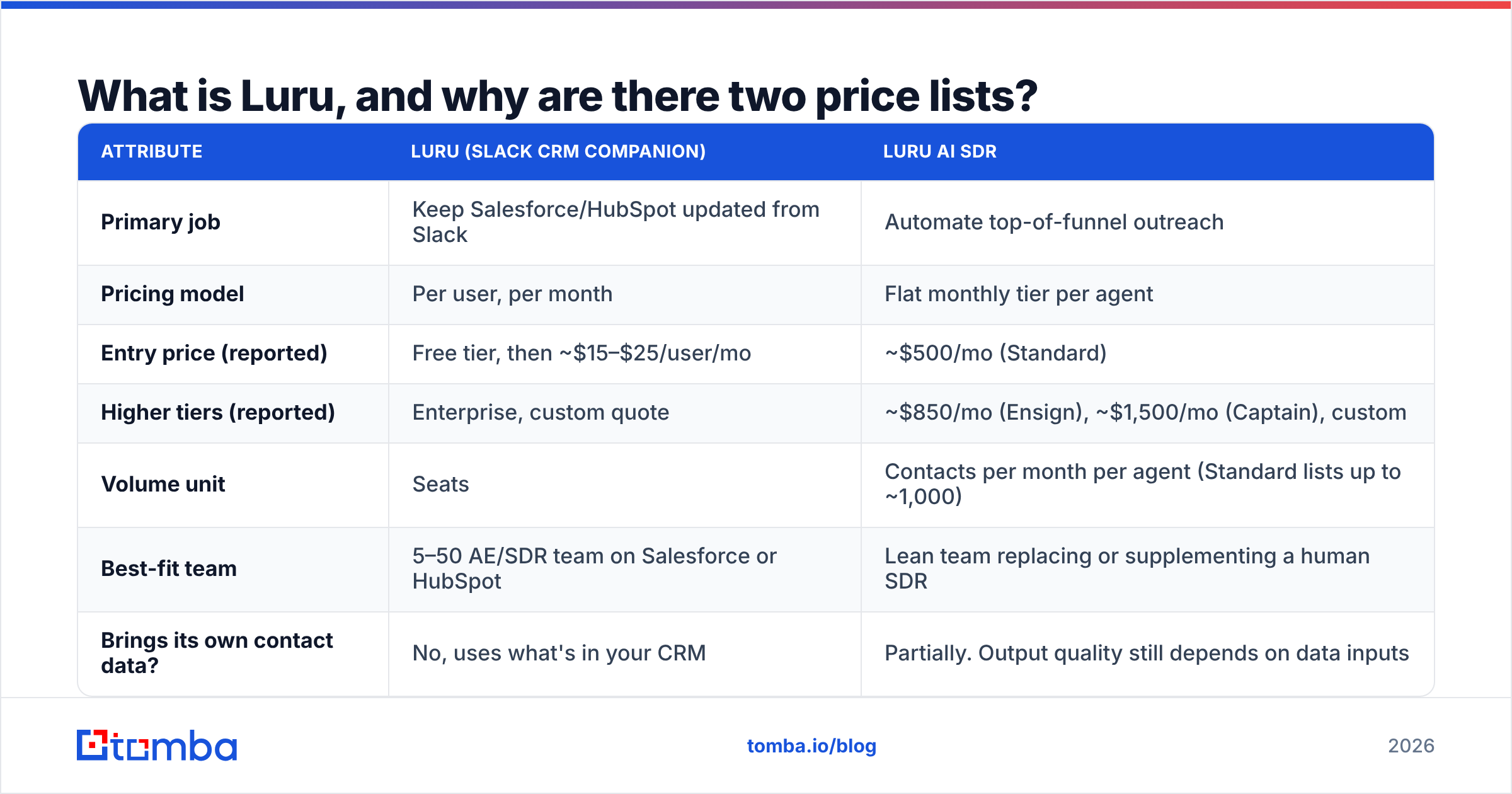
| Attribute | Luru (Slack CRM companion) | Luru AI SDR |
|---|---|---|
| Primary job | Keep Salesforce/HubSpot updated from Slack | Automate top-of-funnel outreach |
| Pricing model | Per user, per month | Flat monthly tier per agent |
| Entry price (reported) | Free tier, then ~$15–$25/user/mo | ~$500/mo (Standard) |
| Higher tiers (reported) | Enterprise, custom quote | ~$850/mo (Ensign), ~$1,500/mo (Captain), custom |
| Volume unit | Seats | Contacts per month per agent (Standard lists up to ~1,000) |
| Best-fit team | 5–50 AE/SDR team on Salesforce or HubSpot | Lean team replacing or supplementing a human SDR |
| Brings its own contact data? | No, uses what's in your CRM | Partially. Output quality still depends on data inputs |
These figures come from third-party listings such as Software Advice, SyncGTM and SourceForge, and from past public pricing pages. Luru doesn't consistently publish a full rate card, so check the current numbers on the official Luru site or on a sales call before you budget.
How much does Luru actually cost in 2026?#
Here are realistic totals, since list prices per seat or per tier rarely match the final bill.
Luru Slack CRM companion: real cost#
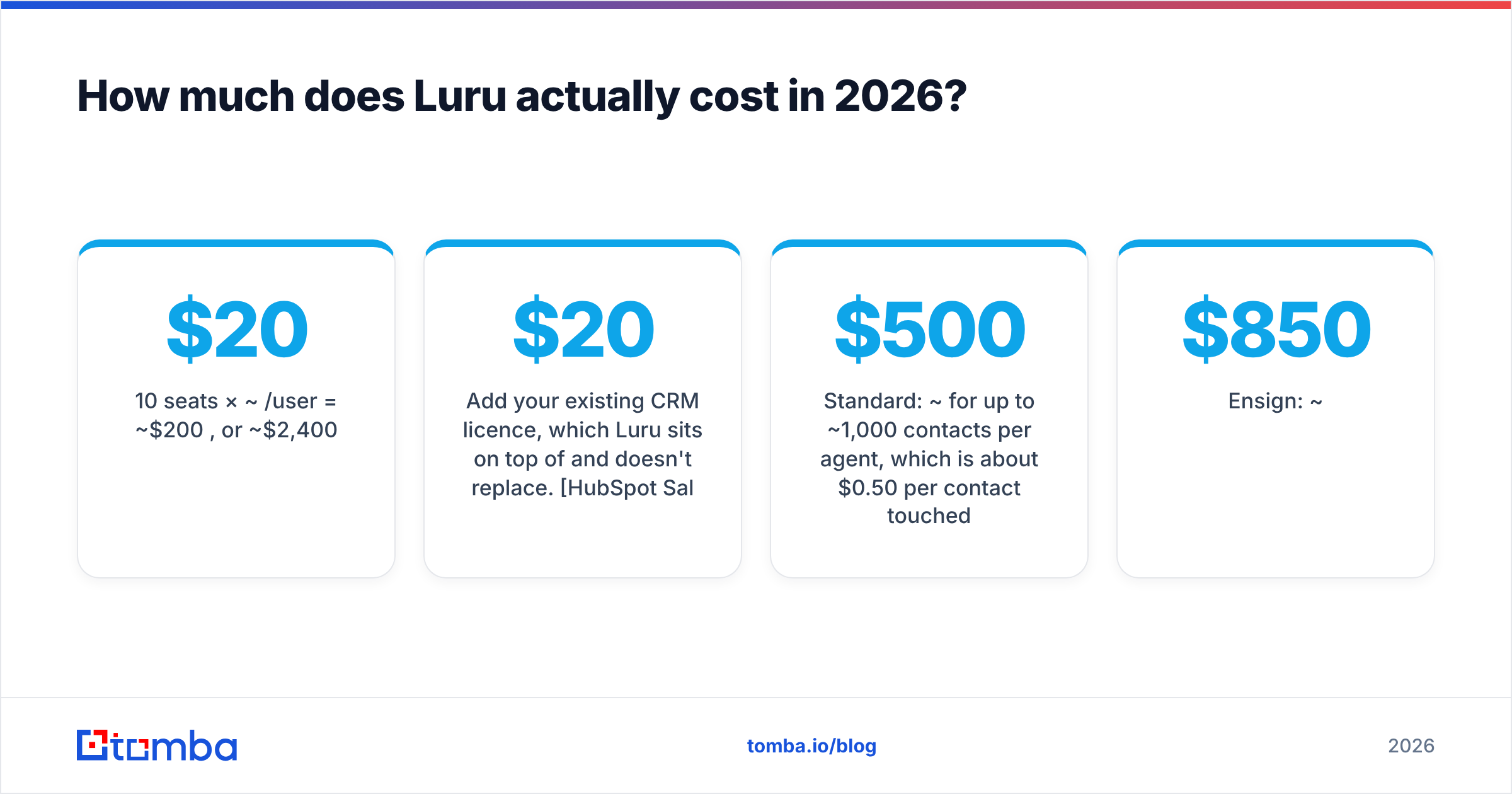
Assume a 10-rep team on the paid Team tier at the midpoint of the reported range:
- 10 seats ×
$20/user/month = **$200/month**, or ~$2,400/year - Add your existing CRM licence, which Luru sits on top of and doesn't replace. HubSpot Sales Hub Starter begins around $20/seat/month. Salesforce ranges much higher depending on edition.
The free tier works for trying Slack-based updates and basic alerts. Teams that want advanced pipeline alerts and workflow automation, which are the features that actually save managers time, will likely need a paid seat.
Luru AI SDR: real cost#
The AI SDR math is different:
- Standard: ~$500/month for up to ~1,000 contacts per month per agent, which is about $0.50 per contact touched
- Ensign: ~$850/month
- Captain: ~$1,500/month
The contact cap matters. If you only have 400 good-fit prospects a month, you pay the same $500, so your real cost is $1.25 per contact. The flat fee only pays off when your list volume fills the tier.
Compare that with a human SDR, whose fully loaded cost in most US markets is well above $5,000/month. On that comparison the AI SDR looks cheap. Against a $49/month email finder plus a $40–$100/month sequencing tool run by one founder, it looks expensive.
What do Luru reviews actually say?#
Luru's review profile is strong but small. The Luru AI SDR page on G2 shows about a 4.8/5 average across a few dozen reviews. On G2's side-by-side comparison pages, Luru scores high on:
- Ease of setup (~9.8/10)
- Ease of use (~9.7/10)
- Integrations / APIs (~9.6/10)
- Quality of support (~9.5/10)
Its weakest relative sub-score is sales forecasting (~9.0). That fits a product built to capture activity in Slack, not to run forecast calls.
Reviews of the Slack companion come up with the same themes again and again:
- "Reps actually update the CRM now." This is the most common praise. Logging a deal update from a Slack thread takes seconds, so hygiene improves without managers chasing people.
- "Setup took an afternoon." Connecting Slack and Salesforce/HubSpot is mostly authentication and field mapping.
- "Support is hands-on." Small vendors tend to respond faster, and reviewers notice.
- "We wanted deeper reporting." Heavier users want forecasting and analytics that match dedicated revenue-intelligence platforms.
- "Pricing wasn't obvious upfront." Several buyers only got clear numbers after a demo.
How much weight should you give these reviews?#
About 30 reviews is a useful signal but not a statistically robust one. Early reviews on any small vendor tend to come from enthusiastic early adopters. Read the 3- and 4-star reviews for your specific CRM, whether Salesforce or HubSpot, before you treat 4.8 as settled. Capterra and Software Advice listings are worth cross-checking too.
What are Luru's pros and cons?#
Here is the full list, split by product.
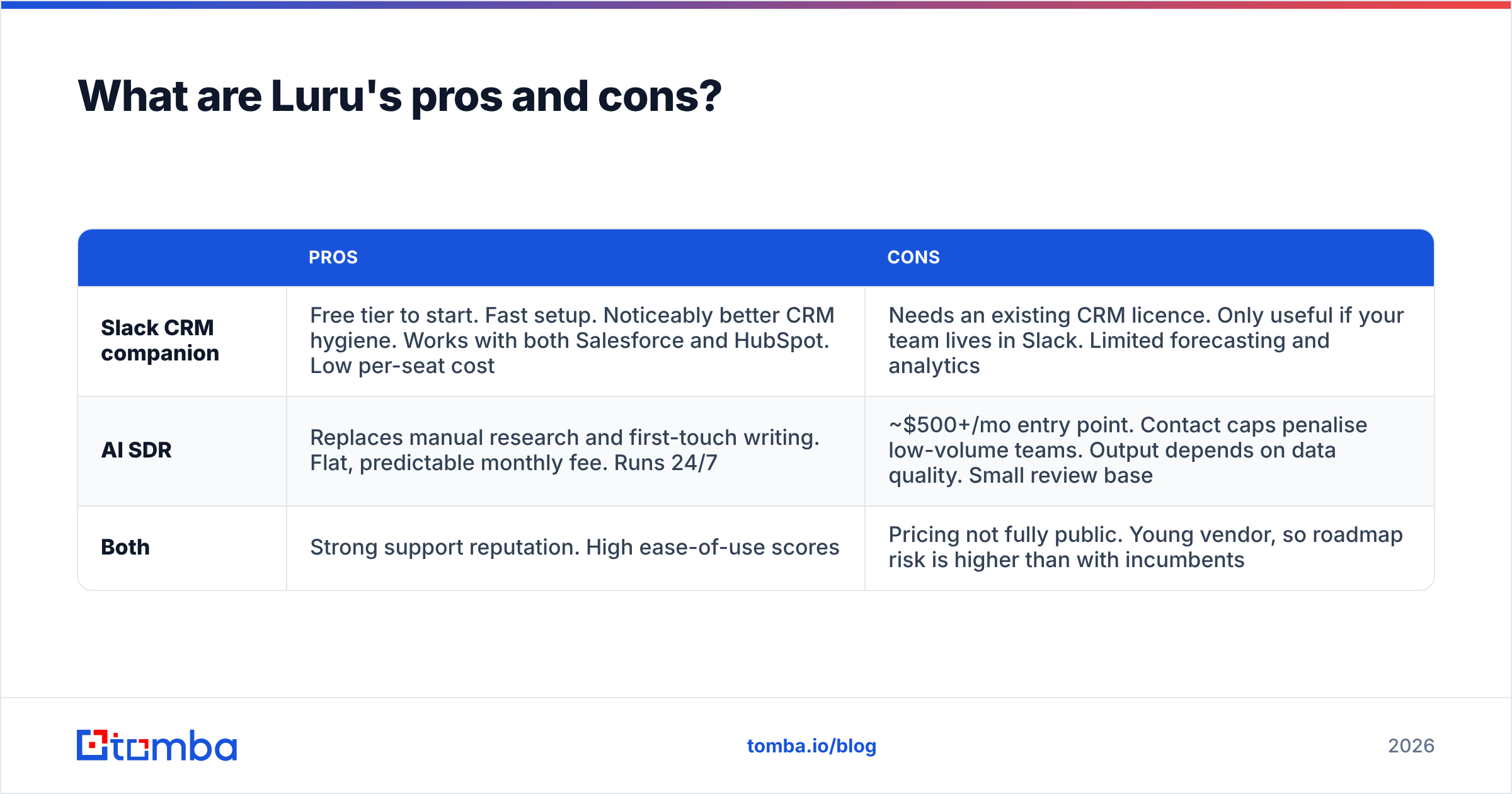
| Pros | Cons | |
|---|---|---|
| Slack CRM companion | Free tier to start. Fast setup. Noticeably better CRM hygiene. Works with both Salesforce and HubSpot. Low per-seat cost | Needs an existing CRM licence. Only useful if your team lives in Slack. Limited forecasting and analytics |
| AI SDR | Replaces manual research and first-touch writing. Flat, predictable monthly fee. Runs 24/7 | ~$500+/mo entry point. Contact caps penalise low-volume teams. Output depends on data quality. Small review base |
| Both | Strong support reputation. High ease-of-use scores | Pricing not fully public. Young vendor, so roadmap risk is higher than with incumbents |
Pro: it solves a real behavioural problem#
Most CRM projects fail because reps don't log activity, not because the CRM is missing features. Luru works around that habit instead of fighting it. For a sales manager who spends Monday mornings asking "is this deal still real?", that's worth more than another dashboard. For a refresher on why this matters, see this CRM primer.
Pro: the free tier gives you a real trial#
You can test whether reps actually use Slack-based updates before you pay for seats. Many sales tools in this category only offer a 14-day trial.
Con: you're adding a layer, not replacing one#
Luru sits on top of Salesforce or HubSpot. Your total cost is CRM plus Luru, and every new field or workflow change has to be mapped in both.
Con: AI SDR economics depend on list volume#
A flat $500–$1,500/month is efficient only if you feed the agent enough qualified contacts every month. If your total addressable market (TAM) is narrow, say 2,000 target accounts in one vertical, you can use up your best prospects within a quarter.
Con: garbage in, garbage out#
This is the biggest issue, and it applies to every AI SDR, not just Luru. The agent can write a well-personalised opener, but if it goes to an invalid or catch-all address, you've paid for a bounce. Bounces hurt your sender reputation, and future campaigns suffer.
Is Luru worth it for your team?#
Match your situation to the right answer.
- You run a 5–50 rep team on Salesforce or HubSpot, and Slack is where work happens. Luru's CRM companion is an easy yes to trial. Start on the free tier and upgrade only the reps who use it.
- You're a founder or tiny team doing outbound yourself. The AI SDR tier is probably too expensive right now. A contact-data tool plus a lightweight sequencer will cost a fraction as much and teach you what messaging works.
- You're a scaling team with 1,000+ verified prospects a month and no SDR headcount budget. Luru AI SDR is worth a structured pilot. Measure cost per booked meeting, not cost per contact.
- Your CRM data is already messy. Fix the data first. Luru will surface the mess faster in Slack alerts, but it won't clean the underlying records.
- You need forecasting and conversation intelligence. Luru isn't built for that. Look at dedicated revenue-intelligence tools, and expect to pay much more.
How does Luru compare to cheaper alternatives?#
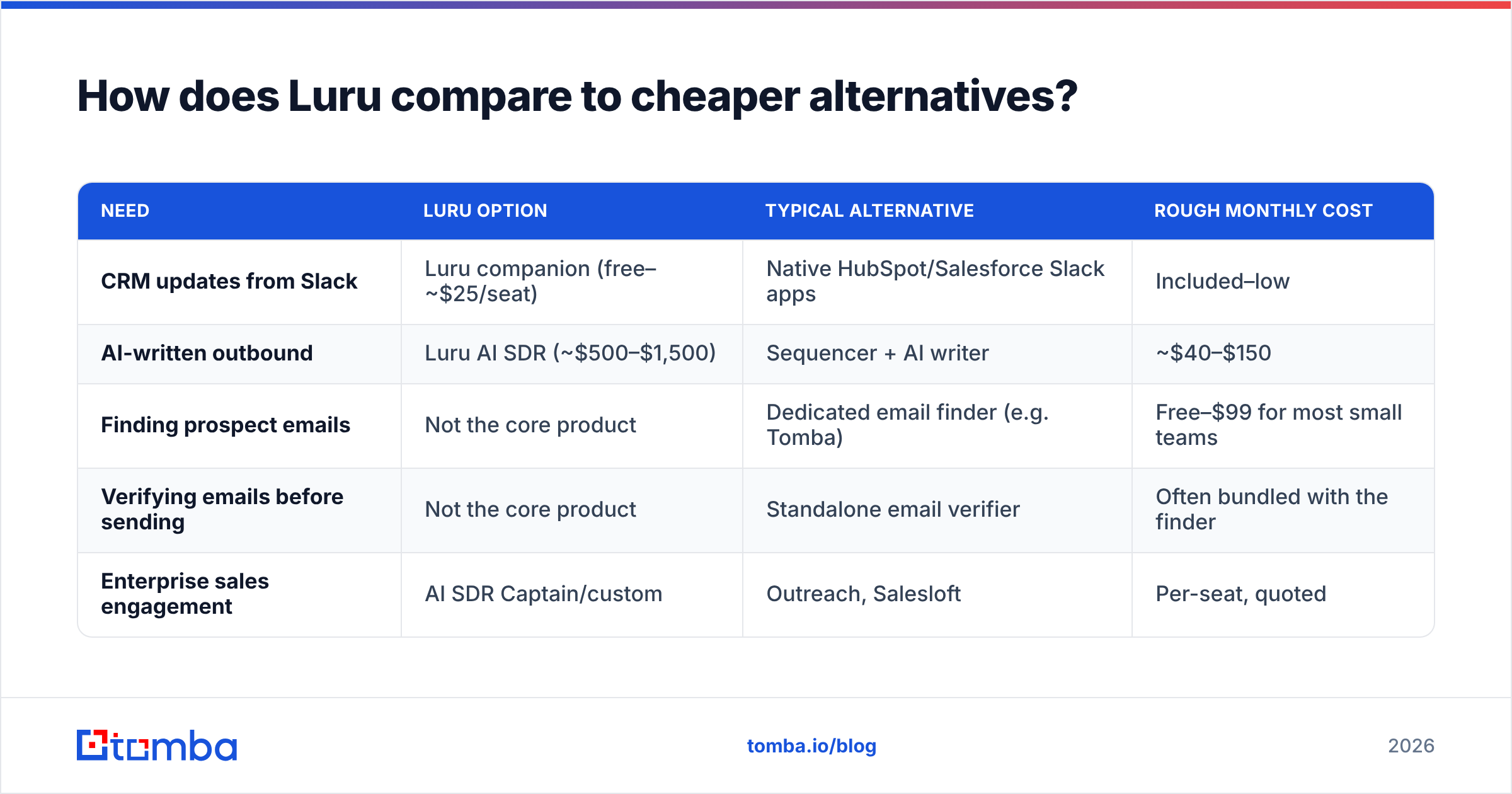
Buyers who search for "Luru pricing" are often comparing two different budgets: automation spend and data spend. They cover different stages of the funnel.
| Need | Luru option | Typical alternative | Rough monthly cost |
|---|---|---|---|
| CRM updates from Slack | Luru companion (free–~$25/seat) | Native HubSpot/Salesforce Slack apps | Included–low |
| AI-written outbound | Luru AI SDR (~$500–$1,500) | Sequencer + AI writer | ~$40–$150 |
| Finding prospect emails | Not the core product | Dedicated email finder (e.g. Tomba) | Free–$99 for most small teams |
| Verifying emails before sending | Not the core product | Standalone email verifier | Often bundled with the finder |
| Enterprise sales engagement | AI SDR Captain/custom | Outreach, Salesloft | Per-seat, quoted |
If you're weighing heavier engagement platforms, compare them side by side. This Outreach alternative breakdown covers the trade-offs of seat-based engagement suites against leaner stacks.
What matters for budgeting: Luru doesn't replace a contact-data layer. Whichever tier you pick, you still need a reliable way to find and verify the people you're contacting. That layer is also the cheapest part of the stack.
What should you do before signing a Luru contract?#
Before you commit, run this checklist:
- Ask for the current rate card in writing. Confirm per-seat versus per-agent pricing, contact caps, overage fees and whether annual billing is required for the quoted price.
- Pilot with your real CRM. Connect a sandbox or one team's pipeline, and track how many deal updates happen through Slack in the first two weeks.
- For the AI SDR, calculate cost per meeting. (Monthly fee) ÷ (meetings booked). If the result is higher than what a human SDR costs per meeting, the pilot has failed.
- Clean your list before the agent sees it. Run every contact through an email verifier first. A 5% bounce rate on 1,000 contacts is 50 hits to your domain reputation every month.
- Check the exit clause. With a young vendor, month-to-month terms or a short initial commitment reduce your risk.
Final verdict: who should pay for Luru?#
Luru has earned its strong reviews. The Slack CRM companion fixes a real problem cheaply, and the free tier lets you check that before you pay anything. The AI SDR is a legitimate bet for teams with volume and clean data. For anyone else, it's a $500+/month experiment that works only as well as the lead lists you give it.
Here's the practical takeaway. If you're comparing Luru pricing plans, set aside part of the budget for data quality first. An AI agent writing to the wrong inbox costs you more than the licence.
Get the data layer right before you automate. Tomba Email Finder finds professional email addresses by name, domain or company and checks them before they reach your CRM or your AI SDR. Start free with 25 searches a month, then scale on plans from $49/month. See the full Tomba pricing and put verified contacts behind whichever sales-automation tool you pick.
Related guides#
// get started
Find, verify and enrich your first contacts today
Start on the free plan with 25 searches a month, then scale when your team is ready.
Free plan · No credit card required · GDPR & CCPA
// about the author