Lusha Pricing 2026: Plans, Credit Math, and Real Cost per Contact
Lusha's sticker price looks low, but phone reveals cost 10x an email and annual credits expire. Here's what each Lusha plan actually costs per contact in 2026, and when a cheaper, email-first tool is the better buy.

TL;DR
- Lusha has four tiers: Free, Pro, Premium and custom Scale. Paid plans start at roughly $30–$52/month on annual billing, depending on which Lusha page you read. Premium lands near $300/month for a 5-seat bundle.
- The listed price hides the real cost. An email reveal costs 1 credit and a phone reveal costs about 10, so one "full contact" can use 11 credits.
- On Pro, a credit works out to about $0.09. That puts a verified email near $0.09 and a direct dial near $0.87.
- On annual plans, unused credits expire at the end of the year. Monthly plans roll credits over, capped at twice the monthly allowance.
- Lusha is worth the money if you need mobile numbers inside a LinkedIn and CRM workflow. If you mostly need emails, an email-first tool like Tomba usually costs less per contact.
What does Lusha cost in 2026?#
Lusha sells a credit-based subscription. You pick a tier, it comes with a yearly or monthly pool of credits, and each contact detail you reveal uses some of them. There are four tiers:
- Free: a small monthly credit allowance, which third-party reviewers put at roughly 40–70 reveals. You get the Chrome extension and basic prospecting.
- Pro: the entry paid tier for individual reps and small teams. It adds CRM integrations, bulk features and basic API access.
- Premium: a multi-seat bundle, typically 5 seats, with a much larger credit pool and advanced API access.
- Scale: custom pricing for larger teams. It adds admin controls and discounted per-credit rates.
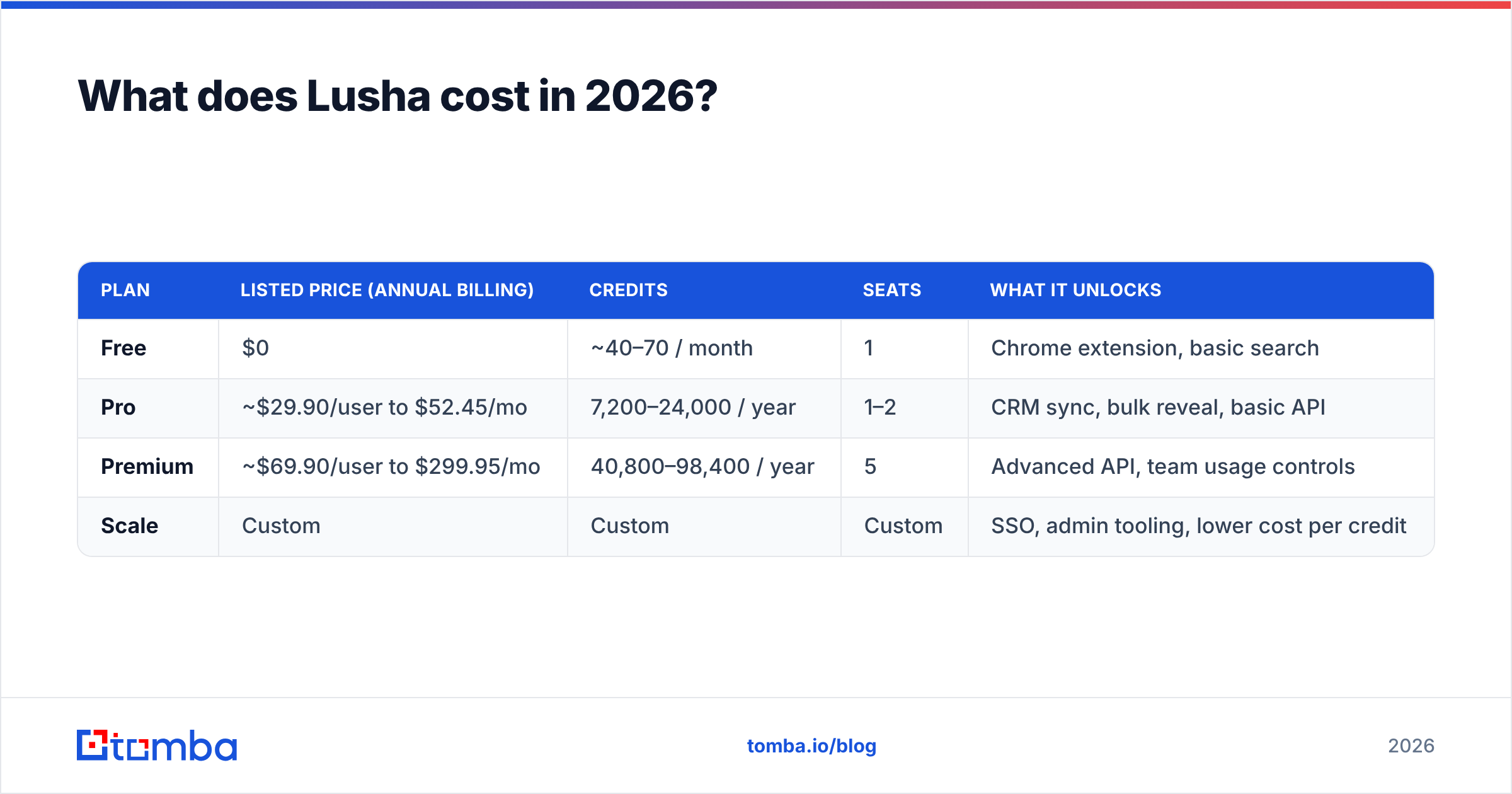
One warning before the numbers. Lusha's public pricing isn't consistent. The G2 vendor listing has shown Pro from about $29.90/user/month and Premium from about $69.90/user/month. The in-app pricing page has shown Pro at $52.45/month and Premium at $299.95/month, both on annual billing. Price the specific seat and credit mix you need on the official Lusha pricing page before you commit.
| Plan | Listed price (annual billing) | Credits | Seats | What it unlocks |
|---|---|---|---|---|
| Free | $0 | ~40–70 / month | 1 | Chrome extension, basic search |
| Pro | ~$29.90/user to $52.45/mo | 7,200–24,000 / year | 1–2 | CRM sync, bulk reveal, basic API |
| Premium | ~$69.90/user to $299.95/mo | 40,800–98,400 / year | 5 | Advanced API, team usage controls |
| Scale | Custom | Custom | Custom | SSO, admin tooling, lower cost per credit |
How do Lusha credits actually work?#
A Lusha credit is like a prepaid arcade token. The token price is fixed, but each game costs a different number of tokens. Emails are the cheap game and phone numbers are the expensive one.
According to Lusha's billing FAQ and recent third-party breakdowns, the credit rules work like this:
- Email reveal: 1 credit. This is the cheapest action on the platform.
- Phone or mobile reveal: about 10 credits. Older plans charged 5, and some older reviews still quote 5. Current plans have moved to 10.
- Both on one contact: up to 11 credits. A "complete" record is where your budget goes.
- Re-reveals are free. You aren't charged again for a contact you already unlocked.
- Monthly billing rolls credits over, capped at 2x your monthly allowance.
- Annual billing front-loads the credits, and anything left at the end of the year disappears.
The annual-expiry rule matters more than most buyers expect. Annual billing gets you the lower headline price, so most teams choose it. Then a slow quarter or a hiring freeze leaves thousands of prepaid credits unused, and they're gone at renewal. That's money you've already spent.
What is the real cost per contact on Lusha?#
This is the number to use when you compare vendors. The math below uses the in-app pricing figures, because those include the seat bundles most teams actually buy.
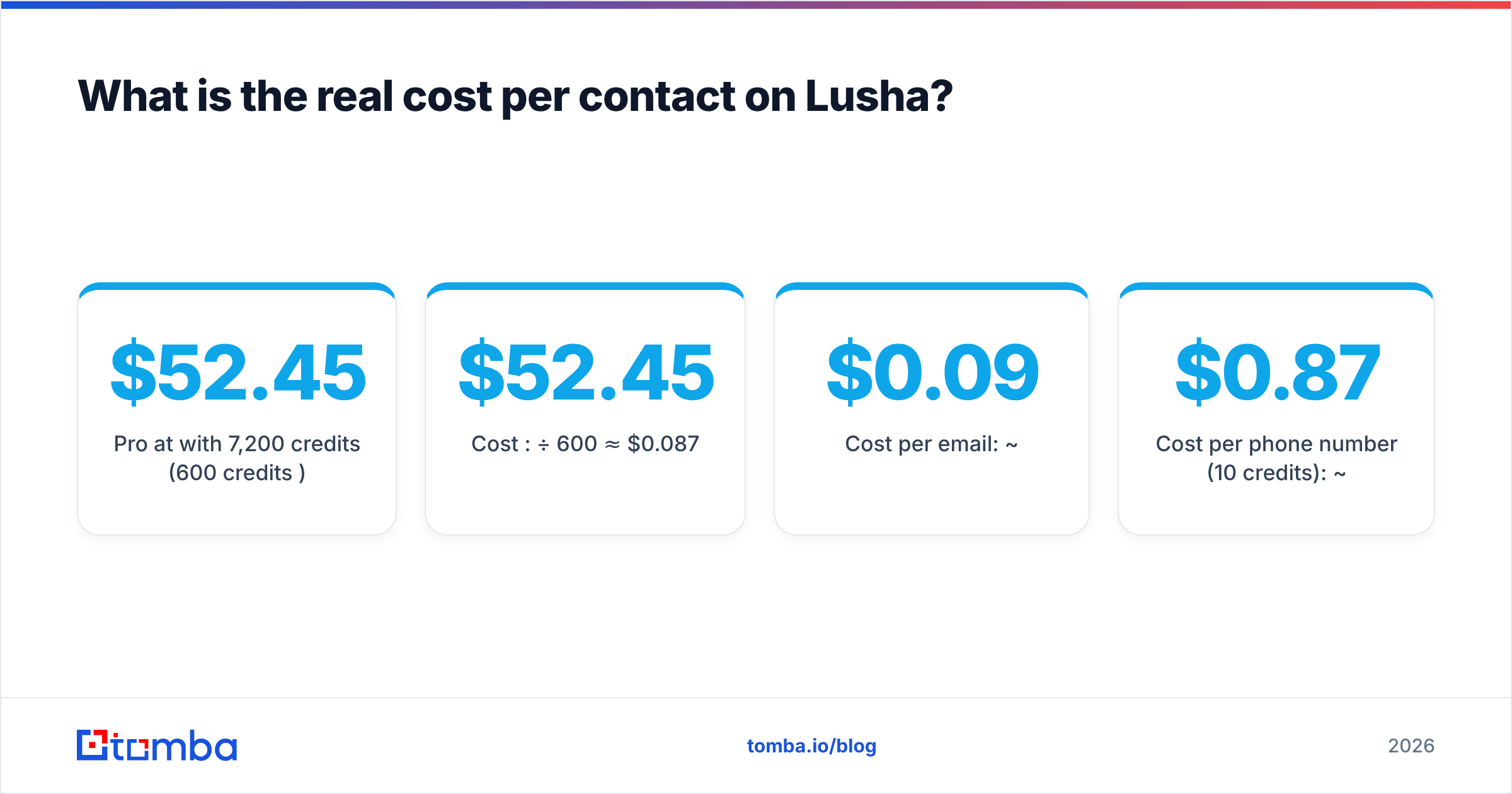
Pro at $52.45/month with 7,200 credits/year (600 credits/month):
- Cost per credit: $52.45 ÷ 600 ≈ $0.087
- Cost per email: ~$0.09
- Cost per phone number (10 credits): ~$0.87
- Cost per full contact (email + phone, 11 credits): ~$0.96
Premium at $299.95/month with 40,800 credits/year (3,400 credits/month):
- Cost per credit: $299.95 ÷ 3,400 ≈ $0.088
- Cost per email: ~$0.09
- Cost per phone number: ~$0.88
Moving from Pro to Premium doesn't lower the cost per credit. You're paying for seats, the larger pool and advanced API access, not a volume discount. Lusha's clearest per-credit discounts only appear at the Scale tier, where reviewers report 50%+ off, and that tier requires a sales conversation.
Plan-level math also ignores match rate, which often hurts more than the listed price. Lusha only charges when it has data to reveal, so a miss doesn't cost a credit. You still need to reach a set number of contacts, though. If Lusha has phone numbers for 50% of your target list, each usable direct dial effectively takes two searches' worth of effort, and you need a second source for the other half.
Is Lusha worth the price?#
It depends on what share of your outreach is phone versus email.
Lusha is worth it when:
- Your reps cold-call. Lusha built its reputation on mobile numbers, especially for North American and European contacts. If your motion is dial-heavy, $0.87 for a mobile number that connects is a reasonable price.
- You work mostly inside LinkedIn and the CRM. The Chrome extension and Salesforce/HubSpot sync are smooth, and the time reps save counts as part of the return.
- You need a compliance story. Lusha publishes GDPR and CCPA positioning and certifications that legal teams like to see.
Lusha is harder to justify when:
- You mostly send cold email. At $0.09 per email you're paying for a phone-data platform you don't use. Email-first tools price that workload more efficiently.
- Your usage is uneven. Annual credit expiry penalises teams that prospect in bursts.
- You have many light users. Per-seat pricing grows linearly. Ten SDRs who each reveal 50 contacts a month still pay for ten seats.
- You work outside Lusha's strongest regions. Coverage and phone accuracy drop in some APAC, LATAM and MENA markets, and fewer matches make each usable credit more expensive.
What hidden costs should you budget for?#
The subscription is only part of the total cost. Before you sign, budget for these:
- Phone-credit burn. Teams sign up expecting "7,200 contacts" and run out in weeks because every phone reveal uses 10 credits. Model your phone-to-email ratio first.
- Credit top-ups. If you run out mid-cycle, you can buy extra credits at list price or upgrade early. Neither is cheap.
- Seat creep. Adding one rep to Premium can push you into a new seat bundle, not just a single extra license.
- Verification overhead. Even good providers return some bounces. If your domain reputation matters, and it always does for cold email, run lists through a separate email verifier before sending. That's a small extra cost that protects the bigger one.
- API gating. Advanced API features sit in higher tiers. If RevOps wants to enrich leads automatically at the form-fill stage, you may be pushed from Pro to Premium for that reason alone.
How does Lusha pricing compare to alternatives?#
Every tool below sells access to B2B contact data, but they structure pricing differently. Some charge per seat, some per credit, some per record. The right choice depends on whether you need phones, emails or full enrichment.
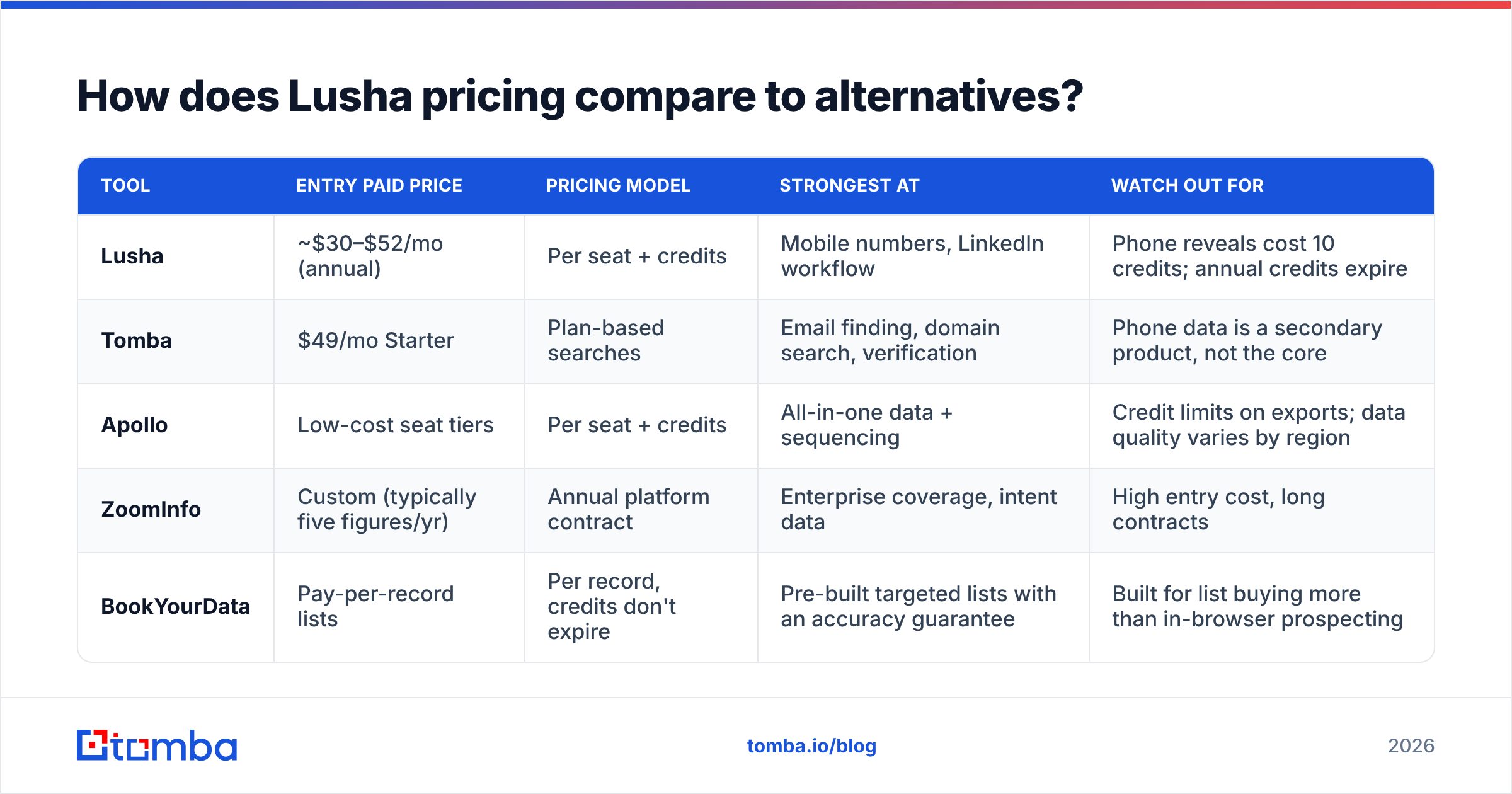
| Tool | Entry paid price | Pricing model | Strongest at | Watch out for |
|---|---|---|---|---|
| Lusha | ~$30–$52/mo (annual) | Per seat + credits | Mobile numbers, LinkedIn workflow | Phone reveals cost 10 credits; annual credits expire |
| Tomba | $49/mo Starter | Plan-based searches | Email finding, domain search, verification | Phone data is a secondary product, not the core |
| Apollo | Low-cost seat tiers | Per seat + credits | All-in-one data + sequencing | Credit limits on exports; data quality varies by region |
| ZoomInfo | Custom (typically five figures/yr) | Annual platform contract | Enterprise coverage, intent data | High entry cost, long contracts |
| BookYourData | Pay-per-record lists | Per record, credits don't expire | Pre-built targeted lists with an accuracy guarantee | Built for list buying more than in-browser prospecting |
A few notes on this table:
- Tomba has a Free tier (25 searches/month) and paid plans at $49 (Starter), $99 (Growth) and $249 (Pro), with custom Enterprise pricing. It's built around email: finding addresses by name and domain, pulling every address on a domain, and verifying them, including catch-all domains. If you want exact allowances by tier, see the Tomba pricing page. For the occasional phone number, the phone finder covers it without making phones the main pricing unit.
- Apollo makes sense if you also want a sequencer in the same tool. If you're weighing that trade-off, our Apollo alternative breakdown goes further.
- BookYourData suits teams that would rather buy a filtered list once than pay for monthly seats. Credits that don't expire fix the annual-reset problem entirely, which is a real advantage for teams that prospect in bursts.
- ZoomInfo belongs in a separate budget bracket. It only makes sense when you need intent signals, org charts and enterprise-wide coverage at scale.
Should you pay monthly or annually for Lusha?#
Pay monthly for the first quarter, even though it costs more. You'll learn three things you can't guess at signup:
- Your real phone-to-email reveal ratio. It sets how fast credits drain.
- Your match rate for your specific ICP. Lusha's coverage for US SaaS and for German manufacturing are very different.
- How many reps actually use it weekly. Most teams overbuy seats.
Once you have those numbers, switch to annual only if your monthly usage is steady and close to the plan's cap. Otherwise the annual discount gets cancelled out by credits that expire.
How can you cut your Lusha bill without losing coverage?#
If you already use Lusha, or you've decided it's the right fit for calling, these tactics reduce spend:
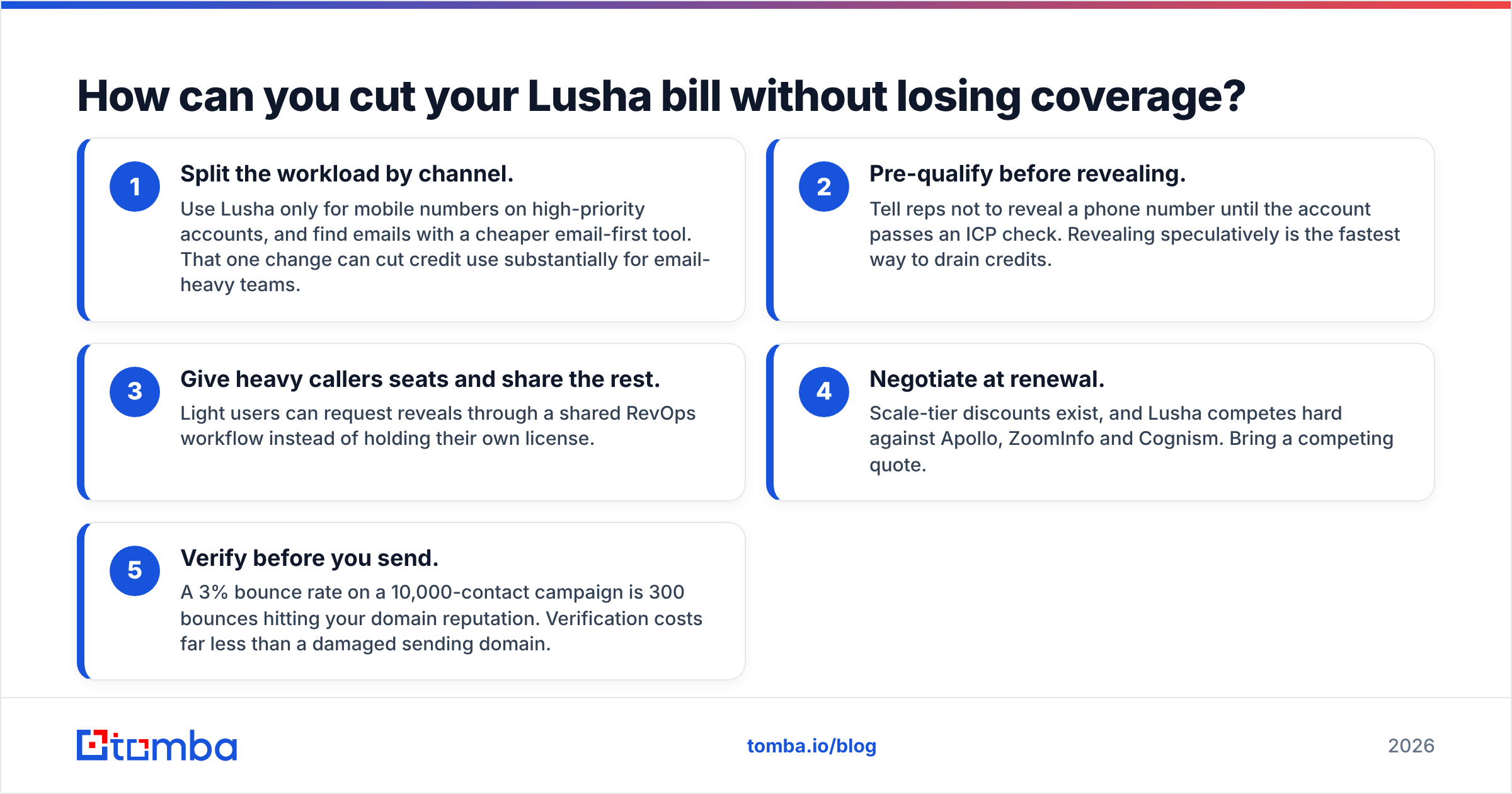
- Split the workload by channel. Use Lusha only for mobile numbers on high-priority accounts, and find emails with a cheaper email-first tool. That one change can cut credit use substantially for email-heavy teams.
- Pre-qualify before revealing. Tell reps not to reveal a phone number until the account passes an ICP check. Revealing speculatively is the fastest way to drain credits.
- Give heavy callers seats and share the rest. Light users can request reveals through a shared RevOps workflow instead of holding their own license.
- Negotiate at renewal. Scale-tier discounts exist, and Lusha competes hard against Apollo, ZoomInfo and Cognism. Bring a competing quote.
- Verify before you send. A 3% bounce rate on a 10,000-contact campaign is 300 bounces hitting your domain reputation. Verification costs far less than a damaged sending domain.
Which Lusha plan should you choose?#
- Solo founder or single SDR testing outbound: Start on Free, then Pro billed monthly. Don't commit to annual until you've tracked two months of usage.
- 2–5 person SDR team, phone-heavy: Premium makes sense for the 5-seat bundle and API access. Model phone credit use first.
- 2–5 person team, email-heavy: Lusha is probably more than you need. An email finder plus a verifier will cover the same pipeline for less.
- 20+ seats or multiple regions: Go straight to a Scale conversation and compare it against ZoomInfo and Cognism quotes. At that size, the listed prices don't reflect what you'll actually pay.
The bottom line on Lusha pricing#
Lusha is a solid product with honest mechanics. You're only charged for data it can reveal, re-reveals are free, and the Chrome extension works well. The problem is the pricing model. Per-seat licensing, 10-credit phone reveals and expiring annual credits all make it more expensive than the headline price suggests, unless calling is central to how you sell. Work out your cost per usable contact, not per plan. That number will tell you whether Lusha fits or whether you're paying phone-data prices for email work.
If most of your pipeline starts with an email address, try Tomba Email Finder. Search by name, company or domain, verify the result in the same workflow, and start on the free tier with 25 searches a month before moving to the $49 Starter plan. Run the same 25 target accounts through Tomba and your Lusha trial, then compare cost per verified email.
Related guides#
// get started
Find, verify and enrich your first contacts today
Start on the free plan with 25 searches a month, then scale when your team is ready.
Free plan · No credit card required · GDPR & CCPA
// about the author