Lusha vs NinjaPear (2026): Contact Data vs Company Intel API
Lusha sells reps phone numbers and emails through a Chrome extension. NinjaPear sells developers company, customer, and competitor data through an API. Here's how to tell which one your team actually needs.
TL;DR
- Lusha is a prospecting tool built for sales reps. You get a Chrome extension, a contact database, direct dials, and CRM enrichment. Plans run from a free tier (40 credits/mo) up to Premium at a $399.90/mo list price, and annual promos often drop that.
- NinjaPear is an API-first B2B intelligence platform from the team behind Proxycurl. Its strength is company data, customer lists, competitor maps, and monitoring feeds, with work email lookup as one endpoint among many. Plans cost $49, $299, $899, and $1,899 per month.
- Pick Lusha if your SDRs need phone numbers and emails inside LinkedIn and Salesforce today.
- Pick NinjaPear if your engineers are building account research, competitive intel, or enrichment pipelines and need company-level signals.
- If what you really need is verified work emails at a sane price, a dedicated email finder will usually beat both on cost per verified address.
What is Lusha?#
Lusha is a B2B contact data platform founded in 2016. It became popular with SDRs and account executives because of its browser extension. You open a LinkedIn profile or a company website, click the Lusha icon, and reveal a work email or a direct phone number. The data comes from a community-contributed model plus partner sources, and Lusha leans hard on compliance messaging (GDPR, CCPA, ISO 27001).
Over the past few years Lusha has grown beyond the extension into a fuller prospecting suite:
- A searchable contact and company database with filters for seniority, department, headcount, and technology
- Intent signals and job-change alerts
- CRM enrichment for HubSpot and Salesforce
- Basic sequencing and list building
- An API for programmatic enrichment
According to Lusha's pricing page, it runs a credit model. Revealing an email costs 1 credit and a phone number costs 5. That pricing tells you where the value sits: Lusha charges a premium for mobile and direct-dial numbers, because those are hard to get anywhere else.
What is NinjaPear?#
NinjaPear is built by Nubela, the company that ran Proxycurl, the developer-favourite LinkedIn data API that shut down in July 2025. The founder has written publicly about what Proxycurl became. The short version is that NinjaPear does not scrape LinkedIn. It works from different primitives: companies, employees from public sources, customers, competitors, and update/monitoring feeds.
In practice that means NinjaPear is good at questions Lusha was never built to answer:
- "Who are this company's customers?"
- "Who does this company compete with?"
- "What has this account announced, raised, or launched recently?"
- "What is the work email for this person at this domain?"
It's a developer product first. You get an API reference, SDKs (there's a public JavaScript library on GitHub), and credit-based billing per endpoint call. There's no rep-facing LinkedIn sidebar in the Lusha mould.
How are Lusha and NinjaPear fundamentally different?#
Here's a comparison: Lusha is a well-stocked convenience store for sales reps. You walk in, grab the phone number you need, and leave. NinjaPear is a wholesale supplier for builders. You get raw materials (company graphs, customer relationships, monitoring feeds) and assemble your own product or workflow.
That difference shows up in five places:
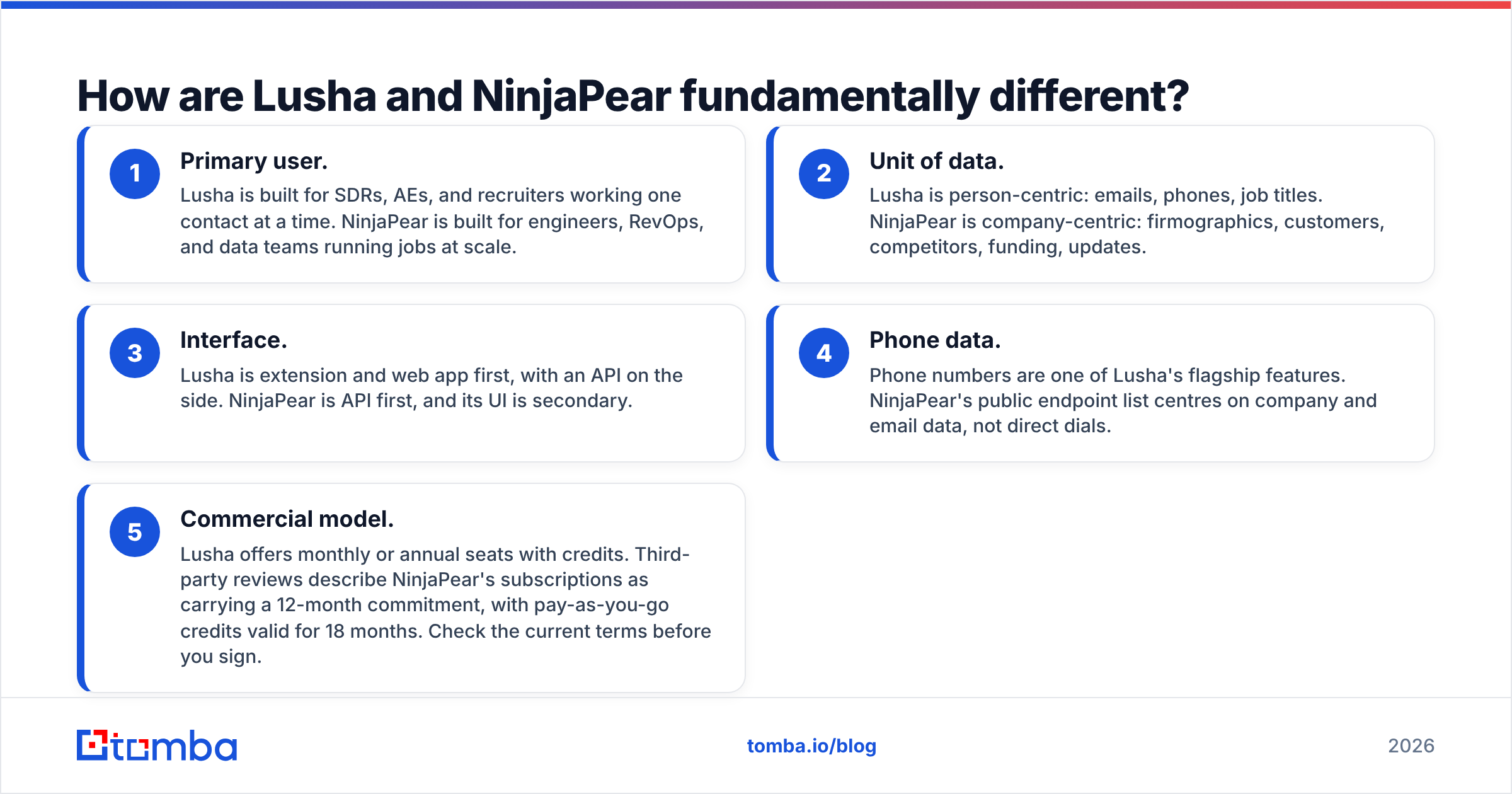
- Primary user. Lusha is built for SDRs, AEs, and recruiters working one contact at a time. NinjaPear is built for engineers, RevOps, and data teams running jobs at scale.
- Unit of data. Lusha is person-centric: emails, phones, job titles. NinjaPear is company-centric: firmographics, customers, competitors, funding, updates.
- Interface. Lusha is extension and web app first, with an API on the side. NinjaPear is API first, and its UI is secondary.
- Phone data. Phone numbers are one of Lusha's flagship features. NinjaPear's public endpoint list centres on company and email data, not direct dials.
- Commercial model. Lusha offers monthly or annual seats with credits. Third-party reviews describe NinjaPear's subscriptions as carrying a 12-month commitment, with pay-as-you-go credits valid for 18 months. Check the current terms before you sign.
How does Lusha vs NinjaPear compare feature by feature?#
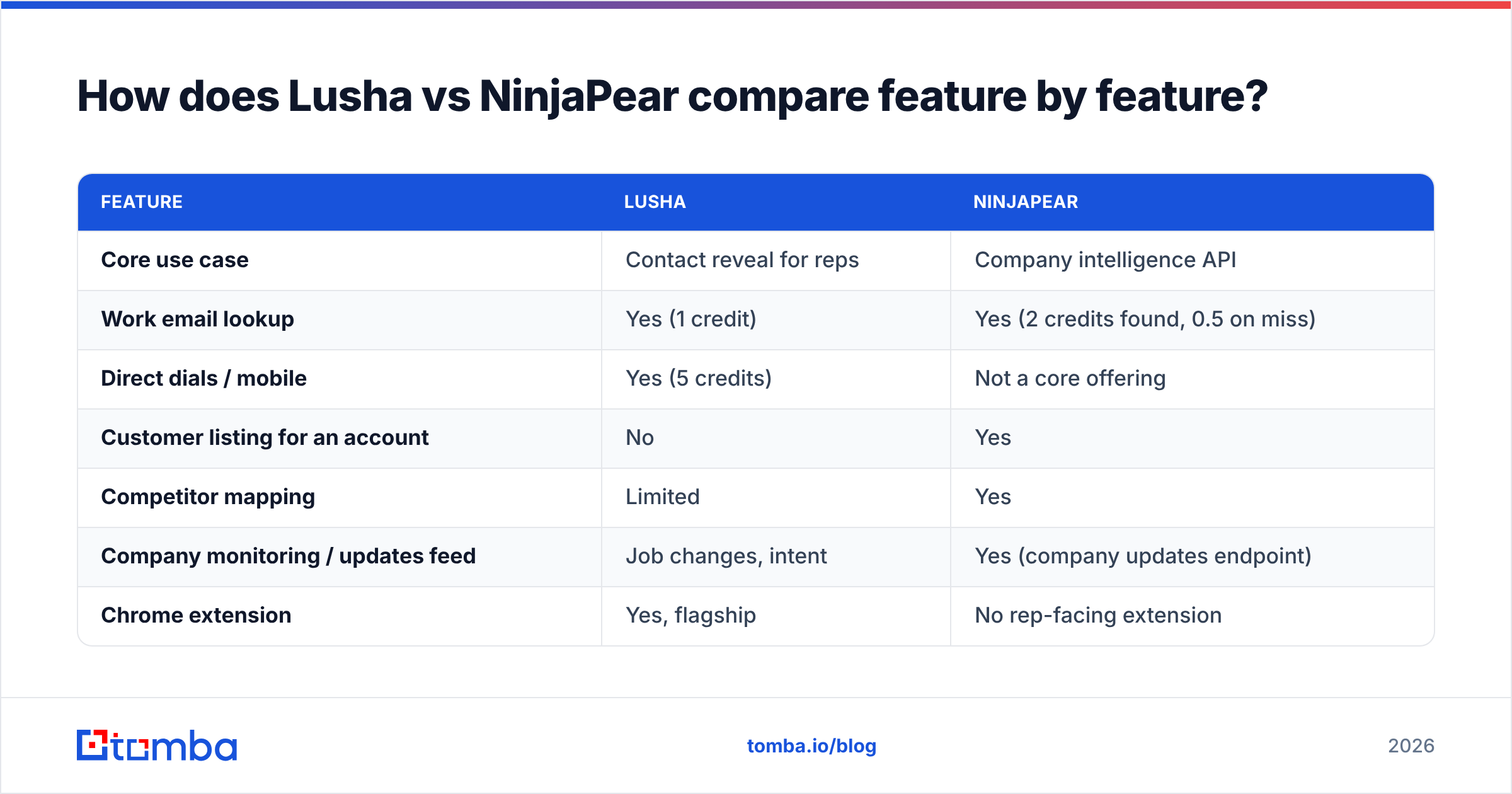
| Feature | Lusha | NinjaPear |
|---|---|---|
| Core use case | Contact reveal for reps | Company intelligence API |
| Work email lookup | Yes (1 credit) | Yes (2 credits found, 0.5 on miss) |
| Direct dials / mobile | Yes (5 credits) | Not a core offering |
| Customer listing for an account | No | Yes |
| Competitor mapping | Limited | Yes |
| Company monitoring / updates feed | Job changes, intent | Yes (company updates endpoint) |
| Chrome extension | Yes, flagship | No rep-facing extension |
| CRM enrichment | Native HubSpot, Salesforce | Via API / your own pipeline |
| Free tier | 40 credits/mo | 3-day trial, 10 credits |
| Entry paid price | $49.90/mo list (Starter) | $49/mo |
| Top public tier | $399.90/mo list (Premium) | $1,899/mo |
| Best buyer | Sales team lead | Engineering / RevOps / data team |
Two notes on this table. First, the credit math isn't apples to apples. A NinjaPear credit and a Lusha credit buy different things, and NinjaPear's company details call costs 3 credits (up to 6 with extra flags). Second, Lusha's prices shift with promotions. During 2026, annual-billing promos showed Starter at $37.45/mo and Pro at $45.45/mo against list prices of $49.90 and $69.90.

Which has better data coverage?#
The honest answer is that it depends on what you count as "coverage".
Lusha's coverage is about people. Its database skews toward North America and Western Europe, and it's strongest for mid-market and enterprise contacts at companies whose employees are active on LinkedIn. Reviewers on G2 consistently praise phone number availability and complain about accuracy drift on smaller companies and non-English markets. That pattern is typical of any contributory dataset.
NinjaPear's coverage is about companies and relationships. If you want to know that Company A is a customer of Company B, or which ten vendors compete for the same buyer, that data simply isn't in Lusha. NinjaPear builds it from public web sources such as case studies, logo walls, press releases, and company sites, so it's strongest for companies with a visible web footprint.
For work email accuracy specifically, neither tool publishes an independent benchmark, so treat any vendor-stated accuracy number with caution. Whatever you pick, run every address through an email verifier before it touches a sequence. Bounce rates above 2–3% will hurt your sender reputation regardless of which vendor supplied the address.
How does pricing really compare?#
Sticker prices make these two look similar at the entry level ($49 vs $49.90). They diverge fast once you scale.
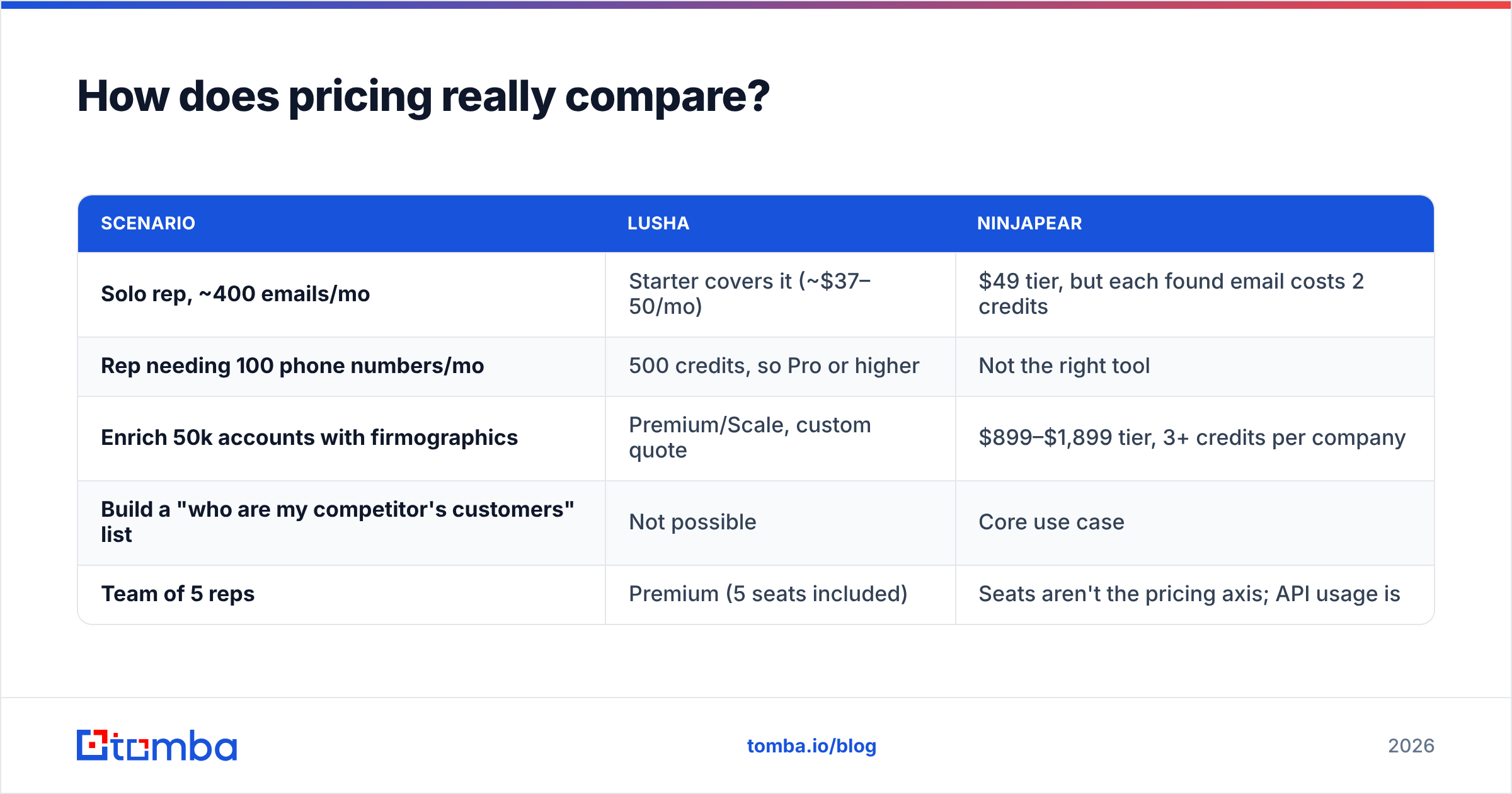
| Scenario | Lusha | NinjaPear |
|---|---|---|
| Solo rep, ~400 emails/mo | Starter covers it (~$37–50/mo) | $49 tier, but each found email costs 2 credits |
| Rep needing 100 phone numbers/mo | 500 credits, so Pro or higher | Not the right tool |
| Enrich 50k accounts with firmographics | Premium/Scale, custom quote | $899–$1,899 tier, 3+ credits per company |
| Build a "who are my competitor's customers" list | Not possible | Core use case |
| Team of 5 reps | Premium (5 seats included) | Seats aren't the pricing axis; API usage is |
The practical takeaway: Lusha costs scale with seats and phone reveals. NinjaPear costs scale with API calls. If your plan is to enrich a whole CRM, model your call volume against NinjaPear's pricing page carefully, because the commitment term matters more than the monthly figure.
Which one is easier to roll out?#
Lusha wins on time-to-value for sales teams. Install the extension, connect Salesforce or HubSpot, and reps start revealing contacts the same afternoon. No engineering ticket needed.
NinjaPear wins on flexibility for technical teams. You can wire the customer listing endpoint into an account-scoring model, push competitor data into a Slack alert, or run a nightly monitoring job on your top 500 accounts. None of that is possible in Lusha without heavy workarounds. But you need someone who writes code, and you have to build the UI and the workflow yourself.
This is the most common mismatch we see. A sales leader buys an API product expecting reps to use it, or an engineering team buys a seat-based tool and then fights its export limits. Match the tool to who will actually touch it every day.
What are the pros and cons of each?#
Lusha pros
- Fast, rep-friendly Chrome extension
- Strong direct-dial and mobile coverage in NA/EU
- Native CRM enrichment and job-change alerts
- Free tier good enough for testing
Lusha cons
- Phone reveals burn credits fast (5 each)
- Annual plans don't roll over unused credits
- Accuracy dips for SMBs and non-English markets
- Limited company relationship data
NinjaPear pros
- Unique customer and competitor listing data
- Clean developer experience, SDKs, clear per-endpoint pricing
- Doesn't depend on LinkedIn scraping, which lowers platform risk after the Proxycurl shutdown
- Credits on miss are discounted for email lookup (0.5 vs 2)
NinjaPear cons
- No rep-facing extension
- Phone data isn't a focus
- Upper tiers get expensive quickly
- 12-month commitment reported on subscriptions
- Narrower endpoint set than Proxycurl offered; some legacy endpoints have no direct replacement
Who should choose Lusha vs NinjaPear?#
Choose Lusha if:
- Your team prospects one contact at a time, mostly from LinkedIn
- Phone outreach is a big part of your motion
- You want enrichment inside your CRM without engineering help
- You need to show value in week one
Choose NinjaPear if:
- You're building account intelligence into your own product or data warehouse
- "Who buys from my competitor?" is a question worth money to you
- You have an engineer or RevOps person who will own the integration
- You're migrating off Proxycurl and want the same team's successor product
Consider neither if your main need is simply finding and verifying professional email addresses. In that case you're paying for phone credits (Lusha) or company intelligence endpoints (NinjaPear) that you won't use.

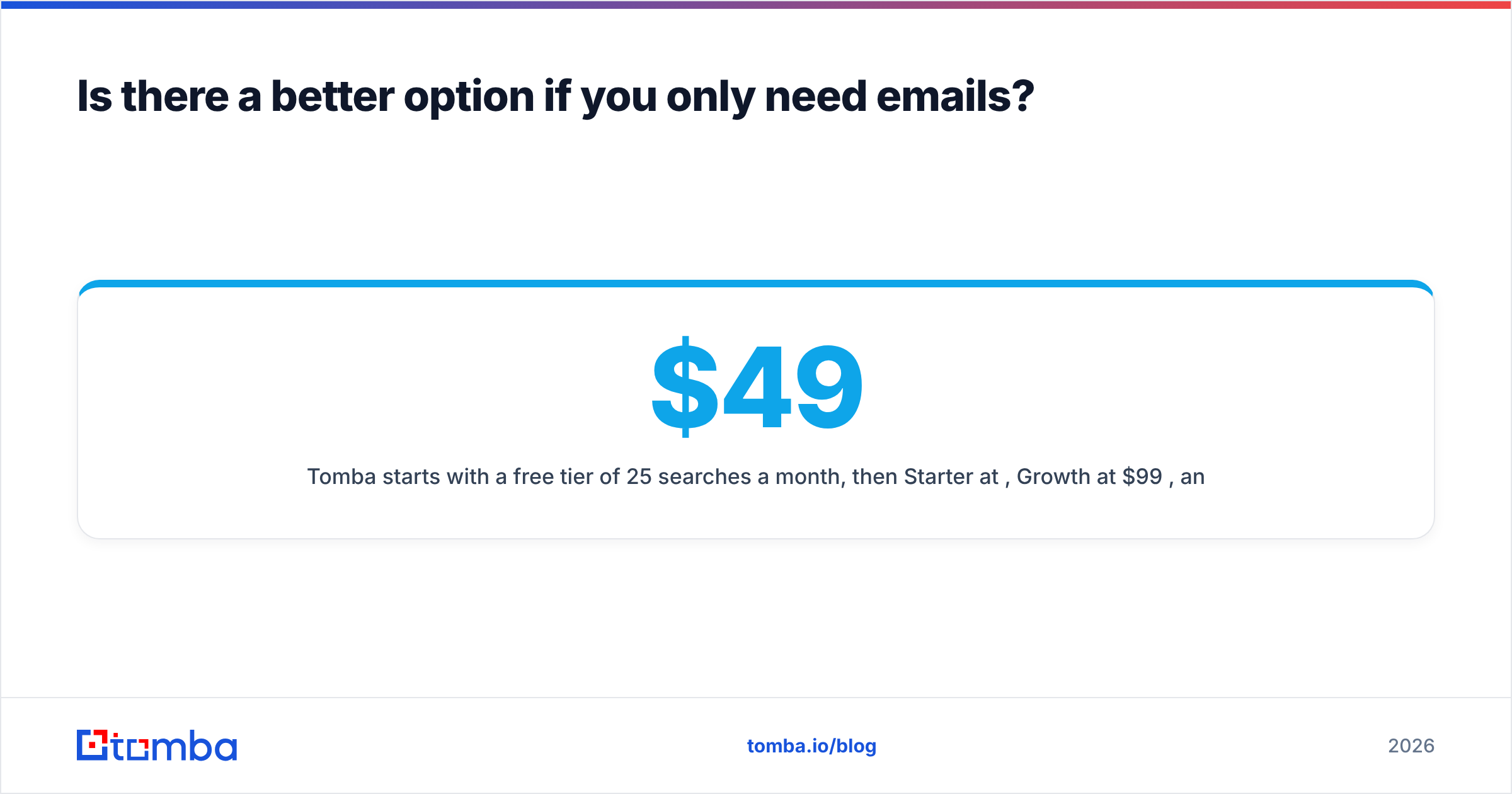
Is there a better option if you only need emails?#
For many outbound teams, the job is narrower than either vendor's pitch. You have a list of target companies, you need the right person's work email, and you need it verified so your domain doesn't get burned.
That's a job for a dedicated email finder. Tomba finds professional addresses by name plus domain, by company, or across a whole domain. It verifies them, handles catch-all domains, and plugs into your stack through a Tomba API, a Chrome extension, Google Sheets, and native CRM integrations. You can pair it with NinjaPear (NinjaPear tells you which accounts matter, Tomba finds who to email there) or use it as a cheaper alternative to Lusha's email reveals when you don't need direct dials.
| Need | Best fit |
|---|---|
| Direct dials for cold calling | Lusha |
| Customer and competitor mapping via API | NinjaPear |
| Verified work emails at volume | Dedicated email finder (e.g. Tomba) |
| CRM enrichment without engineering | Lusha or Tomba integrations |
Tomba starts with a free tier of 25 searches a month, then Starter at $49/mo, Growth at $99/mo, and Pro at $249/mo. See Tomba pricing for credit details.
What's the final verdict on Lusha vs NinjaPear?#
These tools barely compete. Lusha is the better buy for sales teams who need contact data, especially phone numbers, inside the tools they already use. NinjaPear is the better buy for technical teams who need company-level intelligence (customers, competitors, monitoring) delivered through an API. If you try to use either one for the other's job, you'll overpay and under-deliver.
Before you sign either contract, write down the three questions your team asks every day. If they're "what's this person's number?", go Lusha. If they're "which accounts should we target, and why now?", go NinjaPear. If they're "what's this person's email, and will it bounce?", you probably need neither.
If verified emails are the bottleneck in your outbound, start with Tomba Email Finder. Search by name and domain, verify in the same step, and push clean contacts straight to your CRM or sequencer. The free plan gives you 25 searches a month to test it against your own target list before you spend anything.
Related guides#
// get started
Find, verify and enrich your first contacts today
Start on the free plan with 25 searches a month, then scale when your team is ready.
Free plan · No credit card required · GDPR & CCPA
// about the author