Lusha vs No2bounce: Contact Data vs Email Verification in 2026
Lusha finds contacts. No2bounce cleans the lists you already have. Here's what each tool does, what it costs, and when to buy one, both, or neither.
TL;DR
- Lusha and No2bounce solve different problems, so they rarely compete head to head. Lusha is a B2B contact database with a LinkedIn extension. No2bounce is an email verification service that cleans lists you already have.
- Pick Lusha if you need new contacts, especially direct dials and mobile numbers for decision-makers.
- Pick No2bounce if you already have contacts and want to cut bounces cheaply with pay-as-you-go credits that don't expire.
- Lots of teams run both: they source in Lusha, then verify in No2bounce before sending cold email. That means two vendors, two billing cycles, and one more CSV handoff.
- If you want finding and verifying in one place, a combined finder-plus-verifier like Tomba removes that handoff.
What is the real difference between Lusha and No2bounce?#
Comparing Lusha with No2bounce is a bit like comparing a fishing boat with a fish scale. One gets you the catch. The other tells you whether the catch is any good.
Lusha is a contact data provider. You install its Chrome extension, open a LinkedIn profile or a company website, and Lusha shows that person's work email, direct dial, or mobile number from its database. It also has a web prospecting app with filters (industry, headcount, seniority, location, intent signals) and pushes contacts into Salesforce, HubSpot, and other CRMs.
No2bounce is an email verification service. You upload a list or call its API, and it sorts each address into valid, invalid, catch-all, or risky. It runs syntax checks, domain and MX lookups, SMTP handshakes, and catch-all detection so you don't send to addresses that will bounce and drag down your sender reputation. It also has a small email finder module, but verification is the core product.
So the useful question isn't which one is better. It's which part of your workflow is actually broken: finding contacts or keeping lists clean.
How do Lusha and No2bounce compare feature by feature?#
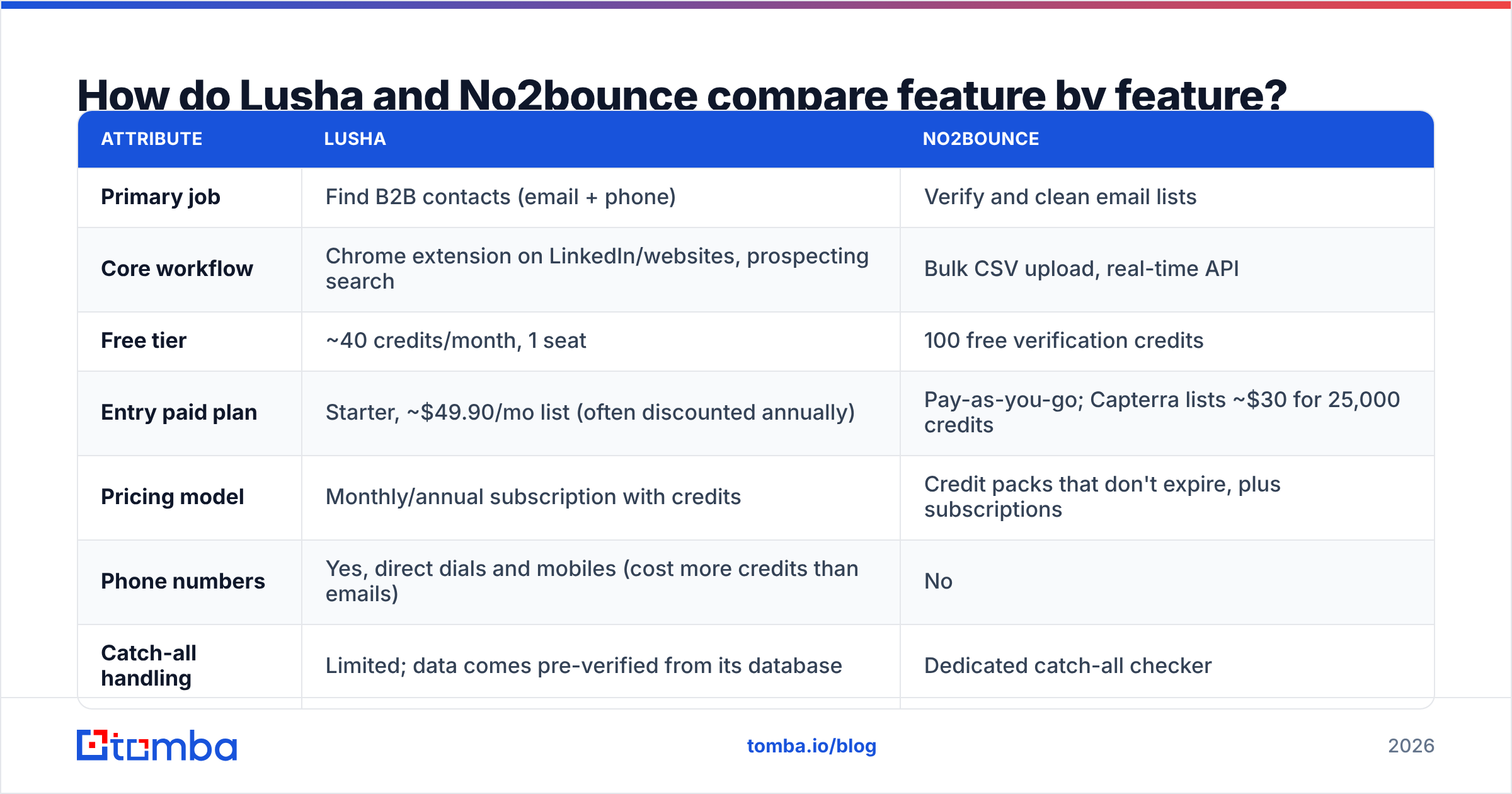
Here is the side-by-side. Pricing reflects what each vendor and the main review sites showed in 2026. Lusha in particular runs frequent promotions, so check the live page before you buy.
| Attribute | Lusha | No2bounce |
|---|---|---|
| Primary job | Find B2B contacts (email + phone) | Verify and clean email lists |
| Core workflow | Chrome extension on LinkedIn/websites, prospecting search | Bulk CSV upload, real-time API |
| Free tier | ~40 credits/month, 1 seat | 100 free verification credits |
| Entry paid plan | Starter, ~$49.90/mo list (often discounted annually) | Pay-as-you-go; Capterra lists ~$30 for 25,000 credits |
| Pricing model | Monthly/annual subscription with credits | Credit packs that don't expire, plus subscriptions |
| Phone numbers | Yes, direct dials and mobiles (cost more credits than emails) | No |
| Catch-all handling | Limited; data comes pre-verified from its database | Dedicated catch-all checker |
| Bulk list cleaning | Not its purpose | Core feature |
| CRM integrations | Salesforce, HubSpot, Pipedrive, Outreach, Salesloft, more | CRM integrations and API |
| Best for | SDRs and AEs building target lists from scratch | Marketers and ops teams with existing databases |
| Main limitation | Credits run out quickly when you reveal phone numbers | Doesn't generate leads; it only judges them |
The table makes one thing obvious: these tools barely overlap. Lusha does have built-in email validation, and No2bounce does have a light finder, but neither one replaces the other's main job.

What does Lusha do well?#
Lusha is strongest when a rep needs a specific person's contact details fast, and above all a phone number.
- Speed in the browser. The extension works on LinkedIn, Sales Navigator, and company websites. One click reveals the contact, and another pushes it to your CRM. For reps who prospect one account at a time, that's hard to beat.
- Phone data. Lusha built its name on direct dials and mobile numbers. If your motion leans on cold calling, this is the main reason to pay for it. Phone reveals cost several times more credits than emails, so budget for that.
- Prospecting filters. The web app lets you build account and contact lists by firmographics and some intent and job-change signals, then enrich in bulk.
- Compliance posture. Lusha publicly emphasizes GDPR and CCPA compliance, which matters if legal reviews your data vendors. Its reviews on G2 tend to praise ease of use and phone coverage.
Where Lusha falls short:
- Credit math gets expensive. The Starter plan's yearly credit allowance goes quickly if your reps reveal mobile numbers, and seat-based plans push teams toward Premium or custom pricing.
- Coverage varies by region and segment. It's strong on North American mid-market and enterprise, and thinner on small companies and some non-English markets. That's true of most databases, but test with your actual ICP before you commit.
- It isn't a list cleaner. If you already have 40,000 leads from a webinar, an old CRM, or an event, Lusha won't tell you which ones bounce.
What does No2bounce do well?#
No2bounce is strongest when you already own the data and the problem is quality.
- Cheap, non-expiring credits. The pay-as-you-go model fits teams that clean lists in bursts, like a quarterly CRM purge or a pre-campaign scrub, rather than every day. Capterra's listing puts bulk credits at roughly a tenth of a cent per check, which is near the bottom of the market.
- Catch-all detection. Catch-all domains accept every address at the SMTP level, so basic verifiers mark them "valid" when they aren't. No2bounce flags these separately, so you can decide whether to send, hold, or route them to a more careful sequence.
- Bulk and API. Upload a CSV for a one-off cleanup, or wire the API into your signup forms and CRM so bad addresses never get in.
- Deliverability focus. It's built around protecting email deliverability, which is what matters once you send at volume.
Where No2bounce falls short:
- It doesn't generate pipeline. A verifier tells you that
jane@acme.comis valid. It doesn't tell you Jane exists or that she's the VP of Ops you were looking for. - Its email finder is secondary. It works for occasional lookups but has nowhere near the database depth of a dedicated contact data provider.
- No phone data. If your outbound is multichannel, you'll need something else for dials.
- Smaller brand footprint. It has fewer public reviews than the big verifiers, so do your own test before you trust it with a large list. The Capterra listing is a good place to check recent user feedback.
How do the two tools fit into a real outbound workflow?#
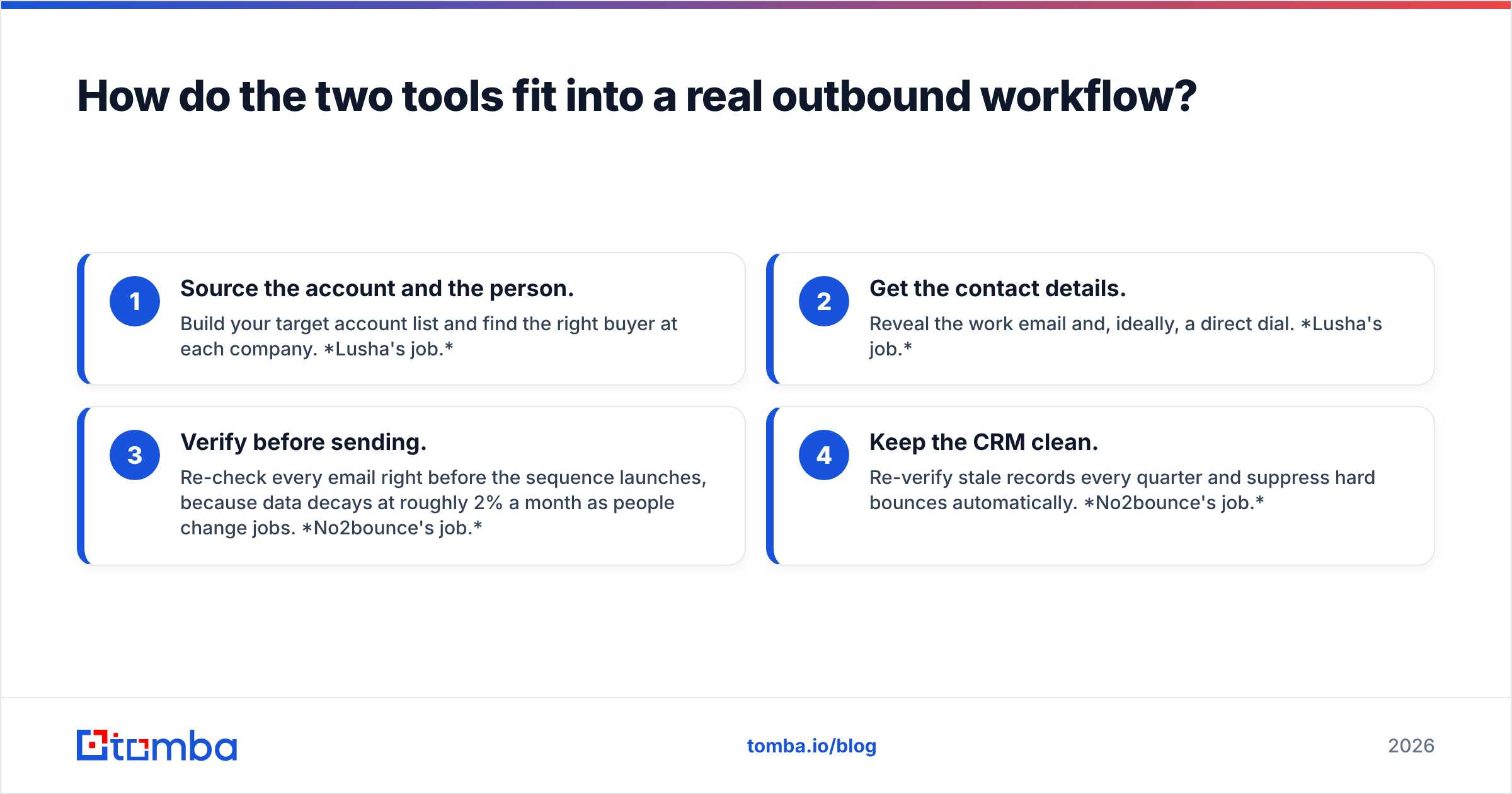
Most mature outbound stacks separate the work into four stages. Here's where each tool fits:
- Source the account and the person. Build your target account list and find the right buyer at each company. Lusha's job.
- Get the contact details. Reveal the work email and, ideally, a direct dial. Lusha's job.
- Verify before sending. Re-check every email right before the sequence launches, because data decays at roughly 2% a month as people change jobs. No2bounce's job.
- Keep the CRM clean. Re-verify stale records every quarter and suppress hard bounces automatically. No2bounce's job.
In other words, they're sequential, not competing. Lusha feeds the top of the funnel, and No2bounce guards the send.
That's why "Lusha vs No2bounce" is often the wrong framing. Many teams end up with both, and the real cost is the operational overhead: exporting from Lusha, uploading to No2bounce, re-importing results, and reconciling statuses in the CRM.
Is Lusha or No2bounce cheaper?#
They price completely different units, so you can't compare them directly. Here's how to estimate cost for your own use case.
Lusha cost drivers:
- Seats (Pro and Premium bundle multiple users)
- Annual credit pool
- Ratio of phone reveals to email reveals, since phones cost multiple credits each
A two-rep team that mostly reveals emails can live on a mid-tier plan. A team that calls heavily will burn through credits several times faster and should look at Premium or custom pricing.
No2bounce cost drivers:
- Total number of addresses to verify
- How often you re-verify (one-time cleanup vs. monthly hygiene)
For most SMB teams, verification is a rounding error compared with data costs. Cleaning 25,000 addresses with No2bounce costs less than one month of a single Lusha seat.
The hidden cost is the workflow tax. If you need both tools, you're paying two vendors and spending hours every month moving CSVs between them. For a solo founder or a two-person SDR team, that time often costs more than either subscription.

When should you choose Lusha?#
Choose Lusha if:
- You need phone numbers. That's the clearest reason. Few tools in this price range match its mobile and direct-dial coverage.
- Your reps prospect inside LinkedIn and Sales Navigator all day and want one-click reveals.
- You sell into North American mid-market or enterprise, where its database is densest.
- You want contacts to flow straight into Salesforce or HubSpot with minimal setup.
Skip it if you mainly have a list-quality problem, or if your budget is tight and you don't need phones.
When should you choose No2bounce?#
Choose No2bounce if:
- You already have a large list (CRM export, event leads, inbound signups) and bounce rates are creeping above 2%.
- You send cold email at volume and need a pre-send scrub on every campaign.
- You want pay-as-you-go pricing without a monthly commitment.
- Catch-all domains are clogging your lists and you need them flagged separately.
Skip it if your problem is "I don't know who to email." A verifier can't answer that.
Is there a simpler option that covers both jobs?#
If you read the sections above and thought "I need a bit of both," you're the typical case. Most B2B teams need to find contacts and verify them, and buying two point solutions for that is a common source of stack sprawl.
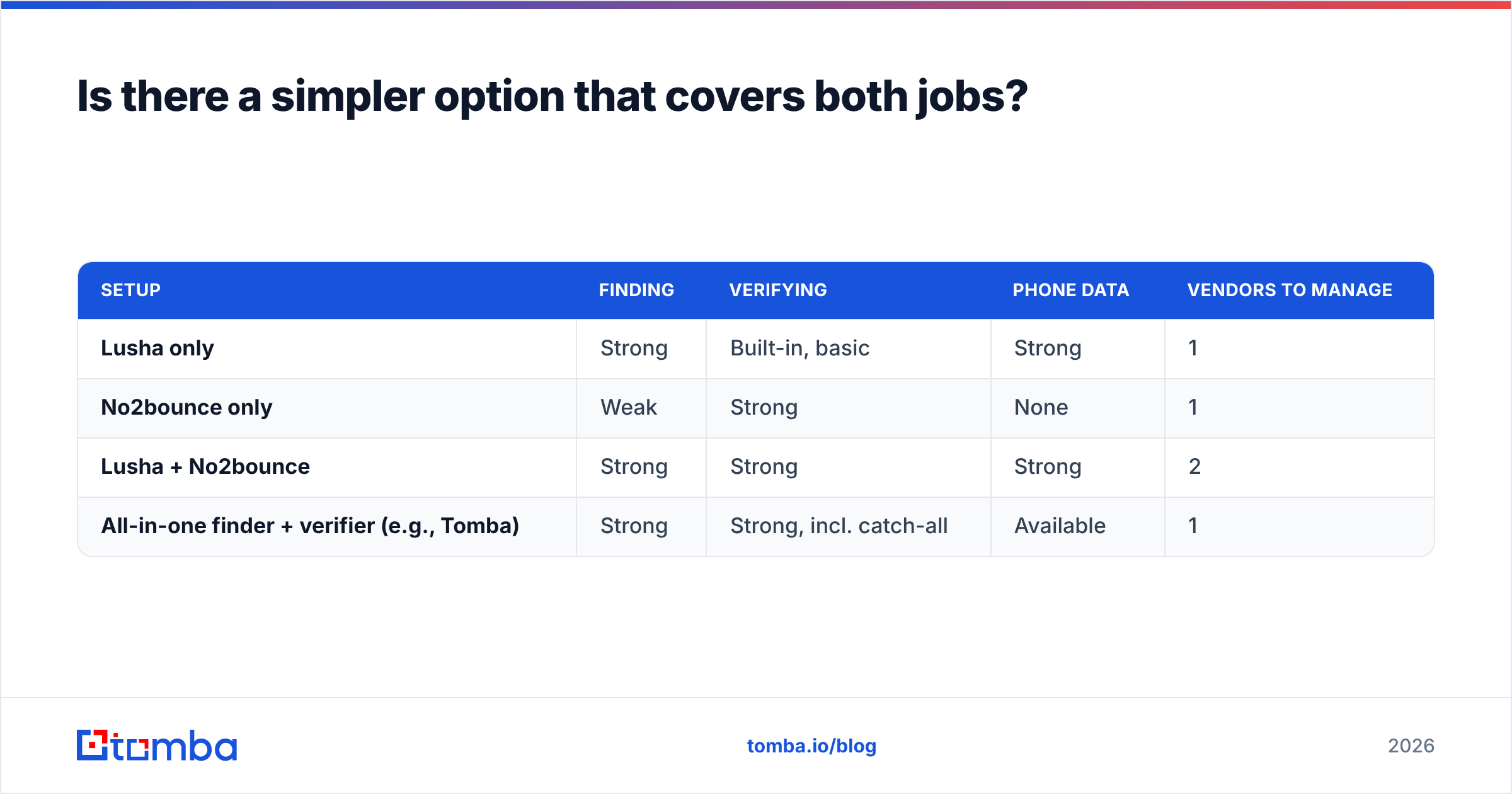
Here are the realistic paths:
| Setup | Finding | Verifying | Phone data | Vendors to manage |
|---|---|---|---|---|
| Lusha only | Strong | Built-in, basic | Strong | 1 |
| No2bounce only | Weak | Strong | None | 1 |
| Lusha + No2bounce | Strong | Strong | Strong | 2 |
| All-in-one finder + verifier (e.g., Tomba) | Strong | Strong, incl. catch-all | Available | 1 |
An all-in-one tool like Tomba combines an email finder, an email verifier, domain search, a catch-all verifier, and a phone finder under one credit pool and one API. Its plans start with a free tier of 25 searches a month, then Starter at $49/mo, Growth at $99/mo, and Pro at $249/mo, with custom Enterprise pricing on top. See the full Tomba pricing for credit breakdowns.
To be fair: if heavy mobile-number coverage in North America is your top priority, Lusha still deserves a trial. And if you only ever need cheap bulk list cleaning, No2bounce's non-expiring credits are hard to argue with. The combined approach wins when your main pain is the handoff between finding and verifying.
How should you test before you buy?#
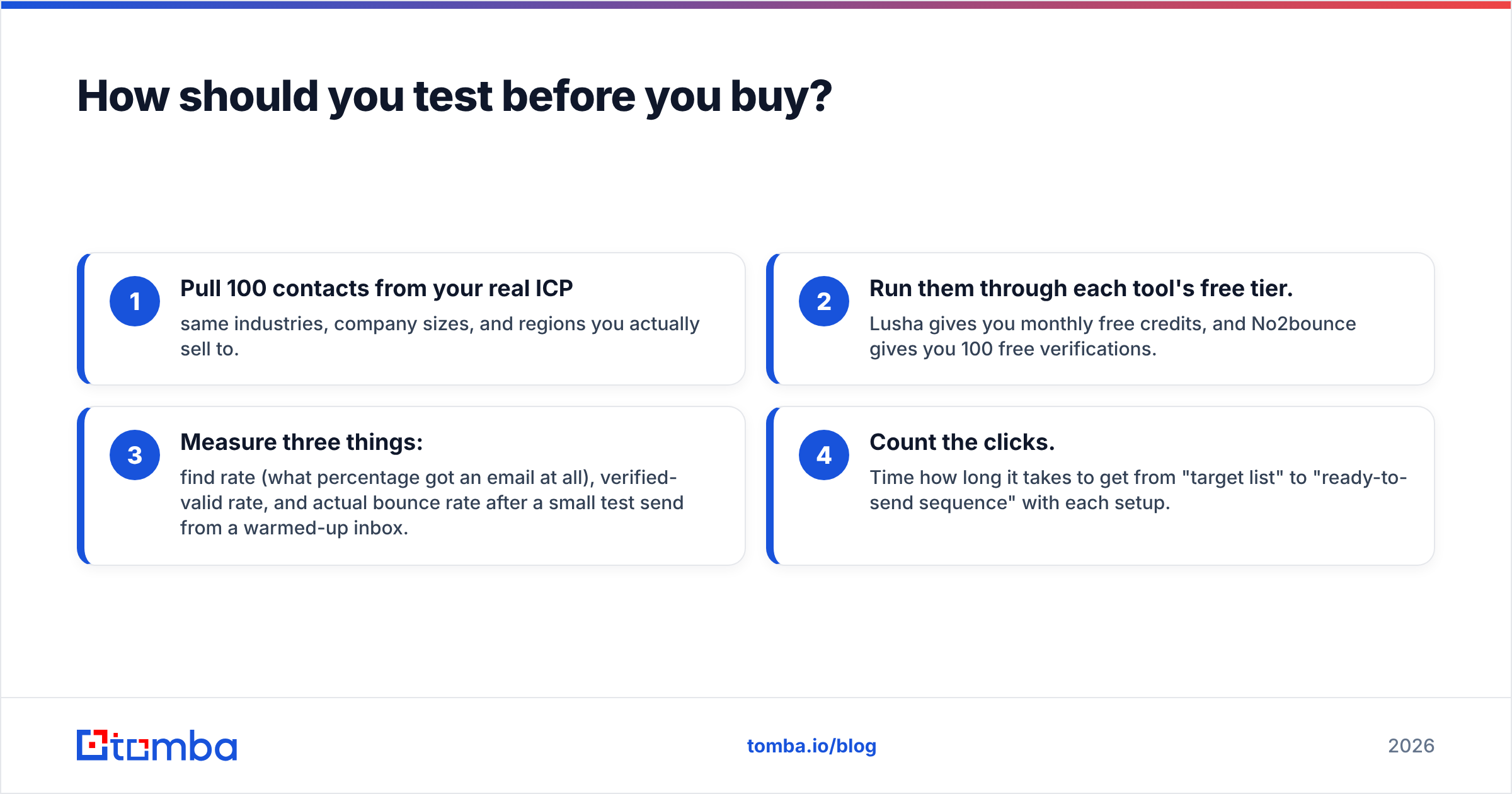
Don't trust any vendor's accuracy claims, including the ones in this post. Run your own test in an afternoon:
- Pull 100 contacts from your real ICP: same industries, company sizes, and regions you actually sell to.
- Run them through each tool's free tier. Lusha gives you monthly free credits, and No2bounce gives you 100 free verifications.
- Measure three things: find rate (what percentage got an email at all), verified-valid rate, and actual bounce rate after a small test send from a warmed-up inbox.
- Count the clicks. Time how long it takes to get from "target list" to "ready-to-send sequence" with each setup.
The numbers from your own data will tell you more than any review grid, and the click-count exercise shows the workflow tax that pricing pages never mention.
The bottom line#
Lusha and No2bounce aren't rivals. Lusha is for finding people. No2bounce is for checking whether the addresses you have still work. If you need contacts and especially phone numbers, start with Lusha. If you have a list and a bounce problem, start with No2bounce. If you need both and don't want to run CSVs between two vendors every week, put both jobs in one tool.
That's what Tomba Email Finder is built for. You can find professional emails by name, domain, or company, verify them in the same step (catch-all domains included), and push clean contacts straight into your CRM or sequencer. Start on the free plan with 25 searches a month, run the 100-contact test above, and compare the results with your current stack before you renew anything.
Related guides#
// get started
Find, verify and enrich your first contacts today
Start on the free plan with 25 searches a month, then scale when your team is ready.
Free plan · No credit card required · GDPR & CCPA
// about the author