Lusha vs OutboundView (2026): Data Tool or Done-for-You Agency?
Lusha sells contact data you work yourself. OutboundView sells meetings booked by its own SDRs, mostly with HR buyers. Here's how the cost, effort, and fit compare, and how to tell which one your team actually needs.
TL;DR
- Lusha and OutboundView are different kinds of product. Lusha is self-serve contact data: a credit-based tool your reps use to reveal emails and phone numbers. OutboundView is an outbound agency from Franklin, Tennessee that books meetings for you, built on its own HR-buyer database called TalentView.
- The cost gap is huge. Lusha's paid plans list at about $49.90 to $399.90/month, with discounts on annual billing. Third-party reviews put OutboundView's programs at roughly $1,000 to $2,500/month for data and demand-gen products, and $2,000 to $5,000+/month for full-service appointment setting.
- Pick Lusha if you already have SDRs, a sequencer, and a broad ICP that goes beyond HR.
- Pick OutboundView if you sell into HR or learning and development, have no outbound team, and would rather pay for meetings than build a process.
- Consider a third route if you want to own your pipeline without paying per-seat prices. A domain-first email finder plus a verifier costs a fraction of either option.
What is the real difference between Lusha and OutboundView?#
Most "X vs Y" posts compare two tools with the same job. This one compares a tool with a service, so the first decision is about how you want to build pipeline. Features come second.
Think of it like a kitchen. Lusha sells you groceries, meaning verified contact details, and you do the cooking: you write the sequence, send the emails, make the calls. OutboundView is a catering company. It brings its own ingredients (TalentView), its own cooks (SDRs), and puts a meal on your calendar in the form of booked meetings.
Lusha is a B2B contact data platform. You install the Chrome extension, open a LinkedIn profile or company website, and spend credits to reveal a work email or direct dial. It also offers a prospecting database with filters, CRM enrichment, and an API. According to Lusha's pricing page, the plans are Free, Pro, Premium, and Scale. Third-party breakdowns also list a Starter tier with smaller credit pools.
OutboundView is a lead generation and appointment-setting agency founded in 2017. Its specialty is helping vendors sell to HR, talent, and learning and development leaders. Its proprietary TalentView database is reported to cover around 550,000 to 675,000 North American HR buyers, with emails, phone numbers, and intent signals across more than 100 HR categories. You can read client reviews on its Clutch profile. Clients often praise the meeting volume and the communication, and a few mention a slow ramp-up.
How do Lusha and OutboundView compare side by side?#
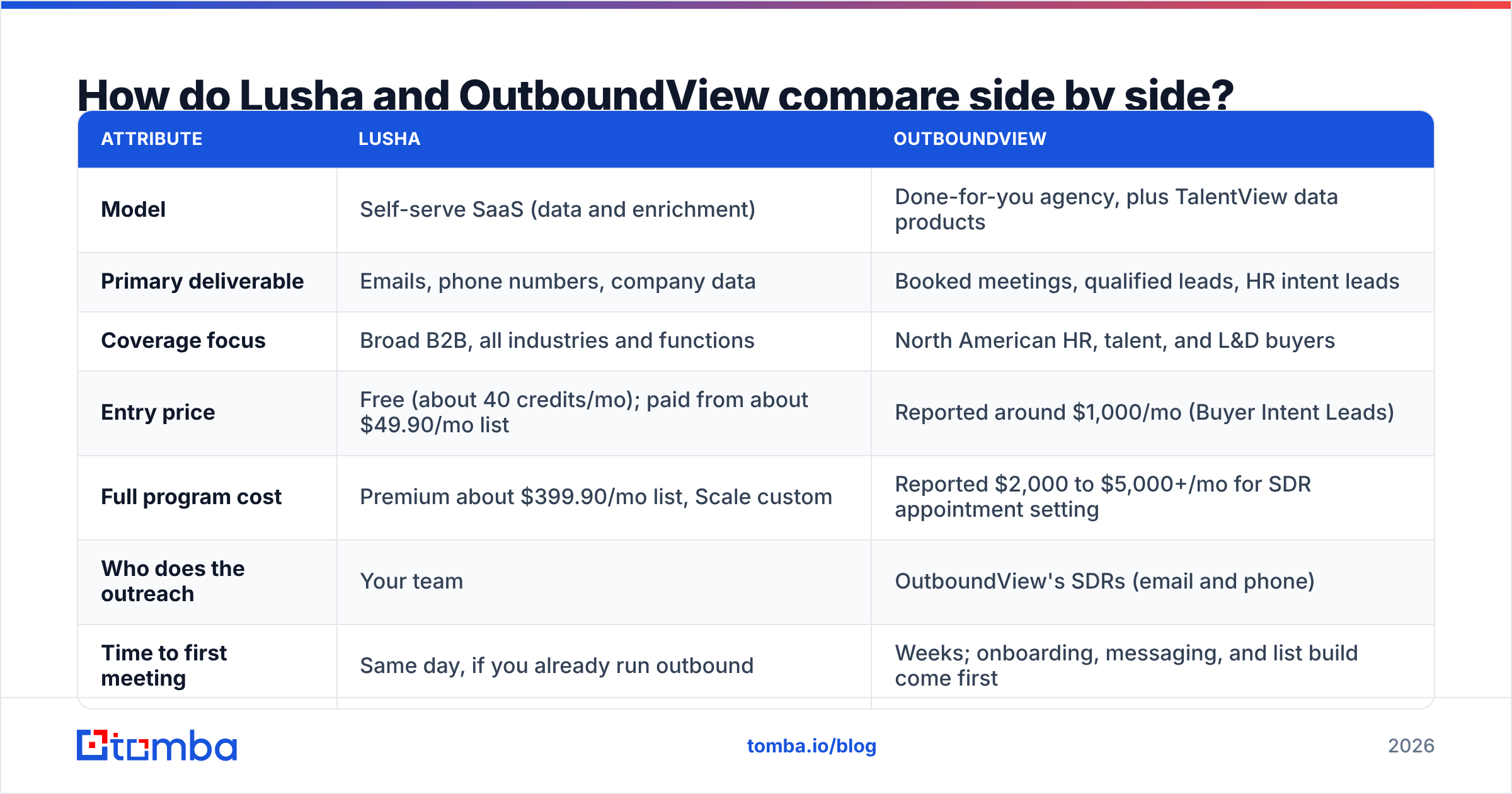
| Attribute | Lusha | OutboundView |
|---|---|---|
| Model | Self-serve SaaS (data and enrichment) | Done-for-you agency, plus TalentView data products |
| Primary deliverable | Emails, phone numbers, company data | Booked meetings, qualified leads, HR intent leads |
| Coverage focus | Broad B2B, all industries and functions | North American HR, talent, and L&D buyers |
| Entry price | Free (about 40 credits/mo); paid from about $49.90/mo list | Reported around $1,000/mo (Buyer Intent Leads) |
| Full program cost | Premium about $399.90/mo list, Scale custom | Reported $2,000 to $5,000+/mo for SDR appointment setting |
| Who does the outreach | Your team | OutboundView's SDRs (email and phone) |
| Time to first meeting | Same day, if you already run outbound | Weeks; onboarding, messaging, and list build come first |
| Data ownership | You keep what you export, subject to plan terms | Mainly delivered as meetings and leads, not a database you own |
| Integrations | Salesforce, HubSpot, Chrome, LinkedIn, API | Works inside your process; CRM handoff of meetings |
| Best fit | Teams with SDRs and a sequencer | HR-tech vendors with no outbound function |
The table makes one thing clear: comparing Lusha's price with OutboundView's isn't fair to either. A Lusha seat doesn't make calls, and an OutboundView retainer isn't a data subscription. The fair comparison is the fully loaded cost per booked meeting, which we work through below.
How does Lusha pricing work in 2026?#
Lusha charges in credits. Per recent breakdowns, one email reveal costs 1 credit and one phone reveal costs 5 credits, so a full contact can cost up to 6. That matters if your playbook leans on cold calling, because phone-heavy teams burn through credits about five times faster than email-only teams.
Snapshot from mid-2026 reviews:
- Free: about 40 credits a month, 1 seat
- Starter: around $49.90/mo list, cheaper on annual promotions
- Pro: around $69.90/mo list, with more credits and seats included
- Premium: around $399.90/mo list, 5 seats
- Scale: custom credits, seats, and pricing
Two details catch buyers out. Monthly plans roll unused credits over, capped at twice the monthly allotment. Annual plans reset credits at the end of the cycle. API calls, exports, and signals can also use credits. Check the current terms on Lusha's site before you sign, because promotional pricing changes often.

How does OutboundView pricing work?#
OutboundView doesn't publish a self-serve price list, so expect a sales call and a scoped proposal. Third-party agency directories and comparison sites report figures in these ranges:
- TalentView Buyer Intent Leads: about $1,000/month
- TalentView Content Connect: about $1,500/month
- Dialworks (calling): about $1,500 per user per month
- TalentView DemandGen Suite: about $2,500/month
- Full-service SDR appointment setting: commonly $2,000 to $5,000+/month, with some pay-per-appointment structures (a base fee plus a commission per meeting)
Treat these as reported ranges, not quotes. Agency pricing depends on how hard your targets are to reach, how many meetings you need, and how qualified those meetings must be.
Which one is cheaper per booked meeting?#
This is the only cost comparison that matters. Here's a simplified model. Swap in your own numbers.
DIY with Lusha. One SDR at roughly $5,000 to $7,000/month fully loaded, plus Lusha at roughly $70 to $400/month, plus a sequencer at $40 to $100/month. If that SDR books 10 to 15 meetings a month, you pay roughly $350 to $750 per meeting.
OutboundView full service. A $3,500/month program that books 8 to 12 meetings works out to roughly $290 to $440 per meeting, with no hiring, no management, and no tooling.
At small scale the agency can win, and that surprises people. The SDR salary dominates the DIY model, and an agency spreads its SDRs, data, and infrastructure across many clients.
At larger scale the maths flips. Once you have three or more reps, the data line stops mattering. You're paying for headcount either way, but in-house reps build institutional knowledge, own the relationships, and don't disappear when a contract ends.
Which has better data accuracy and coverage?#
Each one wins on a different axis.
Lusha covers far more ground. It works across industries, functions, and regions, and its browser extension sits right where reps already prospect. Data quality varies by geography and seniority, as it does with every provider. Contacts at large North American and Western European companies usually resolve better than SMB contacts or contacts in emerging markets. Lusha's G2 reviews regularly praise direct-dial coverage and regularly complain about stale records in niche segments.
OutboundView's TalentView is deep and narrow. If your ideal buyer is a VP of People, CHRO, or L&D director in North America, a database built only around that persona, with HR-specific intent categories, can beat a general-purpose tool on relevance. Outside HR, it isn't designed to help.
Whatever you use, verify before you send. Running exported lists through an email verifier before they go into a sequence is the cheapest bounce insurance you can buy. It protects your domain whether the contacts came from Lusha, an agency, or a spreadsheet you inherited.
When should you choose Lusha?#
Lusha makes sense when these are true:
- You already have people doing outbound. SDRs, AEs who prospect, or founders who send their own emails. Lusha feeds a process that already exists.
- Your ICP is broad. You sell to finance, IT, ops, and marketing, not just HR, and you need one tool that covers all of them.
- You need phone numbers. Direct dials are one of Lusha's strengths, and the 5-credit cost is worth it if your team actually calls.
- You live in LinkedIn and your CRM. The Chrome extension and the Salesforce and HubSpot enrichment remove a lot of copy-pasting.
- You want month-to-month flexibility. You can start, pause, or downgrade a SaaS plan in a way you usually can't with an agency retainer.
When should you choose OutboundView?#
OutboundView makes sense when:
- You sell to HR, talent, or L&D buyers. That's its home turf, and TalentView was built for it.
- You don't have an outbound team, and you don't want to build one yet. Hiring, ramping, and managing SDRs takes months. An agency compresses that.
- You need meetings on the calendar more than you need a list. If your AEs are idle and the board wants pipeline this quarter, a booked meeting matters more than a CSV.
- You want intent data specific to HR categories. Signals tied to HR software and training purchases are hard to rebuild yourself.
- You can absorb a ramp-up period. Some clients report that the first few weeks go mostly to messaging, list building, and calibration before meeting volume picks up.
What are the pros and cons of each?#
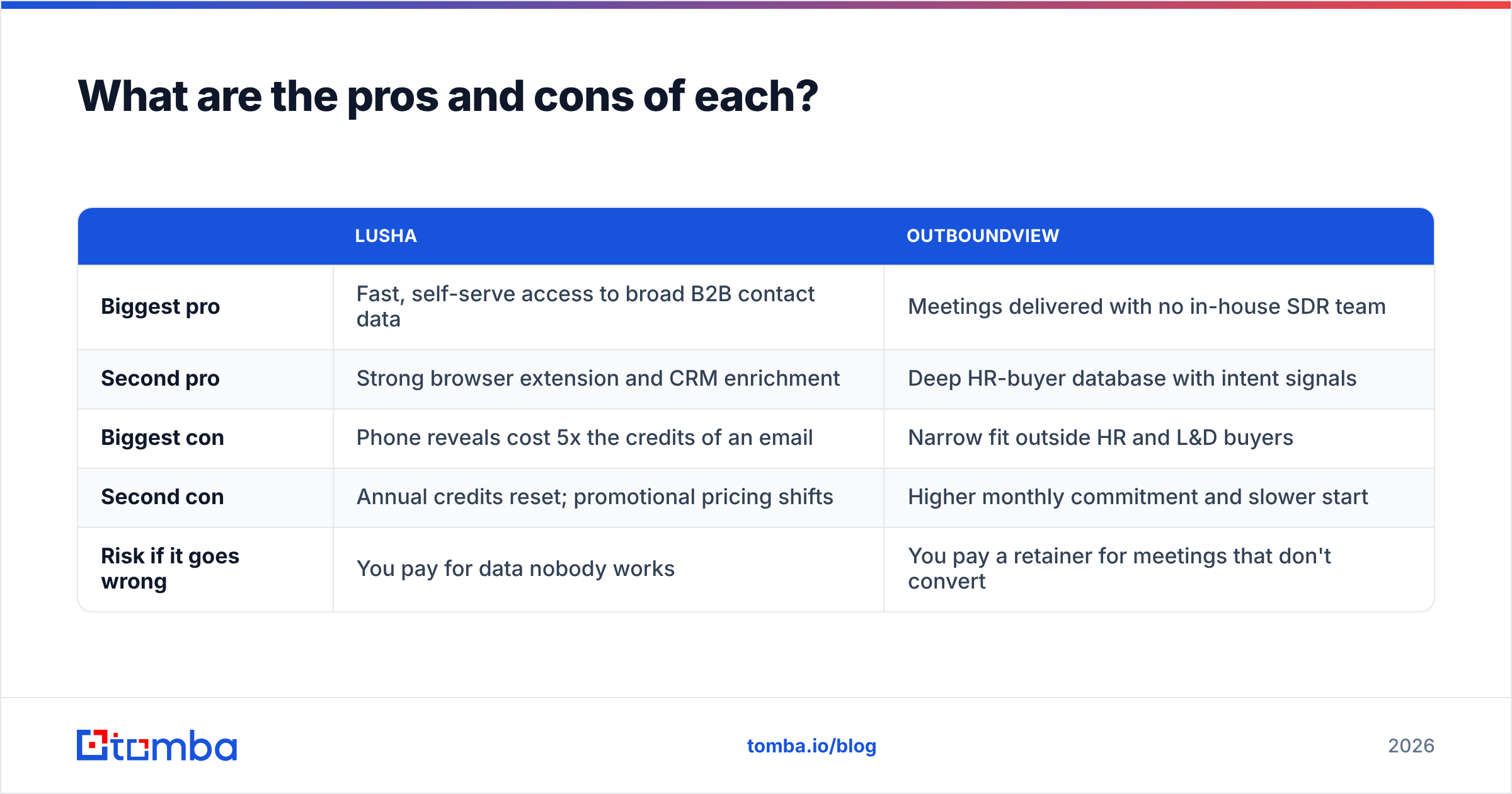
| Lusha | OutboundView | |
|---|---|---|
| Biggest pro | Fast, self-serve access to broad B2B contact data | Meetings delivered with no in-house SDR team |
| Second pro | Strong browser extension and CRM enrichment | Deep HR-buyer database with intent signals |
| Biggest con | Phone reveals cost 5x the credits of an email | Narrow fit outside HR and L&D buyers |
| Second con | Annual credits reset; promotional pricing shifts | Higher monthly commitment and slower start |
| Risk if it goes wrong | You pay for data nobody works | You pay a retainer for meetings that don't convert |
Is there a cheaper middle ground?#
Yes, and it's what most teams with one or two SDRs end up doing. Most of what you pay for in either option is access to a verified email address. If your outreach is mostly email and your targets work at companies whose domains you can list, a domain-first approach costs much less.
The workflow:
- Build your account list from your CRM, a domain search, or a list of target companies.
- Find the right person with an email finder by entering a name and a domain, or pull every public address on that domain.
- Verify everything before it goes into a sequence, including catch-all checks.
- Send from a warmed-up domain with a tight, relevant sequence.
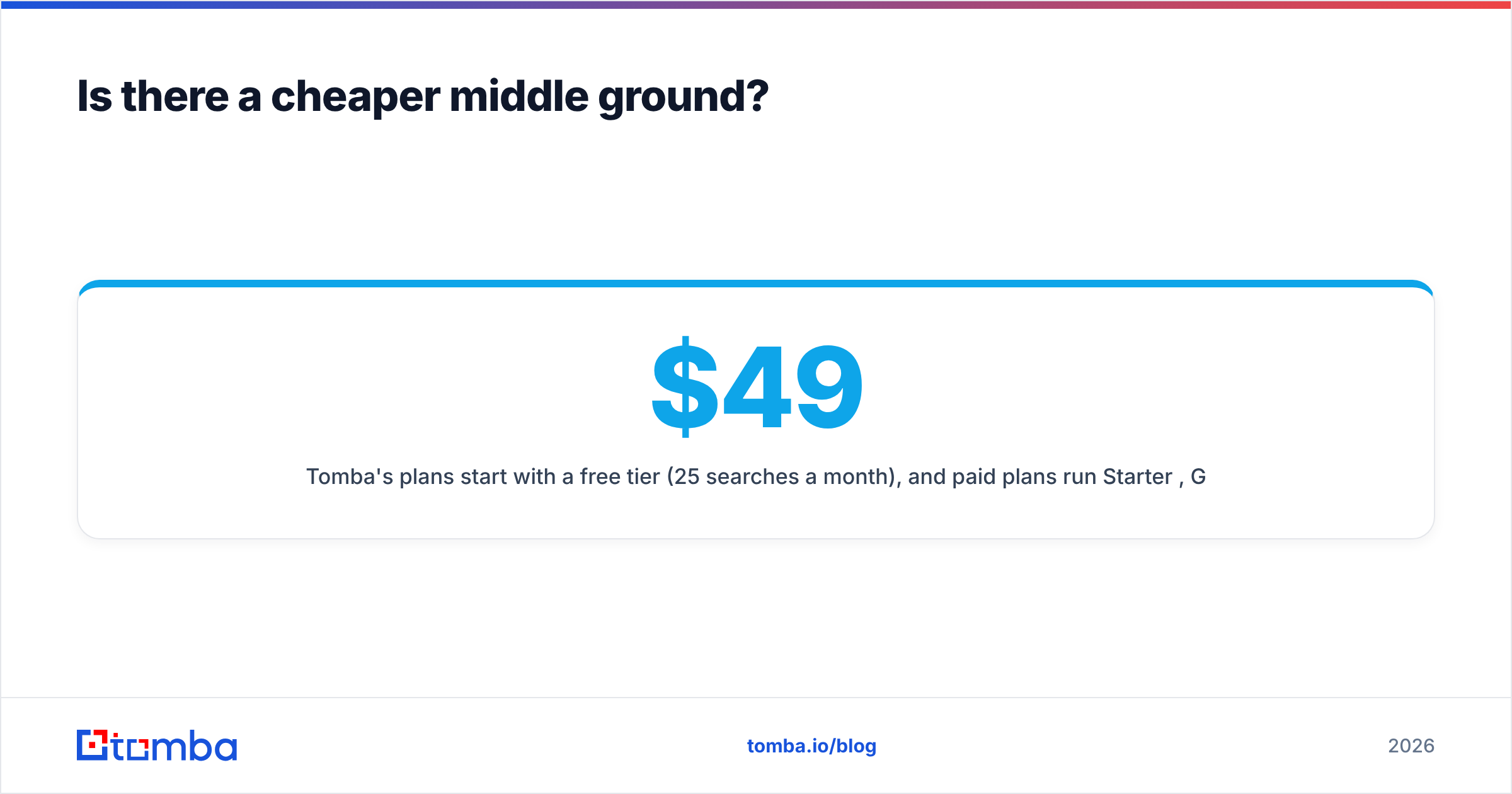
Tomba's plans start with a free tier (25 searches a month), and paid plans run Starter $49/mo, Growth $99/mo, and Pro $249/mo. See Tomba pricing for credit details. That won't replace an agency's SDRs, and it won't match Lusha's phone-number depth. For email-led outbound, though, it covers the main need at a price that makes sense for a single rep.
Can you use Lusha and OutboundView together?#
You can, and some HR-tech vendors do. A common hybrid:
- OutboundView runs a focused HR-buyer program that fills the calendar while you hire.
- Lusha, or another data tool, supports your AEs on non-HR stakeholders in the same deals, such as finance approvers, IT security reviewers, and procurement.
Over time, many teams move the agency program in-house once they've learned which messaging and segments convert. The agency then works as a paid way to discover what resonates, and the data tool becomes the long-term engine.
How do you decide in five minutes?#
Answer these honestly:
- Do you have someone whose job is outbound? No → lean OutboundView. Yes → lean Lusha or a lighter email finder.
- Are more than 70% of your buyers in HR or L&D? Yes → OutboundView's data edge is real. No → a general tool fits better.
- Is your budget under $1,000 a month? Then an agency isn't realistic. Use a self-serve tool.
- Do you need meetings in the next 30 days with no hiring? That's the agency's strongest case.
- Is your outreach mostly email? Then you're probably paying for phone data you won't use. A domain-first finder plus verification is cheaper.
Frequently asked questions#
Is OutboundView a Lusha competitor?#
Only indirectly. Both help you reach B2B buyers, but Lusha sells data access and OutboundView mainly sells outbound execution focused on HR buyers. You'll more often compare OutboundView with other agencies, and Lusha with other data platforms such as Apollo or ZoomInfo.
Does Lusha have a free plan?#
Yes. Lusha's free plan includes a small monthly credit allowance (about 40 credits in 2026 reviews) for one user. That's enough to test the extension, but not enough to run a real campaign.
How much does OutboundView cost?#
OutboundView doesn't publish pricing. Third-party sources report TalentView products at about $1,000 to $2,500/month, and full appointment-setting programs at around $2,000 to $5,000+/month depending on scope.
Which is better for cold calling?#
For in-house cold calling, Lusha's direct dials are the more natural fit. If you'd rather not do the calling at all, OutboundView's SDRs and Dialworks product handle it for you.
What's the cheapest way to get verified B2B emails?#
Use a domain-first email finder and verify every result before sending. Pay-as-you-grow tools like Tomba start free and scale from $49/mo, which is usually far below the cost of a per-seat data platform or an agency retainer.
Final verdict: Lusha or OutboundView?#
Choose Lusha if you have reps, a sequencer, and a broad ICP. You get fast, self-serve contact data with good phone coverage. Watch the credit costs on phone reveals.
Choose OutboundView if you sell to HR and L&D leaders, have no outbound team, and value booked meetings over owning a list. Expect a higher monthly commitment and a ramp-up period.
Choose neither if your outbound is mostly email and your budget is tight. In that case, the leanest setup is a solid email finder, strict verification, and a well-written sequence.
If that last option sounds like you, start with the Tomba Email Finder. Enter a name and a company domain and get a verified professional email in seconds, or pull every public contact on a domain at once. The free tier gives you 25 searches a month to test it on your real target accounts before you commit to a $49/mo plan.
Related guides#
// get started
Find, verify and enrich your first contacts today
Start on the free plan with 25 searches a month, then scale when your team is ready.
Free plan · No credit card required · GDPR & CCPA
// about the author