Lusha vs Pipileads: Pricing, Data Quality & Which to Pick in 2026
Lusha sells polished contact data with phone numbers. Pipileads sells cheap LinkedIn and Sales Navigator scraping with emails attached. Here is how they compare on price, data, and workflow, and which one fits your team.
TL;DR
- Lusha is a contact-data platform. It has a large database, direct dials, CRM integrations and intent-style filters, and it charges premium per-credit prices. Phone reveals use up credits fast.
- Pipileads is a budget LinkedIn and Sales Navigator extraction tool with an email finder and verifier added. Paid plans start around $9.95/mo, and large volumes get cheap per credit.
- Pick Lusha if your team calls prospects, needs mobile numbers and wants enrichment to sync into Salesforce or HubSpot.
- Pick Pipileads if you build lists from Sales Navigator searches, mostly need emails and care about cost per lead.
- If you mainly need verified work emails from domains, names or LinkedIn profiles at a predictable price, a dedicated email finder can be cheaper than either.
People don't usually search "Lusha vs Pipileads" because they're the same kind of product. They search it because both show up when you look for a way to get contact details off LinkedIn. One is a mature data vendor and the other is a lean scraper. That difference affects your price, your data quality and how much cleanup you'll do later. This guide compares them directly.
What is Lusha?#
Lusha is a B2B contact and company data platform. You can search its database by role, seniority, industry, headcount and location, or use the Chrome extension to reveal contact details on LinkedIn profiles and company websites. Its main selling point is phone data: direct dials and mobile numbers, which many cheaper tools don't have.
On top of contact lookups, Lusha now offers enrichment (bulk-updating CRM records), job-change and buying-signal alerts, and prospecting playlists. It integrates natively with Salesforce, HubSpot, Pipedrive, Zoho and Outreach. It's built for sales teams that live in a CRM and want contact data to arrive there automatically.
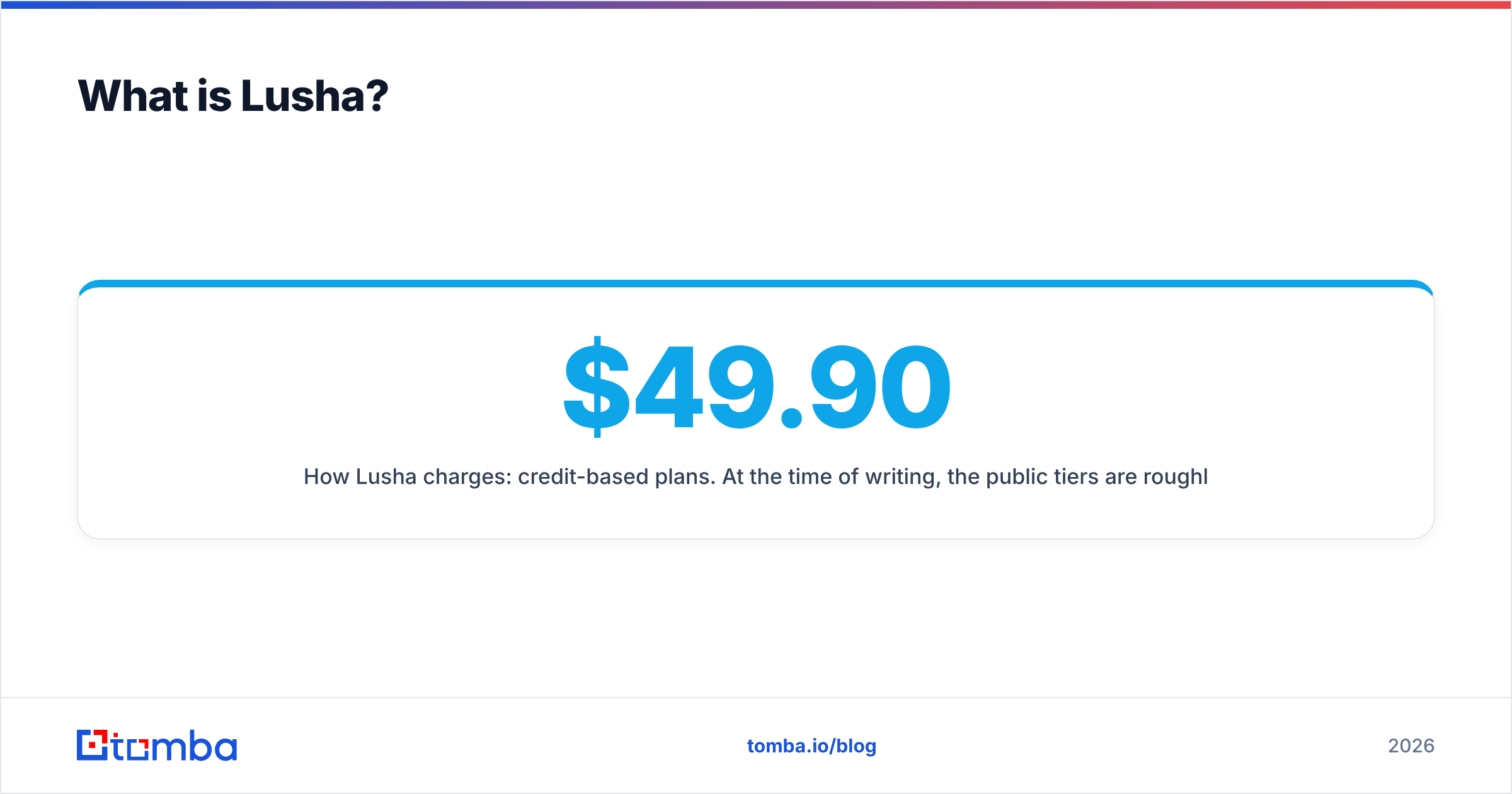
How Lusha charges: credit-based plans. At the time of writing, the public tiers are roughly a free plan (about 40 credits/mo), Starter (around $49.90/mo), Pro (scaled by a credit slider, about $69.90–$227/mo with 2 seats), Premium (about $399.90/mo for 3,400 credits and 5 seats) and a custom Scale plan. An email reveal costs 1 credit. A phone reveal costs several times more, around 10 credits per number according to recent pricing breakdowns. Check the live pricing page before you budget, because Lusha changes its credit math regularly.
What is Pipileads?#
Pipileads is a lead-extraction tool for LinkedIn and LinkedIn Sales Navigator. You run a search in Sales Navigator, Pipileads exports the results (names, titles, companies, profile URLs), and then it tries to find and verify a work email for each row. It also has a standalone email finder, an email verifier and a free Chrome extension for single profiles.
It doesn't try to be a data platform. There's no large proprietary database to filter and no intent layer. Your list-building happens inside Sales Navigator, and Pipileads turns that search into a CSV with emails.
How Pipileads charges: a free tier with about 50 credits/mo, then subscription plans from roughly $9.95/mo (250 credits) up to about $99.95/mo (7,500 credits, 10 users, phone numbers included). There's also pay-as-you-go pricing, from about $0.03 per credit at small volumes down to about $0.013 per credit at 50,000 credits. Per lead, that's a fraction of what Lusha costs.

How do Lusha and Pipileads compare side by side?#
Here is the short version before the details.
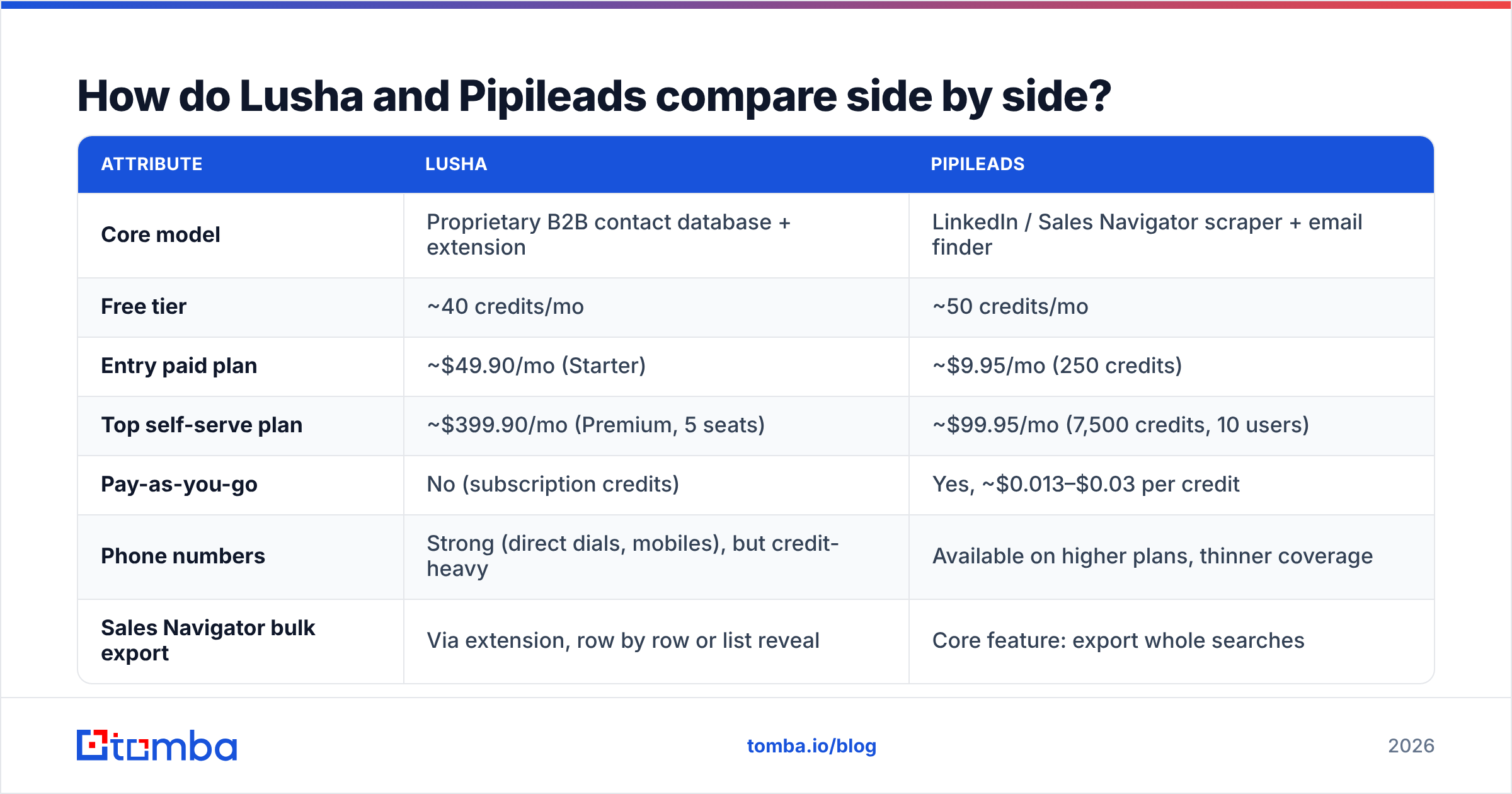
| Attribute | Lusha | Pipileads |
|---|---|---|
| Core model | Proprietary B2B contact database + extension | LinkedIn / Sales Navigator scraper + email finder |
| Free tier | ~40 credits/mo | ~50 credits/mo |
| Entry paid plan | ~$49.90/mo (Starter) | ~$9.95/mo (250 credits) |
| Top self-serve plan | ~$399.90/mo (Premium, 5 seats) | ~$99.95/mo (7,500 credits, 10 users) |
| Pay-as-you-go | No (subscription credits) | Yes, ~$0.013–$0.03 per credit |
| Phone numbers | Strong (direct dials, mobiles), but credit-heavy | Available on higher plans, thinner coverage |
| Sales Navigator bulk export | Via extension, row by row or list reveal | Core feature: export whole searches |
| CRM integrations | Native Salesforce, HubSpot, Pipedrive, Zoho, Outreach | CSV export, lighter integrations |
| Enrichment / signals | Yes (CRM enrichment, job changes, intent) | No |
| Best for | Phone-first SDR teams, CRM-centric orgs | Budget outbound, agencies, solo founders |
Which tool has better data quality?#
Lusha usually wins on phone data. Email accuracy depends heavily on the segment you're targeting.
Lusha keeps its own database, built from community contributions and partner sources, and refreshes it continuously. That gives it an advantage on direct dials and mobile numbers, especially for North American and Western European mid-market contacts. User reviews on G2 generally praise the phone coverage and complain about gaps in niche industries, smaller countries and very senior executives.
Pipileads builds each email on the fly from the LinkedIn profile you exported. It infers the company's email pattern, generates candidates and runs SMTP-level verification. This works well for companies with clean, standard patterns (first.last@company.com). It struggles with three cases:
- Catch-all domains, where the mail server accepts every address so verification can't confirm anything.
- Stale LinkedIn profiles, where someone hasn't updated their job and the tool confidently finds an email at a company they've already left.
- Non-standard company names that don't map cleanly to a domain.
Lusha has the same problems to a lesser degree. Its database records also go stale; the decay simply shows up on a different timeline.
Whichever tool you choose, verify everything before it goes into a sequence. Running exports through an independent email verifier is the cheapest insurance against a bounce spike, and it matters more with scraped lists because pattern-guessed emails bounce more often than database records.
Which is cheaper per usable lead?#
Pipileads is far cheaper per credit. Lusha's real cost per usable contact depends on how many phone numbers you need.
Work through a simple scenario: you want 1,000 prospects a month with a work email for each.
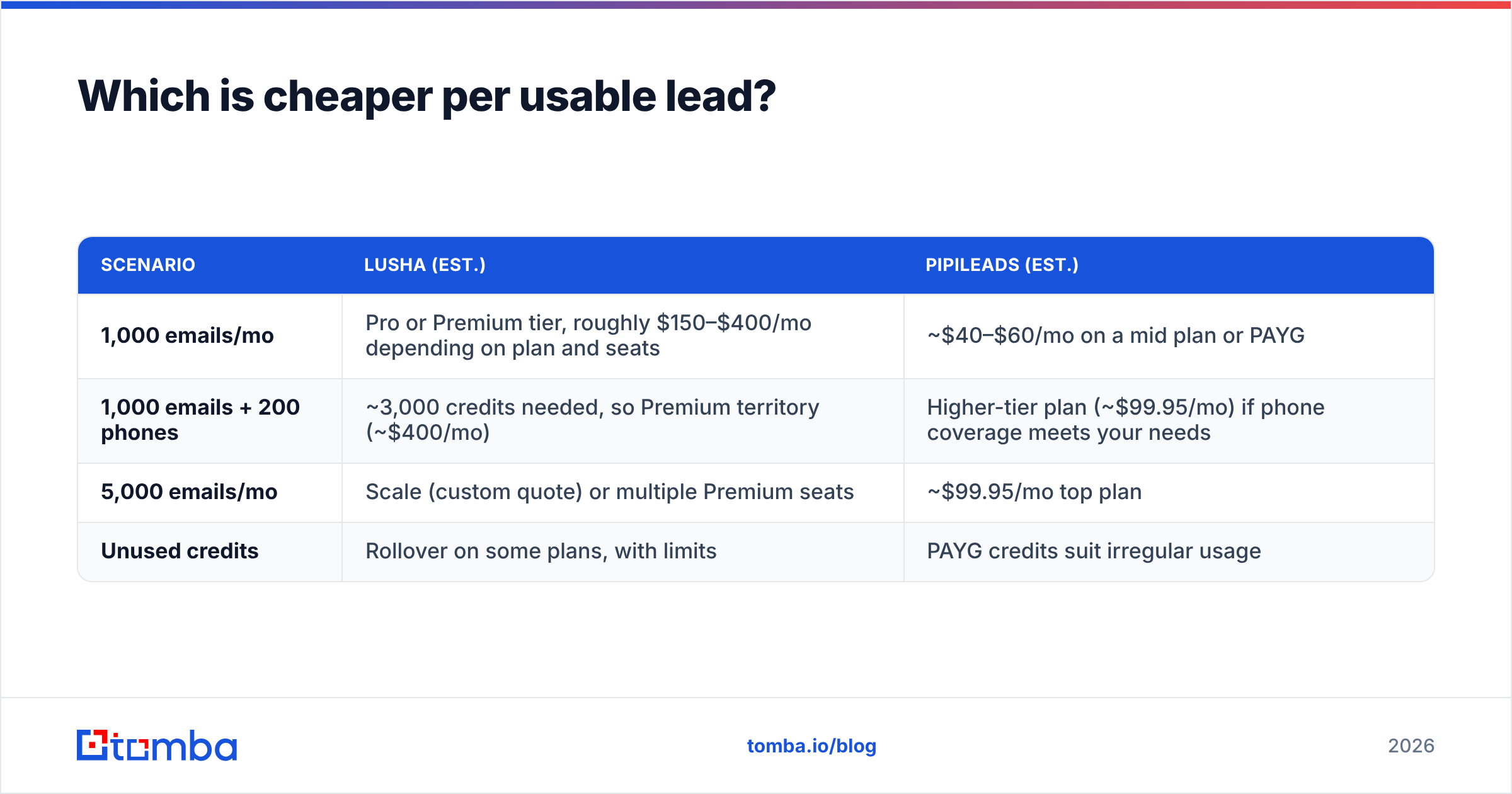
| Scenario | Lusha (est.) | Pipileads (est.) |
|---|---|---|
| 1,000 emails/mo | Pro or Premium tier, roughly $150–$400/mo depending on plan and seats | ~$40–$60/mo on a mid plan or PAYG |
| 1,000 emails + 200 phones | Higher-tier plan (~$99.95/mo) if phone coverage meets your needs | |
| 5,000 emails/mo | Scale (custom quote) or multiple Premium seats | ~$99.95/mo top plan |
| Unused credits | Rollover on some plans, with limits | PAYG credits suit irregular usage |
These are estimates, not quotes. Both vendors change their plans, and Lusha in particular has moved its tiers around several times. The overall picture holds, though: if you mostly need emails, Pipileads costs an order of magnitude less. Lusha's price only makes sense when phone numbers, CRM sync or enrichment actually change how your team sells.
There's a hidden cost on the Pipileads side. Scraping Sales Navigator requires a Sales Navigator seat, which runs about $99+/mo per user. If you don't already pay for one, add it to the comparison. Lusha doesn't require Sales Navigator.
How do the workflows differ day to day?#
The two tools put list-building in different places, and that shapes the whole daily process.
A typical Lusha workflow:
- Search inside Lusha's prospecting database using filters for title, seniority, headcount, industry, tech and signals.
- Reveal contacts in bulk, choosing emails only or emails plus phones.
- Push straight to your CRM or sequencer with native integrations, so nobody handles CSVs.
- Turn on enrichment so existing CRM records get updated phones and emails over time.
A typical Pipileads workflow:
- Build the search in Sales Navigator using LinkedIn's own filters, which are excellent for role and seniority targeting.
- Run Pipileads on the search to extract every result into a sheet.
- Let it find and verify emails for each row.
- Export a CSV and import it into your sequencer (Instantly, Lemlist, Smartlead and similar).
With Lusha, the tool does the targeting and the delivery. With Pipileads, Sales Navigator does the targeting and Pipileads handles extraction. If your SDRs already think in Sales Navigator searches, Pipileads fits easily. If you want a single system of record that RevOps can govern, Lusha is the better fit.
Is scraping LinkedIn with Pipileads a compliance risk?#
There's some risk, and you should understand it before you commit.
LinkedIn's User Agreement prohibits automated scraping of its site. Tools like Pipileads work around this with browser-based extraction under your session, but LinkedIn does periodically restrict accounts it flags for unusual activity. Keep extraction volumes moderate, avoid running several scrapers at once and don't do it from the profile of the executive whose network you depend on.
On data protection, Lusha publicly emphasises GDPR and CCPA compliance and has ISO 27001 and SOC 2 certifications. That's a real reason enterprise procurement teams prefer it. Pipileads is a smaller vendor with less formal compliance documentation. If you sell into the EU or your security team reviews vendors, check that before you sign up.
Which tool fits which team?#
Choose Lusha if:
- Your reps make calls. Direct dials are Lusha's strongest feature, and they're expensive to get anywhere else.
- CRM hygiene is a priority. Native enrichment and sync keep Salesforce or HubSpot from going stale.
- Procurement asks for certifications. SOC 2 and ISO 27001 make security review easier.
- You have budget per seat. The value grows with team size and with how often you use phone data.
Choose Pipileads if:
- You live in Sales Navigator. Exporting whole searches is faster than revealing contacts one at a time.
- Email is your main channel. You don't pay a premium for phone data you won't use.
- You run an agency or a lean founder-led motion. Pay-as-you-go and cheap top tiers suit irregular, high-volume list building.
- You'll verify anyway. If you already clean every list before sending, Pipileads' pattern-based emails are fine as input.

Are there alternatives worth considering?#
Yes, especially if neither profile above matches you exactly. Many teams need verified work emails at a sensible price, with some phone data and a LinkedIn workflow, but don't need a full database contract or a dependence on Sales Navigator.
A dedicated email finder covers that middle ground. Tomba, for example, finds emails by domain, by name plus company, or straight from a LinkedIn profile with its LinkedIn finder. It also has built-in verification, catch-all handling and a separate phone finder. Pricing starts with a free tier of 25 searches/month, then Starter at $49/mo, Growth at $99/mo and Pro at $249/mo (see Tomba pricing). That doesn't replace Lusha's direct dials for a calling-heavy team, and it won't export Sales Navigator searches the way Pipileads does. But if your main job is "get a correct email for this person or this company," it's built specifically for that.
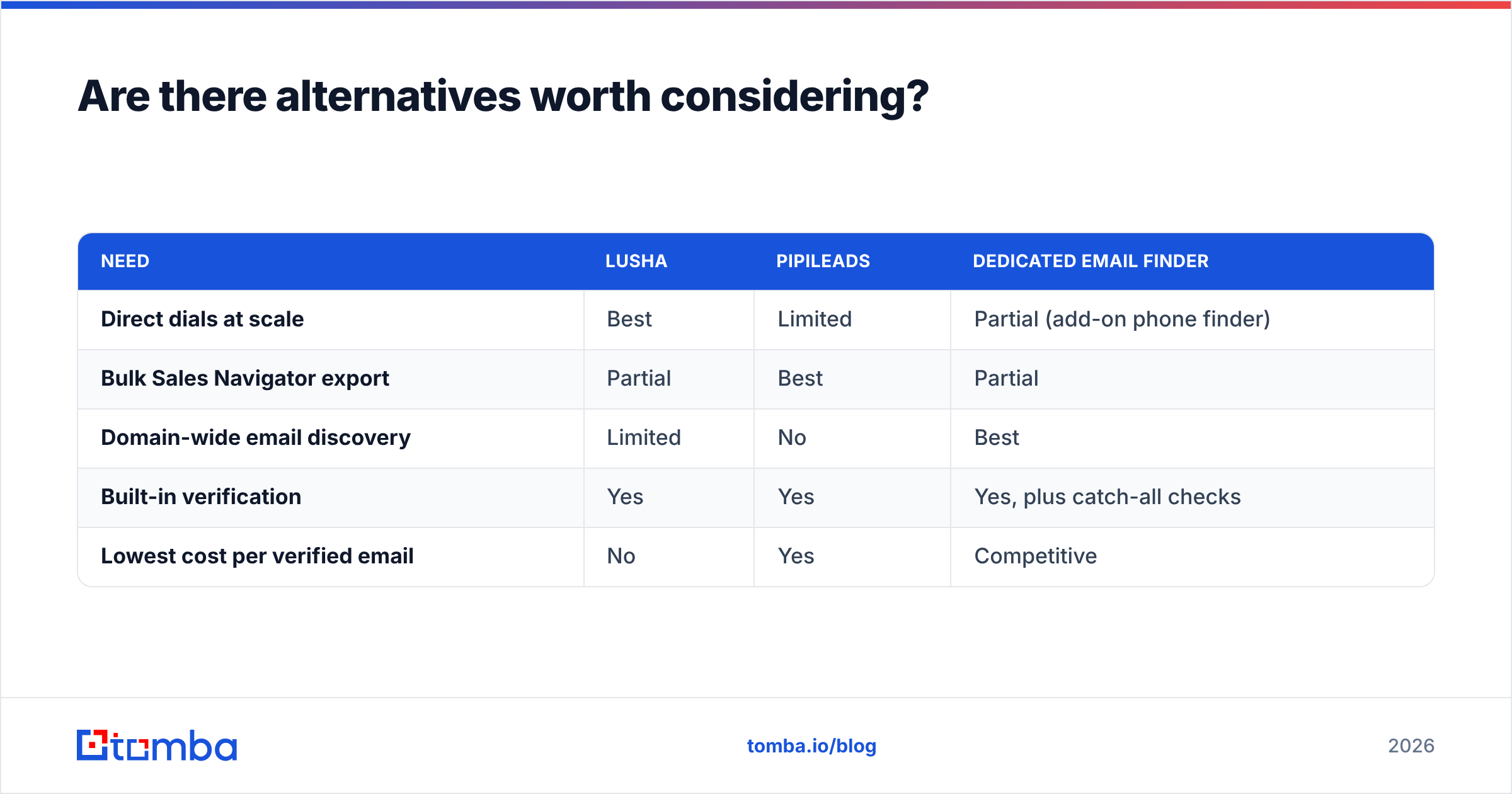
Here's how the three approaches line up:
| Need | Lusha | Pipileads | Dedicated email finder |
|---|---|---|---|
| Direct dials at scale | Best | Limited | Partial (add-on phone finder) |
| Bulk Sales Navigator export | Partial | Best | Partial |
| Domain-wide email discovery | Limited | No | Best |
| Built-in verification | Yes | Yes | Yes, plus catch-all checks |
| Lowest cost per verified email | No | Yes | Competitive |
What's the final verdict on Lusha vs Pipileads?#
They solve different problems, so the answer depends on how you sell.
Lusha is the better choice when phone numbers, CRM enrichment and compliance paperwork matter, and when you have the budget to pay per seat for them. Pipileads is the better choice when Sales Navigator is your targeting engine, email is your channel and cost per lead is the number you watch.
Before you commit to either, test both on the same list. Take 100 contacts from your actual ICP, run them through each tool and count three things: emails found, emails that pass independent verification, and phone numbers that connect. That costs very little in credits and gives you a far better answer than any feature table.
If what you really need is accurate work emails without paying database prices or relying on a Sales Navigator scraper, try the Tomba Email Finder. Search by domain, name or LinkedIn profile, get emails with verification status attached, and start on the free tier before you move to a paid plan.
Related guides#
// get started
Find, verify and enrich your first contacts today
Start on the free plan with 25 searches a month, then scale when your team is ready.
Free plan · No credit card required · GDPR & CCPA
// about the author