Lusha vs ReachStream: Pricing, Data Quality and Best Fit in 2026
Lusha sells a fast, compliant, rep-friendly workflow. ReachStream sells cheap access to a large B2B database. Here's how they compare on pricing, credits, data quality and fit, and when a third option makes more sense.
TL;DR
- Lusha is a workflow tool. It's built around a Chrome extension, CRM enrichment and fast lookups by reps on LinkedIn. You pay a premium for the polish, the compliance posture and the integrations.
- ReachStream is a database play. It gives you low-cost access to a large B2B contact and company dataset (200M+ contacts claimed), with paid tiers starting around $29/mo. It suits founders and small teams who build lists in bulk.
- Pick on the job, not the logo. If your reps prospect one account at a time inside Salesforce or HubSpot, Lusha fits better. If you export segmented lists for cold email on a tight budget, ReachStream gives you more records per dollar.
- Neither one replaces verification. Run any exported list through an email verifier before you send. This matters most for catch-all domains.
- If your real need is "find and verify the right work email for a known person or domain," a dedicated email finder can cost less than either one.
What are Lusha and ReachStream, really?#
The two tools look alike on a G2 grid, but they're built for different buyers.
Lusha is a B2B contact data platform built around speed for individual reps. Most of the work happens inside its browser extension. You open a LinkedIn profile or a company website, click once, and get a work email and often a direct dial. Lusha has added prospecting search, intent signals, CRM enrichment and team-level credit management over time, so it now sells to sales orgs as well as solo SDRs. You can see the current lineup on Lusha's official site.
ReachStream started as a value-priced B2B database. You filter by industry, title, seniority, location and company size, then export contacts. It markets 200M+ contacts and 15M+ company profiles across 150+ countries, with a permanent free plan and paid tiers that start low. The pitch is that you get contact data at the scale of an enterprise vendor without the enterprise contract. Details are on ReachStream's homepage.
In practice:
- Lusha answers "who is this person and how do I reach them right now?"
- ReachStream answers "give me every VP of Ops at 50–500 person logistics companies in Texas."
Both tools can do some of what the other does. But each one's center of gravity shapes its pricing, its credit model and how happy you'll be in month three.
How do Lusha and ReachStream compare side by side?#
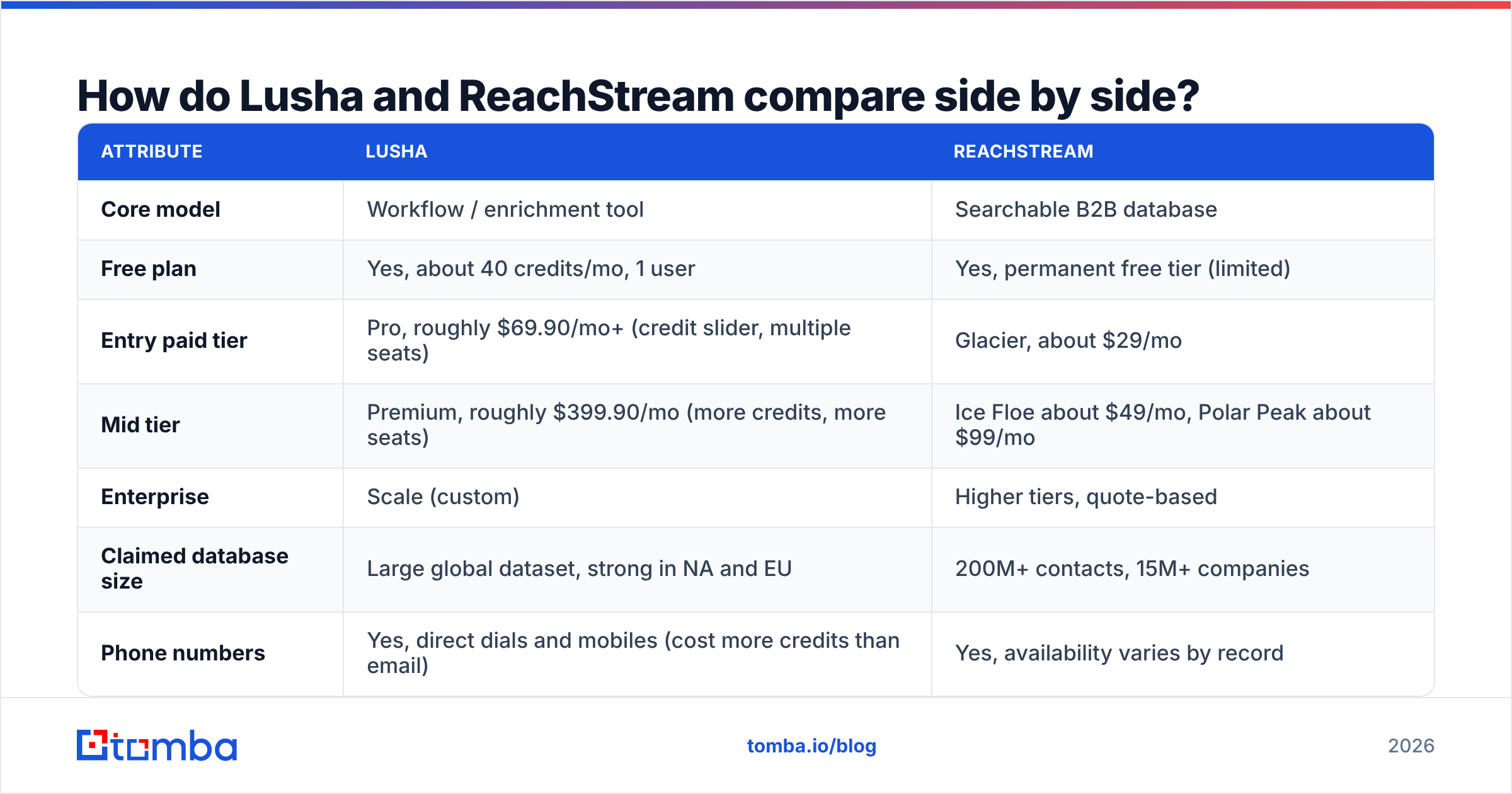
This table covers the attributes that usually decide the purchase. Pricing for both vendors moves often. Lusha uses a credit slider and runs annual-billing promotions, so treat the numbers as of this writing and confirm them on each vendor's pricing page.
| Attribute | Lusha | ReachStream |
|---|---|---|
| Core model | Workflow / enrichment tool | Searchable B2B database |
| Free plan | Yes, about 40 credits/mo, 1 user | Yes, permanent free tier (limited) |
| Entry paid tier | Pro, roughly $69.90/mo+ (credit slider, multiple seats) | Glacier, about $29/mo |
| Mid tier | Premium, roughly $399.90/mo (more credits, more seats) | Ice Floe about $49/mo, Polar Peak about $99/mo |
| Enterprise | Scale (custom) | Higher tiers, quote-based |
| Claimed database size | Large global dataset, strong in NA and EU | 200M+ contacts, 15M+ companies |
| Phone numbers | Yes, direct dials and mobiles (cost more credits than email) | Yes, availability varies by record |
| Chrome / LinkedIn extension | Core product, very mature | Available, less central |
| CRM integrations | Salesforce, HubSpot, Pipedrive, Outreach, Salesloft and more | Lighter. Mostly CSV export plus a few native connectors |
| Best for | Account-by-account prospecting, CRM hygiene | Bulk list building on a budget |
| Main trade-off | Cost per contact climbs fast at scale | Less workflow polish, so verify before sending |
The pattern is clear. Lusha charges for convenience and integration depth. ReachStream charges for raw access. Neither approach is wrong. They fit different motions.
Which tool has better data quality?#
Both vendors claim high accuracy, and neither number is independently audited in a way you can rely on. Here's what actually decides the bounce rate you see.
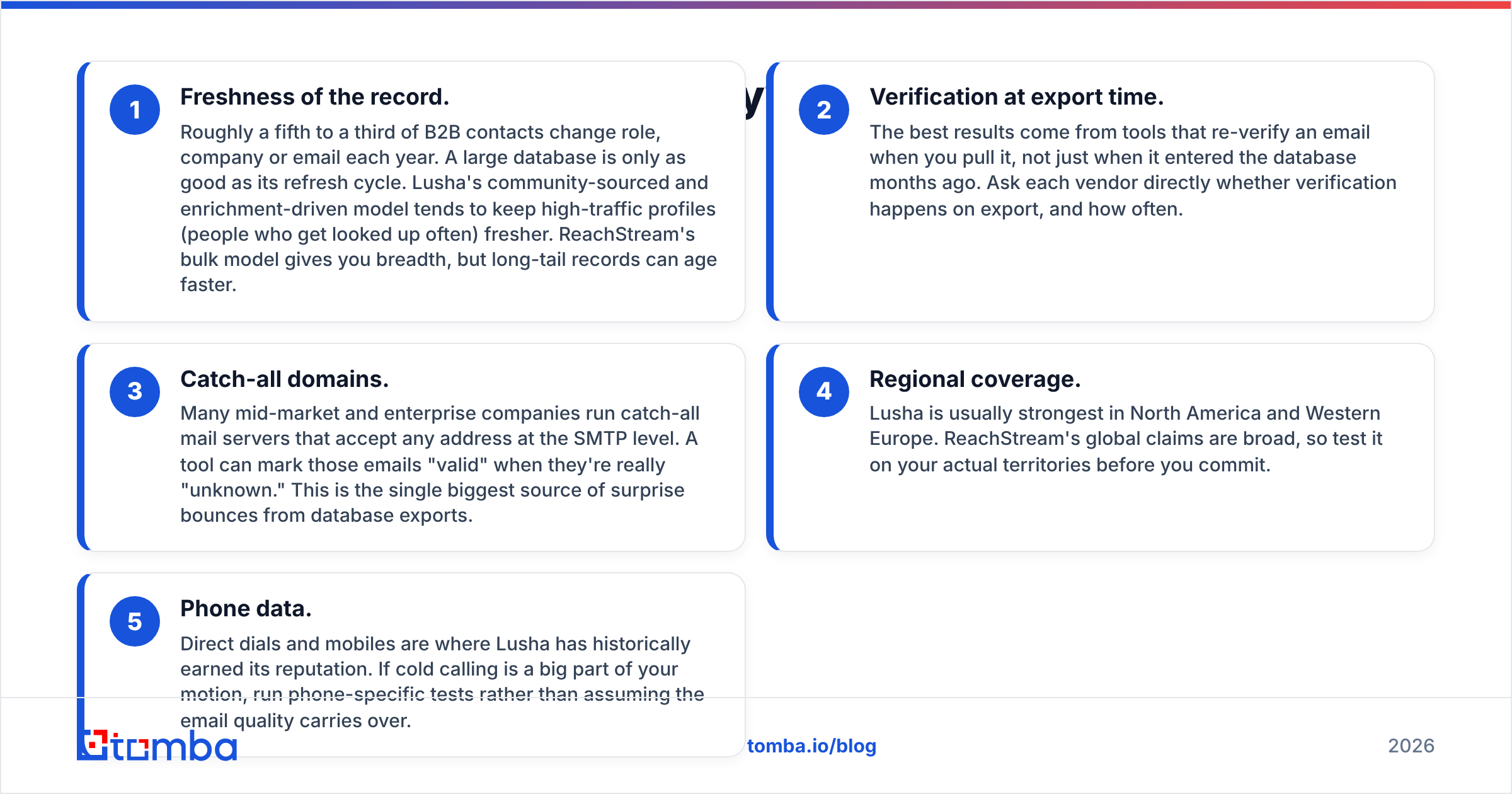
- Freshness of the record. Roughly a fifth to a third of B2B contacts change role, company or email each year. A large database is only as good as its refresh cycle. Lusha's community-sourced and enrichment-driven model tends to keep high-traffic profiles (people who get looked up often) fresher. ReachStream's bulk model gives you breadth, but long-tail records can age faster.
- Verification at export time. The best results come from tools that re-verify an email when you pull it, not just when it entered the database months ago. Ask each vendor directly whether verification happens on export, and how often.
- Catch-all domains. Many mid-market and enterprise companies run catch-all mail servers that accept any address at the SMTP level. A tool can mark those emails "valid" when they're really "unknown." This is the single biggest source of surprise bounces from database exports.
- Regional coverage. Lusha is usually strongest in North America and Western Europe. ReachStream's global claims are broad, so test it on your actual territories before you commit.
- Phone data. Direct dials and mobiles are where Lusha has historically earned its reputation. If cold calling is a big part of your motion, run phone-specific tests rather than assuming the email quality carries over.
The honest takeaway is to run a pilot. Pull 200 contacts from your real ICP in each tool, verify every email independently, and dial a sample of the phone numbers. A spreadsheet of your own results will tell you more than either vendor's accuracy badge.

Is Lusha worth the higher price?#
Lusha is worth it when seat productivity matters more than cost per record.
Say you're a 10-rep team working named accounts. Each rep needs a reliable email and phone number while they're on the LinkedIn profile, and that data has to land in Salesforce without a CSV round trip. Lusha removes friction at every step. The extension is fast, the CRM sync is mature, and admins can allocate credits by user. The compliance posture (GDPR and CCPA programs, plus security certifications listed on its site) also matters if procurement or legal has to sign off.
Lusha is harder to justify when:
- You prospect in bulk. Exporting thousands of contacts a month burns through credits, and phone reveals cost more credits than emails. Your effective cost per contact can climb well above database-style tools.
- You're a solo founder. The free tier is useful for testing, but the jump to Pro is meaningful when you only need a few hundred emails.
- You mostly need emails, not phones. You'd be paying for phone coverage you don't use.
Reviews on G2's Lusha page reflect the same split. Users praise ease of use and the extension, and the common complaints are credit consumption and price at scale.
Is ReachStream good enough for serious outbound?#
ReachStream works for outbound when you treat it as a list source, not a source of truth.
Its strength is economics. For $29–$99/mo you get access to a large, filterable dataset, and that changes what an early-stage company can afford. If you're testing three ICP hypotheses at once, you can build segmented lists for each without a five-figure annual contract.
Expect these trade-offs:
- Lighter workflow. The browser extension and integrations exist but are less central than Lusha's. Most teams use ReachStream through CSV export into a sequencer.
- More validation work on your side. At this price point, plan to run every export through a verifier and drop catch-all and unknown results, or segment them into a lower-volume send.
- Fewer enterprise guardrails. If you need SSO, granular admin roles or a formal DPA process, check what each tier includes before you buy.
For a two-person team running cold email, ReachStream plus a verification step is a defensible stack. For a 40-seat sales floor, the missing workflow features start to show.
Which one should you choose for your use case?#
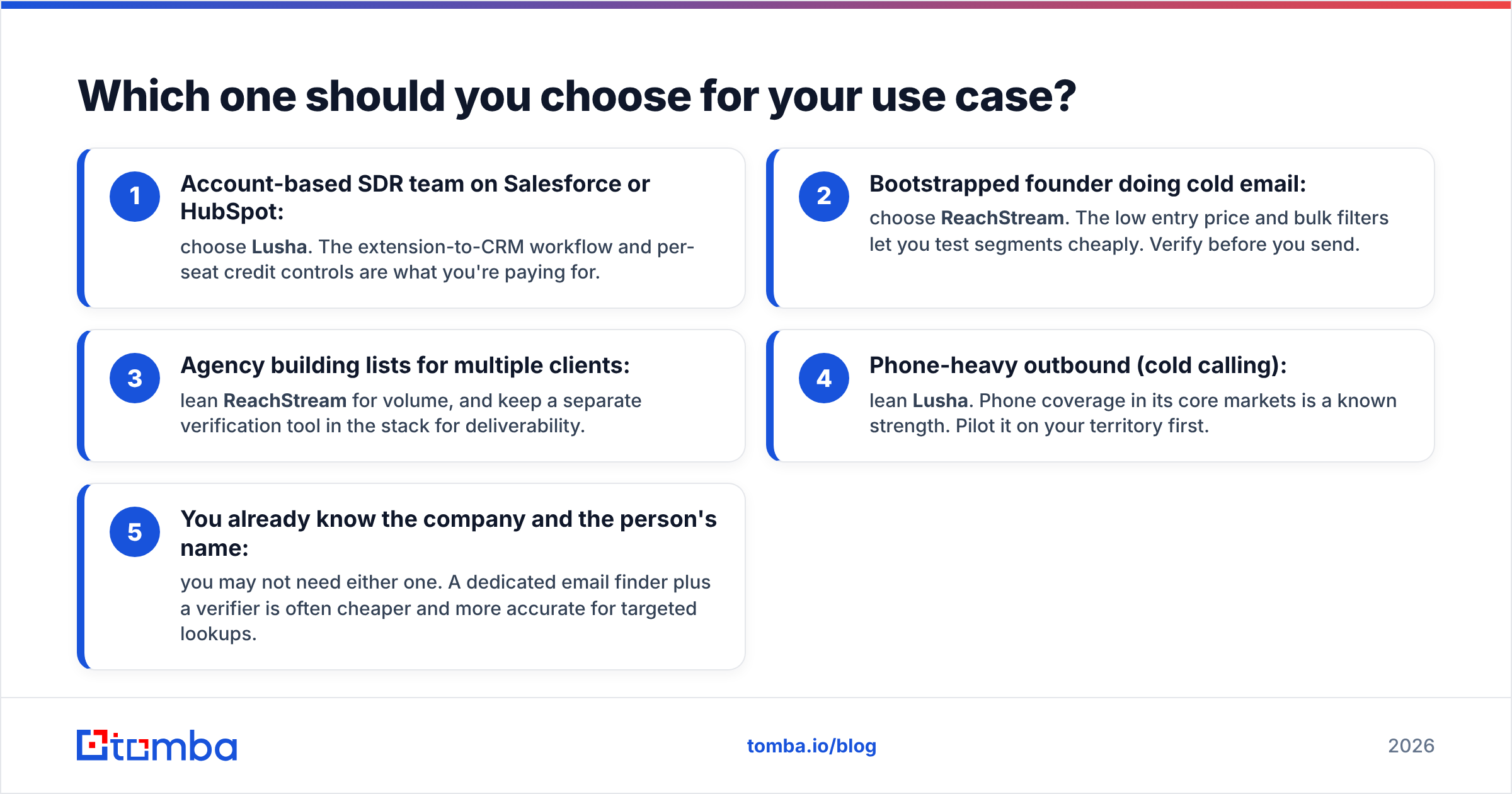
Match the tool to how your team actually prospects. These five scenarios cover most buyers:
- Account-based SDR team on Salesforce or HubSpot: choose Lusha. The extension-to-CRM workflow and per-seat credit controls are what you're paying for.
- Bootstrapped founder doing cold email: choose ReachStream. The low entry price and bulk filters let you test segments cheaply. Verify before you send.
- Agency building lists for multiple clients: lean ReachStream for volume, and keep a separate verification tool in the stack for deliverability.
- Phone-heavy outbound (cold calling): lean Lusha. Phone coverage in its core markets is a known strength. Pilot it on your territory first.
- You already know the company and the person's name: you may not need either one. A dedicated email finder plus a verifier is often cheaper and more accurate for targeted lookups.
The fifth scenario covers more teams than people expect. If your list already comes from LinkedIn Sales Navigator, an event attendee list or your own CRM, you're paying a database vendor for records you don't need. What you actually need is a reliable way to resolve the right email for people you already picked.
What about verification and deliverability?#
This step decides whether either tool pays for itself.
Whatever source you use, Lusha, ReachStream or anything else, the data is a snapshot. Before a list goes into Instantly, Lemlist, Apollo sequences or Outreach, it should go through an email verifier that checks syntax, MX records, SMTP response and catch-all status. Teams that skip this step usually find out the hard way. Hard bounces above 2–3% damage sender reputation, and recovering a burned domain takes weeks.
A practical pre-send pipeline:
- Export from your data source with only the fields you'll use.
- Deduplicate against your CRM and suppression lists.
- Verify every email and split the list into valid, catch-all, risky and invalid.
- Send to valid addresses first at a normal volume. Send to catch-all addresses at a lower volume from a secondary domain, or skip them.
- Monitor bounce and spam complaint rates per batch, and pause if either one spikes.
For companies where neither tool returns a clean result, a domain search shows the email pattern that company uses (first.last, flast and so on) and the addresses publicly tied to it. That lets you confirm or rebuild the address yourself.

How does Tomba fit next to Lusha and ReachStream?#
Tomba isn't a straight swap for either tool, and it's useful to be clear about where it fits.
- Compared with Lusha: Tomba is built mainly around finding and verifying emails, not around a phone-first, extension-first workflow. If direct dials drive your process, Lusha's phone coverage is the reason to buy it. If emails drive your process, Tomba usually costs less for the same volume of verified results.
- Compared with ReachStream: Tomba isn't a pre-filtered list-building database in the same way. It's strongest when you already know the company or person and need the right address, verified, at scale through bulk uploads, the API, Google Sheets or the Chrome extension.
- Pricing: Tomba has a free tier with 25 searches a month, Starter at $49/mo, Growth at $99/mo, Pro at $249/mo and custom Enterprise plans. Full breakdown on Tomba pricing.
Many teams end up with a hybrid stack. They use one source for discovery (a database like ReachStream, or Sales Navigator), then a finder-plus-verifier for resolution and hygiene, then a sequencer. Lusha often sits in that stack on its own for reps who need phone numbers while they work.
Lusha vs ReachStream: what's the final verdict?#
There's no universal winner. The two tools are good at different jobs.
- Choose Lusha if you run a structured sales team, live in your CRM, value phone data and want a polished, compliance-ready workflow. Accept that cost per contact rises as volume grows.
- Choose ReachStream if you need large, filterable lists at a startup budget and are willing to own verification and deliverability yourself.
- Choose neither (or add a finder) if your prospects are already picked and you just need accurate, verified work emails without paying for a database you won't use.
Whichever you choose, run a 200-contact pilot on your real ICP, verify every result independently, and compare the cost per deliverable contact, not the cost per credit. That number decides it.
If your bottleneck is turning names and domains into verified work emails, try the Tomba Email Finder. Start with 25 free searches a month, find addresses by domain, name or company, and verify them in the same workflow before they reach your sequencer. It's a low-cost way to check whether you need a full contact database at all, or just a more accurate way to reach the people you've already chosen.
Related guides#
// get started
Find, verify and enrich your first contacts today
Start on the free plan with 25 searches a month, then scale when your team is ready.
Free plan · No credit card required · GDPR & CCPA
// about the author