Lusha vs Techsalerator: Pricing, Coverage, and Which to Pick in 2026
Lusha sells contact credits to individual reps. Techsalerator licenses bulk B2B datasets by country. Here is how they compare on pricing, coverage, freshness and workflow fit, so you can pick the right one for your team.
- Lusha is a self-serve prospecting tool. Individual reps reveal emails and direct dials one at a time from a Chrome extension or web app and pay with monthly credits.
- Techsalerator is a data provider. It sells B2B (and B2C) datasets by country, by industry list (CPM), through a platform, or over an API. Pricing is mostly custom quotes.
- Pick Lusha if you have a small sales team working named accounts in North America or Western Europe and you need phone numbers today.
- Pick Techsalerator if you need wide firmographic coverage across many countries (it claims 219) for data enrichment, market sizing, or loading a data warehouse.
- Neither is a drop-in replacement for the other. Many teams buy one bulk source and add a per-contact finder and verifier on top.
What is the real difference between Lusha and Techsalerator?#
These two tools do different jobs, even though both come up when people search for "B2B contact data."
Lusha is built for the person sending the email or making the call. You open a LinkedIn profile or a company website, click the extension, and spend credits to reveal a work email or mobile number. It's priced per seat, the onboarding takes minutes, and the output goes straight into your CRM or sequencer.
Techsalerator is built for whoever owns the data: RevOps, data engineering, or a marketing ops lead buying coverage in bulk. According to its Datarade provider profile, it sells country licenses, CPM-priced targeted lists by industry, access to a global B2B platform, and API access. It says its data comes from public records, telco sources, direct opt-in, local sourcing, and third-party acquisition.
Put simply, Lusha sells you answers one lookup at a time, and Techsalerator sells you the database. That split drives every other difference below.
How do Lusha and Techsalerator compare side by side?#
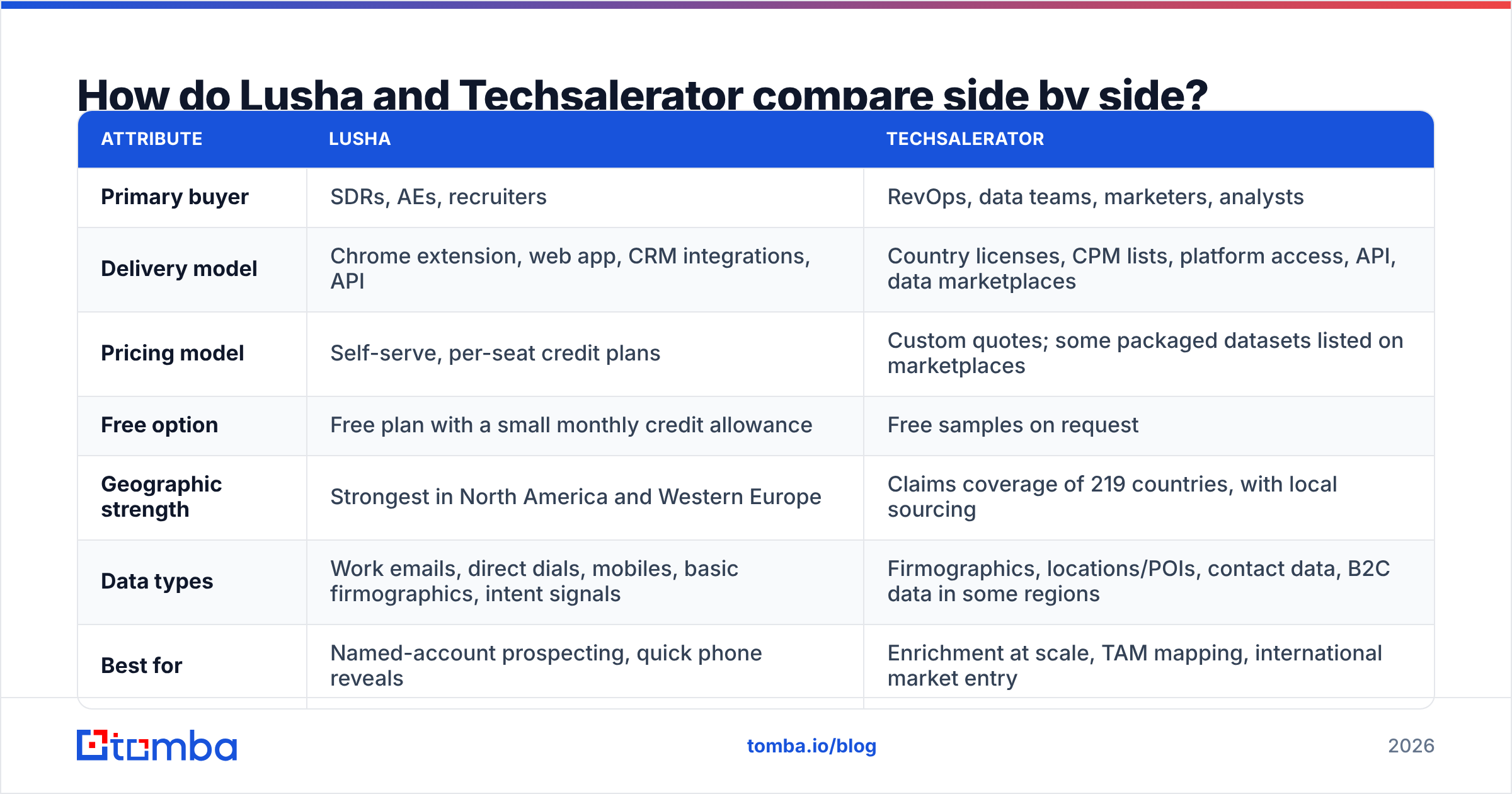
| Attribute | Lusha | Techsalerator |
|---|---|---|
| Primary buyer | SDRs, AEs, recruiters | RevOps, data teams, marketers, analysts |
| Delivery model | Chrome extension, web app, CRM integrations, API | Country licenses, CPM lists, platform access, API, data marketplaces |
| Pricing model | Self-serve, per-seat credit plans | Custom quotes; some packaged datasets listed on marketplaces |
| Free option | Free plan with a small monthly credit allowance | Free samples on request |
| Geographic strength | Strongest in North America and Western Europe | Claims coverage of 219 countries, with local sourcing |
| Data types | Work emails, direct dials, mobiles, basic firmographics, intent signals | Firmographics, locations/POIs, contact data, B2C data in some regions |
| Best for | Named-account prospecting, quick phone reveals | Enrichment at scale, TAM mapping, international market entry |
| Time to first value | Minutes | Days to weeks (scoping, sampling, contract) |
| Main limitation | Credits run out fast if you reveal phones | Not built for rep-level workflows; freshness depends on refresh cadence |
Here's the short version of the table. If your problem is "my reps can't reach the right people," look at Lusha. If your problem is "we don't know who exists in this market," look at Techsalerator.
How do the pricing models actually work?#
The pricing models are as different as the products, so a straight price comparison doesn't tell you much.
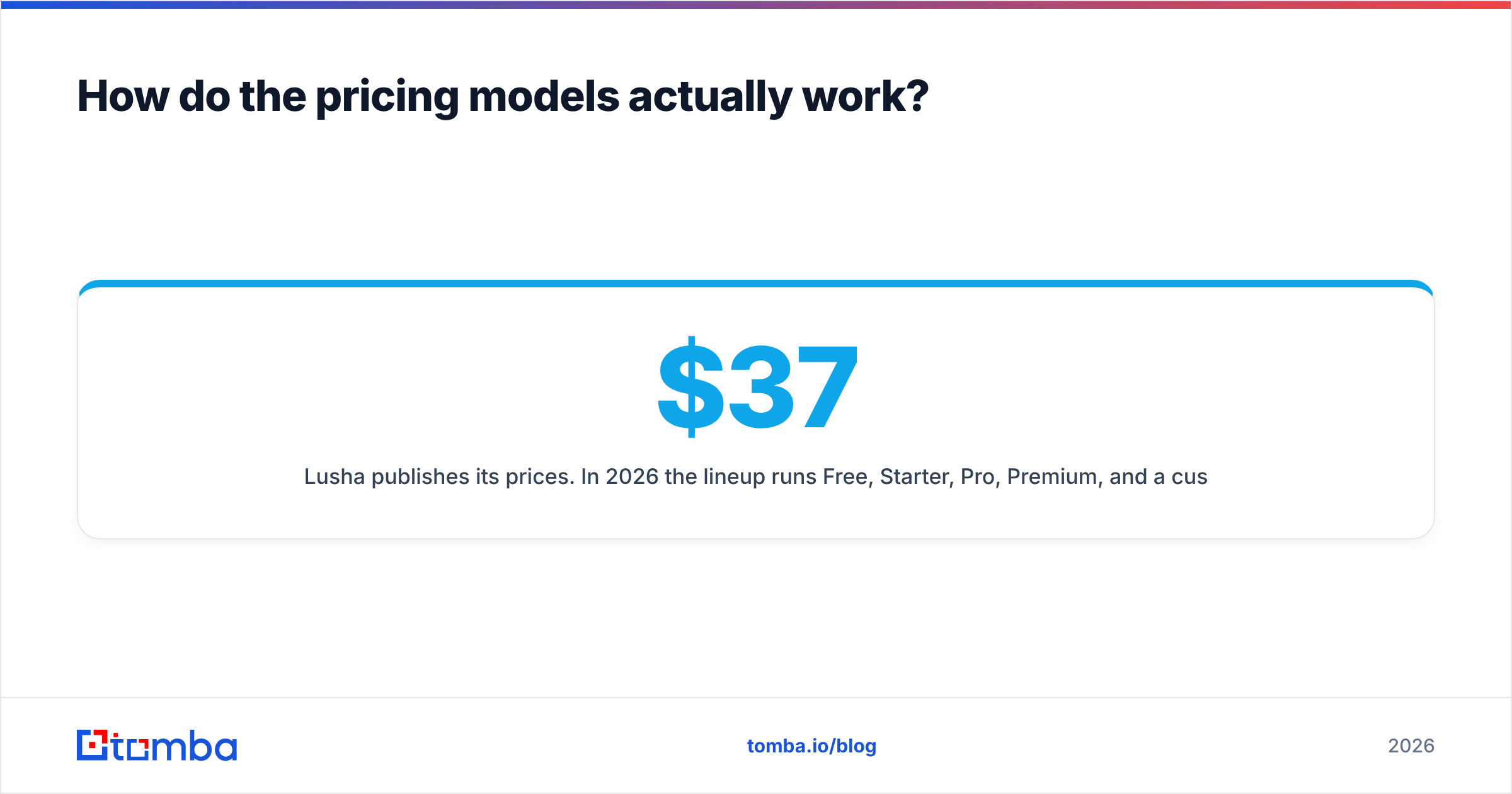
Lusha publishes its prices. In 2026 the lineup runs Free, Starter, Pro, Premium, and a custom Scale tier. Listed self-serve prices have moved around with promotions. Third-party trackers have recorded Starter at about $37 to $50 per month and Premium at about $260 to $400 per month on annual billing, depending on the promotion running at the time. The detail that matters more is credit consumption. An email reveal costs 1 credit, and a phone reveal costs several credits. Lusha has listed 5 credits per phone, and its pricing page more recently showed 10. A team that mostly wants mobile numbers will burn through its allowance much faster than the headline credit count suggests. Check the live Lusha pricing page before you budget.
Techsalerator mostly sells through quotes. Its marketplace listings show packaged datasets starting in the low hundreds of dollars per purchase. Larger deals, such as a full country license, a CPM-priced list for one industry, or ongoing API access, are priced to the volume and use case. You'll typically request a sample, check it against your own CRM, and then negotiate.
How to think about cost:
- Count reveals, not seats. For Lusha, multiply your expected monthly email and phone reveals by their credit costs. Seat count matters less than you'd expect.
- Count records, not deals. For Techsalerator, work out cost per usable record after you dedupe against your CRM and filter to your ICP. A cheap country license full of irrelevant SMBs isn't cheap.
- Price in verification. Neither bulk data nor per-contact data stays clean. Budget for a separate email verifier pass before any cold sequence.
- Price in refresh. A one-time dataset decays. B2B contact data is widely estimated to decay by roughly a quarter or more per year, so ask Techsalerator how often a license is refreshed and what re-delivery costs.
Which one has better data coverage and accuracy?#
The honest answer is that it depends on the region and the field.
Lusha's strengths: Direct dials and mobile numbers for people in the US, Canada, the UK, and the larger EU markets. Its community-contributed and partner data gives it good phone coverage for mid-market and enterprise contacts in those regions. Review sites such as G2 consistently rate it well for ease of use and phone data, with the usual complaints about outdated records and credit costs.
Techsalerator's strengths: Breadth. Covering 219 countries with local sourcing means it can return firmographic and location data in places where US-centric tools return nothing, including parts of Africa, the Middle East, Southeast Asia, and Latin America. If you're entering a new market and need every registered business in a sector, this is where it stands out.
Where each one is weaker:
- Lusha gets thin outside its core regions and for very small companies. Its firmographic data is basic compared with a dedicated data provider.
- Techsalerator's contact-level depth (named decision-makers with verified work emails) varies by country. Some markets will have rich people data; others will be mostly company-level. Ask for a sample in your actual target countries, not a showcase market.
Whichever you choose, test before you commit. Pull 200 contacts you already know are valid, run them through each source, and score match rate, accuracy, and bounce rate. Run that test on your own ICP, because a vendor's claimed coverage doesn't tell you how it performs for you.
How do they fit into a sales and RevOps workflow?#
Integration shape matters more than people expect. Here's how each tool usually ends up being used:
- Rep-led prospecting (Lusha): A rep finds an account, opens the extension, reveals two or three contacts, and pushes them into HubSpot or Salesforce. Lusha has native integrations for both, plus sequencer connections. It needs almost no setup.
- Bulk enrichment (Techsalerator): RevOps loads a dataset into a warehouse or CRM and matches it on domain or company name. That fills in fields like industry, headcount, location, and sometimes contacts. It takes some data engineering work to set up, but you only do it once.
- API enrichment (both): Both offer APIs. Lusha's API suits enriching inbound leads one at a time. Techsalerator's suits enriching large tables or powering an internal tool.
- List building (both, differently): Lusha's prospecting search lets reps filter and reveal in batches against their credit allowance. Techsalerator delivers a pre-filtered list priced per thousand records.
- Compliance: Lusha publicizes its GDPR and CCPA posture and ISO certifications. With Techsalerator, ask per country. Local-sourced and B2C data especially fall under different rules in each jurisdiction.
If you already have a CRM full of half-complete records, Techsalerator-style bulk data enrichment usually delivers more value per dollar. If your CRM is fine and your reps just can't find a phone number, Lusha is the faster fix.
Is Lusha better than Techsalerator for small teams?#
For most small sales teams, yes. Lusha is the more practical choice. Here's why:
- You can start on the free plan today with no procurement step.
- Reps use it inside the tools they already have open, like LinkedIn, Gmail, and the CRM.
- Monthly billing is available, so you aren't stuck in an annual contract.
Techsalerator only makes sense for a small team in specific situations: you're selling into a market that US-centric tools don't cover, or you need a one-off list of every company in a vertical and region. A focused CPM list can then be cheaper than months of credit-based reveals.
Is Techsalerator better than Lusha for enterprise and data teams?#
Often, yes, when the goal is coverage and ownership rather than rep productivity. Data teams tend to prefer:
- Owning the dataset. It sits in your warehouse and you can join, model, and score it however you like.
- Predictable unit costs. CPM or license pricing is easier to forecast than credit burn across 50 reps.
- Global reach. A single vendor for many countries means less vendor sprawl.
The trade-off is maintenance. A bulk dataset is like buying a printed map: it's detailed on the day you get it and starts going out of date the next morning. You'll need a refresh contract or a separate process to re-verify contacts before outreach.
What are the pros and cons of each?#
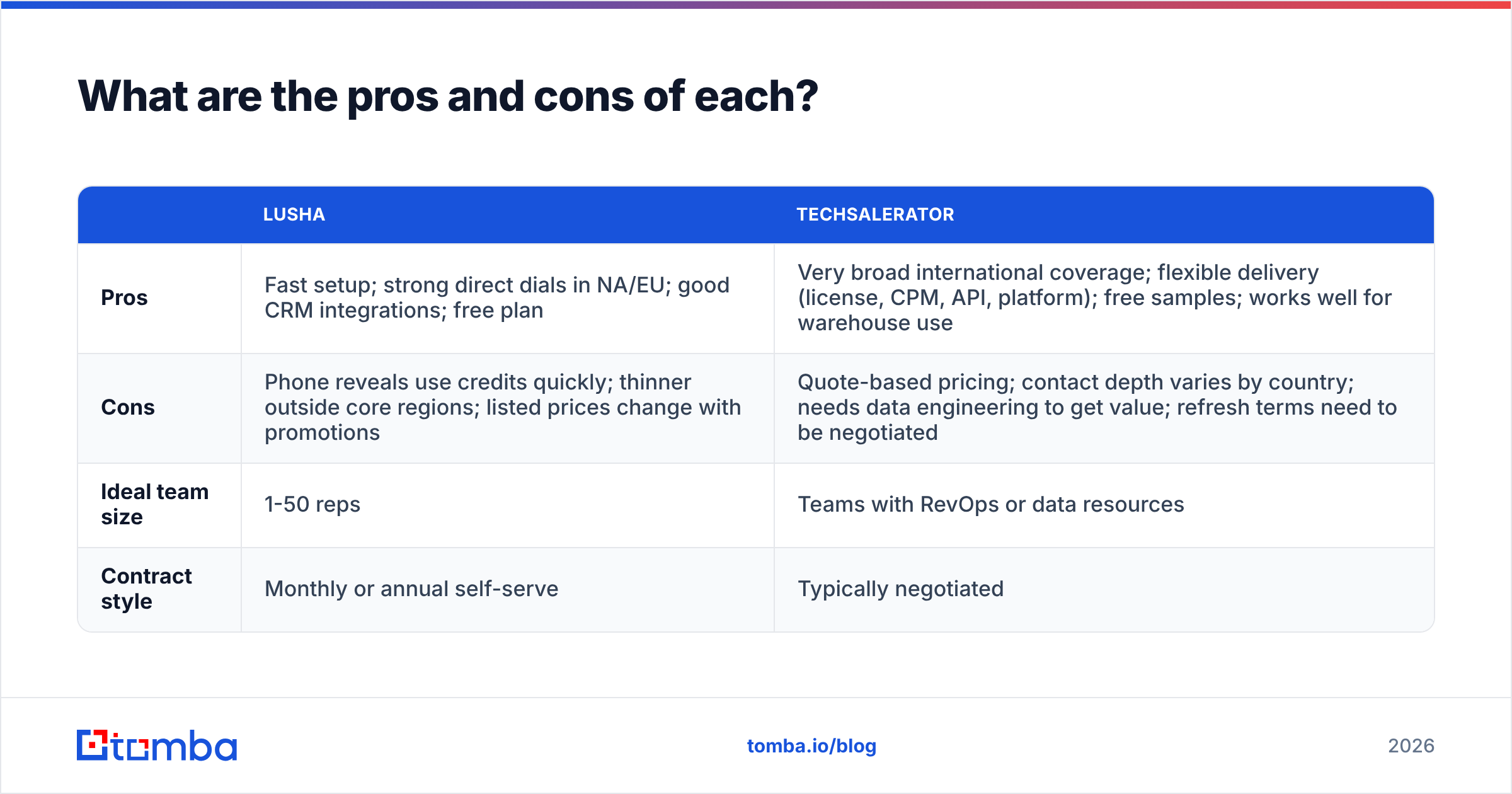
| Lusha | Techsalerator | |
|---|---|---|
| Pros | Fast setup; strong direct dials in NA/EU; good CRM integrations; free plan | Very broad international coverage; flexible delivery (license, CPM, API, platform); free samples; works well for warehouse use |
| Cons | Phone reveals use credits quickly; thinner outside core regions; listed prices change with promotions | Quote-based pricing; contact depth varies by country; needs data engineering to get value; refresh terms need to be negotiated |
| Ideal team size | 1-50 reps | Teams with RevOps or data resources |
| Contract style | Monthly or annual self-serve | Typically negotiated |
When should you use something else entirely?#
There's a third case that neither tool covers well. You have a list of companies, or names plus company domains, and you just need accurate work emails at a predictable cost, without per-phone credit charges or an enterprise data contract.
That's what a dedicated email finder is for. It works from a domain or a name plus company, returns the email with a confidence signal, and lets you verify it before sending. Tomba sits in this category. Its email finder, domain search, and verifier come together in flat monthly plans: a free tier with 25 searches a month, Starter at $49/mo, Growth at $99/mo, and Pro at $249/mo (full breakdown on the Tomba pricing page). It doesn't replace Techsalerator's 219-country firmographic coverage, and it isn't trying to be a Lusha-style direct-dial tool. Plenty of teams use it alongside one of them: Techsalerator for the account universe and a finder plus verifier for the contacts they'll actually email.
So which should you choose: Lusha or Techsalerator?#
Use this decision rule:
- Choose Lusha if your reps prospect named accounts in North America or Western Europe, phone numbers are central to your motion, and you want something working this afternoon.
- Choose Techsalerator if you need broad, multi-country company and contact data that you own and load into your own systems, and you have someone who can run the data side.
- Choose both, or a hybrid, if you're scaling internationally: bulk data for account coverage, plus a per-contact tool for emails and verification right before outreach.
Whichever you pick, request a sample or start on the free plan, test it against 200 records you already trust, and decide on measured match and bounce rates rather than marketing claims.
If what you really need is verified work emails for the accounts you've already picked, without credit math or a data contract, try the Tomba Email Finder. Search by domain, name, or company, verify in the same workflow, and start on the free tier before you commit to a plan.
Related guides#
// get started
Find, verify and enrich your first contacts today
Start on the free plan with 25 searches a month, then scale when your team is ready.
Free plan · No credit card required · GDPR & CCPA
Get the Tomba newsletter
Product and data updates
// about the author