Lyzr Pricing, Reviews, Pros and Cons: An Honest 2026 Breakdown
Lyzr's plans start at $0 and top out at $99 before Enterprise, but credits decide what you really pay. Here is what the plans buy, what reviewers like and dislike, and who should skip it.
TL;DR
- Lyzr has four tiers: Community (free, 500 credits), Starter ($19/mo, 2,000 credits), Pro ($99/mo, or $79/mo billed annually, 10,000 credits), and Enterprise (custom).
- Credits drive your bill. Top-ups start at $10 per 1,000 credits, and model and runtime usage can drain them faster than the plan page suggests.
- On G2, reviewers like how fast you can build an agent and the mix of no-code tools with SDK access. The common complaints are thin documentation, credit math that's hard to predict, and occasional latency.
- Lyzr suits teams that want to build and own AI agents, especially enterprises with compliance needs. It's overkill if you just need a sequence tool or an AI SDR that works out of the box.
- Any sales agent you build on Lyzr still needs verified contact data. Plan to pair it with a dedicated email finder.
What is Lyzr?#
Lyzr is a platform for building, deploying, and managing AI agents. Its main product, Lyzr Agent Studio, lets you put agents together through a visual interface. Developers who want more control can use the SDKs and APIs. Lyzr also sells pre-built agent blueprints for sales, customer support, HR, and banking workflows, and it pitches heavily to regulated enterprises that care about governance, data residency, and responsible-AI guardrails.
Think of Lyzr as a workshop, not a finished product. Some sales tools hand you an assembled machine: an AI SDR that writes and sends emails on day one. Lyzr gives you the workbench, the power tools, and a few templates. You can build something tailored to your process, but you supply the design, the data, and the testing time.
That difference matters a lot for pricing. With a finished tool, you pay for outcomes like seats, contacts, or sends. With Lyzr, you pay for compute and agent activity, which is metered in credits. Your bill depends on how efficiently your agents run, not only on which plan you pick.
How much does Lyzr cost in 2026?#
Here are Lyzr's published tiers, based on the official Lyzr plans documentation as of October 2026:
| Plan | Price | Monthly credits | Agent limit | Best for |
|---|---|---|---|---|
| Community | $0 | 500 | Up to 10 agents | Testing the builder, side projects |
| Starter | $19/mo | 2,000 | Up to 15 agents | Solo builders, small pilots |
| Pro | $99/mo ($79/mo annual) | 10,000 (120K/yr on annual) | Up to 25 agents | Teams running agents in production |
| Enterprise | Custom | Custom / unlimited | Unlimited | Regulated orgs, on-prem or VPC deployment |
The free tier also limits you to five knowledge bases and 100 MB of storage. That's enough to test a RAG-style agent on a handful of documents, but not enough to load a real product catalog or a few years of call transcripts.
What do credit top-ups cost?#
When you run out mid-month, you buy top-ups. Published packs start at $10 for 1,000 credits and scale up to $1,000 for 100,000 credits, with a $5,000 pack for 500,000 credits. Top-ups stack on top of your plan allowance.
The flat rate is the thing to notice. At published rates, 1,000 extra credits costs about the same per credit as the Starter plan. Once you're consistently buying top-ups on Starter, moving to Pro is usually the cheaper choice.
Why do Lyzr's credit numbers look inconsistent?#
If you read Lyzr's docs closely, you'll find different credit definitions on different pages. The main plans page lists the 500 / 2,000 / 10,000 allotments above. A separate credits explainer in the enterprise docs describes credits in dollar terms, with roughly one credit per dollar and a $20 monthly allowance on the free plan. An older Agent Studio plans page lists much smaller numbers.
These pages probably reflect different product generations or scales. Still, it's a real source of confusion, and reviewers mention it. Before you commit budget, open a trial account, run your actual agent 50 to 100 times, and check how many credits each run uses. That number tells you far more than any pricing page.

What are the hidden costs of Lyzr?#
The plan price is the smallest part of your total cost. Budget for these as well:
- Model usage. Agents call large language models, and multi-step agents call them several times per task. Third-party reviewers report that LLM costs are passed through on top of platform fees. Pick a premium model for every step and your credit burn can multiply.
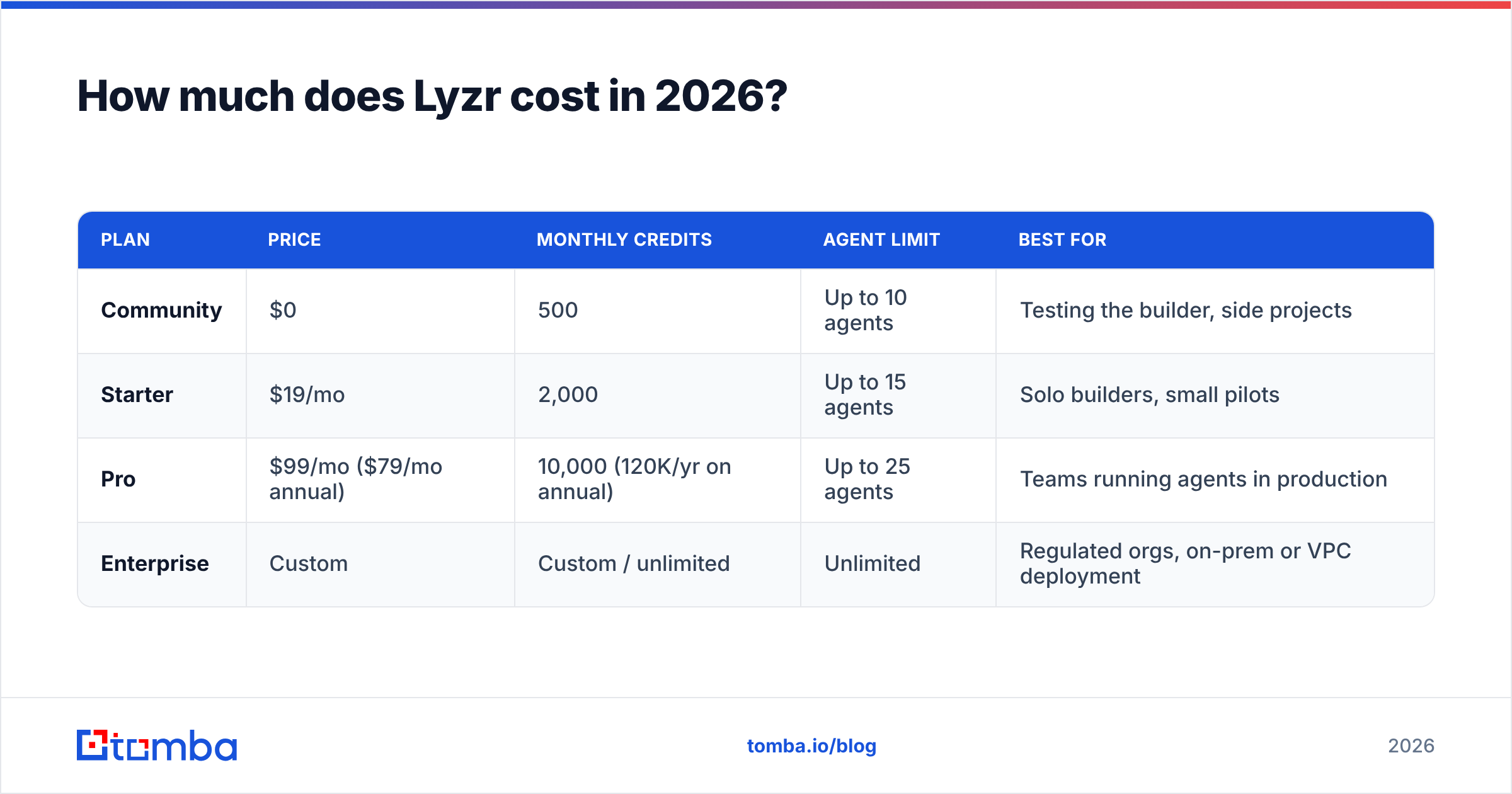
- Runtime and execution fees. Some aggregators cite per-run costs of roughly $0.08 on cloud and $0.03 self-hosted. Lyzr's official page doesn't headline these figures, so treat them as directional and confirm them with sales.
- Build time. A visual builder still needs someone to design prompts, wire up tools, write guardrails, and test edge cases. That's either your engineering time or a services engagement.
- Data inputs. A sales agent is only as good as the contacts and company data you feed it. Lyzr doesn't come with a B2B contact database, so you'll pay for that separately.
- Integration work. Connecting agents to your CRM, inbox, and data warehouse takes setup time. On Enterprise, that may include deployment work inside your own cloud.
A realistic budget for a small sales team running one or two production agents looks like this: Pro at $99/mo, maybe $20 to $50/mo in top-ups during heavy months, a contact-data tool, and a few weeks of someone's time to get the agent reliable. For a mid-sized deployment, that adds up to $200 to $400/mo in software before labor.
What do Lyzr reviews say?#
Lyzr has a solid but small review footprint. On G2, the Lyzr.ai listing shows an average around 4.4 to 4.5 out of 5, across a few dozen reviews depending on when you check. One third-party analysis found that most of those reviews come from users in Asia, so read the sample as directional rather than representative of every market.
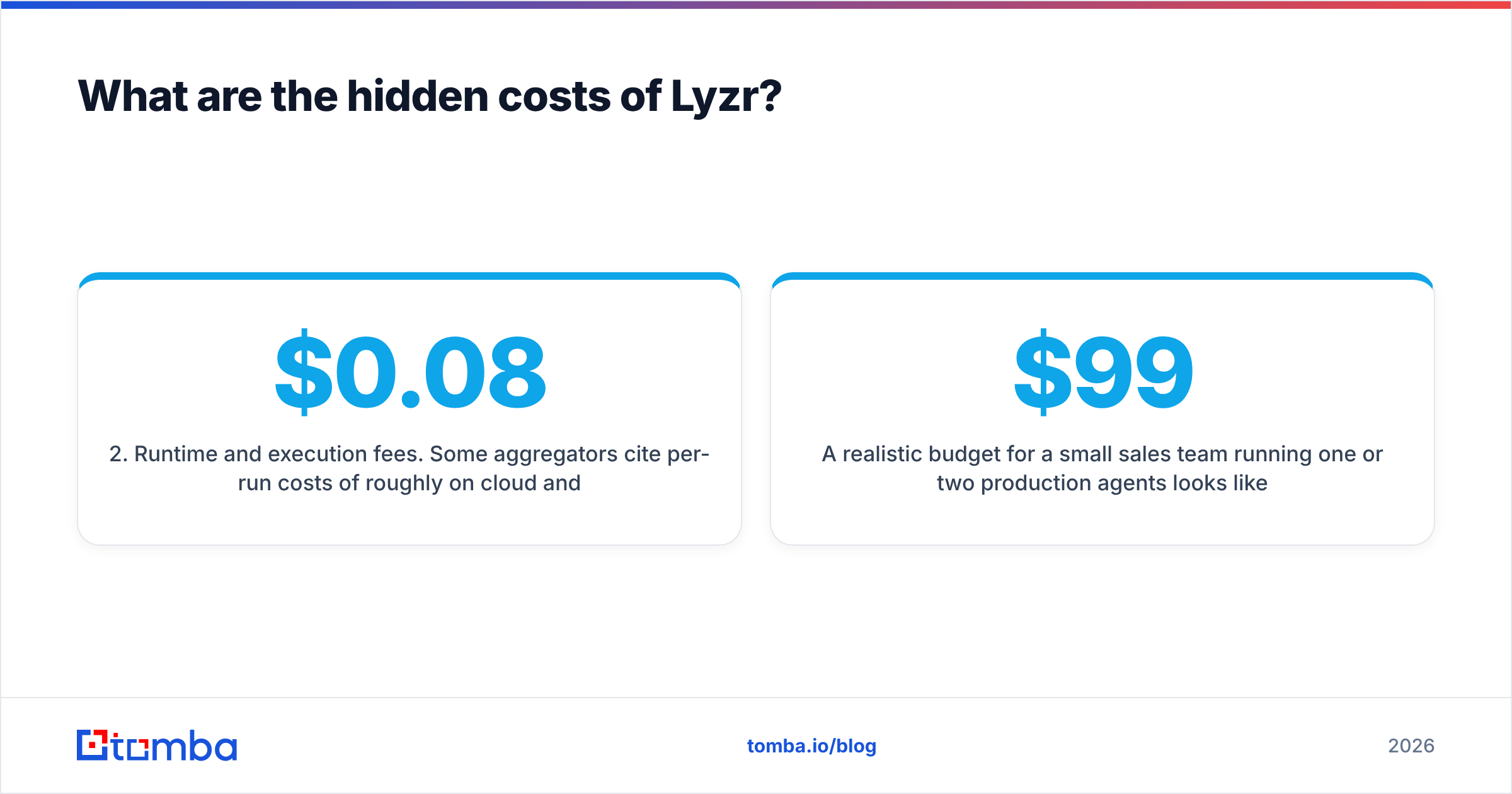
Here's how the feedback breaks down:
| Theme | What reviewers say | How often it comes up |
|---|---|---|
| Ease of use | Fast to stand up a working agent, intuitive builder | Most common praise |
| Flexibility | No-code canvas plus SDKs and APIs for deeper control | Frequent |
| Templates | Blueprints shorten time to first agent | Frequent |
| Documentation | Incomplete or shallow in places | Most common complaint |
| Pricing clarity | Credit model is confusing; costs can climb with usage | Recurring |
| Performance | Some latency when agents run as apps | Occasional |
| Fit | Heavy for simple workflows | Occasional |
What do users like most?#
Speed to a first working agent. Reviewers keep saying they got a functional prototype running in hours rather than weeks. For teams evaluating whether AI agents can handle a workflow at all, that alone is worth the free tier.
The no-code and pro-code split. Business users can build on the canvas, and engineers can take over through the SDK when the logic gets complex. Few platforms handle that handoff cleanly.
Enterprise posture. Lyzr puts governance, private deployment, and responsible-AI controls at the center of its pitch. If your security team blocks most AI SaaS, that matters.
What do users complain about?#
Documentation gaps. This is the most consistent complaint. When you leave the happy path of a template, you may end up reading code or opening a support ticket.
Unpredictable spend. The credit model makes forecasting hard. A small prompt change can double the number of model calls per run, and you'll only see it when credits run out.
Overkill for simple jobs. If you only need "enrich this list and send a three-step sequence," a sales automation tool will get you there faster and cheaper.
What are Lyzr's pros and cons?#
Here's the short version:
Pros
- Low entry price. A free tier plus a $19 Starter plan make experimenting nearly risk-free.
- Flexible build model. Visual builder for operators, SDKs for engineers.
- Enterprise-ready deployment. VPC and on-prem options with governance features that many AI startups don't offer.
- Pre-built blueprints. Sales, support, and back-office templates shorten time to value.
- Reasonable Pro pricing. $79/mo on annual billing is competitive for a full agent platform.
Cons
- Credit math is opaque. Conflicting docs and pass-through model costs make budgeting hard.
- Thin documentation. Expect trial and error past the templates.
- Build effort is real. You're paying for a workshop, so you still have to build.
- No native contact data. Sales agents need a separate data source for emails and phone numbers.
- Small review base. Fewer independent reviews than mature sales platforms, mostly from one region.
Is Lyzr worth it?#
It depends on what you're buying it for. Here's a quick decision guide:
- You want to own custom AI agents across several departments. Lyzr is a strong candidate. Pro or Enterprise makes sense, and the flexibility justifies the build effort.
- You're in a regulated industry with strict data controls. Lyzr's private deployment and governance features are a real differentiator. Talk to sales about Enterprise.
- You want an AI SDR that books meetings next week. Look at purpose-built AI SDR and sequencing tools first. Lyzr can get there, but you'll spend weeks building what those tools ship by default.
- You're a solo founder testing ideas. Start on Community, move to Starter only if you hit the 500-credit ceiling, and track credits per run from the first day.
- You need cleaner contact data for outbound. Lyzr doesn't solve that. Fix your data layer first, because an agent working from bad emails just sends bounces faster.
Benchmarked against the wider market, which analysts at Gartner describe as moving quickly toward agentic AI, Lyzr's list prices are fair. Credit discipline is what separates a good deal from a bad one. Teams that watch per-run consumption and route simple steps to cheaper models get strong value. Teams that don't tend to get surprised.
How does Lyzr compare to other ways of automating sales work?#
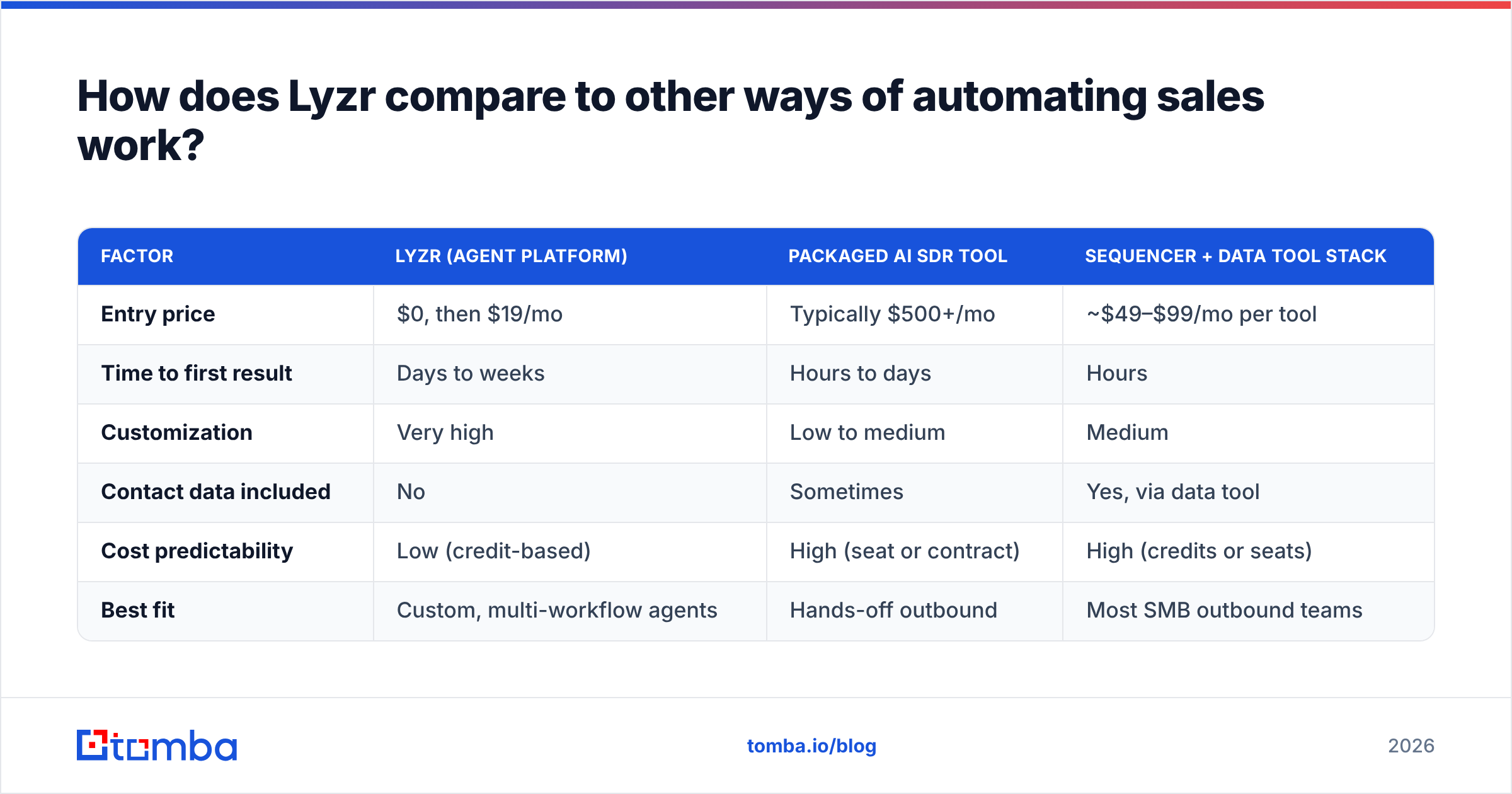
Lyzr isn't the only route to AI-assisted selling. Here's how it compares with the two most common alternatives:
| Factor | Lyzr (agent platform) | Packaged AI SDR tool | Sequencer + data tool stack |
|---|---|---|---|
| Entry price | $0, then $19/mo | Typically $500+/mo | ~$49–$99/mo per tool |
| Time to first result | Days to weeks | Hours to days | Hours |
| Customization | Very high | Low to medium | Medium |
| Contact data included | No | Sometimes | Yes, via data tool |
| Cost predictability | Low (credit-based) | High (seat or contract) | High (credits or seats) |
| Best fit | Custom, multi-workflow agents | Hands-off outbound | Most SMB outbound teams |
For many B2B teams, the practical answer is a hybrid. Run outbound on a proven stack today, and use Lyzr for the workflows no off-the-shelf tool handles, like research briefs, account planning, or internal knowledge agents.
How do you keep a Lyzr sales agent from failing on bad data?#
This is the part most Lyzr evaluations skip. An AI agent that researches accounts and drafts outreach is a multiplier. If the input data is wrong, it multiplies the mistakes.
Before you connect any agent to an outbound workflow:
- Source verified emails. Use a dedicated email finder to pull professional addresses by name and domain rather than letting the agent guess formats.
- Enrich before you prompt. Feed the agent role, seniority, company size, and tech stack through data enrichment so personalization rests on facts rather than hallucinations.
- Cap the agent's send authority. Keep a human approval step until bounce and reply rates look stable.
- Track credits per qualified contact. Divide monthly Lyzr spend by contacts that actually got a reply. That's your real unit cost.
Data tools also bill by credit, so compare them the same way. Tomba pricing starts with a free tier of 25 searches a month, then Starter at $49/mo, Growth at $99/mo, and Pro at $249/mo. Because those plans are tied to contacts found and verified, they're easier to forecast than agent compute.
Final verdict on Lyzr pricing, reviews, pros and cons#
Lyzr is a credible, fairly priced agent platform for teams that want to build. The free and $19 tiers make it cheap to evaluate. Pro at $79 to $99/mo is reasonable for production use, and Enterprise brings deployment and governance options that many competitors lack. The trade-offs are credit forecasting, thin documentation, and the build effort. None of these rule it out, but you should account for all of them.
Treat the sticker price as a starting point. Measure credits per run during the trial, budget for model costs and data, and only scale once the agent reliably beats your manual process. You can confirm current tiers on Lyzr's official site before you sign anything.
Whatever you build on Lyzr, its outreach agents will only perform as well as the contacts you give them. Tomba Email Finder finds professional email addresses by name, domain, or company, with built-in verification, so your agents work from real inboxes instead of guessed patterns. Start free with 25 searches a month, then try your first Lyzr-powered sequence on contacts you can trust: try Tomba Email Finder.
Related guides#
// start free
See who Tomba finds at any company
Type a company's domain to see its people, their roles and verified work emails, each with the pages it was found on. Free account, no card.
Free plan · No credit card required · GDPR & CCPA
// about the author