Mailcheck vs SalesIntel: Verifier or Verified Data in 2026?
Mailcheck cleans email lists for about $10 a month. SalesIntel sells human-verified B2B contacts on five-figure annual contracts. They solve different problems, so the right choice depends on whether your outbound gap is bad emails or no contacts at all.
TL;DR
- Mailcheck and SalesIntel are not direct competitors. Mailcheck checks emails you already have. SalesIntel sells you contacts you don't have yet.
- Their costs are far apart. Mailcheck's self-serve plans start at roughly $10/month for about 1,000 checks. SalesIntel uses annual contracts, and third-party estimates put most teams between $8,000 and $20,000 a year.
- Pick Mailcheck if you already have a list (CRM exports, event leads, signup forms) and want to stop bounces cheaply.
- Pick SalesIntel if you're a funded sales team that needs a large, human-verified US contact database with intent data, and you can commit to a year.
- There's a middle option. If you need to find emails and verify them without an enterprise contract, a finder-plus-verifier such as Tomba covers both from $49/month.
People usually search "Mailcheck vs SalesIntel" while building an outbound stack on a limited budget and trying to work out where the bounces, or the missing contacts, are coming from. These two tools sit at opposite ends of that stack. This guide covers what each one does, what it really costs, how their accuracy claims differ, and which one fits your situation.
What is Mailcheck?#
Mailcheck is a lightweight email verification service. You upload a list or call its API, and it tells you which addresses are valid, invalid, risky, or duplicated. It also cross-checks addresses against social profiles, which helps flag inboxes that technically exist but probably aren't used by a real person.
Its core features:
- Bulk list verification. Upload a CSV and get back a cleaned file.
- Single-email checks. Validate one address in real time from the dashboard.
- Verification API. Plug it into signup forms so bad addresses never reach your CRM.
- Duplicate detection. Removes repeated rows before you pay to verify them.
- Money-back guarantee. Mailcheck has advertised a 40-day refund window, which is unusual in this category.
What Mailcheck doesn't do matters just as much. It doesn't find emails, it has no contact database, and it provides no firmographics, phone numbers, or intent signals. It's a cleaning tool for lists you already own.
What is SalesIntel?#
SalesIntel is a B2B data and sales intelligence platform. Its main selling point is human-verified contact data. The company says it employs a large team of researchers (around 2,000, by its own count) who re-verify records on a roughly 90-day cycle. It claims up to 95% email accuracy on those verified records.
The platform includes:
- A B2B contact and company database, strongest in North America
- Direct dials and mobile numbers, though coverage varies by industry
- Intent data that shows which accounts are researching topics you sell into, on higher tiers
- Technographics and firmographics for account targeting
- Website visitor identification and advertising add-ons
- A Chrome extension and CRM integrations for Salesforce and HubSpot
SalesIntel is built to answer the question "who should my reps call this quarter, and how do they reach them?" It's a prospecting database, not a list-hygiene utility.
How do Mailcheck and SalesIntel compare side by side?#
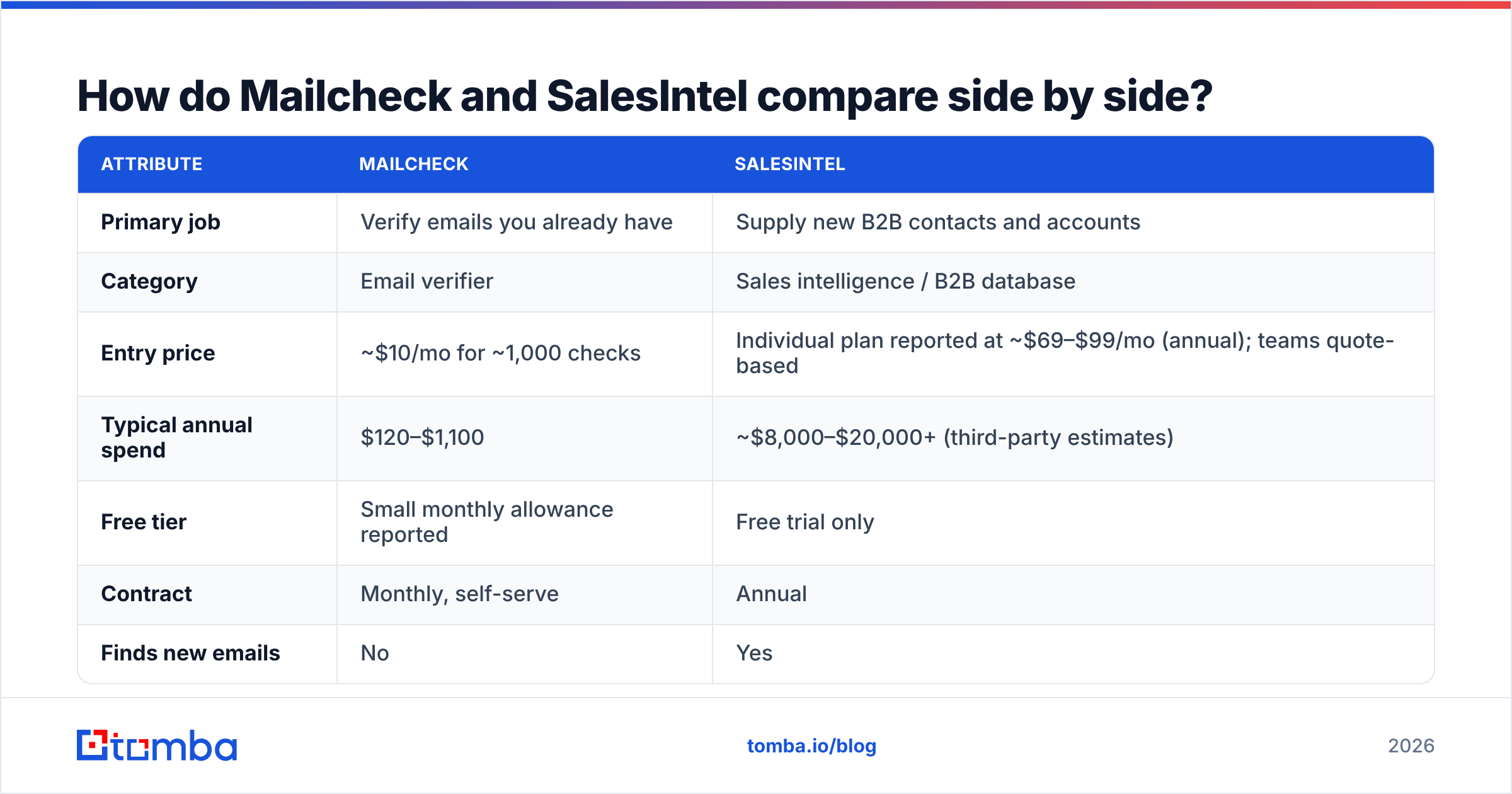
Here is the full comparison. The pricing for SalesIntel is indicative only, because the company doesn't publish team prices.
| Attribute | Mailcheck | SalesIntel |
|---|---|---|
| Primary job | Verify emails you already have | Supply new B2B contacts and accounts |
| Category | Email verifier | Sales intelligence / B2B database |
| Entry price | ~$10/mo for ~1,000 checks | Individual plan reported at ~$69–$99/mo (annual); teams quote-based |
| Typical annual spend | $120–$1,100 | ~$8,000–$20,000+ (third-party estimates) |
| Free tier | Small monthly allowance reported | Free trial only |
| Contract | Monthly, self-serve | Annual |
| Finds new emails | No | Yes |
| Phone numbers | No | Yes (direct dials, mobiles) |
| Intent data | No | Yes (higher tiers) |
| API | Yes (verification) | Yes (data access) |
| Best for | Marketers, small outbound teams, signup forms | Mid-market and enterprise SDR teams |
The table shows the real decision. You aren't choosing between two versions of the same product. You're choosing between fixing data quality and buying data quantity.
Which one is more accurate?#
You can't compare their accuracy directly, because each tool measures a different thing.
Mailcheck's accuracy is about classification. When it says "valid" or "invalid," how often is it right? Like every SMTP-based verifier, it has a weak spot: catch-all domains. These are company mail servers that accept every address, so a verifier can't tell whether jane.doe@company.com is a real inbox. Mailcheck will mark these as risky or unknown, and you have to decide whether to send.
SalesIntel's accuracy is about freshness. Is the record (name, title, email, phone) still correct today? Human verification reduces data decay, but it doesn't eliminate it. People change jobs every week, and a 90-day re-verification cycle still leaves a window where records go stale. Reviews on G2 generally rate the email data well but are more mixed on direct-dial coverage in niche verticals.
In practice, even SalesIntel customers often run exported lists through a verifier before a big send. These tools are frequently used together, not instead of each other. A purchased database tells you who to contact, and a verifier confirms the address won't bounce on the day you hit send.
How much do Mailcheck and SalesIntel really cost?#
Mailcheck pricing#
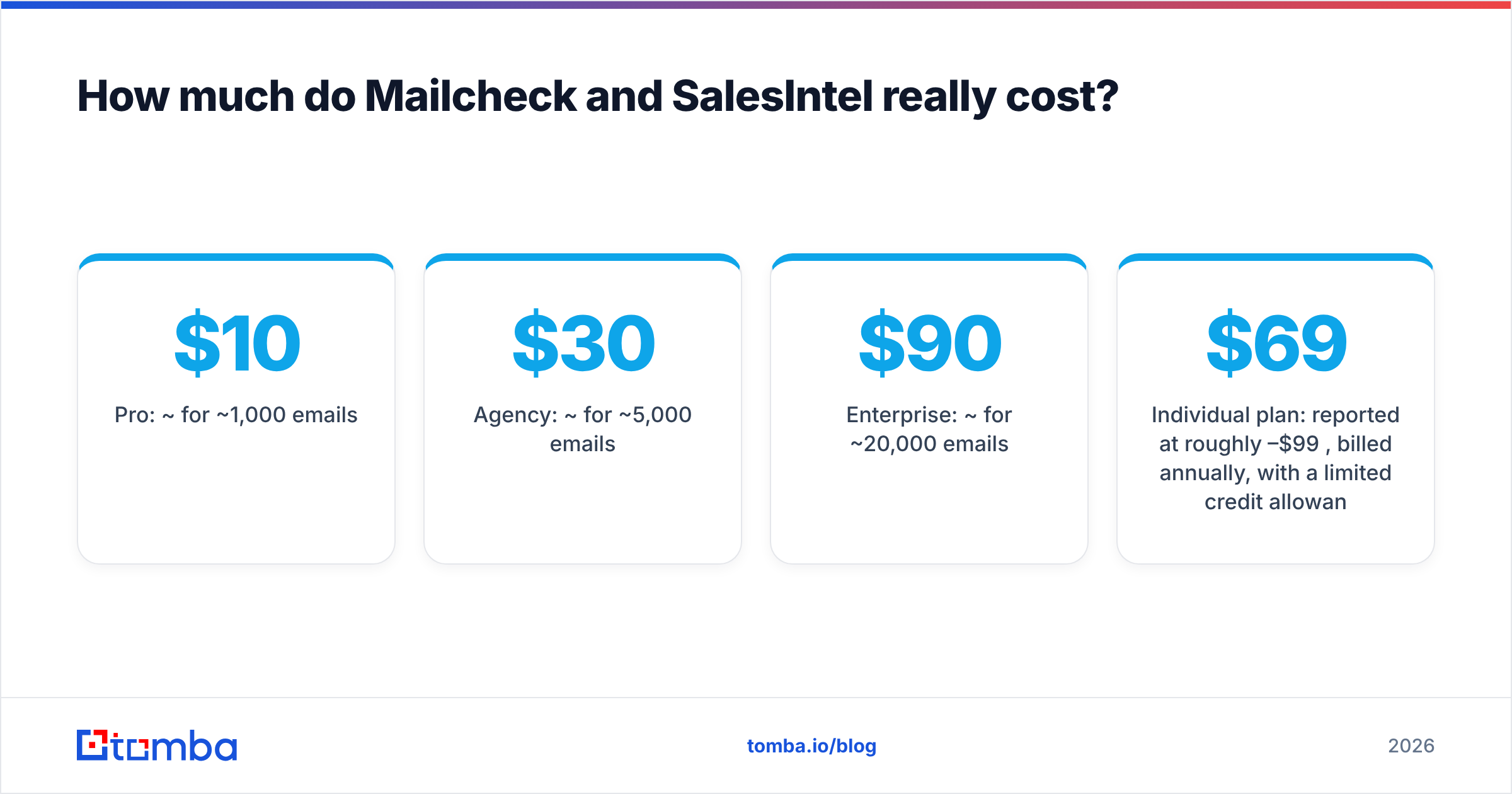
Mailcheck uses simple self-serve tiers. Recent third-party snapshots list roughly:
- Free: a small monthly allowance (around 10 checks)
- Pro: ~$10/mo for ~1,000 emails
- Agency: ~$30/mo for ~5,000 emails
- Enterprise: ~$90/mo for ~20,000 emails
- Custom: volume plans above that
Prices have changed over the years, so check the live pricing page before you budget. But the scale won't change: Mailcheck costs roughly the same as a SaaS lunch budget.
SalesIntel pricing#
SalesIntel doesn't publish team pricing. Based on aggregated buyer data and review sites:
- Individual plan: reported at roughly $69–$99/month, billed annually, with a limited credit allowance
- Team plans: commonly start around $8,000–$10,000/year
- Median contract: buyer-data sources cite roughly $17,600/year
- Add-ons for intent data, visitor ID, and advertising raise the total
The pricing structure usually combines a platform fee, per-seat licenses, and optional modules. SalesIntel has moved toward "unlimited" access models, but export and credit terms still vary by contract. Read the order form closely.
What the numbers mean#
If you send 5,000 cold emails a month and already have the addresses, Mailcheck costs about $30. A SalesIntel contract for the same team could cost 50 times as much, but it also gives you something Mailcheck can't: the contacts themselves. So the cost question really becomes: is your bottleneck finding people, or reaching them without bouncing?
Who should choose Mailcheck?#
Mailcheck is the right call when the following are true.
- You already have contacts. CRM exports, webinar registrants, trade-show scans, inbound leads, or a list a colleague built by hand.
- Bounces are hurting your sender reputation. A bounce rate above 2–3% damages your email deliverability fast, and verification is the cheapest fix.
- You need form validation. The API can block typos and fake signups at the point of entry.
- Your budget is small. Solo founders, agencies, and small marketing teams can verify thousands of addresses for less than one SaaS seat.
The limit shows up once your list runs out. Mailcheck can't help you reach the VP of Finance at a company you've never contacted.
Who should choose SalesIntel?#
SalesIntel fits when the following are true.
- You have an SDR team of 3+ reps who need a steady supply of new, targeted contacts.
- You sell mostly into North America, where SalesIntel's coverage is strongest.
- Intent data matters to your motion. You want to prioritize accounts that are actively researching your category.
- You can sign an annual contract and have someone (RevOps or a sales manager) who will make sure the seats get used.
- Phone outreach is a real channel. Direct dials and mobiles are part of what you're paying for.
If you're a two-person startup testing outbound for the first time, SalesIntel is probably more platform than you need. Analysts at firms like Gartner regularly point out that sales-tech ROI depends far more on adoption than on features. Underused data contracts are one of the most common sources of wasted spend in a sales stack.
Is there a middle ground between Mailcheck and SalesIntel?#
Yes, and that's where most small and mid-sized outbound teams end up.
The gap between "$10/month verifier" and "$17K/year database" is wide. Many teams need something in between: the ability to find a specific person's email address (from a name and a company domain), verify it before sending, and do both without a sales call or an annual commitment.
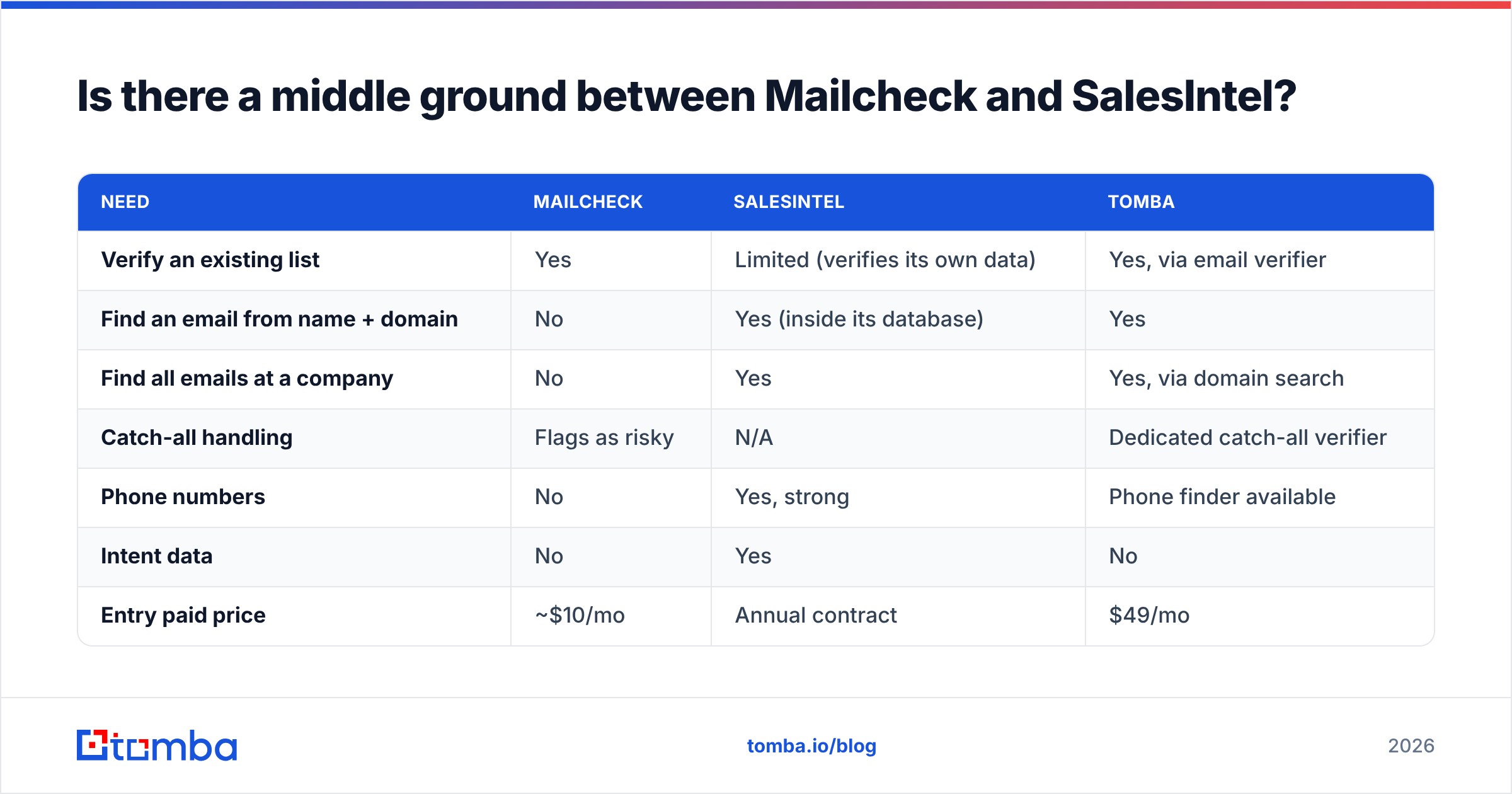
That's the category Tomba sits in. Here is how the three approaches compare:
| Need | Mailcheck | SalesIntel | Tomba |
|---|---|---|---|
| Verify an existing list | Yes | Limited (verifies its own data) | Yes, via email verifier |
| Find an email from name + domain | No | Yes (inside its database) | Yes |
| Find all emails at a company | No | Yes | Yes, via domain search |
| Catch-all handling | Flags as risky | N/A | Dedicated catch-all verifier |
| Phone numbers | No | Yes, strong | Phone finder available |
| Intent data | No | Yes | No |
| Entry paid price | ~$10/mo | Annual contract | $49/mo |
| Free tier | Small | Trial only | 25 searches/mo |
You can see where Tomba wins and where it doesn't. It isn't a replacement for SalesIntel's intent data or its human research team. If you sell to large enterprise accounts and intent signals drive your territory planning, SalesIntel (or a peer in that tier) is the more complete product. What Tomba does give you is the find-and-verify workflow at monthly pricing. It also covers a gap SalesIntel doesn't: coverage outside North America, and the long tail of smaller companies that human research teams tend to prioritize less.
If you're building lists from scratch, the Tomba B2B database and data enrichment can fill in titles, company data, and social profiles on records you already partly have. That's often what teams really want when they first look at an enterprise database.

How should you structure your stack in 2026?#
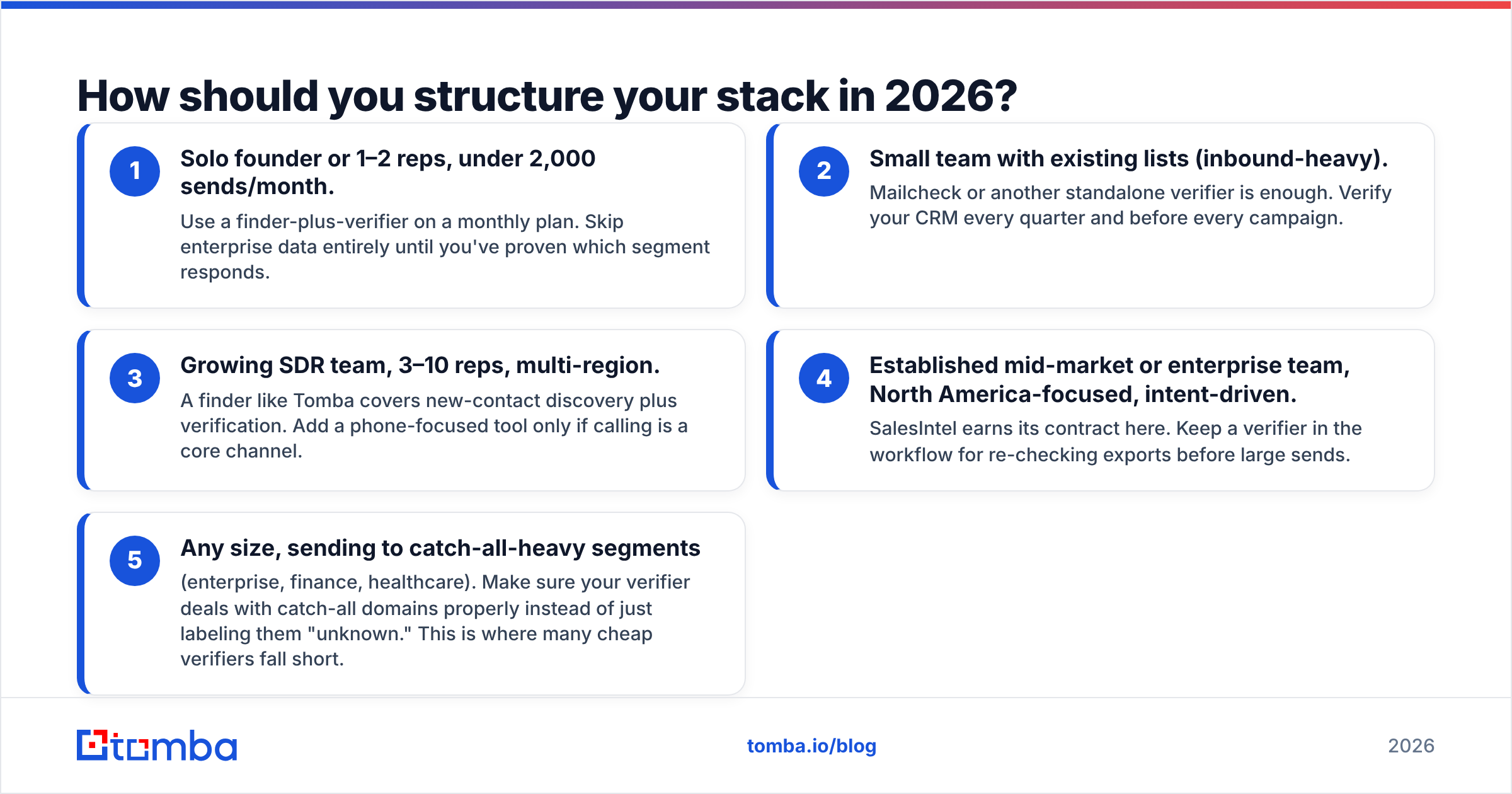
Here's a practical way to decide, based on team size and outbound volume.
- Solo founder or 1–2 reps, under 2,000 sends/month. Use a finder-plus-verifier on a monthly plan. Skip enterprise data entirely until you've proven which segment responds.
- Small team with existing lists (inbound-heavy). Mailcheck or another standalone verifier is enough. Verify your CRM every quarter and before every campaign.
- Growing SDR team, 3–10 reps, multi-region. A finder like Tomba covers new-contact discovery plus verification. Add a phone-focused tool only if calling is a core channel.
- Established mid-market or enterprise team, North America-focused, intent-driven. SalesIntel earns its contract here. Keep a verifier in the workflow for re-checking exports before large sends.
- Any size, sending to catch-all-heavy segments (enterprise, finance, healthcare). Make sure your verifier deals with catch-all domains properly instead of just labeling them "unknown." This is where many cheap verifiers fall short.
Whatever you choose, the rule stays the same: never send to an unverified list. A single campaign with a 10% bounce rate can do lasting damage to your sending domain, and recovering takes weeks. Most CRM vendors, including HubSpot, recommend proactive list cleaning to keep bounces low.
What are the pros and cons of each?#
Mailcheck pros
- Very low cost, with self-serve monthly plans
- Simple to use, with bulk upload and an API
- Duplicate removal and social cross-checks
- Long refund window
Mailcheck cons
- Can't find new contacts
- No enrichment, phones, or firmographics
- Catch-all results remain uncertain
- Smaller vendor with a less extensive integration ecosystem
SalesIntel pros
- Human-verified contact records with regular re-verification
- Direct dials and mobile numbers
- Intent data and technographics for account prioritization
- Strong US coverage and CRM integrations
SalesIntel cons
- Annual contracts and opaque pricing
- Expensive for small teams
- Coverage is thinner outside North America and in some niche industries
- You may still want a separate verifier before large sends
So, Mailcheck vs SalesIntel: which should you pick?#
If you have the emails, buy Mailcheck. If you need the people, look at SalesIntel. If you need both and can't justify a five-figure contract, use a finder-plus-verifier.
Mailcheck is a reliable, inexpensive list-cleaning utility. SalesIntel is a serious sales intelligence platform for teams with budget, scale, and a North American focus. Comparing them as if they were rivals leads to bad buying decisions. The useful question is which layer of your outbound stack is actually broken.
For most teams under ten reps, the broken layer is "I know which companies I want, but I don't have verified emails for the right people." That's a finding problem, and it doesn't call for a list cleaner or a $17K database.
If that describes you, try Tomba Email Finder. Enter a name and company domain (or just the domain) to get professional email addresses, verified before you send. Start on the free tier with 25 searches a month, then scale on monthly plans from $49. Compare all Tomba plans to see which volume fits your outbound cadence. There's no annual contract and no sales call.
Related guides#
// start free
See who Tomba finds at any company
Type a company's domain to see its people, their roles and verified work emails, each with the pages it was found on. Free account, no card.
Free plan · No credit card required · GDPR & CCPA
// about the author