

Mailcheck vs Zintlr: Verifier or Prospecting Database in 2026?
Mailcheck cleans the emails you already have. Zintlr finds the people you don't have yet. Here is how to tell which one your outbound stack actually needs, with pricing, use cases, and a clear pick.
TL;DR
- Mailcheck and Zintlr do different jobs. Mailcheck (mailcheck.co) is mainly an email verification service. Zintlr is a B2B prospecting database with contact data and buyer-personality insights.
- Mailcheck is the cheaper buy. Third-party listings put it at about $10/mo for 1,000 verifications, rising to around $90/mo for 20,000. Zintlr's paid plans reportedly start around $49/mo, and some listings quote higher per-seat prices.
- Pick Mailcheck if you already have lead lists and only need to clean them before sending. Pick Zintlr if you need new contacts and want personality-based talking points for each prospect.
- You may need both, because Zintlr finds contacts and Mailcheck verifies them. That means two vendors, two bills and two integrations. A tool that does both finding and verifying can replace the pair.
- Check prices on the vendors' own pages. Third-party pricing listings for both tools disagree with each other.
"Mailcheck vs Zintlr" sounds like a normal head-to-head, but these tools only overlap a little. One checks whether an email address will accept mail. The other tells you who to email and how to talk to them. If you compare them only on features, you could end up paying for the wrong half of your outbound workflow.
This guide sets the two tools side by side, says where each one is strong, and ends with a pick for each type of buyer.
What is Mailcheck?#
Mailcheck is an email verification service. You upload a list or call its API, and it sorts each address into valid, invalid or risky. Under the hood it runs syntax checks, MX record lookups and mailbox-level SMTP checks. It also flags disposable and role-based addresses.
Mailcheck works like a spell-checker for your contact list. It doesn't write anything new. It just stops you from sending messages that will bounce.
Here is what matters if you're evaluating it:
- Core job: bulk and API email verification
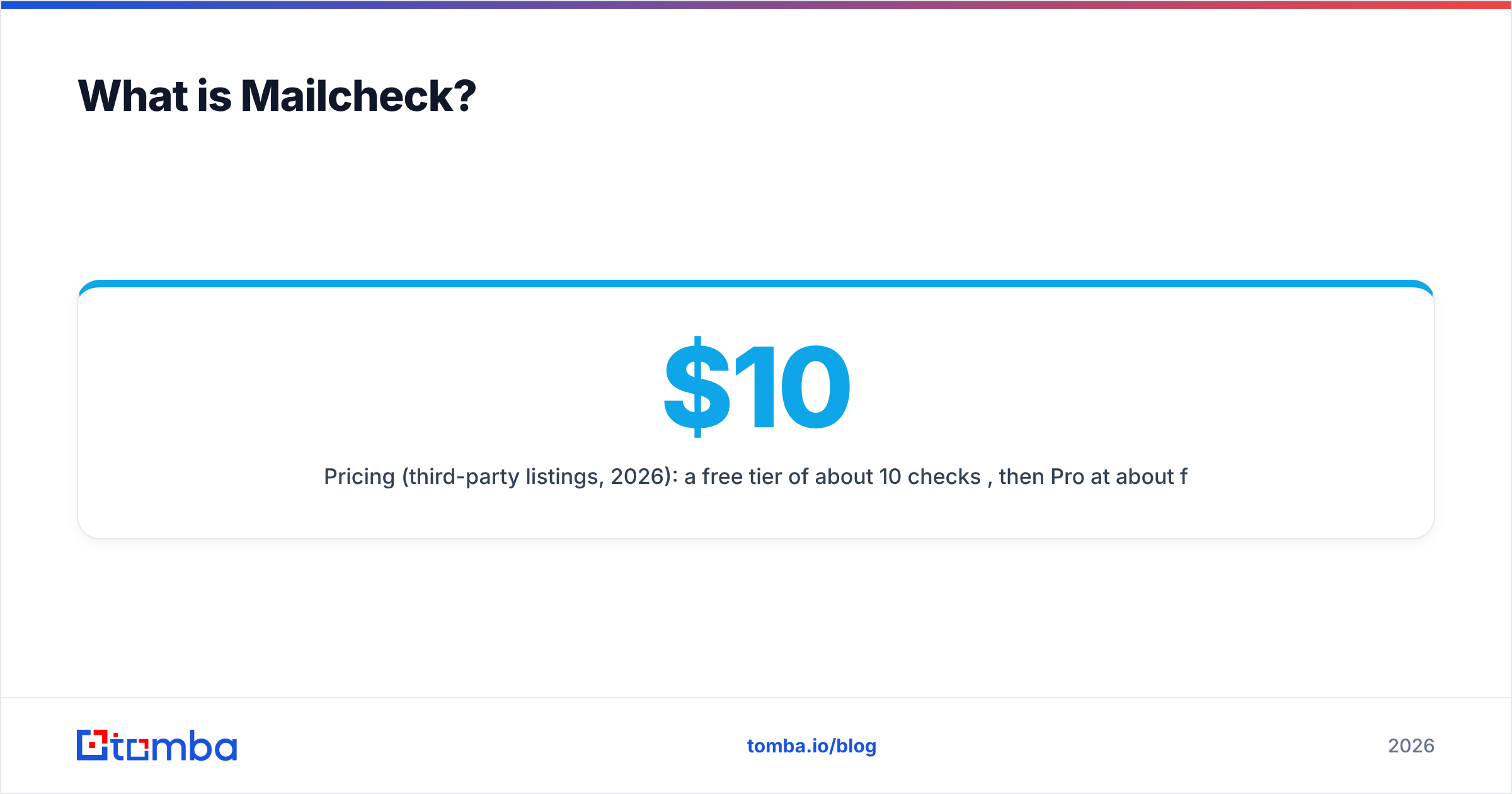
- Pricing (third-party listings, 2026): a free tier of about 10 checks per month, then Pro at about $10/mo for 1,000 emails, Agency at about $30/mo for 5,000 and Enterprise at about $90/mo for 20,000. Overage is charged per extra email.
- Best for: agencies and SDR teams that already source leads elsewhere and need to protect their sender reputation
- What it doesn't do: build lead lists, store firmographic data or give context about prospects
Mailcheck's per-check cost is low, which matters at high volume. One caveat: a verifier is only as useful as the lists you feed it. If the list came from a weak source, verification removes the bad addresses, but your total number of contacts shrinks with them.
What is Zintlr?#
Zintlr is a B2B sales intelligence platform. It combines a contact database with a Chrome extension that works on LinkedIn. Third-party listings say it covers 500M+ contacts and 75M+ companies, though some sources give lower numbers. You search by role, company, industry or location, then reveal emails and phone numbers.
Zintlr's main differentiator is personality insights. Alongside contact details, it gives a behavioural profile of the prospect: communication style, decision drivers and suggested ways to approach them. Most database tools give you a phone number. Zintlr adds a briefing on how the person on the other end likes to be spoken to.
- Core job: prospecting (finding people, emails and phone numbers), plus personality-led outreach context
- Pricing (third-party listings, 2026): a 14-day free trial with no credit card, a Lite plan listed at $49/mo on Capterra, a higher Plus plan and custom enterprise pricing. One aggregator quotes $89 per user per month, so confirm the current price with Zintlr directly.
- Best for: SDRs and founders who do personalised, lower-volume outbound, especially into Indian and APAC markets where Zintlr has invested heavily
- What it doesn't do well: high-volume list hygiene. A database's own verification isn't the same as running a dedicated verifier before a big send.

Is Mailcheck better than Zintlr?#
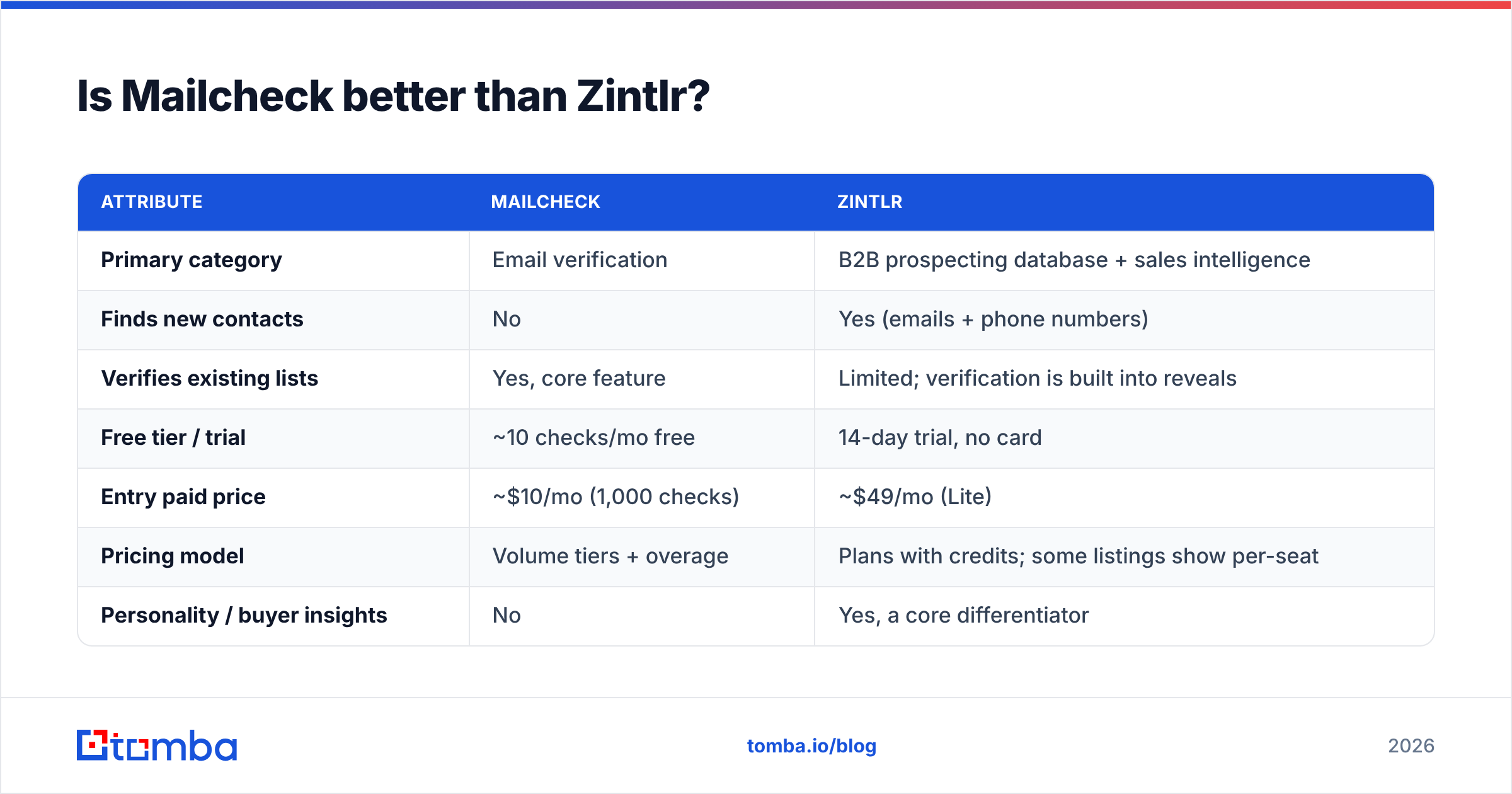
It depends on where your bottleneck is. Here's how the two compare on the attributes that affect your outbound results:
| Attribute | Mailcheck | Zintlr |
|---|---|---|
| Primary category | Email verification | B2B prospecting database + sales intelligence |
| Finds new contacts | No | Yes (emails + phone numbers) |
| Verifies existing lists | Yes, core feature | Limited; verification is built into reveals |
| Free tier / trial | ~10 checks/mo free | 14-day trial, no card |
| Entry paid price | ~$10/mo (1,000 checks) | ~$49/mo (Lite) |
| Pricing model | Volume tiers + overage | Plans with credits; some listings show per-seat |
| Personality / buyer insights | No | Yes, a core differentiator |
| LinkedIn Chrome extension | Not its focus | Yes |
| API access | Yes | Available on higher tiers / by request |
| Best for | List hygiene, bounce prevention | Building and personalising lead lists |
| Biggest limitation | Needs a separate lead source | Not built for bulk list cleaning |
The table shows one thing clearly: these tools are complements rather than substitutes. If you choose one, the other half of the job still has to be done somewhere.
How do Mailcheck and Zintlr fit into an outbound workflow?#
Think of outbound as a short pipeline. Each stage has its own job, and the two tools sit at different points in it:
- Define the ICP. Decide which roles, industries and company sizes you're targeting. Neither tool does this for you.
- Source contacts. Find the people and their emails or phone numbers. Zintlr works here; Mailcheck doesn't.
- Enrich and personalise. Add context so the first line of your email isn't generic. Zintlr's personality insights fit here.
- Verify before sending. Remove invalid, disposable and risky addresses to protect your domain. Mailcheck works here.
- Send and sequence. Load the list into your sequencer. This stage needs a third tool.
- Measure. Track bounces, replies and meetings, then feed what you learn back into step 1.
If you already have a strong sourcing tool, Mailcheck covers step 4 cheaply. If your problem is an empty pipeline, Zintlr covers steps 2 and 3. Mailcheck alone can't fix an empty pipeline, because it only cleans what you give it.
Where does Mailcheck win?#
Cost per verification. At roughly $10 for 1,000 checks, Mailcheck is among the cheaper paid verifiers. If you clean 20,000 addresses a month, the top listed tier is about $90. That's far less than the cost of a burned sending domain.
Simplicity. You upload a CSV and get a clean CSV back. You don't need to configure a database, learn a search UI or allocate seats.
Protecting deliverability. Bounce rates above roughly 2% are widely treated as a warning sign by mailbox providers. Running every list through a verifier before you send is one of the cheapest ways to protect your sender reputation.
Where it falls short: Mailcheck can't tell you who to email. It also has the same limitation as every verifier on catch-all domains. When a server accepts mail for any address, SMTP checks can only label the address "risky" or "unknown". Many B2B domains are set up this way, so a meaningful share of your list may come back unresolved. A dedicated catch-all verifier uses extra signals to narrow that grey zone.
Where does Zintlr win?#
Lead discovery. Zintlr gives you a searchable database plus a LinkedIn extension. You can go from "VP Engineering at Series B fintechs" to a list of real names with contact details, which a verifier can't do.
Personalisation context. Personality insights are useful for small, high-value outbound. Examples include enterprise deals, founder-led sales and account-based plays where every first touch matters. If your SDRs spend 10 minutes researching each prospect, a pre-built behavioural profile shortens that research.
Phone numbers. Zintlr returns direct dials as well as emails. If your team mixes LinkedIn outreach, calls and email, one tool can cover more channels.
Where it falls short: Reviews of most database tools, Zintlr included, mention that coverage varies by region and seniority. Data that's strong in one market can be thin in another. The pricing is also harder to pin down than Mailcheck's. Public listings show figures from $49/mo to $89 per user per month, so ask for a quote that matches your seat count and credit needs. You can read user reviews on G2 and Capterra before committing.
How much does each tool really cost?#
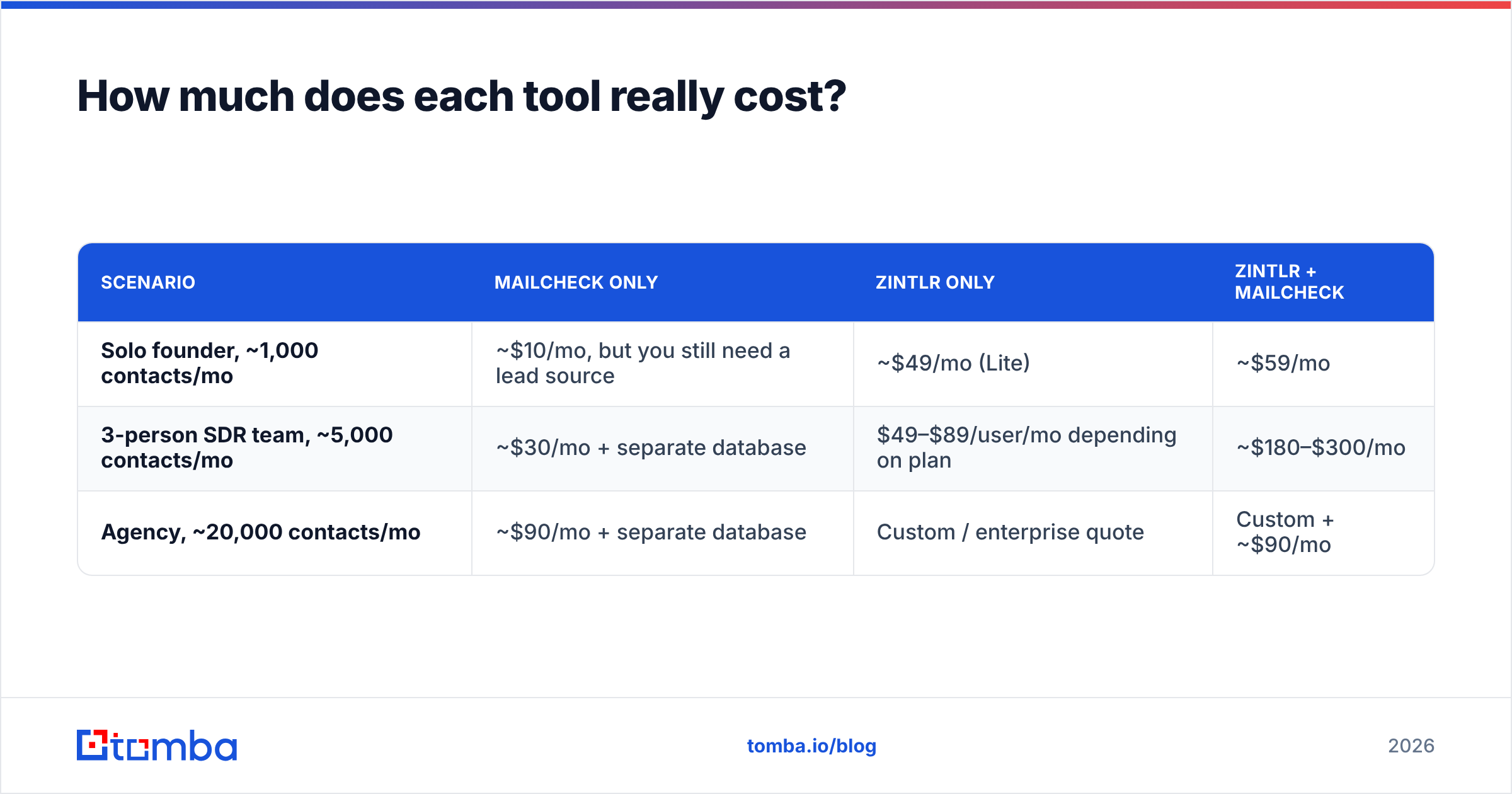
The sticker prices don't show the whole picture. Here's what a typical small outbound team spends:
| Scenario | Mailcheck only | Zintlr only | Zintlr + Mailcheck |
|---|---|---|---|
| Solo founder, ~1,000 contacts/mo | ~$10/mo, but you still need a lead source | ~$49/mo (Lite) | ~$59/mo |
| 3-person SDR team, ~5,000 contacts/mo | ~$30/mo + separate database | $49–$89/user/mo depending on plan | ~$180–$300/mo |
| Agency, ~20,000 contacts/mo | ~$90/mo + separate database | Custom / enterprise quote | Custom + ~$90/mo |
The hidden cost is in the last column. Most teams that pick Zintlr for discovery still run a separate verifier before large sends. Most teams that pick Mailcheck still pay someone for the leads. So you end up with two subscriptions, two dashboards and an export/import step in between, and someone forgets to run it on the Friday-afternoon send.

Who should choose Mailcheck?#
Pick Mailcheck if most of these apply to you:
- You already have leads from events, inbound forms, a CRM backlog or another database.
- Your main pain is bounces, spam-folder placement or a sending domain that's warming up slowly.
- You send high volumes and care about the cost per verification more than anything else.
- You want a simple tool with no seat-based pricing.
Mailcheck is a reasonable, budget-friendly choice for list hygiene. Just don't expect it to grow your pipeline.
Who should choose Zintlr?#
Pick Zintlr if most of these apply to you:
- You need new contacts every week, and your current lists are running dry.
- Your deals are high enough in value that personalising each first touch is worth paying for.
- You prospect heavily on LinkedIn and want emails and phone numbers revealed in-browser.
- You sell into markets where Zintlr's coverage is strong. Test this on a trial with 50 of your real target accounts.
Before you buy, run the same 50-account test you'd run on any database: reveal contacts, then put the emails through a verifier. The share that comes back valid is your real coverage number, and it may differ from the number on the marketing page.
Is there a single tool that does both jobs?#
Yes, and for many teams that's the more practical answer than "Mailcheck vs Zintlr". The finding and verifying steps work best when they happen in one place. A combined tool can verify an email at the moment it finds it, so you never export unverified data.
Tomba is one example. Its email finder looks up professional addresses by domain, name or company. Every result can be checked with the built-in email verifier and the catch-all verification layer. You get both jobs in one workflow, through a Chrome extension, bulk uploads or the API. Pricing starts with a free tier of 25 searches per month, then $49/mo (Starter), $99/mo (Growth) and $249/mo (Pro). Full pricing details are public.
To be fair, here's what Tomba doesn't replace. It doesn't offer Zintlr's personality profiles. If DISC-style buyer insights are central to how your team sells, Zintlr still has a feature Tomba doesn't. And if you only need cheap bulk verification of lists you already own, a pure verifier like Mailcheck may cost less per check.
| Need | Best fit |
|---|---|
| Cheapest list cleaning only | Mailcheck |
| Personality-led, low-volume prospecting | Zintlr |
| Find + verify in one tool, predictable pricing | Tomba |
| Enterprise data with custom contracts | Zintlr enterprise or a larger database vendor |
What is the final verdict on Mailcheck vs Zintlr?#
If you already have leads, use Mailcheck. If you don't have enough leads, use Zintlr.
They solve problems at opposite ends of the outbound pipeline, so the comparison mostly comes down to which problem you have. Mailcheck is the better value for pure verification, with clear tier pricing and a low cost per check. Zintlr is the better tool for discovery and personalisation, and its personality insights are a real differentiator, but you'll pay more and should test its coverage in your markets.
If you're considering buying both, compare the combined cost and the extra workflow step against a single platform that finds and verifies together. For most SMB and mid-market outbound teams, one tool means fewer moving parts and fewer bounces caused by someone skipping the verification step.
If that's the trade-off you're weighing, try the Tomba Email Finder. It returns professional email addresses by domain, name or company and verifies each one in the same step. The free tier gives you 25 searches a month, so you can test it on your own target accounts before paying anything.
Related guides#
// start free
See who Tomba finds at any company
Type a company's domain to see its people, their roles and verified work emails, each with the pages it was found on. Free account, no card.
Free plan · No credit card required · GDPR & CCPA
// about the author