Mailfloss Pricing Reviews Pros and Cons: 2026 Buyer's Guide
Mailfloss cleans your list on autopilot, starting at $29/mo. Before you subscribe, here are the plans, what users say about it, and where it falls short.
Mailfloss cleans your email list on autopilot, but it isn't cheap and it isn't for everyone. This Mailfloss pricing reviews pros and cons guide covers the 2026 plans, what users say and where the tool falls short.
TL;DR
- Mailfloss has three monthly plans: Lite at $29/mo (10,000 credits), Business at $59/mo (25,000 credits) and Pro at $209/mo (125,000 credits). Annual billing saves about 20%.
- Its strength is hands-off, recurring list cleaning. It syncs with your ESP, checks new subscribers daily, fixes typos and removes bad addresses. No CSV uploads.
- Reviews are strong but few. Capterra shows about 4.9/5 from roughly 40 reviews. G2 has one. The top complaint is support: no live chat, no 24/7 help.
- There's no free plan. The 7-day trial needs a card and an ESP connection. If you clean a list once a quarter, pay-as-you-go verifiers cost less.
- Mailfloss only verifies. It doesn't find new contacts. For B2B prospecting, pair it with an email finder or use a tool that does both.
What is Mailfloss?#
Mailfloss is an email verification service built around automation. Most verifiers expect you to export a CSV, upload it, wait and re-import the result. Mailfloss instead connects directly to your email service provider, such as Mailchimp, Klaviyo, ActiveCampaign, AWeber, Constant Contact or HubSpot. It scans the list on a schedule.
A useful comparison is a robot vacuum versus a regular vacuum. A standard verifier like ZeroBounce or NeverBounce does a thorough job when you take it out and run it. Mailfloss runs every day without you thinking about it, so the mess never builds up.
Each scan:
- Checks syntax, the domain and the mailbox for new and existing contacts.
- Fixes common typos automatically, for example
gmial.comtogmail.comoryaho.comtoyahoo.com. - Flags or removes invalid, disposable, role-based (
info@,sales@) and risky addresses, following rules you set. - Sends the results back to your ESP by unsubscribing, tagging or deleting contacts.
Teams that care about email deliverability on newsletters, e-commerce flows or lead-magnet funnels like this. Bad signups get removed before they cause bounces.
How much does Mailfloss cost in 2026?#
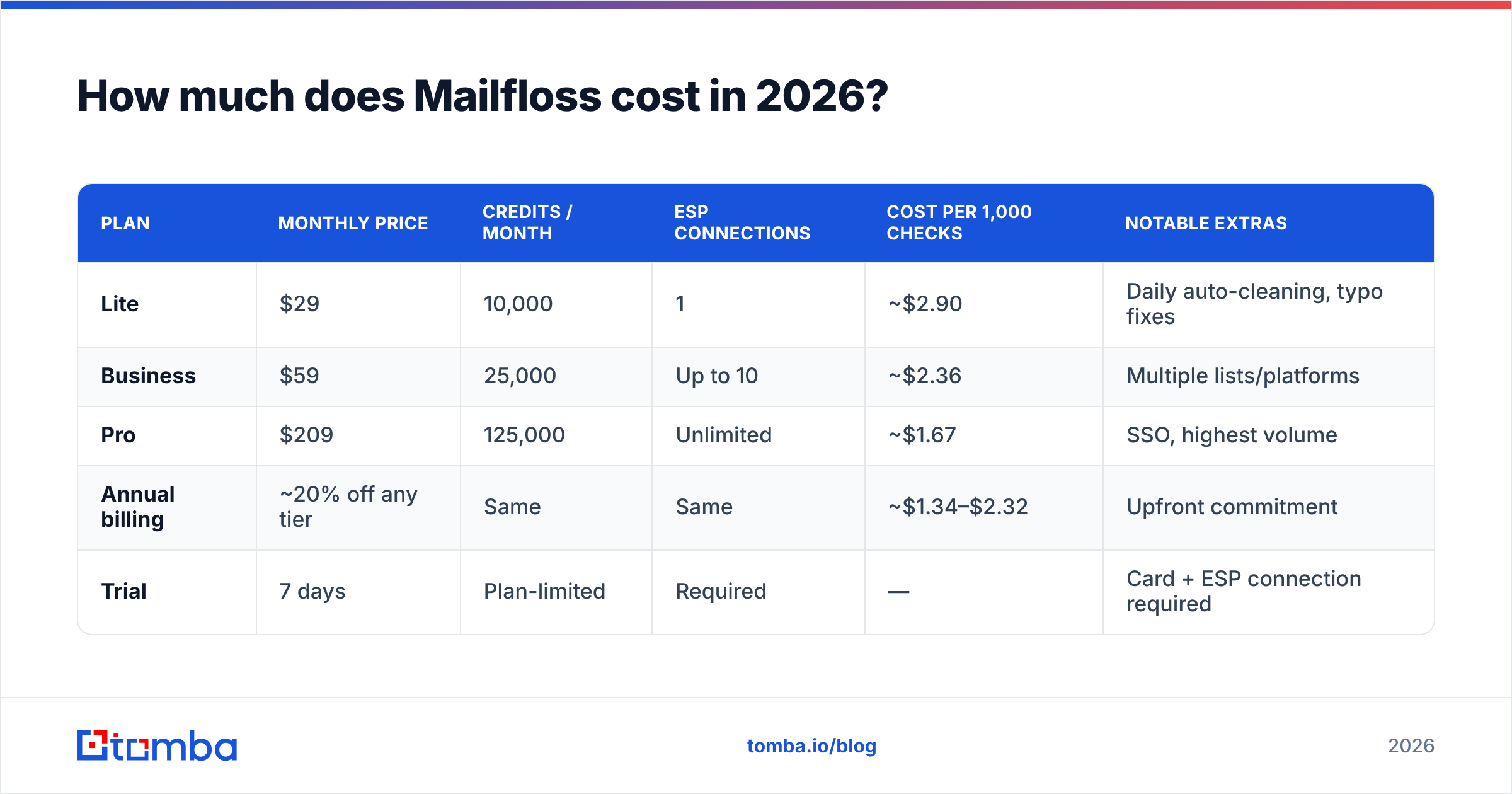
Mailfloss charges a monthly subscription based on verification credits. One credit verifies one email address. Below are the 2026 prices published on mailfloss.com and repeated in third-party listings such as Capterra:
| Plan | Monthly price | Credits / month | ESP connections | Cost per 1,000 checks | Notable extras |
|---|---|---|---|---|---|
| Lite | $29 | 10,000 | 1 | ~$2.90 | Daily auto-cleaning, typo fixes |
| Business | $59 | 25,000 | Up to 10 | ~$2.36 | Multiple lists/platforms |
| Pro | $209 | 125,000 | Unlimited | ~$1.67 | SSO, highest volume |
| Annual billing | ~20% off any tier | Same | Same | ~$1.34–$2.32 | Upfront commitment |
| Trial | 7 days | Plan-limited | Required | — | Card + ESP connection required |
A few things on that table matter more than they first appear.
The credits are monthly, not lifetime. Mailfloss sells a subscription, so plan around steady monthly volume. Don't expect credits to pile up from month to month. Check the current rollover terms before you buy. If you clean 40,000 contacts once and then add only 1,000 new signups a month, most of a large plan will sit unused.
The jump from Business to Pro is big. It goes from $59 to $209. If you need more than 25,000 checks a month but nowhere near 125,000, you'll pay for headroom you don't use.
Older listings show lower prices. Some directories still show prices from earlier pricing generations, such as $17, $49 and $200. Use the vendor's live pricing page, not cached comparison sites.

What do real users say in Mailfloss reviews?#
Reviews are very positive, but the sample is small, so weight them accordingly.
- On Capterra, Mailfloss averages about 4.9/5 from around 40 reviews, with ease of use and customer service both near 4.8. Reviewers keep calling it "set and forget." You connect the ESP once and then mostly forget about it. (Capterra reviews)
- On G2, Mailfloss has a single review (4.0/5). The reviewer liked the range of integrations. They criticized the lack of 24/7 support and the absence of a money-back guarantee. G2 itself says there aren't enough reviews to give buying insight. (G2 listing)
- Smaller directories such as Secret and SaaSworthy repeat the same handful of reviews, so they don't really count as separate evidence.
Taken together, the praise is consistent: easy setup, real automation, useful typo correction. The complaints are consistent too: no live chat, slower support outside business hours and no free tier to test properly.
What you won't find in the reviews is an independent accuracy benchmark. Few people test Mailfloss head-to-head on catch-all-heavy B2B lists. If most of your list is corporate domains, test a sample you already know the answers for. Do this before you sign an annual contract.
What are the pros and cons of Mailfloss?#
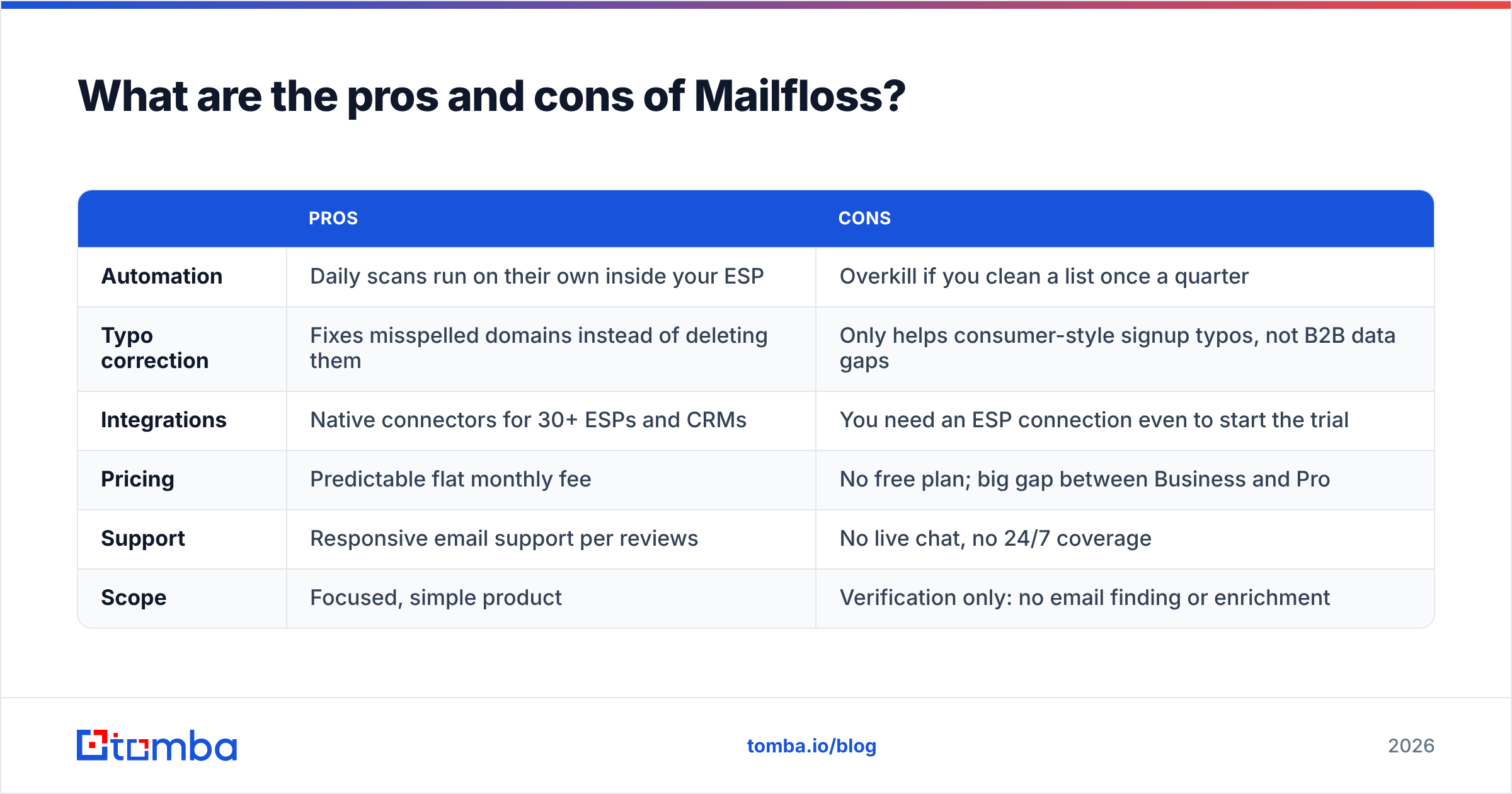
Here is the short version:
| Pros | Cons | |
|---|---|---|
| Automation | Daily scans run on their own inside your ESP | Overkill if you clean a list once a quarter |
| Typo correction | Fixes misspelled domains instead of deleting them | Only helps consumer-style signup typos, not B2B data gaps |
| Integrations | Native connectors for 30+ ESPs and CRMs | You need an ESP connection even to start the trial |
| Pricing | Predictable flat monthly fee | No free plan; big gap between Business and Pro |
| Support | Responsive email support per reviews | No live chat, no 24/7 coverage |
| Scope | Focused, simple product | Verification only: no email finding or enrichment |
Pros#
- Real "set and forget" hygiene. Most verifiers make you schedule the cleanup and remember to do it. Mailfloss does it for you. For teams adding thousands of signups a week, this alone can justify the cost.
- Fixing typos keeps revenue. A buyer who types
hotmial.comat checkout is a real customer. Correcting the address rather than deleting it keeps that contact. Few pure verifiers do this. - Configurable rules. You decide what happens to each category (invalid, disposable, role-based, catch-all): unsubscribe, tag, delete or leave alone.
- Little learning curve. Reviewers consistently say setup takes minutes.
Cons#
- No free tier. Competitors give you a few hundred free verifications to test accuracy. Mailfloss gives you a trial that requires a card.
- Subscription pricing punishes irregular use. If your volume changes a lot, you'll either run out of credits or waste them.
- Catch-all handling is basic. Like most verifiers, Mailfloss can tell you a domain accepts all mail. It can't confirm whether a specific mailbox exists. Many corporate domains are catch-all, so B2B lists end up with lots of "unknown" addresses. A dedicated catch-all verifier fills that gap.
- It cleans lists. It doesn't build them. Mailfloss can't give you a prospect's work email in the first place.
How does Mailfloss compare with other email verifiers?#
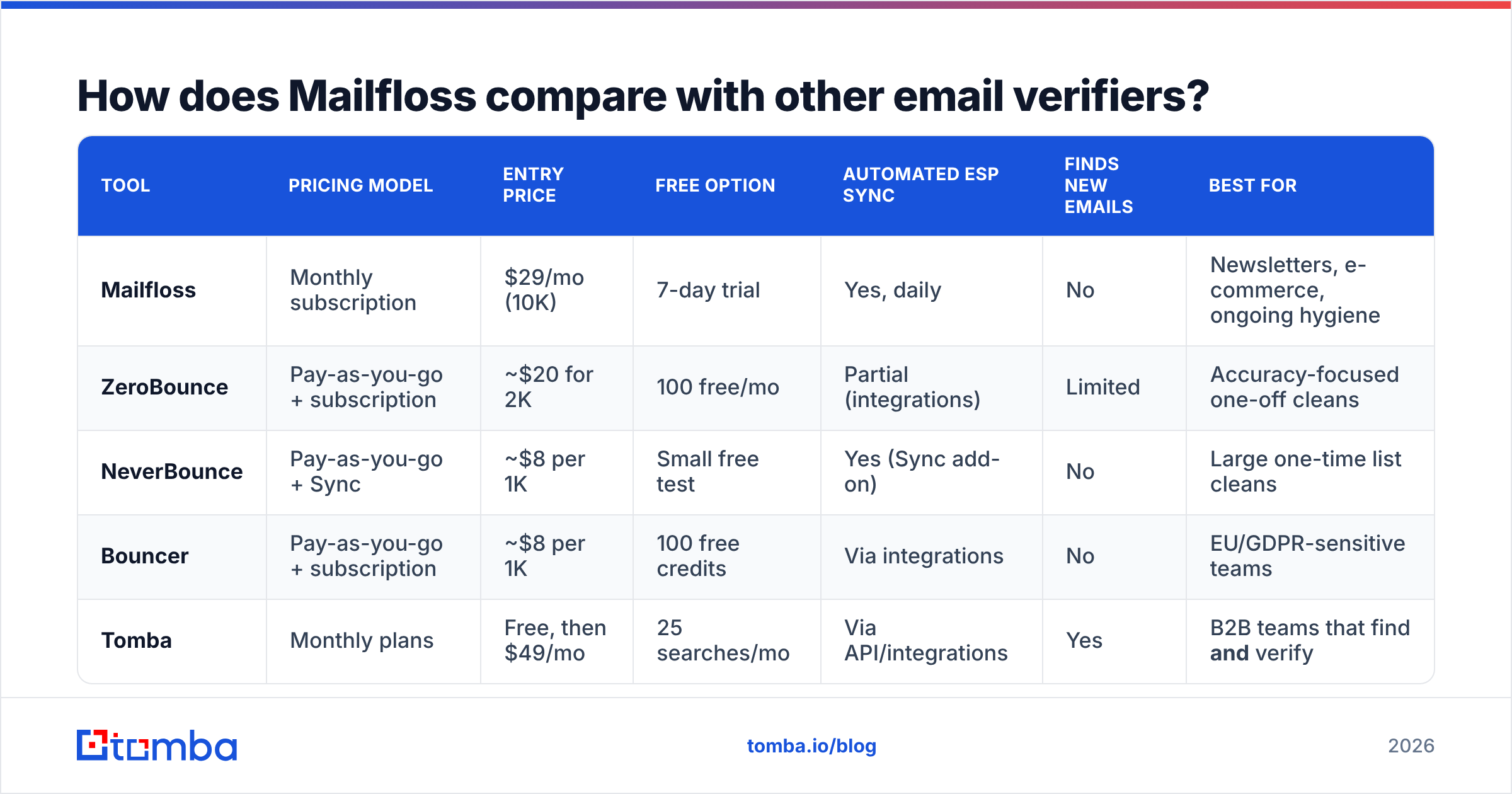
Your choice comes down to how you verify (automated sync or manual batches) and what you're verifying (B2C signups or B2B prospect lists). Prices below are approximate entry points as of 2026. Confirm them on each vendor's site.
| Tool | Pricing model | Entry price | Free option | Automated ESP sync | Finds new emails | Best for |
|---|---|---|---|---|---|---|
| Mailfloss | Monthly subscription | $29/mo (10K) | 7-day trial | Yes, daily | No | Newsletters, e-commerce, ongoing hygiene |
| ZeroBounce | Pay-as-you-go + subscription | ~$20 for 2K | 100 free/mo | Partial (integrations) | Limited | Accuracy-focused one-off cleans |
| NeverBounce | Pay-as-you-go + Sync | ~$8 per 1K | Small free test | Yes (Sync add-on) | No | Large one-time list cleans |
| Bouncer | Pay-as-you-go + subscription | ~$8 per 1K | 100 free credits | Via integrations | No | EU/GDPR-sensitive teams |
| Tomba | Monthly plans | Free, then $49/mo | 25 searches/mo | Via API/integrations | Yes | B2B teams that find and verify |
If your current verifier frustrates you, see our ZeroBounce alternative breakdown for a direct comparison on credits and catch-all handling.
Is Mailfloss worth it for B2B sales teams?#
It depends on where your contacts come from, which is the question most reviews skip.
Inbound lists (signups, customers, newsletter subscribers): Mailfloss is a strong choice. People type this data into forms, so typos and junk addresses are your main problem. Mailfloss is built to catch them as they arrive.
Outbound lists (prospects you sourced): Mailfloss is a weaker fit. Your problem with outbound isn't misspellings. It's coverage and confidence. You need to:
- find the right person's work email at a target account,
- verify it at the moment you send, not on a nightly ESP sync,
- resolve catch-all domains, which are common in mid-market and enterprise, and
- enrich the record with title, company and phone so reps can personalize.
A daily-sync verifier can't do any of that. Outbound teams usually do better with one workflow that covers finding and verification together. For example, use an email finder that returns an already-verified address, plus an email verifier for lists you import from elsewhere. You avoid paying two vendors and avoid an extra CSV round-trip.

How do you get the most from Mailfloss if you buy it?#
If Mailfloss fits your use case, these steps help you avoid the usual mistakes:
- Size the plan to monthly new contacts, not total list size. Run one large initial clean, preferably with a pay-as-you-go tool. Then pick the Mailfloss tier that covers your steady-state inflow.
- Start with "tag," not "delete." Tag risky and catch-all contacts for the first month so you can check the decisions before anything is removed for good.
- Exclude your best customers from aggressive rules. A role address like
orders@at a paying account may be exactly the address you want. - Watch bounce rates in your ESP for 30 days. If hard bounces don't drop below roughly 2%, look at your catch-all settings before blaming the tool.
- Choose annual billing only after a full month on monthly. The 20% saving isn't worth it if you've picked the wrong tier.
What are the hidden costs of Mailfloss?#
The price on the pricing page is rarely the full cost. Budget for these:
- Unused credits. Monthly credits that don't roll over are effectively a fixed cost, whether you use them or not.
- Tier jumps. Going from 25,001 to 125,000 credits nearly quadruples the bill.
- A second tool for catch-alls. If catch-alls are a large share of your list, you'll probably add another verifier anyway.
- A separate prospecting stack. Outbound teams still need an email finder and enrichment, which is a second subscription.
- Support response time. Without live chat, a broken sync on Friday evening can mean a weekend of sending to an unverified list.
None of these is a reason to rule Mailfloss out. They're reasons to price your whole workflow, not just the line item. For a like-for-like view, compare your total monthly spend with an all-in plan that covers finding, verification and enrichment. Our Tomba pricing page lists what each tier includes if you want a benchmark.
Which teams should choose Mailfloss, and which should skip it?#
Choose Mailfloss if you:
- run a newsletter, SaaS signup funnel or e-commerce store with steady daily list growth,
- use one or more of its supported ESPs and want cleaning to happen without anyone managing it,
- care about recovering mistyped consumer addresses, and
- have predictable monthly volume between 10,000 and 25,000 new contacts.
Skip Mailfloss (or pair it with something else) if you:
- clean lists only occasionally, in which case pay-as-you-go is cheaper,
- run outbound prospecting where most addresses are B2B and catch-all,
- need to find emails as well as verify them, or
- need live-chat or round-the-clock support.
Final verdict on Mailfloss pricing reviews pros and cons#
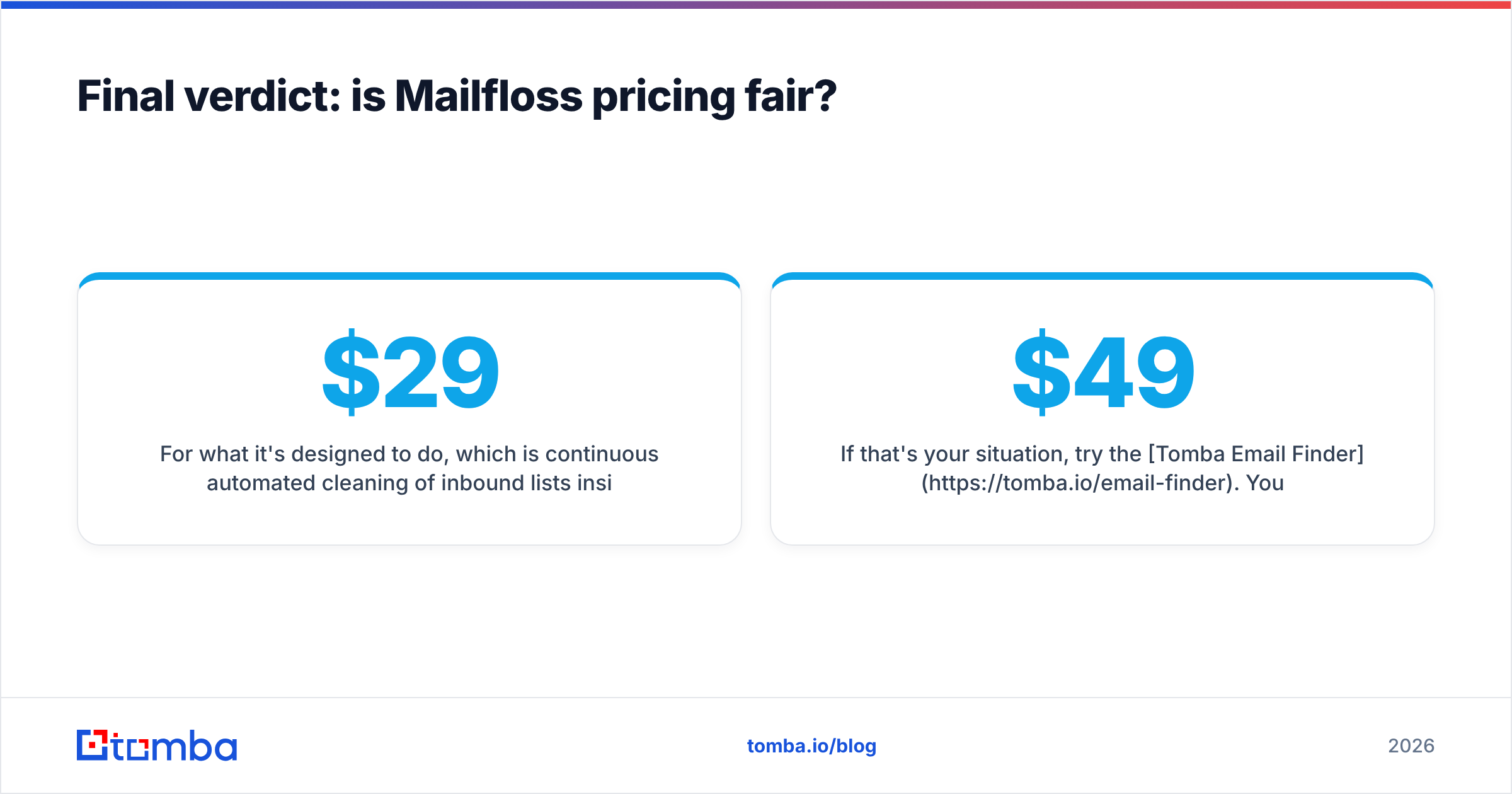
Our read of the Mailfloss pricing reviews pros and cons is simple. For continuous, automated cleaning of inbound lists inside your ESP, Mailfloss is fairly priced. At $29 to $59 a month, most small and mid-sized marketing teams get real automation, typo correction and integrations that work. The Capterra reviews back that up. The weak points are predictable: no free plan, a steep jump to Pro, limited support hours and no prospecting features.
If your bounces mostly come from cold outbound rather than form signups, a different tool fits better. Use one that finds the right contact, checks the mailbox before you send and handles catch-all domains. That way bad addresses never reach your sequences.
If that's your situation, try the Tomba Email Finder. You enter a name and company domain, and Tomba returns the person's work email with a verification status attached. You aren't cleaning the list after the fact. You can start on the free tier (25 searches a month). Paid plans begin at $49/mo with verification, domain search and enrichment in the same account.
Related guides#
// start free
See who Tomba finds at any company
Type a company's domain to see its people, their roles and verified work emails, each with the pages it was found on. Free account, no card.
Free plan · No credit card required · GDPR & CCPA
// about the author