Mailfloss vs OneMoreLead (2026): Email Verifier or Lead Database?
Mailfloss cleans the email lists you already have. OneMoreLead sells you new contacts. Here's how they compare on pricing, data quality and workflow, and when you need both or neither.
TL;DR
- Mailfloss and OneMoreLead solve different problems. Mailfloss verifies and auto-cleans email lists that already sit in your email platform. OneMoreLead is a B2B contact database where you go to find new prospects.
- Pricing models differ. Mailfloss sells monthly subscriptions for automated cleaning plus prepaid credits for one-off jobs. OneMoreLead sells credit bundles that start around $99/mo for 250 credits.
- Pick Mailfloss if you're a marketer with a Mailchimp, Klaviyo or HubSpot list that keeps decaying. Pick OneMoreLead if you're an outbound team that needs filtered prospect lists exported to CSV.
- Neither one covers the whole outbound loop of finding, verifying and enriching contacts. If you need that in one tool, an email finder with built-in verification costs less per usable contact.
When people search "mailfloss vs onemorelead," they usually think they're comparing two tools that do the same job. They aren't. One is a cleaning service and the other is a sourcing service. If you choose the wrong one, you pay for something your workflow never uses.
This guide covers what each tool does, what it costs in 2026, where each one falls short, and which kind of team gets value from each.
What is Mailfloss?#
Mailfloss is an email verification service built for marketers. Its main feature is automation. You connect it to your email service provider, and it scans your list every day. It removes or tags invalid addresses, fixes common typos (for example, gmial.com becomes gmail.com), and flags risky addresses before your next campaign goes out.
It doesn't find new contacts. It assumes you already have a list and keeps that list healthy.
Key characteristics:
- Native ESP integrations. It works with mainstream marketing platforms such as Mailchimp, Constant Contact, AWeber, Klaviyo, ActiveCampaign and HubSpot.
- Daily autopilot cleaning. New signups get checked without you uploading a CSV.
- Typo correction. It repairs malformed addresses instead of just deleting them.
- Prepaid credits. If your platform isn't supported, you can buy credits for one-time bulk verification instead.
Reviewers rate it well. Capterra shows a 4.9 average across a few dozen reviews, which is a small sample. Mailfloss is a focused tool for one job and does that job reliably.
What is OneMoreLead?#
OneMoreLead is a B2B contact database. You filter by industry, job title, company size and location, then reveal emails and phone numbers with credits and export the results as CSV.
It doesn't verify or clean lists you upload. You come here to build lists.
Key characteristics:
- Static database model. Records sit in a searchable index rather than being found live on request.
- Credit-based reveals. Each email or phone lookup uses credits.
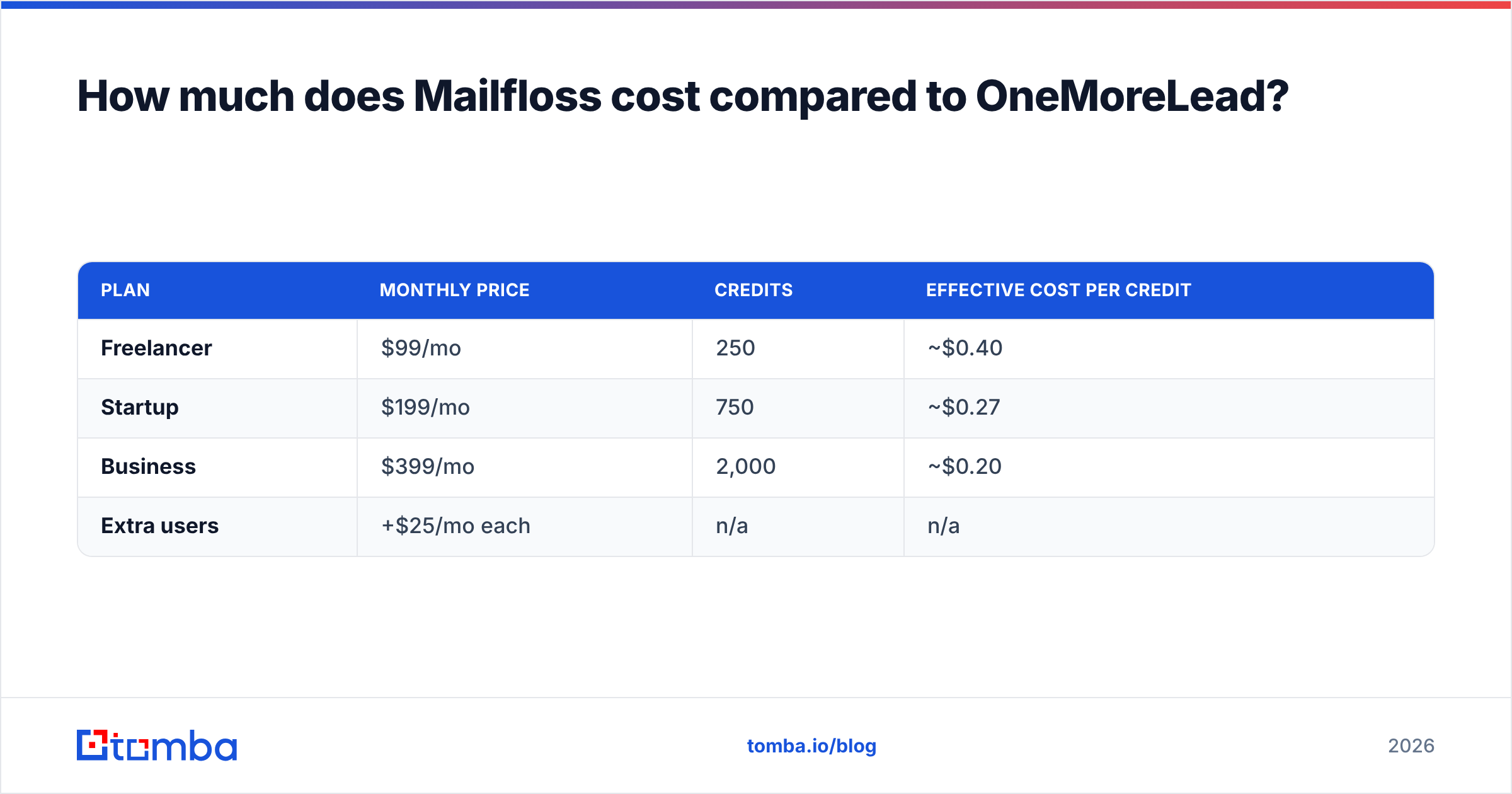
- Deliverability guarantee. The vendor advertises a 95% deliverability guarantee and refunds credits if bounces go above 5%, according to third-party reviews of its pricing.
- Database size claims vary. Different vendor pages cite different numbers, from roughly 55M to 150M contacts, so treat any headline figure carefully.
There are very few public reviews. G2's OneMoreLead page doesn't have enough reviews to produce buying insights. That doesn't make the product bad, but you have less independent evidence before you commit.

How do Mailfloss and OneMoreLead differ at the core?#
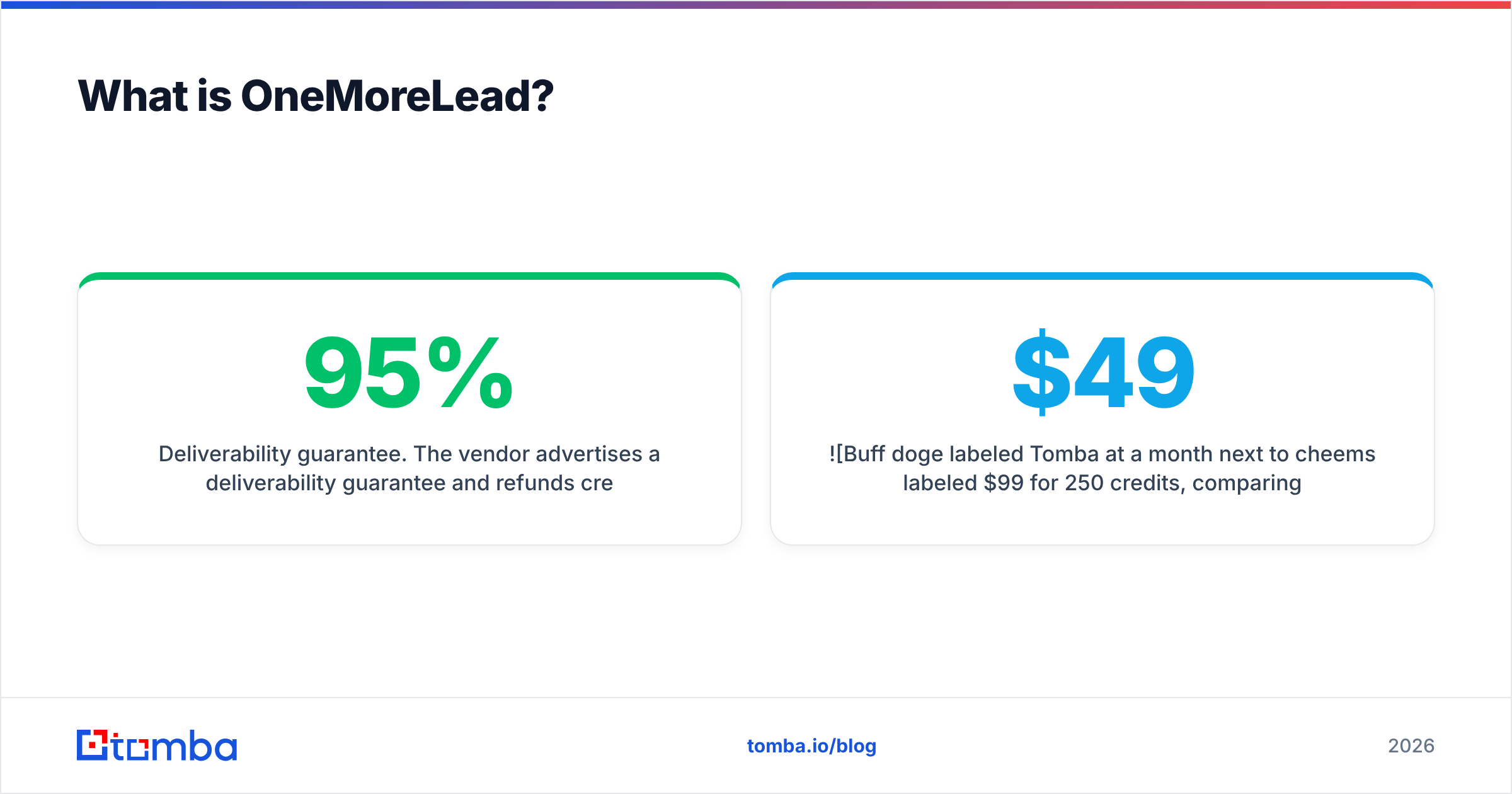
The simplest way to see the difference is to look at where each tool sits in your outbound workflow. Most B2B email programs go through five stages:
- Sourcing. You decide who to contact and get their addresses. OneMoreLead works here.
- Verification. You confirm that each address will accept mail before you send. Mailfloss works here, mainly for marketing lists.
- Enrichment. You add title, company, phone and firmographics to each record. OneMoreLead covers part of this. Mailfloss doesn't.
- Sending. Your ESP or sequencer delivers the message. Neither tool does this. Mailfloss connects to the sender.
- Maintenance. You remove contacts who left their jobs, bounced, or whose domains died. Mailfloss's daily scan covers this.
They overlap on almost nothing. One fills the top of the list and the other keeps the bottom of the list clean.
| Dimension | Mailfloss | OneMoreLead |
|---|---|---|
| Primary job | Email verification & list hygiene | B2B contact sourcing |
| Who it's built for | Email marketers, ecommerce, newsletters | SDRs, agencies, outbound teams |
| Input | Your existing list (via ESP or upload) | Search filters (industry, title, size, geo) |
| Output | Cleaned list, typo fixes, removals | New contacts exported as CSV |
| Automation | Daily scheduled cleaning | Manual search + export |
| Finds new emails | No | Yes |
| Verifies your own list | Yes | No |
| Phone numbers | No | Yes (credit cost) |
| Free option | 7-day trial on subscriptions | No meaningful free tier published |
| Public review volume | Moderate (Capterra) | Very low (G2) |
How much does Mailfloss cost compared to OneMoreLead?#
Both vendors have changed prices over time, and third-party trackers often show old numbers. Check the live pricing pages before you buy.
Mailfloss offers three subscription tiers billed monthly, each with a 7-day free trial. The current pricing page lists Business at about $59/mo and Pro at about $209/mo. Lite costs less than Business (trackers put it around $24/mo). Older listings show $17/$49/$200, which no longer applies. Subscriptions require a supported ESP. If yours isn't supported, you buy prepaid credits instead.
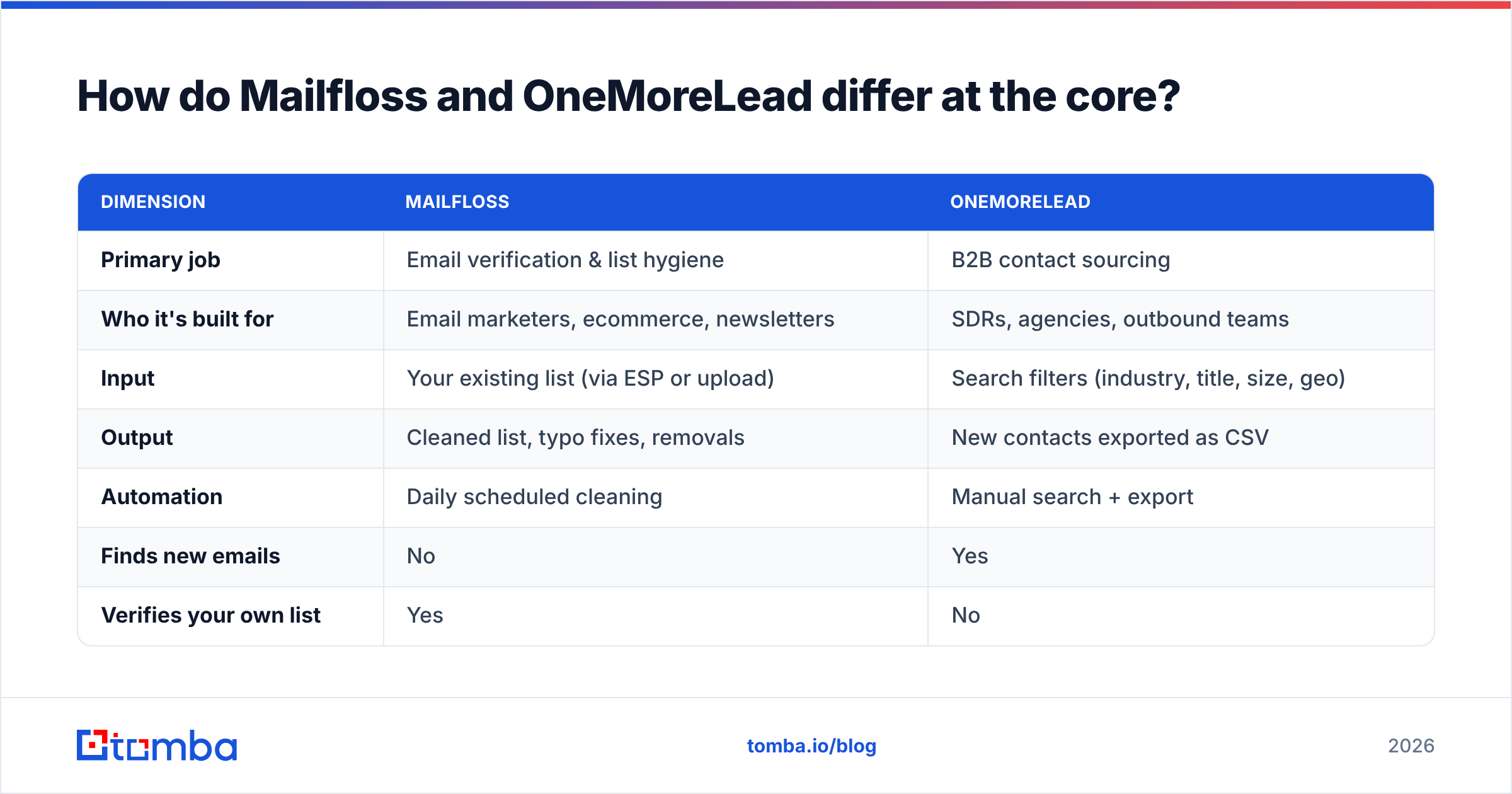
OneMoreLead publishes credit bundles:
| Plan | Monthly price | Credits | Effective cost per credit |
|---|---|---|---|
| Freelancer | $99/mo | 250 | ~$0.40 |
| Startup | $199/mo | 750 | ~$0.27 |
| Business | $399/mo | 2,000 | ~$0.20 |
| Extra users | +$25/mo each | n/a | n/a |
The per-credit math is what matters for OneMoreLead. At the entry tier, each revealed contact costs about 40 cents, before you account for duplicates, people who left their jobs, or catch-all domains that no tool can fully confirm. A 250-contact month is a small month for one SDR.
Mailfloss is cheap for what it does, but it is priced by list size and automation, not by new contacts. Its cost per contact is a fraction of a cent, but none of those contacts are new.
Which one gives you better data accuracy?#
The two tools measure accuracy differently.
Mailfloss accuracy depends on how well it classifies an address as valid, invalid, risky or unknown. Like every verifier, it struggles with catch-all domains, where the mail server accepts every address and an SMTP check can't tell a real inbox from a fake one. Mailfloss handles this by tagging those addresses so you can decide what to do. If your list is heavily B2B, a large share can land in that bucket, and a dedicated catch-all verifier can resolve more of them.
OneMoreLead accuracy depends on how fresh the database is. Static databases decay. People change jobs, companies rebrand, and domains expire. B2B contact data is commonly estimated to decay by 20–30% a year, so any record that hasn't been re-verified recently is a risk. The 95% deliverability guarantee helps, but a credit refund doesn't repair your sender reputation after a bounce spike.
Security researchers reported in 2021 that an unsecured database linked to OneMoreLead exposed a large number of contact records. OneMoreLead has not, as far as public reporting shows, issued a detailed statement. If your company requires vendor security reviews, raise this during procurement.
The practical takeaway: verify database exports before you send, whichever database you buy from. Many teams end up using both tools for exactly that reason.
Which tool fits which team?#
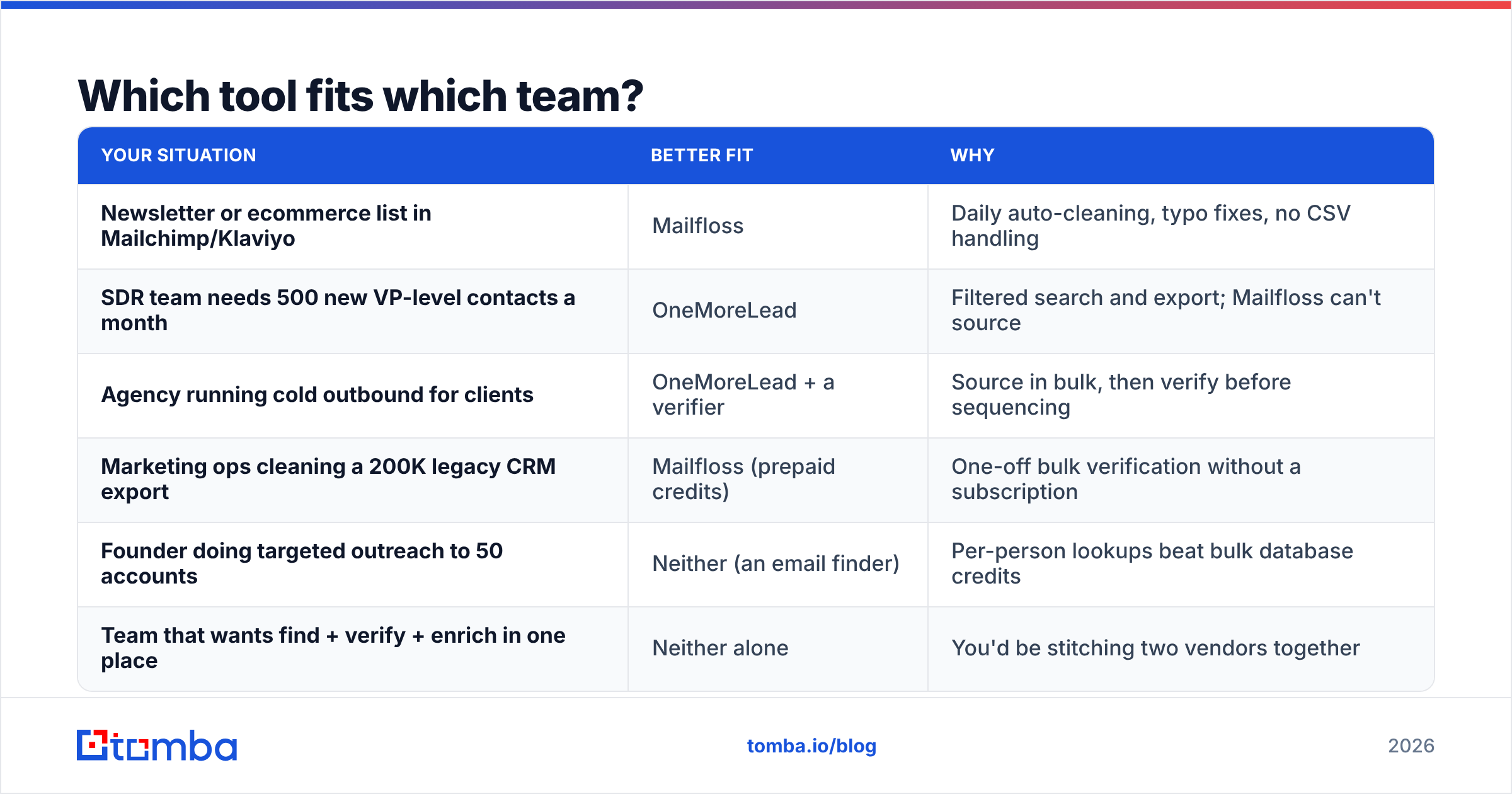
The right answer depends on the job you're hiring the tool for.
| Your situation | Better fit | Why |
|---|---|---|
| Newsletter or ecommerce list in Mailchimp/Klaviyo | Mailfloss | Daily auto-cleaning, typo fixes, no CSV handling |
| SDR team needs 500 new VP-level contacts a month | OneMoreLead | Filtered search and export; Mailfloss can't source |
| Agency running cold outbound for clients | OneMoreLead + a verifier | Source in bulk, then verify before sequencing |
| Marketing ops cleaning a 200K legacy CRM export | Mailfloss (prepaid credits) | One-off bulk verification without a subscription |
| Founder doing targeted outreach to 50 accounts | Neither (an email finder) | Per-person lookups beat bulk database credits |
| Team that wants find + verify + enrich in one place | Neither alone | You'd be stitching two vendors together |
The last two rows are where many buyers get it wrong. If you're doing account-based outreach, you don't need a 100M-row database or a list-hygiene subscription. You need to name a person at a company and get a verified address back. That's an email finder's job, and a domain-first workflow such as domain search usually costs less per usable contact than reveal credits.

What are the pros and cons of each?#
Mailfloss pros
- Set-and-forget daily cleaning through native ESP integrations
- Typo correction keeps signups that other verifiers would delete
- Affordable entry tier and a 7-day free trial
- Strong reviewer sentiment on Capterra
Mailfloss cons
- No prospecting. It can't find a single new contact.
- Subscriptions need a supported ESP. Other setups have to use prepaid credits.
- Built for marketing lists, not cold-outbound sequencers
- Catch-all addresses still come back as "unknown" for B2B-heavy lists
OneMoreLead pros
- Simple filter-and-export workflow that's fast to learn
- Email and phone data in one place
- Published pricing tiers and a deliverability guarantee
- Volume discount per credit at higher tiers
OneMoreLead cons
- High per-contact cost at the entry tier (~$0.40)
- Few independent reviews to validate quality claims
- Database-size claims vary between vendor pages
- Static data needs separate verification before sending
- Past security reporting may slow enterprise procurement
Can you use Mailfloss and OneMoreLead together?#
Yes, and many teams do something like this already. A common flow:
- Build a list in OneMoreLead and export it as CSV.
- Import it into your ESP or CRM.
- Let Mailfloss verify it (or run a prepaid bulk job) before the first send.
- Keep Mailfloss running so the list stays clean as contacts change jobs.
This works, but count the cost. You're paying two vendors, managing two logins and two billing cycles, and moving CSVs between them. For a small team, that's at least $120–$150/mo before anyone sends an email, and you still haven't enriched the records or handled catch-all addresses well.
The alternative is a platform where finding and verifying happen together, so every address you get has already been checked. Compare that against your current spend before you add a second subscription. Tomba's plans, for example, start with a free tier of 25 searches/mo and run from $49/mo (Starter) to $99/mo (Growth) and $249/mo (Pro). Details are on the Tomba pricing page.
Is Mailfloss better than OneMoreLead?#
Mailfloss is better at verification and OneMoreLead is better at sourcing. Neither is better overall, because they don't compete.
- If your problem is "my list is rotting and my open rates are dropping," Mailfloss is the clear pick. OneMoreLead does nothing for you there.
- If your problem is "I don't have enough people to email," OneMoreLead is the one of these two that helps. Mailfloss does nothing for you there.
- If your problem is "I need specific, verified contacts at target accounts without overpaying," neither tool is the most efficient answer. An email finder with built-in verification is.
Frequently asked questions#
Does Mailfloss find email addresses? No. Mailfloss only verifies and cleans addresses you already have. To find new addresses, you need a database or an email finder.
Does OneMoreLead verify emails? OneMoreLead says its data is deliverable and backs that with a bounce-rate guarantee, but it doesn't verify lists you upload. Run exports through a separate email verifier before sending.
Which is cheaper, Mailfloss or OneMoreLead? Mailfloss is cheaper per month, with entry plans well below OneMoreLead's $99 starting tier. But the two tools buy different things, so compare each against what you actually need: list hygiene or new contacts.
Is there a free version of either tool? Mailfloss offers a 7-day free trial on subscriptions. OneMoreLead doesn't publish a free tier.
What should I use for B2B cold outreach? For cold outbound, the main need is finding verified addresses for specific people. A finder that verifies each result costs less per usable contact than buying database credits and then paying a verifier as well.
Which should you pick in 2026?#
Decide which job you need done first. If you need to keep an existing marketing list clean, use Mailfloss and let it run in the background. If you need bulk filtered lists and accept paying per reveal, use OneMoreLead and verify the exports before you send. If you'd rather not pay two vendors to find a contact and then check it, use one tool that does both.
That's what the Tomba Email Finder is for. You enter a name and a company or domain, and you get a professional email address that has already been checked. Verification, catch-all handling and enrichment are built in. You can start free with 25 searches a month and try it on your next target-account list before you buy another database bundle.
Related guides#
// start free
See who Tomba finds at any company
Type a company's domain to see its people, their roles and verified work emails, each with the pages it was found on. Free account, no card.
Free plan · No credit card required · GDPR & CCPA
// about the author