Mailfloss vs Salesbot: List Cleaning or AI Prospecting in 2026?
Mailfloss keeps your existing email list clean. Salesbot finds new prospects and writes the outreach. They solve different problems, and this guide shows which one your pipeline is actually missing.
TL;DR
- Mailfloss is an automated email list cleaner. It connects to your email service provider (ESP), removes invalid, risky, and mistyped addresses every day, and protects your sender reputation. It doesn't find new leads.
- Salesbot (from RecruitBot) is an AI prospecting and outreach tool. It searches a database of several hundred million contacts, drafts personalized emails, and runs drip sequences. List hygiene for an existing database isn't its job.
- Pricing isn't directly comparable. Mailfloss sells subscriptions starting in the low tens of dollars per month, plus prepaid credits. Third-party listings put Salesbot's plans at roughly $49/mo (Basic) and $99/user/mo (Professional).
- If you have a large newsletter or customer list that's bouncing, choose Mailfloss. If you have no list and need outbound pipeline, choose Salesbot. If you need both new contacts and clean data in one place, look at a combined finder and verifier.
- Before you buy either, check the vendor pricing pages. Third-party sites disagree on both tools' current prices.
What is the real difference between Mailfloss and Salesbot?#
These two tools sit at opposite ends of the email pipeline. Mailfloss works at the end, on the contacts you already have. Salesbot works at the start, generating contacts you don't have yet.
Think of it like a restaurant. Salesbot is the supplier that brings in new produce. Mailfloss is the person who goes through the walk-in fridge every morning and throws out what has gone bad. Both matter to the kitchen, but you'd never hire one to do the other's job.
So the question behind "mailfloss vs salesbot" usually isn't "which is better?" It's "which problem do I have right now?" Most teams searching this comparison fall into one of three groups:
- Marketers with a big existing list who see bounce rates creep up and open rates fall.
- Founders or SDRs with no list at all who need net-new B2B contacts and a way to email them.
- RevOps teams trying to combine prospecting and hygiene so they pay one vendor instead of three.
The rest of this guide treats each tool on its own terms and then maps them to those three groups.
What is Mailfloss and how does it work?#
Mailfloss is an email verification service built around automation. You don't upload a CSV every quarter. Instead, you connect Mailfloss to your ESP and it checks new and existing subscribers on a schedule, usually daily.
Here is what it does in practice:
- Syntax and domain checks. It catches malformed addresses and domains with no mail server.
- Mailbox-level verification. It flags addresses that would hard-bounce.
- Typo correction. It fixes common mistakes such as
gmial.com→gmail.cominstead of simply deleting them, which saves real subscribers. - Risky-address handling. It flags role accounts, disposable addresses, and known spam traps, and lets you decide whether to unsubscribe, tag, or delete them.
- Native ESP integrations. It connects directly to the major newsletter and ecommerce email platforms, so cleaned results write back without manual exports.
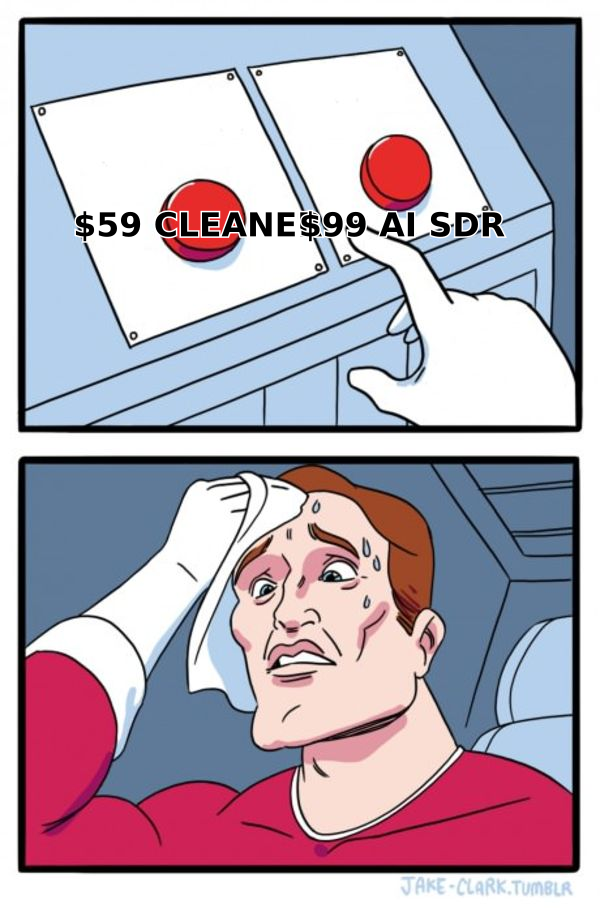
Mailfloss's own pricing page splits the product into two buying modes: subscriptions for automated daily cleanup, and prepaid credits for one-time verification of a file. Subscriptions require a supported email platform and come with a 7-day free trial. At the time of writing, the official page lists a Business plan at $59/month and a Pro plan at $209/month, with a smaller Lite tier below them. Older third-party listings, such as Capterra's Mailfloss pricing page, still show lower legacy prices, so treat anything you read secondhand as approximate.
Where Mailfloss is strong: set-and-forget hygiene for B2C and newsletter-heavy businesses, ecommerce brands on ESPs, and anyone whose list grows from opt-in forms where typos and fake signups pile up.
Where it is weak: it doesn't find contacts, doesn't enrich records with job titles or company data, and doesn't send outreach. If your list is empty, Mailfloss has nothing to work on.
What is Salesbot and how does it work?#
Salesbot grew out of RecruitBot, a machine-learning recruiting platform founded in 2017. The team saw sales teams asking for the same AI-driven sourcing that recruiters used, and built Salesbot for lead sourcing and engagement.
Its core workflow has three steps:
- Search a contact database. Public figures range from about 655 million contacts in launch coverage to "695+ million verified leads" on more recent listings. You can filter by company, job title, predicted revenue, investment stage, and demographic attributes.
- Generate personalized outreach. The AI drafts emails from each prospect's data instead of a single static template.
- Run drip sequences. Follow-ups continue until the prospect replies, and built-in inbox health monitoring throttles volume to reduce spam flags.
It also integrates with CRMs such as Salesforce. Third-party directories list a Basic plan at about $49/month and a Professional plan at about $99/user/month. The Professional plan adds CSV list matching and team features, and Enterprise is custom-priced. The vendor doesn't publish every detail openly, so confirm with sales before you budget.
Where Salesbot is strong: small teams that want one tool to cover finding prospects, writing first-touch emails, and following up, with no stitching together of a database, a sequencer, and a copywriter.
Where it is weak: it's a newer, smaller player with few public reviews on the big directories. It doesn't clean an existing marketing list, and reviewers note that its features beyond prospecting and outreach are limited.

How do Mailfloss and Salesbot compare side by side?#
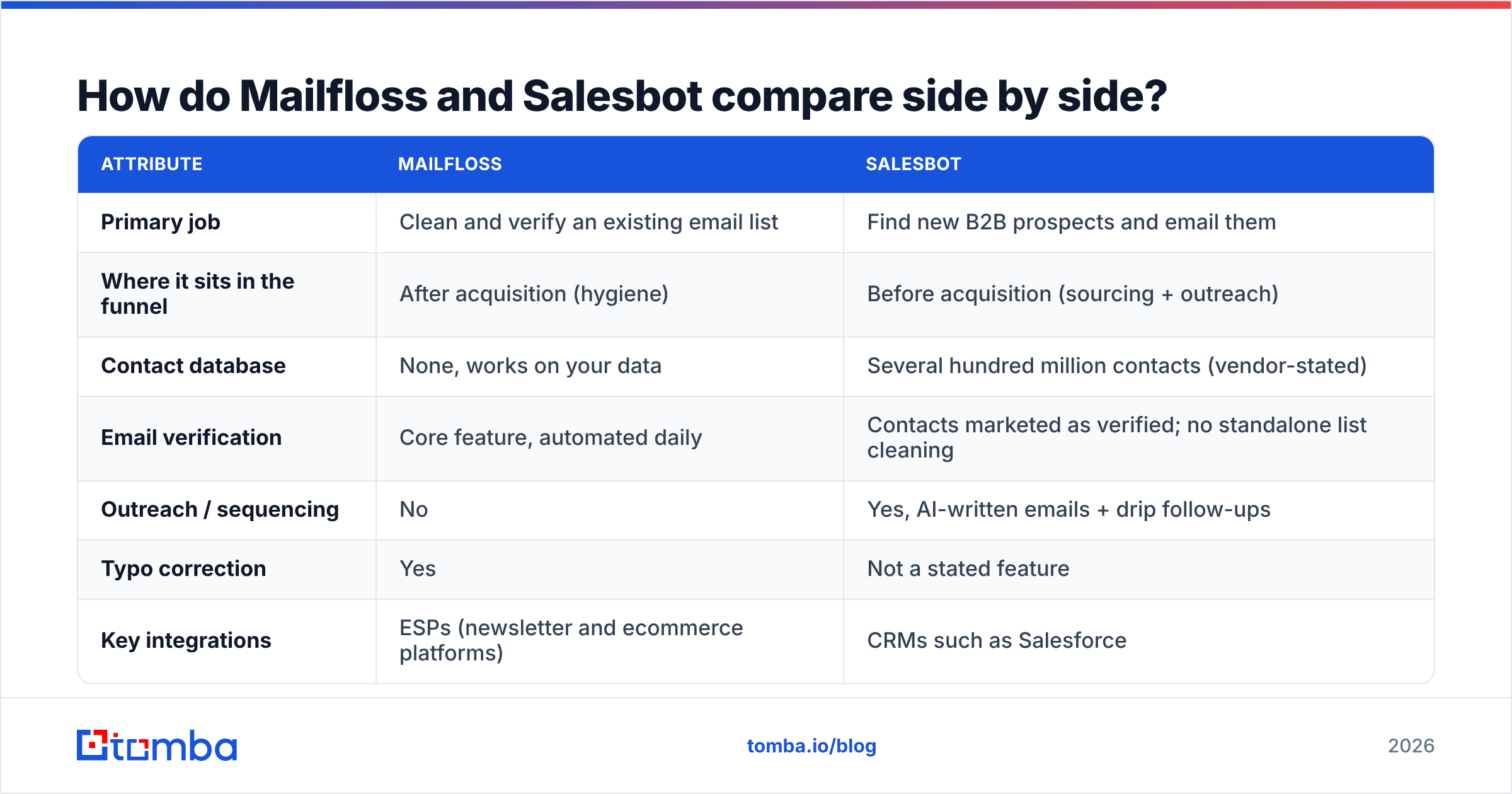
Here's the head-to-head on the attributes that actually drive a buying decision.
| Attribute | Mailfloss | Salesbot |
|---|---|---|
| Primary job | Clean and verify an existing email list | Find new B2B prospects and email them |
| Where it sits in the funnel | After acquisition (hygiene) | Before acquisition (sourcing + outreach) |
| Contact database | None, works on your data | Several hundred million contacts (vendor-stated) |
| Email verification | Core feature, automated daily | Contacts marketed as verified; no standalone list cleaning |
| Outreach / sequencing | No | Yes, AI-written emails + drip follow-ups |
| Typo correction | Yes | Not a stated feature |
| Key integrations | ESPs (newsletter and ecommerce platforms) | CRMs such as Salesforce |
| Entry pricing | Lite tier in the ~$20s/mo; Business $59/mo (official page) | ~$49/mo Basic (third-party listings) |
| Upper tier | Pro $209/mo; prepaid credits for one-off jobs | ~$99/user/mo Professional; Enterprise custom |
| Free trial | 7 days on subscriptions | Free trial listed |
| Best for | Marketers, ecommerce, newsletter publishers | Founders, SDRs, small outbound teams |
The table makes the core point plain: these are complementary tools, not substitutes. The only overlap is that both affect deliverability. Mailfloss improves it by removing bad addresses, and Salesbot protects it by throttling sends.
Which tool should you choose for your situation?#
Use this decision framework. Find the scenario that matches your situation. You don't need to read all of them.
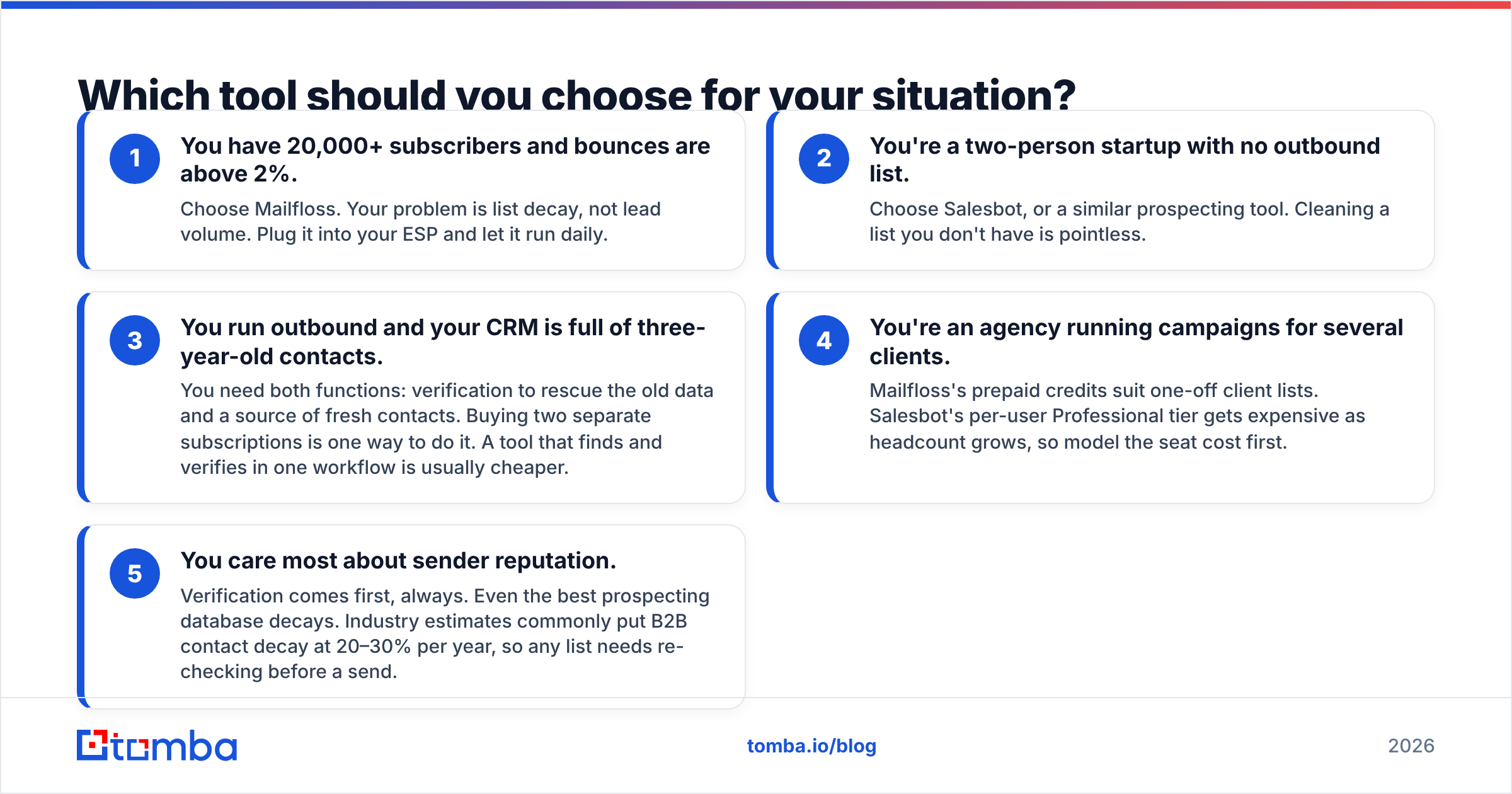
- You have 20,000+ subscribers and bounces are above 2%. Choose Mailfloss. Your problem is list decay, not lead volume. Plug it into your ESP and let it run daily.
- You're a two-person startup with no outbound list. Choose Salesbot, or a similar prospecting tool. Cleaning a list you don't have is pointless.
- You run outbound and your CRM is full of three-year-old contacts. You need both functions: verification to rescue the old data and a source of fresh contacts. Buying two separate subscriptions is one way to do it. A tool that finds and verifies in one workflow is usually cheaper.
- You're an agency running campaigns for several clients. Mailfloss's prepaid credits suit one-off client lists. Salesbot's per-user Professional tier gets expensive as headcount grows, so model the seat cost first.
- You care most about sender reputation. Verification comes first, always. Even the best prospecting database decays. Industry estimates commonly put B2B contact decay at 20–30% per year, so any list needs re-checking before a send.
A useful rule of thumb: sourcing tools optimize for reach, and hygiene tools optimize for trust. Mature outbound programs need both, but which one you buy first should depend on your biggest constraint today.
Is Salesbot's data accurate enough that you can skip verification?#
Not entirely, and that's true of every contact database, not just Salesbot. People change jobs, companies change domains, and catch-all servers accept mail for addresses that don't exist. A contact that was verified when it went into a database can be invalid by the time you send.
The safer workflow is:
- Pull prospects from your sourcing tool.
- Run them through an independent email verifier immediately before the campaign, not weeks before.
- Treat catch-all results as a separate, lower-volume segment.
- Watch your bounce rate per campaign and pause anything over about 2%.
This is also where the mailfloss vs salesbot framing breaks down. Mailfloss's verification is designed around ESP-connected marketing lists, so it doesn't fit naturally into a cold-outbound workflow where contacts live in a CRM or a CSV. If you're running cold email, a verifier with a CSV upload or an API fits that workflow better.
What do they cost over a year?#
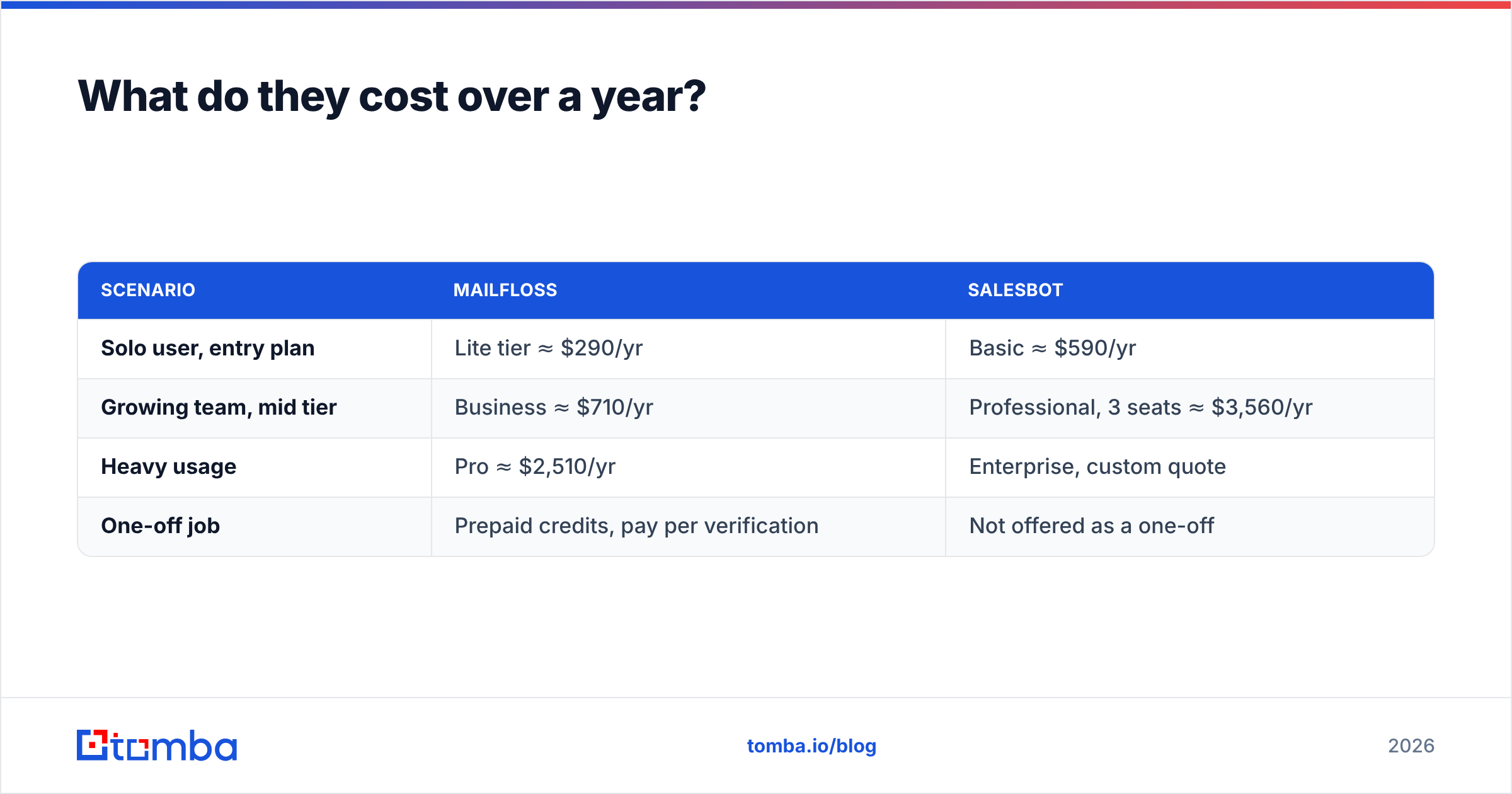
Rough annual math, using the figures available at the time of writing. Confirm these before you sign:
| Scenario | Mailfloss | Salesbot |
|---|---|---|
| Solo user, entry plan | Lite tier ≈ $290/yr | Basic ≈ $590/yr |
| Growing team, mid tier | Business ≈ $710/yr | Professional, 3 seats ≈ $3,560/yr |
| Heavy usage | Pro ≈ $2,510/yr | Enterprise, custom quote |
| One-off job | Prepaid credits, pay per verification | Not offered as a one-off |
Two caveats. First, Mailfloss's tiers scale with the number of contacts on your list, so a very large list can push you up a tier even if your team is small. Second, Salesbot's Professional pricing is per user, so cost grows with headcount rather than list size. Pick the pricing model that matches how your usage grows.
What are the pros and cons of each?#
Mailfloss pros
- Fully automated, daily cleaning with no manual uploads
- Typo correction recovers real subscribers rather than deleting them
- Direct ESP integrations write results back automatically
- Prepaid credits for one-time jobs
Mailfloss cons
- Subscriptions require a supported email platform
- No prospecting, enrichment, or outreach
- Less suited to cold-outbound workflows that live in a CRM or spreadsheet
Salesbot pros
- Large contact database with firmographic filters such as revenue and funding stage
- AI-personalized emails and automated follow-ups in one tool
- Inbox-health throttling built into sending
- Salesforce integration
Salesbot cons
- Few public reviews on major directories, so it's harder to benchmark
- Per-seat pricing on higher tiers
- Limited features beyond prospecting and outreach
- No standalone hygiene for your existing marketing list
Are there alternatives that cover both jobs?#
Yes. If you read this comparison and realized you need to find contacts and keep them clean, you have three options:
- Stack two tools. Use Salesbot, or another sourcing tool, for prospects and a dedicated verifier for hygiene. This is the most flexible option but costs the most.
- Use a verification-first platform with an API. Tools in the ZeroBounce and NeverBounce category clean lists well but don't source contacts. If verification is your main need, our ZeroBounce alternative breakdown covers that category.
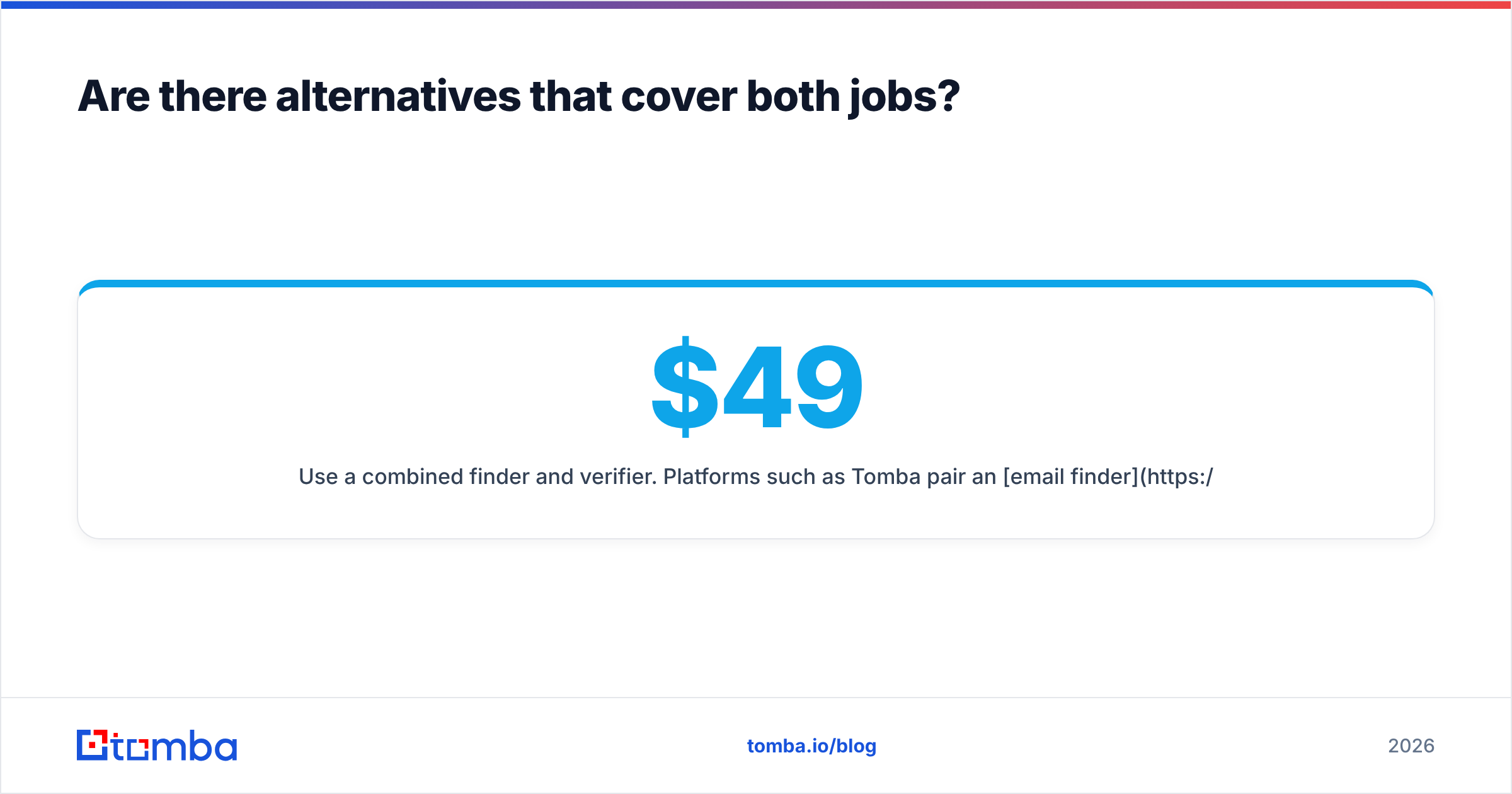
- Use a combined finder and verifier. Platforms such as Tomba pair an email finder with a built-in verifier, domain search, and enrichment. You source a contact and check it in the same workflow. Tomba starts with a free tier of 25 searches per month, then Starter at $49/mo, Growth at $99/mo, and Pro at $249/mo, and Enterprise is custom (full pricing details). Tomba doesn't write AI sequences the way Salesbot does, so outbound teams usually pair it with a separate sequencer.
For independent reviews on any of these, G2 and Capterra remain the most useful places to cross-check claims, especially for newer tools with few published reviews.
Mailfloss vs Salesbot: which one wins?#
Neither wins outright, because they don't compete. Here's the verdict by use case:
- List hygiene for an existing ESP audience: Mailfloss, clearly. Its daily automation and typo correction are exactly what newsletter and ecommerce teams need.
- Net-new B2B prospecting with AI-written outreach: Salesbot. It covers sourcing, copy, and follow-up in one place at an approachable entry price.
- Cold outbound that needs fresh contacts and verification before every send: neither tool alone is enough. Pair a sourcing tool with a verifier, or use a platform that does both.
If you're still unsure, look at your last campaign report. High bounces and falling opens point to Mailfloss. Too few contacts to email points to Salesbot.
Ready to find and verify B2B contacts in one step?#
If what you really need is accurate B2B email addresses you can trust on the first send, without paying for a separate database and a separate cleaner, try the Tomba Email Finder. Search by name, company, or domain. Every result is verified before you export it, and you can start on the free tier with 25 searches a month to test it on your own target accounts.
Related guides#
// start free
See who Tomba finds at any company
Type a company's domain to see its people, their roles and verified work emails, each with the pages it was found on. Free account, no card.
Free plan · No credit card required · GDPR & CCPA
// about the author