Mailmerge365 Pricing Reviews Pros and Cons: 2026 Verdict
Mailmerge365 turns Outlook into a personalized bulk-sending tool. We break down what it really costs, what the few public reviews say, and where its limits are, so you can tell if it fits your outreach.
This Mailmerge365 pricing reviews pros and cons guide covers what the Outlook add-in really costs, what its few public reviews say, and where it falls short for outreach teams.
TL;DR
Mailmerge365 is a Microsoft Outlook add-in. It sends personalized one-to-one emails from your own mailbox, with scheduling, open/click tracking and unsubscribe handling.
Pricing comes in two models: an annual per-mailbox licence (public sources put it at roughly €108–€160 per mailbox per year) and pay-as-you-go recipient packs (around $30 per 1,000 recipients). The trial is limited, so check the vendor's current price page before you buy.
There are very few public reviews. G2 shows only a handful, averaging about 4.3/5. Reviewers like the easy setup and the time it saves.
It works best for Microsoft 365 teams that send relationship-style or semi-cold emails in the hundreds per week. It is not a full cold-outreach platform: there is no inbox rotation, no warmup and no built-in contact data.
A merge tool only sends to the list you give it. Bad addresses hurt your sender reputation no matter which tool you use, so verify the list first.
What is Mailmerge365?#
Mailmerge365 is a mail-merge add-in that runs inside Outlook (desktop, web and the new Outlook). You load a spreadsheet of recipients, write one template with merge fields like {FirstName} and {Company}, and the add-in sends each person an individual email from your own Microsoft 365 mailbox. To the recipient it looks like a normal one-to-one message, not a newsletter.
Its official listing on Microsoft AppSource describes it as a way to run personalized campaigns without leaving Outlook. That is the main thing it sells. It is not an email service provider like Mailchimp, and it is not a sales engagement platform like Outreach. It sits between the two:
- More personal than a newsletter tool, because every email comes from your real mailbox and replies land in your normal inbox.
- Lighter than a sequencer. There are no multi-channel cadences, no CRM-style pipeline and no lead database.
Don't confuse it with EmailMerge365, a separate Outlook add-in from a different vendor with its own pricing. Several comparison blogs mix the two up, which is part of why published price figures for Mailmerge365 disagree.
How much does Mailmerge365 cost in 2026?#
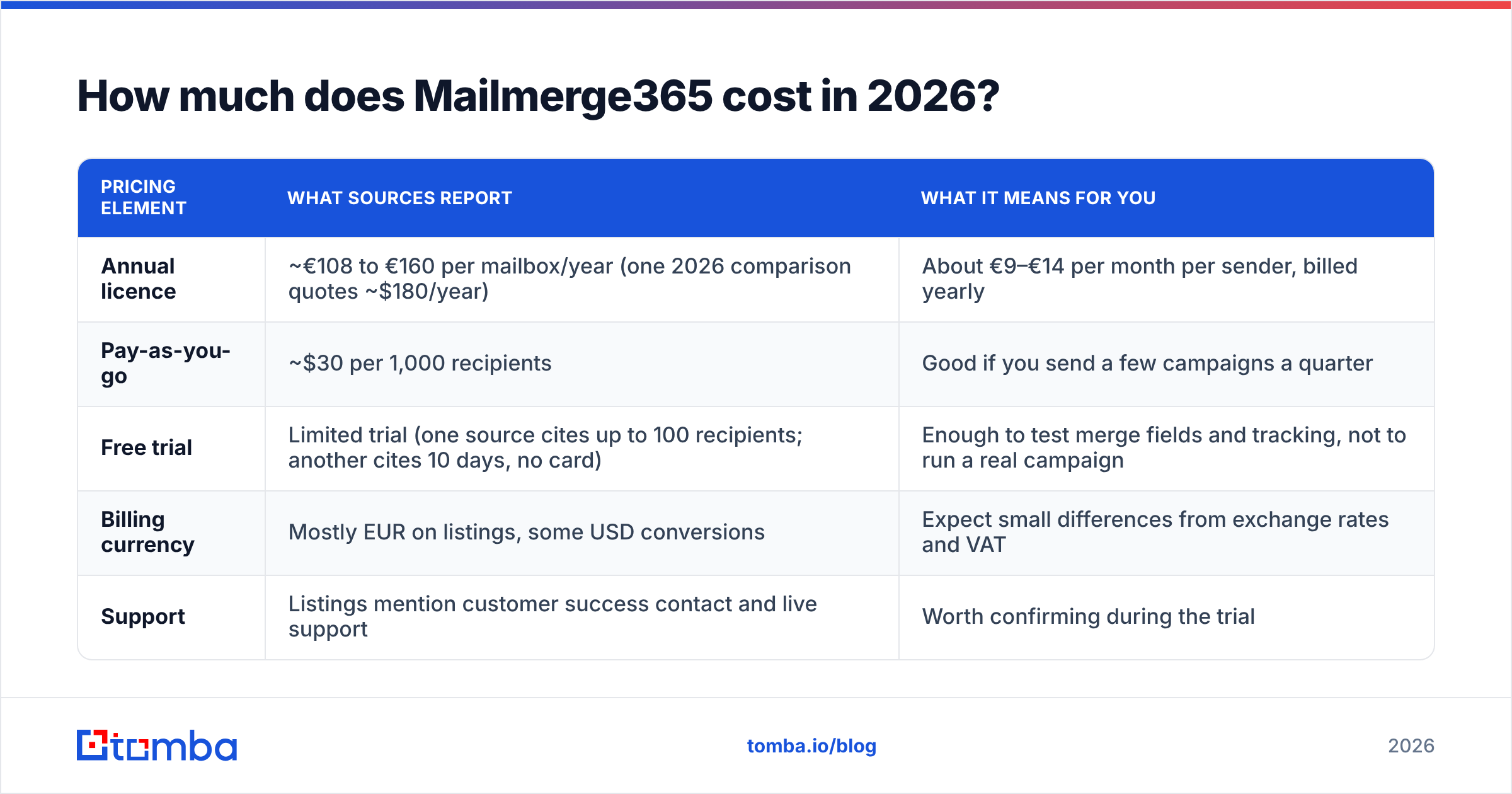
Mailmerge365 does not publish one fixed price that every source agrees on. Here is what third-party listings and recent comparisons report, as of October 2026:
| Pricing element | What sources report | What it means for you |
|---|---|---|
| Annual licence | ~€108 to €160 per mailbox/year (one 2026 comparison quotes ~$180/year) | About €9–€14 per month per sender, billed yearly |
| Pay-as-you-go | ~$30 per 1,000 recipients | Good if you send a few campaigns a quarter |
| Free trial | Limited trial (one source cites up to 100 recipients; another cites 10 days, no card) | Enough to test merge fields and tracking, not to run a real campaign |
| Billing currency | Mostly EUR on listings, some USD conversions | Expect small differences from exchange rates and VAT |
| Support | Listings mention customer success contact and live support | Worth confirming during the trial |
How to read this: treat the range as a ballpark and get the real number from mailmerge365.com for your seat count. The differences between sources most likely come from price changes over time, VAT, currency conversion and some confusion with EmailMerge365.
Annual licence vs pay-as-you-go: which is cheaper?#
Do the maths based on how many recipients you reach in a year:
- About 3,000 recipients a year: pay-as-you-go comes to roughly $90, which is cheaper than or close to an annual seat.
- About 6,000 recipients a year: pay-as-you-go comes to about $180, about the same as the top of the annual range.
- Weekly campaigns of 500 or more: the annual licence wins easily, since you would be spending over $750 a year on recipient packs.
In practice, the cut-off is around 4,000–6,000 recipients per mailbox per year. Below that, buy packs. Above it, get the licence.
What hidden costs should you plan for?#
The licence is rarely the biggest cost. These are:
- Microsoft 365 itself. You need a licensed mailbox for each sender. Mailmerge365 sends through Outlook, so Microsoft's sending limits still apply.
- List quality. If 8% of your CSV bounces, your domain takes the hit, not the add-in's. Cleaning the list is a real line item.
- Contact data. Mailmerge365 doesn't find anyone. If your list doesn't exist yet, you need a data or email-finding tool first.
- Extra seats. Pricing is per mailbox, so five reps sending means five licences.

What do Mailmerge365 reviews actually say?#
There aren't many reviews to go on. On G2, Mailmerge365 has only a couple of reviews, averaging about 4.3 out of 5. That is too few to draw strong conclusions from, but the themes are consistent with how comparison sites describe the tool:
- Easy setup. One reviewer said that once a template is built, reusing it for new accounts is simple.
- Time savings. Another said it cuts the time spent sending repetitive personal emails, and that open tracking works smoothly.
- Tracking and unsubscribes. Independent comparison write-ups (from Mailbutler and SecureMailMerge, both competing Outlook tools) single it out as a good choice when you need click tracking and a built-in unsubscribe option.
What you won't find is a large set of complaints or praise from high-volume senders. Read that two ways. The tool is niche and used by smaller teams, and you should run a real pilot before you commit a whole department to it.
What are the pros of Mailmerge365?#
These are the main advantages, each tied to a real workflow:
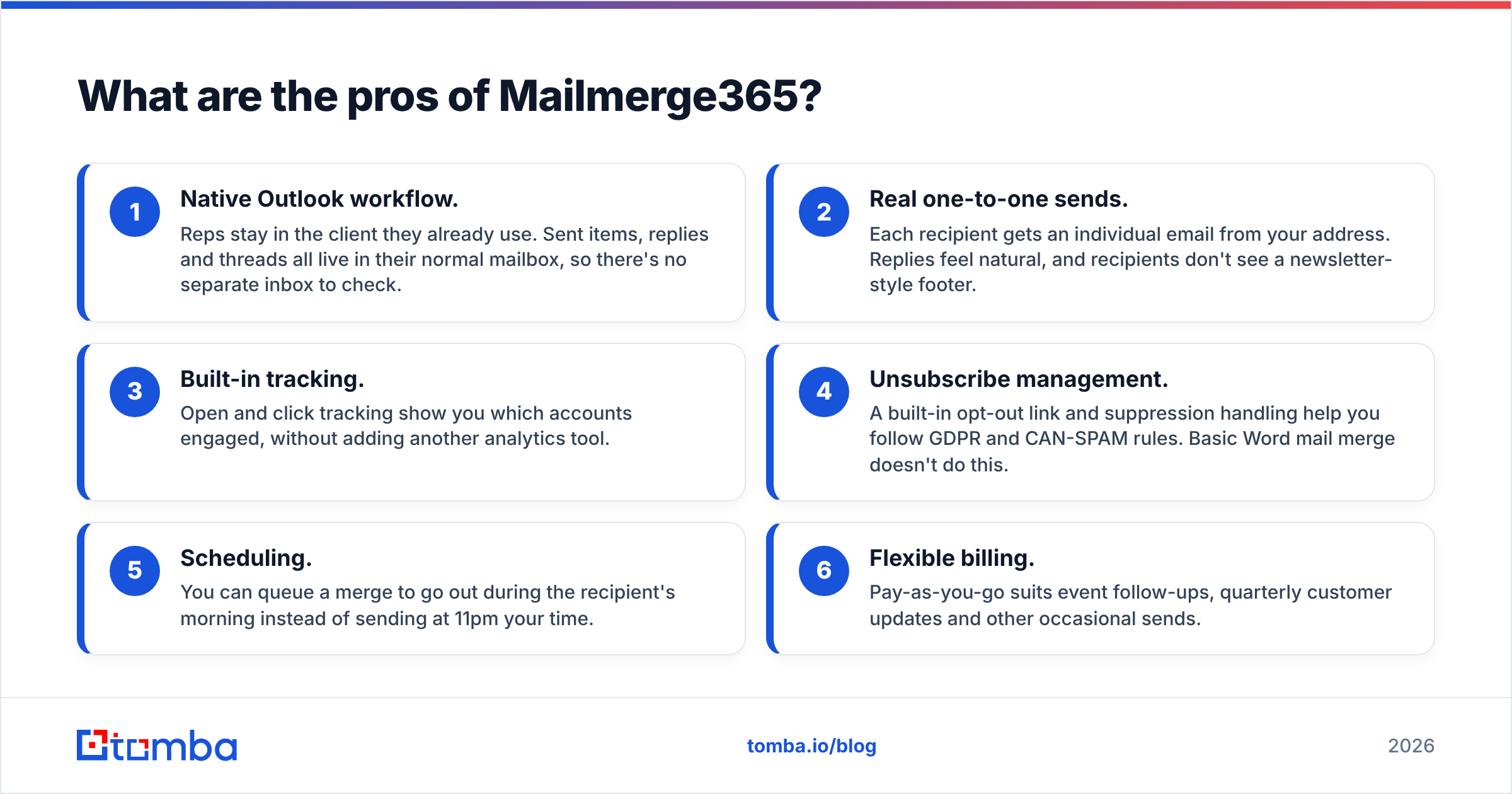
- Native Outlook workflow. Reps stay in the client they already use. Sent items, replies and threads all live in their normal mailbox, so there's no separate inbox to check.
- Real one-to-one sends. Each recipient gets an individual email from your address. Replies feel natural, and recipients don't see a newsletter-style footer.
- Built-in tracking. Open and click tracking show you which accounts engaged, without adding another analytics tool.
- Unsubscribe management. A built-in opt-out link and suppression handling help you follow GDPR and CAN-SPAM rules. Basic Word mail merge doesn't do this.
- Scheduling. You can queue a merge to go out during the recipient's morning instead of sending at 11pm your time.
- Flexible billing. Pay-as-you-go suits event follow-ups, quarterly customer updates and other occasional sends.
What are the cons of Mailmerge365?#
The weaknesses are mostly about scope rather than quality:
- Bound to Microsoft 365. If part of your team uses Google Workspace, they need a different tool such as GMass or YAMM.
- Outlook sending limits. Microsoft caps how much a single mailbox can send each day. The add-in can't get around those limits, and you shouldn't try.
- No deliverability infrastructure. It has no inbox rotation, no automatic warmup and no multi-domain sending. Cold-email platforms build all of these in.
- Limited sequences. It works well for single sends and simple follow-ups. If you need conditional, multi-step, multi-channel cadences, use a sequencer.
- Thin public review base. With only a handful of reviews on G2, you're relying more on the trial than on social proof.
- No contact data. It sends to the list you give it. It doesn't find or verify addresses.
How does Mailmerge365 compare to other Outlook mail merge options?#
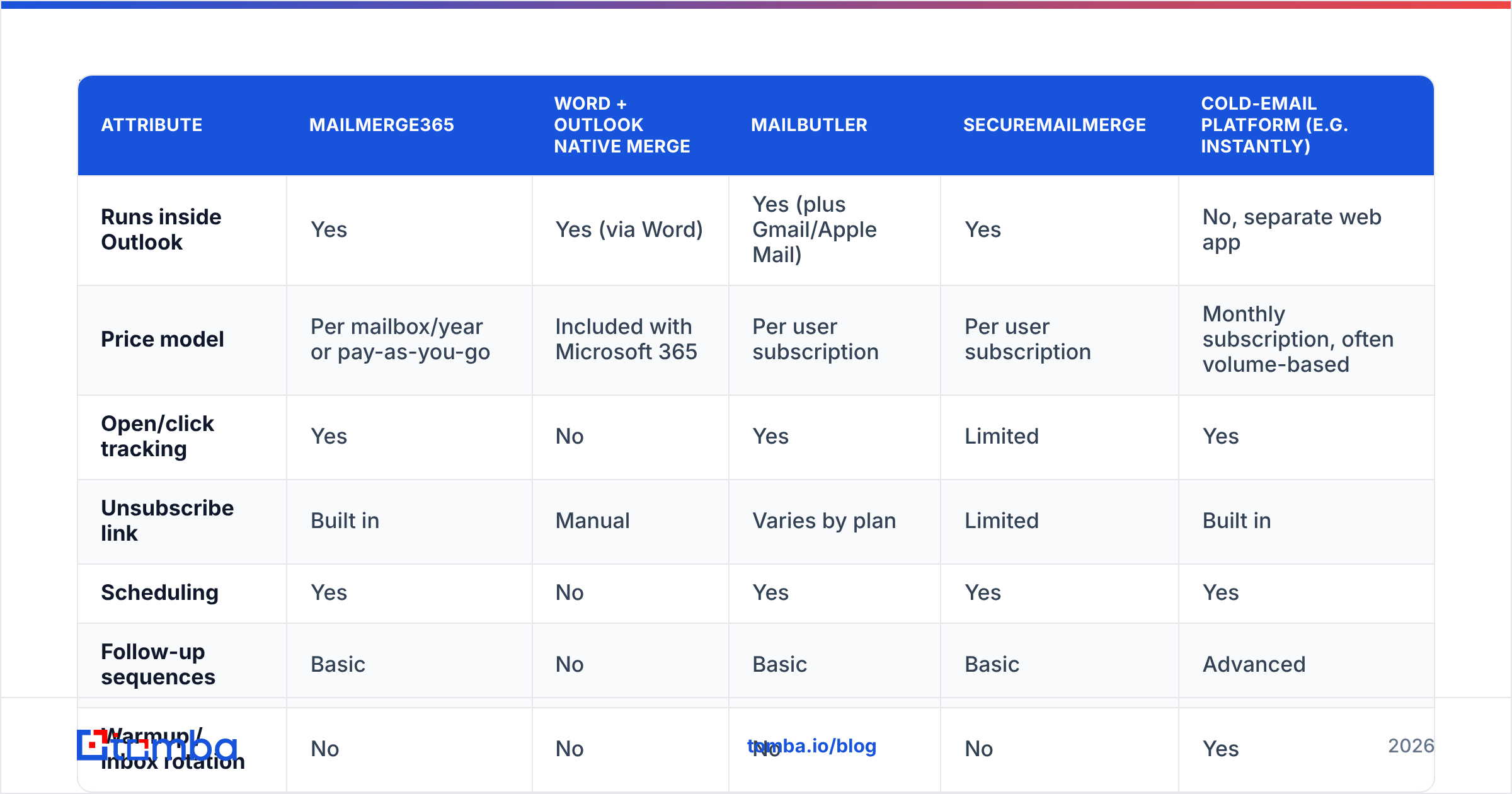
Most buyers aren't comparing Mailmerge365 to Apollo. They're comparing it to the other ways of sending personalized email from Outlook. Here's how they stack up:
| Attribute | Mailmerge365 | Word + Outlook native merge | Mailbutler | SecureMailMerge | Cold-email platform (e.g. Instantly) |
|---|---|---|---|---|---|
| Runs inside Outlook | Yes | Yes (via Word) | Yes (plus Gmail/Apple Mail) | Yes | No, separate web app |
| Price model | Per mailbox/year or pay-as-you-go | Included with Microsoft 365 | Per user subscription | Per user subscription | Monthly subscription, often volume-based |
| Open/click tracking | Yes | No | Yes | Limited | Yes |
| Unsubscribe link | Built in | Manual | Varies by plan | Limited | Built in |
| Scheduling | Yes | No | Yes | Yes | Yes |
| Follow-up sequences | Basic | No | Basic | Basic | Advanced |
| Warmup / inbox rotation | No | No | No | No | Yes |
| Best for | Personal campaigns from M365 | One-off internal sends | Multi-client productivity | Simple secure merges | High-volume cold outbound |
Verdict from the table: Mailmerge365 is a clear step up from Word's free merge once you need tracking and opt-outs. It's a reasonable alternative to other Outlook add-ins. But it's the wrong tool if your plan involves thousands of cold emails a week across several domains.
Who should use Mailmerge365 and who should skip it?#
Good fit:
- Account managers sending renewal notices, QBR invites or product updates to existing customers.
- Recruiters and partnership teams who send a few hundred personal emails a week.
- Event teams running post-webinar or post-trade-show follow-ups from a named rep's mailbox.
- Small B2B sales teams on Microsoft 365 that want light outbound without adopting a new platform.
Skip it if:
- You mainly do cold outbound at scale and need warmup, rotation and A/B testing.
- Your team is on Google Workspace.
- You need deep CRM sync and pipeline reporting. A sales engagement platform covers that.
How do you get better results from any mail merge tool?#
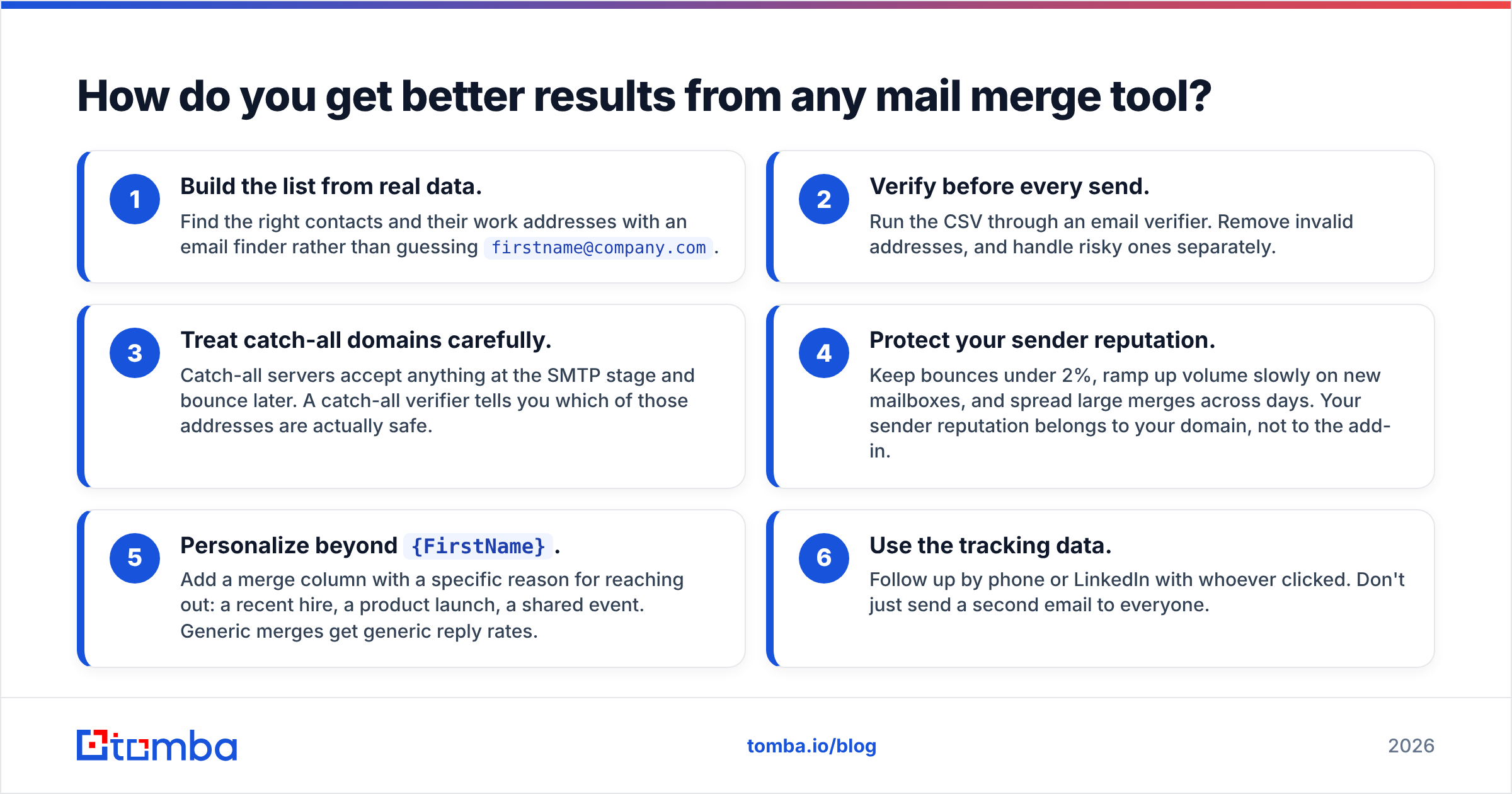
Most mail merge results depend on the list, not the add-in. A clean, well-segmented list sent with Mailmerge365 will beat a messy list sent through an expensive sequencer. This setup helps whatever tool you use:
Build the list from real data. Find the right contacts and their work addresses with an email finder rather than guessing
firstname@company.com.Verify before every send. Run the CSV through an email verifier. Remove invalid addresses, and handle risky ones separately.
Treat catch-all domains carefully. Catch-all servers accept anything at the SMTP stage and bounce later. A catch-all verifier tells you which of those addresses are actually safe.
Protect your sender reputation. Keep bounces under 2%, ramp up volume slowly on new mailboxes, and spread large merges across days. Your sender reputation belongs to your domain, not to the add-in.
Personalize beyond
{FirstName}. Add a merge column with a specific reason for reaching out: a recent hire, a product launch, a shared event. Generic merges get generic reply rates.Use the tracking data. Follow up by phone or LinkedIn with whoever clicked. Don't just send a second email to everyone.

Is Mailmerge365 worth the money?#
For the right team, yes. At about €9–€14 per sender per month, it's cheap compared with the time a rep spends copy-pasting personal emails, and it adds tracking and unsubscribe handling that Word's native merge lacks. Pay-as-you-go makes it close to risk-free for occasional senders.
It isn't worth it if you're buying it to solve a cold-outbound problem. It can't fix deliverability, it won't find prospects, and it won't run complex cadences. In those cases you'll end up adding a sequencer anyway, so start there.
A simple way to decide:
- Fewer than about 4,000 recipients a year and you're on Outlook: start with pay-as-you-go.
- Weekly personal campaigns from Microsoft 365: take the annual licence.
- High-volume cold outbound or a mixed Google/Microsoft team: look at a dedicated cold-email platform instead.
Whichever you choose, use the trial on a real segment of 50–100 verified contacts, not on test addresses. Check your reply rate, bounce rate and how tracking looks in your own Outlook before you pay.
Mailmerge365 pricing reviews pros and cons: the bottom line#
Weighing the Mailmerge365 pricing reviews pros and cons together, the tool does one job well: it sends personal, trackable emails in bulk from Outlook. Pricing is fair and flexible, and the few public reviews are positive. Its limits are about scope, since it isn't a cold-email platform. Judge it on that basis and it holds up.
Your merge results still depend on the contacts in the spreadsheet. If your list is guessed, old or scraped, no add-in will rescue it. Before your next campaign, use the Tomba Email Finder to get verified professional addresses by name, company or domain. You can start on the free tier with 25 searches a month and move to a paid plan when your volume grows (see Tomba pricing, from $49/mo). Clean data in, replies out.
Related guides#
// get started
Find, verify and enrich your first contacts today
Start on the free plan with 25 searches a month, then scale when your team is ready.
Free plan · No credit card required · GDPR & CCPA
// about the author