Email Warmup in 2026: The Complete Deliverability Guide
Email warmup builds sender reputation so your cold emails land in the inbox, not spam. Here is how warmup works in 2026, the best tools, and a ramp schedule you can copy.

TL;DR
- Email warmup gradually increases your sending volume while generating positive engagement (opens, replies, "move to inbox") so mailbox providers learn to trust your domain and IP.
- A cold domain that blasts hundreds of emails on day one almost always lands in spam — warmup is how you avoid that, and it takes 2–4 weeks for a new domain.
- Modern warmup tools automate the whole loop: they send between thousands of real inboxes, open and reply to each other, and pull your messages out of spam automatically.
- Warmup is necessary but not sufficient. Clean lists, proper SPF/DKIM/DMARC, and low spam complaints matter just as much.
- Below: how warmup actually works, a copy-ready 4-week ramp schedule, a tool comparison table, and the metrics that tell you when you are ready to scale.
What is email warmup?#
Email warmup is the process of slowly building a sending reputation on a new (or damaged) email address and domain so that mailbox providers like Gmail, Outlook, and Yahoo treat your messages as trustworthy.
Think of it like building credit. The first time you apply for a loan with no credit history, the bank has no reason to trust you, so it limits what you can borrow. Send 500 cold emails from a brand-new domain and Gmail reacts the same way — it has no track record for you, so it assumes the worst and routes you to spam. Warmup is the slow, consistent "on-time payment" history that earns you a higher limit.
Technically, warmup works by sending a small, growing number of emails that receive strong positive signals: the recipient opens the message, replies to it, marks it as important, and moves it out of spam if it ever lands there. Those interactions tell the provider's filters that real humans want your mail.
This matters for anyone running cold outreach. If you care about email deliverability, warmup is the first domino — get it wrong and every other optimization is wasted because nobody sees your message.
Why do new domains land in spam without warmup?#
A new sending domain has zero history, and spam filters are guilty-until-proven-innocent by design. Three things trigger the filters on a cold domain:
- Volume spikes. Going from 0 to 200 emails per day overnight is the single most common pattern in spam-bot behavior. Filters are tuned to catch exactly that curve.
- Low engagement. Cold prospects open and reply at low rates. With no offsetting positive history, the provider reads silence as "nobody wants this."
- Weak authentication. Missing or misconfigured SPF records, DKIM, or DMARC make you look like a spoofer.
Warmup solves the first two by manufacturing a clean, gradual history of engaged sends before you ever touch a real prospect. You still have to fix authentication yourself — no warmup tool does that for you.
A practical tip: register your sending domain at least 3–4 weeks before your campaign launch, and ideally use a separate domain (like getyourcompany.com instead of your primary yourcompany.com) so a deliverability mistake never burns your main brand domain.
How does email warmup actually work, step by step?#
Automated warmup runs a continuous loop between a large pool of real inboxes that all participate in the same network. Here is the cycle a tool like Instantly or Warmup Inbox runs on your behalf:
- Your inbox sends a handful of innocuous emails to other inboxes in the pool.
- Those inboxes open your email, often reply, and mark it as important.
- If your message lands in spam on the receiving side, the tool automatically pulls it into the primary inbox — a strong "this is not spam" signal.
- Volume ramps up a little each day on a schedule.
- You monitor your inbox-placement and reputation metrics, and only start real outreach once they stabilize.

The key insight is that warmup is engagement generation, not just volume generation. Anyone can send 50 emails a day. What moves your reputation is that those 50 emails get opened and replied to. That is why you can't fake warmup by emailing your own alias — providers can tell the difference between a real engaged network and a loop you set up yourself.
What is a good email warmup schedule?#
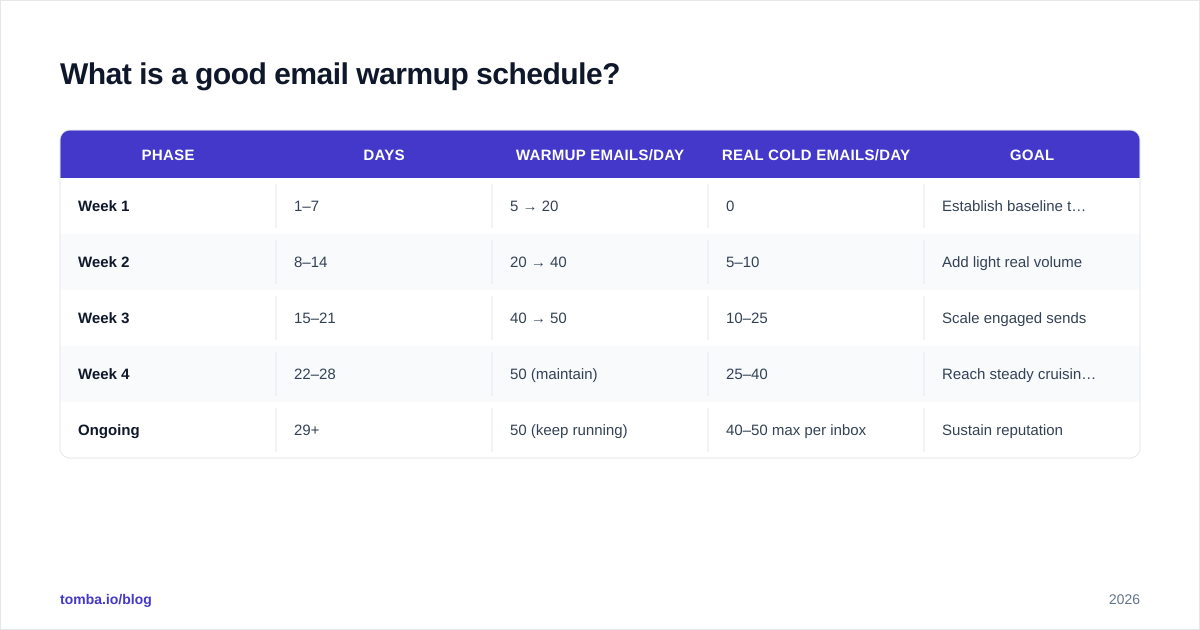
A safe ramp for a brand-new domain is roughly two to four weeks, starting small and increasing daily volume by 25–40%. Here is a copy-ready schedule for a new B2B domain heading toward cold outreach:
| Phase | Days | Warmup emails/day | Real cold emails/day | Goal |
|---|---|---|---|---|
| Week 1 | 1–7 | 5 → 20 | 0 | Establish baseline trust |
| Week 2 | 8–14 | 20 → 40 | 5–10 | Add light real volume |
| Week 3 | 15–21 | 40 → 50 | 10–25 | Scale engaged sends |
| Week 4 | 22–28 | 50 (maintain) | 25–40 | Reach steady cruising volume |
| Ongoing | 29+ | 50 (keep running) | 40–50 max per inbox | Sustain reputation |
Two rules that override the table:
- Never exceed ~50 cold emails per inbox per day, even after warmup. To send more, add more inboxes and domains, don't crank one address higher.
- Keep warmup running in the background forever. Reputation decays. The cheap insurance of 20–50 warmup emails a day keeps your sender score healthy between campaigns.
Before you load real prospects, run your list through an email verifier and drop every risky address. Bounces and spam traps undo weeks of warmup in a single send. A free email reputation checker is a useful pre-flight check too.
Which email warmup tools are best in 2026?#
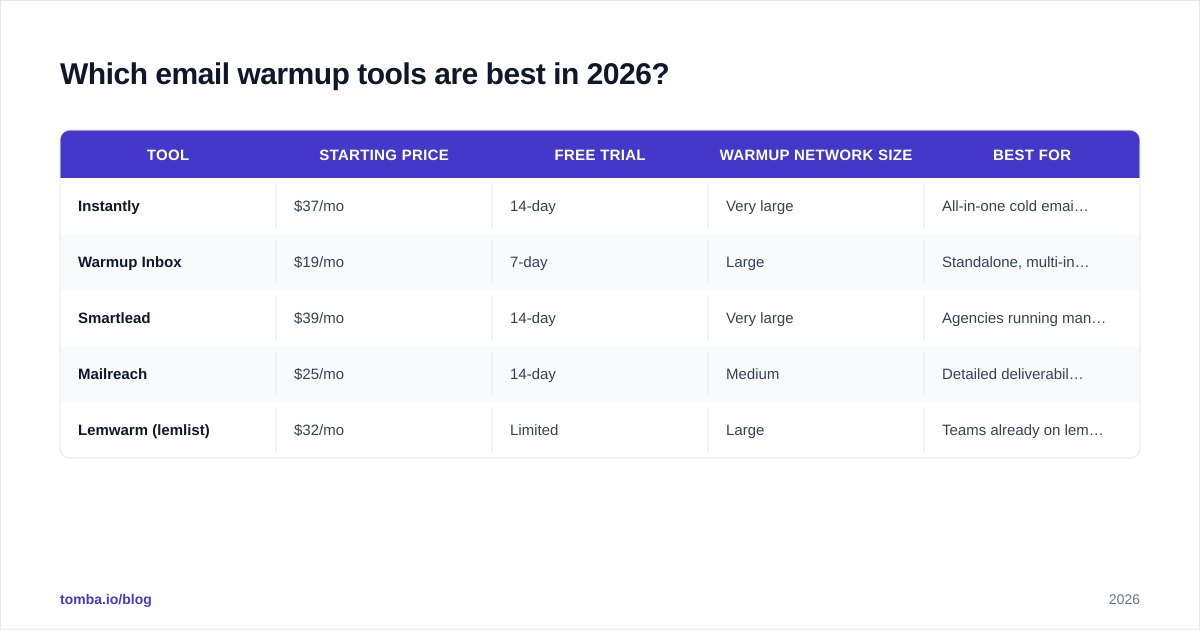
The market has consolidated around a few reliable platforms. Most cold-email sending tools now bundle warmup, while a couple of standalone services still exist. Here is how the main options compare:
| Tool | Starting price | Free trial | Warmup network size | Best for |
|---|---|---|---|---|
| Instantly | $37/mo | 14-day | Very large | All-in-one cold email + warmup |
| Warmup Inbox | $19/mo | 7-day | Large | Standalone, multi-inbox warmup |
| Smartlead | $39/mo | 14-day | Very large | Agencies running many domains |
| Mailreach | $25/mo | 14-day | Medium | Detailed deliverability reports |
| Lemwarm (lemlist) | $32/mo | Limited | Large | Teams already on lemlist |
A few honest caveats on tool selection:
- Bundled beats standalone for most teams. If you are already paying for a sending platform like Instantly or Smartlead, its built-in warmup is usually enough — a separate subscription rarely pays off.
- Network quality matters more than size. A warmup pool full of throwaway addresses generates weak signals. Established networks with real, aged inboxes move your reputation faster.
- Read the reporting. The best tools show you inbox-placement rate per provider (Gmail vs. Outlook), not just a vanity "warmup score."
Independent review sites like G2 and Capterra are worth checking for current user feedback before you commit, since feature sets and pricing shift quarterly.

How is warmup different from deliverability setup?#
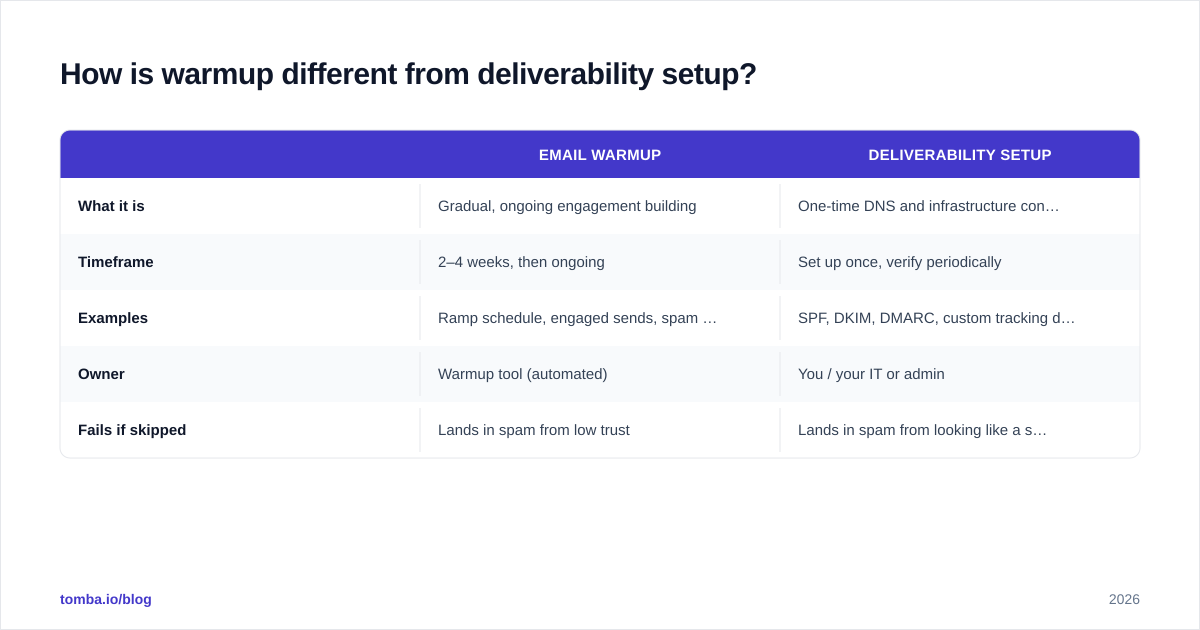
Warmup builds reputation over time; deliverability setup is the one-time technical foundation warmup sits on. You need both, and warmup can't compensate for a missing foundation.
| Email warmup | Deliverability setup | |
|---|---|---|
| What it is | Gradual, ongoing engagement building | One-time DNS and infrastructure config |
| Timeframe | 2–4 weeks, then ongoing | Set up once, verify periodically |
| Examples | Ramp schedule, engaged sends, spam rescue | SPF, DKIM, DMARC, custom tracking domain |
| Owner | Warmup tool (automated) | You / your IT or admin |
| Fails if skipped | Lands in spam from low trust | Lands in spam from looking like a spoofer |
Before warmup even starts, confirm these are in place:
- SPF, DKIM, and DMARC are published and passing. Use a free SPF checker to confirm your record is valid.
- A custom tracking domain so your open/click links don't share a blacklisted shared domain.
- Your domain and IP are not blacklisted. Run a quick blacklist checker before you send anything.
- MX records resolve correctly for the receiving side.
Google's own Postmaster Tools and guidance from providers like HubSpot are the authoritative references here — follow their bulk-sender requirements to the letter, because in 2024 Gmail and Yahoo made several of them mandatory.
What metrics tell you warmup is working?#
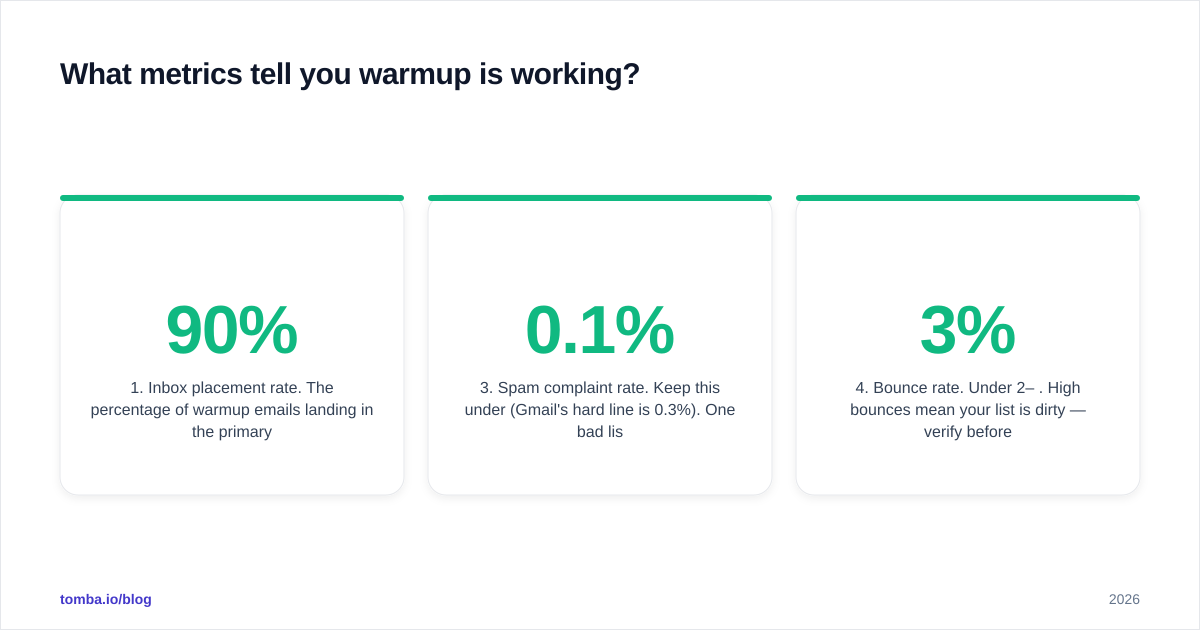
You are ready to scale when your placement and reputation numbers are stable and green. Watch these four:
- Inbox placement rate. The percentage of warmup emails landing in the primary inbox versus spam or promotions. Aim for 90%+ before real outreach.
- Sender reputation / domain reputation. In Google Postmaster Tools this is a Low/Medium/High rating. You want consistent "High." This ties directly to sender reputation, the single most predictive deliverability signal.
- Spam complaint rate. Keep this under 0.1% (Gmail's hard line is 0.3%). One bad list can blow past this fast.
- Bounce rate. Under 2–3%. High bounces mean your list is dirty — verify before you send, not after.
If any of these drift the wrong way during real campaigns, pause, slow your volume, and let warmup re-stabilize the account before pushing again. Reputation is far cheaper to maintain than to rebuild.
A reliable list is the input that keeps these metrics healthy. The most common cause of a sudden spam-complaint or bounce spike is sending to addresses you guessed instead of confirmed — which is exactly the problem a proper finder-plus-verifier workflow solves.
How does list quality connect to warmup?#
Perfectly warmed inboxes still die on a dirty list. Warmup protects your reputation; verified contact data prevents you from spending it. The two work as a system:
- Find accurate addresses rather than guessing patterns. Guessed emails bounce, and bounces erase warmup gains.
- Verify before every send, especially for older lists where people have changed jobs.
- Handle catch-all domains carefully — they accept everything at the SMTP layer, so a standard check can't confirm them. Use a dedicated catch-all verifier for those.
If you build lists at scale, pairing warmup with a high-accuracy data source is the difference between a sender score that climbs and one that quietly erodes campaign after campaign. You can pressure-test your own process with the free email warmup calculator to model how many inboxes and what ramp you need to hit a target send volume.
Common email warmup mistakes to avoid#
- Launching campaigns on day one. The most expensive mistake. Wait out the ramp.
- One inbox, huge volume. Spread sends across multiple inboxes and domains instead of overloading one address.
- Turning warmup off after launch. Keep it running at a low background level permanently.
- Ignoring authentication. No amount of warmup fixes a failing DMARC record.
- Sending to unverified lists. Bounces and spam traps undo weeks of progress instantly.
- Identical copy at scale. Templated, link-heavy, spammy-worded emails get filtered even from a warm domain. Vary your copy and keep it conversational.
Final takeaway and where to start#
Email warmup is non-negotiable for cold outreach in 2026: ramp a fresh domain over two to four weeks, keep volume under ~50 cold emails per inbox per day, run warmup continuously in the background, and watch your inbox-placement and reputation metrics before you scale. Pair that with airtight SPF/DKIM/DMARC and a clean, verified list, and your messages will reach the inbox instead of the spam folder.
The foundation of every healthy campaign is accurate data. Before you warm a single inbox, make sure the addresses you plan to contact are real and reachable. Start with the Tomba Email Finder to source verified professional emails by name, company, or domain — then layer warmup on top so your hard-won reputation is spent on contacts that actually exist. Check current Tomba pricing to find the plan that matches your sending volume, starting free with 25 searches a month.
// get started
Find, verify and enrich your first contacts today
Start on the free plan with 25 searches a month, then scale when your team is ready.
Free plan · No credit card required · GDPR & CCPA
// about the author