Cold Email Infrastructure in 2026: The Complete Setup Guide
Most cold email fails before the first send — at the infrastructure layer. Here's how to set up domains, mailboxes, authentication, and warmup that actually reach the inbox in 2026.
TL;DR
- Cold email infrastructure is the stack of sending domains, mailboxes, DNS authentication, and warmup that decides whether your emails reach the inbox or the spam folder — it matters more than your copy.
- Use separate sending domains (not your primary brand domain), 2–3 mailboxes per domain, and keep each mailbox under ~30–50 cold sends per day in 2026.
- SPF, DKIM, and DMARC are non-negotiable. Missing or misconfigured records are the single fastest way to get filtered after Google and Yahoo tightened bulk-sender rules.
- Warm every new mailbox for 2–3 weeks before real outreach, and never skip list verification — bounces poison domain reputation faster than anything else.
- Shared Google Workspace mailboxes are the pragmatic default for most teams; dedicated SMTP and Microsoft tenants are for scale, not beginners.
What is cold email infrastructure?#
Cold email infrastructure is the technical foundation that delivers your outreach — the sending domains, individual mailboxes, DNS authentication records, IP reputation, and warmup process working together so your messages land in the inbox instead of spam. Think of it like the plumbing behind a faucet: you only notice it when the water stops, but every drop depends on pipes you never see.
Most people obsess over subject lines and personalization. Those matter, but they are downstream. If your cold email infrastructure is broken, the recipient never sees the clever opener because the message was filtered at the gateway. Mailbox providers evaluate how you send long before they evaluate what you send.
In 2026, this layer is more decisive than ever. After Google and Yahoo rolled out stricter requirements for bulk senders, the margin for sloppy setup collapsed. A campaign that would have squeaked into the inbox in 2022 now gets quietly routed to spam — no bounce, no warning, just silence.
Why does cold email infrastructure matter so much in 2026?#
Because providers now treat reputation as the primary signal, and reputation is built entirely at the infrastructure level.
Three forces converged:
- Bulk-sender enforcement. Gmail and Yahoo require SPF, DKIM, and DMARC alignment plus low spam-complaint rates for high-volume senders. The bar that was "recommended" is now "enforced."
- AI-driven filtering. Spam filters model sending behavior — sudden volume spikes, fresh domains blasting hundreds of messages, mismatched authentication. Patterns that look automated get throttled.
- Domain reputation is sticky. Once a domain earns a bad reputation, it can take weeks to recover or may never fully recover. Burning your primary domain is a permanent-feeling mistake.
The practical takeaway: you protect your brand domain by never sending cold outreach from it. You build a parallel infrastructure designed to be slightly disposable, carefully warmed, and rigorously authenticated.
What are the core components of cold email infrastructure?#
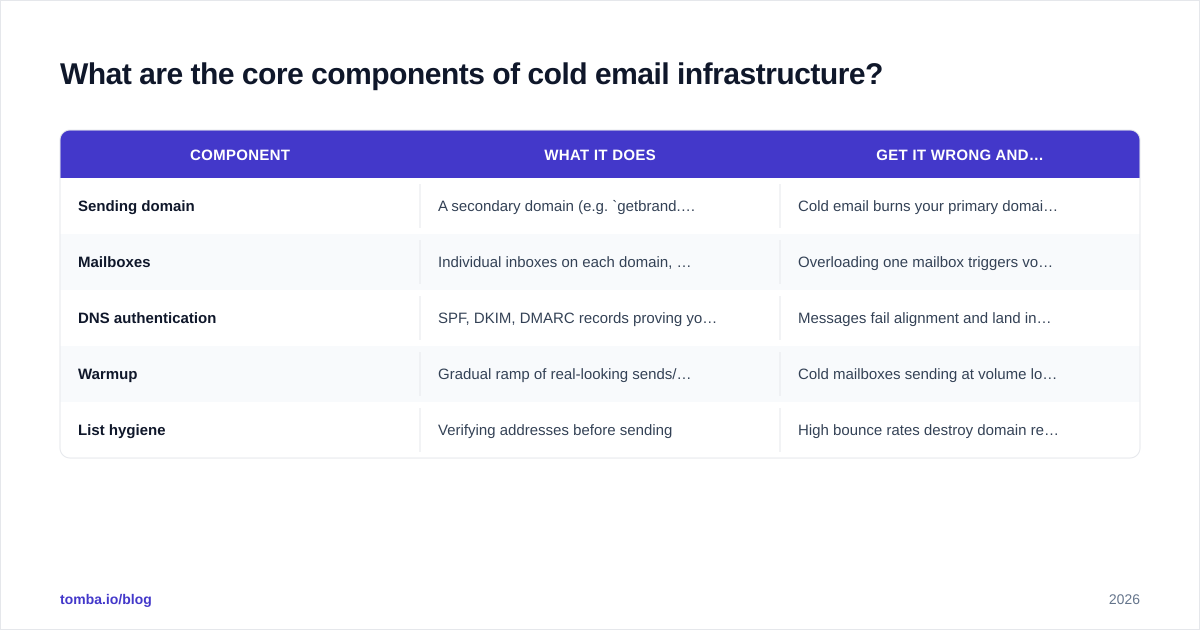
There are five layers, and a weakness in any one drags down the whole stack.
| Component | What it does | Get it wrong and… |
|---|---|---|
| Sending domain | A secondary domain (e.g. getbrand.com for brand.com) used only for outreach |
Cold email burns your primary domain's reputation |
| Mailboxes | Individual inboxes on each domain, each with its own sending limit | Overloading one mailbox triggers volume-based filtering |
| DNS authentication | SPF, DKIM, DMARC records proving you are allowed to send | Messages fail alignment and land in spam |
| Warmup | Gradual ramp of real-looking sends/replies on new mailboxes | Cold mailboxes sending at volume look like spam bots |
| List hygiene | Verifying addresses before sending | High bounce rates destroy domain reputation |
Notice that copy, sequencing, and CRM are not on this list. They sit on top of infrastructure. You can have a world-class sequence and still hit 4% inbox placement if these five layers are weak.
A quick way to audit your own stack: run your sending domain through an SPF checker and a blacklist checker before you send a single campaign. If either flags an issue, stop and fix it first.
How many domains and mailboxes do you actually need?#
Conclusion first: plan roughly one sending domain per 2–3 mailboxes, and one mailbox per ~30–50 cold sends per day. Work backwards from your daily target.
Say you want to send 600 cold emails per day. At a conservative 40 sends/mailbox/day, that is 15 mailboxes. At 2–3 mailboxes per domain, that is 5–8 sending domains. This redundancy is intentional — it spreads risk so a single flagged domain does not take down your entire pipeline.
A few rules that hold up well in 2026:
- Buy secondary domains, not your main one. Common patterns are
try-,get-,-hq, or a.co/.iovariant of your brand. - Redirect every sending domain to your primary site. A naked domain that resolves to nothing looks suspicious.
- Keep per-mailbox volume low. It is far better to run 15 mailboxes at 40/day than 3 mailboxes at 200/day.
- Stagger domain age. Don't register 8 domains the same morning and blast the next week — let them age and warm.
This is also where your data quality compounds. Sending to unverified addresses inflates bounce rates, and bounces hammer domain reputation harder than spam complaints. Pull contacts with an accurate email finder and run the list through an email verifier before any of it touches your mailboxes.
How do you authenticate cold email (SPF, DKIM, DMARC)?#
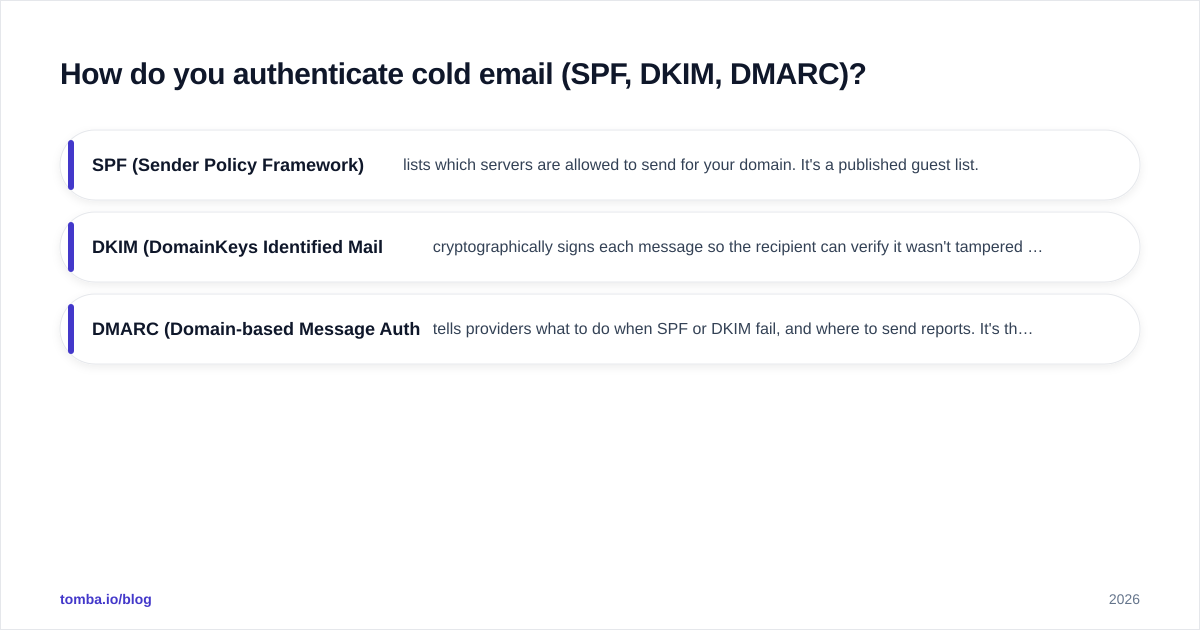
These three DNS records are the lock, key, and ID card of email authentication. Skipping them in 2026 is the equivalent of showing up to a secured building with no badge — you don't get in.
- SPF (Sender Policy Framework) lists which servers are allowed to send for your domain. It's a published guest list.
- DKIM (DomainKeys Identified Mail) cryptographically signs each message so the recipient can verify it wasn't tampered with. It's a tamper-evident seal.
- DMARC (Domain-based Message Authentication) tells providers what to do when SPF or DKIM fail, and where to send reports. It's the policy that ties the first two together.
Gmail and Yahoo now expect all three to align for serious senders. Start DMARC at p=none to monitor, then tighten to p=quarantine once your reports look clean. For the canonical spec, the DMARC overview on Wikipedia is a solid primer, and Google's sender guidelines spell out the exact bulk-sender thresholds.
Once records are live, verify them rather than trusting that the registrar UI did its job. A misconfigured SPF include or a DKIM key that never propagated is invisible until your placement craters. Check, don't assume — this is exactly the kind of thing the email deliverability fundamentals exist to protect.
What is warmup, and can you skip it?#
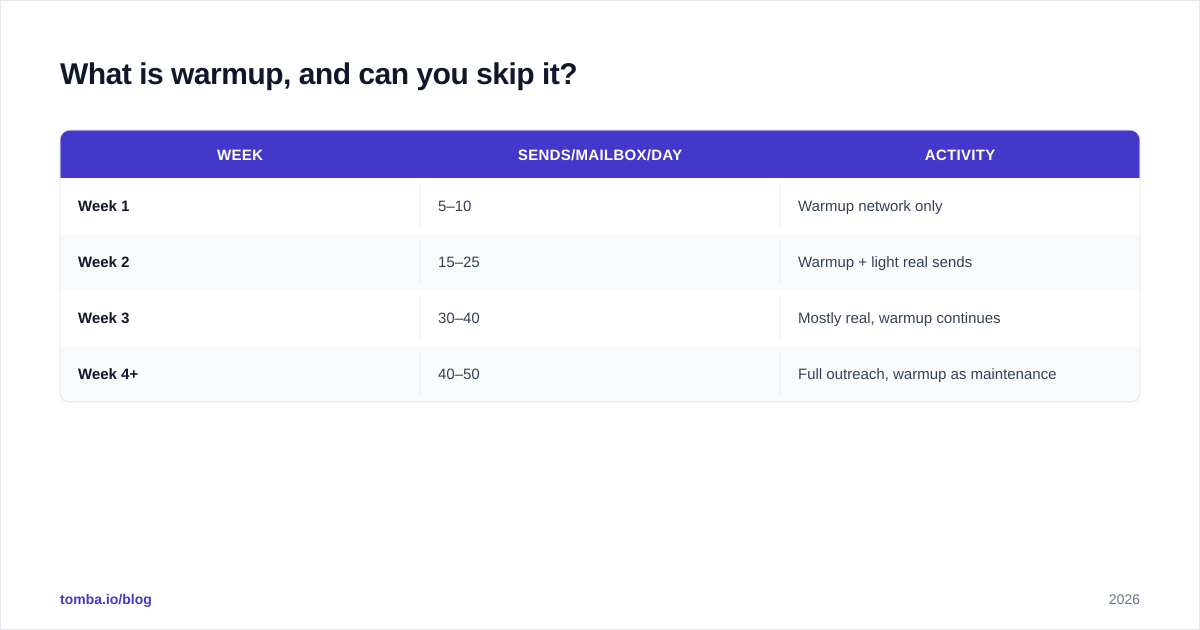
You cannot skip it. Warmup is the process of gradually building a new mailbox's sending reputation by starting with a trickle of low-volume, high-engagement sends — often automated exchanges between warmup-network inboxes that open, reply, and mark messages as important.
The analogy: a brand-new mailbox sending 200 cold emails on day one is like a stranger walking into a quiet office and shouting. The brand-new mailbox that sends 5 friendly messages on day one, 10 on day three, and 25 by week two looks like a normal human ramping up. Providers reward the second behavior.
A reasonable warmup curve:
| Week | Sends/mailbox/day | Activity |
|---|---|---|
| Week 1 | 5–10 | Warmup network only |
| Week 2 | 15–25 | Warmup + light real sends |
| Week 3 | 30–40 | Mostly real, warmup continues |
| Week 4+ | 40–50 | Full outreach, warmup as maintenance |
Keep warmup running in the background even after launch — it's maintenance, not a one-time event. If you want a concrete ramp tailored to your volume, the email warmup calculator maps days to safe send counts so you're not guessing.
Throughout warmup and beyond, watch your reputation in Google Postmaster Tools. If domain reputation slips from "High" toward "Low/Bad," pause, diagnose, and slow down before you dig a deeper hole.
Shared, dedicated, or Google vs Microsoft — which setup should you choose?#
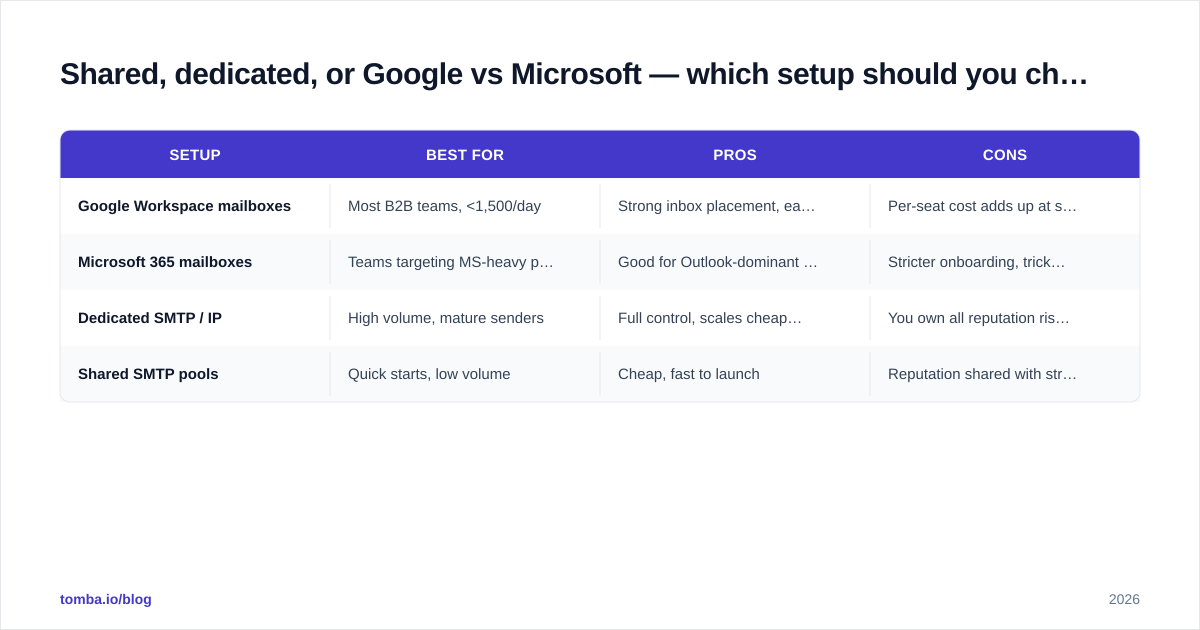
Conclusion first: for most teams in 2026, multiple Google Workspace mailboxes on secondary domains is the best balance of deliverability, cost, and simplicity. Dedicated infrastructure is a scaling decision, not a starting point.
| Setup | Best for | Pros | Cons |
|---|---|---|---|
| Google Workspace mailboxes | Most B2B teams, <1,500/day | Strong inbox placement, easy DNS, trusted sender | Per-seat cost adds up at scale |
| Microsoft 365 mailboxes | Teams targeting MS-heavy prospects | Good for Outlook-dominant audiences | Stricter onboarding, trickier warmup |
| Dedicated SMTP / IP | High volume, mature senders | Full control, scales cheaply per send | You own all reputation risk; needs expertise |
| Shared SMTP pools | Quick starts, low volume | Cheap, fast to launch | Reputation shared with strangers — risky |
A pragmatic path most teams follow:
- Start with Google Workspace mailboxes across 3–5 secondary domains.
- Authenticate everything (SPF/DKIM/DMARC) and warm for 2–3 weeks.
- Scale horizontally — add more domains and mailboxes — rather than cranking volume on existing ones.
- Only graduate to dedicated SMTP/IP once you have the volume and in-house expertise to manage reputation yourself.
If you're evaluating sending platforms and sequencers, comparison sites like G2 are useful for filtering by real reviews rather than vendor claims.

What are the most common cold email infrastructure mistakes?#
These are the failures that quietly kill campaigns:
- Sending from your primary domain. One bad campaign can taint the domain your whole company emails from. Always use secondaries.
- Skipping verification. Unverified lists bounce, and bounce rate is the fastest reputation killer. Verify every list.
- Ramping too fast. A new mailbox at 100+ sends/day reads as a bot. Respect the warmup curve.
- Ignoring authentication reports. DMARC reports tell you when something is failing — read them.
- Reusing burned domains. Once a domain's reputation is shot, retire it. Don't keep flogging it.
- No spam-complaint monitoring. Cross the ~0.3% complaint threshold and providers throttle you hard.
Most of these trace back to impatience. Cold email infrastructure rewards the boring, methodical operator and punishes the one who wants 1,000 sends by Friday. For deeper context on how providers score you, the sender reputation fundamentals are worth bookmarking.
How do you keep infrastructure healthy over time?#
Treat it as ongoing maintenance, not a one-time build. A simple weekly rhythm:
- Check domain reputation in Postmaster Tools.
- Re-verify any list older than 30–60 days before reusing it — B2B data decays fast as people change jobs.
- Keep warmup running as background maintenance on active mailboxes.
- Rotate in fresh domains before existing ones show fatigue, so you always have warmed capacity in reserve.
- Watch bounce and complaint rates per domain, and pull any domain that drifts out of healthy ranges.
The teams that win at cold outreach aren't the ones with the cleverest copy. They're the ones whose infrastructure is so clean that their average email reliably reaches a human being.
Where to start#
Cold email infrastructure is a chain — domains, mailboxes, authentication, warmup, and clean data — and it's only as strong as its weakest link. The fastest wins for most senders are the cheapest ones: stop sending from your primary domain, authenticate properly, slow your warmup down, and verify your lists.
That last link — data quality — is where deliverability is won or lost before a single DNS record matters. Bad addresses bounce, bounces tank reputation, and no warmup strategy survives a dirty list. Start your outreach with accurate, verified contacts from Tomba Email Finder, confirm them with the email verifier, and you've protected the infrastructure you just spent weeks building. Plans start free at 25 searches/month, with paid tiers from $49/mo — see Tomba pricing for the full breakdown. Build the foundation right, and the inbox takes care of itself.
// get started
Find, verify and enrich your first contacts today
Start on the free plan with 25 searches a month, then scale when your team is ready.
Free plan · No credit card required · GDPR & CCPA
// about the author