Email Warmup in 2026: The Complete Deliverability Guide
Email warmup builds the sender reputation that decides whether cold emails hit the inbox or the spam folder. Here's how warmup works in 2026, what to automate, and how to measure it.

TL;DR
- Email warmup is the gradual ramp-up of sending volume from a new (or cold) mailbox so mailbox providers learn to trust you. Skip it and your cold campaigns land in spam no matter how good the copy is.
- Reputation is built on engagement signals: opens, replies, "not spam" rescues, and low bounce/complaint rates. Warmup manufactures those signals safely before you scale.
- A realistic warmup runs 3–6 weeks, starting at ~5–10 sends per day and adding 30–40% volume weekly until you reach your target.
- Authentication (SPF, DKIM, DMARC), a clean list, and a separate sending domain are prerequisites — warmup amplifies a good setup, it can't fix a broken one.
- Automated warmup tools handle the daily mechanics, but you still own list hygiene, domain age, and content quality. Verify every address before it enters a campaign.
What is email warmup?#
Email warmup is the process of slowly increasing how many emails you send from a new mailbox so that providers like Gmail and Outlook learn your domain is run by a real, trustworthy human — not a spammer.
Think of it like building credit. A bank won't hand a brand-new applicant a $50,000 limit on day one. You start small, prove you pay on time, and the limit grows. Mailbox providers work the same way: a domain with no history that suddenly blasts 2,000 cold emails looks exactly like a compromised account or a spam cannon, so the messages get filtered. Warmup is the track record that earns you a higher "credit limit" of daily sends.
Technically, warmup builds your sender reputation — a score each provider keeps on your domain and IP based on how recipients react to your mail. Positive interactions (opens, replies, moving you out of spam) push the score up. Negative ones (spam complaints, hard bounces, deletes-without-open) drag it down. Warmup engineers a stream of positive interactions during the fragile early period when one bad week can blacklist you for months.
Why does email warmup matter for deliverability?#
Because deliverability — not "delivery" — is the metric that pays your bills. A message can be delivered (accepted by the server) and still rot in the spam folder where nobody reads it. Warmup is what moves you from "delivered" to "delivered to the inbox."
The stakes are concrete. According to Google's Postmaster Tools guidance, bulk senders are evaluated on spam complaint rates, authentication, and consistent sending patterns. Cross a complaint threshold (Gmail's is roughly 0.3%) and your inbox placement collapses for every recipient, not just the ones who complained. New domains have zero buffer against this — one careless launch and you're done.
Here's the cost of skipping warmup:
- Spam placement from day one. Providers treat unknown high-volume senders as guilty until proven innocent.
- Domain blacklisting. Spamhaus and similar lists can flag a fresh domain that spikes traffic, poisoning every future send.
- Burned domain. A torched primary domain can hurt your real corporate email (invoices, support, sales replies), not just cold outreach.

How does the email warmup process work?#
Warmup works by simulating the behavior of a healthy, established account: low initial volume, steady growth, and high engagement. You can do it manually or with automation, but the mechanics are the same.
1. Start tiny. Send 5–10 emails a day for the first few days, ideally to real people who will open and reply — colleagues, friendly customers, or an automated warmup network.
2. Drive engagement. The magic ingredient is replies and "move to inbox" actions. An email that gets opened, replied to, and dragged out of spam sends the strongest possible trust signal. Automated tools simulate this by having a network of real inboxes open, reply, and rescue your test sends.
3. Ramp gradually. Increase volume 30–40% per week. Jumping from 10 to 500 overnight undoes everything — consistency matters more than speed.
4. Keep complaints near zero. Every spam complaint during warmup is disproportionately damaging because you have no reputation cushion yet.
5. Maintain it. Warmup isn't one-and-done. Keep a baseline of engaged sending so your reputation doesn't decay during slow periods.
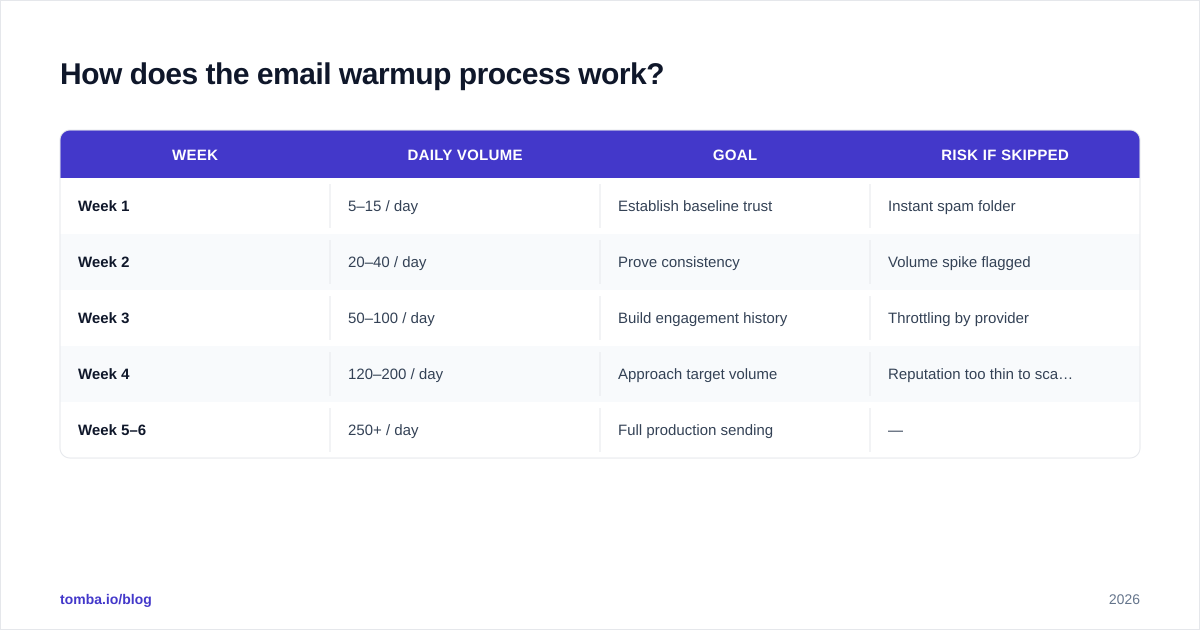
A typical ramp looks like this:
| Week | Daily volume | Goal | Risk if skipped |
|---|---|---|---|
| Week 1 | 5–15 / day | Establish baseline trust | Instant spam folder |
| Week 2 | 20–40 / day | Prove consistency | Volume spike flagged |
| Week 3 | 50–100 / day | Build engagement history | Throttling by provider |
| Week 4 | 120–200 / day | Approach target volume | Reputation too thin to scale |
| Week 5–6 | 250+ / day | Full production sending | — |
These numbers assume one mailbox. The professional move in 2026 is to spread volume across multiple mailboxes and domains rather than pushing a single inbox to its ceiling — more on that below.
What do you need before you start warming up?#
Warmup amplifies a good foundation; it cannot rescue a broken one. Lock these down first.
- A separate sending domain. Never warm up and send cold email from your primary domain (e.g.,
yourcompany.com). Use a variant likegetyourcompany.comso a reputation hit never touches your real corporate mail. - Authentication records. Set up SPF, DKIM, and DMARC. Use an SPF checker to confirm your record is valid — a missing or broken SPF record tells providers you might be a spoofer.
- A clean, verified list. Bounces are reputation poison. Run every address through an email verifier before it touches a campaign. A 2% bounce rate during warmup can stall the entire process.
- A real, complete profile. Add a display name, signature, and ideally a Google/Microsoft Workspace account with some inbox activity. Empty profiles look disposable.
- Aged domain (ideally). A domain that's been registered and parked for a few weeks before sending looks more legitimate than one bought yesterday.
The list-hygiene point deserves emphasis: warmup gets you to the inbox, but a dirty list will throw you back out within days. If you can't confirm an address is deliverable, don't send to it. Bulk-checking thousands of contacts before a launch is exactly what a bulk email finder and verifier workflow is for.
Manual vs automated email warmup: which is better?#
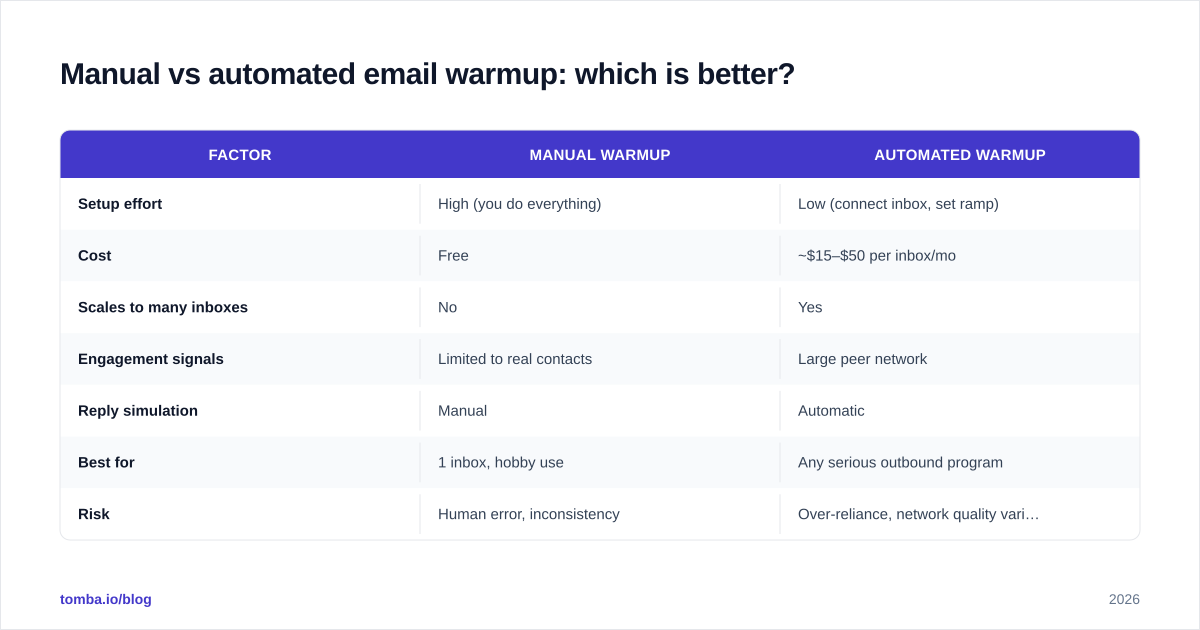
Automated warmup wins for almost everyone, but understanding the trade-off matters.
Manual warmup means you personally send and reply to low-volume email, gradually scaling. It's free and gives you full control, but it's slow, tedious, and nearly impossible to run across the 5–20 inboxes a modern outbound operation uses. Automated warmup tools join your inboxes to a peer network where accounts auto-open, auto-reply, and auto-rescue each other's messages, generating engagement signals around the clock.
| Factor | Manual warmup | Automated warmup |
|---|---|---|
| Setup effort | High (you do everything) | Low (connect inbox, set ramp) |
| Cost | Free | ~$15–$50 per inbox/mo |
| Scales to many inboxes | No | Yes |
| Engagement signals | Limited to real contacts | Large peer network |
| Reply simulation | Manual | Automatic |
| Best for | 1 inbox, hobby use | Any serious outbound program |
| Risk | Human error, inconsistency | Over-reliance, network quality varies |

One honest caveat: mailbox providers have gotten better at detecting artificial warmup networks, and some argue heavy reliance on them is a diminishing-returns game. The 2026 consensus is a hybrid — use automation for the daily grind, but make sure a meaningful share of your sending is real outreach to real, verified prospects who actually reply. Genuine engagement always beats simulated engagement.
Which email warmup tools should you consider in 2026?#
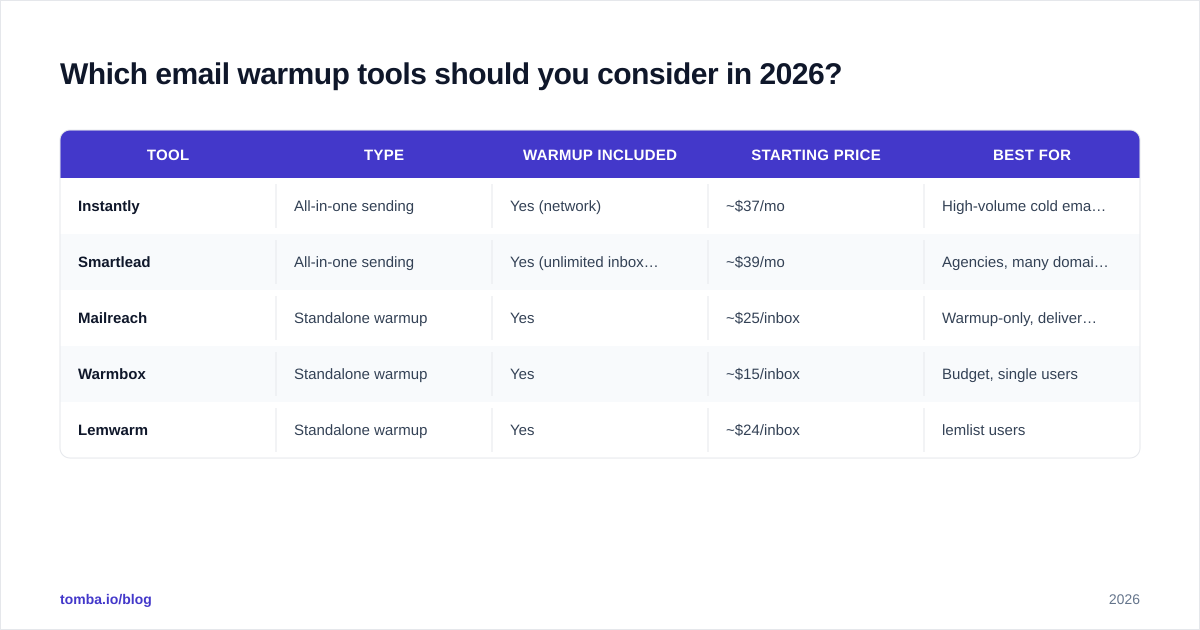
The market splits into standalone warmup services and all-in-one sending platforms with warmup baked in. Here's how the common options compare at a high level. (Pricing changes often — confirm on each vendor's site; we link to neutral review sources where useful.)
| Tool | Type | Warmup included | Starting price | Best for |
|---|---|---|---|---|
| Instantly | All-in-one sending | Yes (network) | ~$37/mo | High-volume cold email |
| Smartlead | All-in-one sending | Yes (unlimited inboxes) | ~$39/mo | Agencies, many domains |
| Mailreach | Standalone warmup | Yes | ~$25/inbox | Warmup-only, deliverability tests |
| Warmbox | Standalone warmup | Yes | ~$15/inbox | Budget, single users |
| Lemwarm | Standalone warmup | Yes | ~$24/inbox | lemlist users |
You can cross-reference user ratings on a neutral marketplace like G2 before committing — review velocity and recent complaints tell you more than a feature list. Whatever you pick, the warmup tool is only half the stack. It feeds engagement signals; you still need a source of accurate, verified contacts to send your actual campaigns to once warmup is done.
How do you measure if your warmup is working?#
You measure warmup the same way providers judge you: by reputation and placement signals, not by how many emails left the building.
Watch these metrics:
- Inbox placement rate. The percentage of sends landing in the primary inbox vs spam/promotions. This is the headline number. Seed-list tests (sending to a spread of test accounts across providers) reveal it.
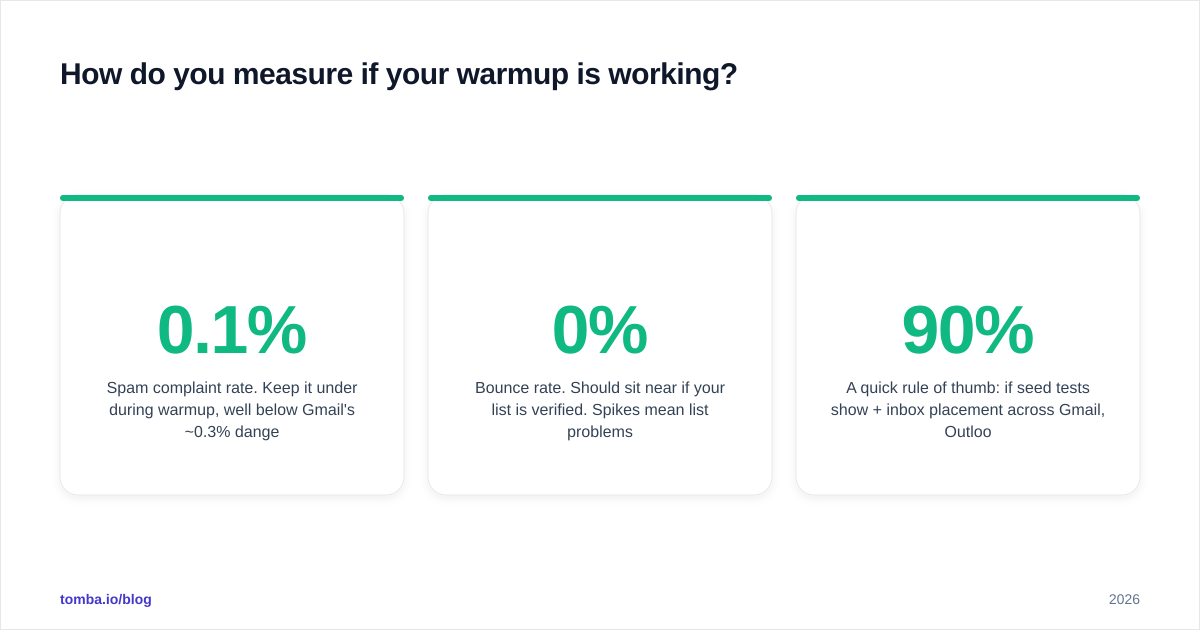
- Spam complaint rate. Keep it under 0.1% during warmup, well below Gmail's ~0.3% danger line. Monitor it in Google Postmaster Tools.
- Bounce rate. Should sit near 0% if your list is verified. Spikes mean list problems, not warmup problems.
- Reply and open rate. Rising engagement confirms the warmup network (or your manual sends) is doing its job.
- Domain/IP reputation. Postmaster Tools shows Gmail's view of your domain — aim to move from "Low"/"Medium" to "High."
A quick rule of thumb: if seed tests show 90%+ inbox placement across Gmail, Outlook, and Yahoo and your complaint rate is flat near zero, you've earned the right to scale. If placement is stuck below 80% after four weeks, stop ramping, audit authentication and list quality, and fix the root cause before adding volume. For a fast estimate of how long your specific ramp should take, an email warmup calculator will model the timeline from your starting volume and target.
What are the most common email warmup mistakes?#
Most warmup failures come from impatience or skipping the prerequisites.
- Scaling too fast. Doubling volume every few days is the number-one killer. Stick to 30–40% weekly growth.
- Warming up the wrong domain. Running cold email from your primary corporate domain risks your real business communications. Always use a separate sending domain.
- Sending to unverified lists. Even a perfectly warmed inbox gets wrecked by a 5% bounce rate. Verify first, every time.
- Ignoring authentication. No DKIM/DMARC means providers can't trust the mail is really from you. Warmup can't compensate for that.
- Stopping warmup entirely after launch. Reputation decays. Keep a baseline of engaged sending.
- Identical content at scale. Hundreds of byte-identical emails trip spam filters. Use personalization and spintax so each message is a little different.
- No monitoring. If you're not watching Postmaster Tools and seed tests, you're flying blind and won't catch a reputation slide until it's too late.
The thread connecting most of these is data quality. You can run a flawless six-week ramp and still crater on launch day if the list you finally send to is full of dead, guessed, or role-based addresses. Warmup and list hygiene are two halves of the same deliverability job.
Where does contact data fit into email warmup?#
Warmup earns inbox access; verified contact data is what you do with it. The cleanest sending domain in the world produces nothing if your campaign list bounces.
This is the part teams underinvest in. They spend weeks warming up inboxes, then load a scraped list of unverified addresses and watch their hard-won reputation evaporate in 48 hours. The fix is to make verification a non-negotiable step between "list built" and "campaign sent."
That's where Tomba fits into the deliverability stack. Use the Tomba Email Finder to source professional addresses by name, domain, or company, then run them through Tomba's verifier so only deliverable, low-risk contacts ever reach your warmed-up inboxes. Plans start with a free tier of 25 searches a month, with paid plans from $49/mo on the Starter tier — see the full Tomba pricing for Growth ($99/mo), Pro ($249/mo), and Enterprise options. Warm up your domain properly, verify before you send, and the inbox is yours.
Start free, verify your list, and protect the reputation your warmup worked so hard to build — find and verify your first contacts with Tomba.
Ready to find emails that actually work?
Join 150,000+ professionals who stopped guessing and started sending. Free credits on signup — no credit card required.
Get the Tomba newsletter
Practical outbound tactics and product updates — once every two weeks.
About the author