Clientjoy Pricing, Reviews, Pros and Cons (2026 Breakdown)
A neutral 2026 breakdown of Clientjoy pricing, real user reviews, and the honest pros and cons — plus where it fits (and where it doesn't) for agencies and freelancers.

Clientjoy is an all-in-one CRM and client portal. It targets agencies, freelancers, and small studios. One subscription bundles lead capture, proposals, invoicing, contracts, and a branded client portal. For a while it was famous for an aggressive AppSumo lifetime deal. In 2026, Synup owns it, and the pricing and roadmap look different. This is a neutral Clientjoy pricing reviews pros and cons breakdown, so you can decide whether it belongs in your stack.
TL;DR#
- Clientjoy pricing centers on affordable monthly and annual tiers (roughly $15–$39 per user each month). The old lifetime deal is now largely retired.
- Reviews are broadly positive on value and the client portal. They also flag slow support and roadmap uncertainty after the Synup acquisition.
- Biggest pro: it is genuinely all-in-one. Proposals, e-sign, invoicing, and CRM live in one login for a low price.
- Biggest con: it is a client-management hub, not a prospecting tool. You still need a way to find and verify the leads you pour into it.
- Best fit: solo consultants and small agencies. They can replace three or four separate SaaS subscriptions with one.
What is Clientjoy?#
Clientjoy is a client relationship and revenue-operations tool for service businesses. Think of it as the front desk and the back office of a small agency. Leads walk in through one door. They get a proposal and contract, sign it, and receive invoices. Then they log in to a branded portal to see everything in one place.
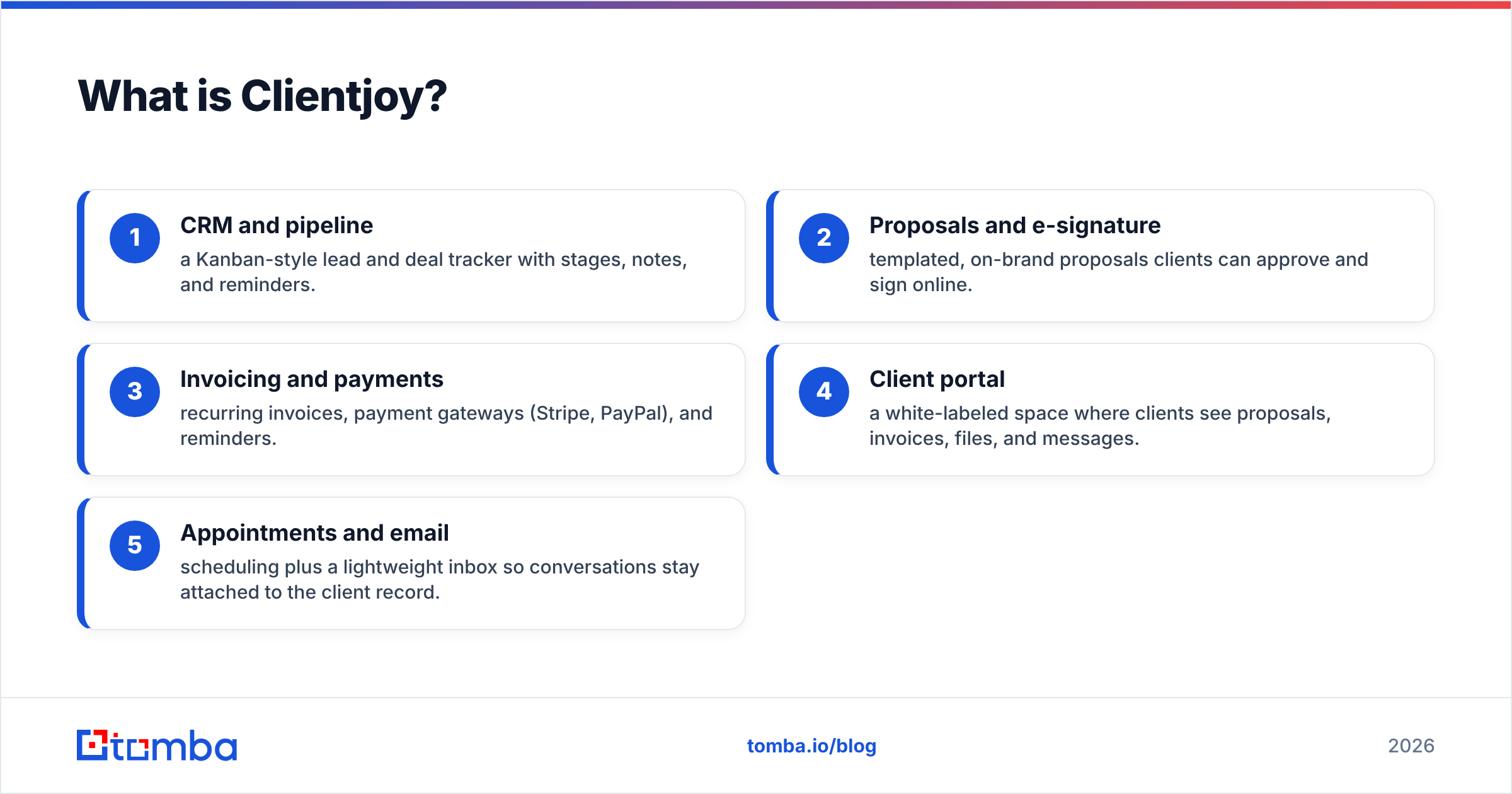
The product clusters into a few core modules:
- CRM and pipeline — a Kanban-style lead and deal tracker with stages, notes, and reminders.
- Proposals and e-signature — templated, on-brand proposals clients can approve and sign online.
- Invoicing and payments — recurring invoices, payment gateways (Stripe, PayPal), and reminders.
- Client portal — a white-labeled space where clients see proposals, invoices, files, and messages.
- Appointments and email — scheduling plus a light inbox, so chats stay attached to the client record.
The pitch is consolidation. Instead of paying for a CRM, a proposal tool, an invoicing app, and a scheduling link, you get one subscription and one client-facing brand. That is the same logic behind consolidating your data stack. The fewer tools your revenue operations touches, the less glue code you maintain.

How much does Clientjoy cost in 2026?#
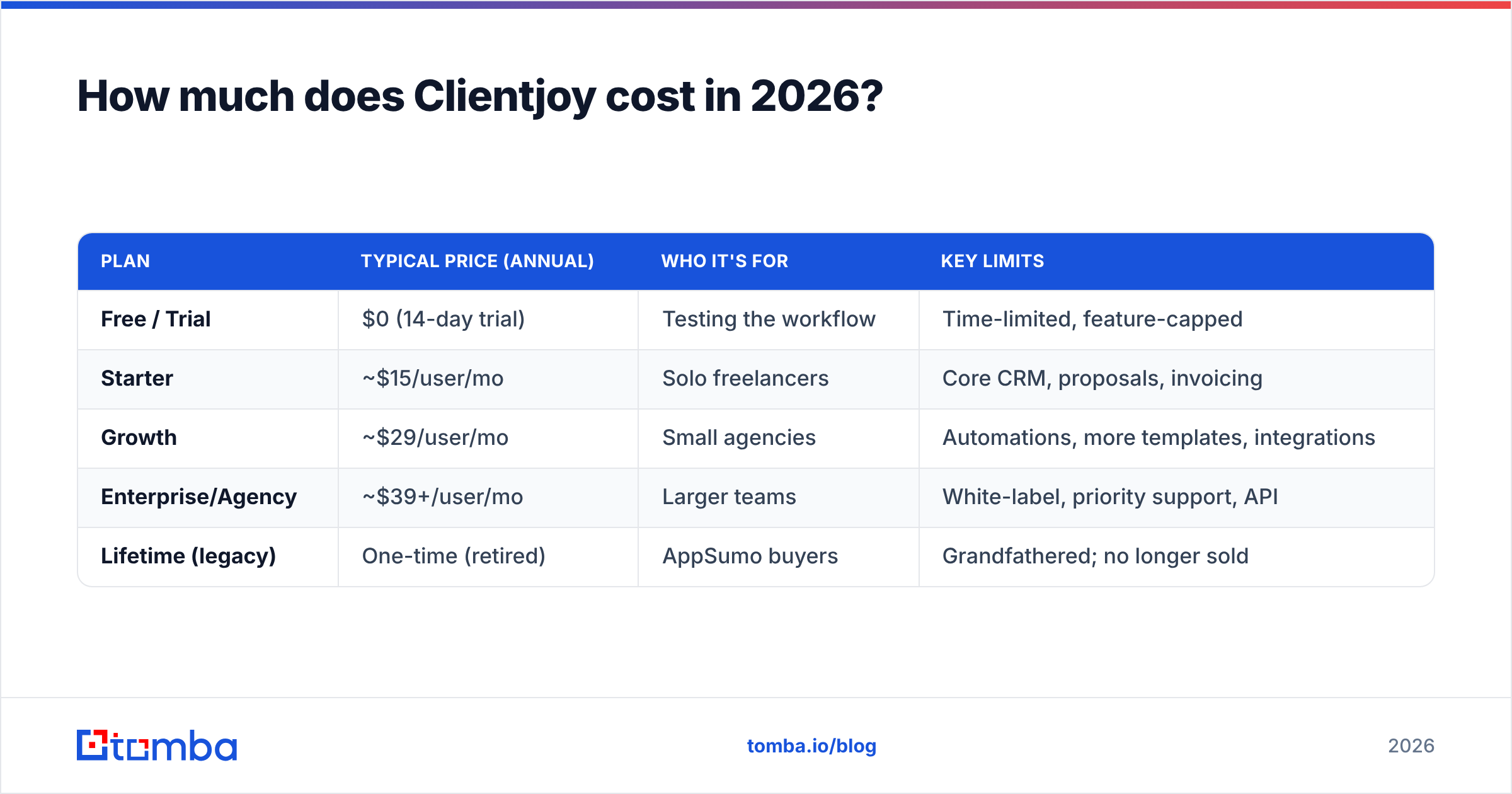
Short answer: Clientjoy is priced for small teams, not enterprises. Public plans have long sat in the low tens of dollars per user each month. Annual billing knocks the effective rate down further. Pricing has shifted since the Synup acquisition and the wind-down of the AppSumo lifetime deal. So always confirm the live number on Clientjoy's own site before you commit. The table below reflects the typical structure users report, not a locked quote.
| Plan | Typical price (annual) | Who it's for | Key limits |
|---|---|---|---|
| Free / Trial | $0 (14-day trial) | Testing the workflow | Time-limited, feature-capped |
| Starter | ~$15/user/mo | Solo freelancers | Core CRM, proposals, invoicing |
| Growth | ~$29/user/mo | Small agencies | Automations, more templates, integrations |
| Enterprise/Agency | ~$39+/user/mo | Larger teams | White-label, priority support, API |
| Lifetime (legacy) | One-time (retired) | AppSumo buyers | Grandfathered; no longer sold |
A few things are worth knowing before the sticker price wins you over:
- Per-user math scales fast. A five-person agency on the Growth tier is a very different line item than a solo user. Model your real seat count, not the headline price.
- The lifetime deal is mostly history. If you bought the AppSumo LTD years ago, you may still be grandfathered. New buyers should plan around subscription pricing.
- Payment processing is separate. Stripe and PayPal fees on collected invoices are their own cost. They are unrelated to your Clientjoy plan.
It helps to benchmark Clientjoy's per-seat cost against tools you already pay for. Many teams find that a focused stack costs about the same as one bloated all-in-one. That stack pairs a dedicated CRM with a specialized data source like Tomba's pricing for finding and verifying contacts. And each tool does its own job better.

What do Clientjoy reviews actually say?#
Sentiment on third-party review sites is positive but not uncritical. On directories like G2 and Capterra, Clientjoy tends to land in the 4-plus-star range. Reviewers cluster around a few consistent themes.
What reviewers praise:
- Value for money. The recurring compliment is a big feature set for a small price. Freelancers escaping a stack of four tools are the happiest cohort.
- The client portal. A white-labeled space makes a one-person shop look like an established agency. People mention it unprompted.
- Proposal-to-payment flow. You send a proposal, get it e-signed, and turn it into an invoice in one tool. That removes real friction.
What reviewers criticize:
- Support responsiveness. This is the most common complaint. Response times and depth vary, and complex issues can sit.
- Roadmap uncertainty. After the Synup acquisition, some long-time users report slower feature velocity. They worry about long-term direction. That is fair to weigh for a tool you will build your billing on.
- Occasional bugs and polish gaps. Edge cases in invoicing, tax handling, or automations show up in reviews. Nothing is catastrophic. Still, the polish is not at the level of a $200/month enterprise suite.
The honest read: Clientjoy earns its ratings on price-to-value. The criticisms are the ones you would expect from a lean team serving a low price point. Just do not assume that "cheap and all-in-one" means "zero trade-offs."
Clientjoy pricing reviews pros and cons: the balanced ledger#
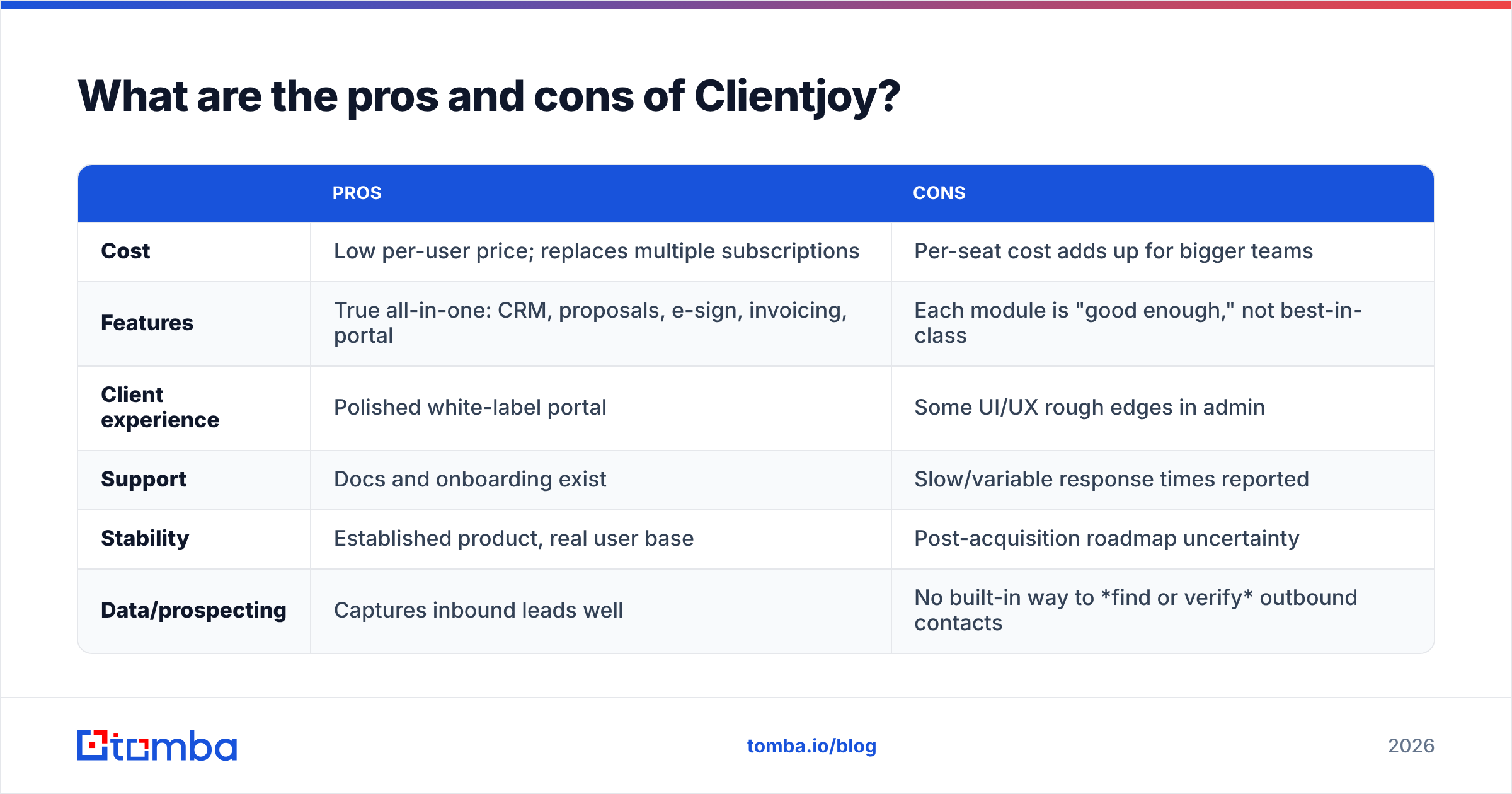
Here is the balanced ledger. Weigh these against your actual workflow, not the marketing site.
| Pros | Cons | |
|---|---|---|
| Cost | Low per-user price; replaces multiple subscriptions | Per-seat cost adds up for bigger teams |
| Features | True all-in-one: CRM, proposals, e-sign, invoicing, portal | Each module is "good enough," not best-in-class |
| Client experience | Polished white-label portal | Some UI/UX rough edges in admin |
| Support | Docs and onboarding exist | Slow/variable response times reported |
| Stability | Established product, real user base | Post-acquisition roadmap uncertainty |
| Data/prospecting | Captures inbound leads well | No built-in way to find or verify outbound contacts |
That last row is the one most buyers underestimate. Clientjoy is excellent at managing clients you already have. It does nothing to help you source new ones. Say your growth depends on outbound — cold email, targeted lists, account-based plays. Then you need a separate motion to feed the pipeline. And you want that data clean before it ever hits your CRM.
Who should (and shouldn't) use Clientjoy?#
Good fit:
- Solo consultants and freelancers who want one login for proposals, contracts, and invoices.
- Small agencies (2–10 people) looking to consolidate tools and present a professional client portal.
- Service businesses with warm, inbound-heavy pipelines where lead sourcing is not the bottleneck.
Poor fit:
- Outbound-first sales teams that live and die by prospecting volume. Clientjoy will not find contacts for you.
- Larger orgs needing deep customization, robust reporting, or enterprise governance.
- Teams that already own a strong CRM (HubSpot, Pipedrive) and only need one missing piece.
If you are in the second bucket, a modular stack usually wins. Pair a light CRM with dedicated tools for the jobs an all-in-one does weakly. For example, use a real email finder for sourcing. Then add an email verifier to keep bounce rates down before those leads reach your pipeline.
How does Clientjoy compare to alternatives?#
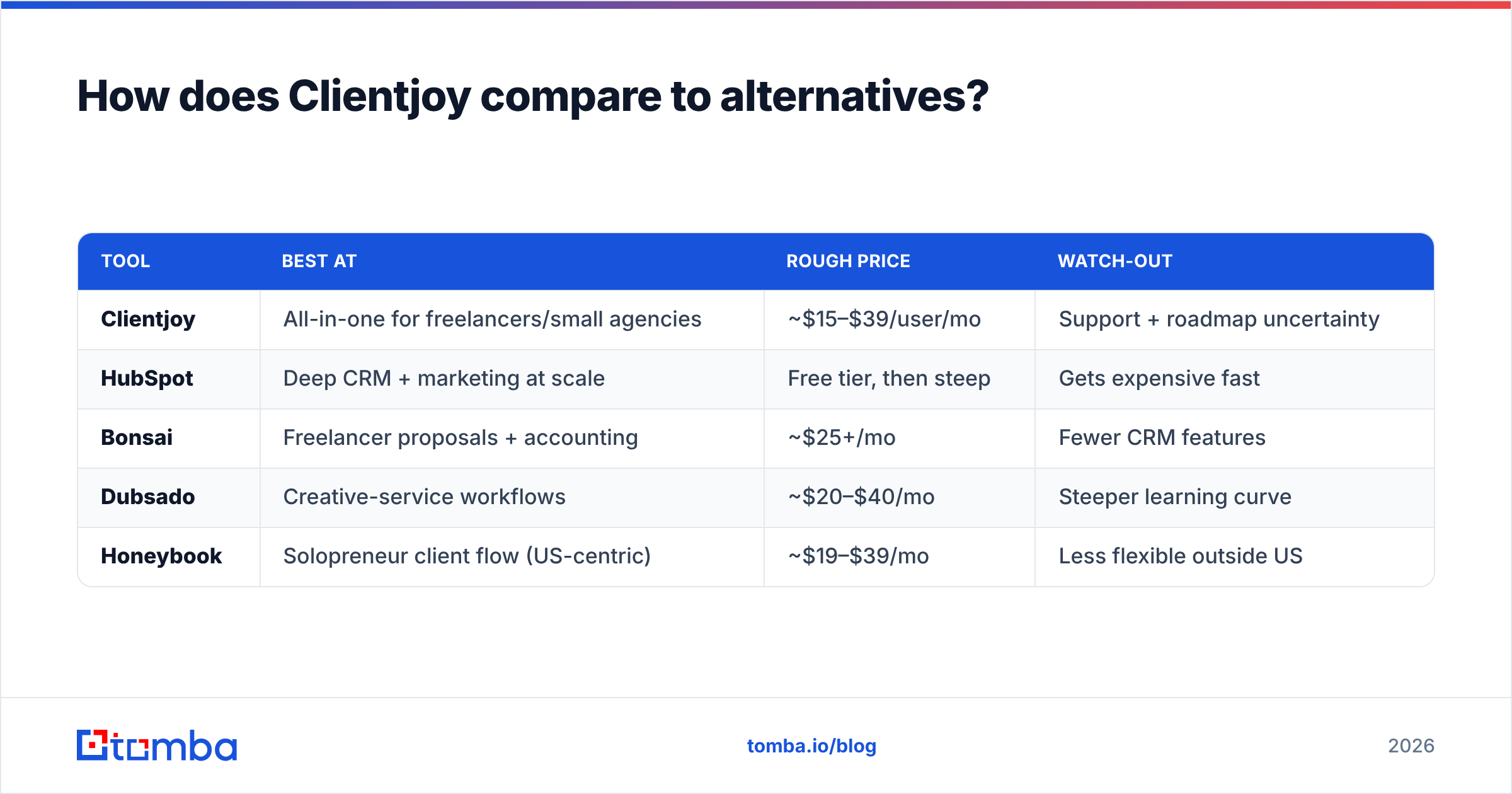
Clientjoy competes in a crowded "agency OS" category. Here is the quick lay of the land:
| Tool | Best at | Rough price | Watch-out |
|---|---|---|---|
| Clientjoy | All-in-one for freelancers/small agencies | ~$15–$39/user/mo | Support + roadmap uncertainty |
| HubSpot | Deep CRM + marketing at scale | Free tier, then steep | Gets expensive fast |
| Bonsai | Freelancer proposals + accounting | ~$25+/mo | Fewer CRM features |
| Dubsado | Creative-service workflows | ~$20–$40/mo | Steeper learning curve |
| Honeybook | Solopreneur client flow (US-centric) | ~$19–$39/mo | Less flexible outside US |
Notice what none of these do: prospecting and contact data. Every one of them assumes the lead is already in your hands. That is by design — client-management platforms manage clients. The moment your growth plan includes outbound, you stack a data layer on top. That holds true whichever "agency OS" you pick. Read the vendor's own materials too. HubSpot's pricing page is a useful yardstick for how fast all-in-one suites climb once you add seats and marketing features.

What Clientjoy doesn't do — and how to fill the gap#
Clientjoy's biggest limitation is not a missing feature inside its wheelhouse. It is the entire stage before the client relationship starts. You cannot run outreach on contacts you do not have. And importing a messy, unverified list into any CRM just poisons your sender reputation and your reporting.
This is where a focused data workflow sits alongside — not against — a tool like Clientjoy:
- Find the right contacts. Use a domain search to pull the professional emails behind a company you are targeting. Or use an email finder to get a specific decision-maker's address.
- Verify before you send. Run every address through verification. That way bounces do not tank your email deliverability, and your domain stays trusted.
- Enrich the record. Add role, company, and firmographic context. Then the lead lands in Clientjoy's pipeline already qualified.
- Then hand off to Clientjoy for the proposal, contract, and invoicing flow it genuinely does well.
The division of labor is clean. A data tool sources and cleans. Clientjoy nurtures and bills. Forcing one tool to do both is where teams overpay for an all-in-one that is mediocre at the half they needed most.
Is Clientjoy worth it in 2026?#
Verdict: yes, if you are a freelancer or small agency with inbound demand. No, if you are an outbound sales team.
Clientjoy delivers real value for its price. The client portal alone can justify the subscription for a solo operator who wants to look bigger. And bundling proposals, e-sign, and invoicing into one login removes daily friction. The reviews back this up. People who fit the profile are happy. The ones who churn usually needed deeper enterprise features or a prospecting engine the tool was never built to be.
Go in with eyes open about two things. First, support — set expectations low on response time. Second, roadmap — the post-acquisition direction is still settling. Neither is a dealbreaker for a low-stakes, low-price tool. But both matter if you bet your entire billing operation on it. This is the core of any honest Clientjoy pricing reviews pros and cons call.
Whatever you decide, remember that Clientjoy starts working after the lead exists. The pipeline it manages is only as good as the contacts you put in it.
Fill the top of your funnel before it hits any CRM#
Clientjoy is a fine home for clients you have already won. It will not find them for you. Before a name ever reaches your pipeline, use the Tomba Email Finder to source verified, professional email addresses by name, company, or domain. Then push clean, enriched contacts straight into your client-management flow. Start on the free tier (25 searches/month). Scale up through Tomba's plans as your outbound grows. Feed a clean funnel, and every tool downstream — Clientjoy included — works better.
Related guides#
Ready to find emails that actually work?
Join 150,000+ professionals who stopped guessing and started sending. Free credits on signup — no credit card required.
Get the Tomba newsletter
Practical outbound tactics and product updates — once every two weeks.
About the author