Clodura.ai vs SalesQL (2026): Which Sales Data Tool Wins?
Clodura.ai bundles a whole sales-intelligence database; SalesQL lives inside LinkedIn. We compare data accuracy, pricing, and workflow so you can pick the right B2B contact tool for 2026.
Choosing between Clodura.ai and SalesQL comes down to one question: do you want a full B2B database that hands you accounts and contacts, or a lightweight LinkedIn scraper that pulls emails from the profiles you already browse? They solve different halves of the same prospecting problem, and picking the wrong one wastes budget on features you never touch.
This is a neutral, hands-on comparison. No affiliation with either vendor—just the pricing, data, and workflow trade-offs that actually decide which tool belongs in your stack.
TL;DR — Clodura.ai vs SalesQL at a glance#
- Clodura.ai is a sales-intelligence platform: a 600M+ contact database, org charts, technographics, buyer intent, and a built-in sequencer. Best for teams that want prospecting and outreach in one place.
- SalesQL is a Chrome extension that extracts emails and phone numbers from LinkedIn and Sales Navigator. Best for reps who live on LinkedIn and want cheap, fast contact pulls.
- Data accuracy is the deciding factor for both, and both leak stale records—so verify before you send regardless of which you choose.
- Pricing: SalesQL is far cheaper for a solo rep (starts around $49/mo for ~1,500 credits); Clodura.ai costs more but replaces several tools.
- The honest verdict: neither is a complete answer. Pair whichever you pick with a dedicated email verifier so bounce rates stay low.
What is Clodura.ai?#
Clodura.ai is an all-in-one sales-intelligence and engagement platform. Think of it as a prospecting supermarket: you walk in with a target profile (industry, title, company size, tech stack) and walk out with a list of accounts, decision-maker contacts, direct dials, and a sequence ready to fire.
Its core pieces:
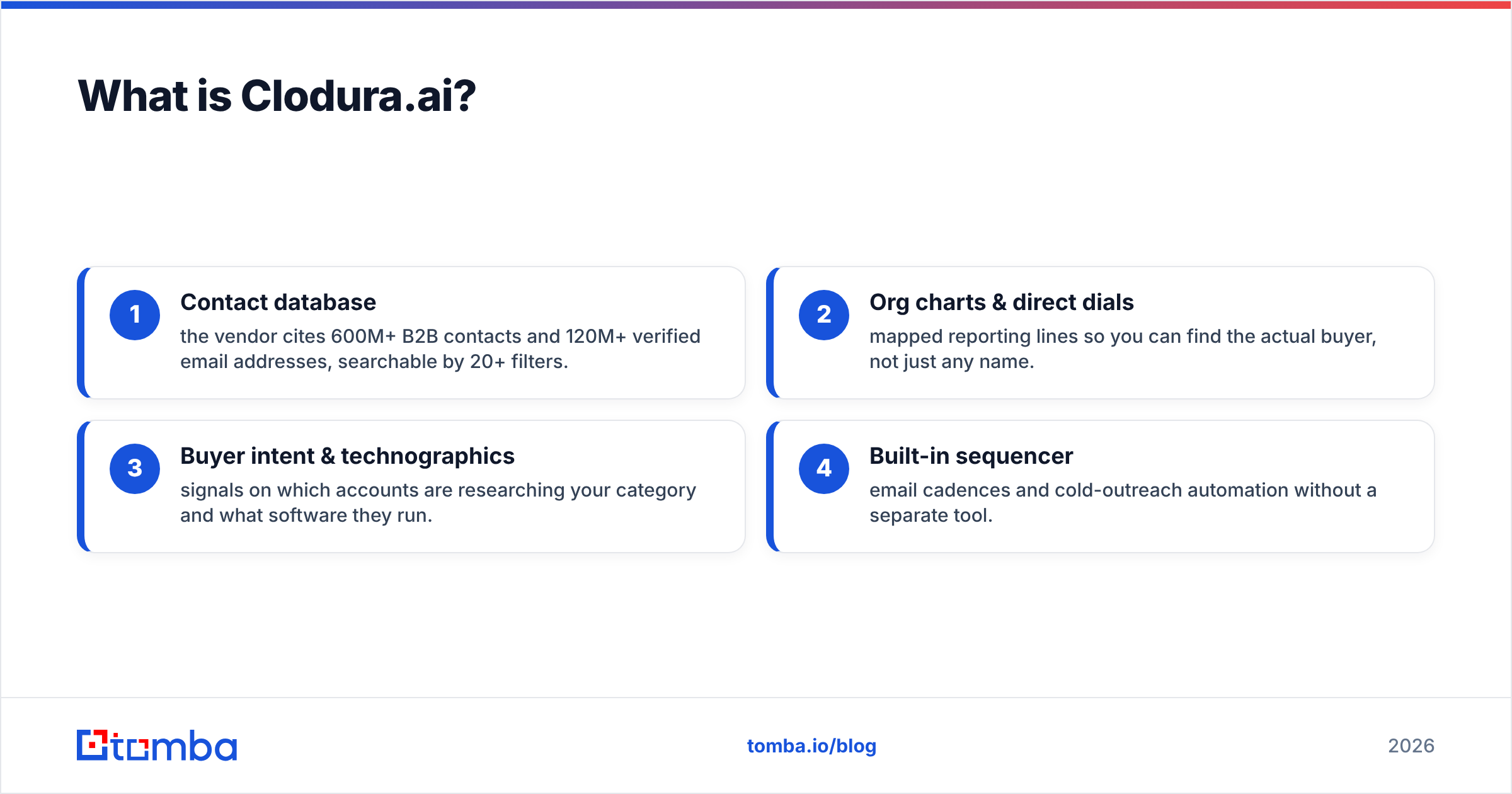
- Contact database — the vendor cites 600M+ B2B contacts and 120M+ verified email addresses, searchable by 20+ filters.
- Org charts & direct dials — mapped reporting lines so you can find the actual buyer, not just any name.
- Buyer intent & technographics — signals on which accounts are researching your category and what software they run.
- Built-in sequencer — email cadences and cold-outreach automation without a separate tool.
The pitch is consolidation. If you're currently paying for a database, a dialer, and an outreach tool, Clodura.ai aims to be one line item instead of three. You can read the specifics on the Clodura.ai site, but treat any single accuracy percentage as marketing until you test it on your own territory.

What is SalesQL?#
SalesQL is a browser-first email and phone finder built specifically for LinkedIn and LinkedIn Sales Navigator. It's a Chrome extension: you open a profile or a search result page, click the SalesQL button, and it returns personal and work emails plus phone numbers, which you can push to a list or export to CSV.
Its whole philosophy is different from Clodura.ai. SalesQL doesn't try to be your database or your sequencer—it's a picker. You do the prospecting inside LinkedIn (where you're probably already working), and SalesQL turns profiles into reachable contacts. That narrow focus is exactly why reps like it: no bloat, low price, near-zero learning curve. The official SalesQL site leans into that simplicity.
The trade-off is scope. SalesQL only knows what LinkedIn shows it. No intent data, no org charts, no technographics, and no way to build a list from company attributes the way a real database does.
Clodura.ai vs SalesQL: the head-to-head comparison#
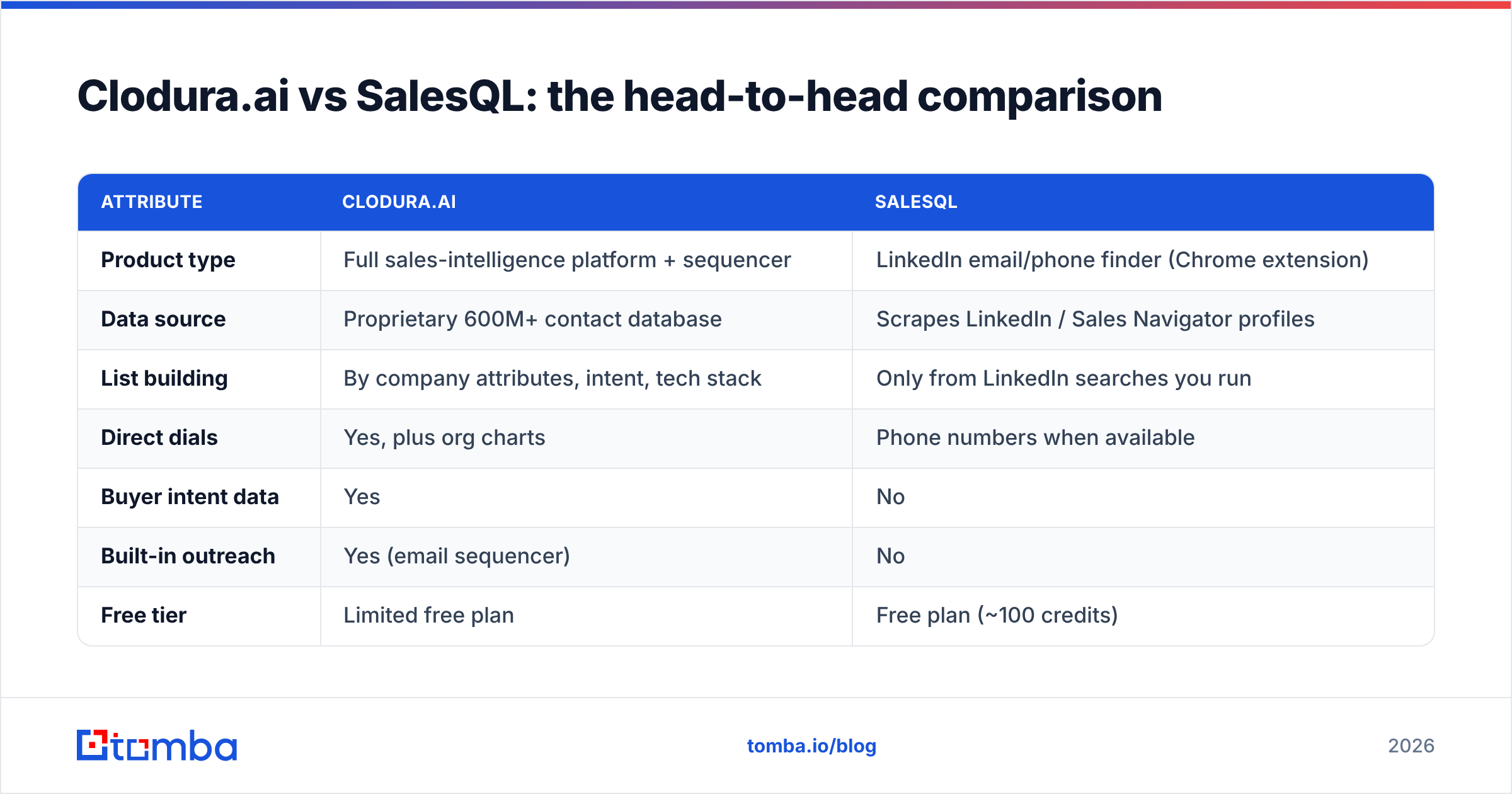
Here's the core matchup on the attributes that actually change your day-to-day workflow and budget.
| Attribute | Clodura.ai | SalesQL |
|---|---|---|
| Product type | Full sales-intelligence platform + sequencer | LinkedIn email/phone finder (Chrome extension) |
| Data source | Proprietary 600M+ contact database | Scrapes LinkedIn / Sales Navigator profiles |
| List building | By company attributes, intent, tech stack | Only from LinkedIn searches you run |
| Direct dials | Yes, plus org charts | Phone numbers when available |
| Buyer intent data | Yes | No |
| Built-in outreach | Yes (email sequencer) | No |
| Free tier | Limited free plan | Free plan (~100 credits) |
| Entry paid price | Higher (platform pricing) | ~$39–$49/mo range |
| Best for | Teams wanting one consolidated stack | Solo reps living inside LinkedIn |
| Learning curve | Moderate (many modules) | Minimal (one-click) |
The pattern is clear: Clodura.ai is broad and heavier; SalesQL is narrow and light. If you need to discover accounts you don't already know about, Clodura.ai wins because SalesQL can only work profiles you've already found. If you already know your targets and just need their contact details fast, SalesQL does that for a fraction of the cost.
Is Clodura.ai's data more accurate than SalesQL's?#
Neither tool should be trusted blind—that's the honest answer, and it's the same for every provider in this category.
The two draw data differently, and each failure mode is different:
- Clodura.ai relies on a large stored database. Databases are fantastic for scale and filtering, but records decay: people change jobs, companies rebrand, domains migrate. A "verified" flag from months ago is not the same as verified today.
- SalesQL pulls from live LinkedIn profiles, so the person is usually current, but the email is inferred. LinkedIn rarely exposes work emails directly, so finders guess the pattern (first.last@company.com) and confirm via SMTP. That guessing is where invalid addresses creep in, especially on catch-all domains.
This is why a standalone verification step matters more than the marketing accuracy number. Independent reviews on G2 show both tools drawing praise for coverage and complaints about stale or wrong contacts—normal for the category. Before any campaign, run your export through an email verifier, and if a domain accepts everything, use a catch-all verifier so you're not counting guesses as valid sends.
Which is cheaper — Clodura.ai or SalesQL?#
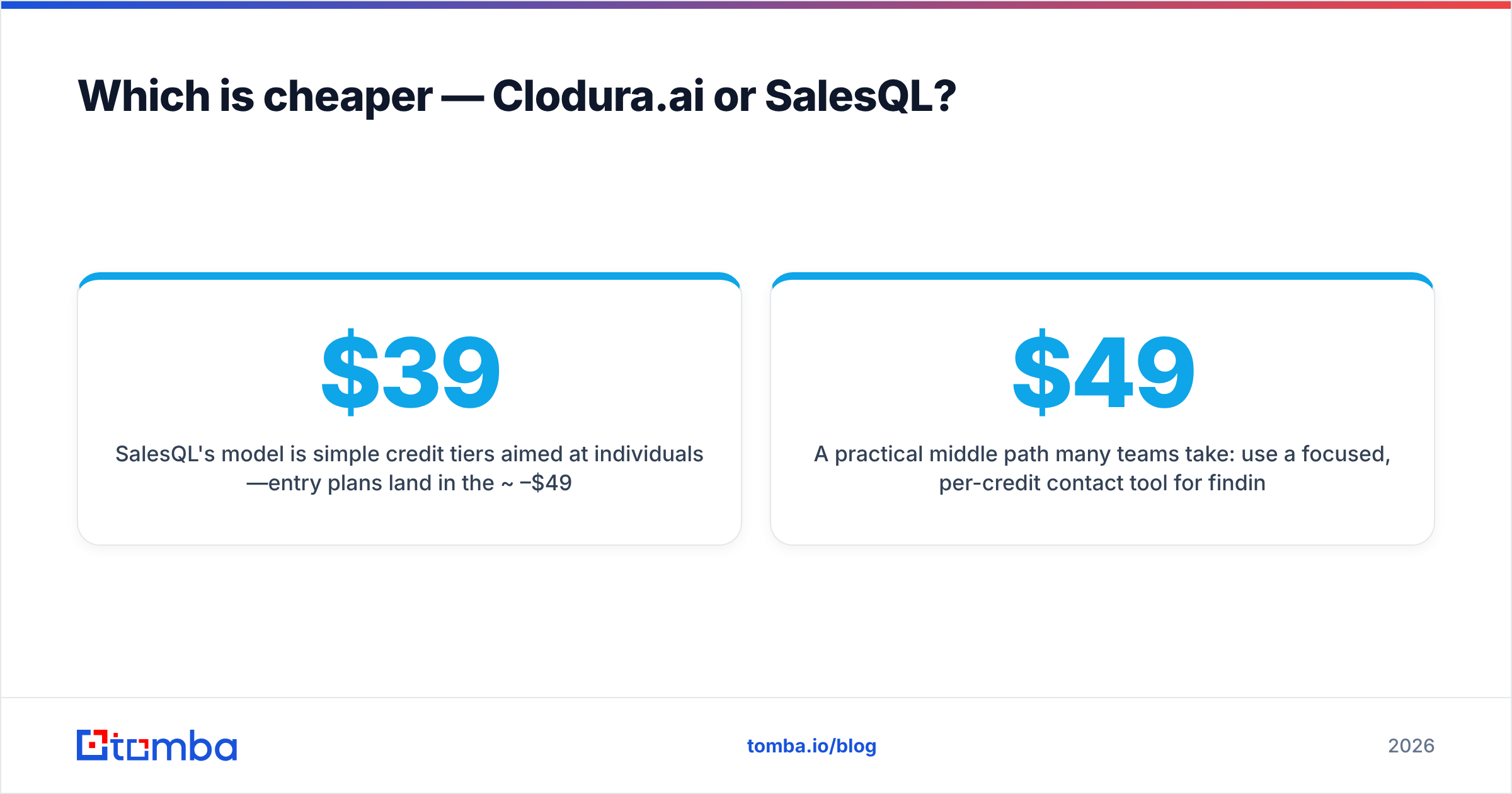
SalesQL is dramatically cheaper for one person; Clodura.ai is more cost-effective only if it replaces several tools you're already paying for.
SalesQL's model is simple credit tiers aimed at individuals—entry plans land in the ~$39–$49/mo range for a few thousand credits, and the free plan gives you a small monthly allotment to test it. There's no platform fee because there's no platform; you're paying purely for contact pulls.
Clodura.ai charges platform pricing because you're buying a database, intent data, and a sequencer together. That's more expensive on paper, but the fair comparison isn't "Clodura.ai vs SalesQL"—it's "Clodura.ai vs (a database + a dialer + an outreach tool)." If you'd otherwise stack three subscriptions, Clodura.ai can come out ahead. If you just want emails off LinkedIn, its extra modules are cost you won't use.
A practical middle path many teams take: use a focused, per-credit contact tool for finding and verifying, and skip paying platform rates for a sequencer you already own. That's where checking transparent Tomba pricing against both vendors is worth five minutes—the Free tier is 25 searches/mo, Starter is $49/mo, and Growth is $99/mo, with no forced bundle.
When should you choose Clodura.ai?#
Pick Clodura.ai when discovery and consolidation matter more than price. It's the stronger choice if you:
- Need to find accounts you don't already know. Attribute- and intent-based list building is something SalesQL structurally can't do.
- Want one tool instead of three. Database + dialer + sequencer in a single login reduces admin and per-seat sprawl.
- Sell to defined verticals where technographics and org charts genuinely shorten the path to the buyer.
- Have a team, not just a solo rep, so the platform cost gets amortized across seats and usage.
If you mainly work a known named-account list and never build audiences from scratch, you'll pay for capacity you don't touch.
When should you choose SalesQL?#
Pick SalesQL when LinkedIn is already your prospecting engine and budget is tight. It's the better fit if you:
- Live in Sales Navigator and just need contact details for profiles you're already viewing.
- Are a solo rep or a small team where a per-credit extension beats a platform subscription.
- Want zero onboarding. Install, click, export—there's almost nothing to learn.
- Already own an outreach tool and don't want to pay for a bundled sequencer.
The ceiling is real, though: your pipeline is only as wide as the LinkedIn searches you run, and you'll still need to verify the emails it infers.
How does Tomba compare to both?#
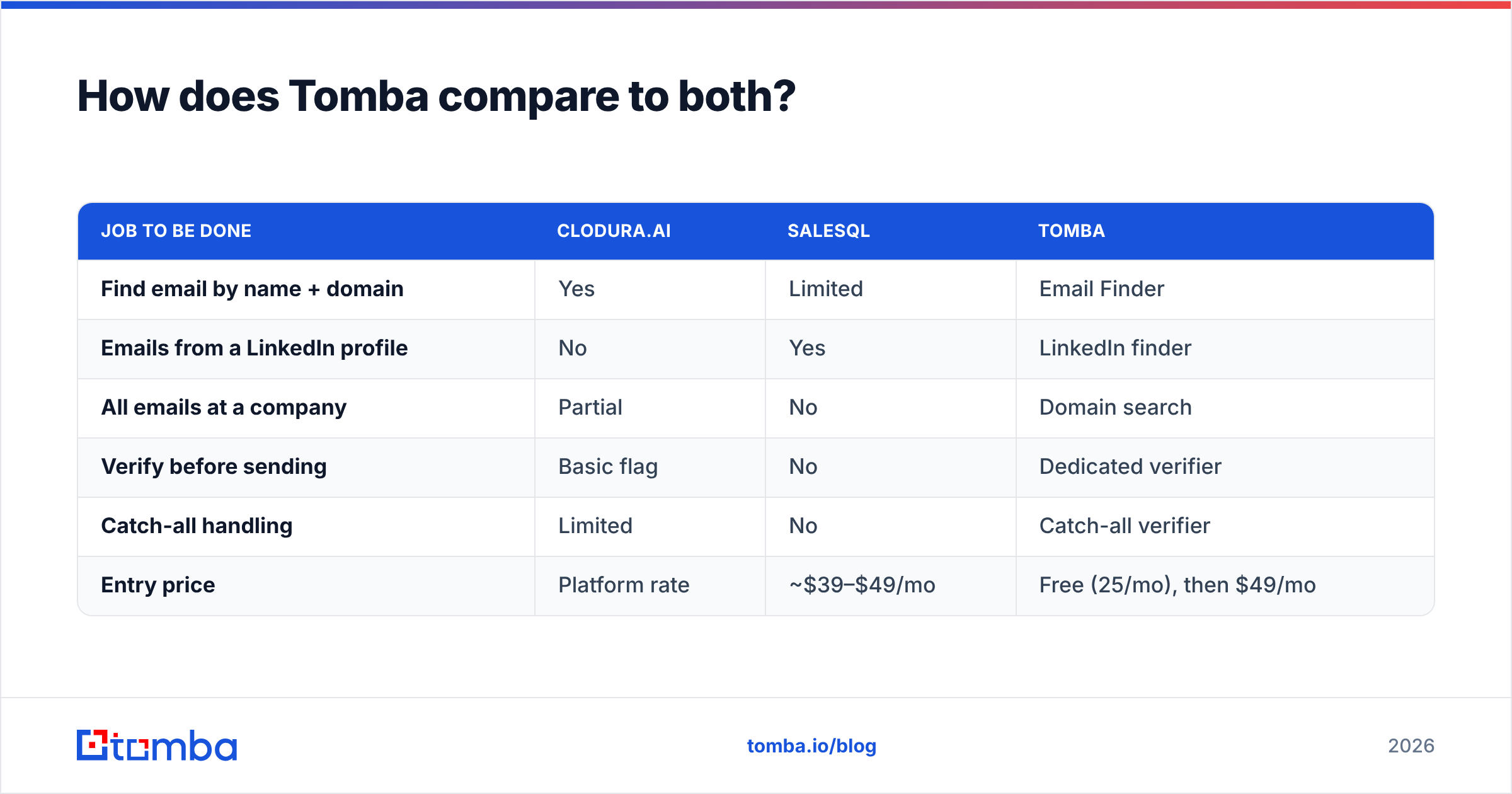
If your actual job is "turn a name, a domain, or a LinkedIn profile into a reachable, verified contact," a dedicated finder-and-verifier can cover the overlap between these two tools without the extremes of either.
Tomba sits in that lane. Instead of a heavy platform (Clodura.ai) or a LinkedIn-only extension (SalesQL), it's a focused contact layer you can run from the web app, Chrome extension, Google Sheets, or the Tomba API.
| Job to be done | Clodura.ai | SalesQL | Tomba |
|---|---|---|---|
| Find email by name + domain | Yes | Limited | Email Finder |
| Emails from a LinkedIn profile | No | Yes | LinkedIn finder |
| All emails at a company | Partial | No | Domain search |
| Verify before sending | Basic flag | No | Dedicated verifier |
| Catch-all handling | Limited | No | Catch-all verifier |
| Entry price | Platform rate | ~$39–$49/mo | Free (25/mo), then $49/mo |
The point isn't that one tool wins every row—it's that "email finder" and "email verifier" are two jobs, and the tools that treat verification as an afterthought are the ones that quietly raise your bounce rate. Whatever you choose as your finder, keep a clean verification step downstream.
Clodura.ai vs SalesQL: frequently asked questions#
Is SalesQL just a LinkedIn scraper? Essentially, yes—it extracts and infers contact details from LinkedIn and Sales Navigator profiles. That's its strength (fresh people data) and its limit (no list-building beyond LinkedIn).
Does Clodura.ai include cold email outreach? Yes. Its built-in sequencer is a core selling point, which is why it's priced as a platform rather than a per-credit finder.
Can I use both together? Some teams do—Clodura.ai for account discovery and intent, SalesQL for quick pulls on specific profiles. Just be sure you're not paying twice for overlapping contact data.
Do I still need a separate email verifier? Yes. Both tools return some invalid or outdated addresses. A dedicated verifier and catch-all check protect your sender reputation before you hit send.
The bottom line#
Choose Clodura.ai if you want a consolidated platform that discovers accounts, adds intent and org data, and sends outreach from one place—and you have the budget to justify it. Choose SalesQL if you're a LinkedIn-first rep who wants cheap, fast contact pulls and already owns the rest of your stack.
Either way, the contacts are only as good as their verification. If your priority is finding accurate, deliverable emails—by name, by domain, or straight from a LinkedIn profile—start with the Tomba Email Finder. The Free tier covers 25 searches a month so you can test accuracy on your own territory before committing a dollar, then pair it with the built-in verifier to keep your bounce rate near zero and your sender reputation intact.
Related guides#
// get started
Find, verify and enrich your first contacts today
Start on the free plan with 25 searches a month, then scale when your team is ready.
Free plan · No credit card required · GDPR & CCPA
// about the author