CloudOffix Pricing, Reviews, Pros and Cons (2026 Guide)
An honest breakdown of CloudOffix pricing, real user reviews, and the pros and cons of its all-in-one low-code suite — plus where it fits and where it falls short.
CloudOffix is a single, low-code platform. It folds CRM, sales, marketing, HR, project, and help-desk apps into one subscription. The "one login for everything" promise is attractive. But it also makes the pricing harder to read than a point tool. This CloudOffix pricing, reviews, pros and cons guide breaks down what you actually pay, what real reviews say, and the honest trade-offs before you commit.
TL;DR#
- CloudOffix is an all-in-one, low-code business suite — CRM plus marketing, HR, project, invoicing, and help-desk clouds bundled under per-user pricing.
- Pricing is per-user, per-month and quote-driven at the top end. Public plans start in the low tens of dollars per user. But the "Total Experience" bundle and enterprise deployments need a sales call.
- Reviews praise the breadth, customization, and support. The most common complaints? A learning curve, some UI roughness, and fewer third-party integrations than HubSpot or Salesforce.
- Best fit: SMBs and mid-market teams that want to merge several tools into one vendor and will invest in setup.
- Weak fit: teams that need a deep, mature data layer. Pair CloudOffix with a specialist like the Tomba Email Finder for contact data instead.
What is CloudOffix?#
CloudOffix is a cloud-based, low-code platform. It bundles many business apps under one roof. Think of it like a shopping mall instead of a single store. You don't buy a CRM here, a marketing tool there, and an HR system elsewhere. Instead, you rent one building. Every department shares the same hallway (data) and the same front door (login).
The suite is organized into "clouds":
- Sales Cloud — CRM, pipeline, quotes, and contact management.
- Marketing Cloud — email campaigns, landing pages, and automation.
- Project Cloud — task and project management with time tracking.
- HR Cloud — recruitment, onboarding, and employee records.
- Help Desk Cloud — ticketing and customer support.
- Invoicing / Finance — quotes, invoices, and billing tied to the CRM.
The low-code angle is the real differentiator. You can reshape objects, fields, and workflows without a developer. That's closer to Salesforce than to a lightweight SMB CRM. The trade-off? Flexibility costs time to set up.

How much does CloudOffix cost in 2026?#
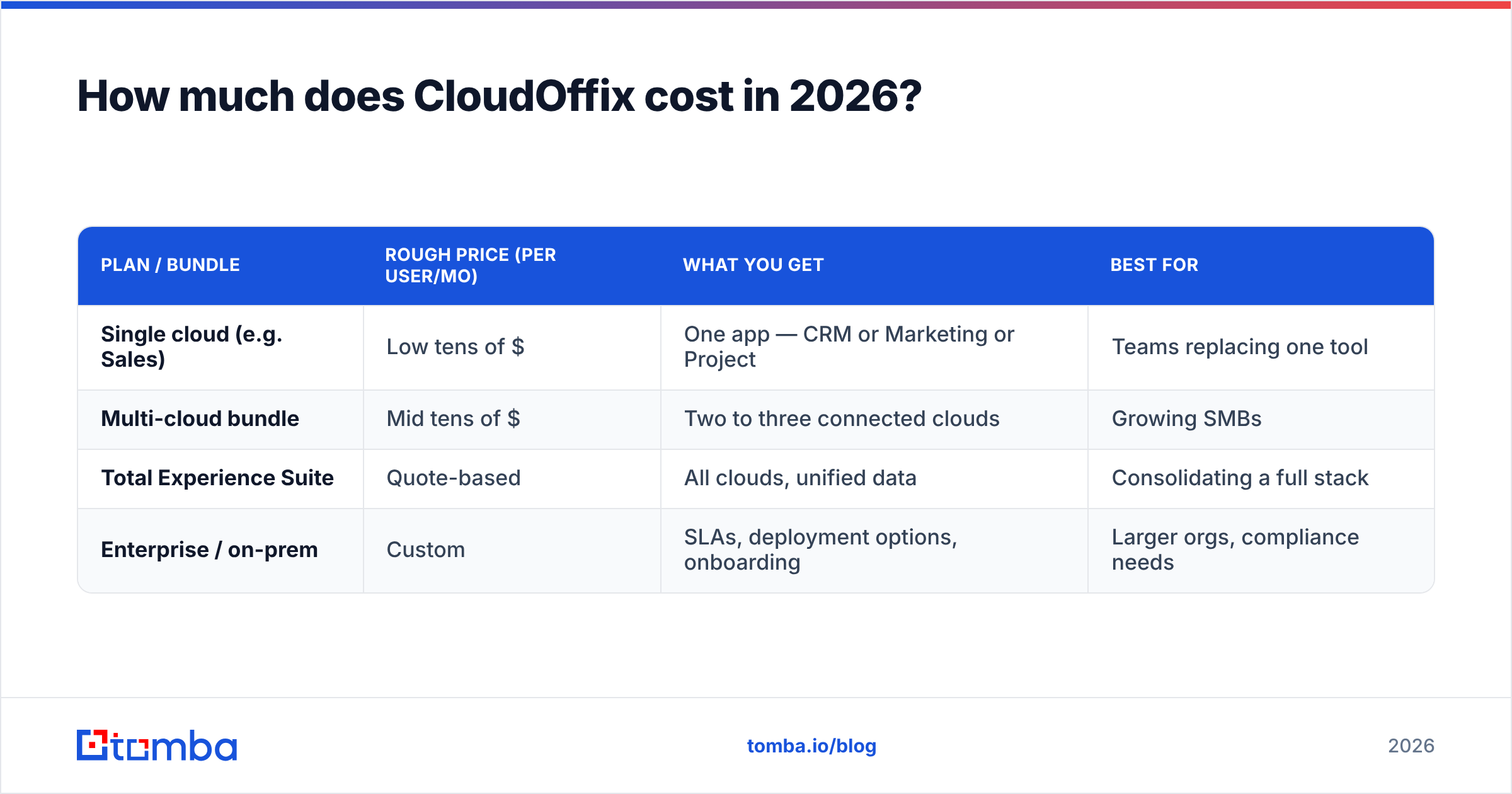
Short answer: CloudOffix uses per-user, per-month pricing. It scales by which clouds you enable, and the flagship "Total Experience" bundle is quote-based. Single clouds are cheaper. The full suite costs more per seat. Enterprise deployments move behind a sales call.
CloudOffix positions itself as a bundle. So the sticker price for a single cloud is rarely what buyers pay. Most teams want two or three clouds working together. That's where the per-user math compounds.
Here's how the tiering generally breaks down. Treat these as rough bands. Confirm live numbers on the vendor's own CloudOffix pricing page, since per-cloud rates and annual discounts change.
| Plan / bundle | Rough price (per user/mo) | What you get | Best for |
|---|---|---|---|
| Single cloud (e.g. Sales) | Low tens of $ | One app — CRM or Marketing or Project | Teams replacing one tool |
| Multi-cloud bundle | Mid tens of $ | Two to three connected clouds | Growing SMBs |
| Total Experience Suite | Quote-based | All clouds, unified data | Consolidating a full stack |
| Enterprise / on-prem | Custom | SLAs, deployment options, onboarding | Larger orgs, compliance needs |
Three cost factors people miss:
- Per-user math scales fast. A "cheap" per-seat rate looks very different across a 25-person team on an annual contract. The headline hides the real total.
- Onboarding and customization. Low-code power means setup time. Some plans include onboarding. Heavier customization may need paid implementation.
- Add-ons and volume. Email sending volume, storage, and premium support tiers can sit outside the base seat price.
Comparing total cost of ownership? Don't stop at the CRM line item. A real estimate weighs seats × clouds × contract term. Add the data and outreach tools you'll bolt on, too.
Is CloudOffix worth it? Weighing the pros and cons#
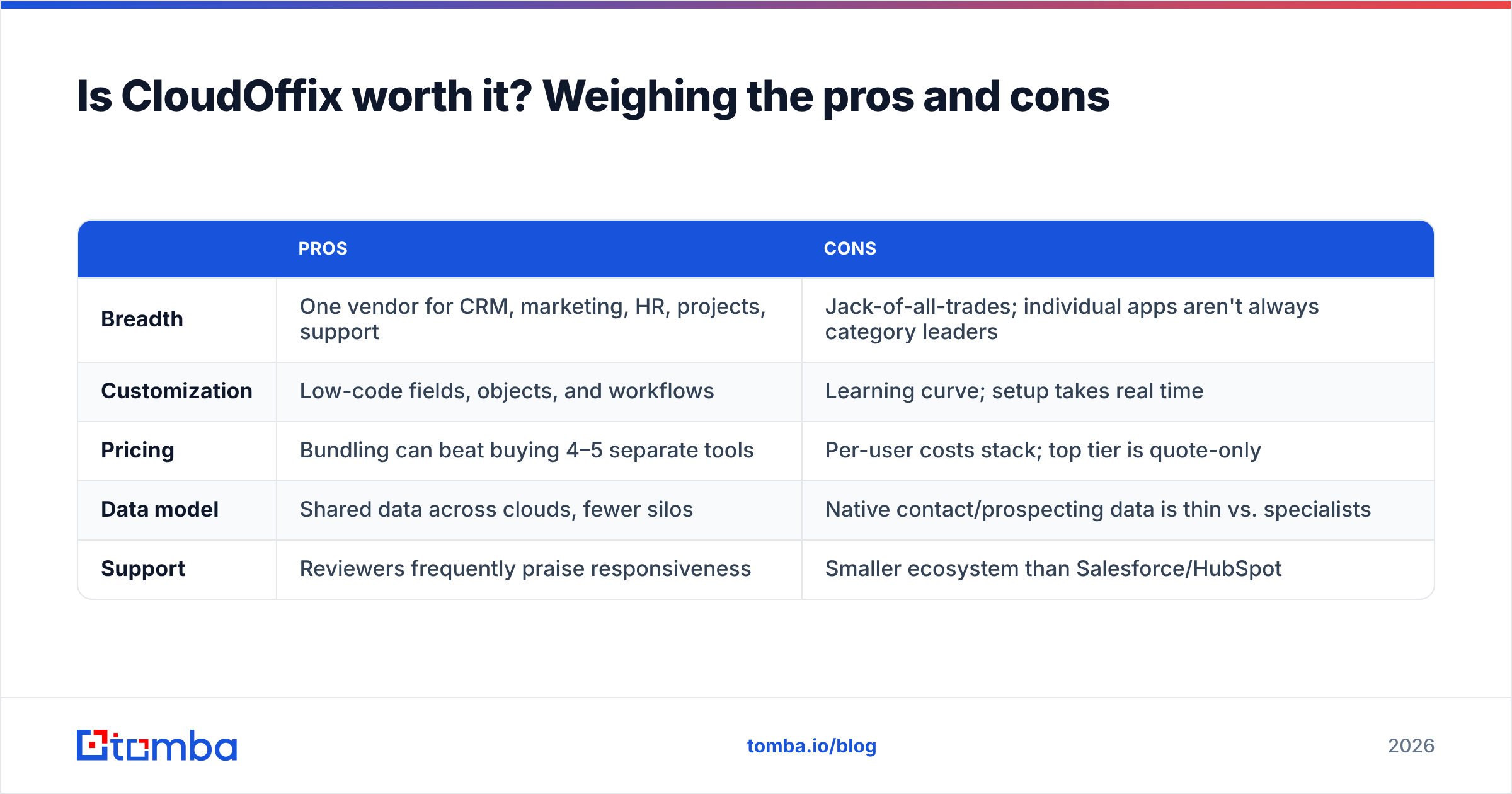
Verdict: CloudOffix is worth it if consolidation is your main goal and you're willing to configure it. It's less ideal if you need a best-in-class single function out of the box. Here's the honest ledger.
| Pros | Cons | |
|---|---|---|
| Breadth | One vendor for CRM, marketing, HR, projects, support | Jack-of-all-trades; individual apps aren't always category leaders |
| Customization | Low-code fields, objects, and workflows | Learning curve; setup takes real time |
| Pricing | Bundling can beat buying 4–5 separate tools | Per-user costs stack; top tier is quote-only |
| Data model | Shared data across clouds, fewer silos | Native contact/prospecting data is thin vs. specialists |
| Support | Reviewers frequently praise responsiveness | Smaller ecosystem than Salesforce/HubSpot |
The pros in plain terms#
You cut tool sprawl. The strongest argument for CloudOffix is a single source of truth. Sales, support, and marketing share one data layer. You stop paying for five subscriptions. You stop reconciling five exports.
It bends to your process. The low-code layer frees you from someone else's pipeline stages or ticket fields. For teams with an unusual workflow, that flexibility is worth a lot.
Support gets good marks. Across review sites, the recurring positive is a hands-on, responsive team. That matters when you're standing up a platform this broad.
The cons you should price in#
Depth vs. breadth. An all-in-one rarely beats a focused specialist on its home turf. CloudOffix's marketing automation is capable, but it won't out-feature a dedicated ESP. Its data enrichment can't replace a real B2B data provider.
Ramp time. Flexibility is a double-edged sword. The same low-code power that lets you customize everything means someone has to do the customizing.
Ecosystem size. It has fewer native integrations and a smaller marketplace than the incumbents. That means more work — or Zapier-style connectors — to wire it into your stack.

What do CloudOffix reviews say?#
Overall sentiment on CloudOffix is positive. It clusters around breadth, customization, and support. The sharpest criticism targets the learning curve and integration depth. Here are the patterns from public reviews on G2 and Capterra:
- "Everything in one place." Reviewers who consolidated multiple tools cite fewer subscriptions and cleaner reporting as the biggest win.
- "Great support team." Responsiveness during onboarding comes up repeatedly as a differentiator against larger, more impersonal vendors.
- "Powerful but takes time." The customization is praised and blamed in the same breath — powerful once configured, slow to get there.
- "UI can feel dense." A minority flag interface rough edges, especially when many clouds are enabled at once.
Net: it's a well-regarded platform for its target buyer, not a magic bullet. Reviews rarely call it the single best tool for one job. They call it a solid tool for many jobs at once.
How does CloudOffix compare to the alternatives?#
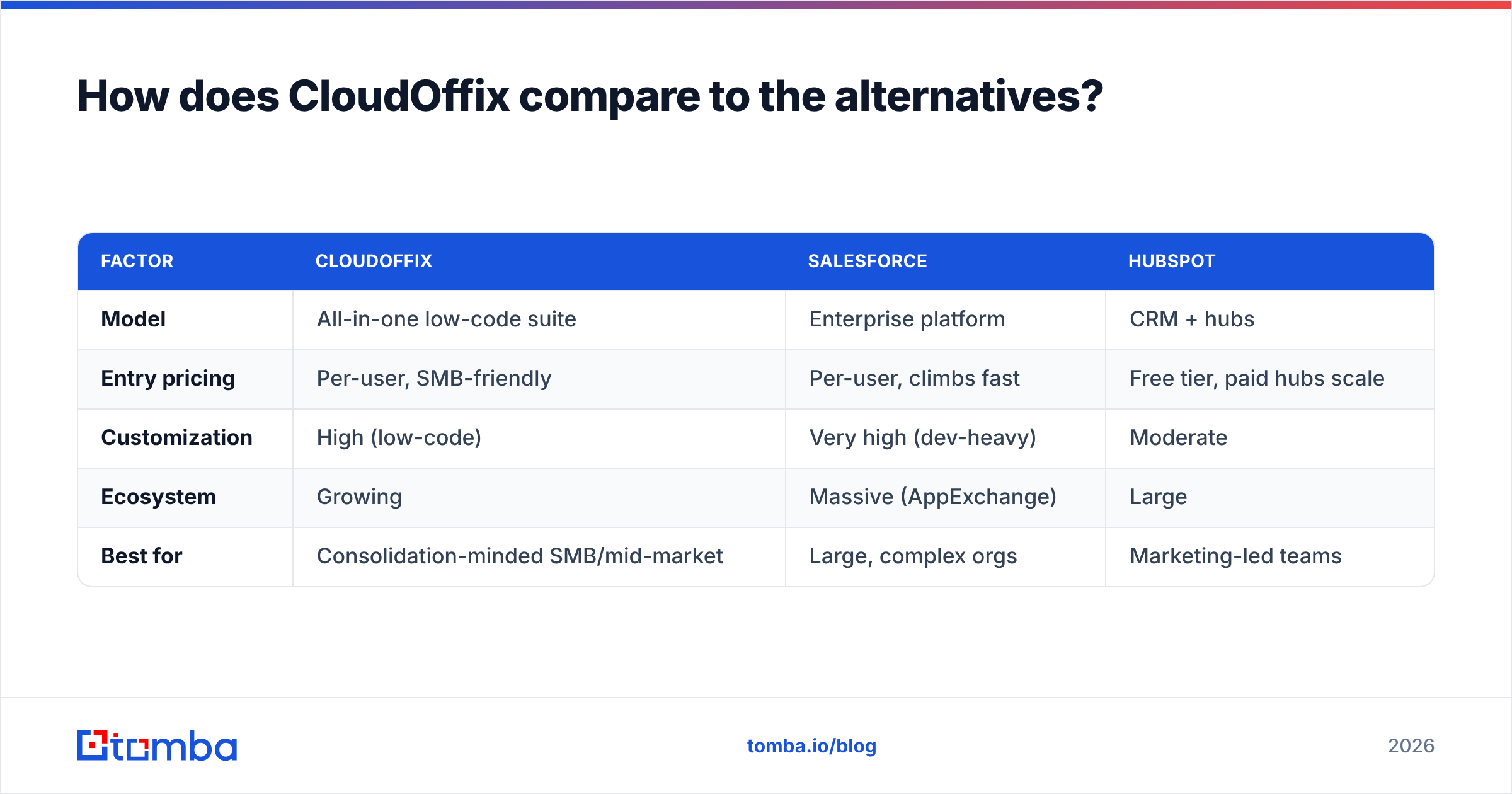
CloudOffix sits between heavyweight platforms like Salesforce and focused SMB CRMs like HubSpot and Pipedrive. It competes on all-in-one value, not category dominance. Your real choice is "one suite vs. a best-of-breed stack." This table frames it.
| Factor | CloudOffix | Salesforce | HubSpot |
|---|---|---|---|
| Model | All-in-one low-code suite | Enterprise platform | CRM + hubs |
| Entry pricing | Per-user, SMB-friendly | Per-user, climbs fast | Free tier, paid hubs scale |
| Customization | High (low-code) | Very high (dev-heavy) | Moderate |
| Ecosystem | Growing | Massive (AppExchange) | Large |
| Best for | Consolidation-minded SMB/mid-market | Large, complex orgs | Marketing-led teams |
The key insight: none of these platforms is a strong data source. Pick CloudOffix, Salesforce, or HubSpot — the CRM is only as useful as the contacts inside it. Each one expects you to bring your own accurate, deliverable data. That's the gap most buyers underestimate.
Where does contact data fit into a CloudOffix stack?#
A CRM organizes relationships you already have. It doesn't find new ones. CloudOffix is a filing cabinet — an excellent one. But it can't fill itself with verified prospect emails and phone numbers. That job belongs to a dedicated data layer.
This is where pairing CloudOffix with a specialist tool pays off:
- Find the contacts — use an email finder to source professional addresses by name, company, or domain before they ever hit your pipeline.
- Verify before you send — run addresses through an email verifier so bounces don't wreck your sender reputation and pollute CloudOffix records.
- Enrich the record — layer in data enrichment so every CRM contact carries firmographic and role context.
- Automate the flow — push clean data straight into your suite via the Tomba API or a no-code connector.
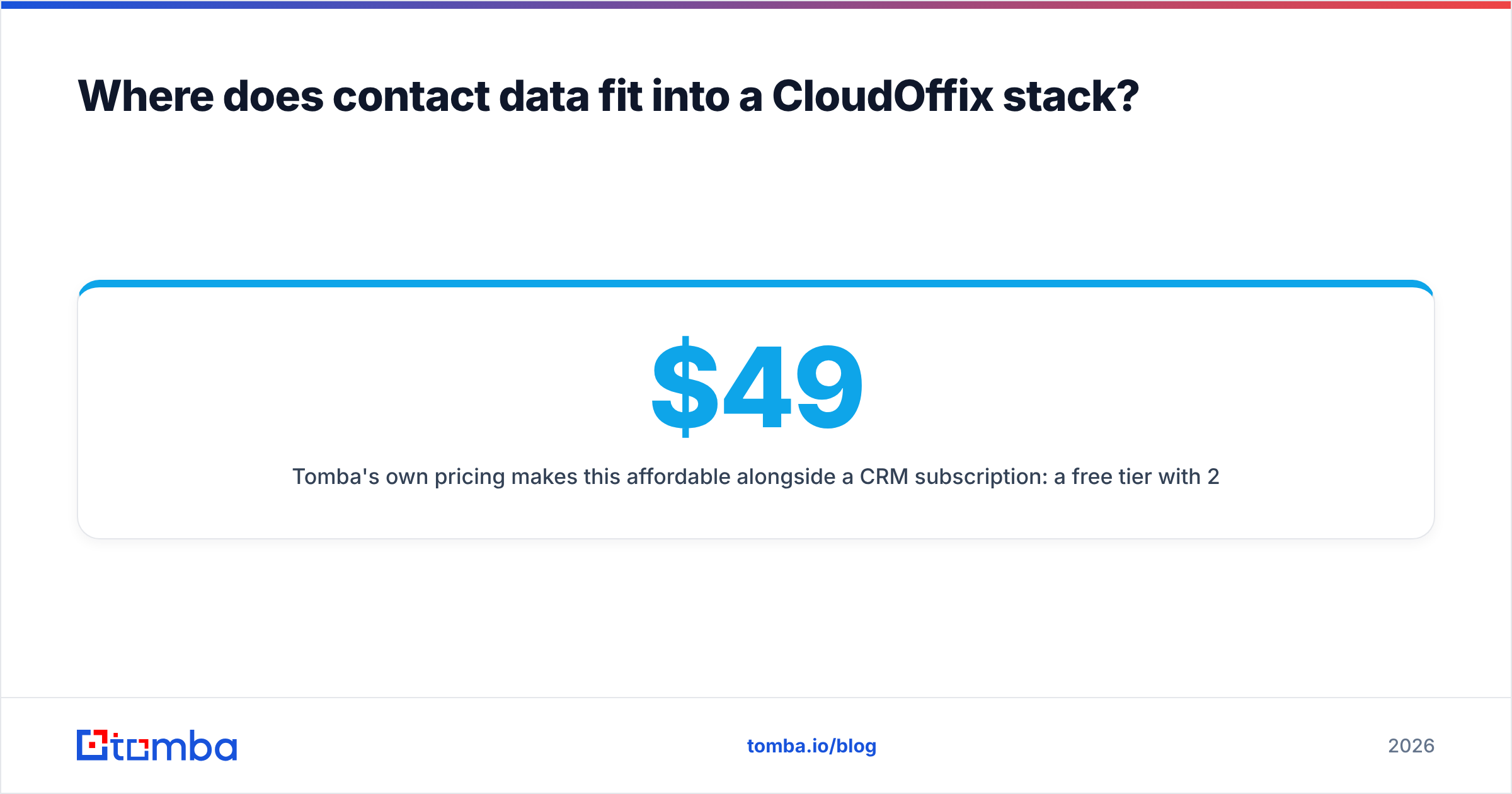
Tomba's pricing stays affordable next to a CRM subscription. The free tier gives 25 searches a month. Then Starter is $49/mo, Growth $99/mo, and Pro $249/mo. See the full Tomba pricing breakdown before you commit. The point isn't to replace CloudOffix. It's to feed it the accurate data that makes any CRM worth paying for.
Who should buy CloudOffix — and who shouldn't?#
Buy CloudOffix if you're an SMB or mid-market team trying to collapse several tools into one vendor. You value customization over out-of-the-box polish. And you have someone who can own the setup. The consolidation savings and shared data model are real. Reviewers also reward the support experience.
Look elsewhere if you need a category-leading version of one function. Or you have little time to configure a platform. Or your team is small enough that a free CRM plus a couple of point tools is simpler and cheaper.
Either way, budget honestly. Multiply seats by clouds by contract term. Add implementation. Add the data tools you'll need around the CRM. That total — not the headline per-user number — is the real CloudOffix pricing.
CloudOffix pricing, reviews, pros and cons: the bottom line#
This CloudOffix pricing, reviews, pros and cons review lands on one verdict: it's a strong all-in-one for teams whose main pain is tool sprawl. Its pricing rewards consolidation. Its low-code flexibility is a genuine edge. Its reviews back up the support story. The honest cons — ramp time, breadth over depth, a smaller ecosystem — are manageable if you go in with clear eyes.
But no CRM finds your next customer for you. Before you fill CloudOffix with contacts, make sure they're real, current, and deliverable. Start free with the Tomba Email Finder. Find and verify professional emails by name, company, or domain. Then push them into your CRM, so the platform you pay per seat for actually earns its keep.
Related guides#
// get started
Find, verify and enrich your first contacts today
Start on the free plan with 25 searches a month, then scale when your team is ready.
Free plan · No credit card required · GDPR & CCPA
// about the author