CloudTalk Pricing Reviews Pros and Cons: 2026 Buyer's Guide
A neutral, numbers-first look at CloudTalk pricing, real user reviews, and the pros and cons that matter before you commit a sales team to a per-seat phone system.
CloudTalk is one of the best-known cloud call-center platforms for outbound and support teams. But its per-seat pricing hides costs that only show up once you scale. This guide to CloudTalk pricing reviews pros and cons stays neutral and numbers-first. You will learn what you actually pay, what real reviewers praise and complain about, and where CloudTalk fits in a modern outbound stack.
TL;DR#
- CloudTalk pricing is per user, per month, billed annually across four tiers (Starter, Essential, Expert, and a custom Business plan), with a common 3-seat minimum that inflates the true entry cost.
- Strengths: fast setup, 160+ international numbers, solid power dialer and call analytics, and deep CRM integrations (HubSpot, Pipedrive, Salesforce).
- Weaknesses reviewers cite most: per-seat costs that climb quickly, add-on fees for numbers and features, occasional call-quality dips, and rigid annual contracts.
- CloudTalk is a phone system, not a data source — it dials the numbers you already have. You still need clean contact data to feed it.
- Best-fit buyers: outbound SDR teams and support desks that live on the phone; overkill for teams making light or occasional calls.
What is CloudTalk and who is it for?#
CloudTalk is a cloud-based business phone system (VoIP) built for sales and support teams that make and receive a high volume of calls. Think of it as the call-center layer that sits on top of your CRM. It gives you local and toll-free numbers, an auto-dialer, call recording, IVR menus, and analytics dashboards. It then syncs every call back to your pipeline.
It competes with tools like Aircall, JustCall, Kixie, and Dialpad. The core promise is simple. Spin up a professional phone presence in dozens of countries without buying hardware, and give managers the call data to coach reps.
If your team lives in the dialer all day — cold calling, qualifying, or running phone-based support — CloudTalk is aimed squarely at you. If you make a handful of calls a week, the per-seat model will feel expensive fast.

How much does CloudTalk cost in 2026?#
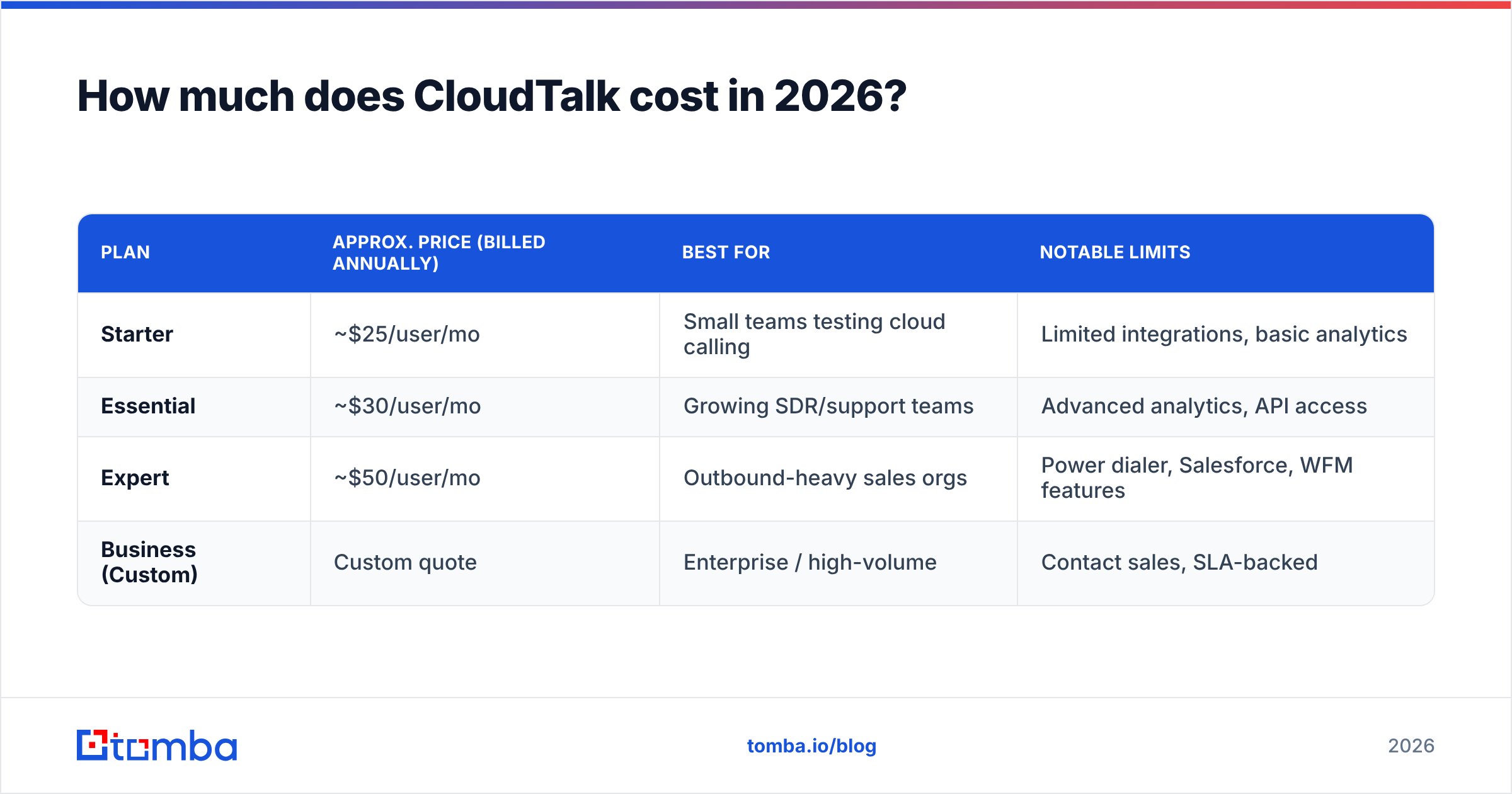
Short answer: expect roughly $25–$50 per user per month on annual billing, plus add-ons — and remember most plans carry a 3-seat minimum. That minimum means the real starting cost is closer to three seats, not one, so budget accordingly.
CloudTalk publishes four tiers. Exact figures shift with promotions and region, so treat these as directional and confirm on the official CloudTalk pricing page before you buy.
| Plan | Approx. price (billed annually) | Best for | Notable limits |
|---|---|---|---|
| Starter | ~$25/user/mo | Small teams testing cloud calling | Limited integrations, basic analytics |
| Essential | ~$30/user/mo | Growing SDR/support teams | Advanced analytics, API access |
| Expert | ~$50/user/mo | Outbound-heavy sales orgs | Power dialer, Salesforce, WFM features |
| Business (Custom) | Custom quote | Enterprise / high-volume | Contact sales, SLA-backed |
A few pricing realities reviewers flag repeatedly:
- The 3-user minimum. Even the entry plan effectively starts at three seats, so "$25/user" is really ~$75/month before extras.
- Numbers are extra. Your subscription includes credits, but many local, toll-free, and international numbers carry monthly rental and per-minute charges on top.
- Annual billing is the default discount. Monthly billing exists but costs meaningfully more per seat.
- Feature gating. The power dialer, Smart dialer, and advanced workflow automations live on higher tiers, so heavy outbound teams are pushed toward Expert.

For a sense of scale: a 10-rep outbound team on the Expert plan lands near $500/month before number rentals and call minutes. That is a real line item. It is why buyers scrutinize CloudTalk pricing reviews pros and cons so carefully before they commit.
CloudTalk Pricing Reviews Pros and Cons: What Users Say#
Across G2 and Capterra, CloudTalk sits in the "solid, well-liked, but watch the costs" band. It typically rates in the low-to-mid 4-star range. Here is the honest split.
Pros reviewers consistently mention#
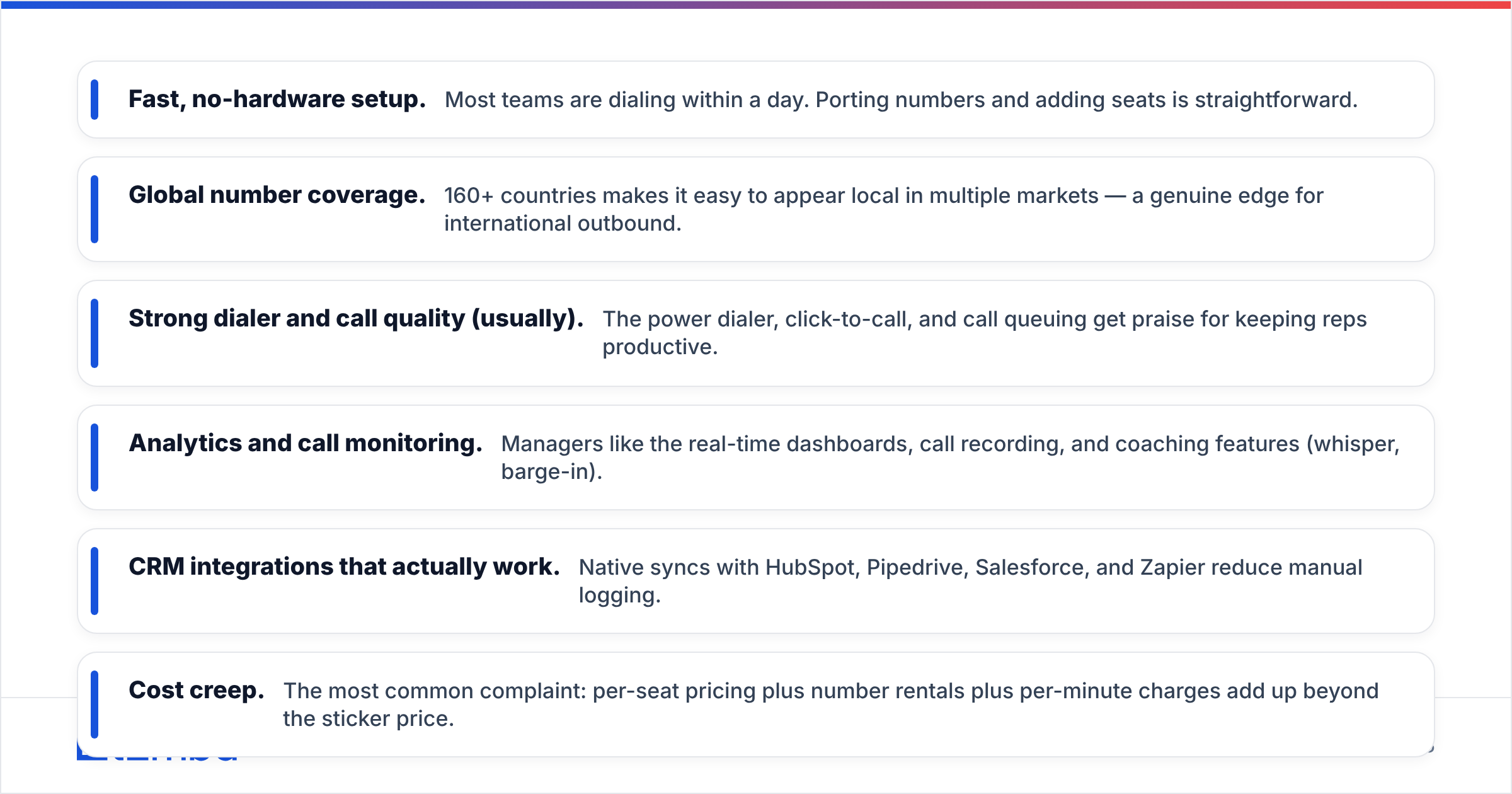
- Fast, no-hardware setup. Most teams are dialing within a day. Porting numbers and adding seats is straightforward.
- Global number coverage. 160+ countries makes it easy to appear local in multiple markets — a genuine edge for international outbound.
- Strong dialer and call quality (usually). The power dialer, click-to-call, and call queuing get praise for keeping reps productive.
- Analytics and call monitoring. Managers like the real-time dashboards, call recording, and coaching features (whisper, barge-in).
- CRM integrations that actually work. Native syncs with HubSpot, Pipedrive, Salesforce, and Zapier reduce manual logging.
Cons reviewers consistently mention#
- Cost creep. The most common complaint: per-seat pricing plus number rentals plus per-minute charges add up beyond the sticker price.
- Annual contract friction. Some users report rigid terms and difficulty downgrading mid-cycle.
- Occasional call-quality dips. A minority report dropped calls or latency, often tied to their own network but frustrating nonetheless.
- Support variability. Experiences range from excellent to slow, depending on plan tier.
- Feature paywalls. Key automation lives on Expert, nudging teams to upgrade sooner than planned.
The pattern is clear. Teams that genuinely make hundreds of calls a day find CloudTalk worth it. Teams with lighter call volume feel they are paying for capacity they do not use.
How does CloudTalk compare to alternatives?#
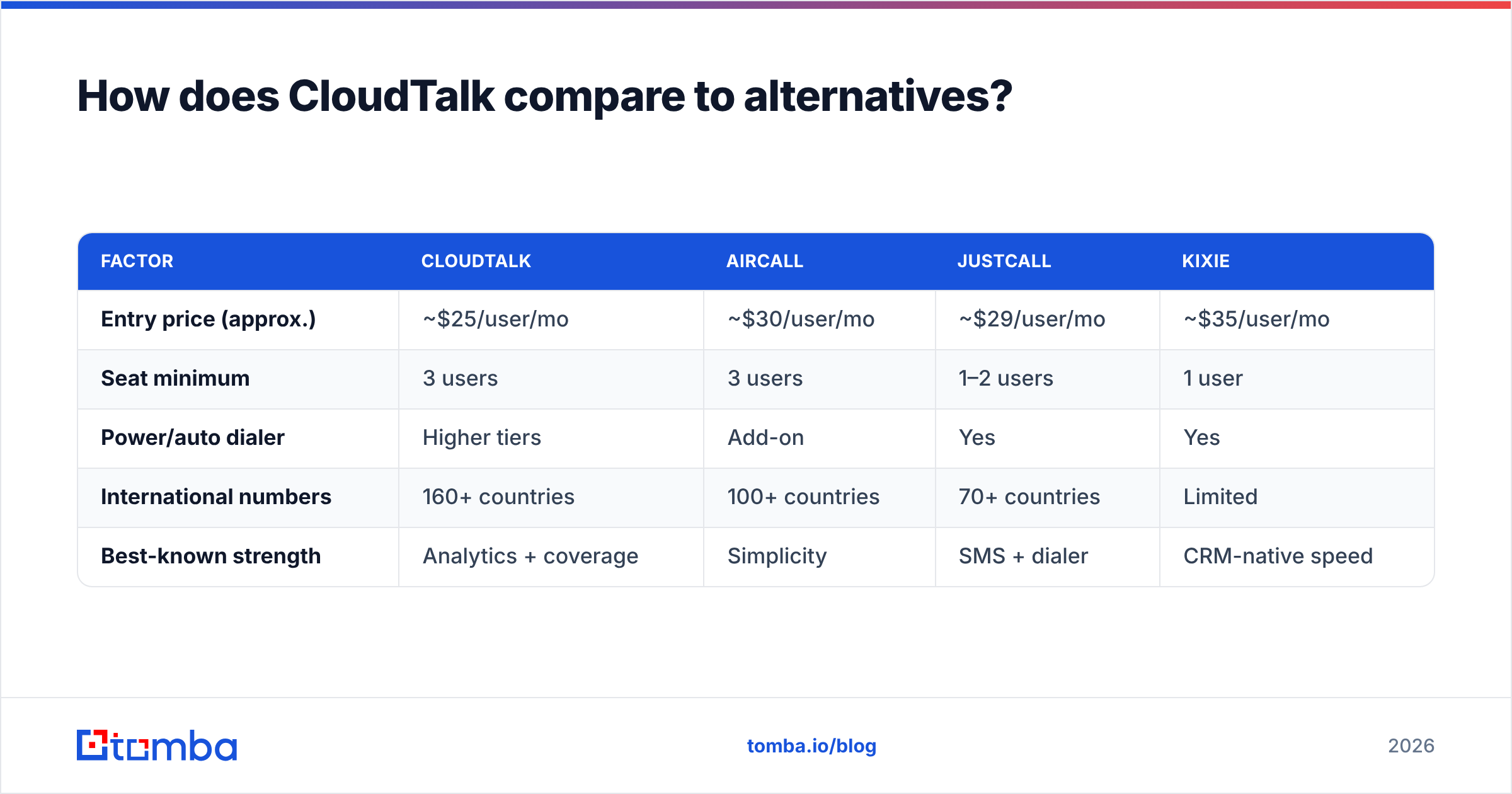
CloudTalk isn't alone. Here's how it stacks against the usual shortlist on the factors buyers weigh most.
| Factor | CloudTalk | Aircall | JustCall | Kixie |
|---|---|---|---|---|
| Entry price (approx.) | ~$25/user/mo | ~$30/user/mo | ~$29/user/mo | ~$35/user/mo |
| Seat minimum | 3 users | 3 users | 1–2 users | 1 user |
| Power/auto dialer | Higher tiers | Add-on | Yes | Yes |
| International numbers | 160+ countries | 100+ countries | 70+ countries | Limited |
| Best-known strength | Analytics + coverage | Simplicity | SMS + dialer | CRM-native speed |
The takeaway: CloudTalk wins on international coverage and analytics depth, JustCall and Kixie compete harder on single-seat flexibility, and Aircall trades features for polish. None of them solve your data problem — which is the part most teams underestimate.
What CloudTalk pricing doesn't cover: your contact data#
Here's the gap no phone-system pricing page mentions. CloudTalk dials numbers; it doesn't find them. A dialer is only as productive as the list you load into it. Reps burning through a power dialer full of stale or wrong numbers just hit voicemail faster.
That's where your outbound math actually breaks down. If 30% of your list is bad data, you're paying premium per-seat rates for reps to dial dead ends. The cost isn't in the phone system — it's in the wasted seat-hours.
To keep a dialer profitable, you need a reliable pipeline of verified contact data feeding it:
- Accurate direct-dial and mobile numbers, so power-dialer minutes aren't wasted. A dedicated phone finder surfaces B2B phone numbers tied to real decision-makers, and a phone validator confirms they're live before your reps ever click dial.
- Verified email addresses for the multichannel follow-up every serious outbound motion now runs. CloudTalk handles the call; a proper email finder handles the inbox side, so a missed call still turns into a touch.
- Enriched contact records so reps know who they're calling — title, company, seniority — before the phone rings. Layering data enrichment onto your list turns cold dials into informed conversations.
This is the honest frame for evaluating CloudTalk: it's an excellent execution layer, but it assumes you've already solved data acquisition. Most teams that regret their CloudTalk spend didn't have a call-quality problem — they had a list-quality problem.
Is CloudTalk worth it?#
CloudTalk is worth it if phone is your primary channel and you'll actually use the dialer daily; it's poor value if calling is occasional. The decision hinges on utilization, not features.
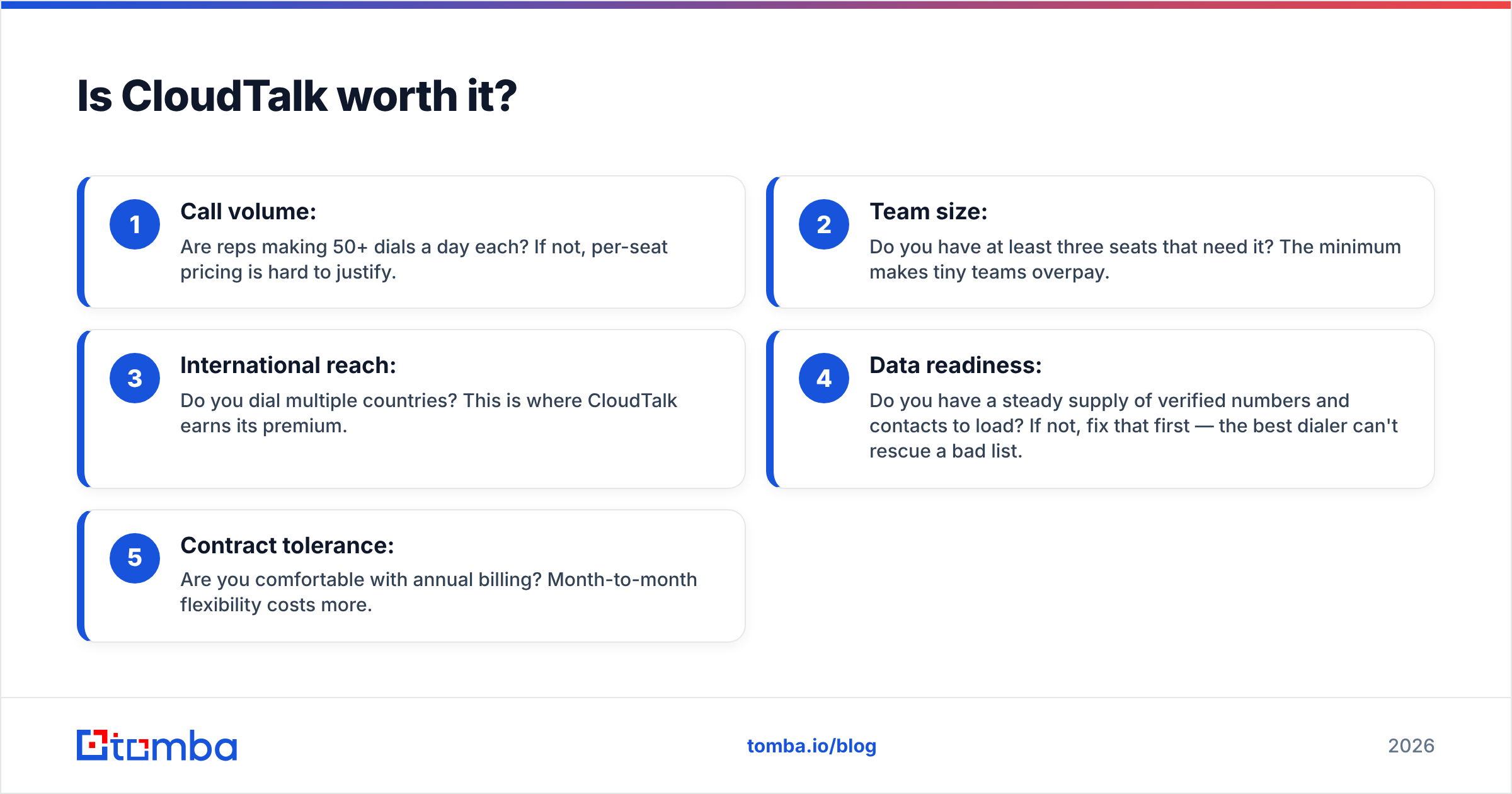
Run this quick gut check before you sign an annual contract:
- Call volume: Are reps making 50+ dials a day each? If not, per-seat pricing is hard to justify.
- Team size: Do you have at least three seats that need it? The minimum makes tiny teams overpay.
- International reach: Do you dial multiple countries? This is where CloudTalk earns its premium.
- Data readiness: Do you have a steady supply of verified numbers and contacts to load? If not, fix that first — the best dialer can't rescue a bad list.
- Contract tolerance: Are you comfortable with annual billing? Month-to-month flexibility costs more.
If you answered yes to most of these, CloudTalk is a defensible, well-reviewed choice. If you hesitated on volume or data, you'll get more ROI by tightening your list before upgrading your phone system.
Frequently asked questions#
Does CloudTalk have a free plan? No permanent free plan, but a free trial is available. Pricing starts on the paid Starter tier with an effective 3-seat minimum on annual billing.
Why is my CloudTalk bill higher than the advertised price? Almost always because of number rentals, per-minute call charges, and the seat minimum. The per-user sticker price excludes those, so model your real usage before committing.
Is CloudTalk cheaper than Aircall or JustCall? On entry per-seat pricing, CloudTalk is competitive to slightly cheaper. Once you add the power dialer and international numbers, total cost converges — so compare on your specific call mix, not the headline rate.
Can CloudTalk find phone numbers for me? No. CloudTalk is a phone system that dials the contacts you provide. Sourcing and verifying those numbers is a separate job for a data tool like Tomba.
The bottom line#
That is the full picture on CloudTalk pricing reviews pros and cons. It is a genuinely strong cloud phone system for outbound and support teams that call constantly — good analytics, wide number coverage, and reliable CRM sync. The catch, echoed across every honest review, is cost. Per-seat pricing plus add-ons rewards heavy users and punishes light ones. And no phone plan, however priced, solves the data problem underneath it.
Before you scale seats, make sure every dial counts. Load your dialer with verified, enriched contacts from the Tomba Email Finder and its phone and enrichment tools — start free with 25 searches a month, and see full Tomba pricing when you're ready to fuel a full outbound team. A great dialer plus a clean list beats an expensive dialer plus a stale one every time.
Related guides#
// get started
Find, verify and enrich your first contacts today
Start on the free plan with 25 searches a month, then scale when your team is ready.
Free plan · No credit card required · GDPR & CCPA
// about the author