How to Find and Verify CMO Email Addresses (2026 Guide)
CMOs get pitched constantly, so a bounced email quietly kills your outreach before anyone reads it. Here's how CMO email verification protects deliverability and gets you in the door.
Reaching a Chief Marketing Officer is hard enough without your email bouncing before it's read. CMOs sit behind assistants, spam filters, and inboxes that get hundreds of cold pitches a week. If even a handful of your messages hit dead addresses, your sender reputation drops and every future email — even the good ones — starts landing in spam.
CMO email verification is the step most reps skip and later regret. This guide shows you how to find, verify, and safely email marketing chiefs in 2026 without torching your domain.
TL;DR#
- A bounced CMO email costs more than a missed reply — it damages the sender reputation that decides whether your other emails get delivered.
- Guessing formats is not a strategy. Verify every address with a real-time SMTP check before you send.
- Catch-all domains are the trap. Big enterprises accept everything, so a "valid" result can still bounce. Use a dedicated catch-all check.
- Enrichment beats scraping. Pair a verified email with title, seniority, and company data so you know you've got the right CMO.
- A clean list of 200 verified CMOs outperforms 2,000 guessed ones on reply rate, deliverability, and rep sanity.
What is CMO email verification?#
CMO email verification is the process of confirming that a specific Chief Marketing Officer's email address actually exists and can receive mail — before you send anything to it. Think of it like calling a restaurant to confirm your reservation before driving across town. The address might look perfect on paper (jane.doe@company.com), but verification is what tells you the table is actually booked.
Technically, verification runs a series of checks against the address: syntax validation, domain and MX-record lookup, and an SMTP handshake that asks the receiving mail server whether the mailbox exists — without delivering a message. For senior contacts like CMOs, this matters more than for any other role, because their inboxes are protected by stricter filters and their companies often run aggressive spam defenses.
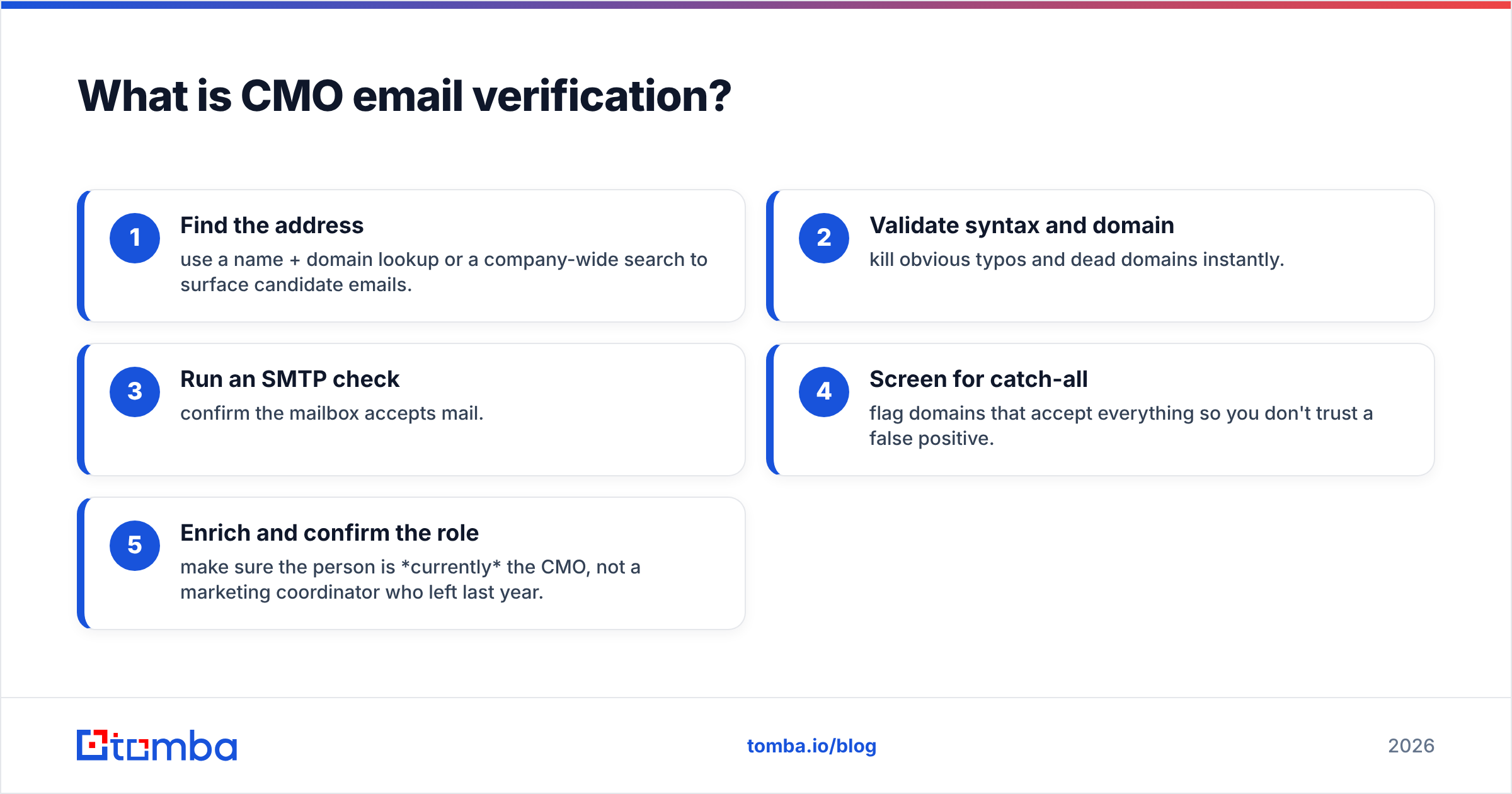
Here's the workflow at a glance:
- Find the address — use a name + domain lookup or a company-wide search to surface candidate emails.
- Validate syntax and domain — kill obvious typos and dead domains instantly.
- Run an SMTP check — confirm the mailbox accepts mail.
- Screen for catch-all — flag domains that accept everything so you don't trust a false positive.
- Enrich and confirm the role — make sure the person is currently the CMO, not a marketing coordinator who left last year.

Why do CMO emails bounce more than other roles?#
Because CMOs change jobs often and hide behind enterprise infrastructure. The average marketing-chief tenure is famously short — Spencer Stuart's long-running CMO tenure study has tracked it hovering around three to four years, the shortest in the C-suite. That churn means a CMO email you sourced six months ago may already point to someone who's gone.
On top of turnover, large companies route executive mail through security gateways, catch-all domains, and alias systems. An address can pass a basic format check and still bounce because:
- The person left and the mailbox was deactivated.
- The domain is catch-all, so every address "accepts" mail but most go nowhere.
- The real inbox is an alias (
marketing@) that forwards, not the personal address you guessed. - A security filter silently rejects unknown senders.
This is exactly why email verification is non-negotiable for executive outreach. A 2% bounce rate is the widely cited danger line — cross it and mailbox providers like Google and Microsoft start throttling you. For a full primer on the mechanics, see the glossary entry on email deliverability.
How do you find a CMO's email address in the first place?#
Start with the domain, not the person. If you know the company, a domain search returns the email patterns that company uses (first.last@, flast@, first@) plus the known contacts already tied to that domain. From there you narrow to the CMO by name.
There are four practical ways to source the address, from most to least reliable:
- Company email search by domain — pull the verified pattern and existing contacts, then match the CMO.
- Name + domain finder — feed the CMO's full name and company domain into an email finder to generate and score the most likely address.
- LinkedIn-based lookup — resolve a profile URL to a work email when you only have the social handle.
- Manual permutation — generate format combinations as a last resort, then verify each one (never send to a guess).
The critical rule: finding is not verifying. A finder gives you the most probable address. Verification tells you whether it's real. Do both, in that order, every time.

What's the difference between finding, verifying, and enriching?#
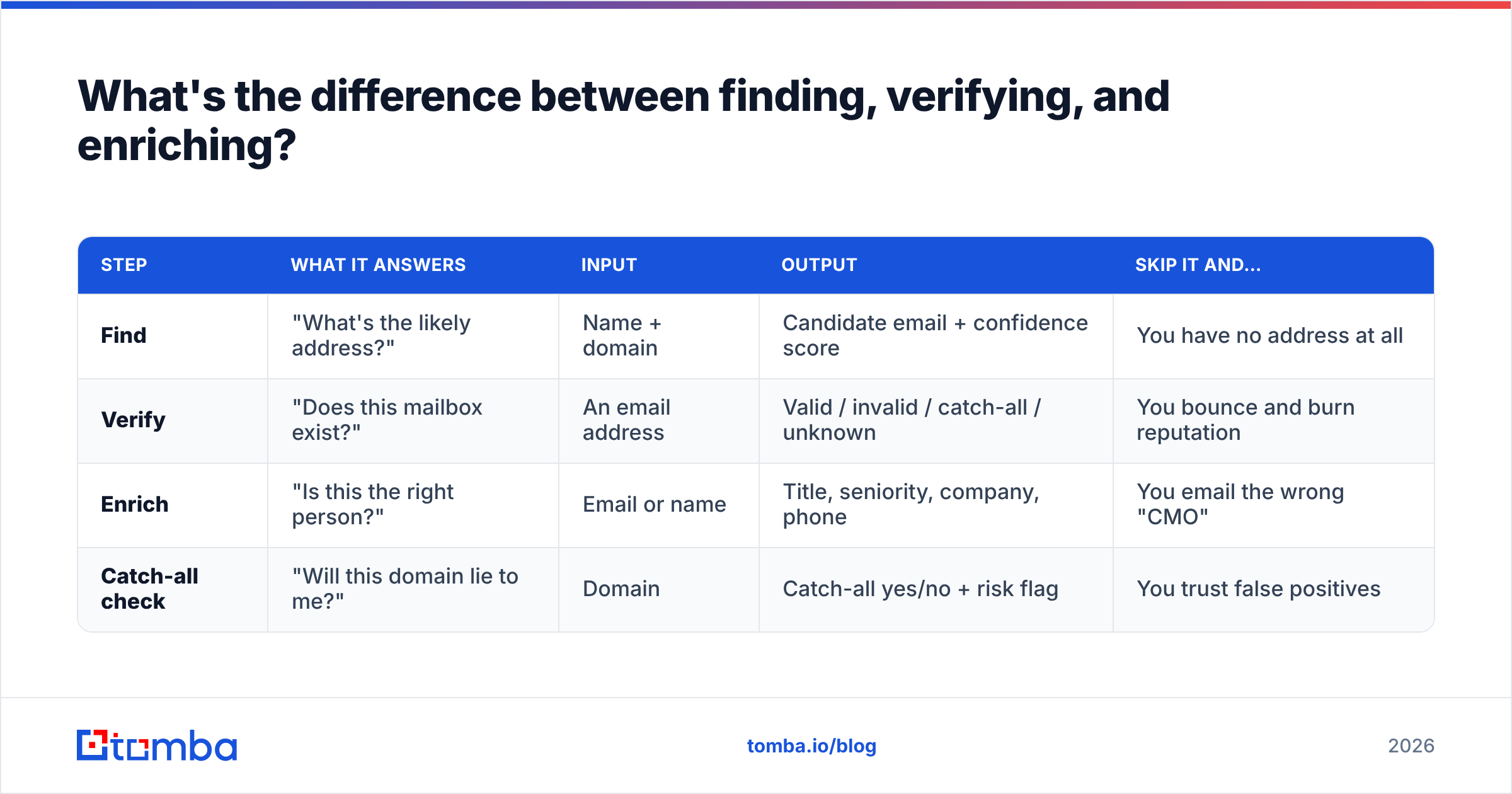
These three steps get conflated constantly, and mixing them up is why lists stay dirty. Here's how they compare.
| Step | What it answers | Input | Output | Skip it and… |
|---|---|---|---|---|
| Find | "What's the likely address?" | Name + domain | Candidate email + confidence score | You have no address at all |
| Verify | "Does this mailbox exist?" | An email address | Valid / invalid / catch-all / unknown | You bounce and burn reputation |
| Enrich | "Is this the right person?" | Email or name | Title, seniority, company, phone | You email the wrong "CMO" |
| Catch-all check | "Will this domain lie to me?" | Domain | Catch-all yes/no + risk flag | You trust false positives |
Run all four for executive outreach. For rank-and-file contacts you can sometimes shortcut, but CMOs justify the full pass because a single reply is worth more and a single bounce hurts more. Layering data enrichment on top confirms the title is current — the difference between reaching the actual decision-maker and a stale record.
How do you handle catch-all domains for enterprise CMOs?#
Treat every "valid" result on a catch-all domain as unconfirmed, not confirmed. A catch-all (or "accept-all") domain is configured to accept mail sent to any address, whether the mailbox exists or not. That means a standard SMTP check comes back "valid" for nonsense@bigcorp.com just as it does for the real CMO — the server never says no.
Enterprise companies, where most CMOs actually work, disproportionately use catch-all setups. So the very audience you most want to verify is the one basic tools get wrong. The fix is a dedicated catch-all verifier that uses additional signals — historical send data, pattern confidence, and known-good records — to estimate whether a specific address on a catch-all domain is genuinely deliverable.
Practical policy for catch-all CMO addresses:
- Never bulk-blast them. Send in small, warmed-up batches.
- Prioritize addresses with independent confirmation (seen in a real dataset, matching the verified company pattern).
- Monitor bounces per domain and pause any domain that starts rejecting.
- Lead with LinkedIn or phone when the email confidence is low.
Which tools do CMO email verification best in 2026?#
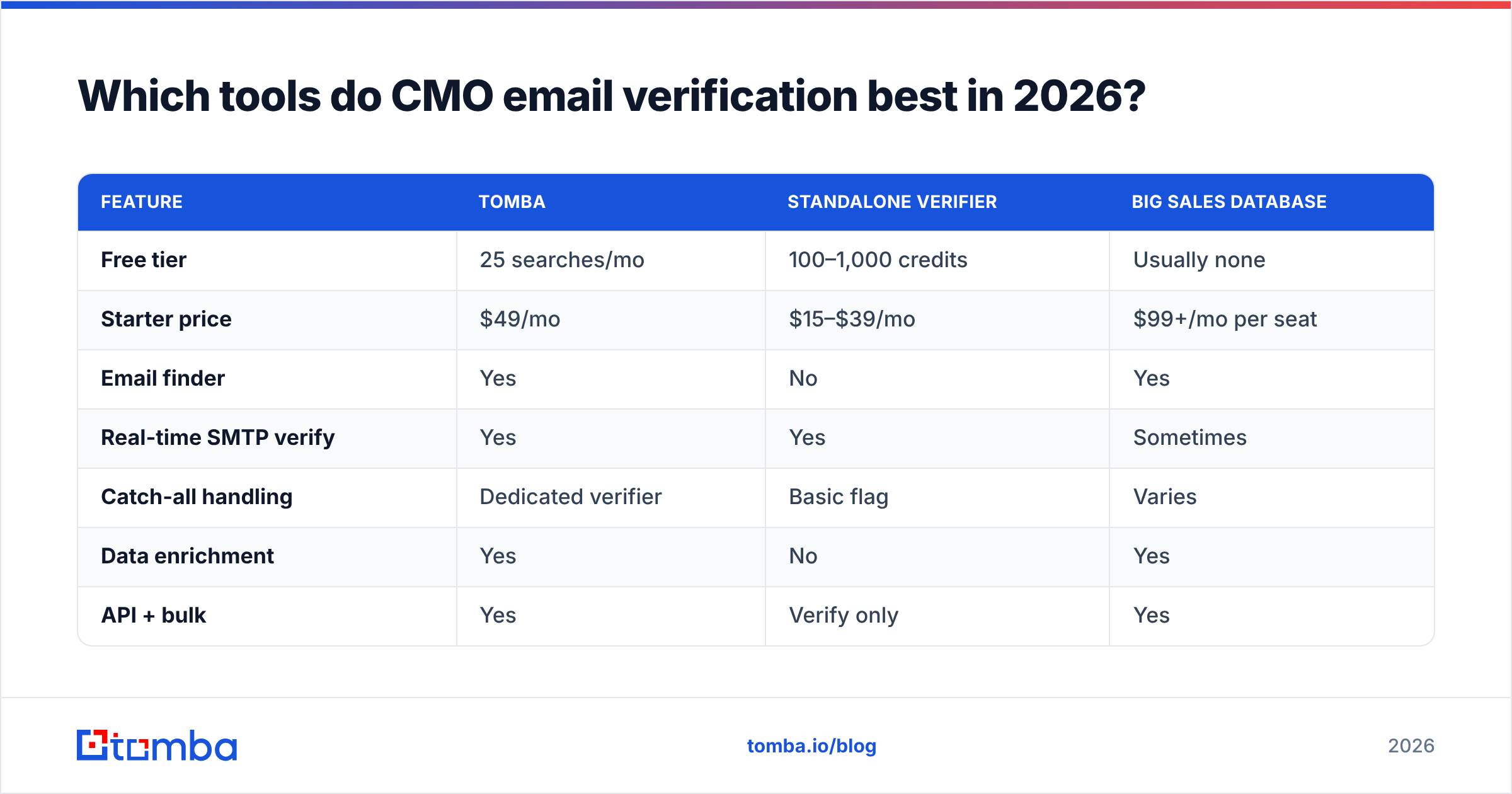
The market splits into finders, verifiers, and all-in-one platforms. For CMO outreach you want a platform that does finding and verifying and catch-all handling, because bouncing between tools leaves gaps. Here's a neutral comparison of common options.
| Feature | Tomba | Standalone verifier | Big sales database |
|---|---|---|---|
| Free tier | 25 searches/mo | 100–1,000 credits | Usually none |
| Starter price | $49/mo | $15–$39/mo | $99+/mo per seat |
| Email finder | Yes | No | Yes |
| Real-time SMTP verify | Yes | Yes | Sometimes |
| Catch-all handling | Dedicated verifier | Basic flag | Varies |
| Data enrichment | Yes | No | Yes |
| API + bulk | Yes | Verify only | Yes |
A standalone verifier is cheap but can't find the CMO — you still need a source. A large sales database finds contacts but often serves stale executive data and charges per seat. A combined finder-plus-verifier like Tomba covers the whole workflow at one predictable price; you can compare the tiers on the Tomba pricing page. If you're weighing platforms, third-party review sites like G2 are useful for real-user accuracy reports, and vendor docs from established players like HubSpot explain how bounces affect your connected sending domain.
What does a clean CMO outreach workflow look like?#
Put the steps together into a repeatable sequence you can run for any target account:
- Build the account list. Identify the companies whose CMO you want to reach.
- Run domain search to capture each company's verified email pattern.
- Find the CMO address by name + domain, keeping the confidence score.
- Verify with a real-time SMTP check, discarding anything invalid.
- Flag catch-all domains and route them to the catch-all verifier.
- Enrich to confirm the person is the current CMO and grab a backup channel (phone or LinkedIn).
- Segment by confidence — high-confidence verified addresses go into your main sequence; catch-all/low-confidence go into a slow, manual track.
- Warm up and send in batches, watching bounce and spam rates per domain.
The payoff is measurable. A list of 200 CMOs where every address is verified will beat a list of 2,000 guessed addresses on reply rate and protect the sender reputation that keeps you out of spam. Volume feels productive; deliverability is what actually books meetings.
How many CMO emails should you verify before a campaign?#
All of them — but the real question is batch size. Verification is fast and cheap; sending to an unverified enterprise executive is neither. Verify 100% of your list, then send in warmed-up batches of 20–50 per day per inbox rather than blasting the whole list at once. This keeps your bounce rate under the ~2% threshold and gives you a chance to spot a bad domain before it poisons the rest.
If you're working at scale, a bulk email finder plus bulk verification lets you process thousands of CMO records in one pass, then export only the deliverable ones. That's the difference between a campaign that lands and one that gets your domain blacklisted in week two.
Frequently asked questions#
Is it legal to email CMOs I found through verification? Verification only confirms an address is real; it doesn't grant permission to spam. For B2B outreach, follow CAN-SPAM (US), and where GDPR applies, rely on legitimate-interest rules with a clear opt-out. Keep messages relevant and honor unsubscribes.
Can I trust an email finder's confidence score alone? No. A confidence score estimates probability; verification confirms reality. Always run the SMTP check after finding, especially for catch-all enterprise domains.
How often should I re-verify a CMO list? Every 30–90 days for active lists, and always right before a send. CMO turnover is high, so a list that was clean last quarter may be 10–15% stale today.
Reach the right CMO, verified — with Tomba#
Stop losing meetings to bounces. With the Tomba Email Finder you can source a CMO's most likely address by name and domain, verify it with a real-time SMTP check, screen catch-all domains, and enrich the record to confirm you've got the current marketing chief — all in one workflow. Start free with 25 searches a month, then scale on the $49/mo Starter plan when you're ready to run full account lists. Verify first, send second, and let your outreach reach the inbox it was built for.
Related guides#
// get started
Find, verify and enrich your first contacts today
Start on the free plan with 25 searches a month, then scale when your team is ready.
Free plan · No credit card required · GDPR & CCPA
// about the author