Cold Call List Generator: How to Build Lists That Actually Connect
A cold call list generator turns raw company data into dial-ready contacts with verified numbers. Here's how the tools work, what to look for, and how to build lists that get pickups in 2026.
Cold calling still works in 2026 — but only if the list underneath it is real. A dialer is useless when half the numbers are disconnected, the titles are wrong, and the "decision maker" left the company 18 months ago. That is the problem a cold call list generator solves: it turns a target market description into a clean, dial-ready set of contacts with verified phone numbers and current job data.
This guide breaks down what a cold call list generator actually does, how to evaluate one, and how to assemble a list that produces pickups instead of dial tones.
TL;DR#
- A cold call list generator builds targeted prospect lists — company, contact, title, and phone number — from a set of filters instead of manual research.
- The single biggest driver of connect rate is phone verification; unverified purchased lists routinely run 30–50% dead numbers.
- The best workflow pairs a data source (firmographic + contact filters) with a verification layer (phone validation + email confirmation) before a single dial.
- Layering a phone finder and phone validator on top of accurate contact data beats buying a static list you can't refresh.
- Budget realistically: expect to pay per verified contact, and treat any "unlimited free list" claim as a red flag.
What is a cold call list generator?#
A cold call list generator is a tool that produces a structured list of sales-ready contacts — name, company, title, direct or mobile phone number, and often email — based on filters you define. Think of it like a smart filter on top of a large B2B contact database: you describe your ideal customer (industry, company size, region, seniority), and the generator returns matching people with the contact details you need to reach them by phone.
The everyday analogy: it's the difference between flipping through an old phone book hoping a business is still open, and asking a concierge who already confirmed the place is open, who the manager is, and the best line to reach them. One wastes your afternoon; the other gets you a conversation.
Under the hood, a good generator does three jobs:
- Targeting — filter a database by firmographics (industry, size, revenue, tech stack) and by person-level attributes (title, department, seniority).
- Enrichment — attach phone numbers, emails, LinkedIn URLs, and company context to each contact.
- Verification — confirm those numbers and emails are live before you dial or send.
Skip the third step and you have a list, not a call list. The verification layer is what separates a productive dialing session from an afternoon of "the number you have dialed is not in service."

Why do most cold call lists fail?#
Because the data decays faster than teams refresh it. B2B contact data goes stale at roughly 2–3% per month as people change roles, companies restructure, and numbers get reassigned. Over a year, that compounds into a list where a large slice is simply wrong.
The common failure modes:
- Bought static lists — cheap per row, but you're buying a snapshot that started aging the moment it was exported. No re-verification, no refresh.
- Scraped-only data — numbers pulled from directories without validation. High volume, low trust.
- CRM rot — your own historical contacts, half of whom moved on. Familiar names, dead lines.
- No phone-type distinction — a main switchboard number is not a direct dial. Reaching a gatekeeper 200 times isn't prospecting.
The fix isn't a bigger list. It's a verified list you can regenerate. That's the core reason to use a generator with a live verification step rather than a one-time CSV purchase.
How does a cold call list generator work, step by step?#
Here is the practical pipeline most high-performing SDR teams run:
- Define the ICP filters. Industry, headcount band, geography, and the specific titles you sell to. Narrow beats broad — 200 precise contacts outperform 2,000 vague ones.
- Pull matching contacts from a B2B database or via domain search when you already have a list of target companies.
- Enrich each contact with a direct phone number using a dedicated phone finder, plus email as a fallback channel.
- Validate the numbers through a phone validator to strip disconnected, invalid, or wrongly-formatted lines and confirm mobile vs. landline.
- Deduplicate and export — remove repeats, tag by segment, and push clean rows into your dialer or CRM.
- Re-run monthly so the list stays current instead of decaying in a spreadsheet.
The difference between a one-time buy and this loop is refreshability. You own the process, not just a file, so next quarter's list is one filter change away.
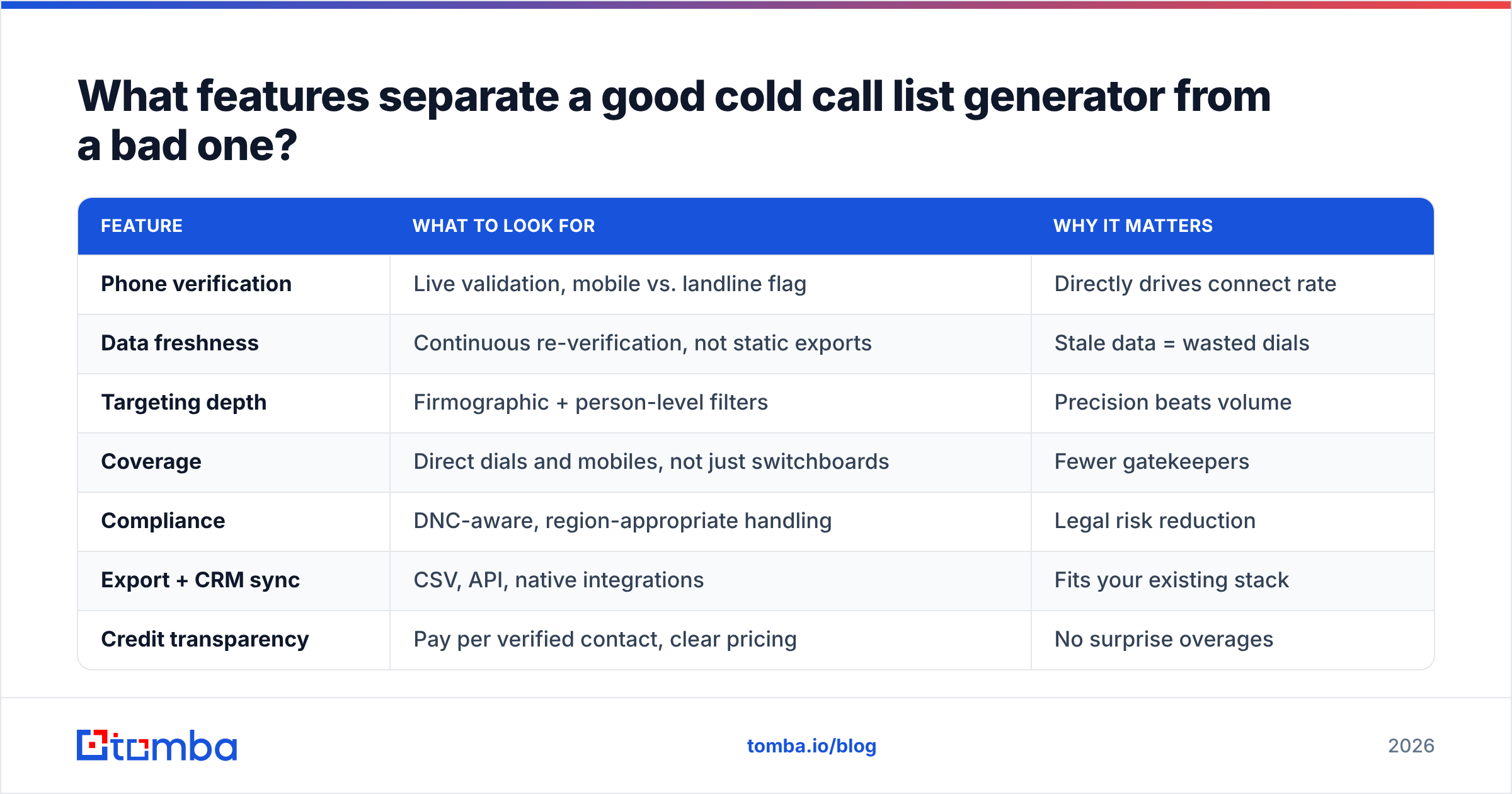
What features separate a good cold call list generator from a bad one?#
Not all generators are built the same. Here's what to weigh before you commit budget.
| Feature | What to look for | Why it matters |
|---|---|---|
| Phone verification | Live validation, mobile vs. landline flag | Directly drives connect rate |
| Data freshness | Continuous re-verification, not static exports | Stale data = wasted dials |
| Targeting depth | Firmographic + person-level filters | Precision beats volume |
| Coverage | Direct dials and mobiles, not just switchboards | Fewer gatekeepers |
| Compliance | DNC-aware, region-appropriate handling | Legal risk reduction |
| Export + CRM sync | CSV, API, native integrations | Fits your existing stack |
| Credit transparency | Pay per verified contact, clear pricing | No surprise overages |
A tool that nails targeting but skips verification is a well-organized way to fail. A tool that verifies but can't filter tightly buries your reps in low-fit calls. You want both, plus an export path into whatever dialer or CRM you already run.
For compliance, always cross-reference against Do-Not-Call rules for your region — the U.S. National Do Not Call Registry is the baseline, and reputable data providers help you stay on the right side of it. Treat legal review as part of list building, not an afterthought.
Should you buy a list or generate your own?#
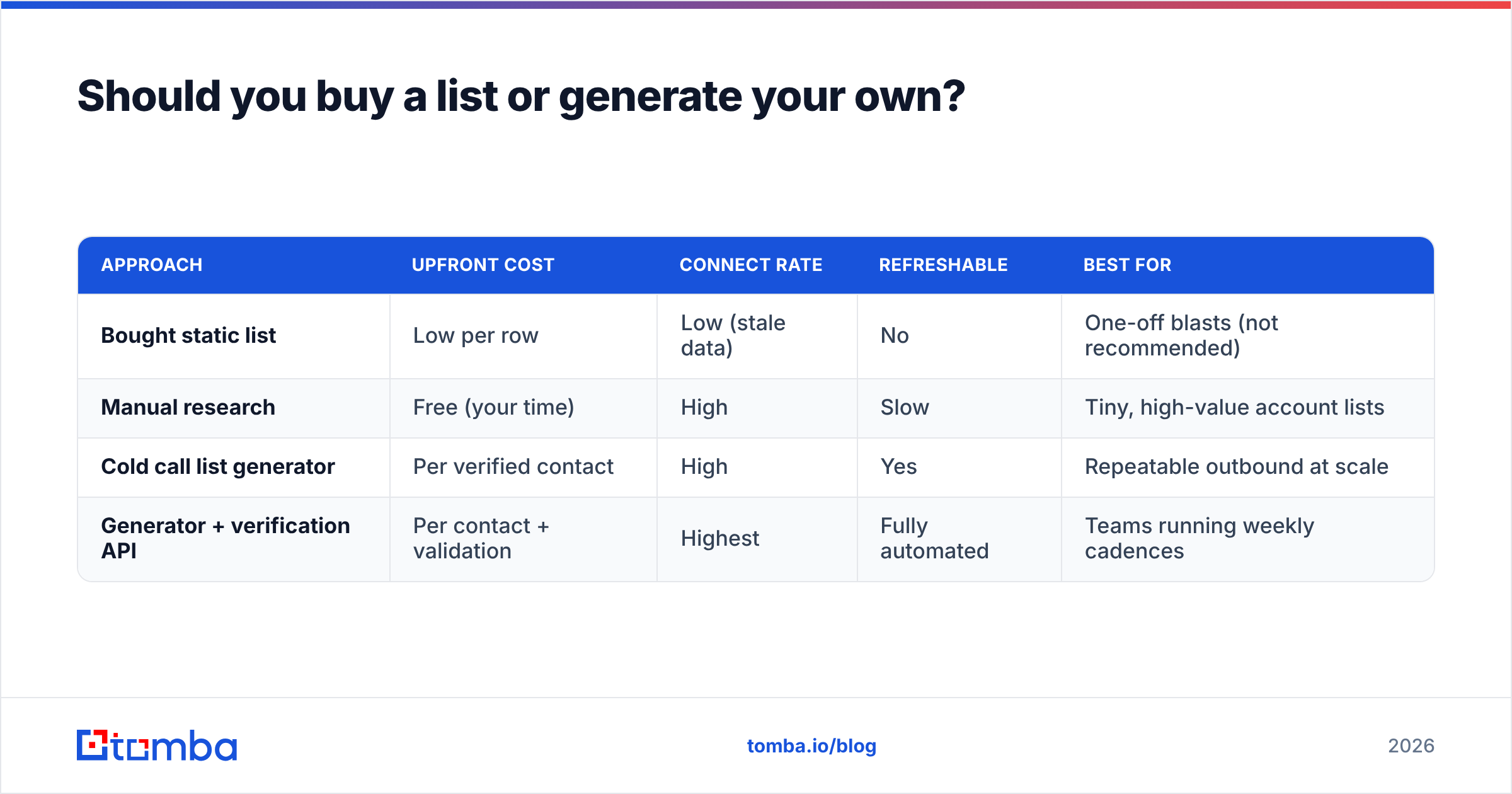
Generate your own, in almost every case. Purchased lists look cheaper up front and cost more per connect once the dead-number tax hits.
Here's the honest comparison:
| Approach | Upfront cost | Connect rate | Refreshable | Best for |
|---|---|---|---|---|
| Bought static list | Low per row | Low (stale data) | No | One-off blasts (not recommended) |
| Manual research | Free (your time) | High | Slow | Tiny, high-value account lists |
| Cold call list generator | Per verified contact | High | Yes | Repeatable outbound at scale |
| Generator + verification API | Per contact + validation | Highest | Fully automated | Teams running weekly cadences |
The math favors the generator route the moment you value your reps' time. If an SDR spends two hours building 40 hand-researched contacts, that's expensive research labor. If a generator produces 400 verified contacts in minutes and validation strips the bad numbers, your cost-per-conversation drops sharply — even after paying for the data.
There's a reason reps quietly abandon the dusty purchased CSV the moment a live, verified source shows up.

How do you verify numbers before dialing?#
Verification is two checks working together: format validation and line status.
- Format validation confirms the number is syntactically valid for its country and normalizes it (correct country code, no stray characters). A phone validator handles this at scale.
- Line status flags whether the number is active, and ideally whether it's a mobile or a landline. Mobiles typically get answered more often for cold outreach, so knowing the type lets you prioritize.
Pair phone verification with email confirmation so you have a second channel. Even when a call goes to voicemail, a verified email lets you follow up the same day. Running contacts through an email verifier alongside phone validation gives every prospect two clean ways to reach them — and a voicemail-plus-email combo lifts reply rates over either channel alone.
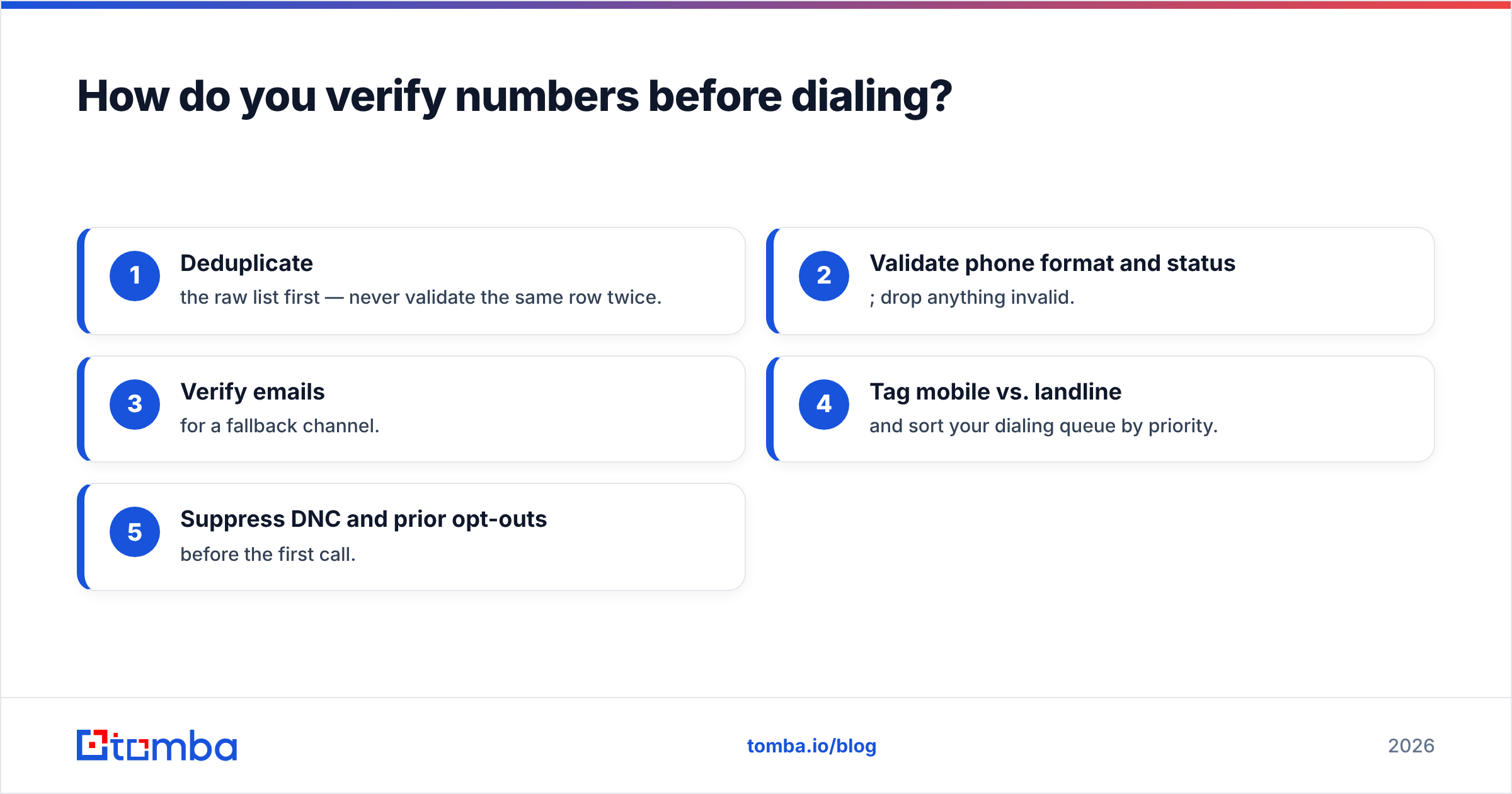
A quick pre-dial checklist:
- Deduplicate the raw list first — never validate the same row twice.
- Validate phone format and status; drop anything invalid.
- Verify emails for a fallback channel.
- Tag mobile vs. landline and sort your dialing queue by priority.
- Suppress DNC and prior opt-outs before the first call.
Where does Tomba fit in a cold call list workflow?#
Tomba is built for the data and verification half of this pipeline — the part that determines whether your dials connect. You start from companies or domains, pull the right contacts, attach and validate phone numbers, and export clean rows into your dialer.
A typical Tomba build looks like this:
- Use domain search to pull the relevant contacts at each target company.
- Enrich decision-makers with direct numbers via the phone finder.
- Run every number through the phone validator and every email through the email verifier.
- For large campaigns, process everything through the bulk email finder and push results to your CRM.
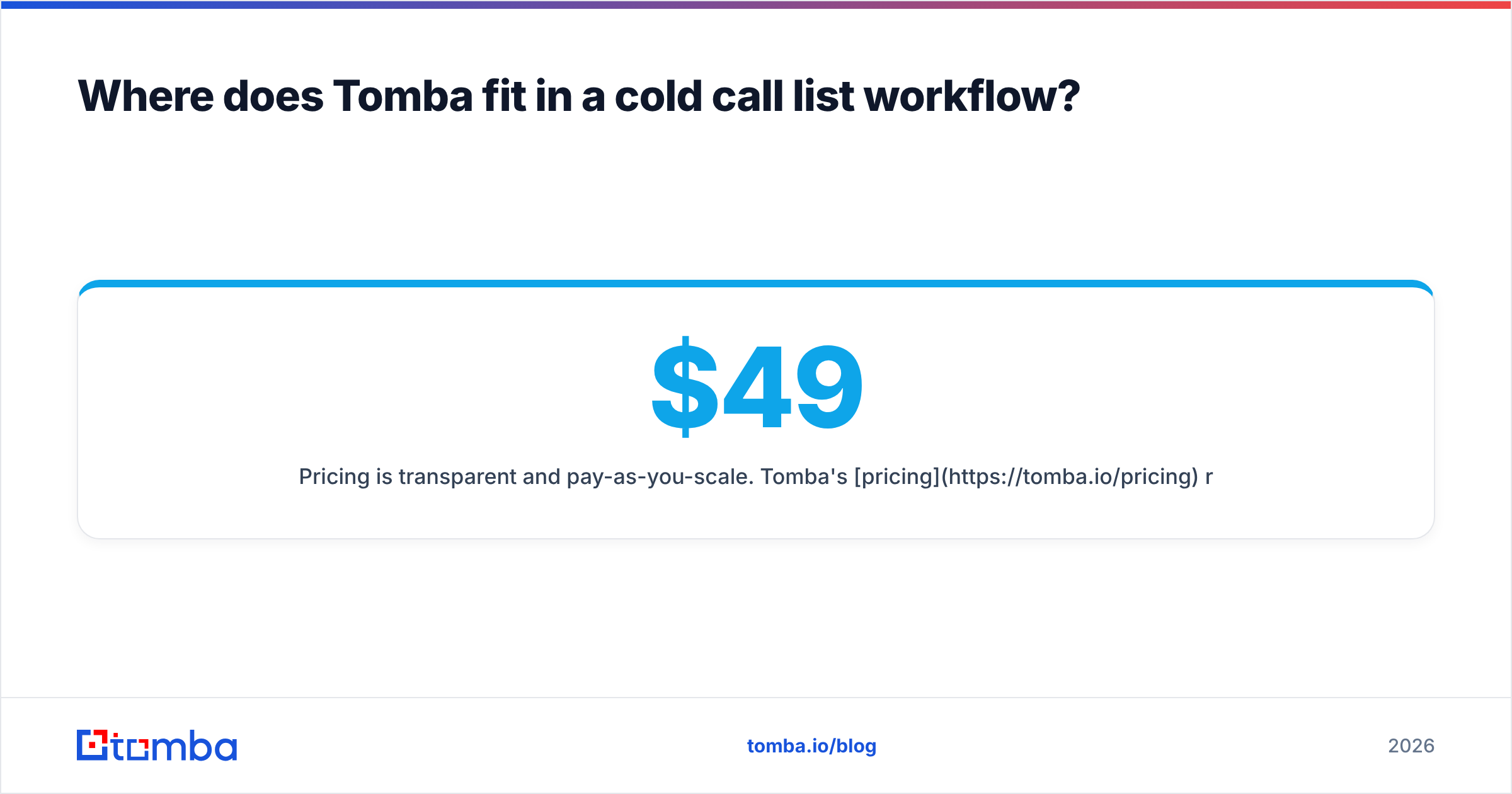
Pricing is transparent and pay-as-you-scale. Tomba's pricing runs a Free tier (25 searches/month), Starter at $49/month, Growth at $99/month, and Pro at $249/month, with custom Enterprise plans. That structure matters for list building: you pay per verified contact, so you're not locked into a giant annual seat before you know the data fits your market.
How does this compare to broader sales-intelligence platforms? Tools like Apollo or ZoomInfo bundle dialers, sequences, and analytics into heavier suites at higher price points. That's a fine fit if you want an all-in-one platform. If you specifically want accurate contact data with strong phone and email verification — and the flexibility to feed it into whatever dialer you already like — a focused tool keeps your cost-per-verified-contact lower and your stack simpler. Both are legitimate choices; pick based on whether you're buying a platform or buying clean data.
What does a strong cold call list look like in practice?#
A finished, dial-ready row should carry, at minimum:
- Full name and current title (verified against a recent source)
- Company + firmographic context (size, industry, location)
- Direct or mobile phone number, validated and typed
- Verified email as a second channel
- LinkedIn URL for pre-call research
- Segment tag so you can sort your calling blocks
If every row hits those fields, your reps open each call already knowing who they're talking to and why they fit. That context is what turns a cold dial into a warm-enough conversation to earn the next 30 seconds.
For teams that want to enrich existing records rather than build from scratch, data enrichment fills the gaps in a CRM you already have — appending missing phones and confirming titles on contacts that have gone stale.
Cold call list generator FAQ#
Is a cold call list generator legal to use? Yes, when you use compliant data sources and honor Do-Not-Call rules and regional privacy regulations. Always suppress DNC-registered numbers and prior opt-outs before dialing.
How often should I regenerate my list? Monthly for active campaigns. B2B data decays 2–3% per month, so a quarterly refresh already means a meaningful chunk of dead numbers by the end of the cycle.
Do I need email verification if I'm cold calling? It's strongly recommended. A verified email gives you a same-day follow-up channel when a call goes to voicemail, and multi-channel outreach consistently outperforms single-channel.
What connect rate should I expect? It varies by industry and segment, but a verified list should meaningfully beat the 30–50% dead-number rate common to unverified purchased lists. Verification is the biggest single lever.
Build your first verified list#
Stop paying the dead-number tax. Start from your target companies, pull the right contacts, and let verification strip the bad numbers before your reps ever pick up the phone. The Tomba Email Finder — paired with the phone finder and validator — turns a target market into a clean, dial-ready list you can regenerate whenever the market shifts. Try it on the Free tier, run a small segment end to end, and measure the connect rate against whatever you're using now. The difference shows up on the very first calling block.
Related guides#
Ready to find emails that actually work?
Join 150,000+ professionals who stopped guessing and started sending. Free credits on signup — no credit card required.
Get the Tomba newsletter
Practical outbound tactics and product updates — once every two weeks.
About the author