How to Build a Cold Calling Database That Actually Converts
A cold calling database is only as good as its phone numbers. Here's how to source, verify, and maintain a call list that keeps reps dialing decision-makers instead of dead lines.
Cold calling still works in 2026 — but only when reps are dialing real people at real numbers. A cold calling database is the machine behind that. Get it right and your team connects with decision-makers; get it wrong and they burn hours on disconnected lines, gatekeepers, and wrong numbers.
TL;DR#
- A cold calling database is a structured, phone-first list of prospects — company, contact, role, and a validated direct or mobile number — built for outbound dialing.
- Phone data decays fast (roughly 30% of B2B contact data goes stale each year), so verification and refresh cadence matter more than raw list size.
- Buying a static list is the slowest-to-value option; building from an enrichment source with live phone lookup gives you fresher, better-targeted numbers.
- Connect rate — not record count — is the metric that pays your reps. Mobile numbers beat switchboards; verified beats "we had it on file."
- Tools like Tomba's phone finder and phone validator let you enrich and clean numbers before they ever hit the dialer.

What is a cold calling database?#
A cold calling database is a phone-first contact list built specifically for outbound calling. Think of it like a well-maintained address book for a delivery driver: it's not enough to know a house exists — you need the exact street, a working buzzer code, and confirmation someone still lives there. A spreadsheet of company names is not a call list. A database with verified direct dials, job titles, and timezone data is.
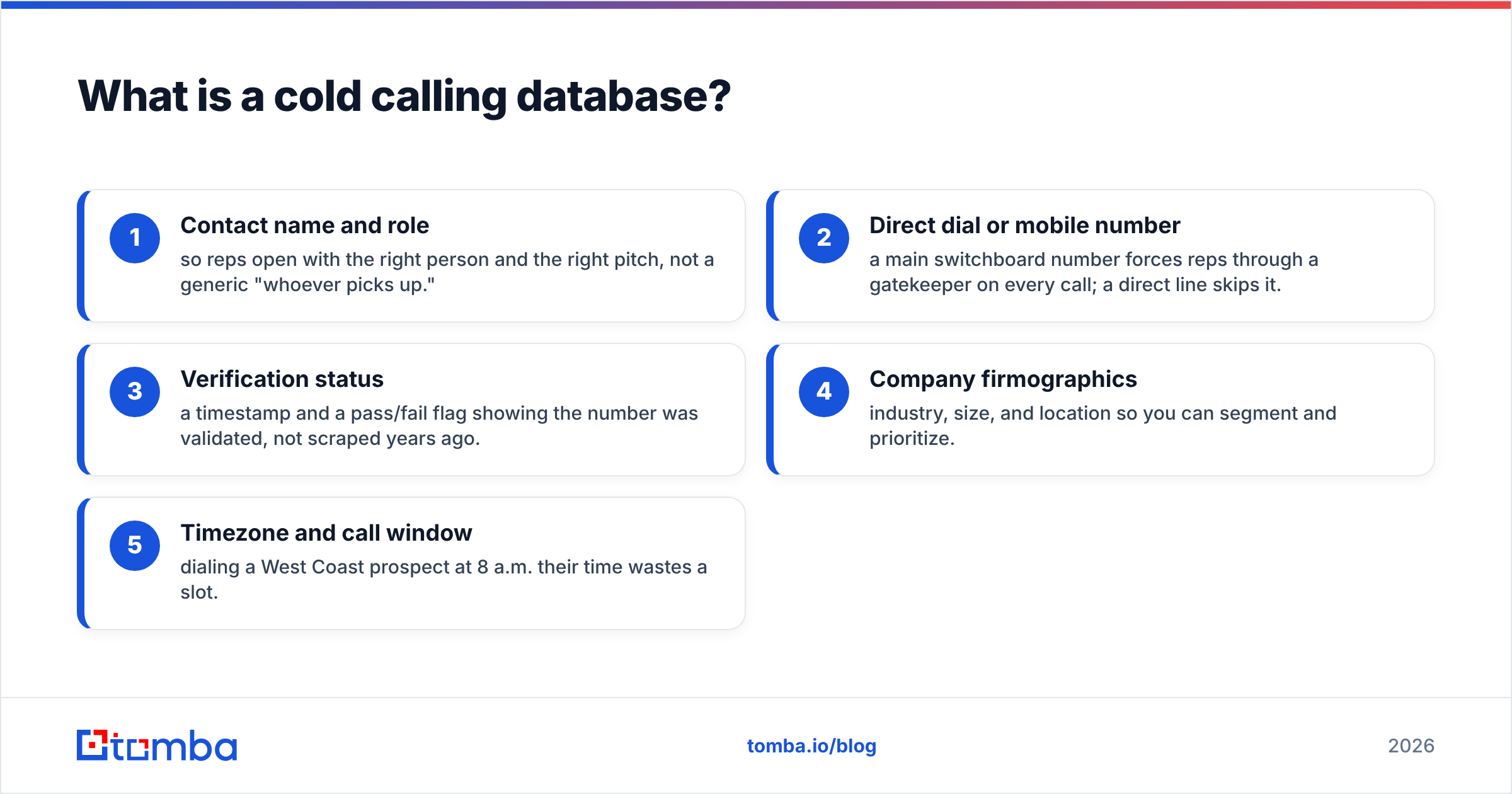
The difference between a "lead list" and a real cold calling database comes down to five fields being present and trustworthy:
- Contact name and role — so reps open with the right person and the right pitch, not a generic "whoever picks up."
- Direct dial or mobile number — a main switchboard number forces reps through a gatekeeper on every call; a direct line skips it.
- Verification status — a timestamp and a pass/fail flag showing the number was validated, not scraped years ago.
- Company firmographics — industry, size, and location so you can segment and prioritize.
- Timezone and call window — dialing a West Coast prospect at 8 a.m. their time wastes a slot.
Miss the middle three and you don't have a database — you have a wish list. If you want the formal definition of the underlying data practice, Wikipedia's overview of lead generation is a neutral starting point.
Why does phone data quality matter more than list size?#
Because a rep's day is a fixed number of dial slots, and every bad number is a slot spent on nothing. Conclusion first: a 2,000-record verified list will out-produce a 20,000-record scraped one, every time.
Here's the math. B2B contact data decays fast — people change jobs, companies rebrand, and phone systems get reprovisioned. Industry estimates put B2B data decay at roughly 25–30% per year, and phone numbers decay faster than email because direct dials get reassigned. A list you bought 18 months ago could be nearly half dead.
That decay shows up as three specific costs on the dialer:
- Wasted dials — disconnected and wrong numbers eat 20–40% of dialing time on unmaintained lists.
- Rep morale — nothing kills a caller's rhythm like six dead lines in a row.
- Compliance risk — calling reassigned numbers raises the odds of hitting someone on a do-not-call list.

This is why the smartest teams treat their database as a living system, not a one-time purchase. You verify on the way in and you re-verify on a schedule. A tool like Tomba's phone number verification checks whether a number is active and correctly formatted before your reps ever load it into the dialer.
Should you buy a cold calling database or build one?#
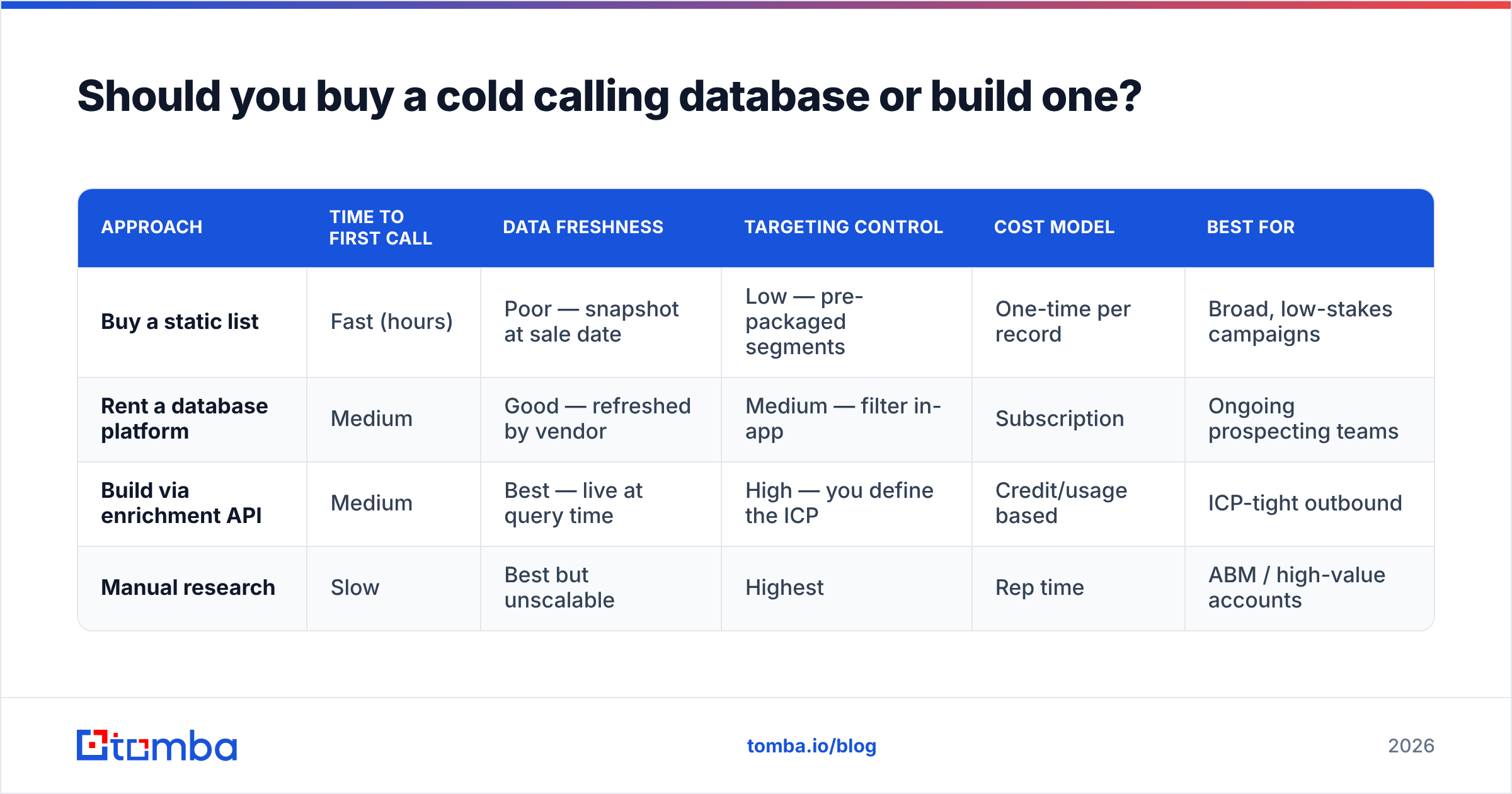
Short answer: build (or enrich) rather than buy a static file — unless you need a very generic list fast and accept the decay. Here's the honest comparison.
| Approach | Time to first call | Data freshness | Targeting control | Cost model | Best for |
|---|---|---|---|---|---|
| Buy a static list | Fast (hours) | Poor — snapshot at sale date | Low — pre-packaged segments | One-time per record | Broad, low-stakes campaigns |
| Rent a database platform | Medium | Good — refreshed by vendor | Medium — filter in-app | Subscription | Ongoing prospecting teams |
| Build via enrichment API | Medium | Best — live at query time | High — you define the ICP | Credit/usage based | ICP-tight outbound |
| Manual research | Slow | Best but unscalable | Highest | Rep time | ABM / high-value accounts |
Buying a static list feels efficient because you get thousands of rows instantly. But you're buying a photograph of the market on the day it was compiled. By the time it's in your dialer, it's aging. Reputable data vendors — including partners like BookYourData — mitigate this with verification guarantees and refresh policies, which is exactly what you should look for if you do buy.
Building from an enrichment source flips the model: instead of downloading a frozen file, you query for contacts matching your ideal customer profile and pull their current numbers at the moment you need them. That's the approach behind Tomba's B2B database and data enrichment — you define the target, the system returns fresh, verified contact points.
How do you build a cold calling database step by step?#
Build it the way you'd stock a kitchen for a busy service: source good ingredients, check them, label them, and restock before you run out. Five steps.
1. Define your ICP and call segments. Before you pull a single record, write down the industries, company sizes, titles, and regions you're targeting. A database without a defined ideal customer profile becomes a junk drawer. Segment by call priority so reps work the hottest tier first.
2. Source contacts from a live enrichment layer. Start from company domains or a target account list and expand into named contacts. Tomba's domain search returns the people at a company, and the phone finder attaches numbers to those contacts. Working from live sources beats importing a year-old CSV.
3. Verify every number on the way in. Run each record through validation before it enters the database. Flag and quarantine anything that fails. This single step is the biggest lever on connect rate — it's cheaper to drop a bad number now than to pay a rep to discover it live.
4. Enrich with context fields. Add role seniority, timezone, LinkedIn URL, and a verified email as a fallback channel. Multi-threading a call with a follow-up email lifts response rates; Tomba's email finder fills the email column so your callers have a second touch ready.
5. Set a refresh cadence. Re-verify on a schedule — monthly for high-priority segments, quarterly for the long tail. Automate it through the Tomba API or a bulk workflow so maintenance doesn't depend on someone remembering.
What fields should a cold calling database include?#
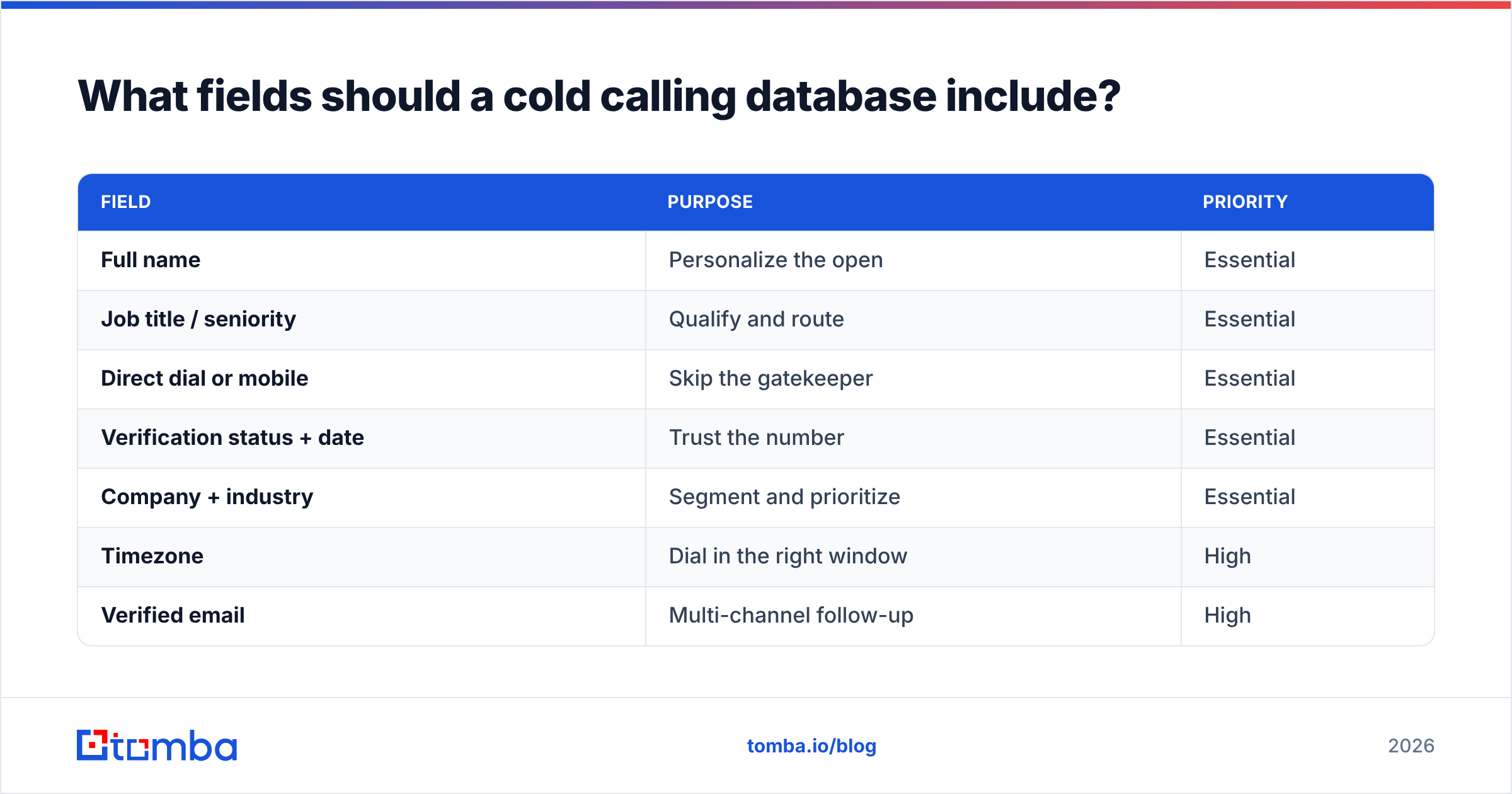
The right schema keeps reps fast and compliant. Here's a practical field set, split by what's essential versus what's nice to have.
| Field | Purpose | Priority |
|---|---|---|
| Full name | Personalize the open | Essential |
| Job title / seniority | Qualify and route | Essential |
| Direct dial or mobile | Skip the gatekeeper | Essential |
| Verification status + date | Trust the number | Essential |
| Company + industry | Segment and prioritize | Essential |
| Timezone | Dial in the right window | High |
| Verified email | Multi-channel follow-up | High |
| LinkedIn URL | Pre-call research | Medium |
| Last contact outcome | Avoid duplicate calls | Medium |
| Consent / DNC flag | Compliance | Essential |
That last row is not optional. Cold calling is regulated — in the U.S., the FTC and FCC maintain do-not-call rules, and many regions have their own consent regimes. Keep a suppression flag and honor it. Vendors like HubSpot and Salesforce document compliance-aware calling workflows worth reading before you scale outbound.
How do you keep a cold calling database clean over time?#
Treat cleaning as routine maintenance, not an emergency repair. The teams with the highest connect rates run three loops continuously.
- Validation loop — every new record is verified before use, and the whole database is re-checked on a cadence. Use bulk verification so you're validating thousands of records in one pass rather than one at a time.
- Enrichment loop — when a contact changes jobs, re-enrich rather than delete. The person is often still a buyer at a new company; update their record instead of losing the relationship.
- Feedback loop — feed dialer outcomes back into the database. A "wrong number" disposition should automatically flag the record for re-verification or removal.
Here's a common failure mode to avoid: teams verify once at import and never again. That's like checking the oil the day you buy a car and never opening the hood again. The data was fine on day one and quietly rotted afterward. Automate the recurring check — through the Tomba API or scheduled bulk jobs — so freshness isn't a manual chore anyone can forget.
How does a good database improve cold calling metrics?#
It moves the two numbers that actually govern outbound results: connect rate and conversations per hour.
Connect rate is the share of dials that reach a live, correct person. On an unmaintained list it can sit in the single digits. On a verified, direct-dial-first database it commonly lands two to three times higher — because you removed the disconnected numbers and switchboards that were absorbing dials. More connects at the same dial volume means more conversations, and conversations are where pipeline is born.
The knock-on effects compound:
- Higher rep efficiency — reps spend minutes talking to buyers instead of listening to disconnection tones.
- Better forecasting — a clean, segmented database makes activity-to-pipeline ratios predictable.
- Faster ramp for new hires — a new rep on a verified list gets early wins, which shortens the time to productivity.
- Lower compliance exposure — maintained suppression flags reduce the risk of dialing numbers you shouldn't.
None of this requires a bigger list. It requires a cleaner one. If you want the underlying methodology, review how analysts at G2 categorize sales intelligence and data-quality tooling — the recurring theme is accuracy over volume.
Where does Tomba fit in your cold calling stack?#
Tomba is the data layer that keeps the dialer fed with numbers worth calling. Instead of buying a frozen list, you build and maintain a live one:
- Find contacts by company with domain search.
- Attach direct dials and mobiles with the phone finder.
- Clean the list with the phone validator before it reaches reps.
- Add a verified email fallback with the email finder for multi-channel follow-up.
- Automate refresh at scale through bulk tools and the Tomba API.
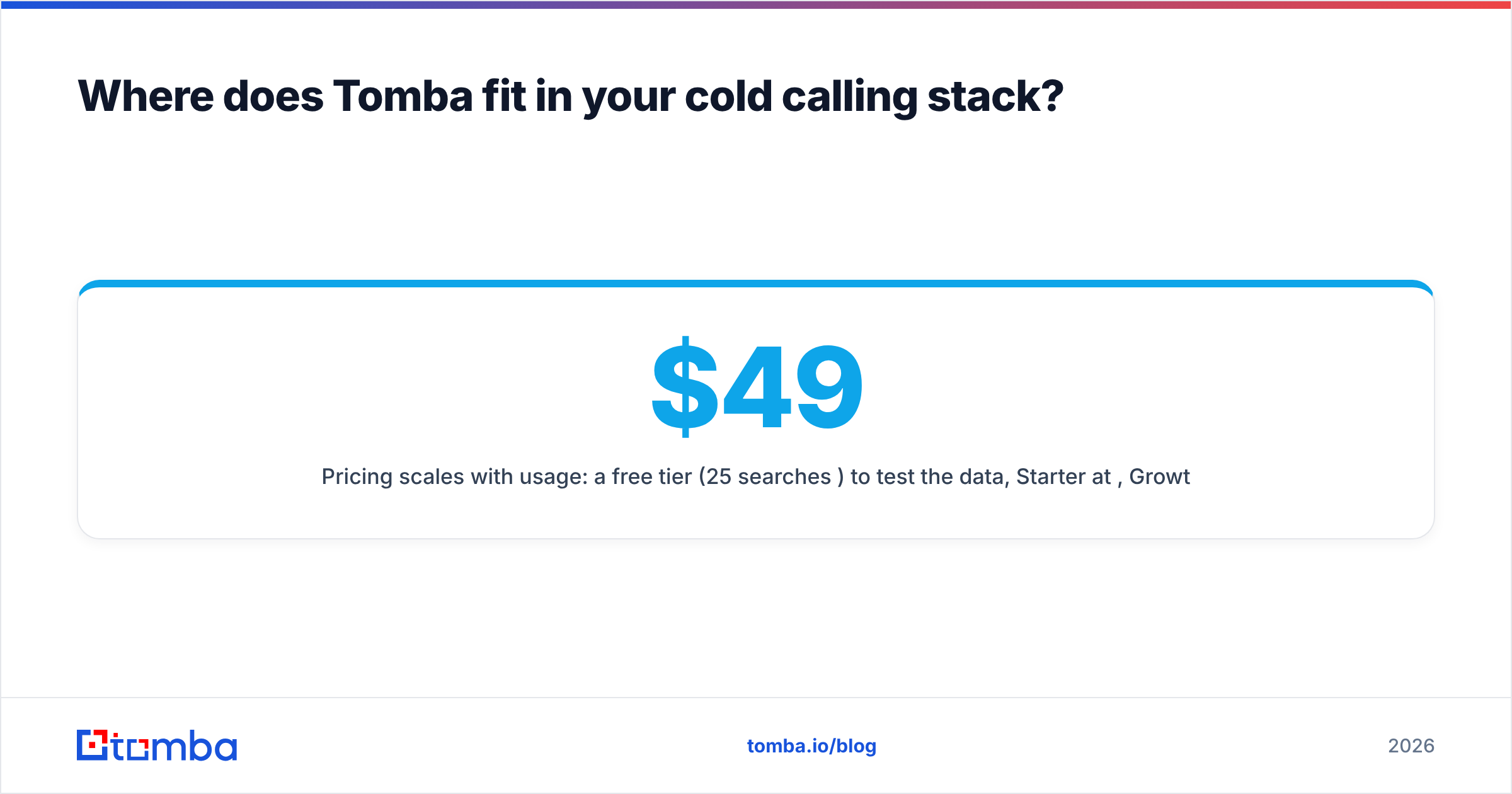
Pricing scales with usage: a free tier (25 searches/month) to test the data, Starter at $49/mo, Growth at $99/mo, and Pro at $249/mo, with Enterprise available for larger teams. See full Tomba pricing for credit breakdowns.
The bottom line#
A cold calling database earns its keep through freshness, not size. Source contacts from a live layer, verify every number before it hits the dialer, enrich with the context reps need, and re-check on a schedule. Do that and your team spends its dial slots on decision-makers instead of dead lines.
Ready to stop calling disconnected numbers? Start free with Tomba's Email Finder and pair it with the phone finder to build a verified, phone-first call list your reps will actually want to dial — no static CSV required. Test 25 lookups on the free tier, then scale with the plan that fits your outbound volume.
Related guides#
Ready to find emails that actually work?
Join 150,000+ professionals who stopped guessing and started sending. Free credits on signup — no credit card required.
Get the Tomba newsletter
Practical outbound tactics and product updates — once every two weeks.
About the author