Cold Calling Email Templates: 9 Scripts That Actually Get Replies
Nine cold calling email templates that pair with your dials to book more meetings — with timing, subject lines, and a framework you can copy today.
Cold calling still works, but the call rarely closes the meeting on its own. The email you send before or after the dial is what turns a voicemail into a booked call. This guide gives you nine cold calling email templates built to ride alongside your phone outreach, plus the timing, subject lines, and framework that make them convert.
TL;DR#
- The call and the email are one play, not two. Use email to warm the dial, then use email again to recover the voicemail you left.
- Nine templates below cover pre-call, post-voicemail, "we spoke briefly," gatekeeper, and breakup scenarios — copy them, swap the brackets, ship them.
- Timing beats cleverness. Send the pre-call email 1–2 hours before you dial; send the voicemail follow-up within 5 minutes of hanging up.
- Personalization needs a real reason. Reference a trigger event, not a generic compliment. Verified contact data is what makes the reference land in the right inbox.
- Best-fit tool: Tomba Email Finder to source and verify the addresses your call list is missing.
Why pair cold calling with email templates at all?#
Because a single channel is a coin flip, and two channels compound. Think of it like a sales rep knocking on a door: the knock (your call) gets attention, but the note left under the door (your email) is what the prospect actually reads when they have a free minute. Most decision-makers ignore the first dial and never hear the voicemail — but they will open an email with a subject line that references the call.
The data backs the combo. According to HubSpot's sales research, it takes an average of multiple touches across channels before a prospect responds, and reps who blend phone and email consistently outbook single-channel reps. The templates below are designed to be the email half of that sequence.
One rule before you copy anything: an email template is only as good as the address it lands on. Sending a polished script to a bounced or catch-all address is worse than not sending at all, because it drags down your sender reputation. Run your list through an email verifier first, then personalize.
What makes a cold calling email template convert?#
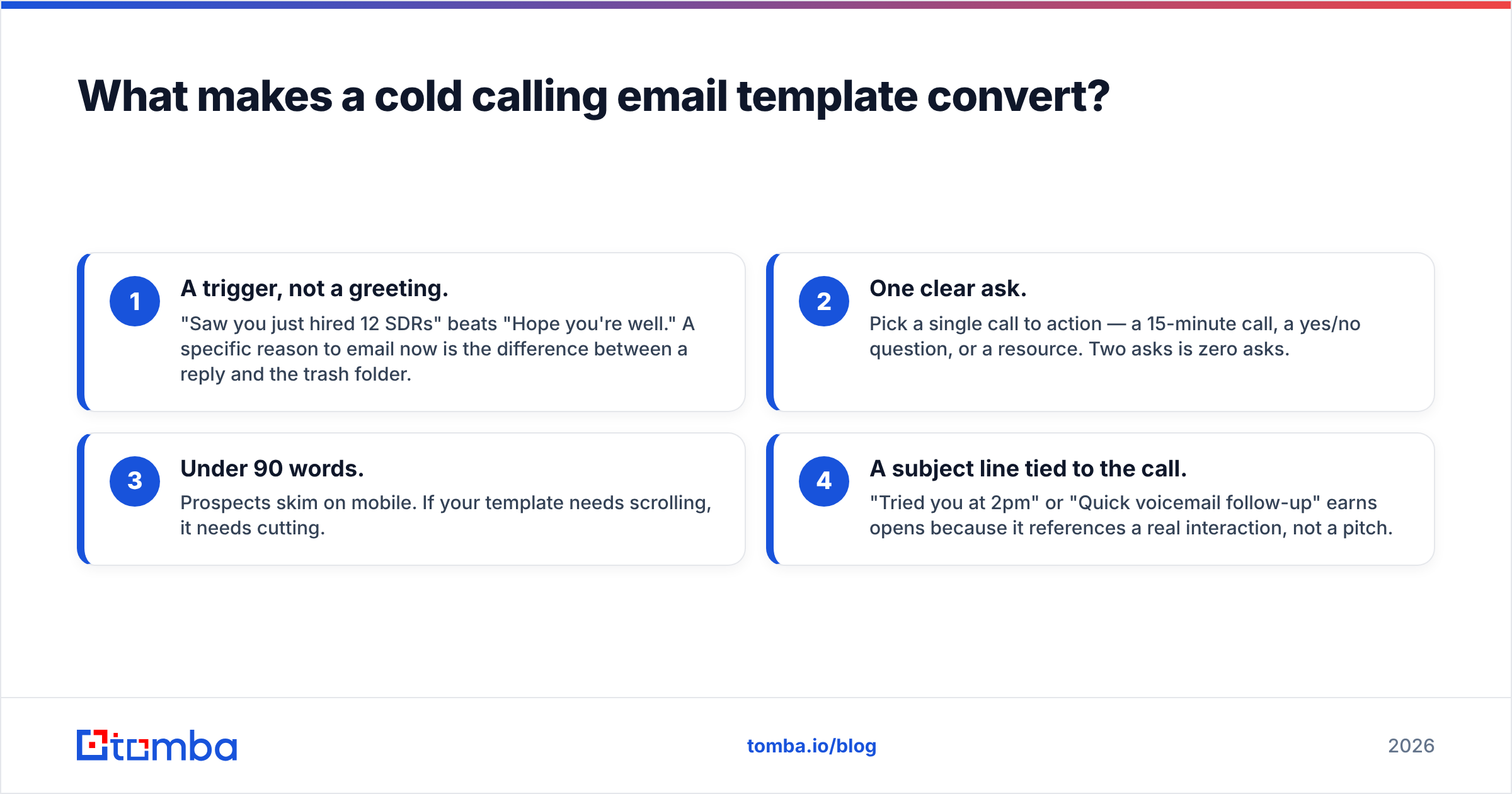
Four things, in order of impact:
- A trigger, not a greeting. "Saw you just hired 12 SDRs" beats "Hope you're well." A specific reason to email now is the difference between a reply and the trash folder.
- One clear ask. Pick a single call to action — a 15-minute call, a yes/no question, or a resource. Two asks is zero asks.
- Under 90 words. Prospects skim on mobile. If your template needs scrolling, it needs cutting.
- A subject line tied to the call. "Tried you at 2pm" or "Quick voicemail follow-up" earns opens because it references a real interaction, not a pitch.
Every template below follows this structure. Fill the brackets with real research, keep the length, and resist the urge to add a second paragraph of features.
The 9 cold calling email templates#
1. The pre-call warm-up (send 1–2 hours before you dial)#
Subject: Calling you this afternoon re: [specific outcome]
Hi [First Name],
I'm going to try you around [time] today. Wanted to give you the context first so it's not a cold ambush.
[Company] just [trigger event], and we've helped teams like [peer company] handle exactly that — [one-line result].
If now's a bad time to talk, reply here and I'll work around you.
[Your name]
2. The voicemail follow-up (send within 5 minutes of hanging up)#
Subject: Just left you a voicemail
Hi [First Name],
Left you a quick voicemail — figured email might be easier. The short version: [one sentence on the value].
Worth a 15-minute call next week to see if it's a fit? Tuesday or Thursday morning work on my end.
[Your name]
3. The "we spoke briefly" recovery#
Subject: Following up on our quick call
Hi [First Name],
Thanks for the 60 seconds earlier — I know I caught you mid-day. You mentioned [thing they said], which is exactly where we help.
Here's a two-line summary you can forward internally: [value]. Want me to send times?
[Your name]
4. The gatekeeper bridge#
Subject: [Referrer name] suggested I reach [Decision Maker]
Hi [First Name],
[Assistant/colleague name] mentioned you're the right person for [topic]. I've been trying to reach you by phone without much luck.
We help [role] teams [outcome] — [peer company] saw [result]. Open to a short call this week?
[Your name]
5. The trigger-event opener#
Subject: Congrats on [funding / launch / hire]
Hi [First Name],
Saw [Company] just [trigger]. Usually that means [predictable pain] lands on your desk next.
That's the exact moment we're most useful — [one-line result]. I'll try you by phone [day], but reply here if that's faster.
[Your name]
6. The value-add (no ask)#
Subject: Something for [Company]'s [team]
Hi [First Name],
No pitch here. I put together a short breakdown of how [peer company] solved [problem] — thought your team might use it: [resource].
If it's useful, I'll follow up by phone next week. If not, ignore me.
[Your name]
7. The question-only email#
Subject: Quick one
Hi [First Name],
Is [specific problem] something your team is actively fixing this quarter, or is it parked for later?
Asking because it changes whether a call is worth your time. I'll try you [day] either way.
[Your name]
8. The social-proof nudge#
Subject: How [competitor] handled [problem]
Hi [First Name],
[Competitor/peer] was dealing with [problem] until [outcome]. Same playbook could apply to [Company].
I've called a couple times — happy to walk through it in 15 minutes. What day works?
[Your name]
9. The breakup email#
Subject: Closing your file
Hi [First Name],
I've tried reaching you a few times by phone and email without luck, so I'll assume the timing isn't right.
I'll close things out on my end. If [problem] becomes a priority later, my door's open — just reply here.
[Your name]
When should you send each template?#
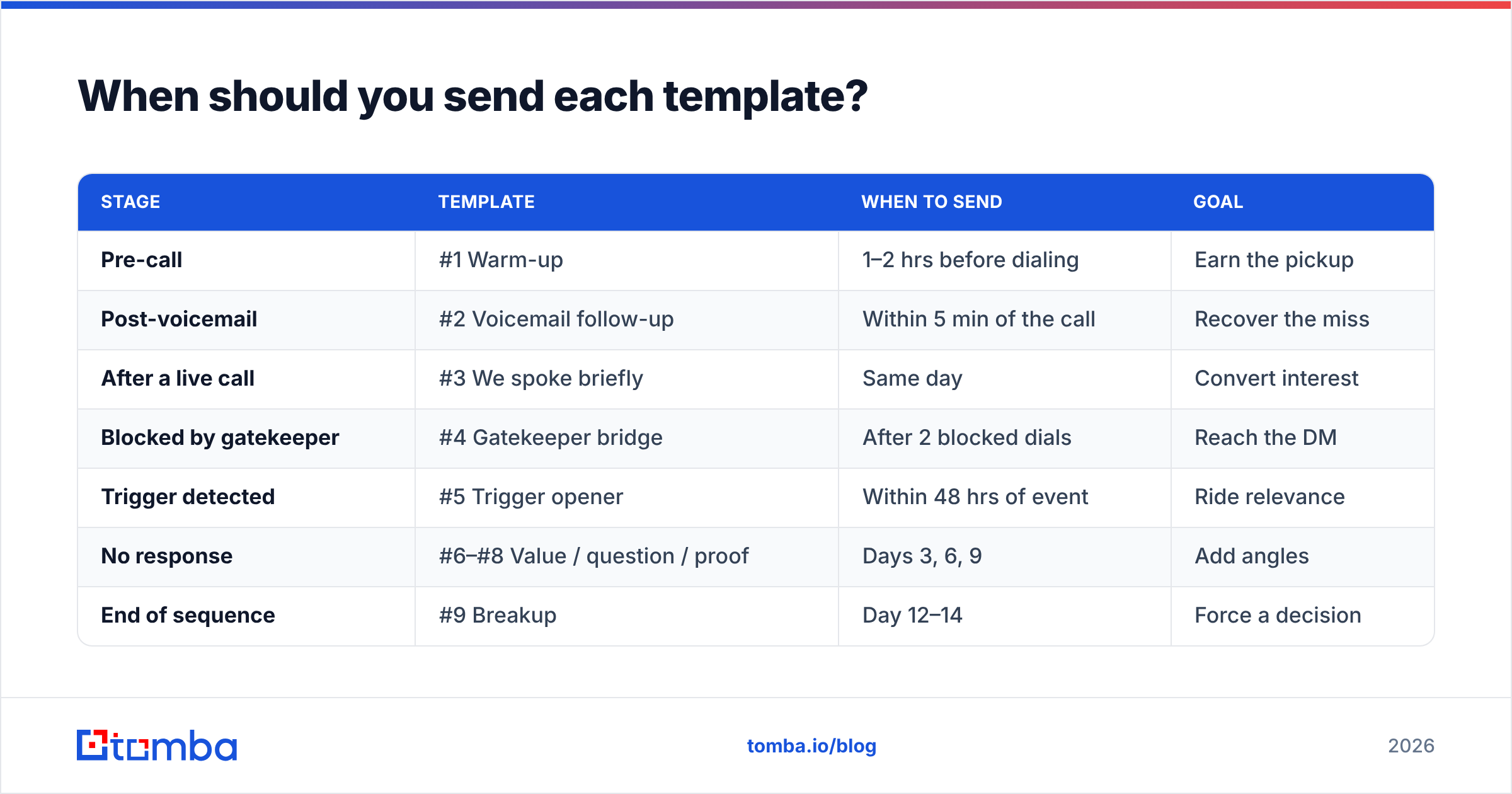
Timing is where most reps lose the deal. Here's the sequence that works, mapped to the dial:
| Stage | Template | When to send | Goal |
|---|---|---|---|
| Pre-call | #1 Warm-up | 1–2 hrs before dialing | Earn the pickup |
| Post-voicemail | #2 Voicemail follow-up | Within 5 min of the call | Recover the miss |
| After a live call | #3 We spoke briefly | Same day | Convert interest |
| Blocked by gatekeeper | #4 Gatekeeper bridge | After 2 blocked dials | Reach the DM |
| Trigger detected | #5 Trigger opener | Within 48 hrs of event | Ride relevance |
| No response | #6–#8 Value / question / proof | Days 3, 6, 9 | Add angles |
| End of sequence | #9 Breakup | Day 12–14 | Force a decision |
Notice that no two emails repeat the same angle. If your first three follow-ups all say "just checking in," the prospect learns to ignore you. Rotate between value, a question, and social proof so each touch feels like a new reason to reply.
How do cold calling emails differ from pure cold email?#
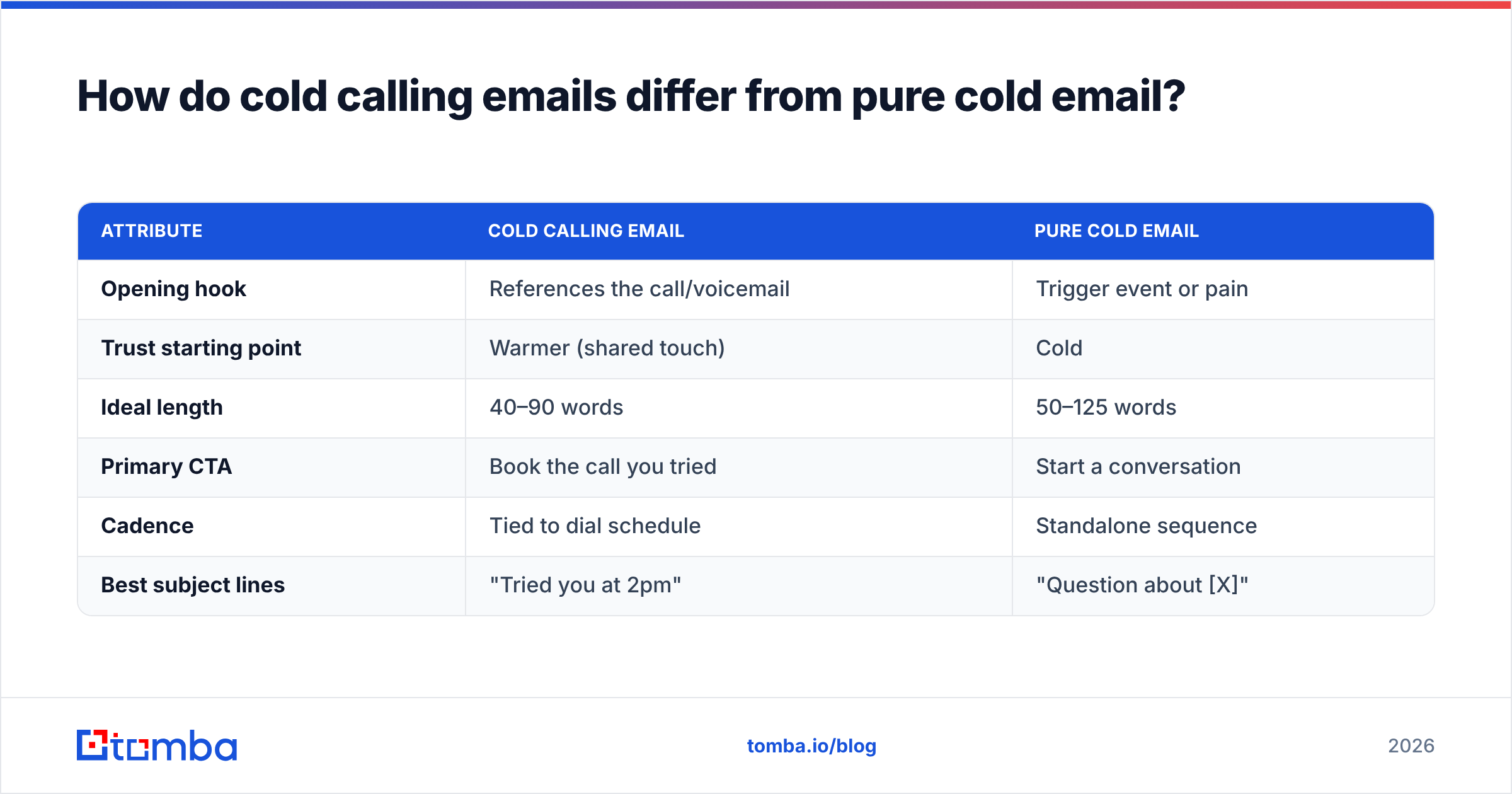
They differ mainly in reference and rhythm. A standalone cold email has to earn attention from a cold start. A cold calling email gets to reference a shared moment — the dial, the voicemail, the 60-second live chat — which lowers the reader's guard.
| Attribute | Cold calling email | Pure cold email |
|---|---|---|
| Opening hook | References the call/voicemail | Trigger event or pain |
| Trust starting point | Warmer (shared touch) | Cold |
| Ideal length | 40–90 words | 50–125 words |
| Primary CTA | Book the call you tried | Start a conversation |
| Cadence | Tied to dial schedule | Standalone sequence |
| Best subject lines | "Tried you at 2pm" | "Question about [X]" |
If you want to go deeper on standalone scripts, our cold email templates library covers openers that don't depend on a prior call. For call-paired outreach, the templates above are purpose-built.
What kills these templates before they get read?#
Three preventable mistakes:
- Bad data. The single biggest killer isn't copy — it's a wrong address. If your call list came from a scraped export, half those emails may be stale, personal, or catch-all. Verify before you send, and use a domain search to fill the gaps for accounts where you only have a phone number.
- Deliverability neglect. Even perfect copy dies in spam if your email deliverability fundamentals are broken. Authenticate your domain, warm the inbox, and keep bounce rates low.
- Over-automation. Templates are a starting frame, not a mail-merge crutch. Swap in one genuinely specific detail per email — a recent hire, a product launch, a LinkedIn post. Generic personalization ("I see you work at [Company]") reads as automated and gets ignored.
For teams checking their own domain reputation before a big push, a free sender reputation checker surfaces issues that would otherwise sink the whole sequence.
How do you scale this without losing personalization?#
You separate the mechanical work from the human work. The mechanical part — finding and verifying addresses for a list of named accounts — is where most reps burn hours. Automate that with a bulk email finder so you start each day with a clean, verified call-and-email list. Then spend your saved time on the one variable that actually moves reply rates: the specific, researched first line.
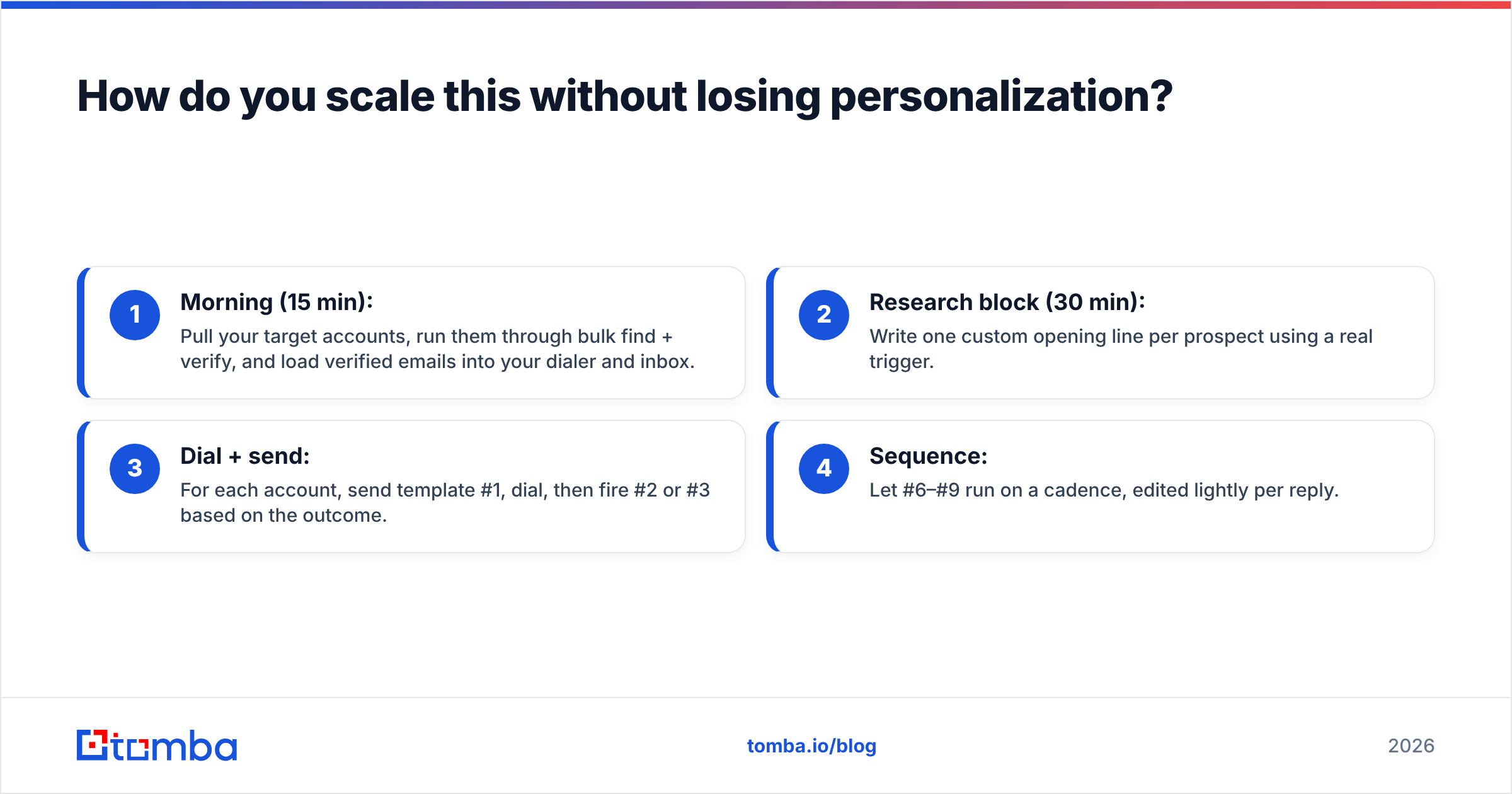
A practical daily rhythm:
- Morning (15 min): Pull your target accounts, run them through bulk find + verify, and load verified emails into your dialer and inbox.
- Research block (30 min): Write one custom opening line per prospect using a real trigger.
- Dial + send: For each account, send template #1, dial, then fire #2 or #3 based on the outcome.
- Sequence: Let #6–#9 run on a cadence, edited lightly per reply.
This keeps volume high without turning your outreach into obvious spam — the balance that separates reps who book meetings from reps who get blocked.
Frequently asked questions#
Should I email or call first? Email first, by 1–2 hours, using template #1. A prospect who has seen your name is measurably more likely to take the dial than a truly cold ring.
How many follow-ups is too many? Six to nine touches across 12–14 days is the sweet spot for cold calling email templates. Past that, the breakup email (#9) does more for your reply rate than a tenth "just checking in."
Do subject lines really matter that much? Yes. A subject that references the call ("Tried you at 2pm") consistently out-opens a pitch subject, because it signals a real interaction rather than a blast.
What's the fastest way to get verified emails for my call list? Run named accounts through a finder-plus-verifier flow. See Tomba pricing for volume tiers, or start on the free plan with 25 searches a month.
Put your templates on verified addresses#
The nine templates above will book meetings — but only if they reach real inboxes. The fastest way to kill a great script is to send it to a bounced or catch-all address, because it tanks your deliverability before the good prospects ever see you.
Start by building a clean list. Use Tomba Email Finder to source professional email addresses by name, company, or domain, then verify them in the same workflow so every dial has a matching, deliverable email behind it. Free tier includes 25 searches a month; paid plans start at $49/mo when you're ready to scale. Get the data right, and let these templates do the rest.
Related guides#
// get started
Find, verify and enrich your first contacts today
Start on the free plan with 25 searches a month, then scale when your team is ready.
Free plan · No credit card required · GDPR & CCPA
// about the author