Cold Email API in 2026: Send Cold Email at Scale
A developer-first guide to the cold email API: what it does, how sending, warmup, and verification APIs fit together, and how to pick one without torching your domain.
Cold Email API in 2026: Send Cold Email at Scale
You want to send cold email from your own code — not click around a dashboard. That is what a cold email API is for. But "cold email API" is a fuzzy label that hides at least three different products: the API that sends the mail, the API that warms up the inbox, and the API that verifies the address before you ever hit send. Get the split wrong and you will burn a domain in a week.
This guide breaks down each layer, shows how they connect, and gives you a concrete way to choose — with pricing, pitfalls, and a build-vs-buy call at the end.
TL;DR#
- A "cold email API" is really three APIs. Sending (SMTP/HTTP relays or sequencer APIs), warmup (automated reputation building), and verification (address validation). Most stacks need all three.
- Deliverability is an API problem, not just a copy problem. Authentication, throttling, and list hygiene are all programmable — and all things a raw transactional API will happily let you do wrong.
- Verify before you send, every time. A single verification call against a list drops your bounce rate and protects sender reputation more than any subject-line tweak.
- Don't confuse transactional relays with cold outreach. SendGrid and Postmark are built for receipts and password resets; sending cold volume through them gets accounts suspended.
- Build the glue, buy the hard parts. Warmup, verification, and enrichment are commodity APIs. Your competitive edge is targeting and sequencing logic, not reinventing SMTP.
What is a cold email API?#
A cold email API is an HTTP interface that lets your application send, manage, or support cold outreach programmatically instead of through a web UI. Think of it like the difference between mailing a letter at the post office counter versus running your own mailroom: the API is the mailroom — you feed it addresses and content, and it handles pickup, routing, and delivery reporting at whatever scale you script.
The confusion starts because "cold email" touches several jobs, and vendors each expose an API for their slice. Here is the honest breakdown of the layers you will actually integrate:
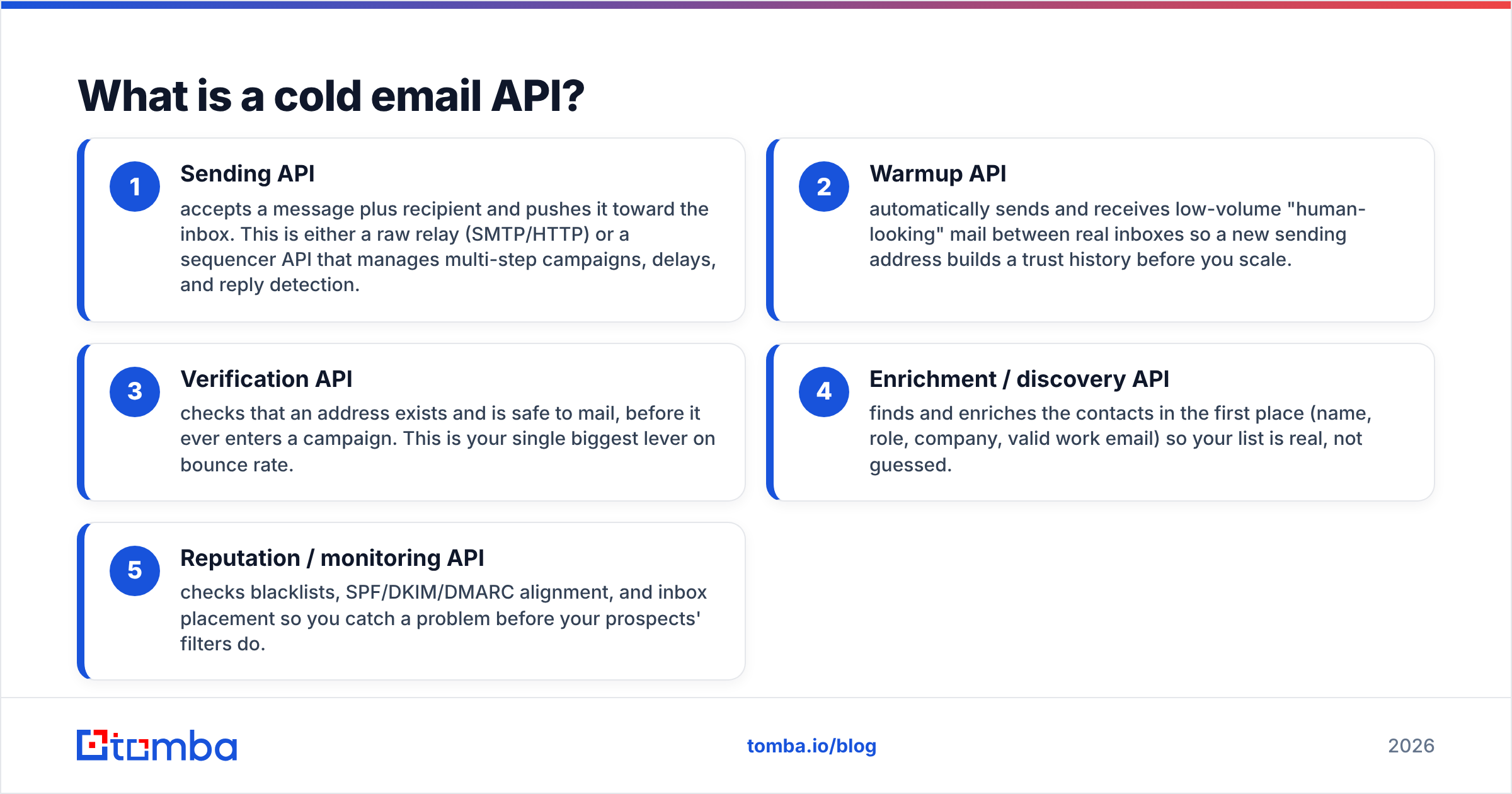
- Sending API — accepts a message plus recipient and pushes it toward the inbox. This is either a raw relay (SMTP/HTTP) or a sequencer API that manages multi-step campaigns, delays, and reply detection.
- Warmup API — automatically sends and receives low-volume "human-looking" mail between real inboxes so a new sending address builds a trust history before you scale.
- Verification API — checks that an address exists and is safe to mail, before it ever enters a campaign. This is your single biggest lever on bounce rate.
- Enrichment / discovery API — finds and enriches the contacts in the first place (name, role, company, valid work email) so your list is real, not guessed.
- Reputation / monitoring API — checks blacklists, SPF/DKIM/DMARC alignment, and inbox placement so you catch a problem before your prospects' filters do.
Most teams assume the sending API is the whole product. It is the least differentiated part. The layers around it — verification, warmup, and enrichment — decide whether your mail lands in the inbox or the spam folder.

Is a transactional email API the same as a cold email API?#
No — and mixing them up is the fastest way to get suspended. Transactional APIs like SendGrid, Postmark, or Amazon SES are engineered for mail the recipient expects: receipts, password resets, shipping alerts. Their terms of service explicitly prohibit unsolicited cold outreach, and their shared IP pools punish high complaint rates fast.
Cold email tools do the opposite: they spread volume across many dedicated inboxes, rotate sends, warm each address, and throttle to mimic human behavior. A transactional relay is built to send a million identical emails from one trusted domain in seconds. Cold outreach is built to send a few hundred personalized emails from dozens of domains slowly. Same protocol, opposite playbook.
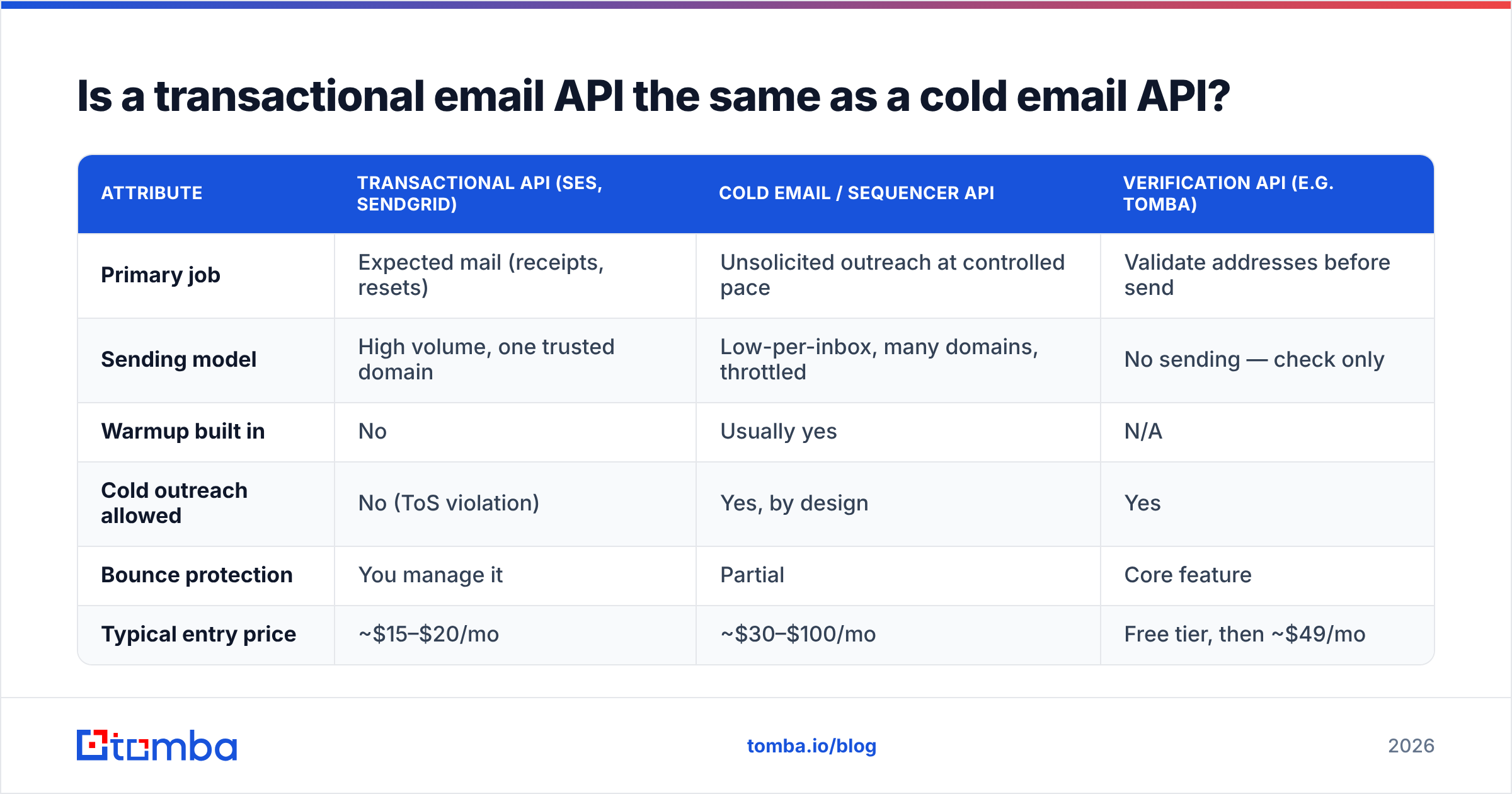
| Attribute | Transactional API (SES, SendGrid) | Cold email / sequencer API | Verification API (e.g. Tomba) |
|---|---|---|---|
| Primary job | Expected mail (receipts, resets) | Unsolicited outreach at controlled pace | Validate addresses before send |
| Sending model | High volume, one trusted domain | Low-per-inbox, many domains, throttled | No sending — check only |
| Warmup built in | No | Usually yes | N/A |
| Cold outreach allowed | No (ToS violation) | Yes, by design | Yes |
| Bounce protection | You manage it | Partial | Core feature |
| Typical entry price | ~$15–$20/mo | ~$30–$100/mo | Free tier, then ~$49/mo |
The takeaway: use transactional APIs for product mail, use purpose-built cold outreach tooling for prospecting, and put a verification API in front of both.
How do the sending, warmup, and verification APIs fit together?#
They run in sequence, and each one hands clean data to the next. A well-built cold email pipeline looks like this:
- Step 1 — Discover. Pull target contacts via an enrichment or email finder API. You get candidate work addresses tied to real names and roles.
- Step 2 — Verify. Run every candidate through an email verifier call. Drop invalids, flag risky catch-alls, and keep only deliverable addresses.
- Step 3 — Warm. Ensure each sending inbox has been through a warmup API for at least two to three weeks before it carries real campaign volume.
- Step 4 — Send. Push verified contacts into the sending/sequencer API with conservative daily caps and randomized delays.
- Step 5 — Monitor. Check blacklists, DMARC alignment, and reply/bounce webhooks so you can pause a domain the moment metrics slip.
Skip step 2 and everything downstream degrades: bounces spike, mailbox providers throttle you, and the warmup you paid for is wasted on dead addresses. Verification is cheap; a burned domain is not.
What makes a cold email API deliverable at scale?#
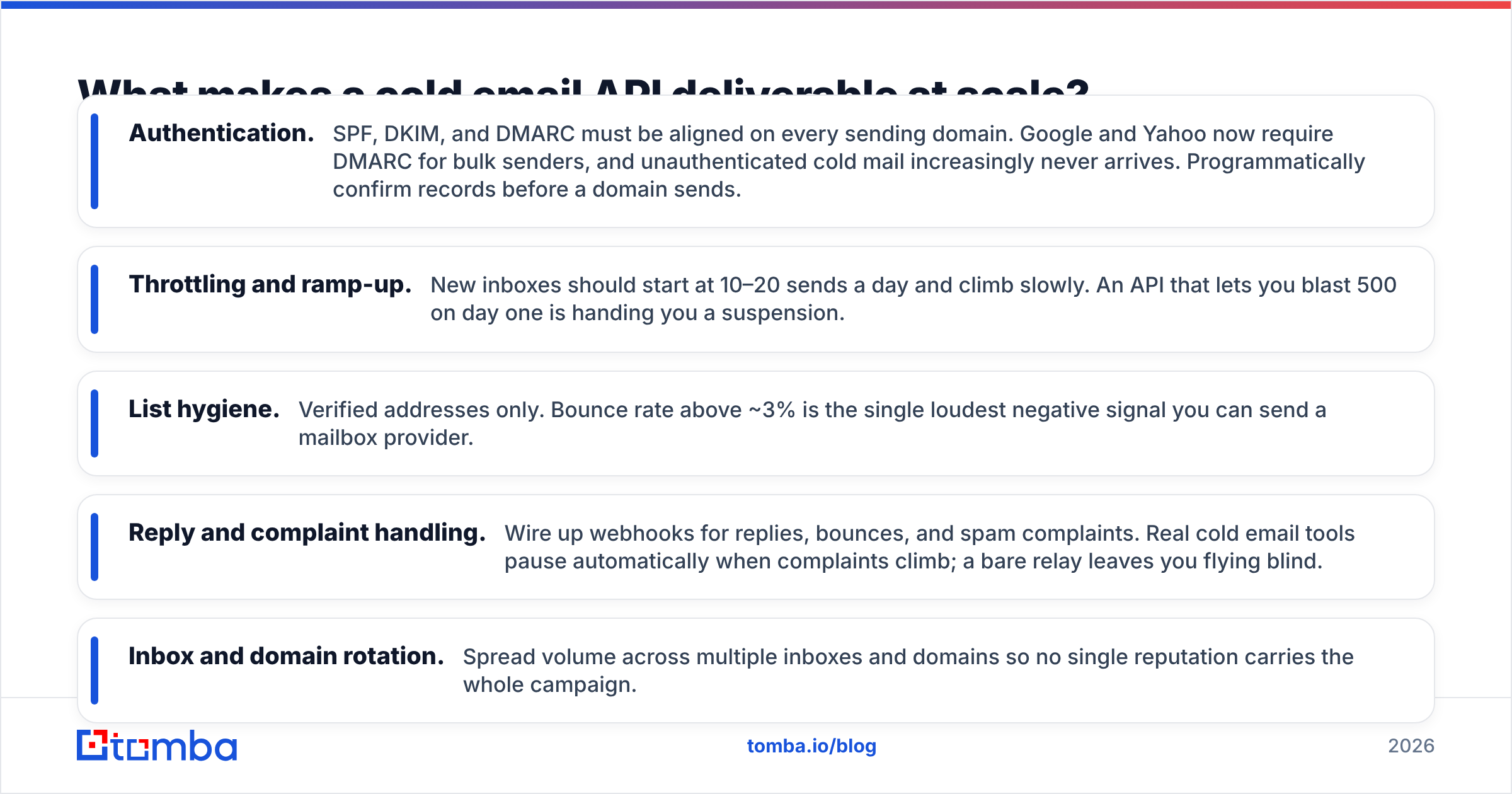
Deliverability is mostly a set of programmable rules, which is exactly why a raw API is dangerous — it does what you tell it, including the wrong thing. The non-negotiables:
- Authentication. SPF, DKIM, and DMARC must be aligned on every sending domain. Google and Yahoo now require DMARC for bulk senders, and unauthenticated cold mail increasingly never arrives. Programmatically confirm records before a domain sends.
- Throttling and ramp-up. New inboxes should start at 10–20 sends a day and climb slowly. An API that lets you blast 500 on day one is handing you a suspension.
- List hygiene. Verified addresses only. Bounce rate above ~3% is the single loudest negative signal you can send a mailbox provider.
- Reply and complaint handling. Wire up webhooks for replies, bounces, and spam complaints. Real cold email tools pause automatically when complaints climb; a bare relay leaves you flying blind.
- Inbox and domain rotation. Spread volume across multiple inboxes and domains so no single reputation carries the whole campaign.
If you want to sanity-check the underlying concepts, Tomba's email deliverability glossary entry is a fast primer on what mailbox providers actually score.
How much does a cold email API cost in 2026?#
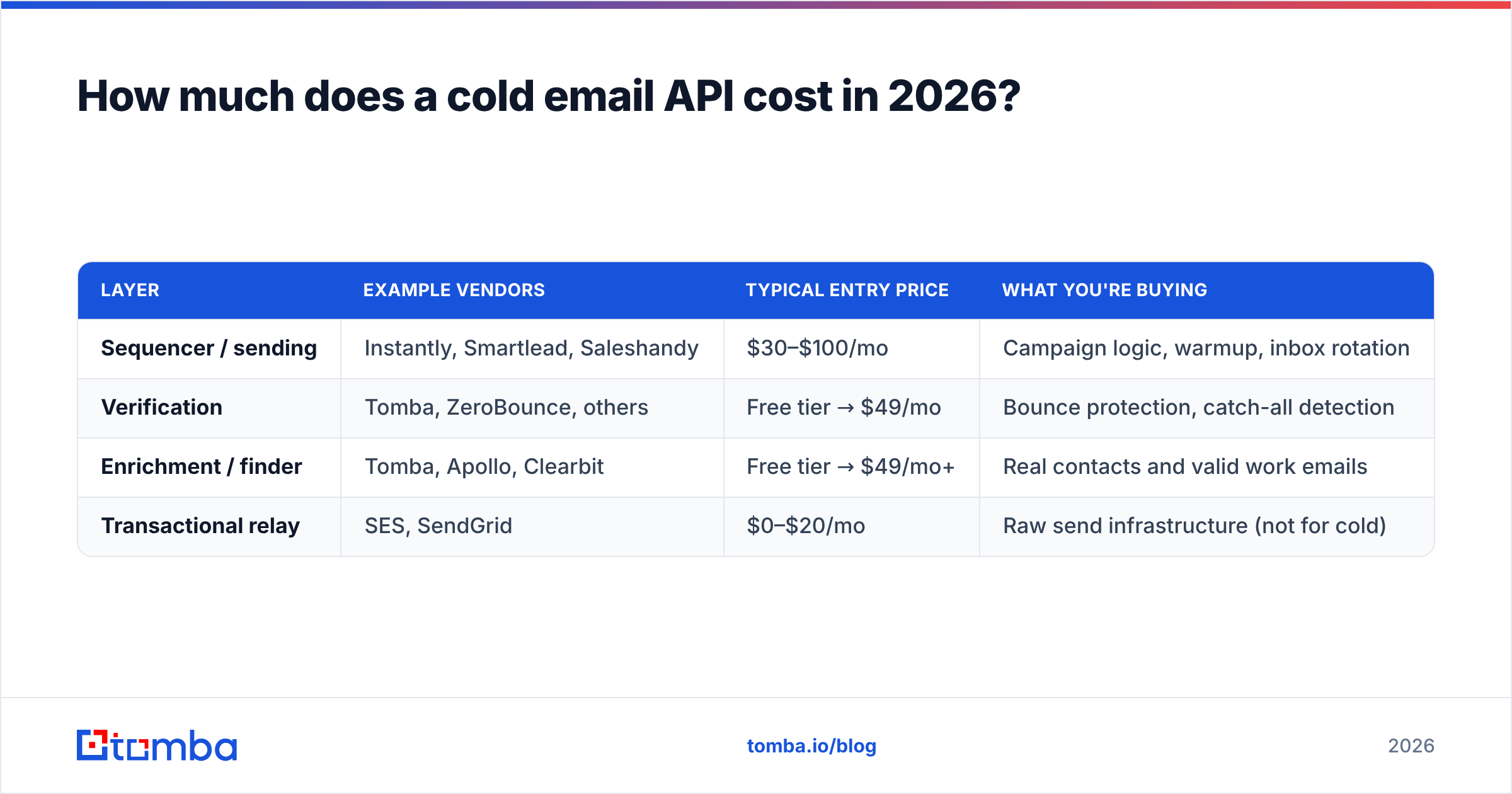
Pricing splits by layer, and you will likely pay for two or three. Rough 2026 market ranges:
| Layer | Example vendors | Typical entry price | What you're buying |
|---|---|---|---|
| Sequencer / sending | Instantly, Smartlead, Saleshandy | $30–$100/mo | Campaign logic, warmup, inbox rotation |
| Verification | Tomba, ZeroBounce, others | Free tier → $49/mo | Bounce protection, catch-all detection |
| Enrichment / finder | Tomba, Apollo, Clearbit | Free tier → $49/mo+ | Real contacts and valid work emails |
| Transactional relay | SES, SendGrid | $0–$20/mo | Raw send infrastructure (not for cold) |
For the discovery and verification layers, Tomba pricing starts with a free tier at 25 searches per month, then Starter at $49/mo, Growth at $99/mo, and Pro at $249/mo — with the same credits usable across the email finder, verifier, domain search, and enrichment endpoints through one Tomba API key. That single-key model matters when you are gluing layers together: fewer vendors, fewer billing surfaces, one auth flow.
A realistic small-team stack lands around $80–$150/mo total: a sequencer for sending and warmup, plus a finder/verifier for clean data. Compare that to the cost of a suspended primary domain, and the verification spend is trivial insurance.
Should you build your own cold email API or buy one?#
Buy the hard parts, build the glue. Here is the split most teams get right:
- Build: your targeting rules, sequencing logic, personalization, and CRM sync. This is where your GTM edge lives and where off-the-shelf tools are weakest.
- Buy: warmup, verification, enrichment, and deliverability monitoring. These are commodity, high-maintenance, and expensive to run well yourself.
Rolling your own SMTP-based sender feels cheap until you are hand-managing IP warmup, blacklist removals, DMARC alignment, and feedback loops across a dozen domains at 2 a.m. Those are solved problems with mature APIs. Spend your engineering time on what actually differentiates your outreach: who you contact and what you say.
The one layer worth integrating directly no matter what you buy is verification, because it plugs into everything — CRM imports, form submissions, list uploads, and live sends. A single email verification call in your ingestion path stops bad data at the door instead of letting it poison every downstream campaign.
What are the common mistakes when using a cold email API?#
- Sending before verifying. The number-one bounce driver. Always validate first.
- Using a transactional relay for cold volume. Fast route to account suspension.
- Ignoring warmup. Cold-starting a brand-new domain at high volume signals "spammer" to every filter.
- No monitoring webhooks. If you find out about a blacklisting from your open rate, you found out too late.
- One domain, all your eggs. Concentrating volume means one bad week kills your entire outreach channel.
- Treating catch-all as valid. Catch-all domains accept everything, so a naive check passes addresses that will still bounce — you need a dedicated catch-all check.
Most of these are process failures, not tooling failures. The API will faithfully execute whatever pipeline you design, which is exactly why the design has to respect deliverability rules from the first request.
Frequently asked questions#
Is a cold email API legal? The API is a tool; legality depends on how you use it. Follow CAN-SPAM, GDPR, and local rules — accurate sender info, a real opt-out, and a legitimate basis for B2B contact. Verification and targeting help you stay compliant by keeping lists clean and relevant.
Can I send cold email through Gmail's or Outlook's API? You can connect those inboxes to a sequencer, but sending high cold volume directly through consumer APIs risks rate limits and suspension. Purpose-built cold email tools manage the pacing that keeps those accounts alive.
How many emails can I send per inbox per day? Conservatively, 20–50 per warmed inbox once ramped. Scale by adding inboxes and domains, not by cranking one inbox to hundreds.
Do I still need verification if my finder returns valid emails? Yes. Data ages, people change jobs, and catch-all domains hide dead addresses. A verify pass at send time catches drift a finder captured months earlier.
The bottom line#
A "cold email API" is not one product — it is a pipeline of discovery, verification, warmup, sending, and monitoring. Buy the commodity layers, build the targeting logic that makes you money, and never let an unverified address reach a campaign. That last rule alone protects the domain reputation everything else depends on.
If you are wiring this up, start where the data enters: find real contacts and confirm they are deliverable before you send a single message. The Tomba Email Finder and its verification endpoints share one API key and a free tier, so you can add clean, validated contact data to your cold email stack today and only scale spend when your pipeline proves out.
Related guides#
Ready to find emails that actually work?
Join 150,000+ professionals who stopped guessing and started sending. Free credits on signup — no credit card required.
Get the Tomba newsletter
Practical outbound tactics and product updates — once every two weeks.
About the author