How to Build a Cold Email Lead Database That Actually Converts
Most cold email lead databases are 30% wrong before you send the first sequence. Here's how to source, verify, price, and maintain one that survives contact with a real inbox.
TL;DR
- A cold email lead database is not a spreadsheet of addresses. It's a maintained system: identity, contact point, verification status, source provenance, and a refresh cadence.
- B2B contact data decays roughly 25–30% per year. A database bought in January is materially wrong by December, and nobody sends you a changelog.
- The buy-vs-build question is a false binary. The pattern that works in 2026 is a blend: a static base list for coverage, plus on-demand lookup and verification at send time for freshness.
- Verification is the single highest-ROI line item. A 40% bounce rate doesn't just waste credits — it torches the sending domain you spent three weeks warming.
- Budget for records you keep, not records you buy. A 100,000-row list where 55,000 are valid costs more per usable contact than a 20,000-row list where 19,000 are.
What is a cold email lead database?#
Think of it like a restaurant's walk-in fridge. Anyone can fill it. The chefs who stay in business are the ones with a labeling system, a first-in-first-out rotation, and someone who throws out what's spoiled before it reaches a plate. Most teams treat their lead data like a fridge nobody has opened in eight months, then wonder why the diners get sick.
Technically: a cold email lead database is a structured store of prospect records used to seed outbound sequences. Each row minimally holds a person, a company, a deliverable email address, and a confidence signal about whether that address is still real. Everything else — job title, headcount, tech stack, funding round, phone number — is enrichment layered on top of that spine.
The distinction that matters is between a list and a database. A list is a one-time export. A database has state: it knows when a record was last verified, where it came from, whether it bounced, and whether the person still works there. Lists rot silently. Databases tell you they're rotting.
Why do cold email lead databases decay so fast?#
Three forces work against you simultaneously, and they compound.
Job mobility. People change roles. Every departure invalidates a firstname@company.com record and creates a new one somewhere else that your database doesn't know about. In tech and SaaS, median tenure is short enough that a two-year-old list is closer to fiction than data.
Domain churn. Companies rebrand, get acquired, consolidate onto a parent domain, or migrate from Google Workspace to Microsoft 365 and quietly change their email pattern from first.last@ to flast@. Your pattern-guessed addresses silently stop resolving.
Mailbox hardening. Providers keep tightening. Catch-all configurations, aggressive greylisting, and the 2024 bulk-sender requirements from Google and Yahoo mean a technically-valid address can still be a deliverability trap. Sending to a catch-all domain and treating a non-bounce as a success is how teams convince themselves a bad list is a good one.
The industry rule of thumb — roughly 25–30% annual decay — is not a marketing stat you should ignore because it's inconvenient. It sets a hard ceiling on how long any purchased dataset stays useful. If you paid for a snapshot, you paid for a depreciating asset.

What should a cold email lead database actually contain?#
Coverage beats completeness, but only if the core fields are trustworthy. Here's the minimum viable schema, ordered by how badly things break when the field is wrong.
- Verified email address — with a status enum, not a boolean.
valid,invalid,catch_all,disposable,role_based,unknown. Collapsing these into "good/bad" throws away the exact information you need to decide whether to send. - Verification timestamp — a record verified 400 days ago is unverified. Store the date, and treat anything older than 90 days as stale for outbound purposes.
- Source provenance — where did this row come from? A scraped conference page, a data partner, a form fill, a domain crawl? Under GDPR you may need to answer this, and internally it tells you which sources produce bounces.
- Company domain, canonicalised — one company, one domain.
acme.com, not a mix ofacme.com,www.acme.com, andacmecorp.io. Deduplication downstream depends entirely on this being clean. - Role and seniority, normalised — "VP of Growth", "Vice President, Growth", and "VP Growth" must resolve to the same segment or your targeting logic silently drops a third of your ICP.
- Suppression flags — bounced, unsubscribed, complained, competitor, existing customer. This table is more valuable than the leads table, because sending to a complainer twice is what kills a domain.
Everything past this is optional. Firmographics, intent signals, and technographics improve targeting, but they do not save a sequence that's mailing dead addresses.
Should you buy, build, or blend?#
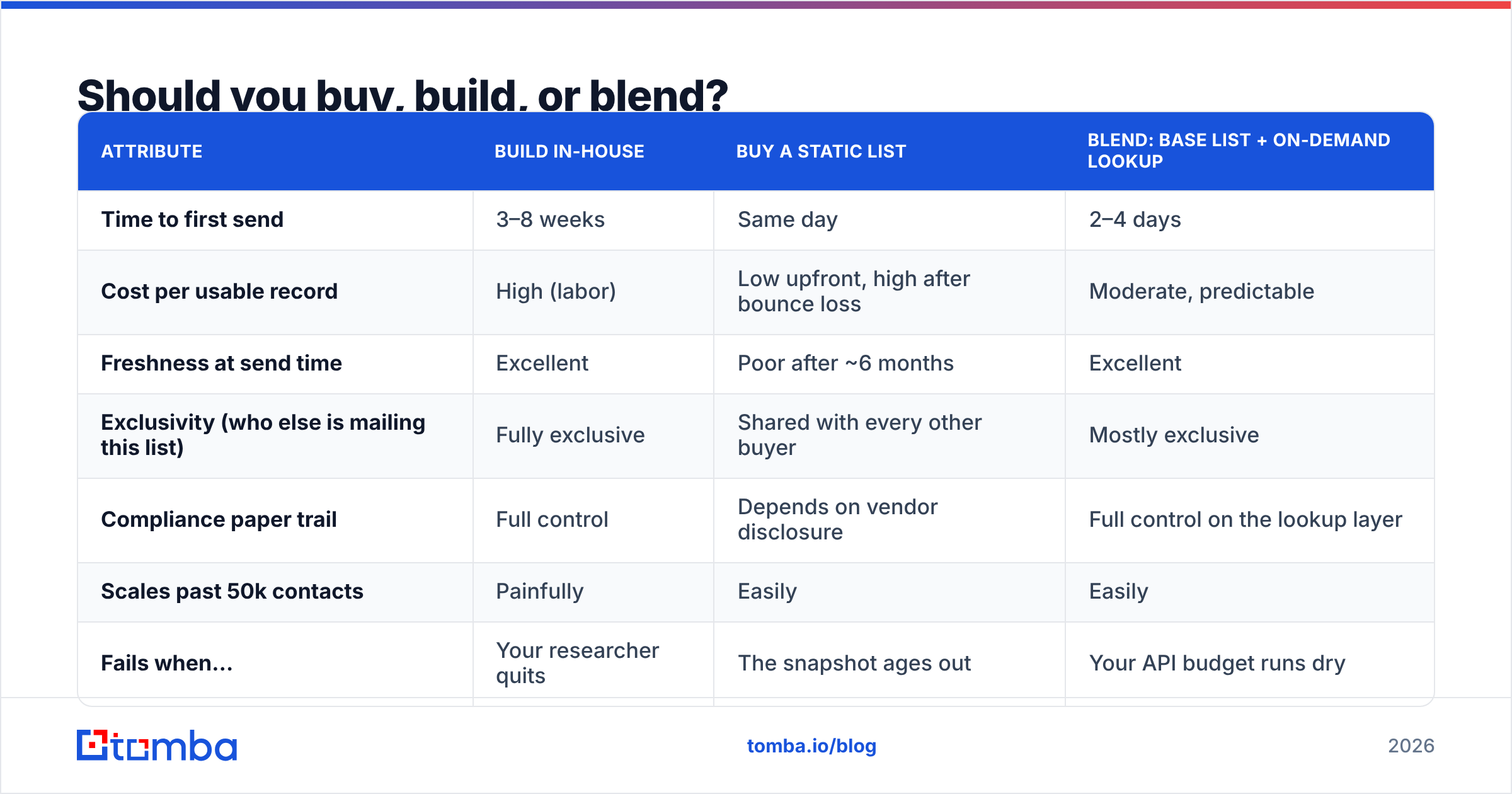
Buying gives you volume tomorrow. Building gives you data nobody else is emailing. Neither is free of the other's problems.
| Attribute | Build in-house | Buy a static list | Blend: base list + on-demand lookup |
|---|---|---|---|
| Time to first send | 3–8 weeks | Same day | 2–4 days |
| Cost per usable record | High (labor) | Low upfront, high after bounce loss | Moderate, predictable |
| Freshness at send time | Excellent | Poor after ~6 months | Excellent |
| Exclusivity (who else is mailing this list) | Fully exclusive | Shared with every other buyer | Mostly exclusive |
| Compliance paper trail | Full control | Depends on vendor disclosure | Full control on the lookup layer |
| Scales past 50k contacts | Painfully | Easily | Easily |
| Fails when… | Your researcher quits | The snapshot ages out | Your API budget runs dry |
The blend wins for most teams under 200 seats. You buy or assemble a targeting layer — the accounts and people you want — and you resolve the contact layer at the moment you're about to send, using a live email finder and email verifier rather than trusting a field that was populated eighteen months ago.
The practical version: keep account and person records in your CRM permanently. Treat the email address as a perishable good you fetch fresh. This inverts the usual model, and it's why teams running this pattern hold sub-2% bounce rates while list-buyers sit at 15–40%.
How do the main options compare in 2026?#
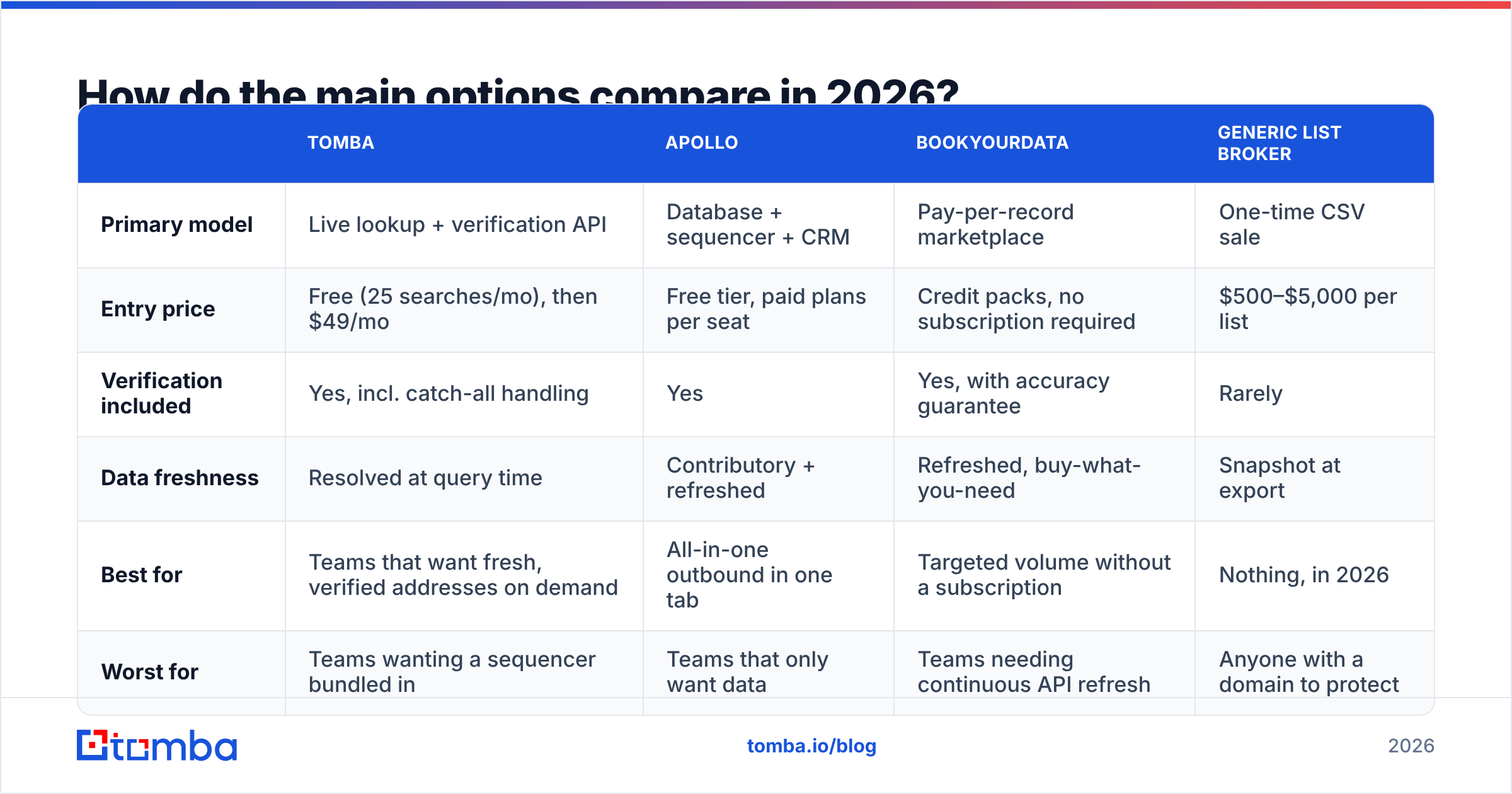
There's no single "best cold email lead database" because the vendors optimise for different jobs. A pay-per-record marketplace and a real-time lookup API are not competitors so much as different layers of the same stack.
| Tomba | Apollo | BookYourData | Generic list broker | |
|---|---|---|---|---|
| Primary model | Live lookup + verification API | Database + sequencer + CRM | Pay-per-record marketplace | One-time CSV sale |
| Entry price | Free (25 searches/mo), then $49/mo | Free tier, paid plans per seat | Credit packs, no subscription required | $500–$5,000 per list |
| Verification included | Yes, incl. catch-all handling | Yes | Yes, with accuracy guarantee | Rarely |
| Data freshness | Resolved at query time | Contributory + refreshed | Refreshed, buy-what-you-need | Snapshot at export |
| Best for | Teams that want fresh, verified addresses on demand | All-in-one outbound in one tab | Targeted volume without a subscription | Nothing, in 2026 |
| Worst for | Teams wanting a sequencer bundled in | Teams that only want data | Teams needing continuous API refresh | Anyone with a domain to protect |
A note on honesty: Apollo's bundled sequencer is genuinely convenient, and if you want data, sending, and light CRM in one subscription, that convenience is worth paying for. BookYourData solves a real problem too — you buy exactly the records you want, at a per-record price, without committing to a monthly seat. That's a clean fit for agencies and one-off campaigns where a subscription would sit idle. Tomba's advantage is narrower and more specific: it resolves and verifies addresses at query time, via Tomba API, which is what you want when the address must be correct today rather than correct on the day it was exported.
Check current pricing on each vendor's own page before you budget — everyone in this category reprices, and vendor comparison posts (including this one) age. G2 is a reasonable place to sanity-check whether a provider's coverage claims match what buyers report.
What does bad data actually cost you?#
Run the arithmetic once and you'll never buy an unverified list again.
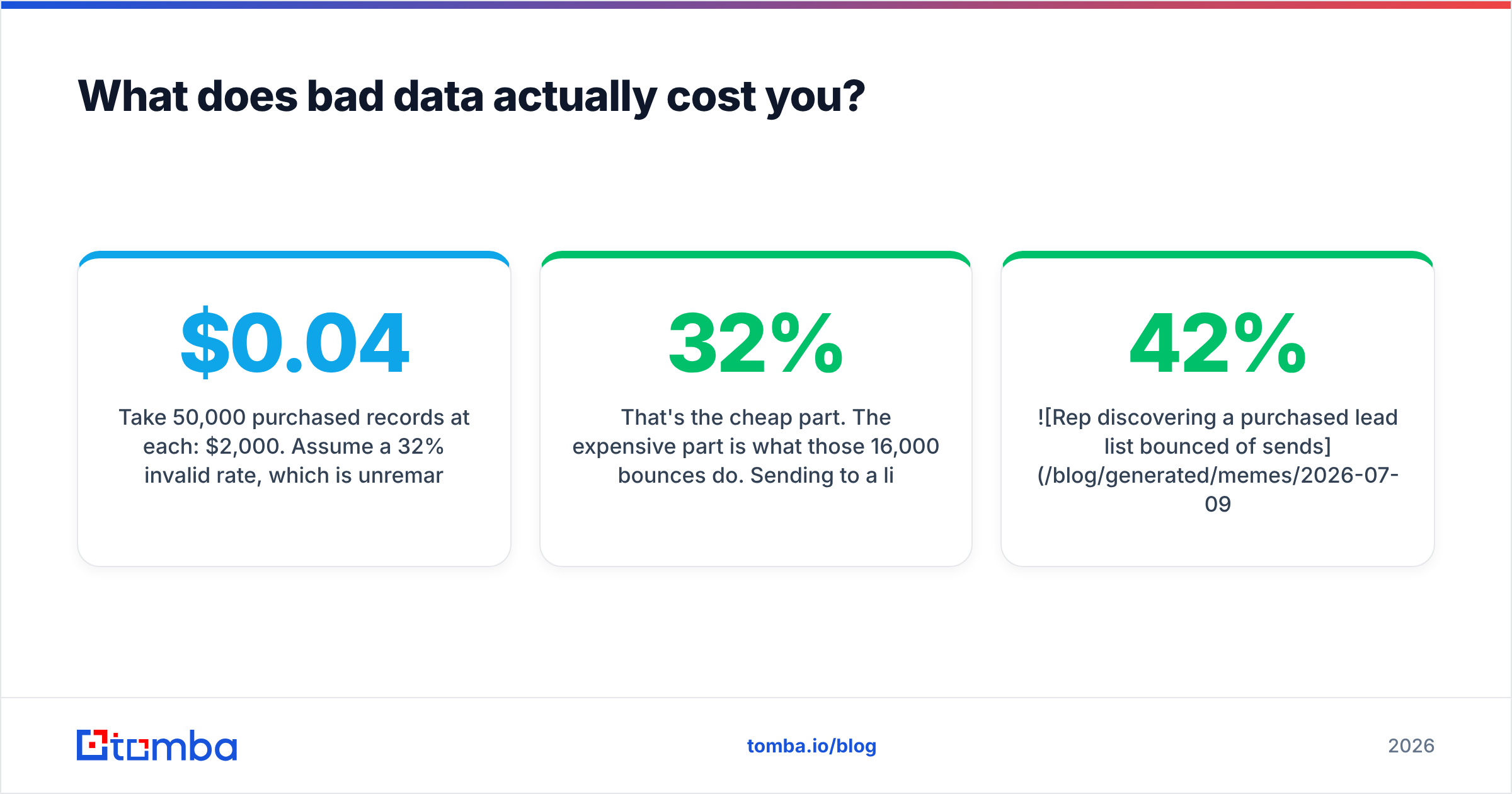
Take 50,000 purchased records at $0.04 each: $2,000. Assume a 32% invalid rate, which is unremarkable for a list older than a year. You now have 34,000 usable contacts, so your real cost is $0.059 per usable record — a 47% premium you didn't budget for.
That's the cheap part. The expensive part is what those 16,000 bounces do. Sending to a list with a 32% hard-bounce rate will get your sending domain throttled within the first few thousand messages, and mailbox providers do not forget quickly. You will spend four to eight weeks rebuilding sender reputation on a fresh domain, during which your pipeline generates nothing. Price that at whatever your monthly outbound-sourced pipeline is worth, and the $2,000 list becomes a five-figure mistake.

The counter-move is boring: verify everything, immediately before sending, not at import. Verification is cheap relative to the domain it protects. Run the whole file through bulk verify and drop anything that comes back invalid or disposable. For catch_all results, segment them into a separate, slower-paced sequence rather than mixing them with your clean sends — catch-all domains accept everything, so a non-bounce tells you nothing about whether a human read it.
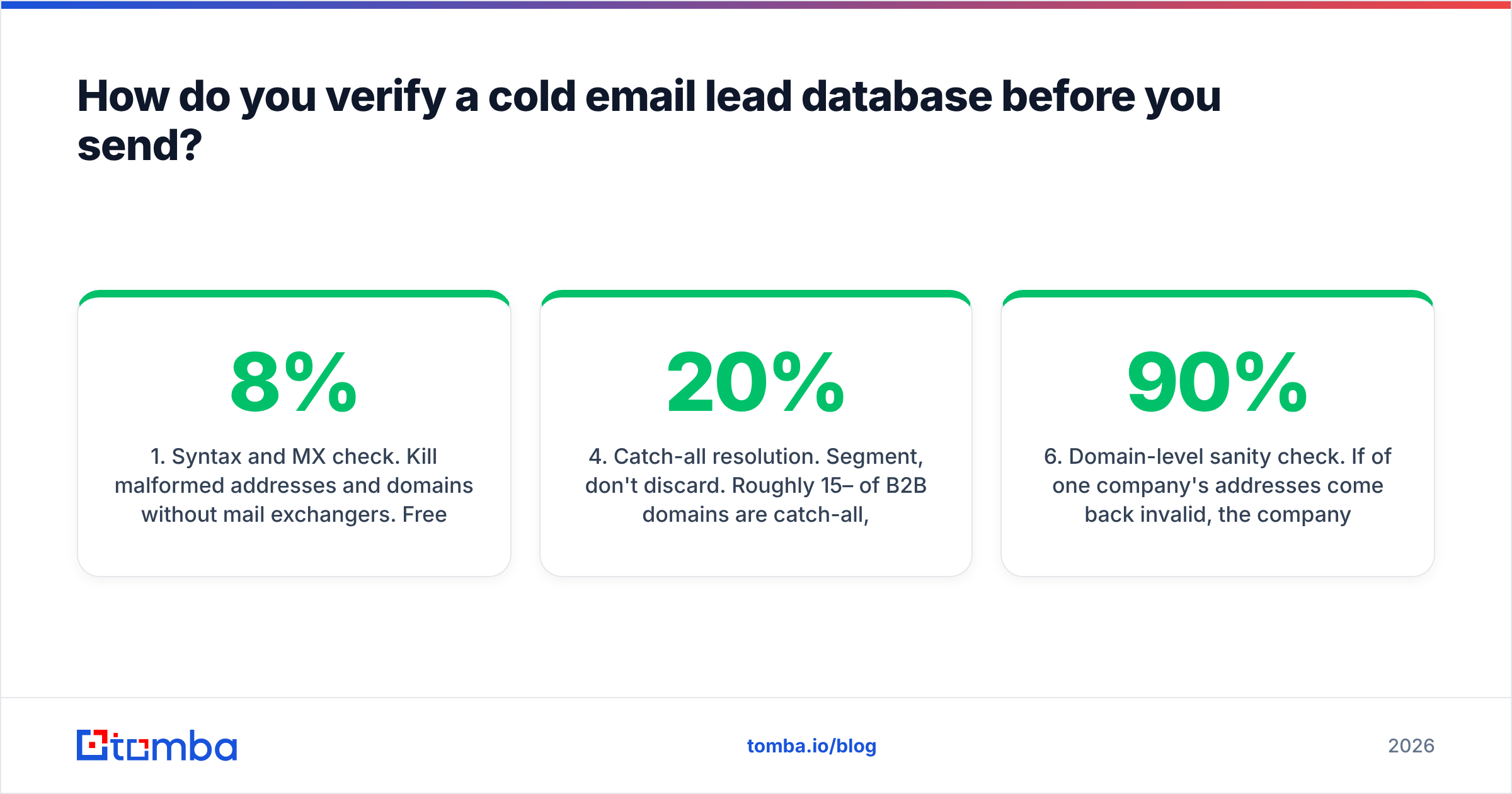
How do you verify a cold email lead database before you send?#
A workable pre-send gate, in order:
- Syntax and MX check. Kill malformed addresses and domains without mail exchangers. Free, instant, removes 3–8% of a typical purchased file.
- Disposable and role-based filtering. Remove
info@,sales@,support@, and known throwaway domains. Role addresses inflate your list size and depress your reply rate. - SMTP-level verification. Confirm the mailbox accepts mail. This is the step most cheap tools skip or fake.
- Catch-all resolution. Segment, don't discard. Roughly 15–20% of B2B domains are catch-all, and a lot of your ICP lives there.
- Suppression cross-check. Against your own bounce, unsubscribe, complaint, and customer tables. This is a database join, not a vendor feature — nobody else can do it for you.
- Domain-level sanity check. If 90% of one company's addresses come back invalid, the company likely changed its email pattern. Re-run those accounts through domain search rather than deleting them.
Step six recovers more revenue than most teams expect. A pattern change at a 400-person account doesn't mean the account is dead; it means your data is.
Is buying a cold email lead database legal?#
Short answer: it depends on where the recipient sits, and the vendor's terms are not your legal defence.
In the US, CAN-SPAM permits unsolicited commercial email to business addresses provided you identify yourself accurately, use a truthful subject line, include a physical postal address, and honor opt-outs promptly. Purchased lists are not prohibited. Deceptive headers and ignored unsubscribes are.
In the EU and UK, GDPR and PECR are stricter. The workable basis for B2B cold email is usually legitimate interest, which requires you to document a balancing test, disclose your data source on request, and give a clear opt-out. Practically, that means provenance tracking is a compliance requirement, not a nice-to-have — you must be able to say where a given record came from. A purchased list with no source documentation makes that answer impossible.
Canada's CASL is the strictest of the three and effectively requires consent or a clear existing business relationship for most cold sends. Segment your database by recipient jurisdiction before you sequence, not after you get a complaint.
None of this is legal advice. It is a reason to keep the source column populated.
What does a maintained database look like in practice?#
Here's the cadence that holds up over 12 months:
- Weekly: verify every record entering a sequence in the 24 hours before first send. No exceptions, including records you verified last month.
- Monthly: re-run contact enrichment on any account showing job-change or funding signals. Those accounts are where new contacts appear.
- Quarterly: bulk re-verify the entire active pool. Archive anything that comes back invalid twice; a single failure can be a temporary greylist.
- Continuously: write every bounce, complaint, and unsubscribe back to the suppression table within the hour. Automated, not manual.
- Annually: audit source performance. Rank your data sources by bounce rate and reply rate, then cut the bottom quartile. Most teams discover one source is quietly responsible for half their bounces.
This is unglamorous and it is the entire game. The teams with 8% reply rates aren't writing better copy than the teams with 1.2% reply rates. They're mailing people who exist.
Where to start#
If you're building the blend model, start at the layer that decays fastest. Get your account and persona targeting right in a spreadsheet, then resolve contact points on demand rather than buying a snapshot you'll have to re-buy in nine months.
Tomba's Email Finder does exactly that job: give it a name and a domain, get back a verified, source-attributed address with a confidence score and a catch-all flag. The free tier covers 25 searches a month if you want to test the accuracy on accounts you already know the answers to — which is, frankly, the only honest way to evaluate any provider in this category. Paid plans start at $49/mo; see Tomba pricing for the full breakdown, or wire it straight into your pipeline via the API and skip the CSV round-trip entirely.
Verify before you send. Everything else in outbound is downstream of that.
Related guides#
// get started
Find, verify and enrich your first contacts today
Start on the free plan with 25 searches a month, then scale when your team is ready.
Free plan · No credit card required · GDPR & CCPA
// about the author