Cold Email Marketing Tools: The 2026 Stack That Actually Works
Nine cold email marketing tools, tested against the only metrics that matter: deliverability, data accuracy, and what you actually pay at month three. Plus the two line items vendors leave off the pricing page.
TL;DR
- "Cold email marketing tools" is not one category. It's three: data, sending infrastructure, and deliverability monitoring. Buying one and expecting all three is how most teams end up in spam.
- The tool almost never causes the bounce. Bad data does. A 6% bounce rate will sink a warmed domain regardless of which sender you paid for.
- Sending platforms have converged on price ($30–$100/mo for a small team). The real spread is in data cost per verified contact and in mailbox rotation limits.
- Watch for two hidden line items: per-seat minimums on enterprise sequencers and credit rollover policies that expire unused data every 30 days.
- Best default stack for a 1–10 person outbound team in 2026: a dedicated data source (Tomba), a lightweight sequencer (Smartlead or Instantly), and free deliverability telemetry from Google Postmaster Tools.
What are cold email marketing tools, exactly?#
Ask ten founders and you'll get ten answers, because the phrase covers a stack, not a product. Think of it like a restaurant: the sequencer is the waiter, the data provider is the supplier, and deliverability tooling is the health inspector. You can hire the best waiter alive and still get shut down if the supplier sends spoiled produce.
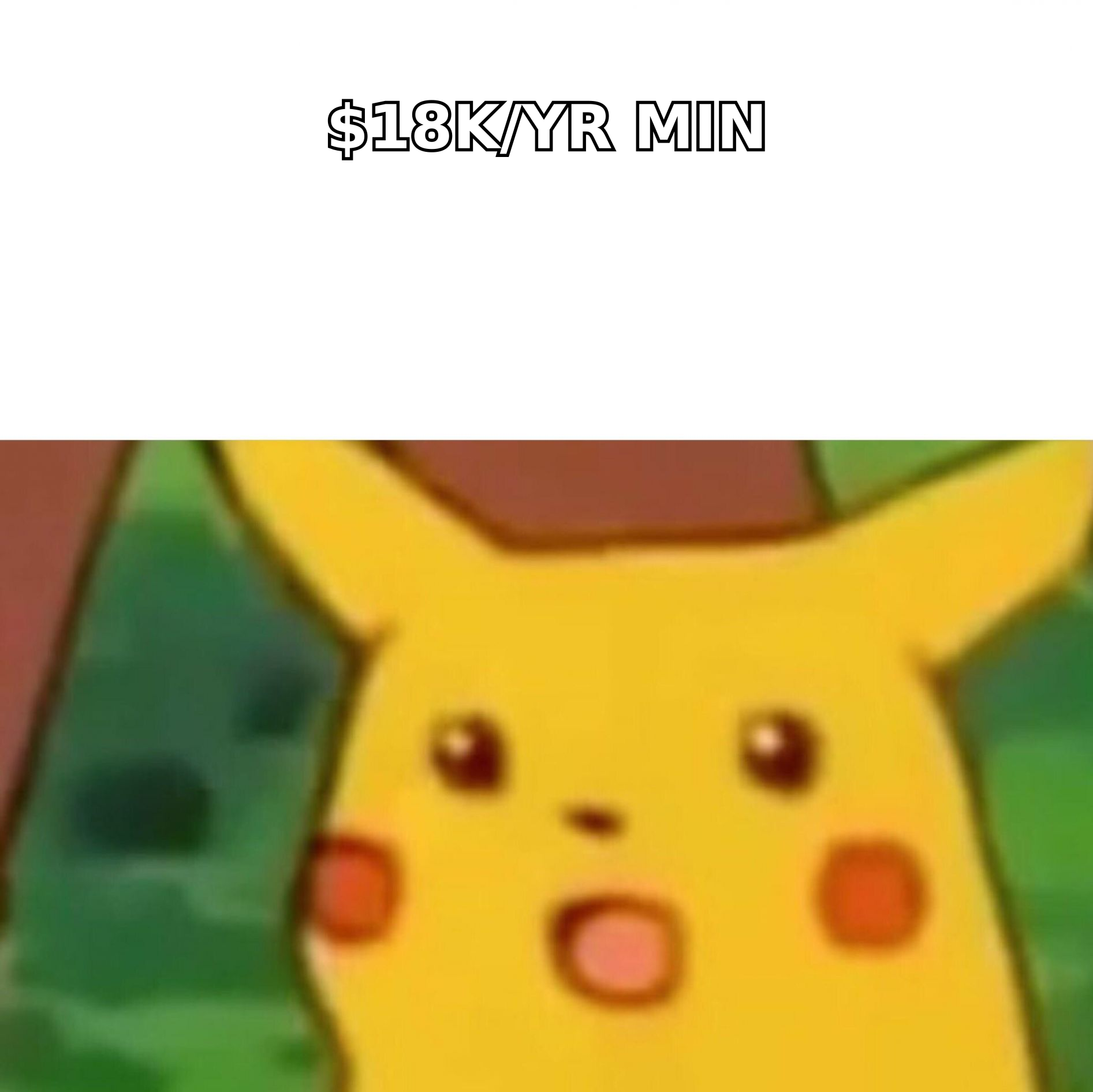
Broken into functions, a cold outbound stack has four jobs:
- Find and verify contacts. Turn a company list into deliverable inboxes. This is where an email finder and an email verifier live. Bounce rate is the KPI.
- Send and sequence. Rotate mailboxes, throttle volume, handle replies and follow-ups. Reply rate is the KPI.
- Protect the sending domain. SPF, DKIM, DMARC, warmup, reputation monitoring. Inbox placement is the KPI.
- Route what converts. Push positive replies into a CRM before the SDR forgets. Meetings booked is the KPI.
Most tools marketed as "cold email marketing tools" cover job 2 well, job 3 partially, job 1 badly, and job 4 through an integration. The all-in-one platforms cover all four adequately and none of them exceptionally — which is a real trade, not a criticism.
Here's the part nobody puts on the pricing page: job 1 determines whether jobs 2 and 3 matter at all. Google and Microsoft both tightened bulk-sender enforcement in 2024, and the thresholds have not loosened. Sustained bounce rates above roughly 3% and spam complaints above 0.3% will degrade sender reputation no matter how elegant your sequence builder is. The sequencer is downstream of data quality. Always.
Which cold email marketing tools should you actually compare?#
Below is the honest field as of mid-2026, grouped by what each tool is genuinely good at rather than what its homepage claims. Prices are list prices for the entry paid tier at the time of writing; check the vendor before you buy, because this category re-prices constantly.
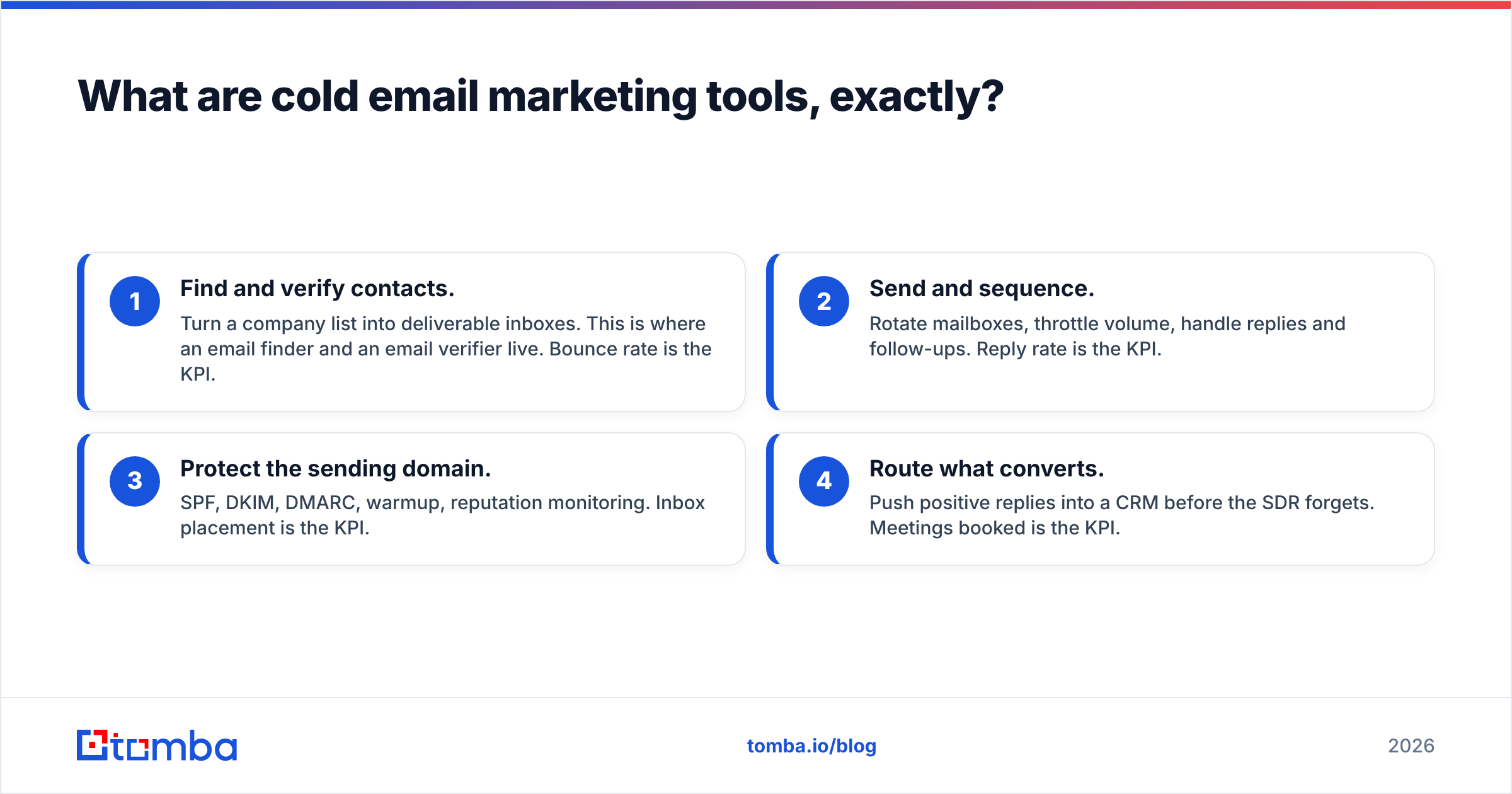
| Tool | Primary job | Entry price | Free tier | Best for | Real weakness |
|---|---|---|---|---|---|
| Tomba | Data (find + verify) | $49/mo | 25 searches/mo | Teams that need accurate emails and catch-all handling before sending | Not a sequencer — you still need a sender |
| Instantly | Sending + warmup | ~$37/mo | No | Unlimited mailbox rotation at low cost | Built-in data is thin; verification is basic |
| Smartlead | Sending + inbox rotation | ~$39/mo | 14-day trial | Agencies running many client domains | Learning curve; UI density |
| Apollo.io | All-in-one (data + send) | ~$49/user/mo | 10k email credits/mo | Solo sellers who want one login | Contact data accuracy varies sharply by region |
| BookYourData | Verified B2B contact lists | Pay-as-you-go | Sample credits | Buying a clean, filtered list outright with a bounce guarantee | List-buy model, not a live search API |
| Lemlist | Sending + personalization | ~$39/mo | 14-day trial | Image/video personalization at scale | Deliverability tooling is add-on priced |
| Outreach | Enterprise sequencing | Custom (seat minimums) | No | 20+ rep teams with RevOps support | Annual contracts; heavy implementation |
| Salesloft | Enterprise sequencing | Custom (seat minimums) | No | Coaching, call + email in one workflow | Same seat-minimum math as Outreach |
| Google Postmaster Tools | Deliverability telemetry | Free | Free | Seeing your actual Gmail spam rate | Gmail-only; no Outlook equivalent as good |
Two rows in that table deserve a second look.
BookYourData solves a different problem than the rest. It sells verified contact lists with a stated bounce guarantee, which is genuinely the right tool when you need 5,000 filtered contacts once and don't want to build a search workflow. It's a peer to the API-first tools, not a substitute — if your motion is "one big list, quarterly," it will beat a per-search tool on effort. If your motion is "enrich inbound signups in real time," you want an API.
Outreach and Salesloft are excellent products carrying a pricing model that punishes small teams. Both quote custom, both typically carry seat minimums, and both usually want an annual commitment. A 10-seat team at even $150/seat/mo lands at $18,000 a year before you've bought a single contact record. That's the enterprise pricing shock that catches teams who evaluated on features and forgot to evaluate on contract shape.
Why does data quality outrank the sending tool?#
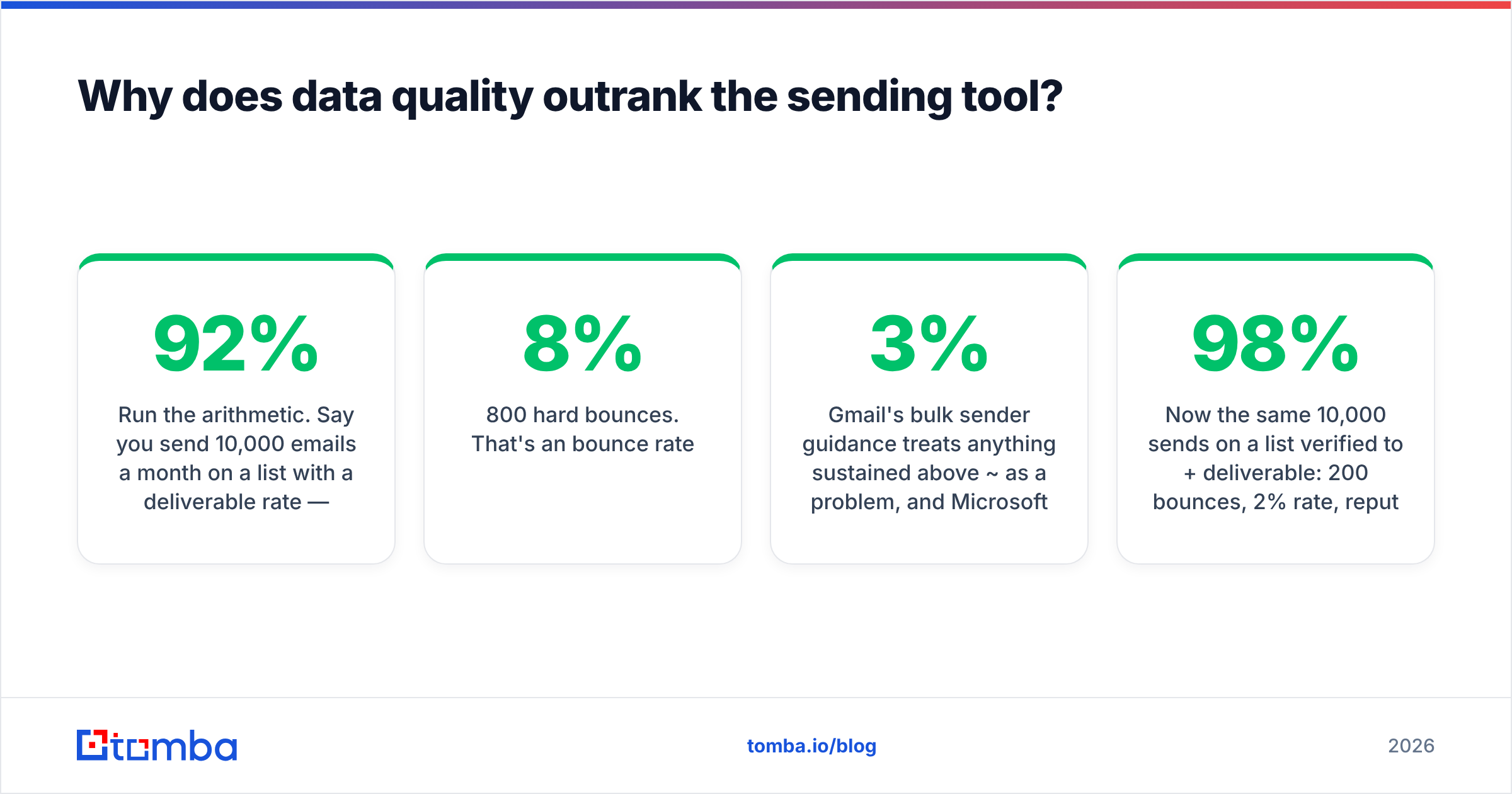
Run the arithmetic. Say you send 10,000 emails a month on a list with a 92% deliverable rate — an optimistic number for scraped or stale data.
- 800 hard bounces. That's an 8% bounce rate.
- Gmail's bulk sender guidance treats anything sustained above ~3% as a problem, and Microsoft's SNDS follows similar logic.
- Your domain reputation degrades in weeks, not months. Your good contacts stop seeing the inbox.
- You now blame the sequencer, buy a different one, migrate, and reproduce the exact same result.
Now the same 10,000 sends on a list verified to 98%+ deliverable: 200 bounces, 2% rate, reputation stable, and the sequencer's features finally have a chance to matter.
This is why email deliverability belongs in the data conversation, not the sending conversation. The single highest-leverage change most teams can make is not switching sequencers. It's putting a catch-all verifier in front of the send, because catch-all domains — which accept every address at the SMTP layer and bounce later, or silently discard — are where "verified" lists quietly rot. A generic verifier marks them "unknown" and you either send blind or throw away real contacts.
How do the data sources actually differ?#
- Pattern-based finders guess the format (
first.last@) from a domain and validate via SMTP. Fast, cheap, unreliable on catch-alls and on companies with mixed formats. - Database lookups query a stored contact set. Instant, but the data has an age. Ask any vendor when the record was last verified — the honest ones will tell you.
- Hybrid (find, then verify live) searches sources, then runs a real-time deliverability check before returning the address. Slower per lookup, dramatically lower bounce. This is what Tomba's approach to data sourcing is built on.
- Purchased lists hand you a static file with a guarantee attached. Zero infrastructure, but the freshness clock starts the moment you download it.
- Scraped exports from browser extensions. Cheapest, and the reason so many sending domains are burned.
The right choice depends on volume shape, not on budget. High-volume, one-time: buy a list. Continuous, low-volume, high-value: use a find-then-verify API. Enrichment on inbound: definitely an API.
What do cold email marketing tools cost once you add data?#
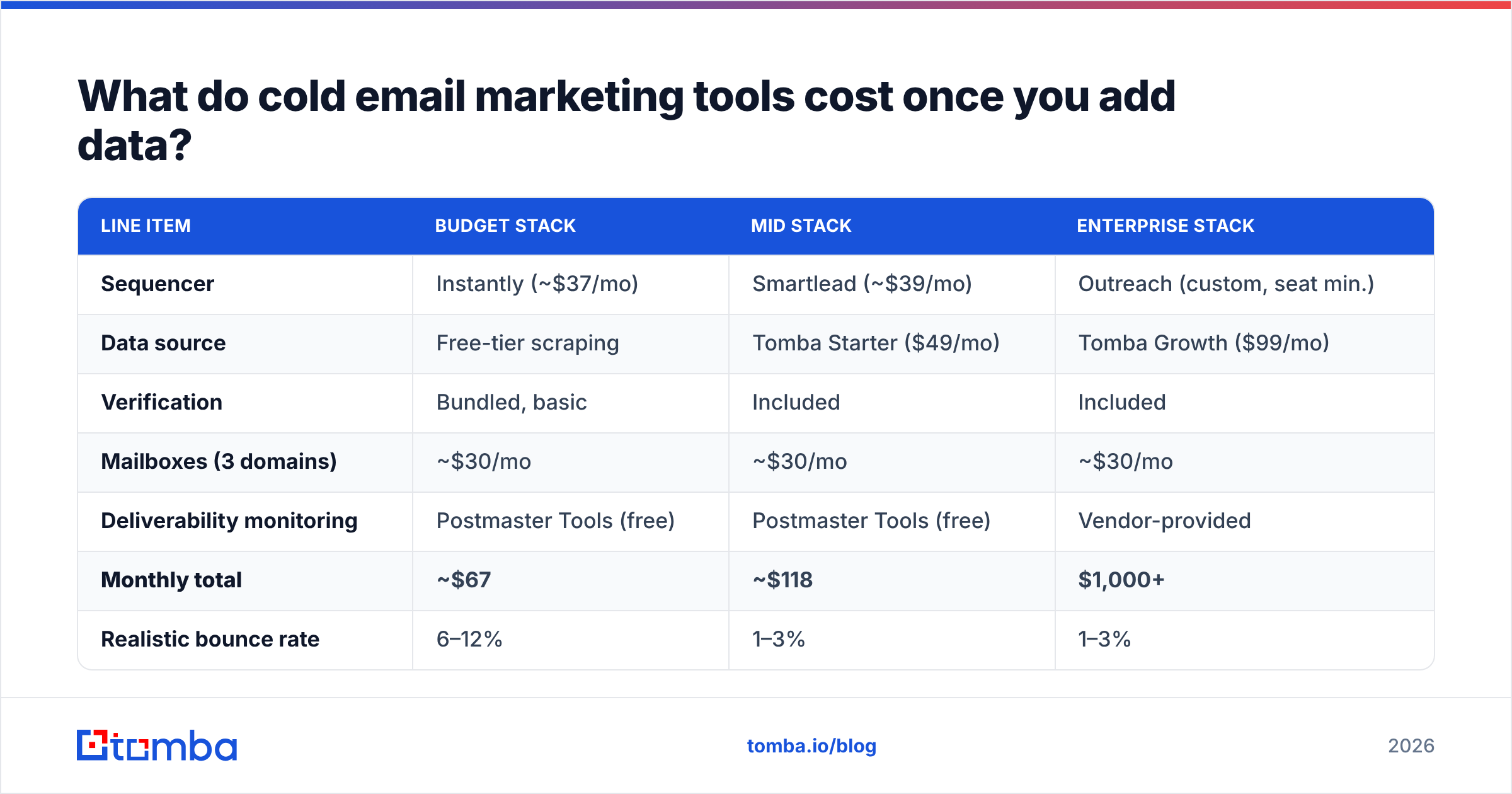
Sequencer pricing is the sticker. Data pricing is the bill. Here's a realistic three-month cost for a two-person outbound team sending 4,000 emails/month to net-new contacts.
| Line item | Budget stack | Mid stack | Enterprise stack |
|---|---|---|---|
| Sequencer | Instantly (~$37/mo) | Smartlead (~$39/mo) | Outreach (custom, seat min.) |
| Data source | Free-tier scraping | Tomba Starter ($49/mo) | Tomba Growth ($99/mo) |
| Verification | Bundled, basic | Included | Included |
| Mailboxes (3 domains) | ~$30/mo | ~$30/mo | ~$30/mo |
| Deliverability monitoring | Postmaster Tools (free) | Postmaster Tools (free) | Vendor-provided |
| Monthly total | ~$67 | ~$118 | $1,000+ |
| Realistic bounce rate | 6–12% | 1–3% | 1–3% |
| Domain lifespan | Months | Years | Years |
The budget stack looks like it saves $51/month. It costs you the domain. Replacing a burned sending domain — new domain, 4–6 weeks of warmup, lost pipeline in the gap — runs well past a year of the difference. Full Tomba pricing breaks down where the credit tiers sit, but the shape of the argument holds regardless of vendor: paying for verification is cheaper than not paying for verification.
Note what's missing from every vendor's public pricing page: credit rollover. Several tools in this category expire unused credits monthly. If your prospecting is lumpy — heavy in January, light in February — you're paying for capacity you can't bank. Ask before you sign.
How do you evaluate a sending tool without wasting a quarter?#
Skip the feature matrix. Run this instead, on a real list, over two weeks.
- Seed the list. Take 500 verified contacts from one source. Do not mix sources — you're testing the sender, not the data.
- Split by mailbox, not by tool. Send from three warmed mailboxes on the same domain through candidate A. Repeat the identical copy through candidate B on three different mailboxes, same domain age, same warmup history.
- Measure inbox placement, not open rate. Apple Mail Privacy Protection has made open rate largely decorative since 2021. Use seed inboxes across Gmail, Outlook, and one corporate Microsoft 365 tenant.
- Log spam complaint rate in Google Postmaster Tools. Anything trending toward 0.3% is a copy problem, not a tool problem.
- Check reply-handling. Send yourself an out-of-office. Does the tool correctly classify it as neither a reply nor a bounce? Many don't, and your reported reply rate inflates.
- Test the export. Can you get your sequence data out as CSV without a support ticket? If not, you're not evaluating a tool, you're evaluating a hostage situation.
Two weeks. Real numbers. No demo call required.

Do you still need a separate email verifier in 2026?#
Yes, and the reason is structural. Sequencers verify to protect their IP reputation and their platform-wide sender scores. That interest overlaps with yours but does not match it. A sequencer's built-in check is typically syntax + MX + a shallow SMTP probe. It will pass a catch-all domain, pass a role account (info@, sales@), and pass an address that hasn't been used since 2019.
A dedicated verification layer adds:
- Catch-all resolution — determining whether a specific mailbox on an accept-all domain actually exists.
- Role-account flagging — so you don't send a personalized founder pitch to a shared inbox.
- Disposable and spam-trap detection — the single fastest way to blacklist a domain.
- Bulk processing — 50,000 addresses through bulk verification before a campaign, not one at a time.
If you're running under 500 sends a month, the built-in check is probably fine. Above that, the math stops working. One spam trap in a 10,000-contact list can undo six months of warmup, and no sequencer's bundled verifier is designed to catch it.
For teams already living in a CRM, the cleanest pattern is verification at the point of record creation — a HubSpot integration or Salesforce workflow that enriches and validates before the contact ever reaches a sequence. Garbage never enters the system, so you never have to clean it out.
What's the right stack for your team size?#
- Solo founder, <1,000 sends/mo. Tomba free tier or Starter for data, Instantly for sending, Postmaster Tools for monitoring. Under $90/month, and the data is clean.
- 2–5 person team, 5,000–20,000 sends/mo. Tomba Growth ($99/mo) plus Smartlead. Add a second sending domain before you add a second sequencer. Budget for domain rotation, not for features.
- Agency running client campaigns. Smartlead's client-workspace model plus a per-seat data plan. Verify every client list on intake — you inherit their bounce history the moment you send from their domain.
- 20+ reps with RevOps. Outreach or Salesloft earns its price here through forecasting, call recording, and coaching workflows. Pair it with an email finder API so enrichment happens in the pipeline, not in a rep's browser tab.
- One-off list build. BookYourData or a similar verified-list vendor. Cheaper in effort than standing up a search workflow for a single campaign.
Notice that the sequencer changes across those rows and the data layer barely does. That's not an accident. Sequencers are increasingly commodity — inbox rotation, warmup, and A/B testing are table stakes now, and the pricing has compressed accordingly. Data accuracy has not commoditized, because it's the one thing you cannot rebuild by writing more UI. G2's category data on sales engagement platforms shows exactly this convergence: feature parity, price parity, and reviews that increasingly turn on data quality rather than sending features.
Where do most teams go wrong?#
They optimize the layer they can see. The sequencer has a dashboard, a Slack community, and a feature roadmap. The data layer is a CSV that either works or doesn't. So teams spend three weeks choosing between two sending tools that are functionally identical, then feed both of them the same 89%-deliverable list scraped from a browser extension.
Then the bounce rate climbs. Then reputation drops. Then the campaign that worked in month one dies in month three, and the retrospective blames the copy.
Fix the input. Verify before you send, resolve your catch-alls instead of guessing, and treat your sending domain as an appreciating asset rather than a consumable. The sequencer choice matters — but it matters roughly a tenth as much as the list.
Start where the leverage is. Before you migrate sequencers again, run one campaign's list through Tomba's Email Finder and compare bounce rates against your current source. The free tier gives you 25 searches to test the difference on a real segment, and Starter is $49/mo when you're ready to run it against a full list. Clean data makes every other tool in your stack look better than it is — and dirty data makes every tool in your stack look broken.
Related guides#
Ready to find emails that actually work?
Join 150,000+ professionals who stopped guessing and started sending. Free credits on signup — no credit card required.
Get the Tomba newsletter
Practical outbound tactics and product updates — once every two weeks.
About the author