How to Build a Cold Email Pipeline That Books Meetings in 2026
Most teams call a sequencer a pipeline and wonder why replies dry up. Here's the five-stage cold email pipeline that actually holds volume — and the exact metric to check at each stage before you scale.
TL;DR
- A cold email pipeline is a five-stage system — source, verify, enrich, send, route — not a sequencing tool with a CSV bolted onto it.
- Each stage has one gate metric. If the gate fails, adding volume downstream makes things worse, not better.
- Bounce rate is the cheapest early-warning signal you have. Above 3%, stop sending and fix your data layer before you touch copy.
- Verification and enrichment belong before the sequencer, not after. Most teams have this backwards.
- The tooling stack costs less than one SDR's monthly salary. The failure mode is almost never budget — it's skipped steps.
What Is a Cold Email Pipeline?#
A cold email pipeline is the end-to-end system that turns a target account list into booked meetings, with a defined handoff and a measurable pass/fail gate at every stage.
Think of it like a water treatment plant. Raw water goes in one end, drinking water comes out the other, and there are four or five filtration stages in between. Skip the sediment filter and you clog the carbon filter. Skip the carbon filter and you poison the customer. Nobody looks at a treatment plant and says "the plant is the UV lamp." But that's exactly what happens in outbound: teams buy Instantly or Smartlead, upload a list, and call the sequencer "the pipeline."
The sequencer is one stage. It's the pump, not the plant.
Technically, a cold email pipeline has five discrete stages, each with an input, an output, and a gate metric that must pass before data moves downstream:
- Source — build the account and contact list from ICP criteria. Gate: does every row have a company domain and a named human? Anonymous
info@rows are not contacts. - Verify — confirm each address is deliverable before it ever enters a sending tool. Gate: verified-deliverable rate above 95% on the segment you're about to send.
- Enrich — attach the fields your copy actually references. Gate: 100% coverage on every merge field used in the sequence. One missing
{{company}}breaks the email, not just the personalization. - Send — warm domains, throttled volume, reply-aware sequencing. Gate: bounce rate under 3%, spam complaint rate under 0.1%.
- Route — replies get triaged and pushed into CRM within a working day. Gate: median time-to-first-response under 4 hours.
Notice what's missing from that list: "write great copy." Copy matters enormously, but copy is a multiplier applied to stages 1–3. Brilliant copy sent to a list with 28% invalid addresses does not book meetings. It gets your domain flagged.
Why Do Most Cold Email Pipelines Leak?#
Because the failure is silent at the point it happens and loud three weeks later, in a place that looks unrelated.
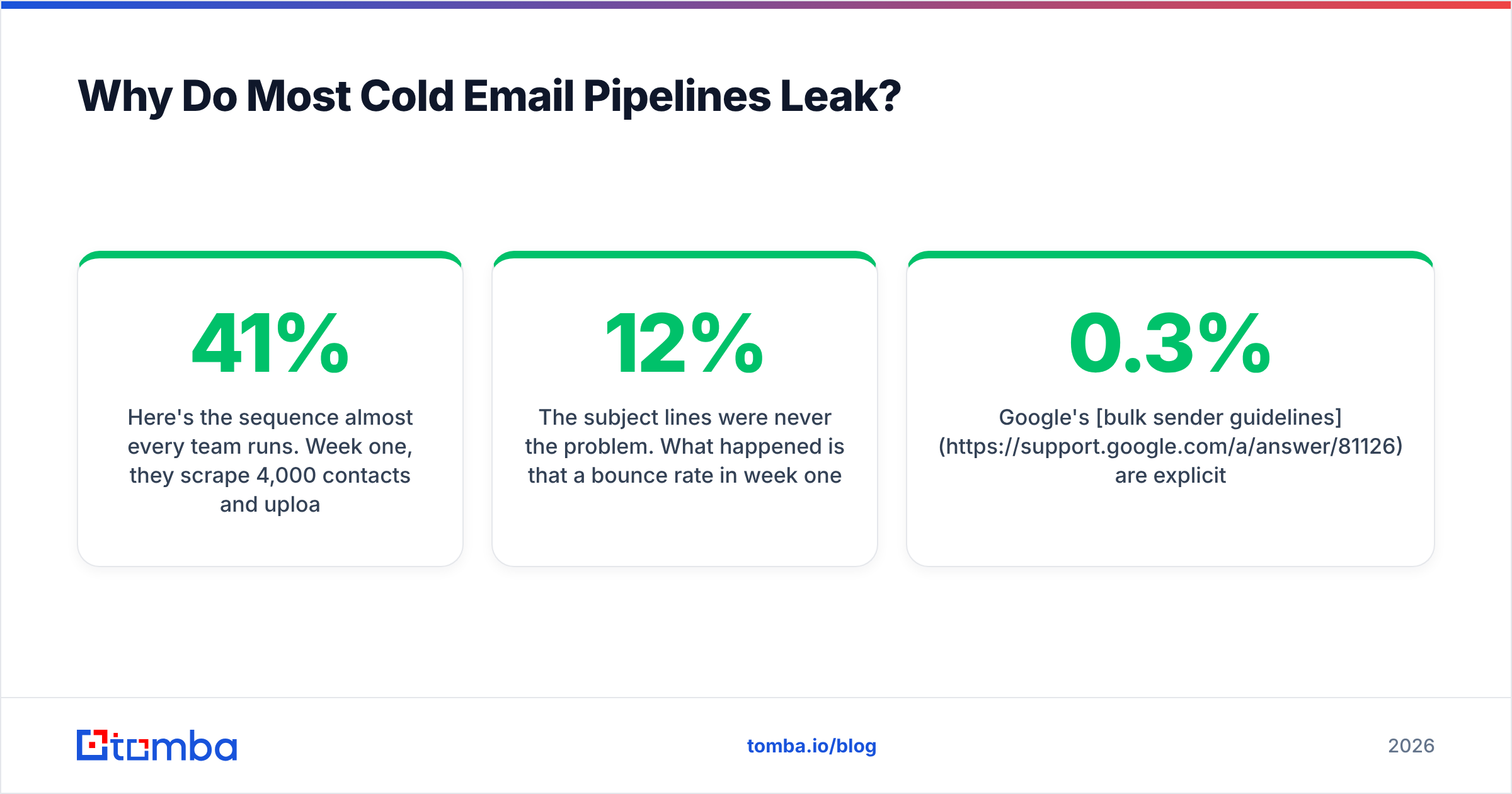
Here's the sequence almost every team runs. Week one, they scrape 4,000 contacts and upload them. Week two, open rates look fine — 41%, respectable. Week three, opens drop to 22%. Week four, they're in spam and nobody knows why, so they rewrite the subject lines.
The subject lines were never the problem. What happened is that a 12% bounce rate in week one told inbox providers this sender doesn't know who they're emailing. Sender reputation is a trailing indicator — it degrades over days and recovers over weeks. By the time open rate moves, the damage is two weeks old and the cause is invisible.

Google's bulk sender guidelines are explicit about this: keep spam complaints below 0.3% and ideally under 0.1%, and authenticate with SPF, DKIM, and DMARC. Providers don't publish a bounce threshold, but the operational consensus across deliverability teams is that sustained bounce rates above 3% trigger throttling, and above 8% trigger outright blocking.
The leak points, ranked by how much damage they do per unit of neglect:
- Unverified addresses at send time. Highest-cost mistake. Every hard bounce is a direct debit against domain reputation, and it's fully preventable.
- Catch-all domains treated as valid. A catch-all accepts everything at the SMTP layer and silently discards most of it. Your sequencer reports "delivered." Nobody read it. Run these through a catch-all verifier instead of guessing.
- Role accounts in the list.
sales@,info@,support@— these inflate volume, tank reply rates, and attract complaints. - Merge-field gaps.
Hi {{first_name}},rendering asHi ,is worse than no personalization. It signals automation immediately. - Reply routing on a 48-hour lag. HubSpot's sales research has consistently found that response speed is one of the strongest predictors of conversion. A reply that sits in a shared inbox over a weekend is a lost deal.
Which Tools Do You Actually Need at Each Stage?#
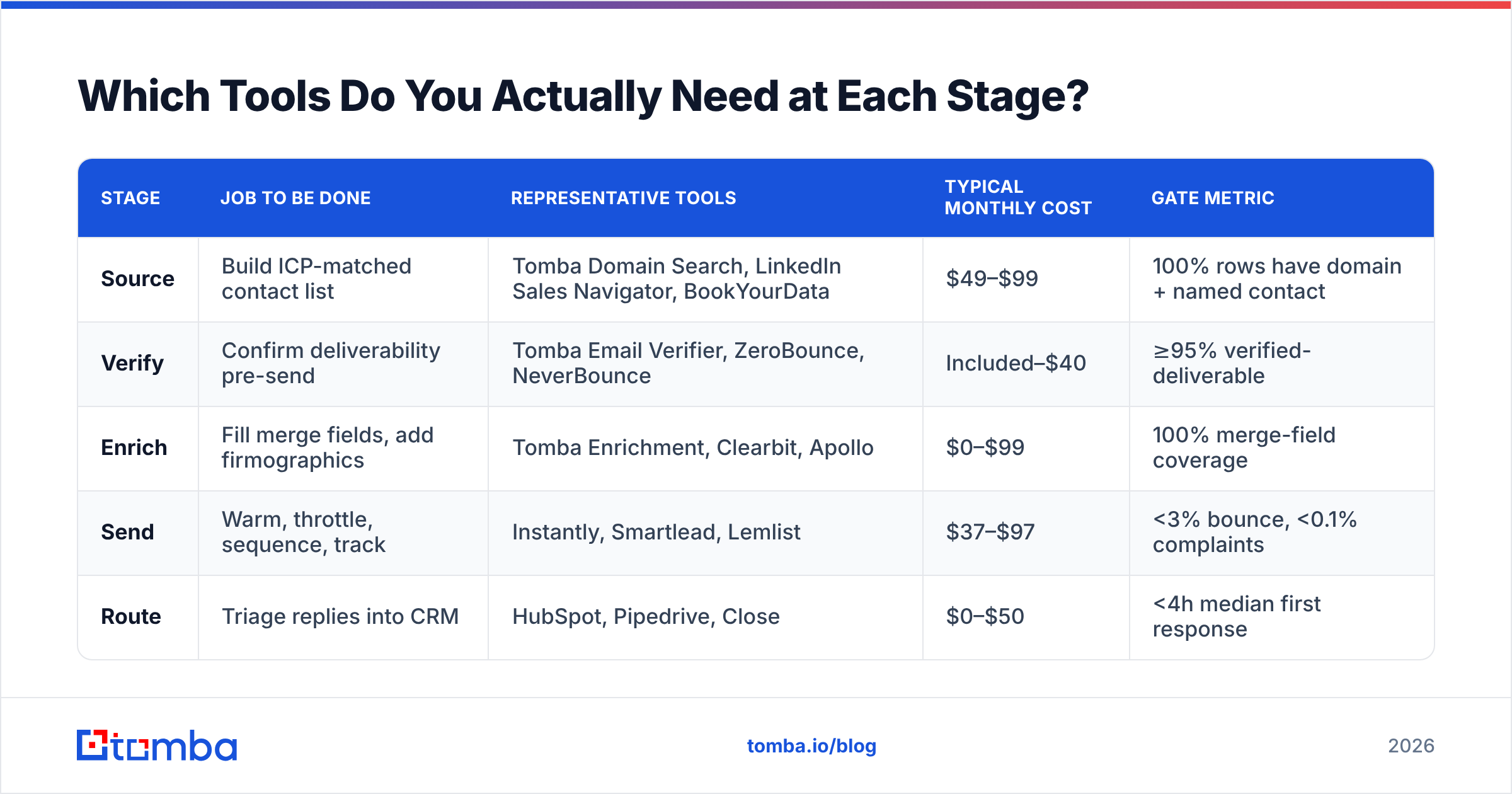
Fewer than the vendor landscape suggests. Here's what each stage requires and what it typically costs at a 3-rep team's volume — roughly 2,000 new contacts per month.
| Stage | Job to be done | Representative tools | Typical monthly cost | Gate metric |
|---|---|---|---|---|
| Source | Build ICP-matched contact list | Tomba Domain Search, LinkedIn Sales Navigator, BookYourData | $49–$99 | 100% rows have domain + named contact |
| Verify | Confirm deliverability pre-send | Tomba Email Verifier, ZeroBounce, NeverBounce | Included–$40 | ≥95% verified-deliverable |
| Enrich | Fill merge fields, add firmographics | Tomba Enrichment, Clearbit, Apollo | $0–$99 | 100% merge-field coverage |
| Send | Warm, throttle, sequence, track | Instantly, Smartlead, Lemlist | $37–$97 | <3% bounce, <0.1% complaints |
| Route | Triage replies into CRM | HubSpot, Pipedrive, Close | $0–$50 | <4h median first response |
Two things stand out when you lay it out this way.
First, the sending tool — the one most teams think of as "the cold email tool" — is neither the most expensive line nor the one with the tightest gate. It's a pump.
Second, stages 1–3 collapse into a single vendor more often than people expect. If your source, verify, and enrich steps share one API, you eliminate the CSV round-trips where data quality goes to die. That's the practical argument for consolidating the data layer: not price, but the absence of a handoff.
For teams building this programmatically, the Tomba API exposes finder, verifier, and enrichment on the same key, so a single script can go from domain to verified, enriched row without touching a spreadsheet. If you'd rather stay in a sheet, the bulk email finder handles the same flow at list scale.
Should You Buy a List or Build One?#
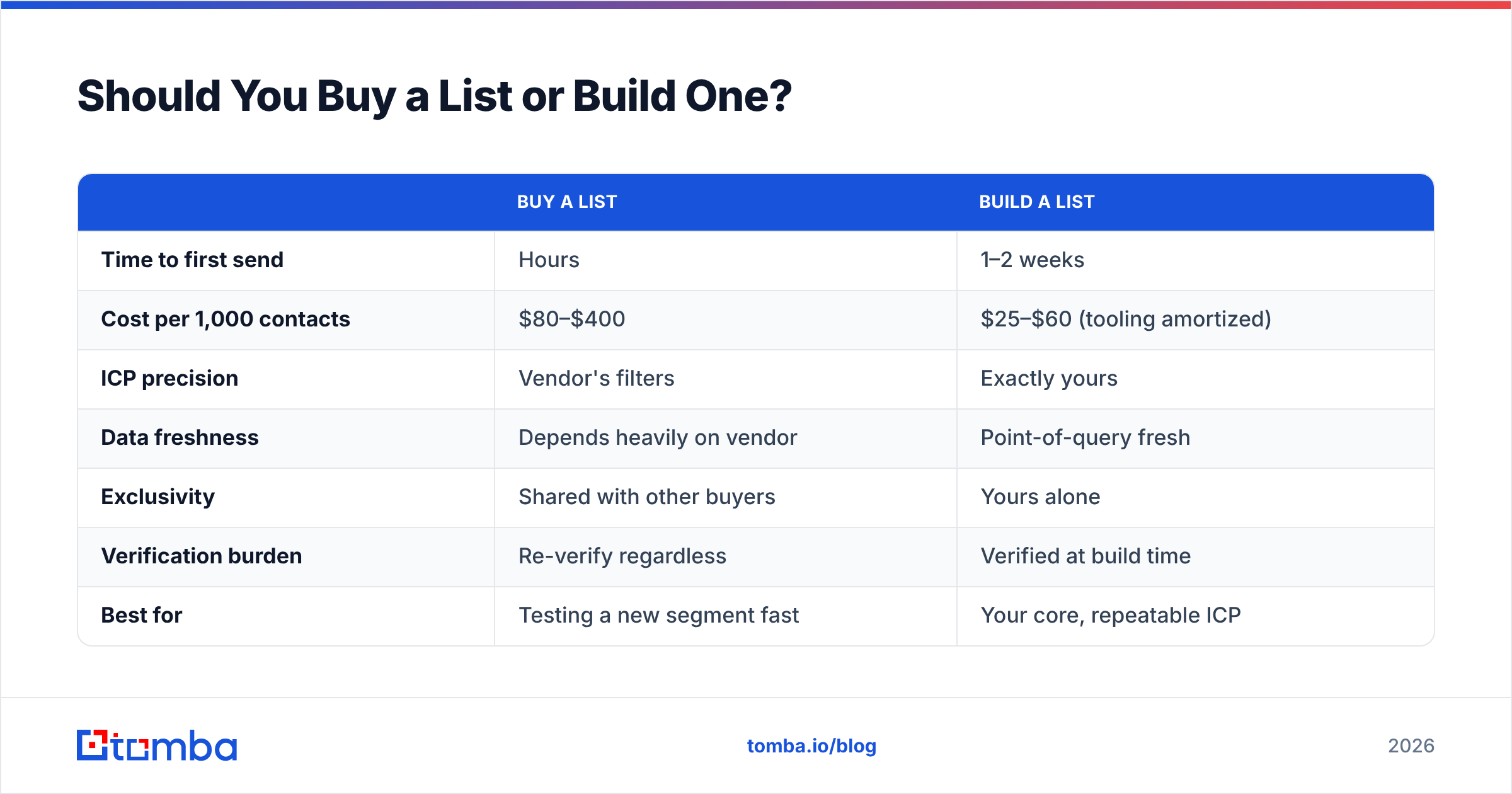
Both work. The mistake is assuming they're substitutes — they solve different problems and carry different failure modes.
| Buy a list | Build a list | |
|---|---|---|
| Time to first send | Hours | 1–2 weeks |
| Cost per 1,000 contacts | $80–$400 | $25–$60 (tooling amortized) |
| ICP precision | Vendor's filters | Exactly yours |
| Data freshness | Depends heavily on vendor | Point-of-query fresh |
| Exclusivity | Shared with other buyers | Yours alone |
| Verification burden | Re-verify regardless | Verified at build time |
| Best for | Testing a new segment fast | Your core, repeatable ICP |
Reputable list vendors — BookYourData among them — sell pre-verified, human-checked data and will tell you their accuracy guarantee up front. That's a legitimate path, particularly when you're testing whether a new vertical responds at all and don't want to spend two weeks building a list for a segment that turns out to be dead.
What is not legitimate is treating any purchased list as send-ready. Re-verify it. Contact data decays at roughly 2–2.5% per month through job changes alone, so a list built in January is meaningfully worse in July regardless of how good it was on day one. Run it through an email verifier the day you send, not the day you bought it.
The durable answer for most B2B teams: buy to test, build to scale. Once a segment proves out, move it into your own sourcing flow so you control freshness and exclusivity.
How Do You Measure a Cold Email Pipeline?#
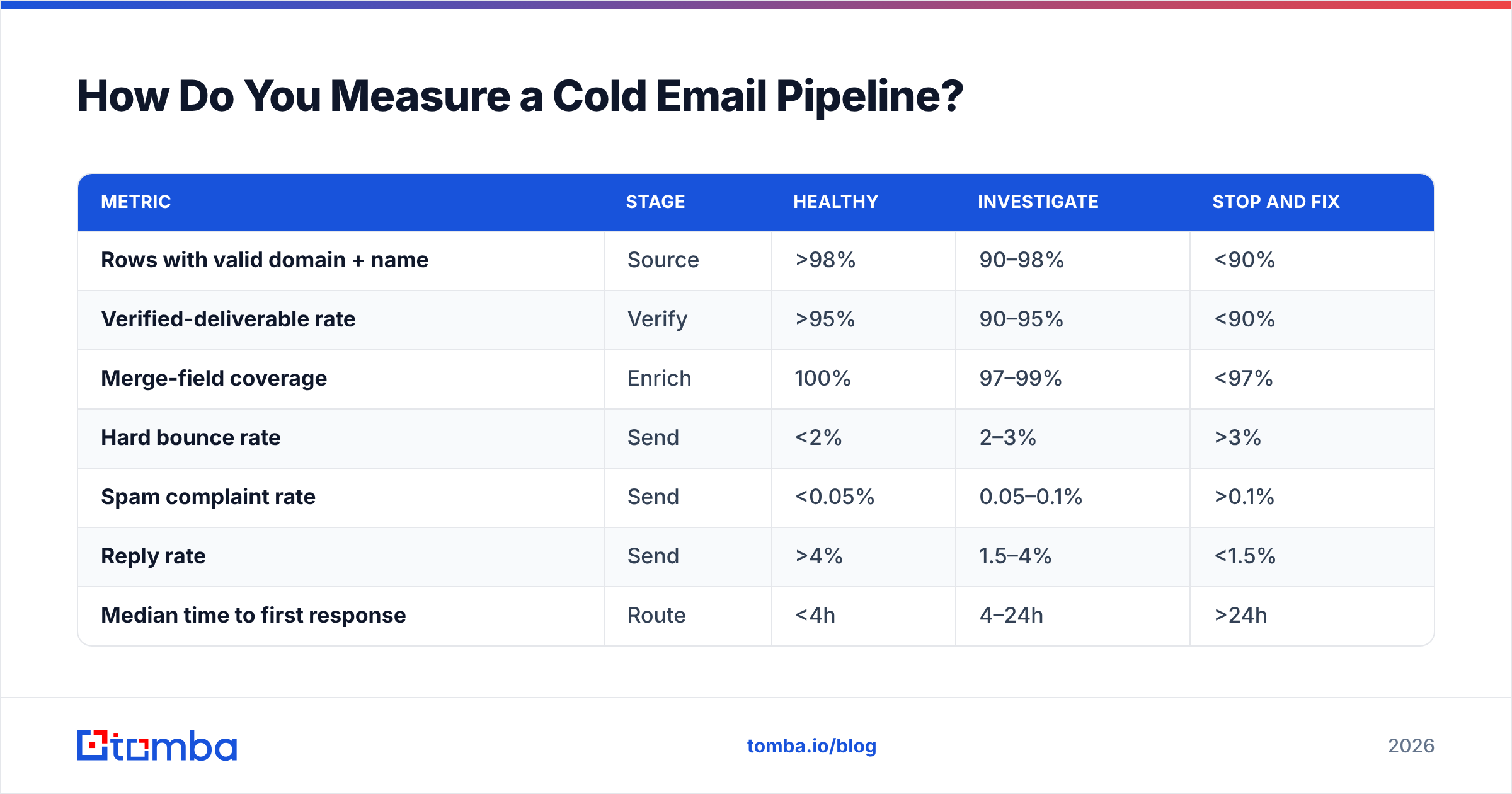
By stage, not in aggregate. An aggregate reply rate tells you the pipeline is sick. It doesn't tell you which organ.
Run these five numbers weekly. Each maps to exactly one stage, so a red number points at one place to look.
| Metric | Stage | Healthy | Investigate | Stop and fix |
|---|---|---|---|---|
| Rows with valid domain + name | Source | >98% | 90–98% | <90% |
| Verified-deliverable rate | Verify | >95% | 90–95% | <90% |
| Merge-field coverage | Enrich | 100% | 97–99% | <97% |
| Hard bounce rate | Send | <2% | 2–3% | >3% |
| Spam complaint rate | Send | <0.05% | 0.05–0.1% | >0.1% |
| Reply rate | Send | >4% | 1.5–4% | <1.5% |
| Median time to first response | Route | <4h | 4–24h | >24h |
The diagnostic logic is strictly ordered. If verified-deliverable rate is red, do not look at reply rate — reply rate is meaningless when a tenth of your sends never arrive. Fix upstream first, always. It's the same reason a doctor checks your airway before your reflexes.
One number people over-index on: open rate. Apple Mail Privacy Protection has pre-fetched images since 2021, which means a meaningful share of your "opens" are a proxy server, not a person. Open rate is directionally useful for spotting a sudden collapse. It is not a metric you optimize. Email deliverability is measured by what lands and what replies, not what pixels fire.
What Does a Working Weekly Cadence Look Like?#
Here's the operating rhythm for a three-rep team running roughly 500 sends per week. It fits in about six hours of non-selling work.
Monday — Source. Pull next week's accounts from your ICP filters. Run domain search across each target company to surface named contacts and the company's email pattern. Output: raw list, ~600 rows.
Monday afternoon — Verify. Push the raw list through verification. Drop invalids, quarantine catch-alls into a separate low-volume segment, remove role accounts. Output: ~470 verified rows. Losing 20% here is normal and healthy — those 130 rows were going to cost you deliverability.
Tuesday — Enrich. Fill every merge field the sequence references. If a row is missing the field, it doesn't go in the sequence. No exceptions, no "fallback to 'there'." Output: ~450 send-ready rows.
Tuesday afternoon — Load and stagger. Split across sending inboxes at no more than 40 sends per inbox per day. New domains stay under 20 until they've been warming for at least three weeks.
Wednesday through Friday — Send and route. Sequence runs. Replies get triaged same-day into three buckets: interested, not now, never. "Never" gets suppressed globally, not just in this campaign — reusing a hard no is how you generate complaints.
Friday — Review the gate table. Seven numbers, ten minutes. Any red cell gets an owner and a fix before Monday's sourcing run.
That's it. The discipline is not in the sophistication of any single step. It's in refusing to let data move downstream when a gate is red — which is precisely the discipline that collapses first when someone above you asks why sends are down this week.
What Should You Do First?#
If you're starting from zero: build the verify stage before you build anything else. It's the single highest-leverage insertion point, it takes an afternoon, and it retroactively improves every list you already own.
If you have a pipeline that's degrading: pull last month's bounce rate by campaign. You will almost certainly find that one list — usually the one someone exported in a hurry — is responsible for most of the damage. Suppress it, re-verify it, and watch the aggregate recover over the following two to three weeks. Reputation recovery is slow, which is exactly why prevention is cheaper than repair.
If you're comparing vendors: check whether the tool tells you why it thinks an address is valid. Sources, confidence score, last-seen date. A tool that returns a bare boolean is asking you to trust it blindly. Where the data comes from is a fair question and a good vendor answers it in public.
Start where the leak is. The Tomba Email Finder covers the source and verify stages in one pass — search by domain, name, or company, get back addresses with a confidence score and the sources behind it, and push straight into your sequencer without a CSV in between. The free tier gives you 25 searches a month to test the flow against a real segment; paid plans start at $49/mo with bulk and API access included. Check Tomba pricing if you're sizing it against your monthly contact volume, or wire it in through the API and let the pipeline run itself.
Related guides#
Ready to find emails that actually work?
Join 150,000+ professionals who stopped guessing and started sending. Free credits on signup — no credit card required.
Get the Tomba newsletter
Practical outbound tactics and product updates — once every two weeks.
About the author