Cold Email Verification: A Complete 2026 Guide for Senders
Bounce rates decide whether your cold email lands or dies. Here's how cold email verification actually works, what SMTP checks can and can't prove, and when paying to verify a list is a waste of credits.
TL;DR
- Cold email verification is an SMTP-level check that confirms a mailbox exists before you send to it. It is not a guarantee of a reply, an open, or even an inbox placement.
- Mailbox providers treat bounce rate as a reputation signal. Above roughly 3% you start losing inbox placement; above 5% you are actively burning the sending domain.
- Verification cannot resolve catch-all domains with certainty. Roughly 20–25% of B2B domains are catch-all, and any vendor promising 100% certainty there is overselling.
- You do not need to verify every list. Lists from a live-verified finder, scraped ~48 hours ago, are already clean enough. Lists older than 90 days, purchased, or exported from a stale CRM absolutely need a pass.
- Verification is cheap insurance — usually $0.001–$0.008 per email. A single burned domain costs far more in warmup time.
What is cold email verification?#
Cold email verification is the process of checking whether an email address can actually receive mail before you send a cold outreach message to it.
Think of it like calling a phone number and hanging up after one ring. You learn the line is connected without saying anything. Verification tools do the same thing over SMTP: they open a conversation with the recipient's mail server, ask "will you accept mail for this address?", read the response code, and disconnect before any message is delivered.
Technically, a verifier runs a stack of checks in sequence, cheapest first:
- Syntax check — does the address conform to RFC 5322? Catches typos like
john@@acme.comandjohn@acme..com. Free, instant, filters maybe 1–2% of a messy list. - Domain and MX check — does
acme.comresolve, and does it publish MX records? A domain with no MX cannot receive mail at all. This alone catches most dead startups and parked domains. - Disposable and role detection — is this
mailinator.com, or is itinfo@,sales@,support@? Role accounts rarely convert and often sit behind shared inboxes with aggressive spam filters. - SMTP handshake — connect to the MX server, issue
HELO,MAIL FROM, andRCPT TO, then read the response. A250means the mailbox is accepted. A550means it doesn't exist. ThenQUITwithoutDATA, so nothing is delivered. - Catch-all detection — probe the domain with a nonsense address like
qx7f2k9@acme.com. If the server accepts that too, the domain accepts everything and the SMTP result told you nothing. - Risk scoring — combine everything above with historical bounce data, spam-trap lists, and mailbox-provider patterns into a single verdict: valid, invalid, catch-all, or risky.
Steps 1–3 are near-free. Step 4 is where cost and latency live. Step 5 is where honest vendors and dishonest ones diverge.
Why does bounce rate matter so much?#
Because bounce rate is one of the loudest signals a mailbox provider has that you don't know who you're emailing.
When you send to an address that doesn't exist, the receiving server returns a hard bounce. Gmail, Outlook, and every serious inbox provider log that. A sender whose mail bounces at 8% looks structurally identical to a spammer running a dictionary attack — because functionally, they are doing the same thing.
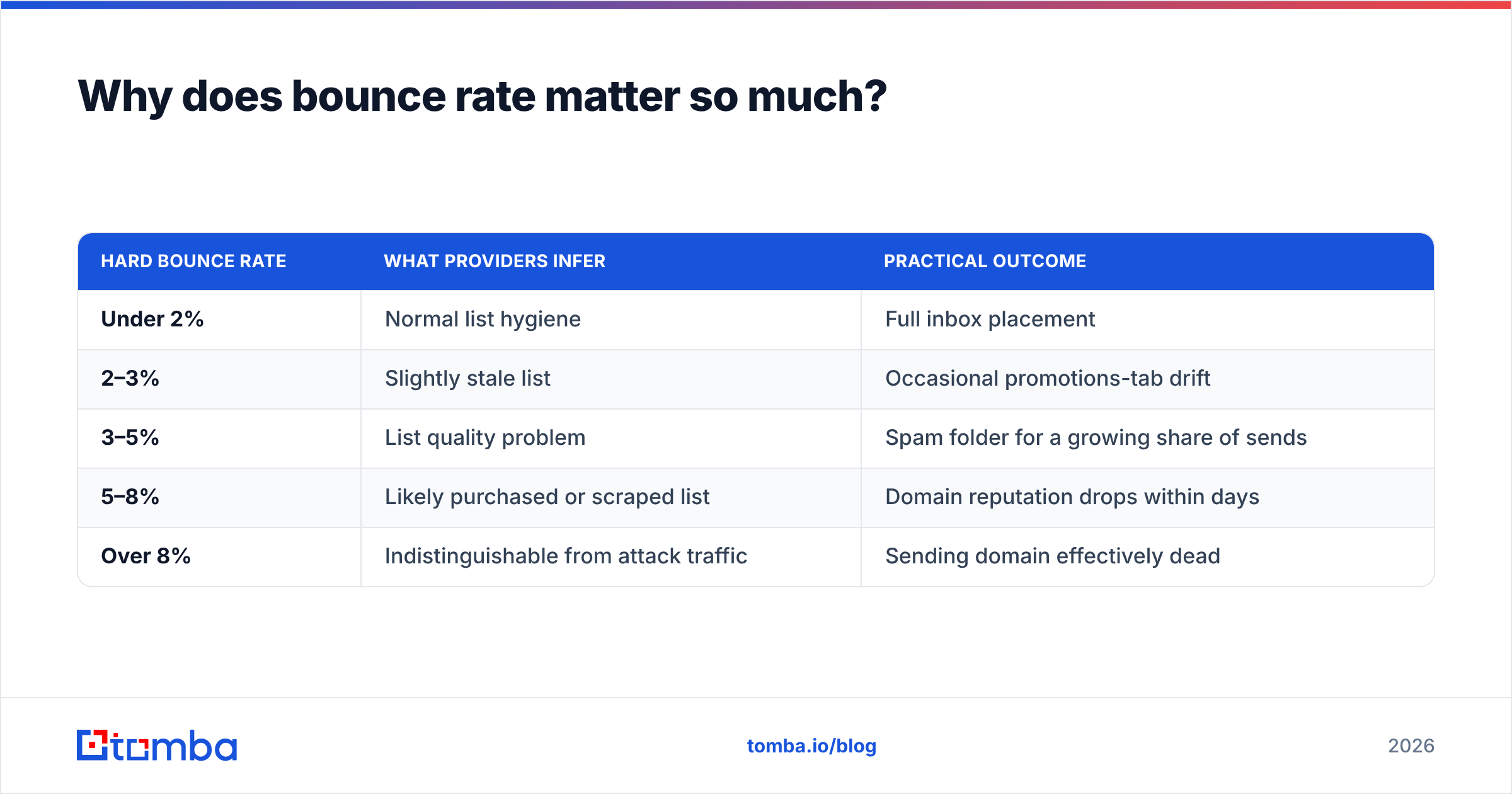
Google's sender guidelines are explicit that senders should keep spam complaint rates below 0.3% and maintain valid recipient lists. There's no published bounce threshold, but the operational consensus across cold email teams is:
| Hard bounce rate | What providers infer | Practical outcome |
|---|---|---|
| Under 2% | Normal list hygiene | Full inbox placement |
| 2–3% | Slightly stale list | Occasional promotions-tab drift |
| 3–5% | List quality problem | Spam folder for a growing share of sends |
| 5–8% | Likely purchased or scraped list | Domain reputation drops within days |
| Over 8% | Indistinguishable from attack traffic | Sending domain effectively dead |
The asymmetry is what makes verification worth it. A hard bounce is a permanent, non-recoverable failure — see the bounce message mechanics if you want the RFC-level detail. Meanwhile the cost to prevent that bounce is a fraction of a cent. You are paying $0.004 to avoid a signal that takes three weeks of warmup to unwind.
Also worth being blunt: verification protects your sender reputation, not your reply rate. A perfectly verified list of people who don't care about your product will still fail. Verification removes a failure mode. It does not add a success mode.
What is a catch-all domain, and why can't verification solve it?#
A catch-all (or "accept-all") domain is configured to accept mail for every address at that domain, whether the mailbox exists or not. Mail to nonexistent-person@acme.com is accepted at the SMTP layer, then silently discarded, forwarded to a wildcard inbox, or bounced hours later as a soft failure.
This breaks the entire verification model. The SMTP handshake returns 250 OK regardless of truth. Your verifier learned nothing.
Roughly a fifth to a quarter of B2B domains are catch-all, and the number skews higher at large enterprises running Microsoft 365 with a security gateway in front. So on an enterprise-heavy list, catch-alls are not an edge case — they are a quarter of your total addressable prospects.
Vendors handle this three ways:
- Mark them "unknown" and charge you nothing. Honest, unhelpful. You still have to decide.
- Mark them "valid" and move on. Inflates the vendor's accuracy score and quietly hands you the bounce risk.
- Run a secondary inference layer. Cross-reference the address against known-good sends, pattern confidence for the domain, and third-party signals to produce a probability rather than a binary.
The third approach is the only useful one, and it's what tools like a dedicated catch-all verifier attempt. Nobody resolves catch-alls with certainty over SMTP alone. If a vendor claims otherwise, ask them to explain how they distinguish 250 OK from 250 OK.
Practical rule: send to catch-alls, but segment them. Put them in a separate sequence, on a separate sending domain, with a lower volume cap. If that segment bounces at 4% while your verified segment bounces at 0.6%, you have learned something concrete about your data source, and your primary domain never absorbed the damage.
When should you verify — and when is it a waste of credits?#
This is the question most guides skip, because "always verify" sells more credits.
You do not need to verify when:
- The addresses came from a live email finder that runs SMTP verification at discovery time. The address was validated minutes ago. Re-verifying it tomorrow tells you the same thing and costs you twice.
- The list is under 30 days old and came from a source with a published accuracy methodology.
- You're sending to fewer than ~50 addresses. Manual sanity-checking is faster than a batch job.
You absolutely need to verify when:
- The list is older than 90 days. B2B email decays at roughly 22–30% annually — people change jobs, companies rebrand, mailboxes get deprovisioned.
- The list was purchased, downloaded, or scraped without per-address validation.
- The list came out of a CRM that nobody has cleaned since the last funding round.
- You're about to run a high-volume sequence on a domain you care about.
- You're onboarding a new sending domain and cannot afford a single reputation hit during warmup.
The decision is economic, not moral. A 5,000-address list costs about $20 to verify. A burned domain costs three weeks of warmup, a new domain purchase, and whatever pipeline you didn't build during those three weeks.

How do the main approaches compare?#
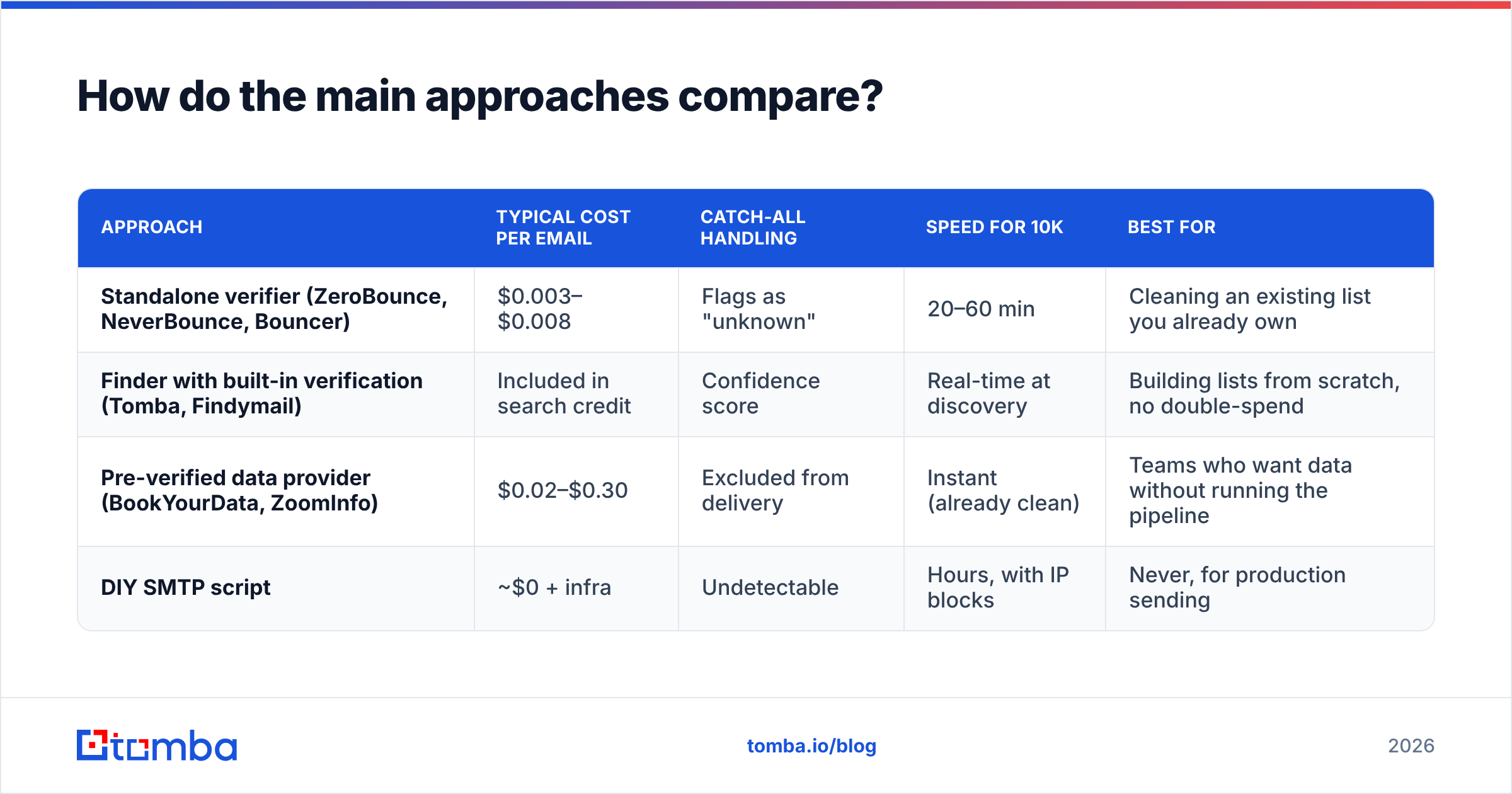
There are four ways to end up with a clean list, and they trade cost against control differently.
| Approach | Typical cost per email | Catch-all handling | Speed for 10k | Best for |
|---|---|---|---|---|
| Standalone verifier (ZeroBounce, NeverBounce, Bouncer) | $0.003–$0.008 | Flags as "unknown" | 20–60 min | Cleaning an existing list you already own |
| Finder with built-in verification (Tomba, Findymail) | Included in search credit | Confidence score | Real-time at discovery | Building lists from scratch, no double-spend |
| Pre-verified data provider (BookYourData, ZoomInfo) | $0.02–$0.30 | Excluded from delivery | Instant (already clean) | Teams who want data without running the pipeline |
| DIY SMTP script | ~$0 + infra | Undetectable | Hours, with IP blocks | Never, for production sending |
The DIY row deserves a warning. Running raw RCPT TO probes from your own IP gets that IP throttled by Google and Microsoft within a few thousand queries, and the results degrade silently — you start getting 450 temporary failures that your script may mis-read as valid. Verification vendors exist because they maintain rotating IP pools and reputation with mailbox providers. That infrastructure is the product; the SMTP logic is trivial.
The middle two rows are where most teams land. Pre-verified providers like BookYourData sell lists that arrive already validated, which is a genuinely good fit if your bottleneck is analyst time rather than budget. Finder-plus-verifier tools are the better fit when you're building targeted lists per campaign and don't want to pay twice for the same address.
What does verification actually cost?#
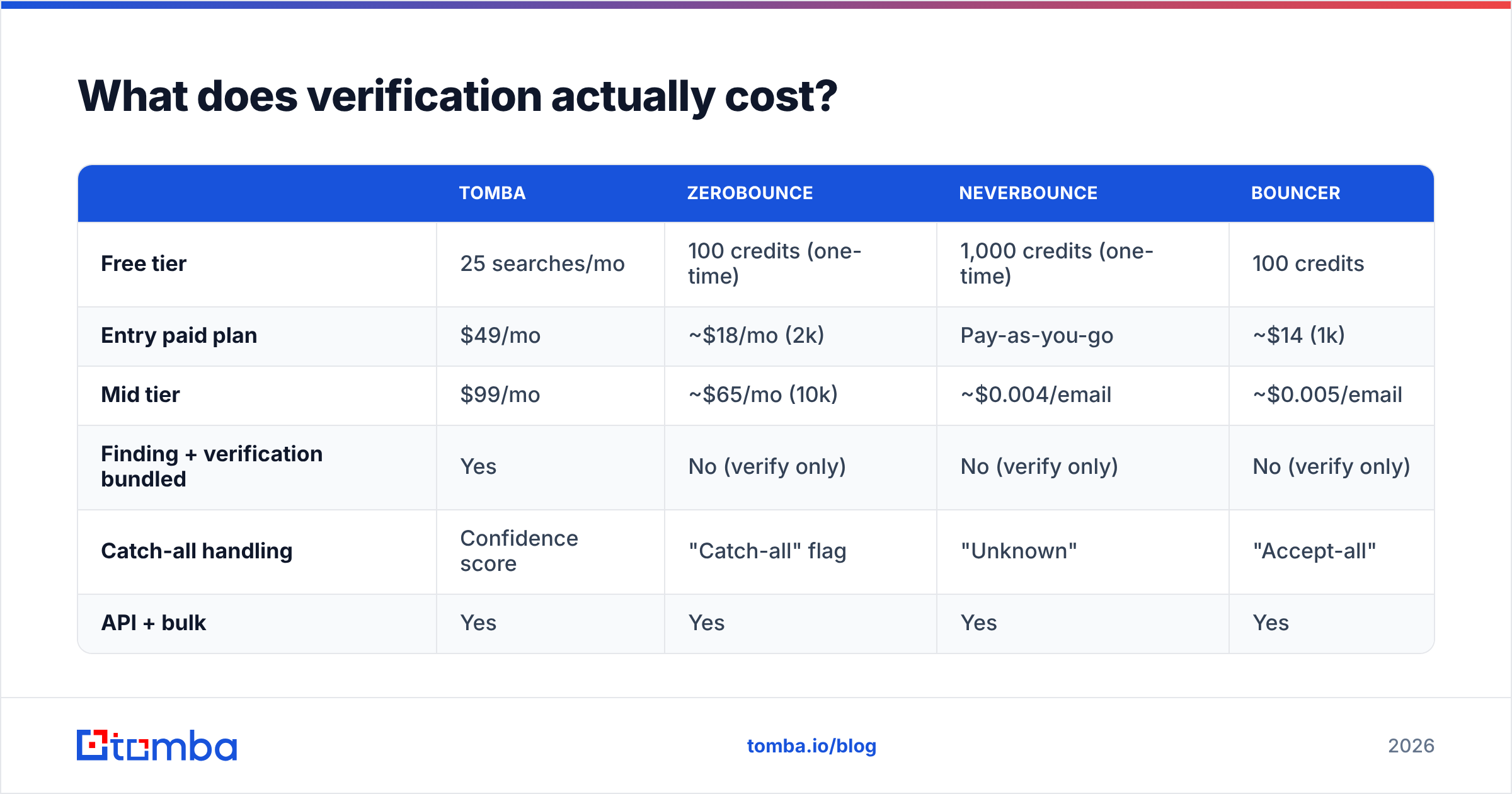
Pricing across the category is more similar than the marketing suggests. Most vendors are within a factor of two on per-email cost; the real differences are in the free tier, whether catch-alls are billed, and whether verification is bundled with finding.
| Tomba | ZeroBounce | NeverBounce | Bouncer | |
|---|---|---|---|---|
| Free tier | 25 searches/mo | 100 credits (one-time) | 1,000 credits (one-time) | 100 credits |
| Entry paid plan | $49/mo | ~$18/mo (2k) | Pay-as-you-go | ~$14 (1k) |
| Mid tier | $99/mo | ~$65/mo (10k) | ~$0.004/email | ~$0.005/email |
| Finding + verification bundled | Yes | No (verify only) | No (verify only) | No (verify only) |
| Catch-all handling | Confidence score | "Catch-all" flag | "Unknown" | "Accept-all" |
| API + bulk | Yes | Yes | Yes | Yes |
Two things to read out of that table.
First, standalone verifiers are cheaper per email than bundled tools — because they only do one thing. If you already have 200,000 addresses sitting in a warehouse, a standalone verifier is the correct purchase, and Tomba is not the cheapest way to clean them.
Second, if you're generating lists rather than cleaning them, bundling wins, because a bundled tool verifies at discovery. You never pay a second credit to confirm what you already confirmed. Tomba's pricing starts at a free tier of 25 searches per month, then $49/mo for Starter, $99/mo for Growth, and $249/mo for Pro — with verification, domain search, and enrichment drawing from the same credit pool.
Check the current email verification category on G2 before committing to an annual contract. Pricing in this space moves quarterly and the review volume tells you which vendors have real operational scale.
What verification will not fix#
Verification is a hygiene step, not a strategy. Teams routinely over-index on it and then wonder why a 0.2%-bounce campaign generated four replies from 3,000 sends.
Verification does not fix:
- Bad targeting. A valid mailbox belonging to someone with no budget and no problem is still a wasted send.
- Missing authentication. No SPF record, DKIM, or DMARC alignment means your mail gets filtered regardless of list quality.
- Cold domains. A brand-new domain sending 500 messages on day one will land in spam with a perfectly verified list.
- Spam-trap hits. Recycled traps are technically valid mailboxes. They pass verification cleanly and still blacklist you. Only list age and provenance protect you here.
- Volume abuse. Verified addresses do not raise your safe daily send limit.
- Bad copy. Nothing does.
If your email deliverability is broken and your bounce rate is already under 2%, verification is the wrong lever. Look at authentication, domain age, send volume ramp, and complaint rate first.
What does a sane workflow look like?#
Here's the sequence that holds up across most B2B outbound teams:
- Source addresses from a finder that verifies inline. You get a validated address at discovery. No separate cleaning step for fresh data.
- Segment catch-alls immediately. Separate list, separate sending domain, lower cap. Never mix them into your primary sequence.
- Re-verify anything older than 90 days. A bulk verify pass before a campaign takes minutes and costs less than lunch.
- Drop role accounts unless the role is the buyer.
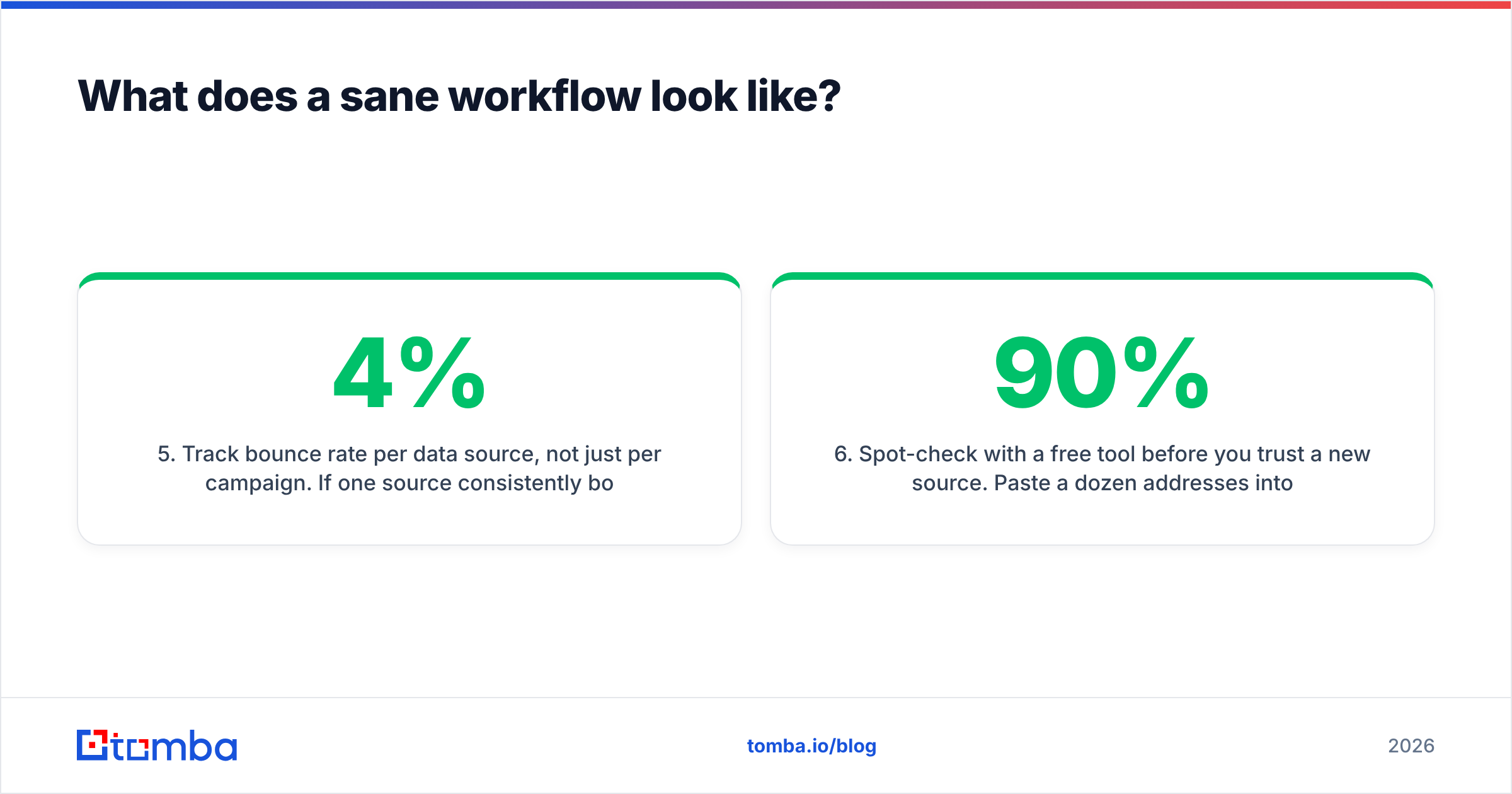
info@almost never converts in B2B.procurement@sometimes does. Know which you're targeting. - Track bounce rate per data source, not just per campaign. If one source consistently bounces at 4% and another at 0.5%, you have a vendor problem, not a verification problem.
- Spot-check with a free tool before you trust a new source. Paste a dozen addresses into a free email checker and see how many come back valid. If it's under 90%, walk away.
That last point is the highest-leverage habit on the list. Verification cleans a bad list. Measuring source quality means you stop buying bad lists in the first place.
The honest verdict#
Cold email verification is worth doing, cheap, and boring. It is also over-marketed as a growth lever when it is really a downside-protection measure.
If you're buying or reviving lists, verify — the math is trivially in your favor. If you're building lists with a tool that already validates at discovery, verifying again is a tax you're paying to a vendor for a result you already own. And if your bounce rate is fine but your replies are zero, verification is not your problem. Targeting is.
Segment your catch-alls. Track bounce rate by source. Re-verify anything that's been sitting for a quarter. That's the whole discipline.
Build clean lists instead of cleaning dirty ones. Tomba's Email Finder runs SMTP verification at the moment of discovery, scores catch-all domains instead of guessing, and pulls from the same credit pool as domain search and enrichment — so you're never paying twice to confirm the same address. Start on the free tier with 25 searches a month, or check the email verifier if you have an existing list that needs a pass first.
Related guides#
// get started
Find, verify and enrich your first contacts today
Start on the free plan with 25 searches a month, then scale when your team is ready.
Free plan · No credit card required · GDPR & CCPA
// about the author