Cold Email Warm Up: The Complete 2026 Guide to Inbox Placement
Warming up an inbox is not a 14-day chore you finish once. It's a reputation loop that either compounds or collapses. Here's what actually moves the needle in 2026 — and what's cargo-cult ritual.

TL;DR
- A cold email warm up builds sender reputation by sending small, engaged volumes from a new domain and inbox until mailbox providers trust you. It is a prerequisite, not a fix.
- The 14-day timeline everyone quotes is a floor, not a rule. Real ramp to 50+ cold sends/day takes 3–6 weeks, and it resets every time you spike volume.
- Warmup pools inflate open and reply rates with bot-to-bot traffic. Google and Microsoft have gotten measurably better at discounting that signal since the 2024 bulk-sender rules.
- The single biggest deliverability lever is not warmup software — it's list hygiene. A 5% bounce rate wipes out six weeks of careful ramping in one send.
- Authentication (SPF, DKIM, DMARC) must be live before the first warmup email leaves the box. Warming an unauthenticated domain teaches providers nothing.
What is a cold email warm up, really?#
A cold email warm up is the process of gradually increasing sending volume from a new domain and mailbox so that Gmail, Outlook, and corporate spam filters build a positive reputation profile for you before you start real outbound.
Think of it like a credit score. A brand-new domain has no credit history. Nobody knows if you pay your bills. Send 200 emails on day one and you look exactly like a spammer who bought a domain yesterday — because behaviorally, you are indistinguishable from one. Warmup is the sequence of small, boring, well-received transactions that establishes a payment history.
Technically, what you're influencing is a bundle of signals mailbox providers track per-domain and per-IP:
- Volume shape — how fast your daily send count grows, and how consistent it is day over day.
- Engagement rate — opens, replies, and "move to inbox" actions relative to sends.
- Complaint rate — spam-button presses. Google's bulk sender guidelines set the hard ceiling at 0.3%, with 0.1% as the target.
- Bounce rate — hard bounces signal you're mailing a purchased or stale list.
- Authentication alignment — SPF, DKIM, and DMARC all passing and aligned to your From domain.
Warmup software addresses exactly one of those five: engagement. That's the uncomfortable part most vendor blogs skip.
Why does the "14-day warmup" advice keep failing?#
Because 14 days is the time it takes for a warmup tool to generate a nice-looking graph, not the time it takes for a mailbox provider to trust you.
Here's what actually happens on a fresh domain. Days 1–5, you send 5–10 warmup emails a day into a reciprocal pool. They get opened, replied to, and dragged out of spam by other users of the same tool. Your dashboard turns green. Day 15, you fire your first real cold sequence at 40 prospects. Half are catch-all domains you never verified. Six bounce. Two mark you as spam because your subject line was "Quick question." Your reputation, which was built on synthetic engagement, collapses in 48 hours because the real signal contradicts the synthetic one.
The failure mode is a mismatch between the warmup traffic and the production traffic. If your warmup emails average a 60% reply rate and your cold campaign averages 2%, the provider doesn't average those. It notices the discontinuity.
Three practical corrections:
- Ramp in proportion to your real list quality. If you can only verify 200 clean contacts a week, don't ramp to 100 sends/day.
- Keep warmup running during production, not just before it. Reputation decays. A domain that goes quiet for three weeks starts partway back down the ladder.
- Never spike. A 3× jump in daily volume is a stronger negative signal than a slightly elevated bounce rate.
How long should a cold email warm up actually take?#
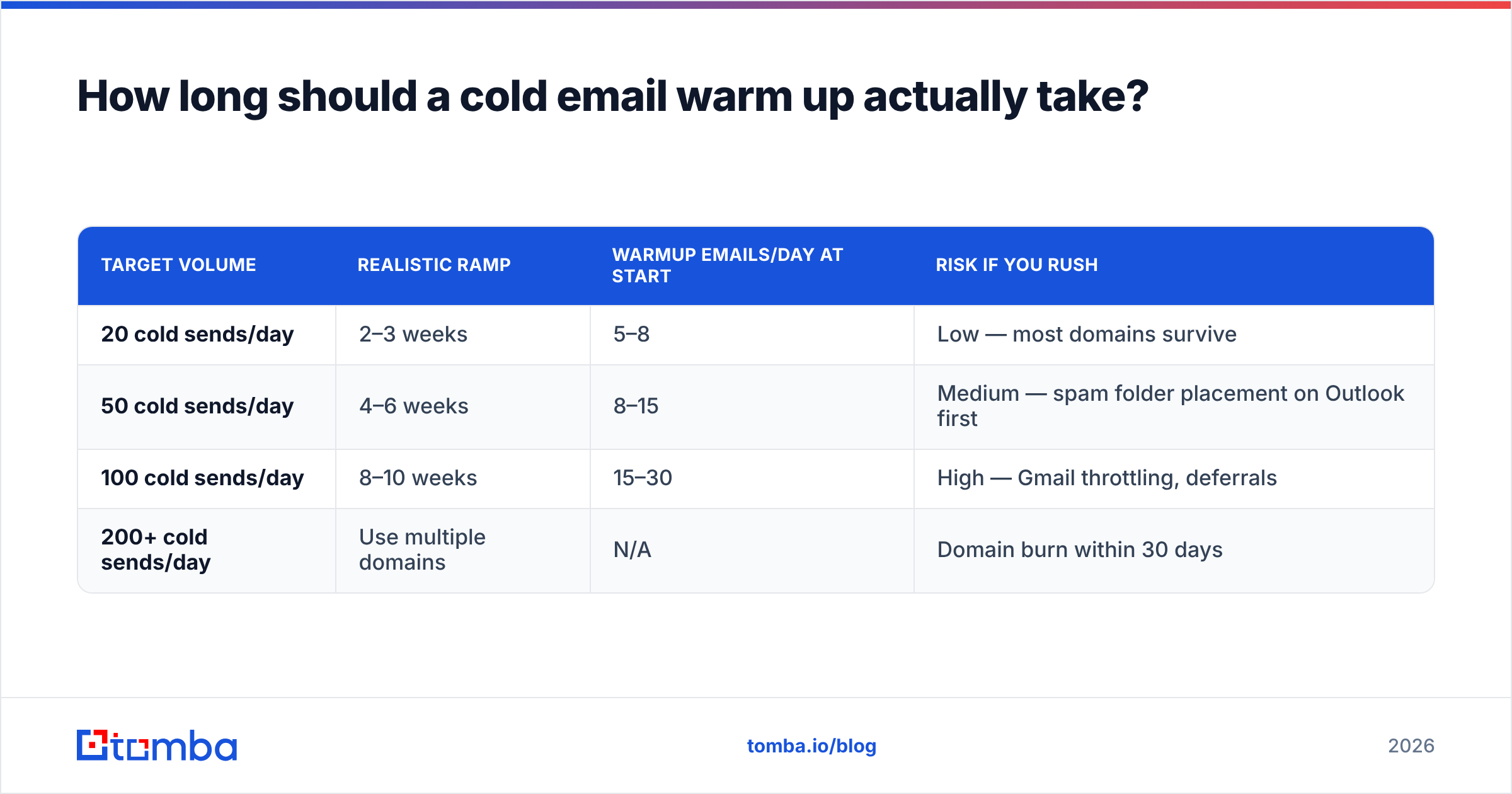
Longer than you want, shorter than paranoia suggests. The variable that matters is target daily volume, not calendar days.
| Target volume | Realistic ramp | Warmup emails/day at start | Risk if you rush |
|---|---|---|---|
| 20 cold sends/day | 2–3 weeks | 5–8 | Low — most domains survive |
| 50 cold sends/day | 4–6 weeks | 8–15 | Medium — spam folder placement on Outlook first |
| 100 cold sends/day | 8–10 weeks | 15–30 | High — Gmail throttling, deferrals |
| 200+ cold sends/day | Use multiple domains | N/A | Domain burn within 30 days |
A note on that last row: past roughly 100 cold sends per day per mailbox, the correct answer stops being "warm up harder" and becomes "add mailboxes." Most experienced outbound teams run 2–4 inboxes per sending domain and 3–5 sending domains, each capped around 30–50 sends/day. The math is boring and it works.
What does a real warmup schedule look like week by week?#
Here's a schedule that assumes a new domain, correct authentication on day zero, and a target of 40 cold sends/day.
- Week 0 — Infrastructure. Buy the domain (a
.comvariant of your main brand, not a random TLD). Set up SPF, DKIM, DMARC atp=none. Add a real MX record. Put up a one-page website that redirects nowhere suspicious. Wait 7–14 days before sending anything. Domain age is a live signal. - Week 1 — Human warmup only. 5–10 emails/day to colleagues, existing customers, your own other accounts. Real conversations with real replies. No tooling.
- Week 2 — Add automated warmup. Layer in a warmup pool at 10–15/day. Keep human sends going. Monitor Google Postmaster Tools for the first reputation data point.
- Week 3 — First production sends. 5–10 cold emails/day, to your best-verified contacts only. Warmup continues in parallel. Watch reply rate and complaint rate daily.
- Week 4–6 — Scale by 30% per week. 10 → 13 → 17 → 22 → 29 → 38. If bounce rate exceeds 2% or complaint rate exceeds 0.1% in any week, hold volume flat until it recovers.
- Ongoing — Never turn warmup off. Keep 10–20 warmup emails/day running underneath production forever.
The discipline in step 5 is where most teams break. A 30% weekly increase feels glacial when your quota is monthly. It is also the difference between a domain that lasts two years and one that lasts nine weeks.
Is warmup software worth paying for?#
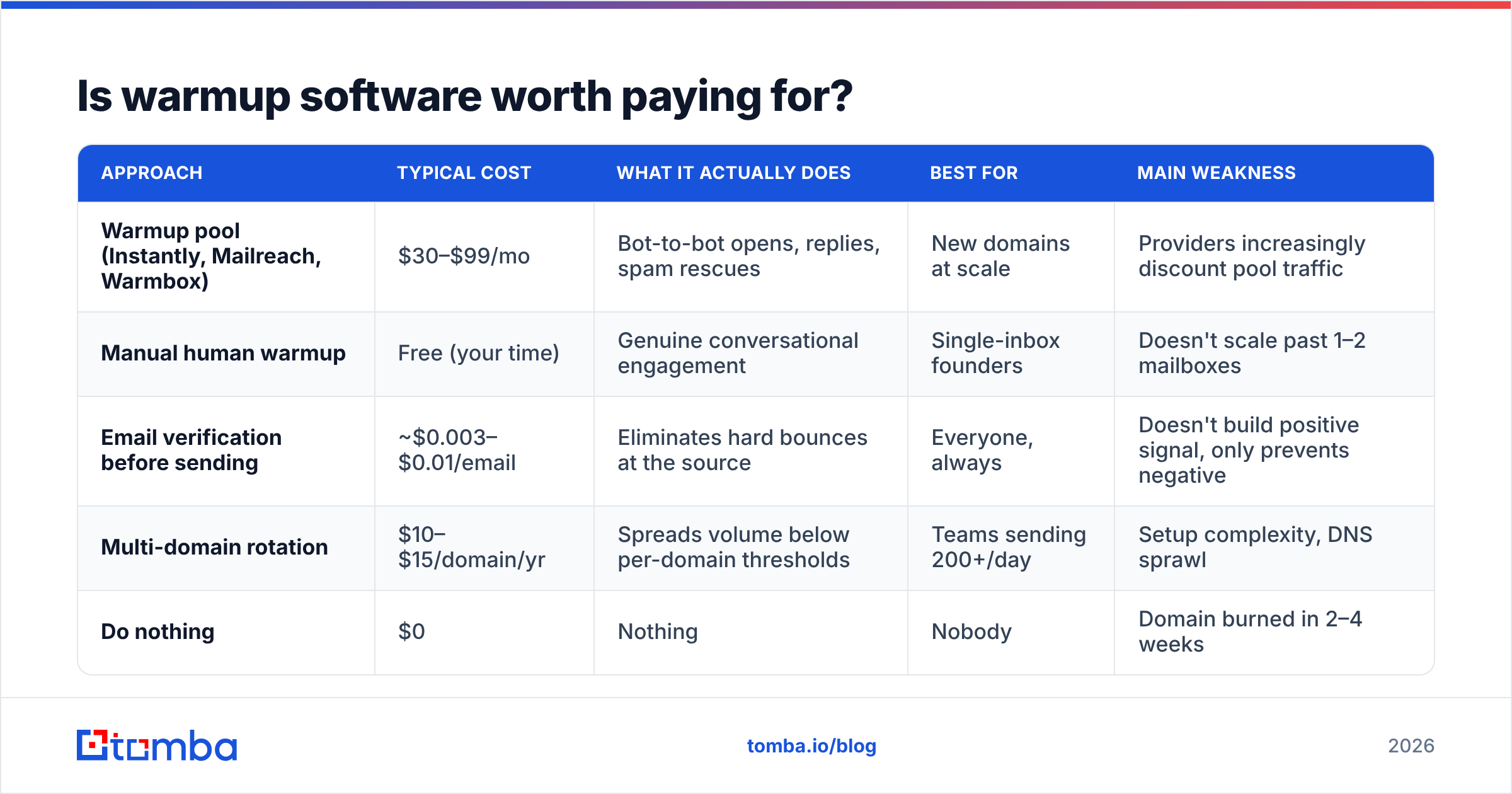
It depends on whether you're buying engagement signal or buying reassurance. Here's an honest comparison of the approaches.
| Approach | Typical cost | What it actually does | Best for | Main weakness |
|---|---|---|---|---|
| Warmup pool (Instantly, Mailreach, Warmbox) | $30–$99/mo | Bot-to-bot opens, replies, spam rescues | New domains at scale | Providers increasingly discount pool traffic |
| Manual human warmup | Free (your time) | Genuine conversational engagement | Single-inbox founders | Doesn't scale past 1–2 mailboxes |
| Email verification before sending | ~$0.003–$0.01/email | Eliminates hard bounces at the source | Everyone, always | Doesn't build positive signal, only prevents negative |
| Multi-domain rotation | $10–$15/domain/yr | Spreads volume below per-domain thresholds | Teams sending 200+/day | Setup complexity, DNS sprawl |
| Do nothing | $0 | Nothing | Nobody | Domain burned in 2–4 weeks |
The honest read: warmup pools are a supplement, not a foundation. They were dramatically more effective in 2021 than they are in 2026, because providers have had five years to fingerprint reciprocal networks. Anecdotally, teams that rely on pool traffic alone and skip verification see spam placement at Outlook/Microsoft 365 domains far earlier than Gmail — Microsoft's filters weight complaint and bounce history more aggressively than engagement.
What has not gotten less effective: not sending to dead addresses. Which brings us to the thing nobody sells because it isn't a subscription with a dashboard.
Why does list quality beat warmup every single time?#
Because bounces are a deterministic negative signal and engagement is a probabilistic positive one.
A hard bounce tells the provider, with certainty, that you mailed an address that does not exist. There's exactly one way to acquire a large number of non-existent addresses: you didn't check. Providers know this. Gmail will tolerate a lot of low engagement; it tolerates very little bouncing.
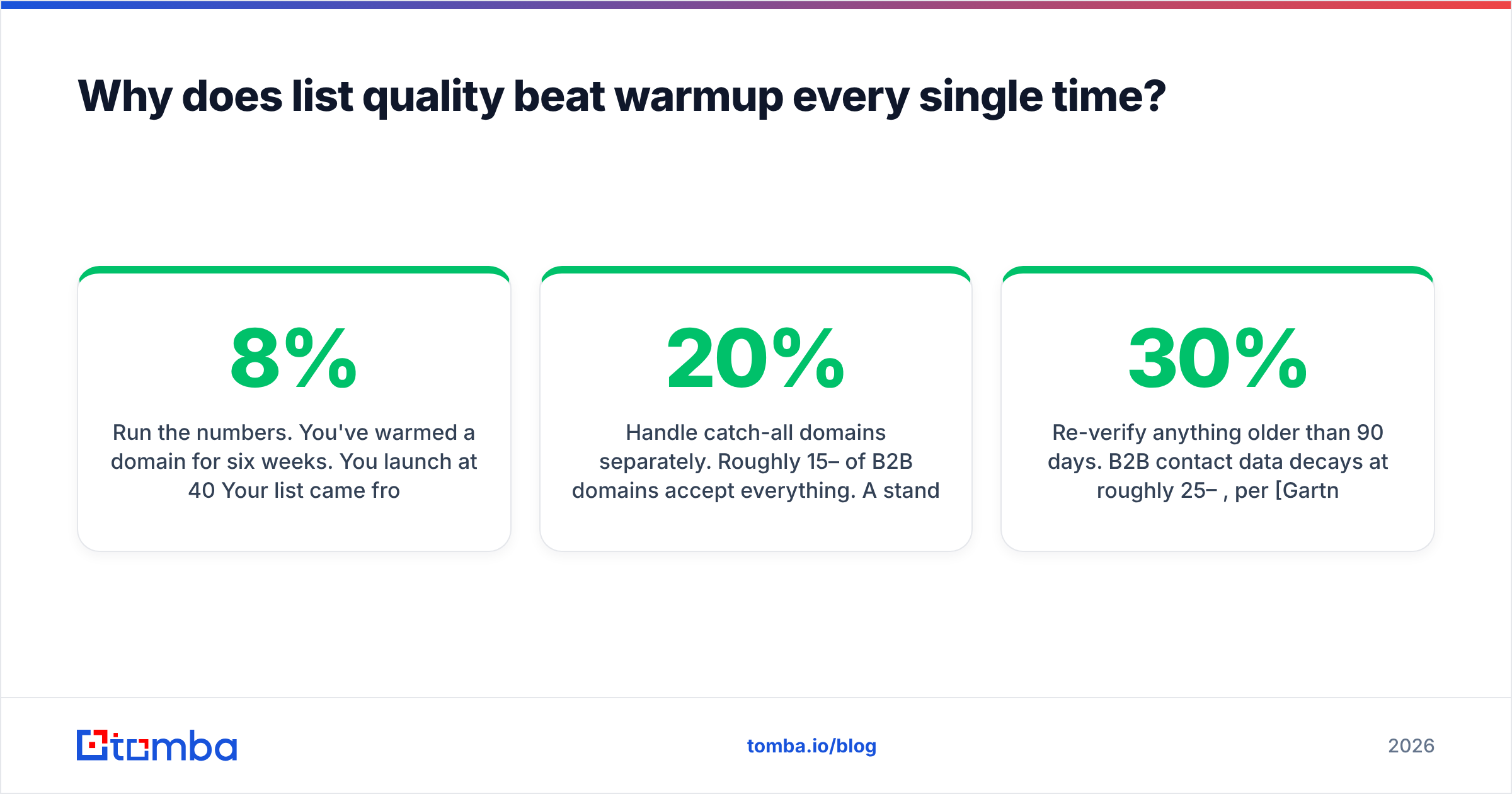
Run the numbers. You've warmed a domain for six weeks. You launch at 40/day. Your list came from a scraped export and has an 8% invalid rate. That's ~3 hard bounces per day, every day. Within a week, you've told Gmail eleven separate times that you're mailing garbage. No amount of pool-generated replies offsets that.
The fix is unglamorous and takes twenty minutes:
- Verify every address before it enters a sequence. Use an email verifier that does SMTP-level checks, not just syntax and MX lookups.
- Handle catch-all domains separately. Roughly 15–20% of B2B domains accept everything. A standard verifier returns "unknown." A dedicated catch-all verifier applies pattern confidence and historical data to give you a real risk score instead of a shrug.
- Source emails you can trust from the start. Finding an address by domain pattern and validating it in the same step (domain search) beats buying a list and cleaning it afterward.
- Re-verify anything older than 90 days. B2B contact data decays at roughly 25–30% per year, per Gartner and most vendor-neutral estimates. Your six-month-old list is not the list you exported.

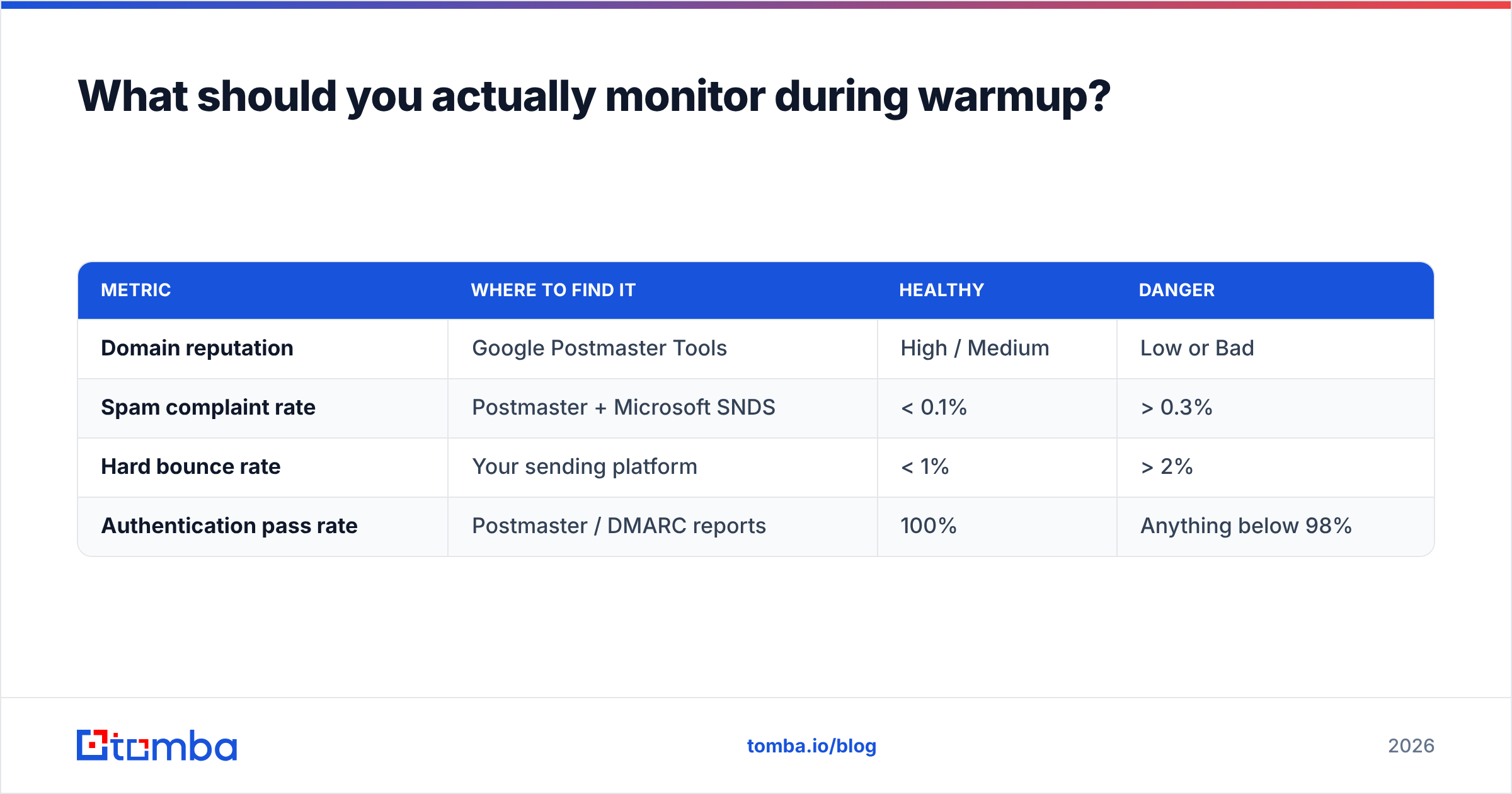
What should you actually monitor during warmup?#
Four numbers, checked weekly. Ignore vanity metrics.
| Metric | Where to find it | Healthy | Danger |
|---|---|---|---|
| Domain reputation | Google Postmaster Tools | High / Medium | Low or Bad |
| Spam complaint rate | Postmaster + Microsoft SNDS | < 0.1% | > 0.3% |
| Hard bounce rate | Your sending platform | < 1% | > 2% |
| Authentication pass rate | Postmaster / DMARC reports | 100% | Anything below 98% |
Google Postmaster Tools is free and requires a DNS TXT record to activate. Microsoft's equivalent, SNDS, is IP-based and mostly useful if you run your own infrastructure rather than sending through Google Workspace.
If domain reputation drops from High to Medium, stop scaling immediately and hold flat for two weeks. If it drops to Low, pause production sends entirely, keep warmup running, and audit the last 500 addresses you mailed. In practice, the audit almost always finds the same thing: unverified contacts, a spike day, or a subject line that triggered complaints.
When should you skip warmup entirely?#
Three cases, and they're narrower than people assume.
Your domain is established and already sends transactional or newsletter mail. If yourcompany.com has been sending receipts for four years with clean metrics, adding 20 cold sends/day from a new mailbox on that domain needs mailbox-level ramping, not domain-level warmup. But understand the trade: you are now putting your primary domain's reputation at risk. Most teams shouldn't.
You're sending fewer than 10 emails a day, forever. At that volume, human-quality personalization and clean addresses are sufficient. Warmup pools add noise, not signal.
You're replying, not initiating. Inbound replies and referral intros carry engagement signal that no pool replicates.
Everything else — new domain, cold list, any volume above a trickle — needs the ramp.
What's the practical checklist?#
- Buy the domain 2 weeks before you need it. Age is free reputation.
- SPF, DKIM, DMARC live before email one.
p=noneinitially, tighten top=quarantineafter 30 days of clean reports. Check your record with an SPF checker rather than trusting your DNS panel. - Human warmup week 1. Tooling week 2. Production week 3.
- Cap each mailbox at 30–50 cold sends/day. Add mailboxes, not volume.
- Verify every address. Every time. No exceptions for "this list looks fine."
- Never increase volume more than 30% week over week.
- Check Postmaster Tools every Monday. If reputation dips, hold flat.
- Keep warmup running underneath production permanently.
- Rotate content. Identical templates at scale are a fingerprint.
- Kill any sequence with a complaint rate above 0.2% immediately. Don't tune it. Kill it.
The part that decides everything#
Warmup is reputation maintenance. It doesn't create trust out of nothing — it protects trust you haven't spent yet. The fastest way to spend it is to mail addresses that don't exist, and the cheapest insurance is knowing they exist before you press send.
That's the whole argument for getting the sourcing step right. If your contacts come from a verified, SMTP-checked source with pattern confidence on catch-alls, your bounce rate stays under 1% by construction — and every hour of warmup you invested keeps compounding instead of leaking.
Start there. The Tomba Email Finder returns addresses with a confidence score and runs verification in the same call, so a contact never enters your sequence unless it's real. The free tier gives you 25 searches a month to test it against a list you already trust, and paid plans start at $49/mo — see Tomba pricing for the full breakdown. Warm up your domain properly, then feed it addresses that won't undo the work.
Related guides#
// get started
Find, verify and enrich your first contacts today
Start on the free plan with 25 searches a month, then scale when your team is ready.
Free plan · No credit card required · GDPR & CCPA
// about the author