Company Data API: How to Enrich Records at Scale in 2026
A company data API turns a bare domain or company name into a full firmographic profile in milliseconds. Here's how they work, what to check before you buy, and how to keep the data fresh.
Picture a lead form that captures nothing but a work email. Behind the scenes, before the record even hits your CRM, a single API call turns jane@acme.com into a full profile: Acme's industry, headcount band, revenue estimate, HQ location, tech stack, and social handles. That call is a company data API at work, and it's the difference between a sales team that guesses and one that routes, scores, and personalizes in real time.
This guide explains what a company data API actually does, how to judge one, and where the honest trade-offs live.
TL;DR#
- A company data API returns structured firmographic data (industry, size, revenue, location, tech) from a single input like a domain, company name, or email.
- The three metrics that matter are coverage (how many companies it knows), freshness (how recently the record was updated), and match rate (how often you get a hit on your input).
- Real-time enrichment at signup beats batch CSV uploads because stale data decays roughly 25–30% per year.
- Pricing models split into per-call, credit-based, and flat monthly. Watch for hidden costs on bulk jobs and low match rates that inflate your effective price.
- Pair a company data API with an email finder and data enrichment endpoint so you enrich both the account and the contact in one flow.
What is a company data API?#
A company data API is a web service that accepts a simple identifier and returns a structured JSON profile of the organization behind it. Think of it like a search librarian for businesses: you hand over one detail you already know (a domain, say), and it comes back with the full record card — no manual lookup, no browser tab, no copy-paste.
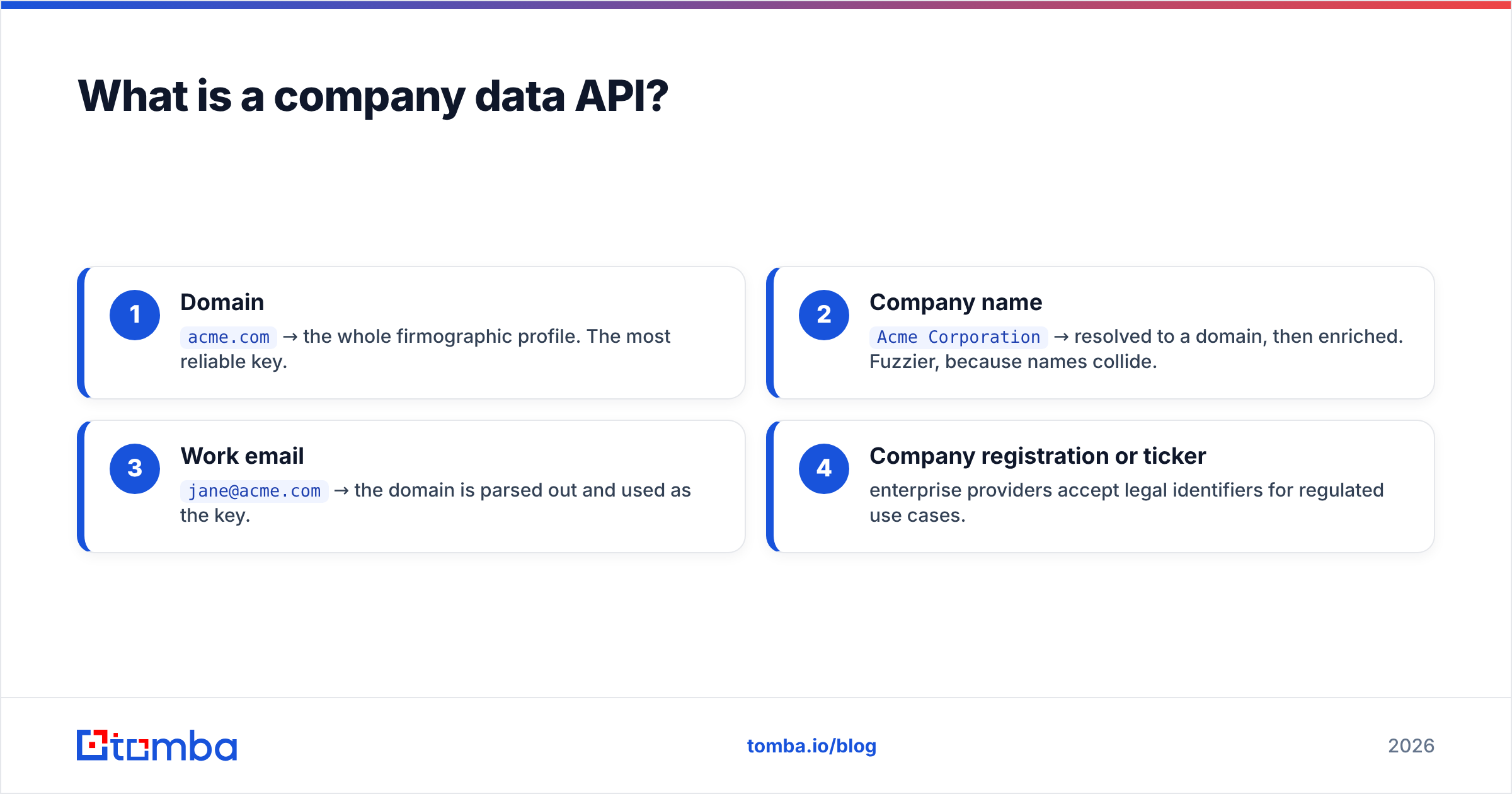
The typical input is one of:
- Domain —
acme.com→ the whole firmographic profile. The most reliable key. - Company name —
Acme Corporation→ resolved to a domain, then enriched. Fuzzier, because names collide. - Work email —
jane@acme.com→ the domain is parsed out and used as the key. - Company registration or ticker — enterprise providers accept legal identifiers for regulated use cases.
What comes back is a normalized object. Instead of the ten different ways a website might list "50-200 employees," you get a clean employee_range field you can filter and score on. That normalization is the real product — raw facts exist all over the public web, but turning them into consistent, machine-readable fields is the hard part.
What fields does a company data API return?#
Coverage varies by vendor, but a mature company data API exposes most of the following:
- Firmographics: industry, sub-industry, NAICS/SIC codes, founded year
- Size signals: employee count or range, revenue estimate, funding stage
- Location: HQ address, country, additional offices
- Digital footprint: website, social profiles, logo URL
- Technographics: detected tech stack (CRM, analytics, ecommerce platform)
- Contact scaffolding: common email pattern, phone numbers, key roles
If you only need the last group — reaching people rather than profiling accounts — a focused domain search returns the emails behind a company without the full firmographic payload.
Why does a company data API matter for B2B teams?#
Because manual research doesn't scale and stale data quietly rots your funnel. According to Gartner, data quality is a persistent drag on sales and marketing productivity, and firmographic data decays as companies hire, move, get acquired, and change tools. A company data API is how you fight that decay continuously instead of once a quarter.
Here's where it earns its keep:
- Lead routing. Enrich at form submission and route enterprise deals to senior reps and SMB deals to self-serve — instantly, before a human touches the record.
- Lead scoring. Feed employee count, revenue, and tech signals into your scoring model so a 5-person shop and a 5,000-person enterprise don't get the same score.
- Shorter forms. Ask for an email only. Let the API fill the other nine fields. Every removed form field lifts conversion.
- Territory and TAM analysis. Enrich your whole database to size markets and spot whitespace.
- Personalization. "I saw Acme just moved to Shopify Plus" beats "Dear Sir or Madam."
The analogy: a company data API is the credit-check step for B2B. A lender doesn't take your word for your income — they pull a verified file in seconds and decide. Your revenue team can do the same for every inbound account.
How do you evaluate a company data API?#
Judge every provider on three numbers first, then everything else.
1. Coverage. How many companies are in the database, and in which regions? A US-heavy provider will leave gaps if you sell into APAC or EMEA. Ask for coverage by geography and by company size — many databases skew toward large enterprises and thin out on SMBs.
2. Freshness. When was the average record last refreshed? Data that's 18 months old will misroute leads and embarrass reps. Ask how often the source is recrawled and whether you can see a last_updated timestamp per record. Transparent vendors publish their data sources and refresh cadence.
3. Match rate. Of the inputs you actually send, what percentage return a usable profile? A database with 200 million companies is worthless if it whiffs on your specific ICP. The only honest way to know is to test with a sample of your own domains — never a vendor's cherry-picked demo list.
Beyond the big three, weigh these:
- Latency — sub-300ms if you enrich synchronously at signup.
- Rate limits — will they throttle you mid-campaign?
- Compliance — GDPR/CCPA posture and lawful basis, especially for any personal data.
- Bulk support — a proper bulk email finder or batch endpoint for enriching lists, not just one call at a time.
- Documentation — clear, tested API docs save days of integration time.

Build vs. buy: should you scrape your own company data?#
You can absolutely scrape company websites, LinkedIn, and public registries yourself. The question is whether it's cheaper than buying — and it almost never is once you count the true cost.
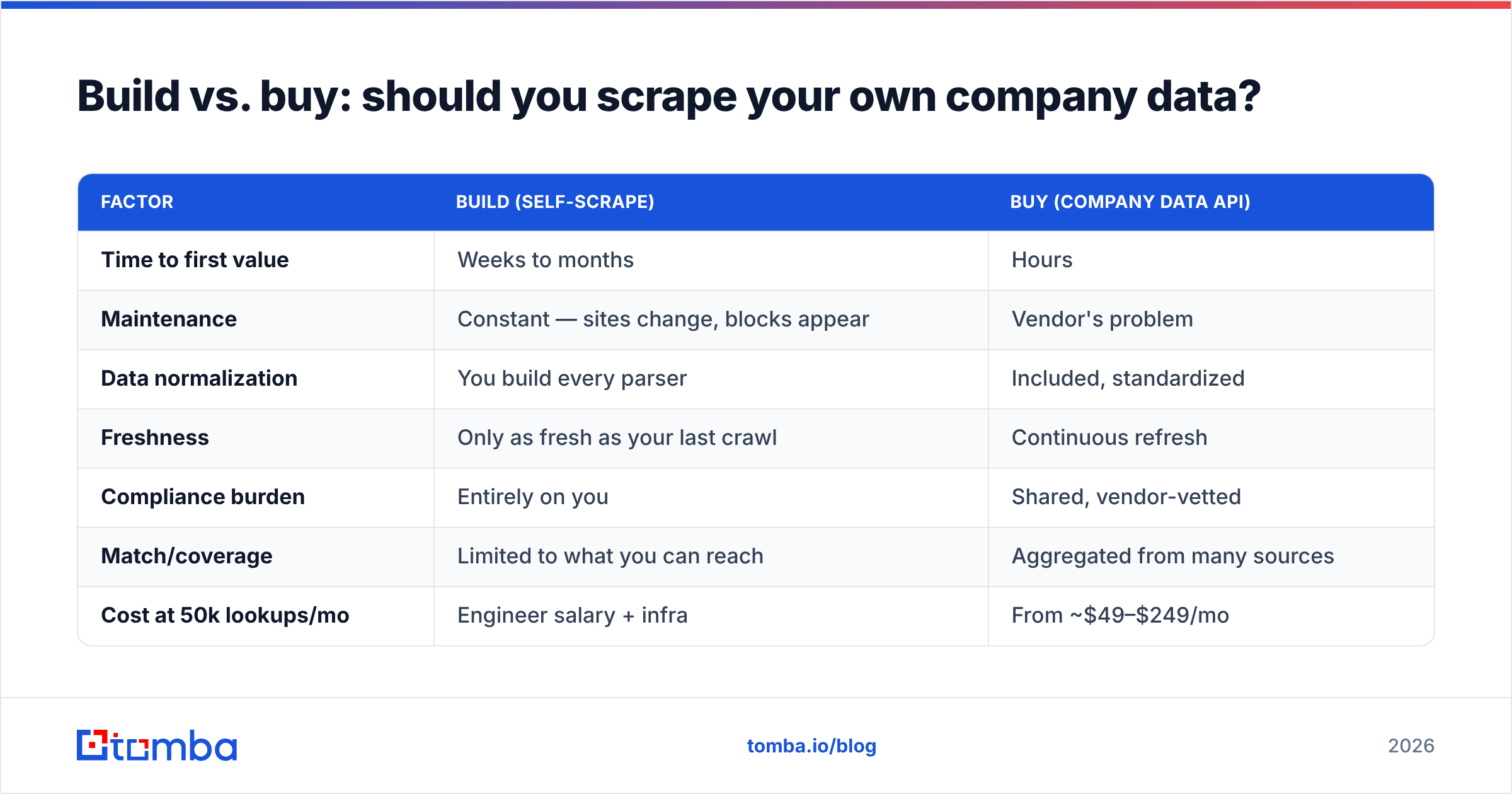
| Factor | Build (self-scrape) | Buy (company data API) |
|---|---|---|
| Time to first value | Weeks to months | Hours |
| Maintenance | Constant — sites change, blocks appear | Vendor's problem |
| Data normalization | You build every parser | Included, standardized |
| Freshness | Only as fresh as your last crawl | Continuous refresh |
| Compliance burden | Entirely on you | Shared, vendor-vetted |
| Match/coverage | Limited to what you can reach | Aggregated from many sources |
| Cost at 50k lookups/mo | Engineer salary + infra | From ~$49–$249/mo |
Scraping makes sense only when your data need is genuinely proprietary — a niche public dataset no vendor indexes. For standard firmographics, buying wins on cost, speed, and legal exposure. The build path also hides an ongoing tax: every time a target site changes its markup or adds bot protection, an engineer stops shipping features to fix a parser.
How do the pricing models compare?#
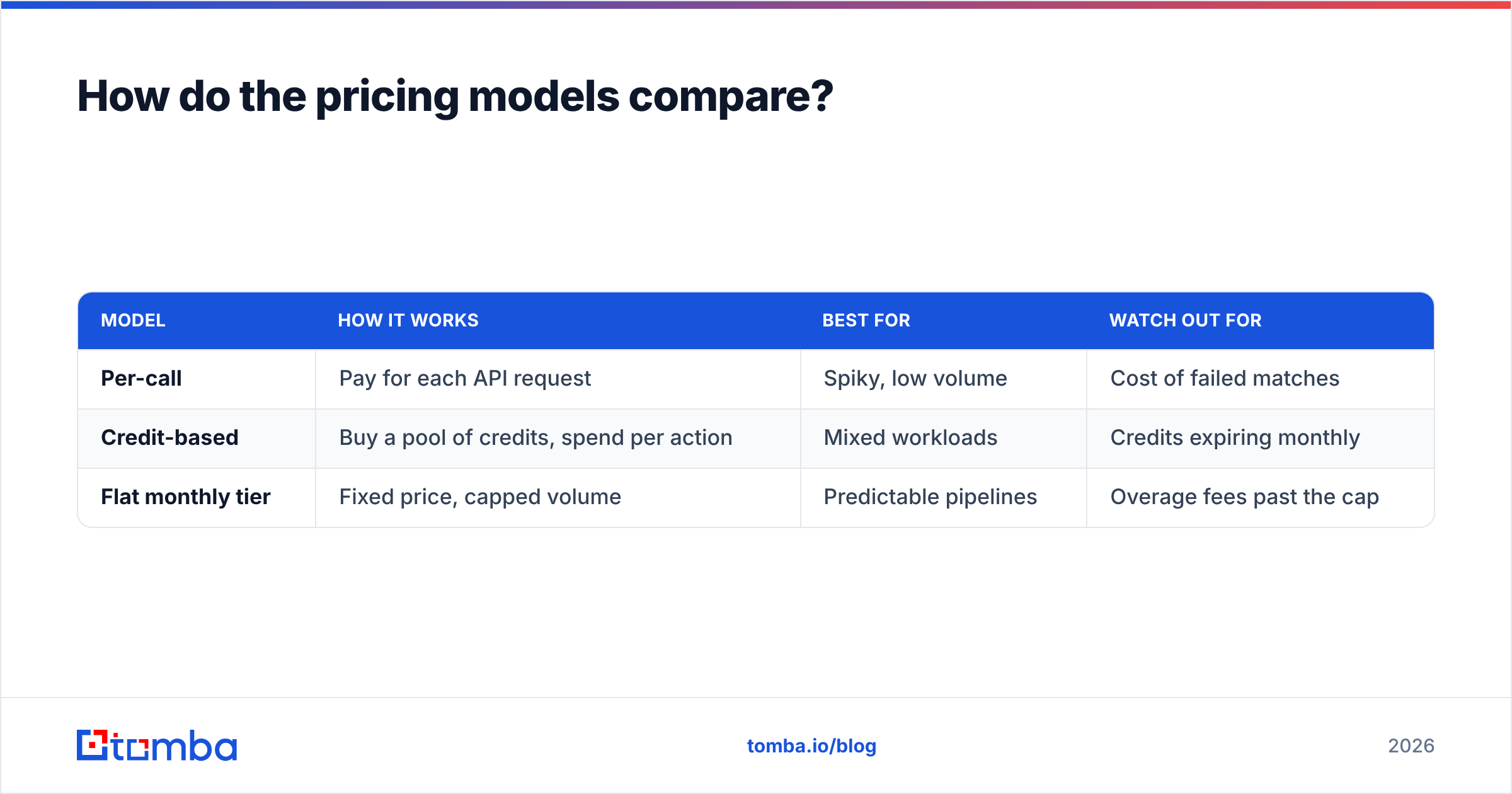
Company data APIs price in three broad ways, and the sticker number rarely reflects what you'll actually pay.
| Model | How it works | Best for | Watch out for |
|---|---|---|---|
| Per-call | Pay for each API request | Spiky, low volume | Cost of failed matches |
| Credit-based | Buy a pool of credits, spend per action | Mixed workloads | Credits expiring monthly |
| Flat monthly tier | Fixed price, capped volume | Predictable pipelines | Overage fees past the cap |
The trap is effective cost per usable record. A provider charging $0.01 per call with a 40% match rate costs you $0.025 per usable profile. A provider at $0.02 per call with an 85% match rate costs $0.024 — and wastes far less of your team's time chasing blanks. Always divide the price by the match rate, not the raw call count.
For reference, Tomba pricing runs a Free tier (25 searches/mo), Starter at $49/mo, Growth at $99/mo, Pro at $249/mo, and custom Enterprise — with the email finder, verifier, domain search, and enrichment sharing one credit pool so you're not buying four separate subscriptions.
Company data API vs. contact data API: what's the difference?#
They're complementary, not interchangeable, and confusing them is a common buying mistake.
- A company data API profiles the account: the organization's size, industry, tech, and location. It answers "is this company a fit?"
- A contact data API (an email finder or phone finder) profiles the person: their verified email, direct dial, and role. It answers "how do I reach the right human?"
A complete outbound stack uses both. You enrich the account to decide whether to pursue it, then find the contact to actually start the conversation. Tomba's contact database and phone finder sit next to the company-level lookups so one workflow covers both layers. If you only bolt on company data without contact data, you'll build a beautiful account profile and still have no one to email.
What are the most common company data API mistakes?#
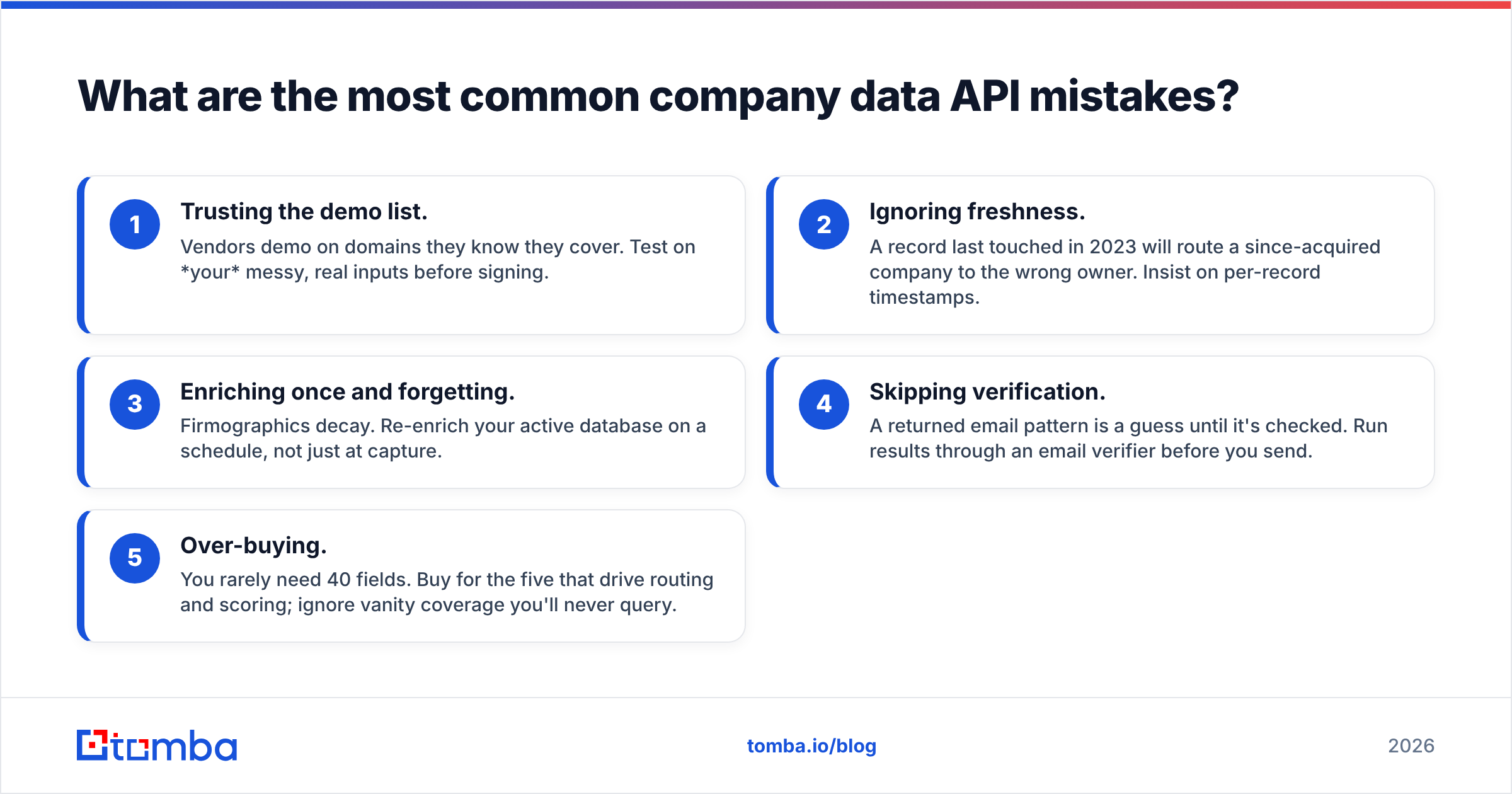
Five patterns burn teams repeatedly:
- Trusting the demo list. Vendors demo on domains they know they cover. Test on your messy, real inputs before signing.
- Ignoring freshness. A record last touched in 2023 will route a since-acquired company to the wrong owner. Insist on per-record timestamps.
- Enriching once and forgetting. Firmographics decay. Re-enrich your active database on a schedule, not just at capture.
- Skipping verification. A returned email pattern is a guess until it's checked. Run results through an email verifier before you send.
- Over-buying. You rarely need 40 fields. Buy for the five that drive routing and scoring; ignore vanity coverage you'll never query.
On that fourth point: enrichment and verification are different jobs. Enrichment tells you what a company is; verification confirms a contact detail is deliverable right now. Skipping the second step is why so many "enriched" lists still bounce.
How do you integrate a company data API cleanly?#
A durable integration follows a simple, boring pattern — and boring is what you want in plumbing.
- Enrich at the boundary. Call the API the moment data enters your system (form submit, CRM create), so no record lives un-enriched.
- Cache aggressively. Store the profile and a
last_enricheddate. Don't re-call for the same domain twice in a day. - Set a refresh TTL. Re-enrich records older than, say, 90 days. Balances freshness against cost.
- Handle misses gracefully. Design for the 15–40% that won't match. Fall back to a partial profile or a manual queue.
- Validate inputs. Normalize domains (strip
www, lowercase) before you send them, or you'll pay for avoidable misses.
If your team lives in spreadsheets rather than a codebase, you don't have to touch the raw API at all — a Google Sheets add-on or the ready-made HubSpot integration enriches rows where you already work. And when you're comparing vendors, independent review sites like G2 and reference material on firmographics are useful neutral checkpoints against any vendor's own claims.
Which company data API should you choose?#
There's no single winner — there's a best fit for your ICP, geography, and volume. Run a real trial: send 500 of your own domains through each finalist, measure match rate and freshness on the results, then divide price by usable records. The vendor that wins on that math wins for you, regardless of headline database size.
For teams that want firmographic enrichment and contact discovery from one place — with transparent pricing and a free tier to test on your real data — start with the Tomba Email Finder and layer in data enrichment as you scale. You can validate coverage on 25 free searches, confirm the match rate against your own list, and only upgrade once the numbers hold up. Enrich the account, find the contact, verify it's deliverable — one workflow, three problems solved.
Related guides#
Ready to find emails that actually work?
Join 150,000+ professionals who stopped guessing and started sending. Free credits on signup — no credit card required.
Get the Tomba newsletter
Practical outbound tactics and product updates — once every two weeks.
About the author