CompanyData.com (BoldData) vs LeadIQ: Which B2B Data Wins?
CompanyData.com (BoldData) sells static company lists; LeadIQ streams contacts into your CRM. We compare accuracy, pricing, and workflow fit so you pick the right B2B data tool in 2026.
Choosing between CompanyData.com (BoldData) vs LeadIQ comes down to one question: do you want a list or a workflow? Both sell B2B contact and company data, so they sound like rivals. In practice, they solve different problems. Buy the wrong one and you can waste a quarter of budget.
This guide breaks down what each tool does, how they price, where the data comes from, and who should pick which. No vendor spin — just the trade-offs.
TL;DR: BoldData vs LeadIQ in five bullets#
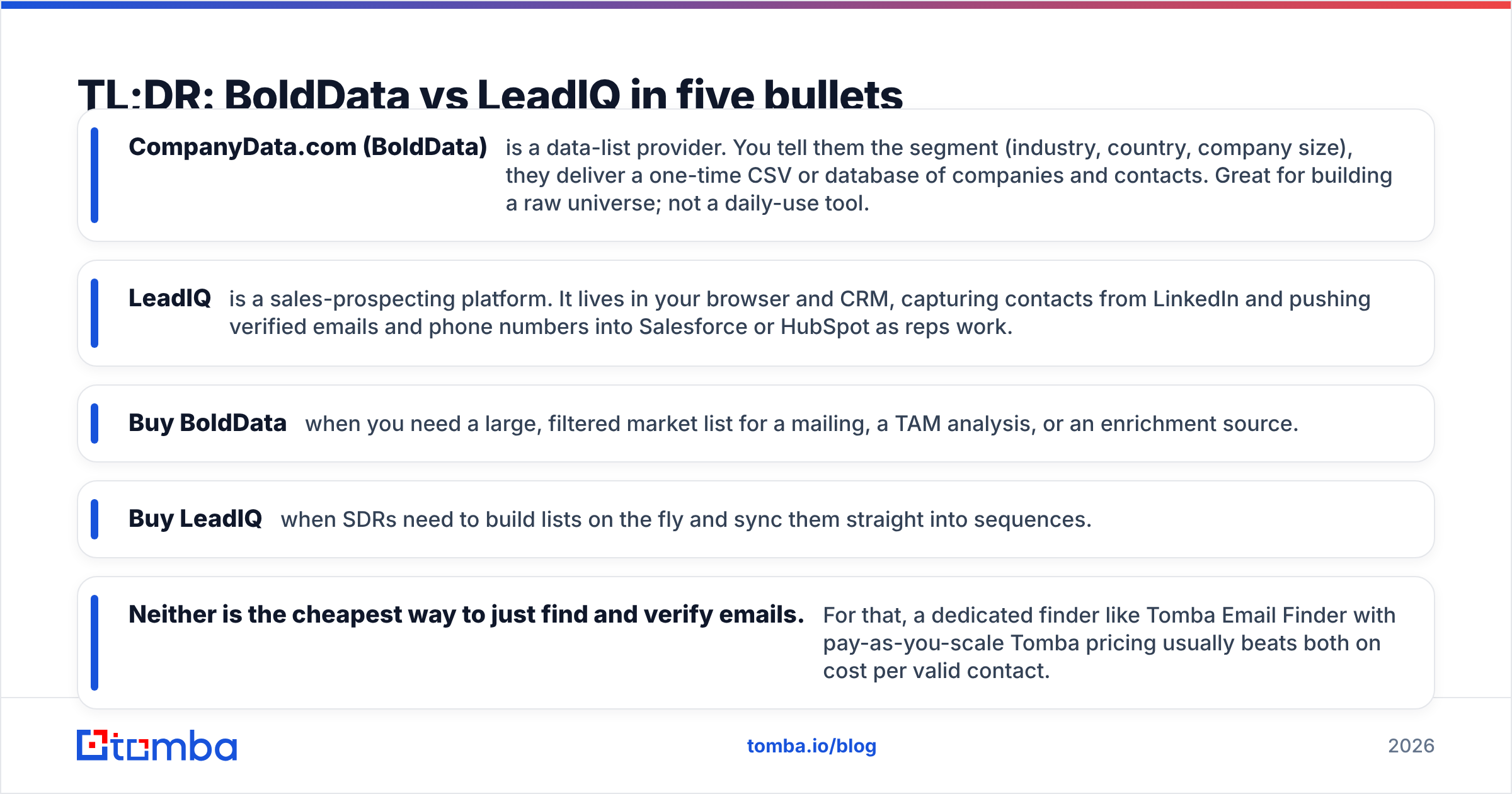
- CompanyData.com (BoldData) is a data-list provider. You tell them the segment (industry, country, company size), and they deliver a one-time CSV or database of companies and contacts. It is great for building a raw universe, but it is not a daily-use tool.
- LeadIQ is a sales-prospecting platform. It lives in your browser and CRM. It captures contacts from LinkedIn and pushes verified emails and phone numbers into Salesforce or HubSpot as reps work.
- Buy BoldData when you need a large, filtered market list for a mailing, a TAM analysis, or an enrichment source.
- Buy LeadIQ when SDRs need to build lists on the fly and sync them straight into sequences.
- Neither is the cheapest way to just find and verify emails. For that, a dedicated finder like Tomba Email Finder with pay-as-you-scale Tomba pricing usually beats both on cost per valid contact.
What is CompanyData.com (BoldData)?#
BoldData — which runs the CompanyData.com brand — is an Amsterdam-based B2B data vendor. It sells targeted company and contact databases. You describe an audience — say, all manufacturing firms in Germany with 50+ employees. They return a custom file drawn from a global database of hundreds of millions of companies across 200+ countries. You can read their positioning on the BoldData site.
The model is consultative and list-first. You do not log in every morning; you commission a dataset. That makes BoldData strong for:
- Direct mail and cold-outreach universes — a clean, filtered list to load into your outreach stack.
- Market sizing / TAM — counts by geography, industry (SIC/NACE codes), and revenue band.
- Enrichment source — fill gaps in an existing CRM with firmographics.
The catch is that a purchased list is a snapshot. People change jobs at about 2–3% per month, so a static contact file decays fast. You own the data outright, but you own its aging too.
What is LeadIQ?#
LeadIQ is a prospecting workflow tool. Its core surface is a Chrome extension that overlays LinkedIn and Sales Navigator. A rep views a prospect and clicks capture. LeadIQ then finds the work email and phone number, verifies them, and pushes the record into the CRM and sequencer in one motion.
Where BoldData hands you a finished list, LeadIQ is built for reps who assemble lists continuously as they research accounts. Its strengths:
- CRM-native capture — deduplicates against Salesforce/HubSpot so reps don't re-add existing contacts.
- Sequence sync — pushes straight into Outreach or Salesloft.
- Real-time verification — emails are checked at capture, not months earlier.
- Scribe — an AI writer for personalized outreach lines.
The trade-off is that LeadIQ is priced around seats and workflows, not raw volume. It is excellent for an SDR team's daily motion. It is overkill — and overpriced — if you just need 20,000 filtered records once.
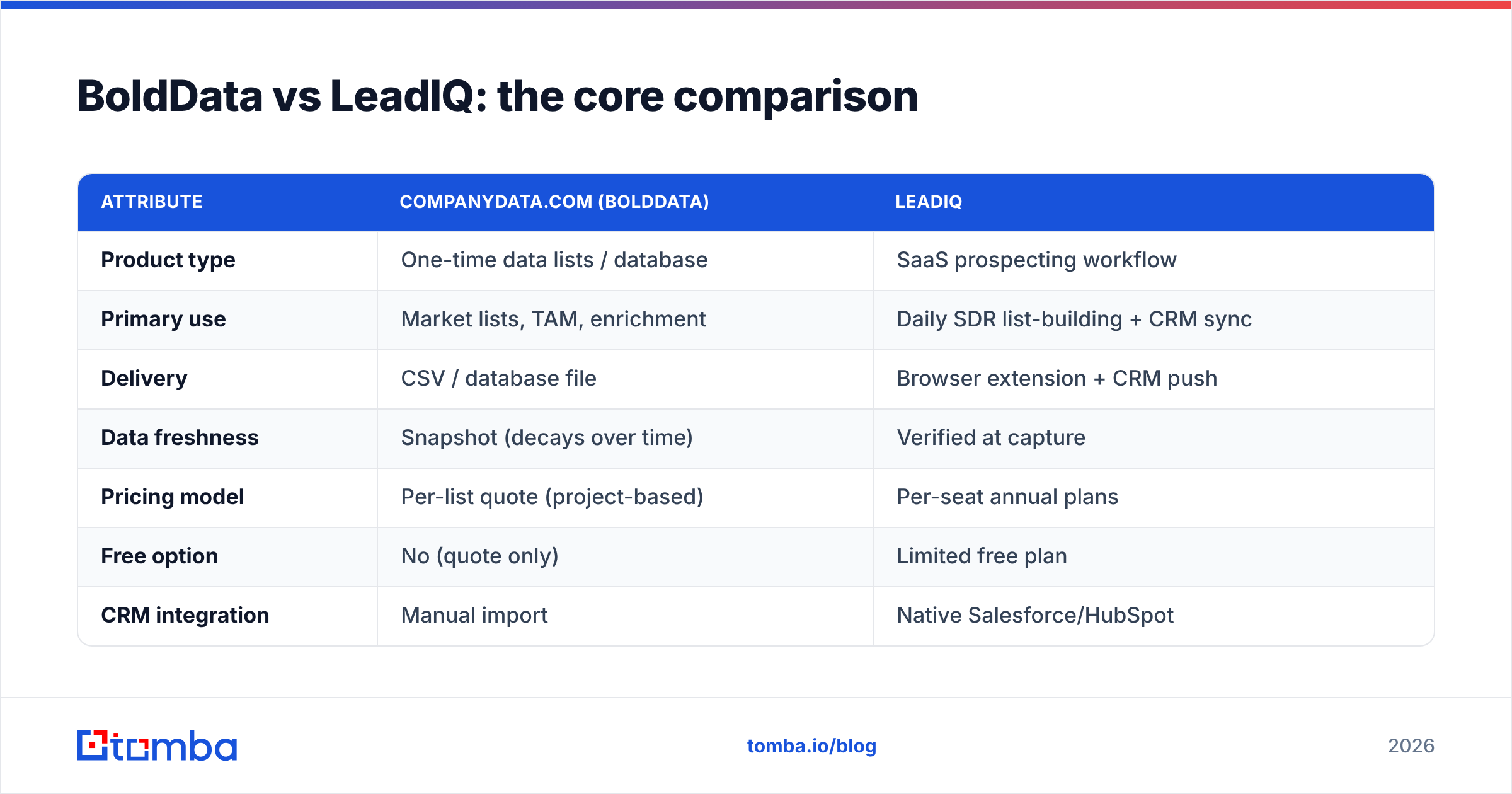
CompanyData.com (BoldData) vs LeadIQ: the core comparison#
| Attribute | CompanyData.com (BoldData) | LeadIQ |
|---|---|---|
| Product type | One-time data lists / database | SaaS prospecting workflow |
| Primary use | Market lists, TAM, enrichment | Daily SDR list-building + CRM sync |
| Delivery | CSV / database file | Browser extension + CRM push |
| Data freshness | Snapshot (decays over time) | Verified at capture |
| Pricing model | Per-list quote (project-based) | Per-seat annual plans |
| Free option | No (quote only) | Limited free plan |
| CRM integration | Manual import | Native Salesforce/HubSpot |
| Best for | Marketers, ops, data buyers | SDR / AE teams |
| Weak spot | Aging data, no live workflow | Cost per contact at scale |
The pattern is simple: BoldData optimizes for breadth and ownership; LeadIQ optimizes for freshness and workflow. Your choice follows your motion, not a feature checklist.
How do the pricing models actually differ?#
Neither publishes simple public pricing, which tells you something. Both are quote-driven and sales-led.
- BoldData quotes per project. Cost scales with the number of records and the depth of fields (firmographics only vs. verified contacts with emails). You pay once and keep the file. There is no monthly platform fee, but there is also no ongoing refresh unless you re-buy.
- LeadIQ sells annual per-seat plans with credit allotments for captures and enrichment. A free tier exists for trial-level volume. Paid tiers climb quickly once you add seats and want phone or mobile data. Third-party reviews on G2 frequently flag credit limits and renewal pricing as the main friction.
Here is the trap buyers walk into:
You size the deal on list price. Then the real bill arrives — extra seats, mobile-number credits, or a bigger list than the sample implied. Model your cost per verified contact you actually email, not the sticker price. A dataset that is 30% stale on arrival doubles its effective cost.
What about data accuracy and sourcing?#
Accuracy is where snapshot vs. streaming matters most.
BoldData compiles from business registries, directories, and partner sources, then sells the compiled file. The data can be broad and well-structured. But because it ships as a fixed export, verification is a point-in-time event. By the time you work the bottom of a large list, a meaningful slice has churned.
LeadIQ verifies at the moment of capture, so a rep working today gets a today-checked email. The downside is coverage. LeadIQ is strong where LinkedIn is strong — tech, mid-market, English-speaking markets. It is thinner where LinkedIn presence is light. That is exactly where BoldData's registry-based approach can win.
Whatever the source, treat every list as unverified until you re-check it. Run any purchased or captured file through a dedicated email verifier before you send. It protects your sender reputation and keeps bounce rates under the ~2–3% threshold mailbox providers punish. Most teams skip this step, and it is the cheapest insurance in cold outreach.
Which teams should choose which?#
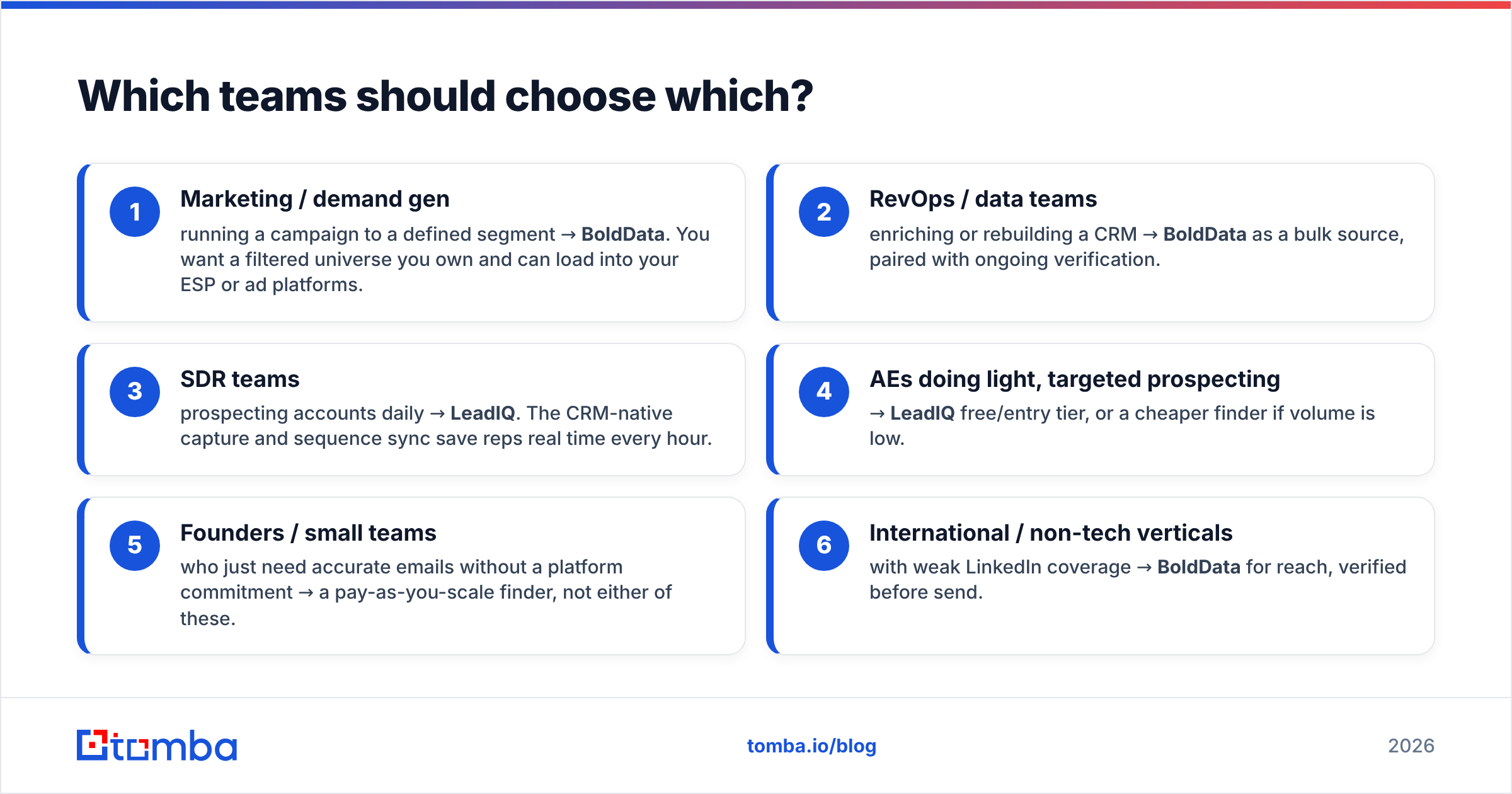
Match the tool to who is buying and why:
- Marketing / demand gen running a campaign to a defined segment → BoldData. You want a filtered universe you own and can load into your ESP or ad platforms.
- RevOps / data teams enriching or rebuilding a CRM → BoldData as a bulk source, paired with ongoing verification.
- SDR teams prospecting accounts daily → LeadIQ. The CRM-native capture and sequence sync save reps real time every hour.
- AEs doing light, targeted prospecting → LeadIQ free/entry tier, or a cheaper finder if volume is low.
- Founders / small teams who just need accurate emails without a platform commitment → a pay-as-you-scale finder, not either of these.
- International / non-tech verticals with weak LinkedIn coverage → BoldData for reach, verified before send.
If you were eyeing LeadIQ mainly for its email-finding, it is worth pricing a focused LeadIQ alternative first — you often get the same verified contacts without buying the full seat-based platform.
Where does a dedicated email finder fit?#
Both BoldData and LeadIQ bundle contact-finding into a bigger, pricier package — a list-buying relationship or a per-seat workflow suite. Plenty of teams don't need either; they need accurate emails on demand, at a predictable cost.
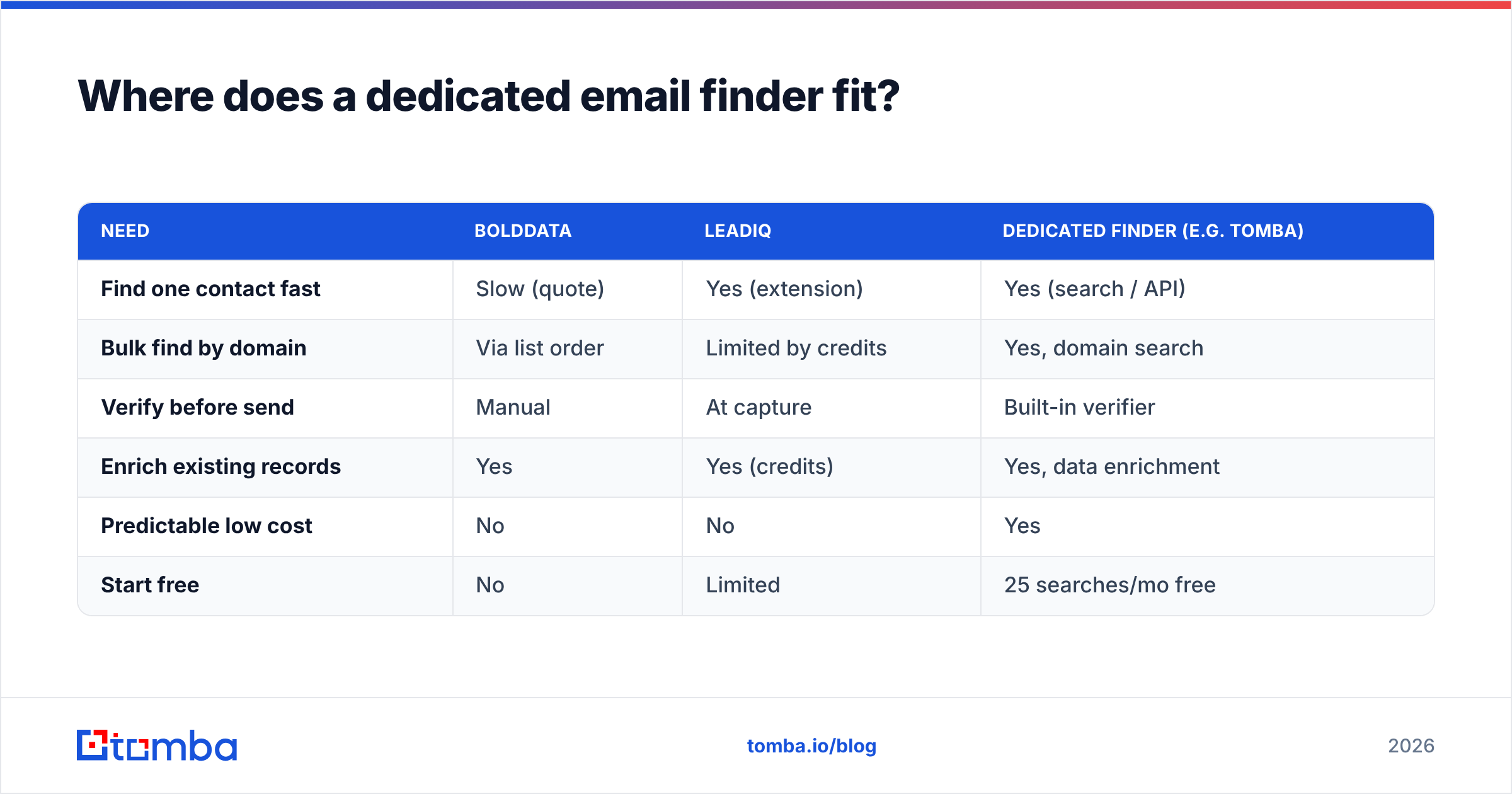
That's the gap a purpose-built finder fills. Here's how the three approaches stack up for the specific job of getting a valid work email:
| Need | BoldData | LeadIQ | Dedicated finder (e.g. Tomba) |
|---|---|---|---|
| Find one contact fast | Slow (quote) | Yes (extension) | Yes (search / API) |
| Bulk find by domain | Via list order | Limited by credits | Yes, domain search |
| Verify before send | Manual | At capture | Built-in verifier |
| Enrich existing records | Yes | Yes (credits) | Yes, data enrichment |
| Predictable low cost | No | No | Yes |
| Start free | No | Limited | 25 searches/mo free |
A finder like Tomba won't hand you a 100,000-row market list the way BoldData does, and it won't sit inside Salesforce capturing LinkedIn profiles the way LeadIQ does. What it does is the middle 80% of what most teams actually need — find, verify, enrich — without a project quote or a seat contract. For many buyers that's the whole job.
The honest verdict#
There is no universal winner, because these tools answer different questions. That is the honest way to read CompanyData.com (BoldData) vs LeadIQ.
- Pick CompanyData.com (BoldData) if your job is "give me a large, filtered, ownable list of companies and contacts" — for mail campaigns, market sizing, or CRM enrichment. Budget for its aging and verify before you send.
- Pick LeadIQ if your job is "let my SDRs build and sync lists all day inside the CRM" — the workflow is the product, and it is a good one. Just model the seat-and-credit bill honestly.
- Pick a dedicated email finder if your real need is accurate, verified emails at a predictable cost without a platform commitment — the situation most small and mid-market teams are actually in.
Buy the shape that matches your motion, not the longest feature list.
Ready to skip the quote and the seat contract?#
If what you actually need is verified professional emails — by name, company, or whole domain — start with Tomba Email Finder. The free tier gives you 25 searches a month, paid plans start at $49/mo, and every result runs through built-in verification so your bounce rate stays low from day one. Find the contacts, skip the list quote, and keep your sender reputation clean.
Related guides#
Ready to find emails that actually work?
Join 150,000+ professionals who stopped guessing and started sending. Free credits on signup — no credit card required.
Get the Tomba newsletter
Practical outbound tactics and product updates — once every two weeks.
About the author