CompanyData.com BoldData vs LeadsForge: 2026 Comparison
CompanyData.com, BoldData, and LeadsForge all sell B2B data—but they solve very different problems. Here's an honest breakdown of accuracy, pricing, coverage, and which one fits your outbound in 2026.
Picking a B2B data provider is less about who has the most records. It's really about who has records you can email tomorrow. This guide compares CompanyData.com BoldData vs LeadsForge in plain terms. All three sell contacts and company data. But they sit in three different corners of the market. Below, we cut through the sales pages so you can match the right vendor to the way you actually prospect.
TL;DR — Which one should you pick?#
- CompanyData.com is best for broad, self-serve US and global company firmographics with a simple credit-based list pull. Coverage is strong. Deep verification is lighter.
- BoldData is best for custom, human-curated B2B lists. It shines in European and niche markets and ships as one-off files. Targeting is great, but it's a data-as-a-service model, not a live tool.
- LeadsForge is best if you want an AI-assisted list builder. It generates prospect lists fast for cold outreach, with a lower entry price and a modern SaaS feel.
- The catch for all three: static lists decay 2–3% per month. Whatever you buy, you need a live email verifier and a refresh workflow. Skip that, and you pay to bounce.
- If email accuracy is the priority, a real-time finder-plus-verifier stack like Tomba usually beats a static list dump on deliverability.
CompanyData.com BoldData vs LeadsForge: what are they?#
They all sell "B2B data." The delivery model is where they split.
- CompanyData.com is a firmographic and contact database you query and export. Think large company records—industry, size, location, revenue signals—with contacts attached. It leans toward self-serve list building for sales and marketing teams that want volume.
- BoldData is a Netherlands-based B2B data provider that specializes in tailor-made lists. You tell them the segment (say, "manufacturing CFOs in Germany with 50+ employees"). They then build and deliver a file. It's closer to a data agency than a software product. You can see their positioning on the official BoldData site.
- LeadsForge is a newer, AI-flavored lead list builder. It targets founders and SDRs who want to describe an ideal customer in plain language, get a usable prospect list quickly, and push it into cold email.
The practical difference is simple. CompanyData.com and LeadsForge are things you log into and pull from. BoldData is something you order. That single distinction drives most of the trade-offs below.
How do they compare on features and pricing?#
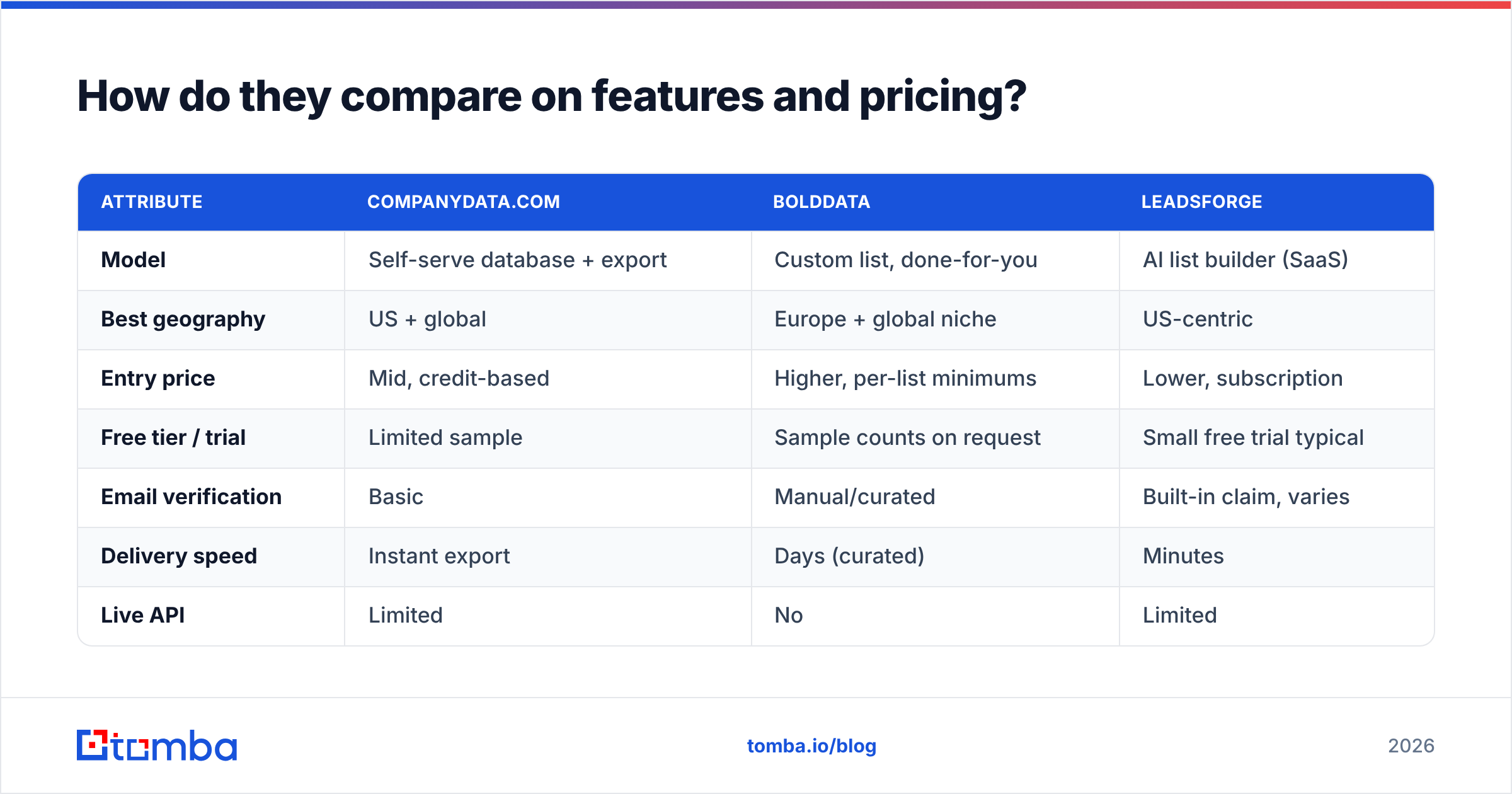
Pricing across all three is quote-heavy and changes often. Treat the numbers below as directional, and confirm on each vendor's page before you buy. The structural differences matter more than any single price point.
| Attribute | CompanyData.com | BoldData | LeadsForge |
|---|---|---|---|
| Model | Self-serve database + export | Custom list, done-for-you | AI list builder (SaaS) |
| Best geography | US + global | Europe + global niche | US-centric |
| Entry price | Mid, credit-based | Higher, per-list minimums | Lower, subscription |
| Free tier / trial | Limited sample | Sample counts on request | Small free trial typical |
| Email verification | Basic | Manual/curated | Built-in claim, varies |
| Delivery speed | Instant export | Days (curated) | Minutes |
| Live API | Limited | No | Limited |
| Ideal user | Volume list buyers | Precise segment targeting | Founders, lean SDR teams |
A few honest takeaways from that table:
- BoldData wins on targeting precision because a human builds the segment. If your ICP is weird ("family-owned wineries in Portugal"), that's a real edge no self-serve tool copies cleanly.
- LeadsForge wins on speed-to-list and price, which is why early-stage teams like it. The trade-off is simple: AI-assembled lists still need verification before you send.
- CompanyData.com wins on breadth for standard US firmographic pulls, and sits between the two on price.
None of that tells you about deliverability. And that's the number that decides whether your campaign lands in the inbox or the spam folder.
Which one has the most accurate data?#
Accuracy is where "number of records" stops mattering. What counts is how recently a record was verified. All three sell static exports, and static B2B data goes stale fast. People change jobs. Companies rebrand. Catch-all domains hide dead inboxes.
Here's the pattern buyers report on review sites like G2 and Capterra:
- Curated lists (BoldData) tend to be cleaner on delivery because a human touched them. But they're a snapshot. By month three, expect meaningful drift.
- Self-serve databases (CompanyData.com) trade some freshness for volume. The wider the net, the more decayed records slip through.
- AI-generated lists (LeadsForge) are only as good as the sources the model stitches together. So verification is non-negotiable before you hit send.

This is why many teams stop treating "buy a list" as the finish line. Whatever provider you choose, run the file through verification before your first send. Re-verify anything older than 30 days. A cheap bounce today is an expensive domain-reputation problem next quarter. See how sender reputation and email deliverability tie together before you scale volume.
Is a live email finder better than buying a static list?#
Often, yes. That's especially true if your outreach is targeted rather than spray-and-pray. A static list is like a printed phone book. A live finder is like calling directory assistance. One was accurate the day it was printed. The other tells you what's true right now.
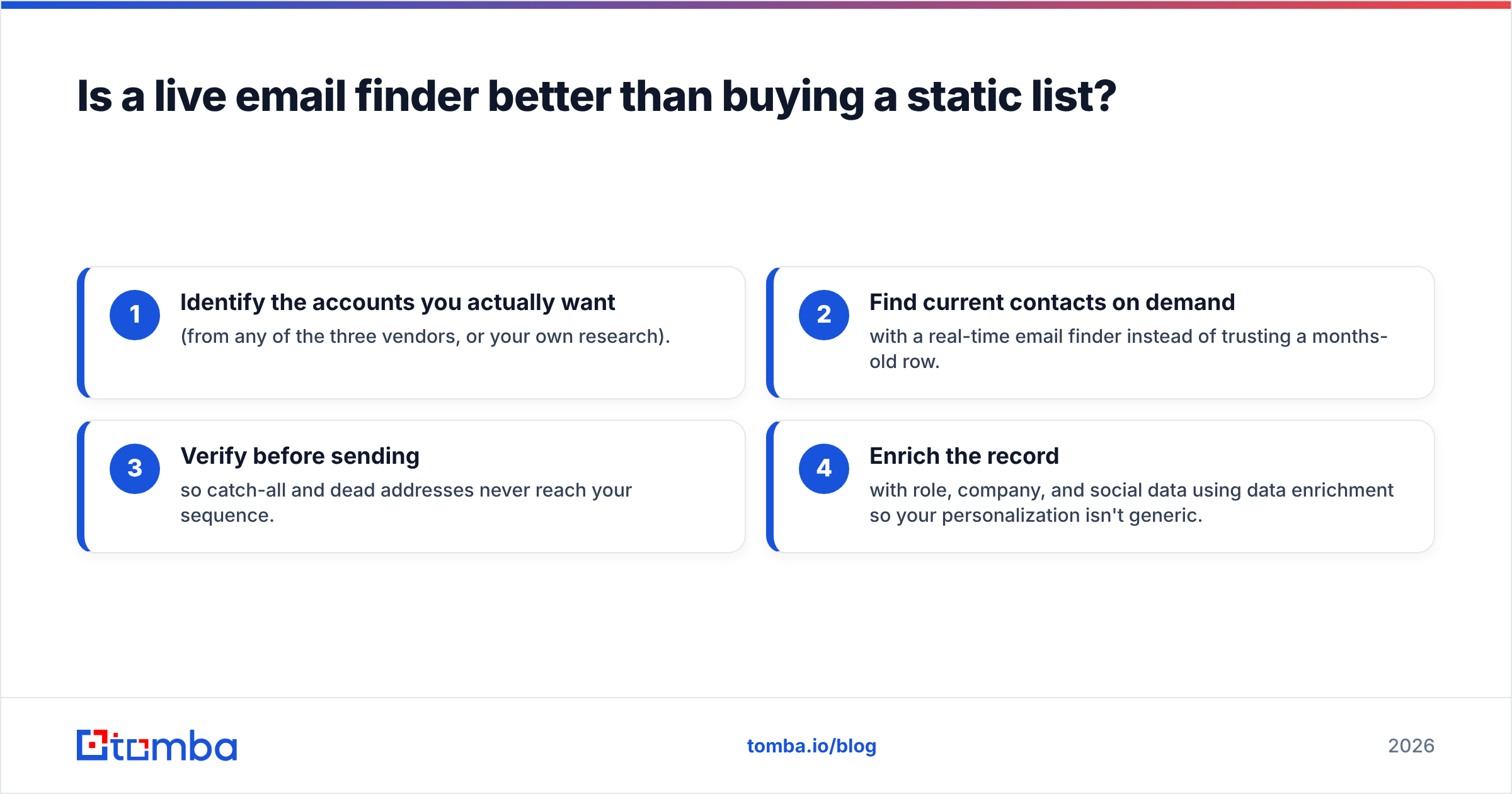
A live workflow looks like this:
- Identify the accounts you actually want (from any of the three vendors, or your own research).
- Find current contacts on demand with a real-time email finder instead of trusting a months-old row.
- Verify before sending so catch-all and dead addresses never reach your sequence.
- Enrich the record with role, company, and social data using data enrichment so your personalization isn't generic.
This is where a tool like Tomba fits alongside a list vendor, not necessarily instead of one. You might buy a targeted segment from BoldData for the account list. Then use Tomba's finder and catch-all verifier to confirm the emails are live at send time. The Tomba database and domain search cover the "who works here now" question that a static export can't keep current.
How do the three vendors handle different use cases?#
Match the tool to the motion, not the marketing.
- Broad US SMB outbound at volume: CompanyData.com's self-serve export gets you moving fastest with the least fuss. Pair it with verification.
- Precise European or niche targeting: BoldData is hard to beat because the segment is hand-built. It's worth the higher minimum when your ICP is narrow and your deal size justifies it.
- Founder-led or lean SDR outbound on a budget: LeadsForge's AI list builder gets a usable list fast and cheap. It's ideal for testing offers before you invest in premium data.
- Deliverability-first campaigns where reply rate is everything: a real-time finder-plus-verifier stack (Tomba or similar) cuts bounces more reliably than any static file, because you verify at the moment of send.
The mistake teams make is picking one tool and treating it as the whole system. In practice, the best outbound stacks combine a source (list vendor or database) with a verification and enrichment layer (a live tool). The list gets you the shape of the market. The live layer makes it mailable.
What about integrations and workflow?#
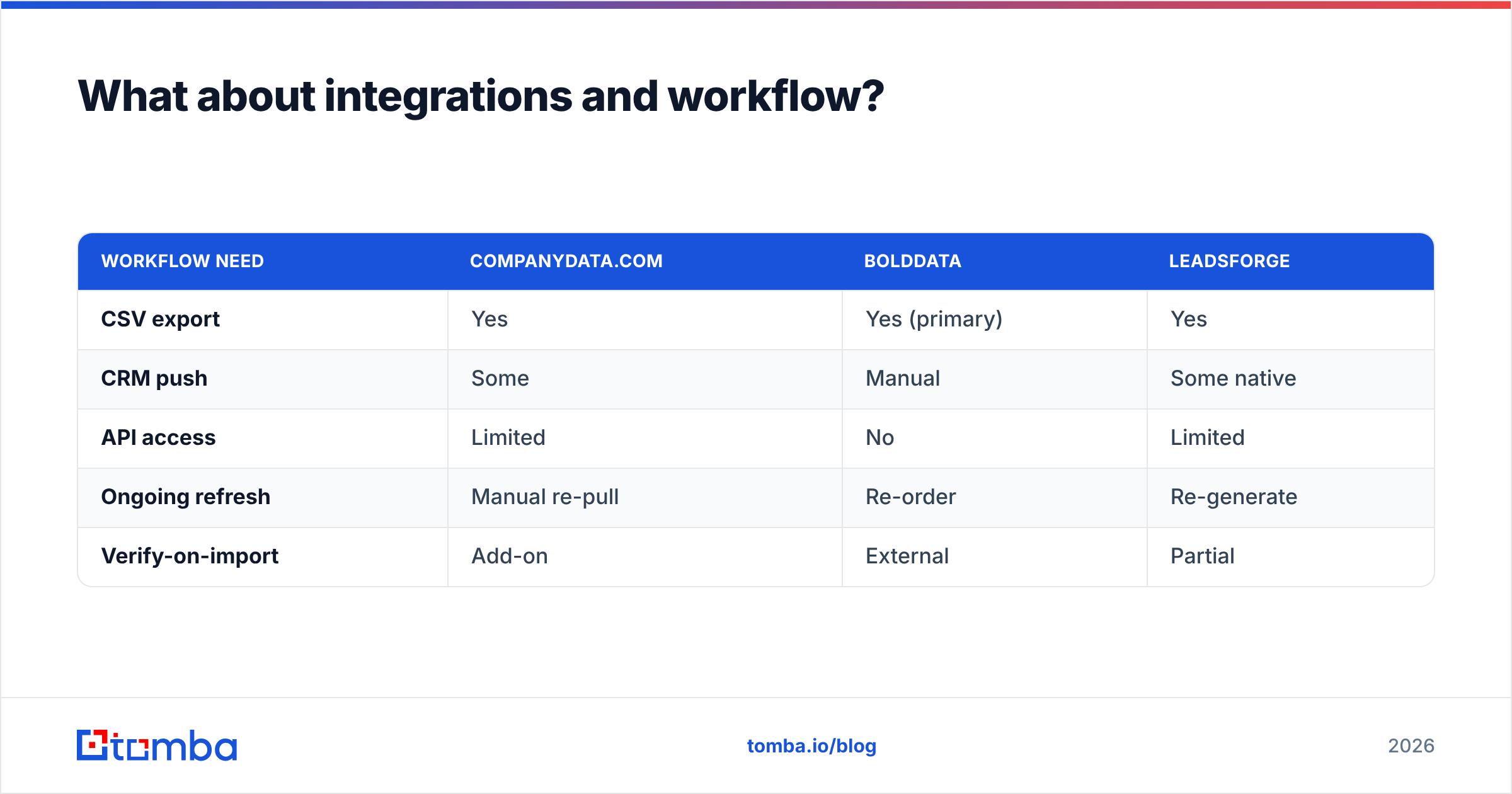
A list is only useful if it lands where you work. This is another area where the three diverge:
| Workflow need | CompanyData.com | BoldData | LeadsForge |
|---|---|---|---|
| CSV export | Yes | Yes (primary) | Yes |
| CRM push | Some | Manual | Some native |
| API access | Limited | No | Limited |
| Ongoing refresh | Manual re-pull | Re-order | Re-generate |
| Verify-on-import | Add-on | External | Partial |
If you live in a CRM and want data flowing continuously, none of these three is a pure "set it and forget it" pipe. That job usually falls to a finder/verifier with real integrations—Zapier, HubSpot, Salesforce, Google Sheets. Records then refresh where your reps already work, not in a downloaded file that ages on someone's desktop. Compare that against the API and integration depth of a dedicated tooling layer before you commit budget.
The honest verdict#
There's no single winner. There's a best fit per job:
- Choose BoldData when precision targeting in tricky geographies is worth paying for, and you're comfortable with a done-for-you file.
- Choose CompanyData.com when you want broad, self-serve US and global firmographics with minimal friction.
- Choose LeadsForge when speed and a low entry price matter more than depth, and you'll verify before sending.
- Layer a live finder + verifier on top of any of them. Static data decays, and deliverability is decided at send time, not at purchase time.
Buying data is the easy part. Keeping it mailable is the job that actually protects your sender reputation and reply rates.
Start with data you can actually send to#
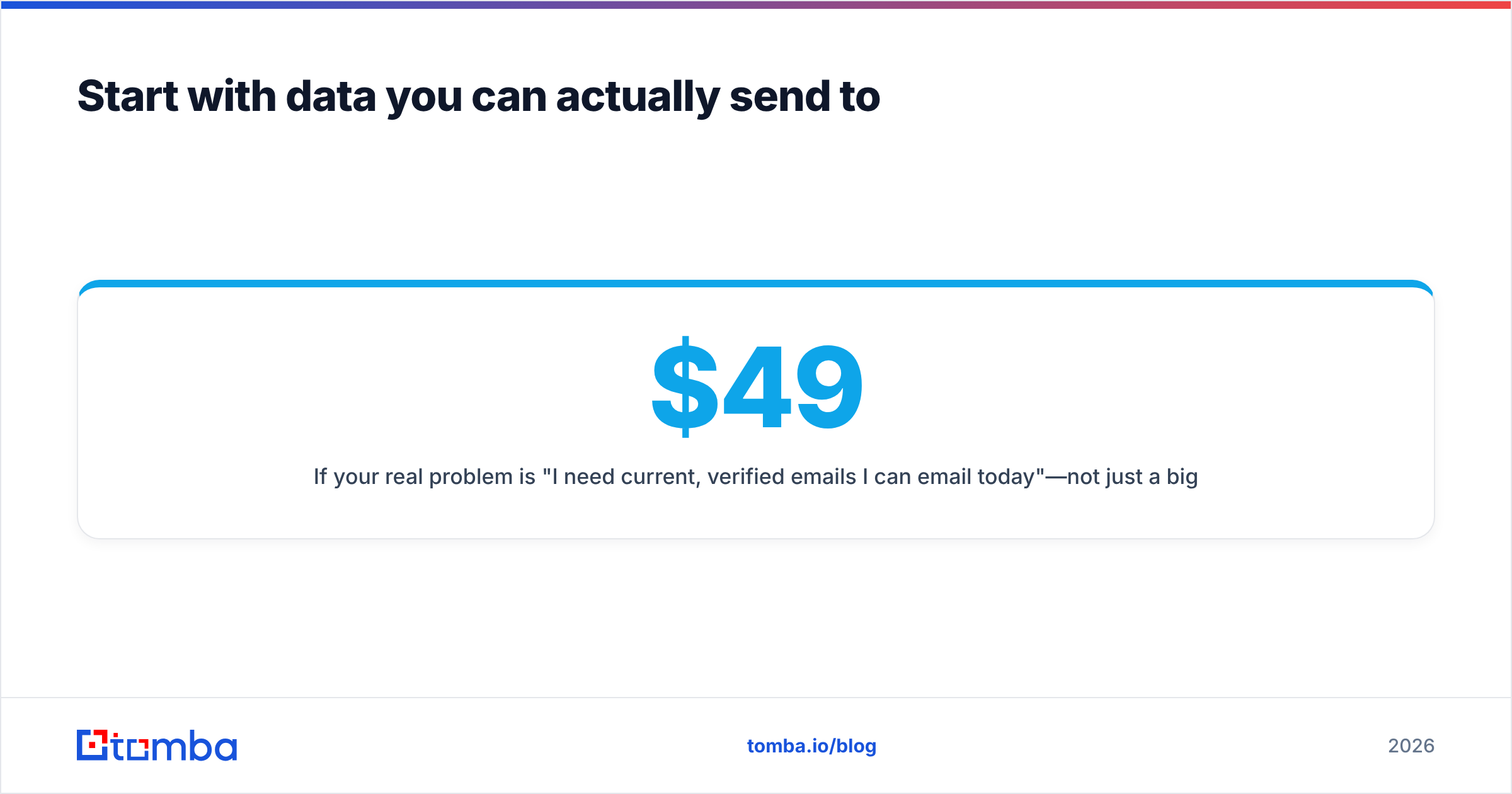
If your real problem is "I need current, verified emails I can email today"—not just a big file—start with the live layer. Tomba's Email Finder pulls professional addresses by domain, name, or company in real time. The built-in verifier keeps bounces off your sends. Plans are transparent: a free tier with 25 searches a month, then Starter at $49/mo, Growth at $99/mo, and Pro at $249/mo. Full Tomba pricing and API access are there if you want to automate the whole thing. Use a list vendor for the account map, and let Tomba make sure every email on it is real before you press send.
Related guides#
Ready to find emails that actually work?
Join 150,000+ professionals who stopped guessing and started sending. Free credits on signup — no credit card required.
Get the Tomba newsletter
Practical outbound tactics and product updates — once every two weeks.
About the author