CompanyHub Pricing, Reviews, Pros and Cons: A 2026 Buyer's Guide
An honest breakdown of CompanyHub's pricing tiers, real user reviews, and the pros and cons that matter before you commit your sales team to another CRM.
CompanyHub calls itself a "fully customizable CRM." You can shape it to any sales process without a developer. That pitch lands well. But the price tag, the trial limits, and a few rough edges catch buyers off guard. Here is a neutral look at CompanyHub pricing reviews pros and cons. Read it before you move your pipeline into the tool.
TL;DR#
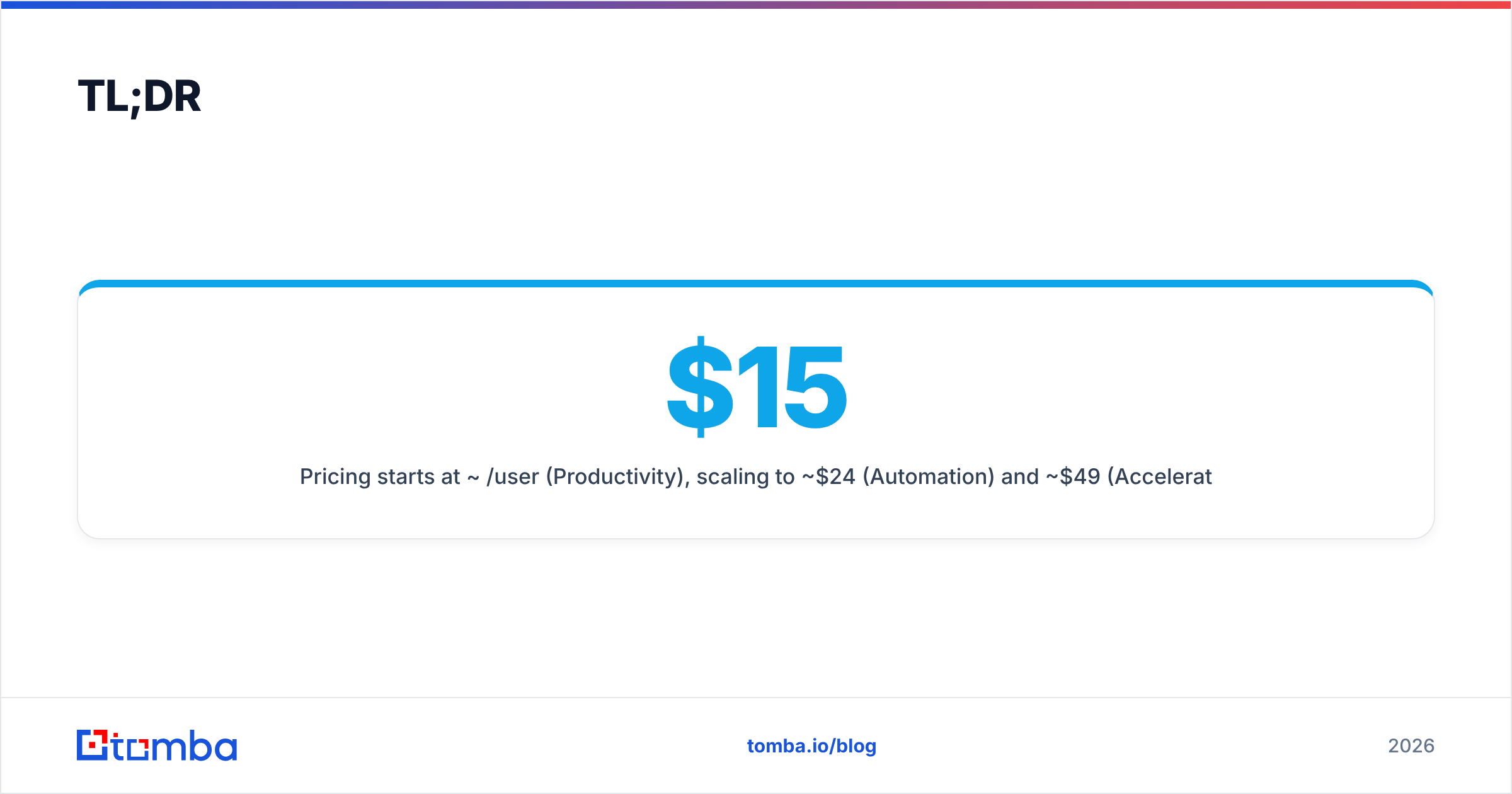
- Pricing starts near $15/user/month (Productivity). It scales to about $24 (Automation) and $49 (Accelerate Growth), billed yearly. That is mid-market pricing, not a bargain CRM.
- Biggest strength: you can customize tables, fields, and columns without code. Email and reporting are strong for a tool this size.
- Biggest weakness: the ecosystem is small. Native integrations are thin. Reviewers say the UI looks dated next to HubSpot or Pipedrive.
- The real hidden cost is not the license. It is the empty CRM. No CRM ships with verified contact data. You still need a way to find and verify emails to fill it.
- Verdict: it is a good fit if you want a tailor-made CRM on a budget. It is weaker if you need a big app marketplace or built-in prospecting data.
What is CompanyHub?#
CompanyHub is a customer relationship management (CRM) platform. It is built around one idea: your sales process is unique, so your CRM tables should be too. Most CRMs force you into fixed "Contacts / Deals / Companies" objects. CompanyHub does not. You create custom tables, add fields, and reshape columns like a spreadsheet. Relationships, automation, and reporting sit on top.
Think of it like a made-to-measure suit versus off-the-rack. HubSpot and Salesforce are the big off-the-rack brands. They come with endless tailors, or integrations. CompanyHub hands you the fabric and a good pair of scissors. It says, "build the fit you want." If your workflow never matched a standard CRM, that flexibility is the whole appeal.
It covers the core CRM jobs. You get lead and contact management. You get a visual sales pipeline. You also get email sync with tracking and bulk send, task reminders, and custom reports. It targets small and mid-sized B2B sales teams, not enterprise RevOps departments.

How much does CompanyHub cost in 2026?#
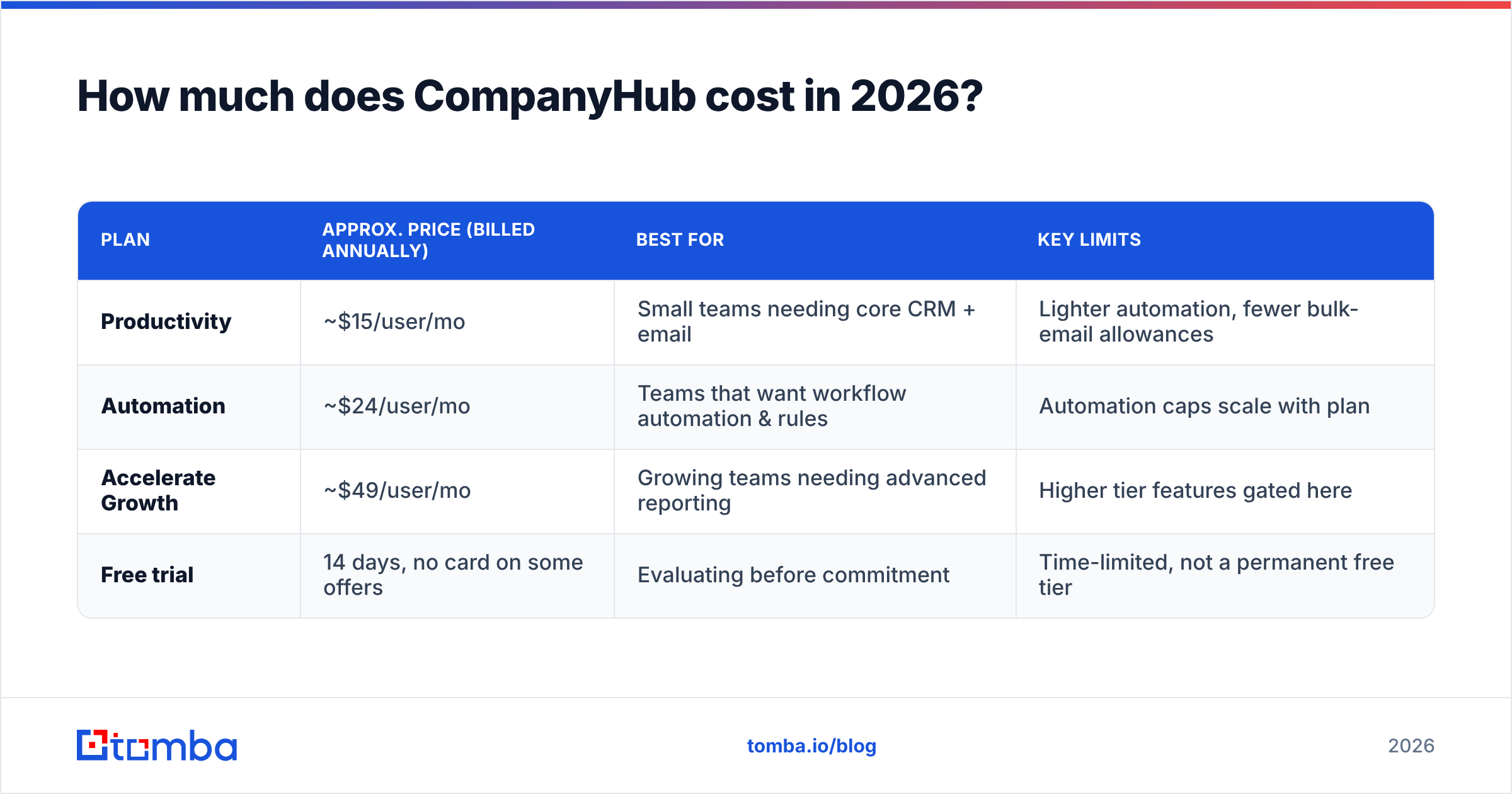
CompanyHub uses a per-user, per-month model. There are three published tiers. Each is cheaper when billed yearly. Pricing has held fairly steady. Still, confirm the current numbers on the official CompanyHub site before you buy. Vendors adjust tiers quietly.
| Plan | Approx. price (billed annually) | Best for | Key limits |
|---|---|---|---|
| Productivity | ~$15/user/mo | Small teams needing core CRM + email | Lighter automation, fewer bulk-email allowances |
| Automation | ~$24/user/mo | Teams that want workflow automation & rules | Automation caps scale with plan |
| Accelerate Growth | ~$49/user/mo | Growing teams needing advanced reporting | Higher tier features gated here |
| Free trial | 14 days, no card on some offers | Evaluating before commitment | Time-limited, not a permanent free tier |
A few things about the pricing structure stand out:
- No permanent free plan. HubSpot has a forever-free CRM. CompanyHub gives you a trial window, then you pay. This is not the tool for a free two-person side project.
- Annual billing sets the sticker price. Month-to-month costs more. The headline numbers above assume a yearly commitment.
- Automation sits behind a paywall. The useful workflow automation lives on the middle and upper tiers. Budget-tier buyers may feel boxed in fast.
- Per-user math scales in a straight line. Ten reps on Automation cost about $240 a month. That is fair, but there is no volume break at team scale.
How does it compare on price? CompanyHub sits in the affordable-but-not-cheapest band. Pipedrive's entry tiers are close. HubSpot's free tier is cheaper to start but gets pricey at Professional. Salesforce is a different weight class.
Is CompanyHub good? What do the reviews say?#
Short answer: reviews are mostly positive. People praise the flexibility and support. They are mixed on polish and ecosystem. Ratings on G2 and Capterra trend favorable. The recurring themes are below.
What reviewers praise:
- Customization without code. This is the most repeated compliment. Sales ops people who hated rigid CRMs love reshaping tables and fields.
- Responsive support. Many reviews call out fast, hands-on onboarding. That matters for small teams with no admin.
- Email power for the price. Bulk email, tracking, and templates punch above the tier cost.
- Reporting depth. Custom reports and dashboards feel more capable than the price suggests.
What reviewers criticize:
- Dated interface. This is the most common complaint. The UI feels a step behind Pipedrive or HubSpot.
- Integration gaps. The native catalog is small. You lean on Zapier-style tools or the API.
- Learning curve. The same flexibility can overwhelm non-technical users at first.
- Weak mobile app. Several reviewers say it trails the desktop version.
The pattern is clear. People who want a moldable, cheap CRM and accept a plain UI are happy. People who expect a huge app marketplace and a modern feel tend to churn.
CompanyHub Pricing Reviews Pros and Cons: The Scorecard#
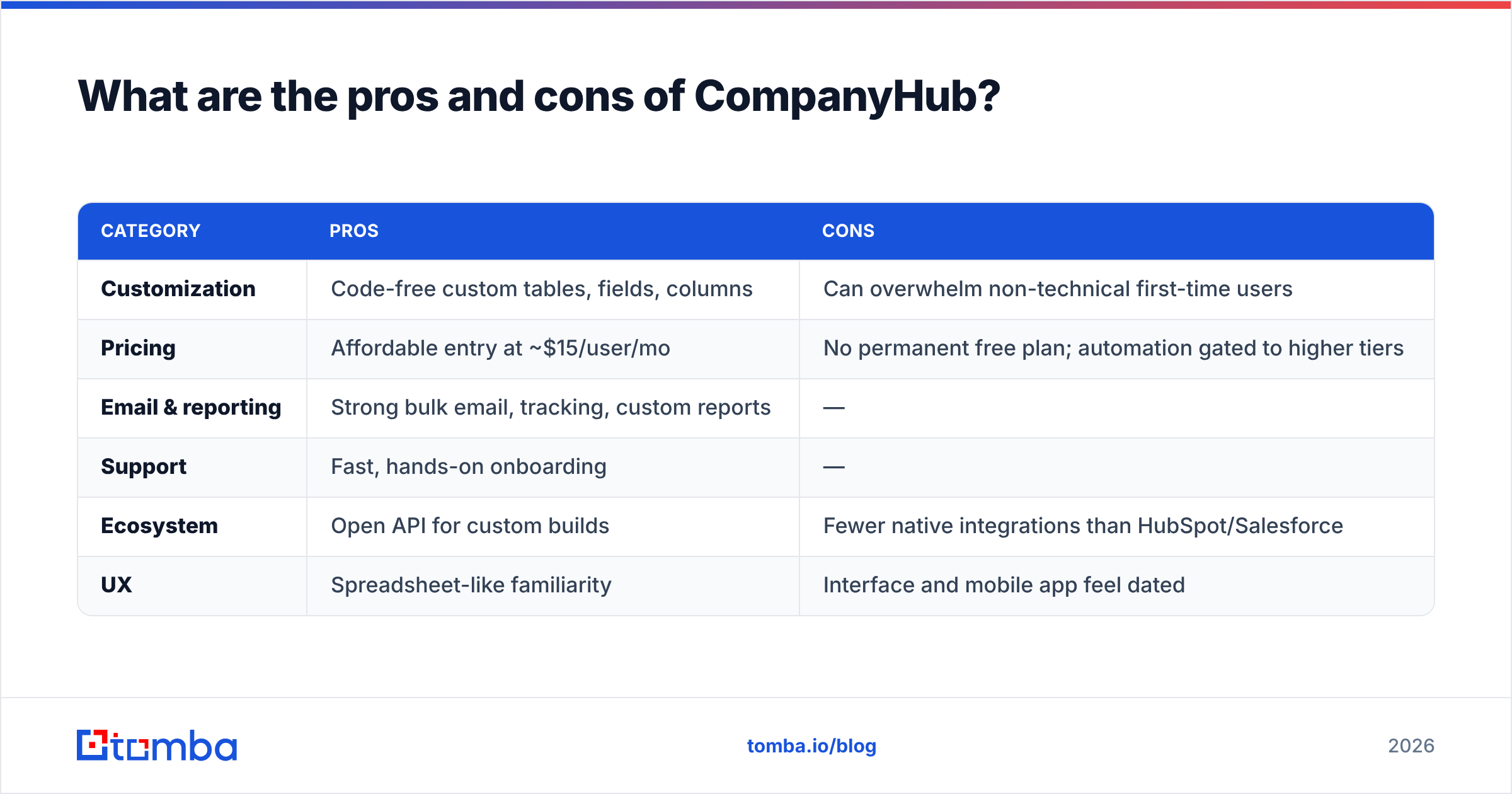
Here is the balanced scorecard. It pulls from the pricing and review themes above.
| Category | Pros | Cons |
|---|---|---|
| Customization | Code-free custom tables, fields, columns | Can overwhelm non-technical first-time users |
| Pricing | Affordable entry at ~$15/user/mo | No permanent free plan; automation gated to higher tiers |
| Email & reporting | Strong bulk email, tracking, custom reports | — |
| Support | Fast, hands-on onboarding | — |
| Ecosystem | Open API for custom builds | Fewer native integrations than HubSpot/Salesforce |
| UX | Spreadsheet-like familiarity | Interface and mobile app feel dated |
Who it fits: small-to-mid B2B teams with a non-standard sales process, a modest budget, and patience to set things up.
Who should look elsewhere: teams that need a deep integration marketplace on day one, a polished UI for low-tech reps, or a truly free long-term plan.
What does CompanyHub NOT include? (The hidden cost)#
Here is the part most CRM comparisons skip. The CRM is an empty container. CompanyHub organizes contacts well. But it does not find them for you. It does not tell you which emails still work. That is not a CompanyHub flaw. It is true of Pipedrive, HubSpot, Salesforce, and every CRM. The database only matters once it is full of accurate, reachable people.
That gap is the real hidden cost of any CRM. You can pay for seats all year and still email dead addresses. It happens when no one enriches or verifies the data going in.

So a dedicated data layer belongs in front of your CRM, not inside it:
- Find the contact. An email finder turns a name and company domain into a verified email. Drop it straight into CompanyHub.
- Clean what you have. An email verifier checks your existing CompanyHub list. You stop burning sender reputation on dead addresses.
- Fill the blanks. Data enrichment adds job titles, company details, and phone numbers to thin records.
None of this competes with CompanyHub. It makes CompanyHub worth paying for. A tailor-made CRM full of junk data is still junk.
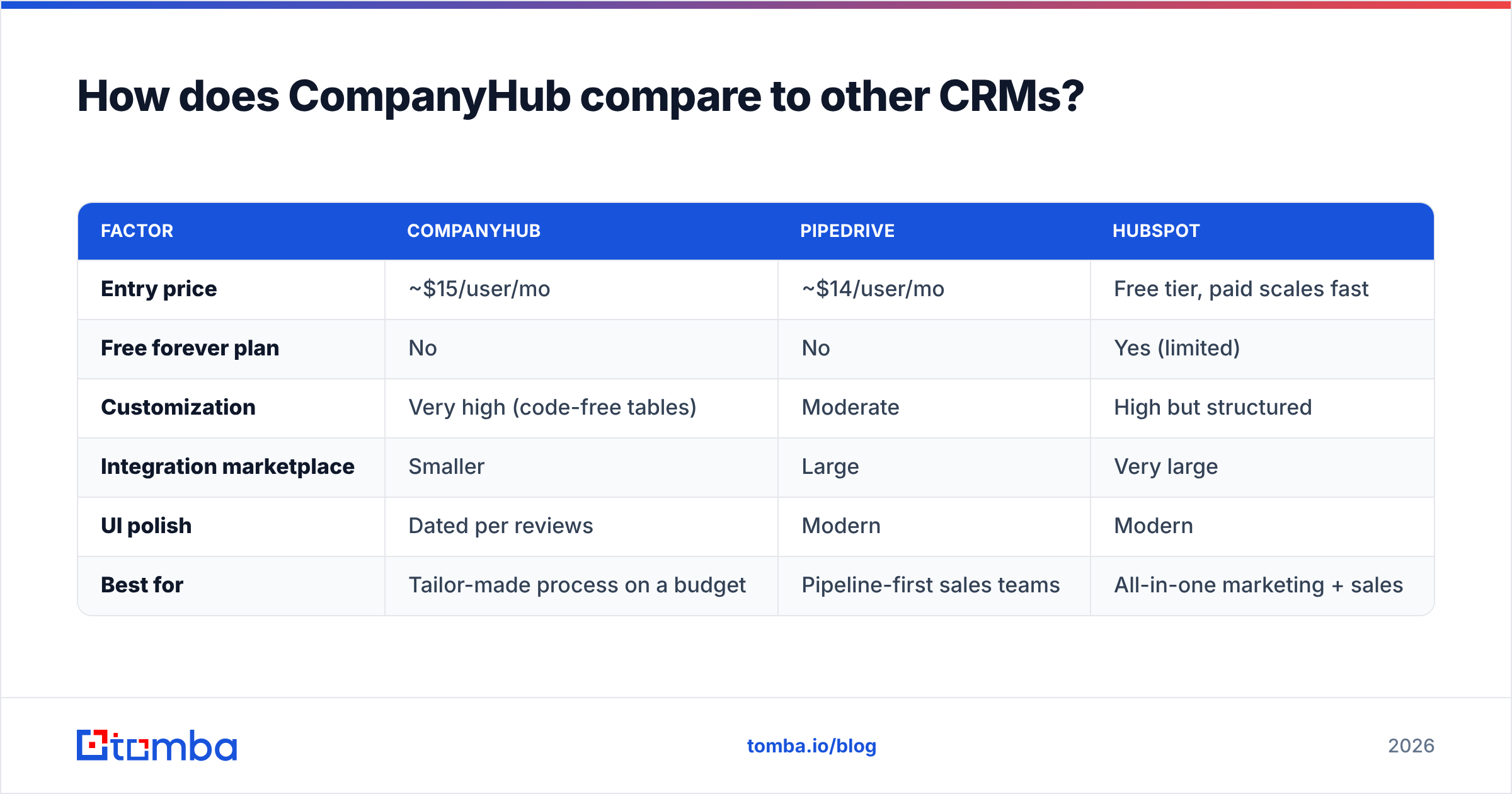
How does CompanyHub compare to other CRMs?#
Weighing CompanyHub against the field? Here is the quick positioning.
| Factor | CompanyHub | Pipedrive | HubSpot |
|---|---|---|---|
| Entry price | ~$15/user/mo | ~$14/user/mo | Free tier, paid scales fast |
| Free forever plan | No | No | Yes (limited) |
| Customization | Very high (code-free tables) | Moderate | High but structured |
| Integration marketplace | Smaller | Large | Very large |
| UI polish | Dated per reviews | Modern | Modern |
| Best for | Tailor-made process on a budget | Pipeline-first sales teams | All-in-one marketing + sales |
CompanyHub wins on raw flexibility per dollar. It loses on ecosystem breadth and interface polish. Does your edge come from an unusual sales workflow? Then its customization is a real advantage. Does your edge come from fast, plug-and-play setup? Then the bigger platforms pull ahead.
Whatever CRM you pick, the data problem is the same. That is why teams pair any CRM with a standalone find-and-verify layer. They do not bet on a CRM's thin built-in data.
Is CompanyHub worth it in 2026?#
Verdict: yes, for the right team. Want a customizable, affordable CRM? Can you live with a plainer interface and a smaller integration catalog? Then CompanyHub gives you more configurability per dollar than most rivals in its band. The ~$15 entry point and ~$24 automation tier are fair. The support reputation lowers the risk for teams with no admin.
It is not worth it if you expected a permanent free plan, a huge app marketplace, or a UI your least-technical rep will love on day one. Those buyers should try Pipedrive or HubSpot first.
But whatever you choose, remember the order of operations. A CRM is where good data lives. It is not where good data comes from. Solve the input first. Get verified, enriched contacts flowing in. Then the CRM choice matters far less than the pipeline it holds.
Fill your CRM with contacts that actually convert#
CompanyHub can organize your pipeline well. But only if the contacts inside are real and reachable. Start with the Tomba Email Finder. It turns company domains and names into verified professional emails. Push them straight into CompanyHub or any CRM. Add the email verifier to keep bounce rates low. Then check current Tomba pricing — it includes a free tier of 25 searches a month — before you spend another dollar on CRM seats you will only half-fill. The best CRM in the world is worthless with bad data. Fix the input first.
Related guides#
Ready to find emails that actually work?
Join 150,000+ professionals who stopped guessing and started sending. Free credits on signup — no credit card required.
Get the Tomba newsletter
Practical outbound tactics and product updates — once every two weeks.
About the author