Conga Pricing Reviews Pros and Cons: A 2026 Buyer's Guide
An honest, third-party breakdown of Conga pricing, real reviews, and the pros and cons of its CLM and document-automation suite — plus who should skip it.
Conga sells itself as the "revenue lifecycle" platform. It puts documents, quotes, contracts, and e-signature under one roof. That breadth is why pricing is hard to pin down. It is also why buyers get surprised by the invoice six months in. This guide on Conga pricing reviews pros and cons gives you the honest version. You will see what Conga actually costs in 2026, what real reviews say, and where the pros stop and the cons start.
TL;DR: Conga Pricing Reviews Pros and Cons at a Glance#
- Conga pricing is quote-only. There is no public price list. Real-world deals for the document/CLM suite typically land in the $15,000–$60,000+/year range once you add seats, modules, and Salesforce dependency.
- Biggest strength: deep, native Salesforce document generation and contract lifecycle management (CLM) that scales to enterprise legal and RevOps teams.
- Biggest weakness: modular add-on pricing, a steep learning curve, and implementation costs that often rival the license itself.
- Best fit: mid-market and enterprise teams already standardized on Salesforce that need CPQ + document generation + e-signature in one governance layer.
- Overkill for: small teams who just need to find contacts, generate a doc, or send a quote — cheaper, faster point tools win there.
What is Conga and what are you actually paying for?#
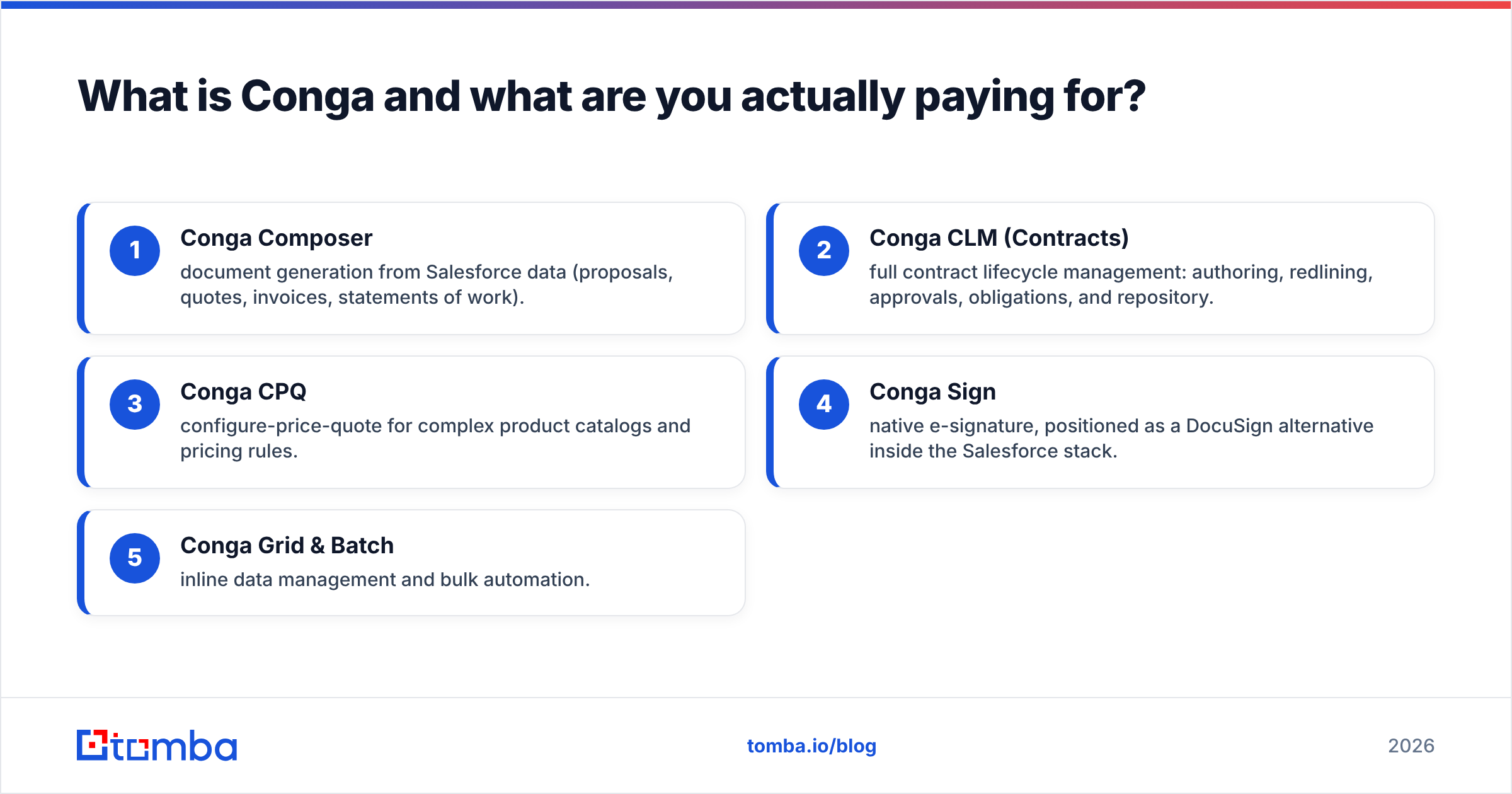
Conga is a suite, not a single product. Think of it like a mechanic's tool chest: you don't buy "the chest," you buy the specific drawers you need, and each drawer has its own price tag.
The core modules most buyers evaluate:
- Conga Composer — document generation from Salesforce data (proposals, quotes, invoices, statements of work).
- Conga CLM (Contracts) — full contract lifecycle management: authoring, redlining, approvals, obligations, and repository.
- Conga CPQ — configure-price-quote for complex product catalogs and pricing rules.
- Conga Sign — native e-signature, positioned as a DocuSign alternative inside the Salesforce stack.
- Conga Grid & Batch — inline data management and bulk automation.
You pay for two things at once. First, the software license. Second, the fact that it lives natively inside Salesforce. That integration is the moat. It is also the reason costs compound. Every module you switch on assumes you already run Salesforce. Many features also lean on your Salesforce edition and API limits.
How much does Conga cost in 2026?#
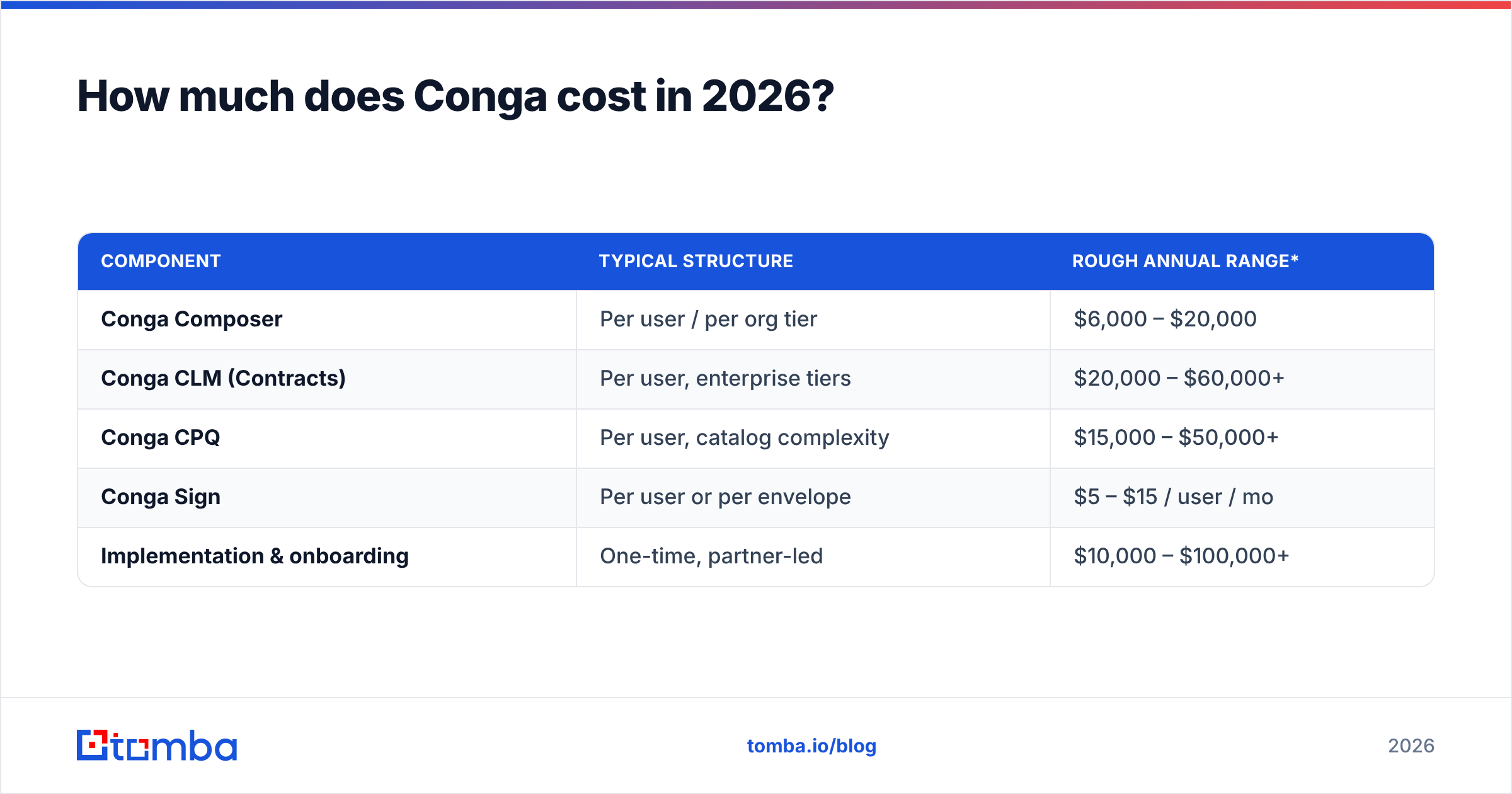
Short answer: Conga does not publish pricing, and every deal is negotiated. Based on aggregated buyer reports on G2 and Capterra, here is a realistic picture rather than a fabricated price sheet.
| Component | Typical structure | Rough annual range* |
|---|---|---|
| Conga Composer | Per user / per org tier | $6,000 – $20,000 |
| Conga CLM (Contracts) | Per user, enterprise tiers | $20,000 – $60,000+ |
| Conga CPQ | Per user, catalog complexity | $15,000 – $50,000+ |
| Conga Sign | Per user or per envelope | $5 – $15 / user / mo |
| Implementation & onboarding | One-time, partner-led | $10,000 – $100,000+ |
*Ranges are directional estimates compiled from public buyer reviews, not official Conga quotes. Your number depends on seats, modules, contract length, and negotiation.
Three cost realities most vendor pages won't tell you:
- Modules stack. A "Conga" deal is rarely one line item. Composer + CLM + Sign is three prices, three renewals, three sets of limits.
- Implementation is not optional. CLM and CPQ almost always require a partner or professional-services engagement. Budget for it as a real line, not an afterthought.
- Annual, prepaid, multi-year. Expect annual billing with pressure toward 2–3 year terms. There is no meaningful free tier and no self-serve monthly plan.
If your actual need is "find the right contact and enrich the record before a quote ever gets built," that's a different budget entirely. A focused tool like Tomba's data enrichment solves that slice for a fraction of a CLM license — more on that below.
What do Conga reviews say? (Pros and cons)#
So what do Conga pricing reviews pros and cons actually reveal? Review sentiment is mixed but mostly positive. Buyers praise the capability. They fault the ease of use and the cost transparency. Here is the honest split.
Pros buyers consistently mention#
- Native Salesforce depth. Document and contract data stay inside Salesforce with no brittle sync. For Salesforce-first orgs, this is the headline reason to buy.
- Enterprise-grade CLM. Redlining, approval routing, clause libraries, and obligation tracking are mature. Legal and procurement teams get real governance, not a glorified template tool.
- Complex quoting handled. Conga CPQ manages configurable products and pricing rules that basic quote tools choke on.
- Consolidation. One vendor for docs, quotes, contracts, and signature reduces integration surface area for large teams.
Cons buyers consistently mention#
- Opaque, modular pricing. The number-one complaint. Buyers report renewal surprises and add-on creep.
- Steep learning curve. Composer templates and CLM configuration reward specialists. Non-technical admins struggle.
- Implementation cost and time. Multi-month rollouts with partner fees are common, especially for CLM/CPQ.
- Support variability. Enterprise tiers report decent support; smaller accounts report slower response.
- Salesforce lock-in. The strength is also the trap — value drops sharply if you ever leave or dual-run CRMs.
Is Conga worth it, or is there a cheaper path?#
It depends entirely on scope. Conga earns its price when you genuinely need CLM + CPQ + document generation governed inside Salesforce at enterprise scale. If you're buying it to solve one narrow problem, you're renting a freight train to move a couch.
Run this quick gut-check before you sign:
- Do you already run Salesforce as your system of record? If no, Conga's core advantage evaporates.
- Do legal/procurement need true contract lifecycle management (redlines, approvals, obligations) — or just a filled-in PDF?
- Is quoting genuinely complex (configurable SKUs, pricing rules), or is it a two-line quote a template can handle?
- Have you budgeted implementation separately? If that line is blank, your real cost is understated by a lot.
If you answered "no" to most of these, a stack of focused tools will be cheaper, faster to deploy, and easier to leave.
How does Conga compare to lighter alternatives?#
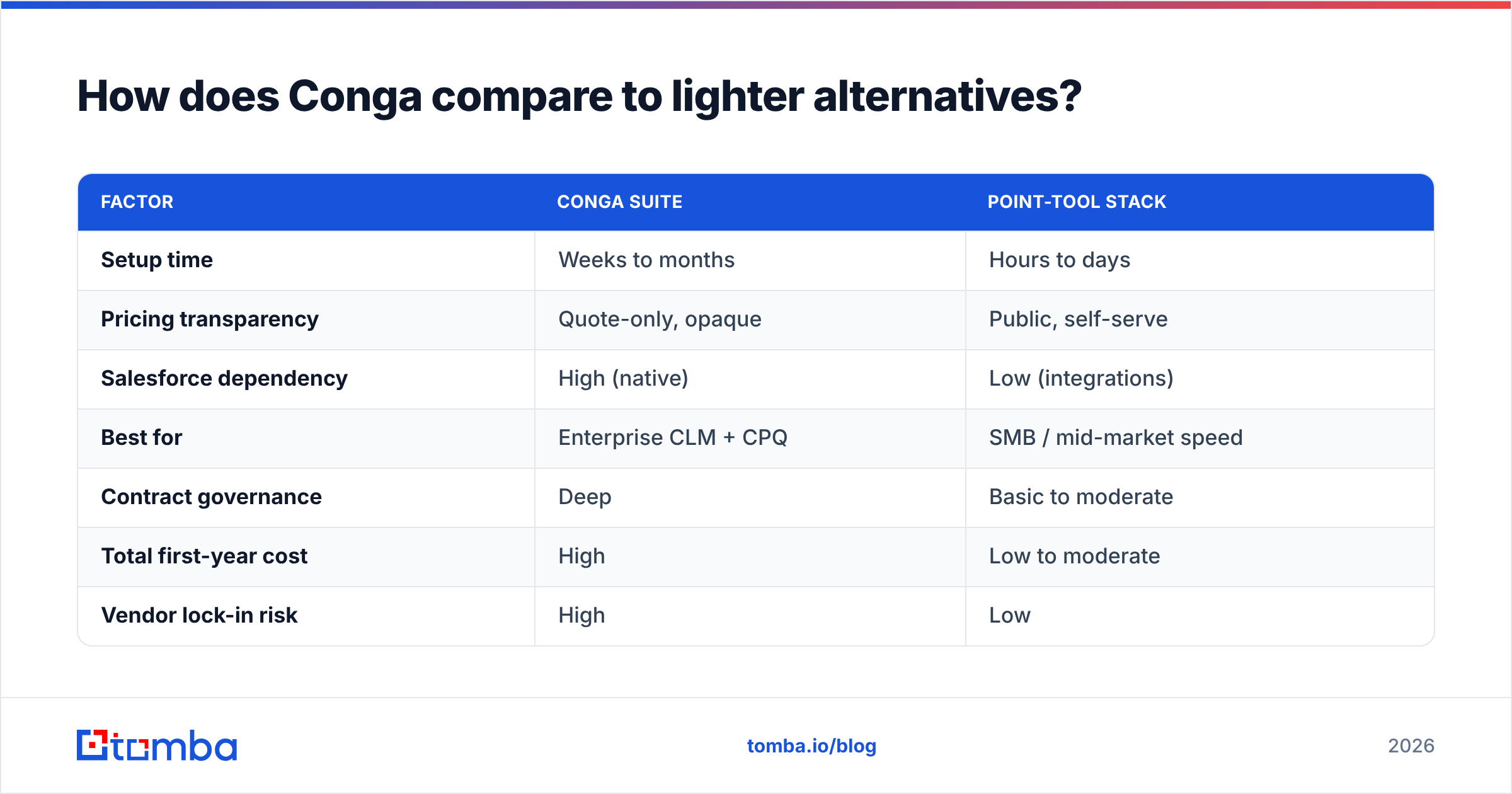
Conga competes at the platform tier. But most teams evaluating it are really comparing a full CLM suite against a leaner assembly of point tools. Here's how the trade-offs line up.
| Factor | Conga suite | Point-tool stack |
|---|---|---|
| Setup time | Weeks to months | Hours to days |
| Pricing transparency | Quote-only, opaque | Public, self-serve |
| Salesforce dependency | High (native) | Low (integrations) |
| Best for | Enterprise CLM + CPQ | SMB / mid-market speed |
| Contract governance | Deep | Basic to moderate |
| Total first-year cost | High | Low to moderate |
| Vendor lock-in risk | High | Low |
The pattern is clear: Conga wins on depth and governance; point tools win on cost, speed, and flexibility. Neither is "better" in a vacuum — it's about matching the tool to the actual job.
There's also a sequencing point worth making. Before any document, quote, or contract exists, someone has to find and qualify the right person. That top-of-funnel step is where a dedicated contact tool beats a CLM platform every time. Conga assumes the contact and the deal already exist; it does nothing to fill your pipeline.
Where does a contact-data tool fit alongside (or instead of) Conga?#
Conga operates at the bottom of the funnel — turning known deals into signed paper. It does not find prospects, verify emails, or enrich records. That's a separate job, and pairing the two is common.
If you're evaluating Conga mainly because "our sales docs are a mess," first check whether the real bottleneck is earlier: bad contact data feeding into whatever generates the doc. Clean inputs make every downstream tool cheaper.
Practical, lower-cost building blocks that complement — or in small teams, replace — a heavy suite:
- Find email addresses by name or company so quotes and proposals reach a verified inbox, not a bounce.
- Verify emails before outreach to protect email deliverability and keep your sender reputation intact.
- Company email search by domain to map every relevant contact at a target account before the deal even opens.
- Enrich leads with firmographic and contact data so your CRM records are complete before a document ever gets generated.
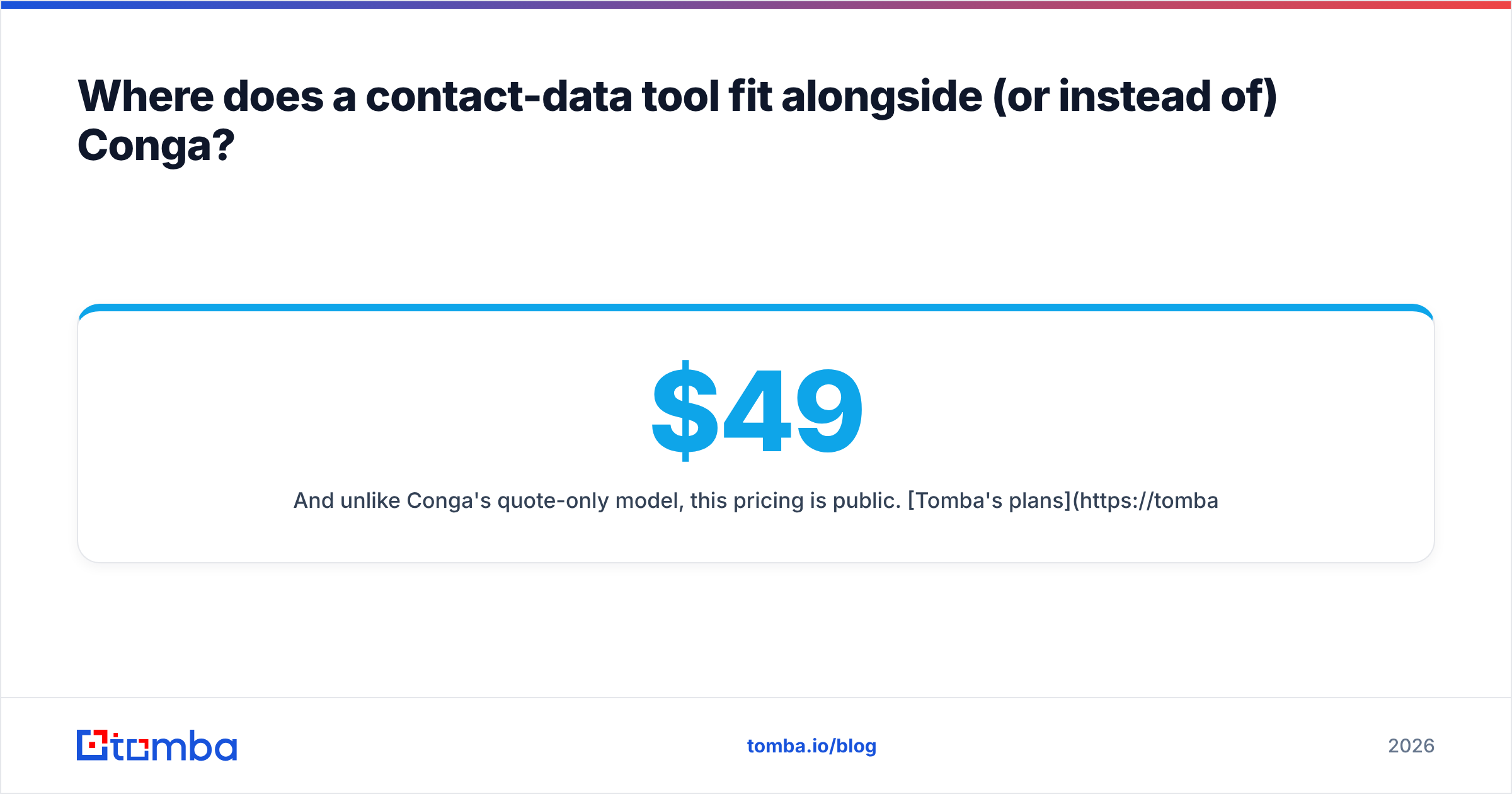
And unlike Conga's quote-only model, this pricing is public. Tomba's plans start with a free tier (25 searches/mo), then Starter at $49/mo, Growth at $99/mo, and Pro at $249/mo — no sales call required to see a number.
Conga pricing FAQ#
Does Conga have a free trial or free plan? There's no meaningful self-serve free tier. Conga runs demos and trials through sales. If you want to test capability without a commitment, expect a scoped pilot, not a signup form.
Why can't I find Conga's prices online? Because pricing is deal-negotiated by module, seat count, and term. This is standard for enterprise CLM/CPQ vendors — it lets them price to account size, but it also makes budgeting harder for buyers.
Is Conga better than DocuSign or a standalone CPQ? For Salesforce-native consolidation, often yes — one governance layer beats three integrations. For a single narrow need (just signatures, just simple quotes), a focused tool is usually cheaper and faster. Cross-check current positioning on Conga's own site and analyst coverage from Gartner before deciding.
What's the real total cost of ownership? License + implementation + admin specialization + renewal escalation. First-year TCO frequently runs well above the sticker license because of services and the Salesforce prerequisites.
The honest verdict#
Here is the short take on Conga pricing reviews pros and cons. Buy Conga if you're a Salesforce-standardized mid-market or enterprise org that needs genuine contract lifecycle management, complex CPQ, and document automation under one governed roof — and you've budgeted implementation as a real, separate cost.
Skip Conga if your pain is narrower: finding contacts, verifying data, or generating a simple quote. In that case you'll deploy a lean stack in a day, see public pricing up front, and avoid multi-year lock-in.
If your funnel problem starts before the paperwork — getting accurate, verified contacts into your CRM — that's the cheapest, highest-leverage fix to make first. Start free with the Tomba Email Finder to fill and clean your pipeline, then layer on heavier document tooling only when the deal complexity actually demands it. Your inputs get clean, your outreach lands, and you only pay platform prices for the problems that truly need a platform.
Related guides#
// get started
Find, verify and enrich your first contacts today
Start on the free plan with 25 searches a month, then scale when your team is ready.
Free plan · No credit card required · GDPR & CCPA
// about the author