ContactOut Pros and Cons in 2026: An Honest, Complete Review
ContactOut is a popular LinkedIn email finder, but is it worth the price? Here's an honest breakdown of its strengths, weaknesses, pricing, and better-value alternatives.

ContactOut has built a strong reputation as a LinkedIn-first contact finder, but a strong reputation and a good fit for your team are two different things. Before you commit budget, you want the unvarnished version: what it does well, where it frustrates users, and whether the price matches the value.
This is that breakdown — a neutral look at the real ContactOut pros and cons in 2026, backed by pricing, accuracy expectations, and honest alternatives.
TL;DR: Is ContactOut Worth It?#
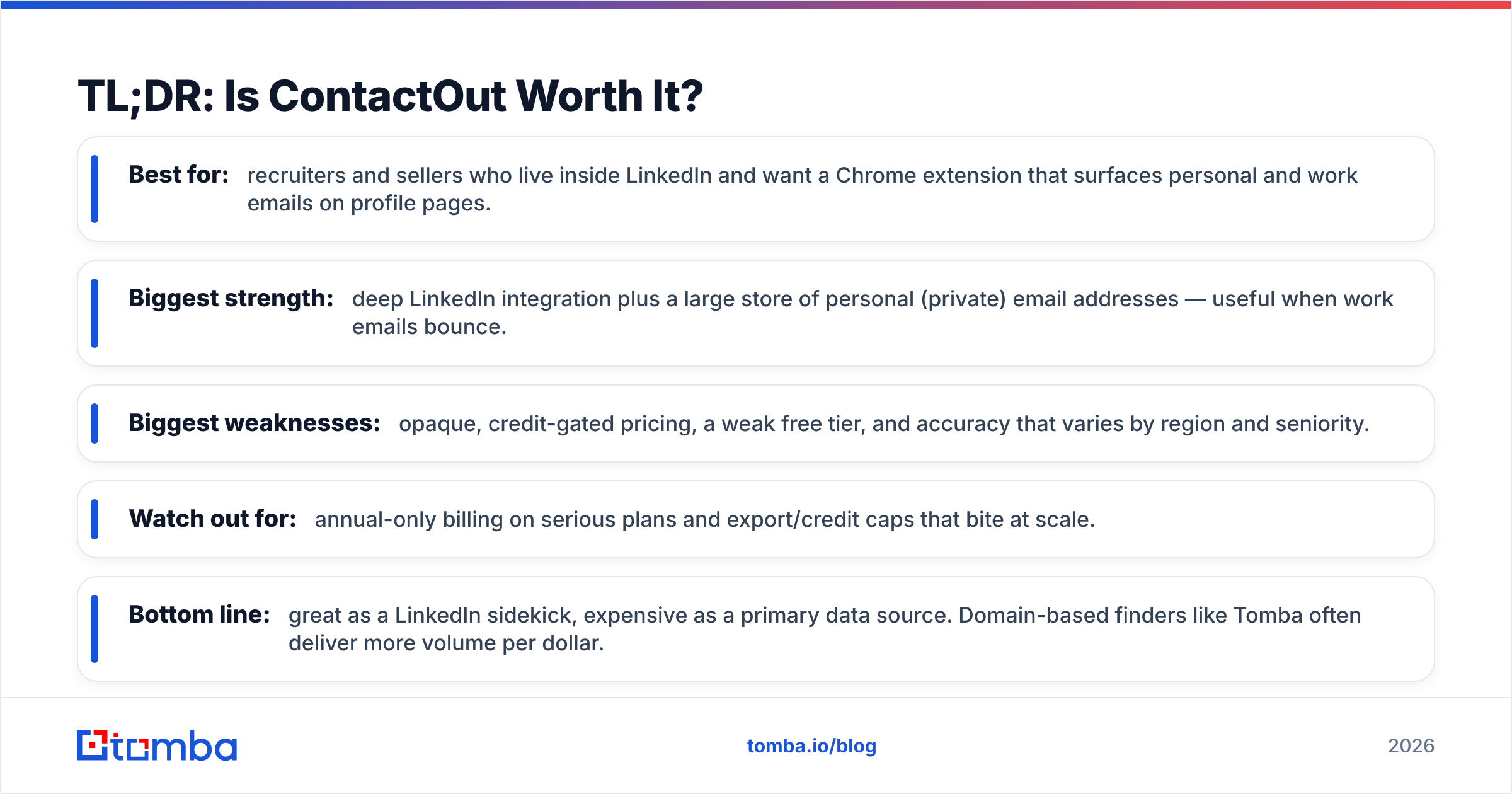
- Best for: recruiters and sellers who live inside LinkedIn and want a Chrome extension that surfaces personal and work emails on profile pages.
- Biggest strength: deep LinkedIn integration plus a large store of personal (private) email addresses — useful when work emails bounce.
- Biggest weaknesses: opaque, credit-gated pricing, a weak free tier, and accuracy that varies by region and seniority.
- Watch out for: annual-only billing on serious plans and export/credit caps that bite at scale.
- Bottom line: great as a LinkedIn sidekick, expensive as a primary data source. Domain-based finders like Tomba often deliver more volume per dollar.
What Is ContactOut and Who Is It For?#
ContactOut is a contact-intelligence tool that finds email addresses and phone numbers, primarily by working alongside LinkedIn. Its flagship feature is a browser extension that overlays contact details directly on LinkedIn and Sales Navigator profiles, plus a web "search portal" and an API for programmatic lookups.
The core promise is personal emails. While most B2B finders focus on professional (name@company.com) addresses, ContactOut leans into consumer email coverage — the Gmail and Outlook addresses people actually check. For recruiters chasing passive candidates who ignore their work inbox, that is a genuine differentiator.
It's aimed squarely at three groups:
- Recruiters and sourcers who need to reach candidates outside the company inbox.
- SDRs and account executives running LinkedIn-based prospecting.
- RevOps and growth teams enriching lists via the API or spreadsheet exports.
If your workflow doesn't start on a LinkedIn profile, a lot of ContactOut's advantage evaporates — and that's the first clue about who should look elsewhere.

What Are the Main Pros of ContactOut?#
Credit where it's due — ContactOut does several things genuinely well.
Deep LinkedIn and Sales Navigator integration. The extension is the product's heart. You browse a profile, click, and contact details appear in-line. For anyone whose day is spent in LinkedIn, this removes the copy-paste-into-another-tool tax.
Strong personal email coverage. ContactOut markets a large database of personal emails and phone numbers. When a work email bounces or a prospect has left the company, a verified Gmail address can be the difference between silence and a reply.
Prospecting portal and lists. Beyond the extension, the search portal lets you filter by title, company, industry, and location to build lists without manually visiting each profile — closer to a lightweight sales-intelligence platform than a pure lookup tool.
AI email assistant and workflow extras. Recent versions bundle an AI email writer and enrichment features, nudging it toward an all-in-one outreach hub rather than just a finder.
API access. For teams that want to enrich records at scale, the ContactOut API exposes lookups programmatically, which is table stakes for serious RevOps but still worth noting.
What Are the Cons and Hidden Limits?#
This is where the picture gets more complicated — and where a neutral review earns its keep.
Opaque, credit-based pricing. Pricing isn't cleanly published for every tier, and much of it sits behind a "book a demo" wall. Credits gate email reveals, phone reveals, and exports separately, so a plan that looks generous can drain faster than you expect once real usage starts.
A thin free tier. The free plan is more of a trial than a workspace. Compared to finders that hand you meaningful monthly credits at $0, ContactOut's free allotment feels designed to push you toward a paid annual commitment quickly.
Annual-first billing. Meaningful plans lean toward annual contracts. If you want to test a tool month-to-month before committing a year of budget, that friction matters.
Accuracy varies by segment. Personal-email coverage is a strength in North America and for senior profiles, but data density thins out for smaller markets, non-English regions, and junior roles. No provider is immune to this, but it undercuts the "it just works" pitch.
Export and seat restrictions. Bulk export volumes and team seats are tied to tier, so scaling a team can mean jumping plans faster than the raw credit math suggests.
Compliance considerations. Surfacing personal emails is powerful, but personal data carries GDPR/CCPA obligations. That's an operational cost — suppression lists, consent handling — not a flaw, but budget for it.

ContactOut Pricing vs Alternatives (2026)#
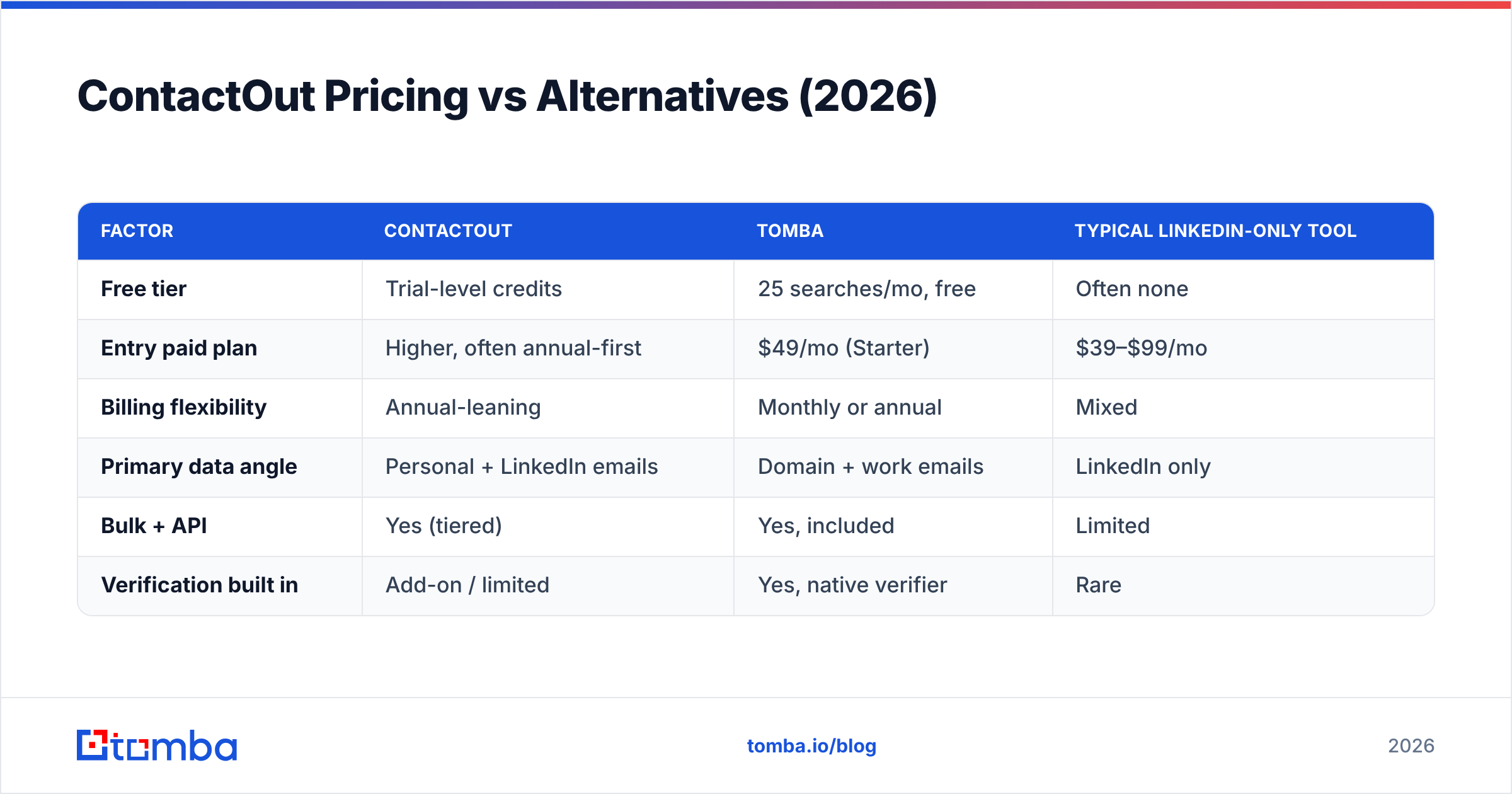
Here's the practical comparison. Because ContactOut's public pricing is partly gated, treat its figures as representative ranges; the structural differences matter more than any single number.
| Factor | ContactOut | Tomba | Typical LinkedIn-only tool |
|---|---|---|---|
| Free tier | Trial-level credits | 25 searches/mo, free | Often none |
| Entry paid plan | Higher, often annual-first | $49/mo (Starter) | $39–$99/mo |
| Billing flexibility | Annual-leaning | Monthly or annual | Mixed |
| Primary data angle | Personal + LinkedIn emails | Domain + work emails | LinkedIn only |
| Bulk + API | Yes (tiered) | Yes, included | Limited |
| Verification built in | Add-on / limited | Yes, native verifier | Rare |
The headline: if your outreach is work-email and domain-driven, a finder priced from $49/mo with native verification usually stretches further. If you specifically need personal emails off LinkedIn, ContactOut's premium is easier to justify. See current Tomba pricing for the exact tier breakdown, and cross-check any tool on independent review sites like G2 before you sign.
How Accurate Is ContactOut's Data?#
Accuracy is the metric that actually decides ROI, because every wrong address is a bounce that erodes your sender reputation. ContactOut is competitive on personal emails and reasonable on work emails, but "reasonable" isn't the same as "verified at send time."
The safer workflow — with any provider — is a two-step one: find, then verify. A finder gives you candidate addresses; a verifier confirms they're live before you load them into a sequence. If your finder doesn't include verification, you're paying twice or gambling with deliverability.

This is a structural knock against single-purpose LinkedIn finders: many surface an address without a real-time SMTP check. Tools that pair discovery with an email verifier close that gap in one step, and a native catch-all verifier handles the domains that quietly accept everything and lie about it.
Whatever tool you choose, protect your domain — high bounce rates hurt email deliverability fast, and no data provider will refund a burned sending reputation.
When Should You Pick ContactOut vs a Domain Finder?#
Match the tool to the motion. Here's a clean decision framework.
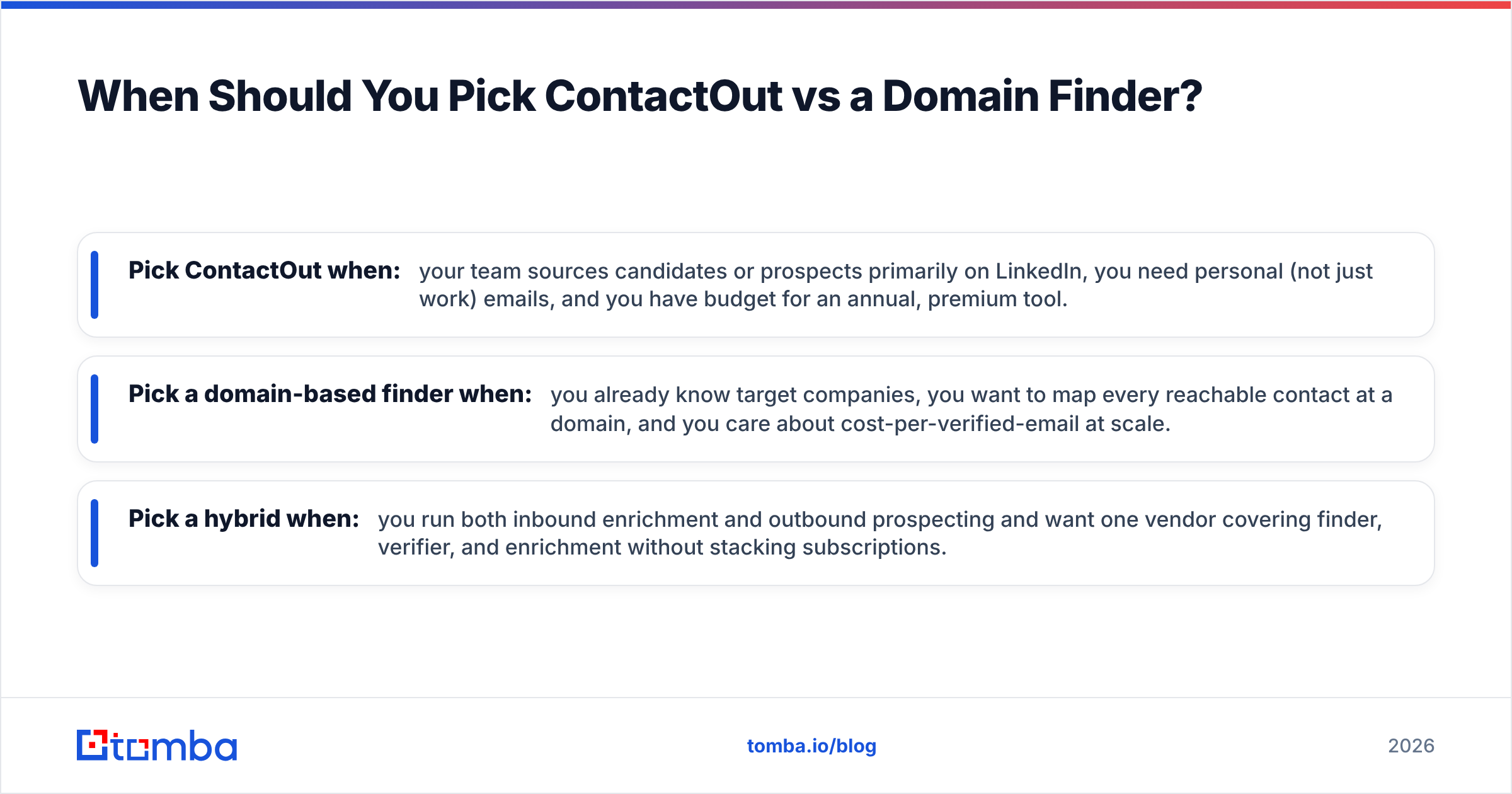
- Pick ContactOut when: your team sources candidates or prospects primarily on LinkedIn, you need personal (not just work) emails, and you have budget for an annual, premium tool.
- Pick a domain-based finder when: you already know target companies, you want to map every reachable contact at a domain, and you care about cost-per-verified-email at scale.
- Pick a hybrid when: you run both inbound enrichment and outbound prospecting and want one vendor covering finder, verifier, and enrichment without stacking subscriptions.
For the second and third cases, a domain search approach — enter a company URL, get the verified contacts and email patterns behind it — is usually faster and cheaper than revealing profiles one at a time. It also plays nicely with a bulk email finder when you're processing a list of hundreds of accounts.
ContactOut Pros and Cons at a Glance#
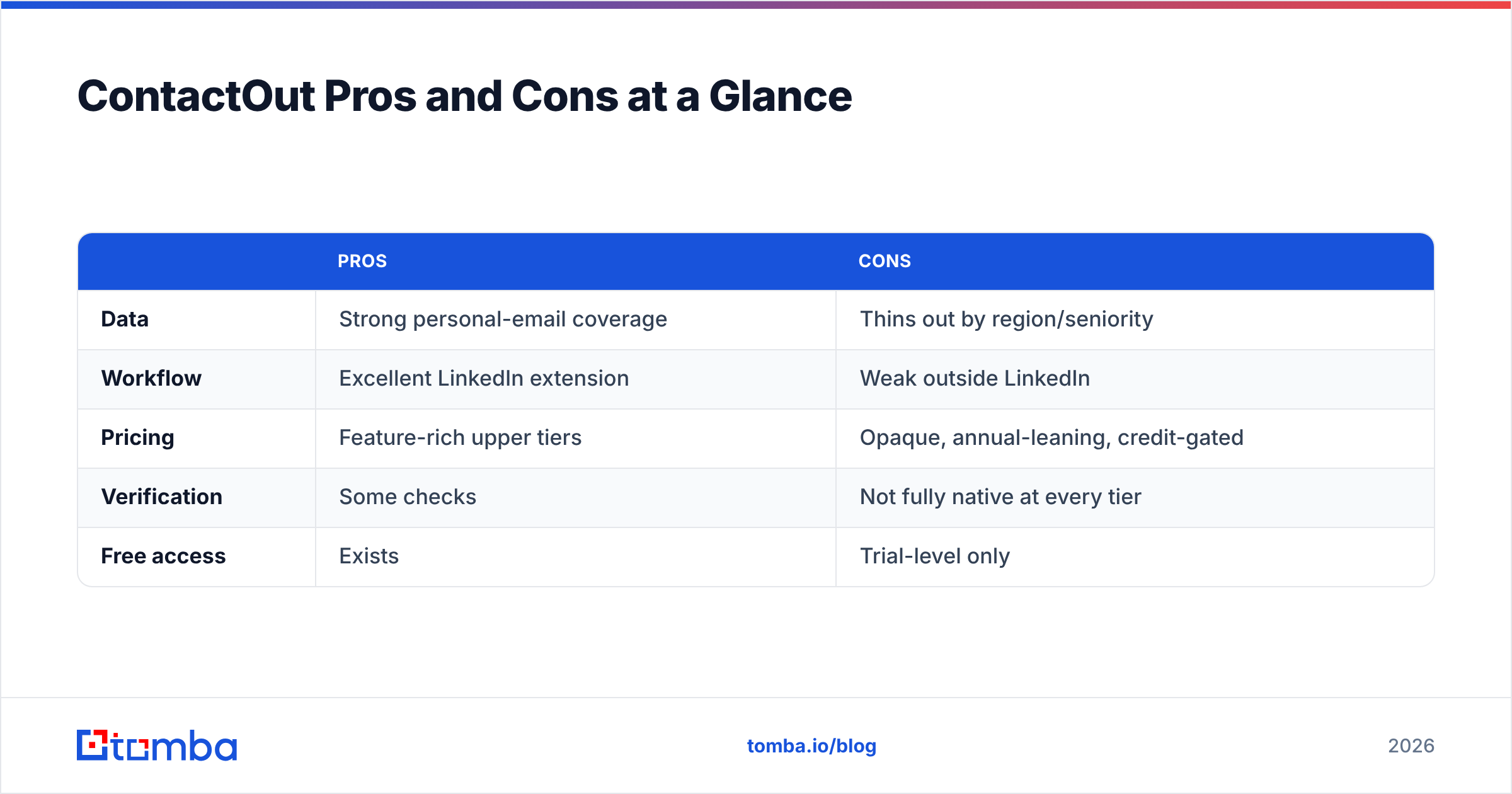
| Pros | Cons | |
|---|---|---|
| Data | Strong personal-email coverage | Thins out by region/seniority |
| Workflow | Excellent LinkedIn extension | Weak outside LinkedIn |
| Pricing | Feature-rich upper tiers | Opaque, annual-leaning, credit-gated |
| Verification | Some checks | Not fully native at every tier |
| Free access | Exists | Trial-level only |
The pattern is consistent: ContactOut is a specialist. Inside its lane — LinkedIn-native, personal-email sourcing — it's very good. Outside it, the pricing and coverage tradeoffs push toward a more general, better-value finder.
What Are the Best ContactOut Alternatives?#
If the cons above are dealbreakers, you have solid options depending on what you're optimizing for.
- Tomba — a domain-first finder with native verification, a real free tier (25 searches/mo), monthly billing, and an API. Best when work emails and cost-efficiency matter. Explore the ContactOut alternative breakdown for a feature-by-feature look.
- LinkedIn-native rivals — other extension-based tools compete directly on personal-email coverage; useful if LinkedIn is your only channel.
- Enrichment platforms — heavier, CRM-centric suites that fold contact data into scoring and routing. More power, more cost, more setup.
Most teams don't actually need the most expensive option — they need reliable, verified emails at a predictable price. That's the gap a straightforward finder-plus-verifier fills, and it's why "cheaper than the incumbent" wins more evaluations than vendors like to admit.

The Verdict: Should You Use ContactOut?#
ContactOut is a legitimately good tool for a specific person: the LinkedIn-native recruiter or seller who needs personal emails and has budget for a premium, annual plan. If that's you, the extension alone can justify the cost.
For everyone else — teams working from company domains, running cost-conscious outbound, or wanting find-and-verify in one place — the pricing opacity and LinkedIn dependency are real friction. That's the honest read on ContactOut's pros and cons: excellent specialist, expensive generalist.
If you want to test the alternative path, start with the Tomba Email Finder. Find professional emails by domain, name, or company, verify them natively before you send, and keep 25 free searches a month with no annual lock-in. Run the same target list through both tools, compare the verified-email counts and the bill, and let the numbers — not the marketing — pick your winner.
Related guides#
Ready to find emails that actually work?
Join 150,000+ professionals who stopped guessing and started sending. Free credits on signup — no credit card required.
Get the Tomba newsletter
Practical outbound tactics and product updates — once every two weeks.
About the author