ContactOut vs Crunchbase: Which B2B Data Tool Wins in 2026?
ContactOut finds contacts, Crunchbase maps companies. We compare pricing, data accuracy, coverage, and workflows so you pick the right B2B tool for prospecting in 2026.
You are choosing between two tools that people lump together but that solve genuinely different problems. ContactOut hands you a person's email and phone number. Crunchbase tells you a company's funding, headcount, and momentum. Buying one when you needed the other is the most common mistake sales teams make with this pair.
This comparison breaks down what each tool actually does, where the data comes from, what you pay, and which workflows each one wins. By the end you will know which side of the contactout vs crunchbase decision fits your team, and where a dedicated email tool beats both.
TL;DR: ContactOut vs Crunchbase at a glance#
- ContactOut is a contact-data tool: personal and work emails, phone numbers, and a LinkedIn Chrome extension. Best for reps who already know who they want and need to reach them.
- Crunchbase is a company-intelligence database: funding rounds, investors, headcount, and growth signals. Best for finding which accounts to target and timing outreach around events.
- They are complementary, not interchangeable. Many teams run Crunchbase for account selection and a contact tool for the actual emails.
- Pricing: ContactOut and Crunchbase both gate serious use behind $49–$99+/month seats, and credit limits bite fast on either.
- If your core need is accurate, verified email addresses at scale, a purpose-built email finder like Tomba will out-deliver both on cost-per-valid-contact.
What is ContactOut and who is it for?#
ContactOut is a contact-enrichment platform built around a LinkedIn Chrome extension. You browse a profile, click the extension, and it surfaces the person's work email, personal email, and phone number. It also offers a search portal and a data-export API for bulk work.
The pitch is speed for individual recruiters and SDRs. If your prospecting motion is "I found this person on LinkedIn and I need their email right now," ContactOut is designed for exactly that moment. It leans heavily on personal Gmail-style addresses, which recruiters value because candidates check them.
Where it gets weaker is scale and verification. Credits deplete quickly, personal emails go stale, and you are trusting a scraped match rather than a live SMTP check. For one-off recruiting touches that trade-off is fine. For a 5,000-contact outbound campaign, unverified addresses turn into bounces that damage your sender reputation.

What is Crunchbase and who is it for?#
Crunchbase is a company database. It started as a directory of startups and funding rounds and grew into a full account-intelligence platform. You get company profiles, funding history, investor lists, employee-count trends, acquisitions, and news-based growth signals.
Crunchbase does not exist to hand you a specific person's email. Its paid tiers surface some contact data and integrations, but the reason teams buy it is targeting: build a list of Series B fintech companies that raised in the last 90 days, then push that list into your CRM or sequencer.
If your bottleneck is "which accounts should we even be calling," Crunchbase is strong. If your bottleneck is "I have the account, I need the CRO's direct line," Crunchbase alone will leave you guessing.
ContactOut vs Crunchbase: the core difference#
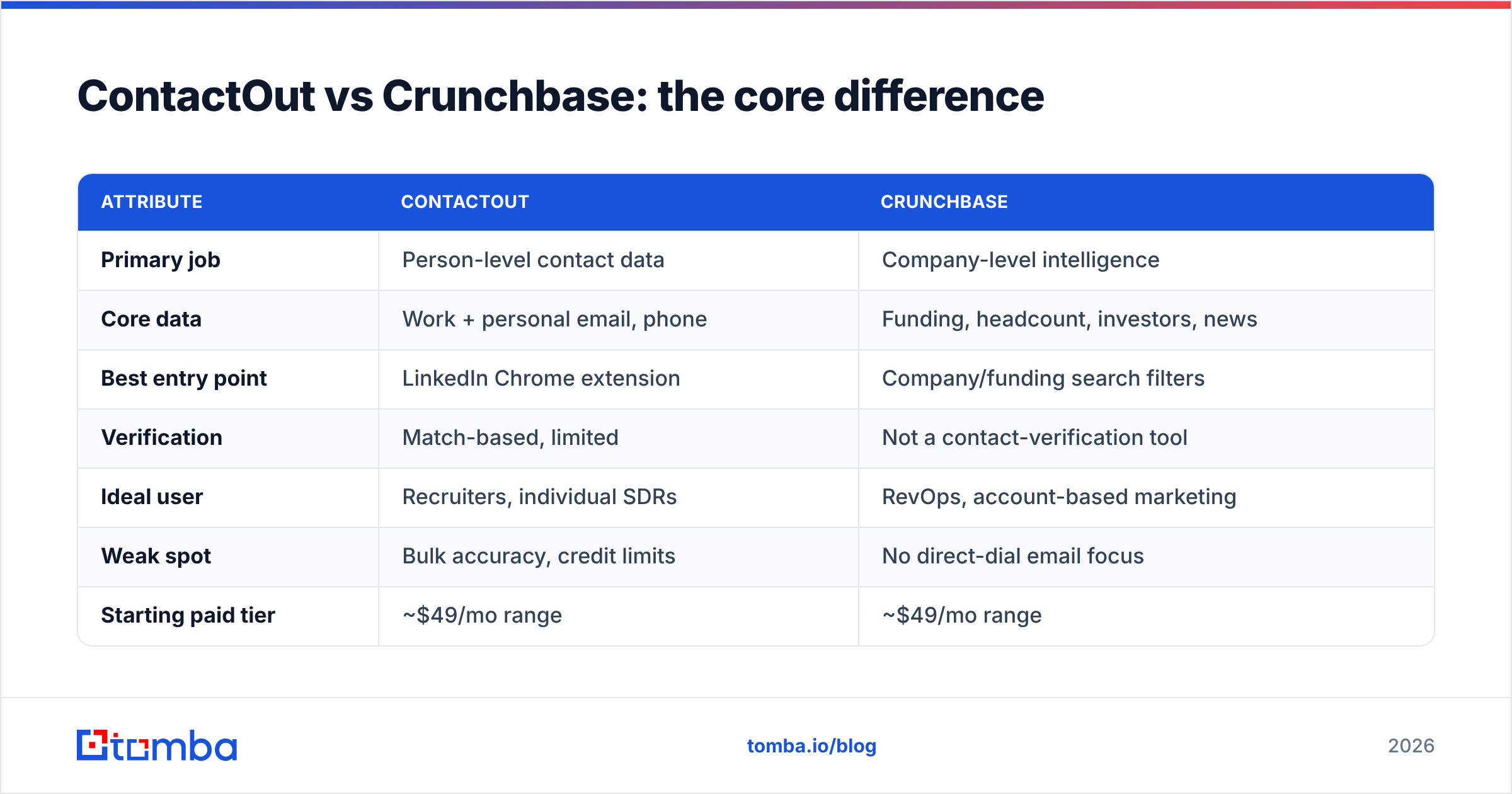
Here is the one-sentence version: ContactOut answers how do I reach this person, Crunchbase answers which company should I chase.
Think of it like planning a road trip. Crunchbase is the map that shows you which cities are worth visiting and which are booming. ContactOut is the GPS address for the specific house you want to knock on. A map without an address gets you to the right town but not the door; an address without a map means you are driving blind about where to go first.
Most mature go-to-market teams use both layers. The mistake is buying one and expecting it to do the other job.
| Attribute | ContactOut | Crunchbase |
|---|---|---|
| Primary job | Person-level contact data | Company-level intelligence |
| Core data | Work + personal email, phone | Funding, headcount, investors, news |
| Best entry point | LinkedIn Chrome extension | Company/funding search filters |
| Verification | Match-based, limited | Not a contact-verification tool |
| Ideal user | Recruiters, individual SDRs | RevOps, account-based marketing |
| Weak spot | Bulk accuracy, credit limits | No direct-dial email focus |
| Starting paid tier | ~$49/mo range | ~$49/mo range |
| Free option | Limited credits | Limited search |
Which has better data accuracy?#
Neither tool is built to guarantee a verified inbox, and that is the honest headline.
ContactOut's accuracy depends on how fresh its scraped match is. Work emails following a known company pattern hold up reasonably well; personal emails decay faster because people change providers and jobs. Crunchbase's company data is genuinely good — funding and headcount figures are well maintained — but its contact data is a secondary feature, not its strength.
The deliverability problem is the same on both sides: an address that looks right is not the same as an address that accepts mail. Before any address you pull from either tool goes into a campaign, it should pass a real-time SMTP check. Running your list through an email verifier catches invalid, catch-all, and role-based addresses before they bounce. According to G2 reviews across this category, bounce complaints are the number-one recurring gripe with scraped-contact tools — and it is almost always a missing verification step, not the finder itself.

How do ContactOut and Crunchbase pricing compare?#
Both tools follow the same playbook: a thin free tier to hook you, then per-seat monthly plans where the real limits are the credits.
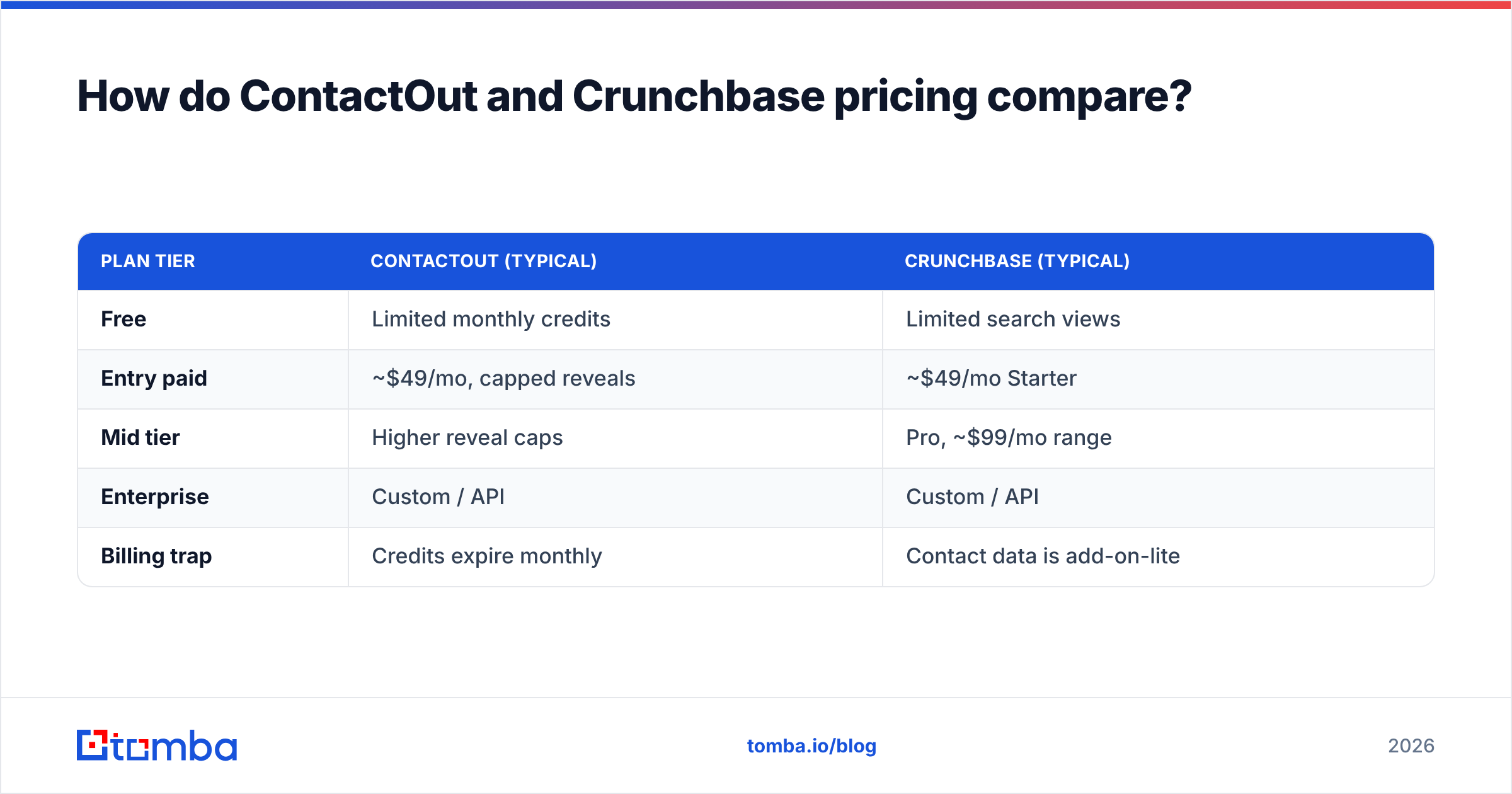
ContactOut publishes tiered plans that scale by the volume of contacts you reveal each month; heavy exporters land on custom pricing fast. Crunchbase sells Starter and Pro seats plus an enterprise tier for teams that want API access and larger export limits. In both cases the sticker price hides the true cost, which is cost per usable contact after you subtract stale and unverified records.
| Plan tier | ContactOut (typical) | Crunchbase (typical) |
|---|---|---|
| Free | Limited monthly credits | Limited search views |
| Entry paid | ~$49/mo, capped reveals | ~$49/mo Starter |
| Mid tier | Higher reveal caps | Pro, ~$99/mo range |
| Enterprise | Custom / API | Custom / API |
| Billing trap | Credits expire monthly | Contact data is add-on-lite |
For comparison, transparent Tomba pricing runs a genuinely usable Free tier (25 searches/mo), Starter at $49/mo, Growth at $99/mo, and Pro at $249/mo — with verification bundled rather than sold as a separate accuracy tax. When you price on valid contacts rather than raw reveals, a finder-plus-verifier stack usually beats paying two premium seats.
When should you use ContactOut over Crunchbase?#
Choose ContactOut when your work is person-first and LinkedIn-driven:
- Recruiting — you are sourcing candidates and need personal emails they actually read.
- Founder-led sales — low volume, high-value, one prospect at a time from LinkedIn.
- Individual SDR quota — you own a named-account list and just need the direct contact.
- Chrome-extension workflow — your reps live inside LinkedIn and want in-context reveals.
In all four cases you already know the account. The job is the last mile: the email and the phone number.
When should you use Crunchbase over ContactOut?#
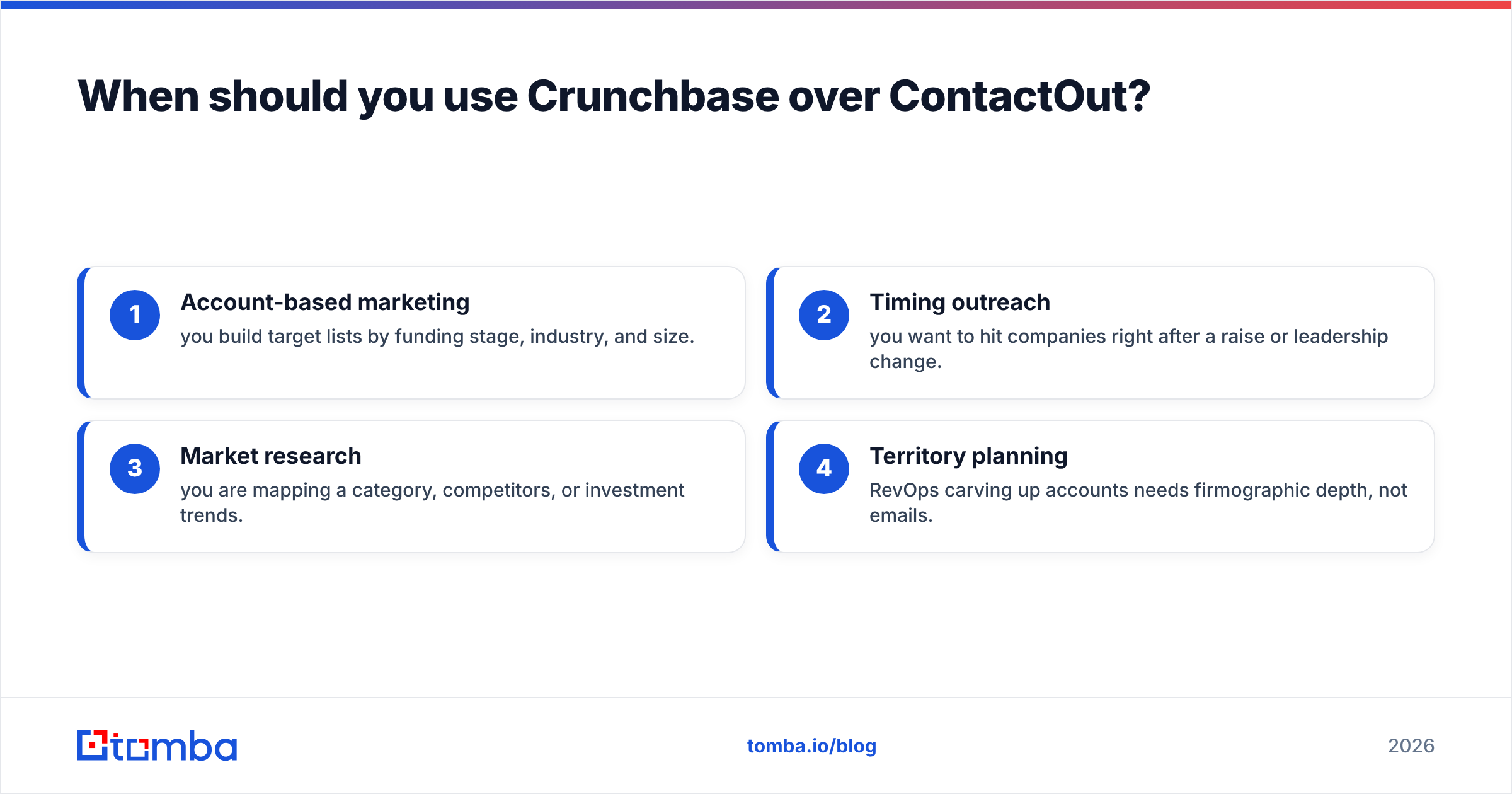
Choose Crunchbase when your work is account-first and signal-driven:
- Account-based marketing — you build target lists by funding stage, industry, and size.
- Timing outreach — you want to hit companies right after a raise or leadership change.
- Market research — you are mapping a category, competitors, or investment trends.
- Territory planning — RevOps carving up accounts needs firmographic depth, not emails.
Crunchbase shines at the top of the funnel where you decide where to spend effort. It is not the tool that closes the gap between a target account and a real conversation.
What is the smarter stack for 2026?#
The best-performing teams stop treating this as either/or. They layer it:
- Targeting layer — Crunchbase (or a comparable firmographic source) to choose accounts and time the outreach around real events.
- Contact layer — a dedicated finder-and-verifier to pull accurate, deliverable emails at scale.
- Enrichment layer — data enrichment to fill CRM gaps and keep records fresh as people move.
This is where a single-purpose tool earns its keep. Crunchbase gives you 500 target companies; you still need the right people at each one and verified inboxes for all of them. Feeding those domains into a bulk domain search returns the people and patterns per company, and the built-in verifier confirms deliverability in the same pass — no second seat, no separate accuracy bill.
ContactOut vs Crunchbase vs a dedicated email finder#
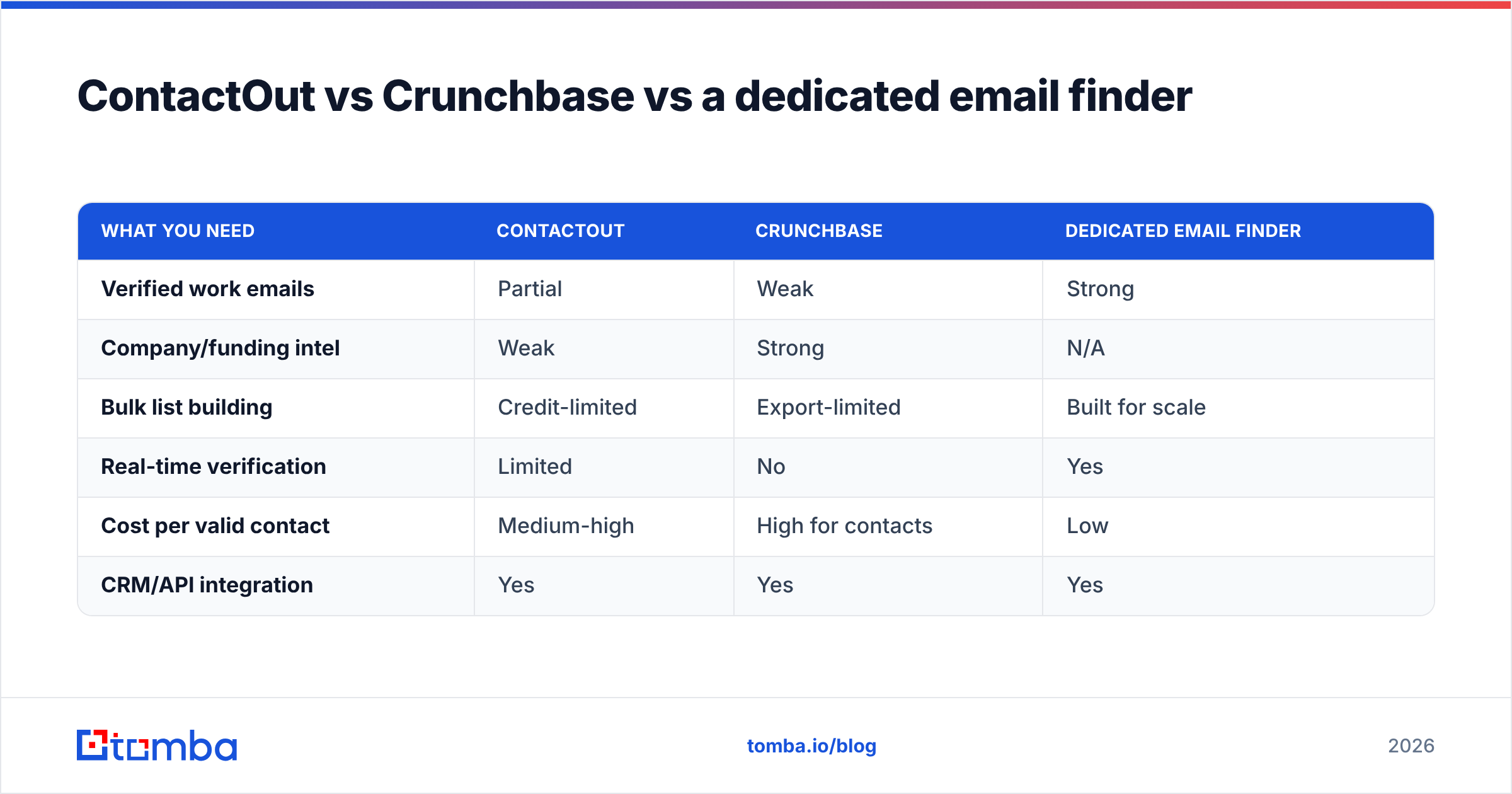
To make the trade-off concrete, here is how the two compare against a purpose-built email tool on the metrics that actually decide a campaign's ROI.
| What you need | ContactOut | Crunchbase | Dedicated email finder |
|---|---|---|---|
| Verified work emails | Partial | Weak | Strong |
| Company/funding intel | Weak | Strong | N/A |
| Bulk list building | Credit-limited | Export-limited | Built for scale |
| Real-time verification | Limited | No | Yes |
| Cost per valid contact | Medium-high | High for contacts | Low |
| CRM/API integration | Yes | Yes | Yes |
The pattern is clear. Crunchbase owns account intelligence. ContactOut is a convenient LinkedIn reveal tool. But neither is optimized for the thing most outbound teams actually get judged on: a big list of deliverable addresses at a low cost per valid contact.
Common questions#
Is ContactOut a Crunchbase competitor? Not really. They overlap only at the edges. ContactOut competes with contact-data tools; Crunchbase competes with firmographic databases. Comparing them head-to-head is like comparing a phone book to a stock screener.
Can Crunchbase find someone's email? Its paid tiers surface limited contact data, but email discovery is not its purpose. For reliable emails you need a dedicated finder plus verification.
Does ContactOut verify emails? It provides match confidence, not a live SMTP verification. Always run pulled addresses through a real verifier before sending to protect your email deliverability.
Which is cheaper? Both start near $49/mo, but "cheaper" depends on cost per usable record. A finder-plus-verifier stack often wins because you are not paying for stale or unverified data.
The verdict#
If you must pick one: buy Crunchbase when your problem is which accounts and when, and buy ContactOut when your problem is reach this specific LinkedIn person now. They are different tools for different stages of the funnel, and most teams eventually run both.
But if the real goal is turning a target list into thousands of emails that actually land, neither tool is your workhorse — a purpose-built finder-and-verifier is. That is exactly what the Tomba Email Finder does: find professional emails by name, company, or domain, verify them in the same workflow, and export clean lists to your CRM. Start on the free tier (25 searches/mo), scale to Starter at $49/mo when it proves out, and pay for valid contacts instead of raw reveals. Pair Crunchbase's targeting with Tomba's verified contact data and you get the full stack without the double premium seat.
Related guides#
Ready to find emails that actually work?
Join 150,000+ professionals who stopped guessing and started sending. Free credits on signup — no credit card required.
Get the Tomba newsletter
Practical outbound tactics and product updates — once every two weeks.
About the author