ContactOut vs Debounce: Email Finder vs Verifier (2026)
ContactOut finds emails; Debounce verifies them. They solve different problems, so picking one over the other is usually the wrong question. Here's how they compare and when you actually need both.
Most "ContactOut vs Debounce" comparisons get one thing wrong: they treat these as rivals. They aren't. ContactOut is a contact finder that pulls emails and phone numbers off LinkedIn profiles. Debounce is an email verifier that tells you whether an address will bounce. One fills your list; the other cleans it. Picking a "winner" is like asking whether a fishing rod beats a fillet knife.
This post cuts through that. You'll see exactly what each tool does, where they overlap (barely), what they cost, and how to decide which one—or which combination—your outbound actually needs.
TL;DR#
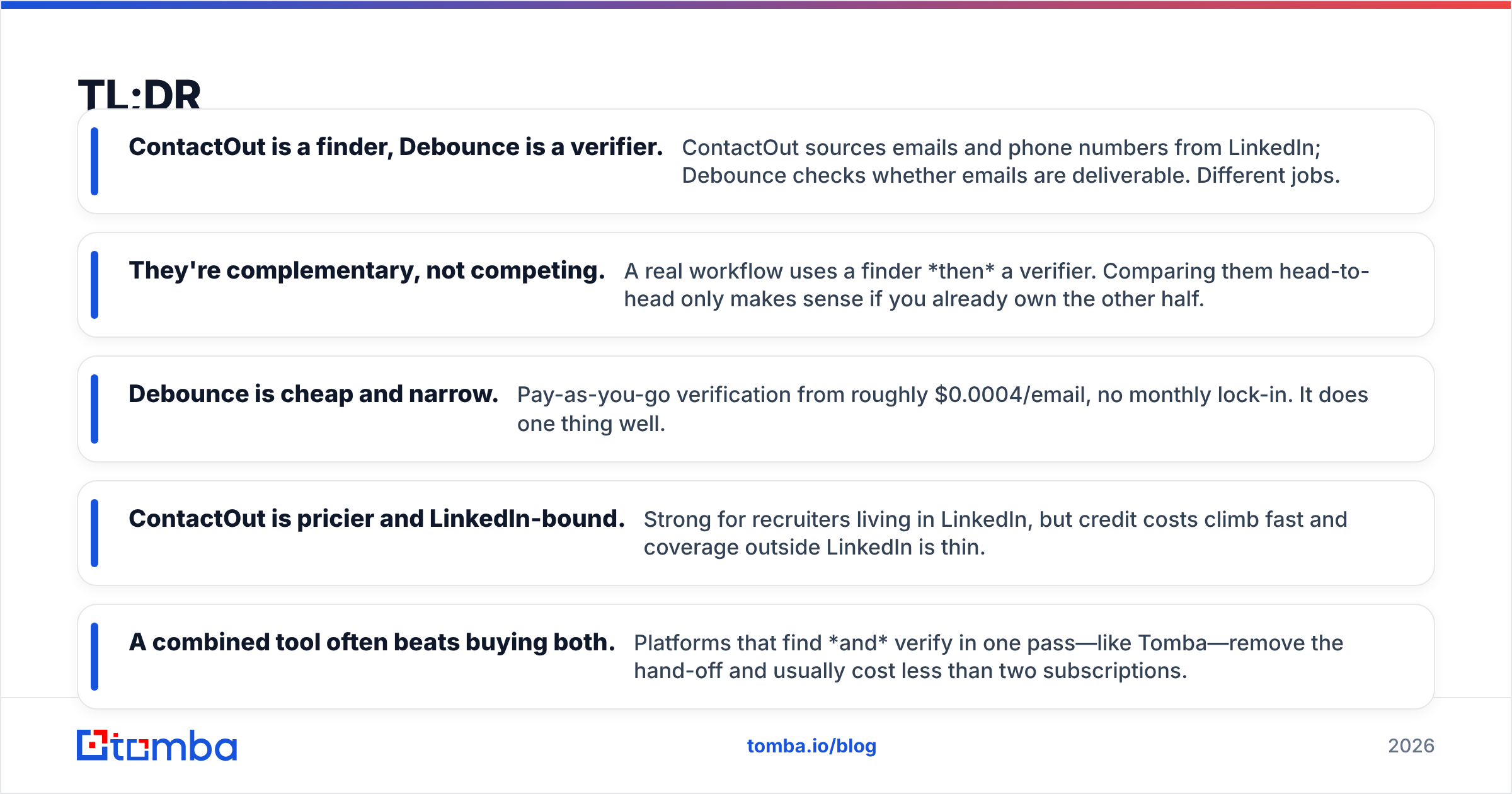
- ContactOut is a finder, Debounce is a verifier. ContactOut sources emails and phone numbers from LinkedIn; Debounce checks whether emails are deliverable. Different jobs.
- They're complementary, not competing. A real workflow uses a finder then a verifier. Comparing them head-to-head only makes sense if you already own the other half.
- Debounce is cheap and narrow. Pay-as-you-go verification from roughly $0.0004/email, no monthly lock-in. It does one thing well.
- ContactOut is pricier and LinkedIn-bound. Strong for recruiters living in LinkedIn, but credit costs climb fast and coverage outside LinkedIn is thin.
- A combined tool often beats buying both. Platforms that find and verify in one pass—like Tomba—remove the hand-off and usually cost less than two subscriptions.
What is ContactOut?#
ContactOut is a B2B contact-finding tool built around LinkedIn. You install its Chrome extension, browse to a profile, and it surfaces personal and work email addresses plus phone numbers. It also offers a search portal and an API for pulling contacts in bulk.
Its core strength is recruiting. If your day is spent inside LinkedIn Recruiter hunting for candidate contact details, ContactOut sits right where you work. It claims a large store of personal emails, which matters when you want to reach someone off their corporate inbox.
The trade-offs are real, though. Coverage is tightly coupled to LinkedIn—if a prospect has a thin or missing profile, you get little. Credits are consumed per reveal, and heavy users burn through plans quickly. And critically, ContactOut is a finder: it hands you an address, but it does not run deep deliverability checks the way a dedicated verifier does. You can read its own positioning on contactout.com.

What is Debounce?#
Debounce is a dedicated email verifier. You upload a list of addresses—or call the API—and it returns a status for each: deliverable, undeliverable, risky, or unknown. It runs syntax checks, domain and MX record lookups, SMTP handshakes, spam-trap detection, and catch-all identification.
Debounce does not find emails. It cannot browse LinkedIn or guess an address from a name and company. It assumes you already have a list and want it clean before you hit send.
Its appeal is focus and price. Verification is pay-as-you-go, with no forced monthly subscription, and per-email cost is tiny at scale. For teams that already collect emails through forms, exports, or another finder, Debounce is a low-friction way to protect sender reputation and keep bounce rates down. Details live on debounce.io.
ContactOut vs Debounce: what's the actual difference?#
The single most important line in this whole comparison: they operate at different stages of the outreach pipeline.
- Sourcing stage — You need a contact's email. This is ContactOut's job. Debounce can't help; it has nothing to verify yet.
- Hygiene stage — You have addresses and need to know which are safe to email. This is Debounce's job. ContactOut doesn't do rigorous deliverability scoring.
- Send stage — Neither tool sends your campaign. You still need an outreach platform or inbox.
So "which is better" depends entirely on which stage is your bottleneck. If your list is empty, a verifier is useless. If your list is full but bouncing, a finder won't save you.
Here's the head-to-head on the attributes that matter.
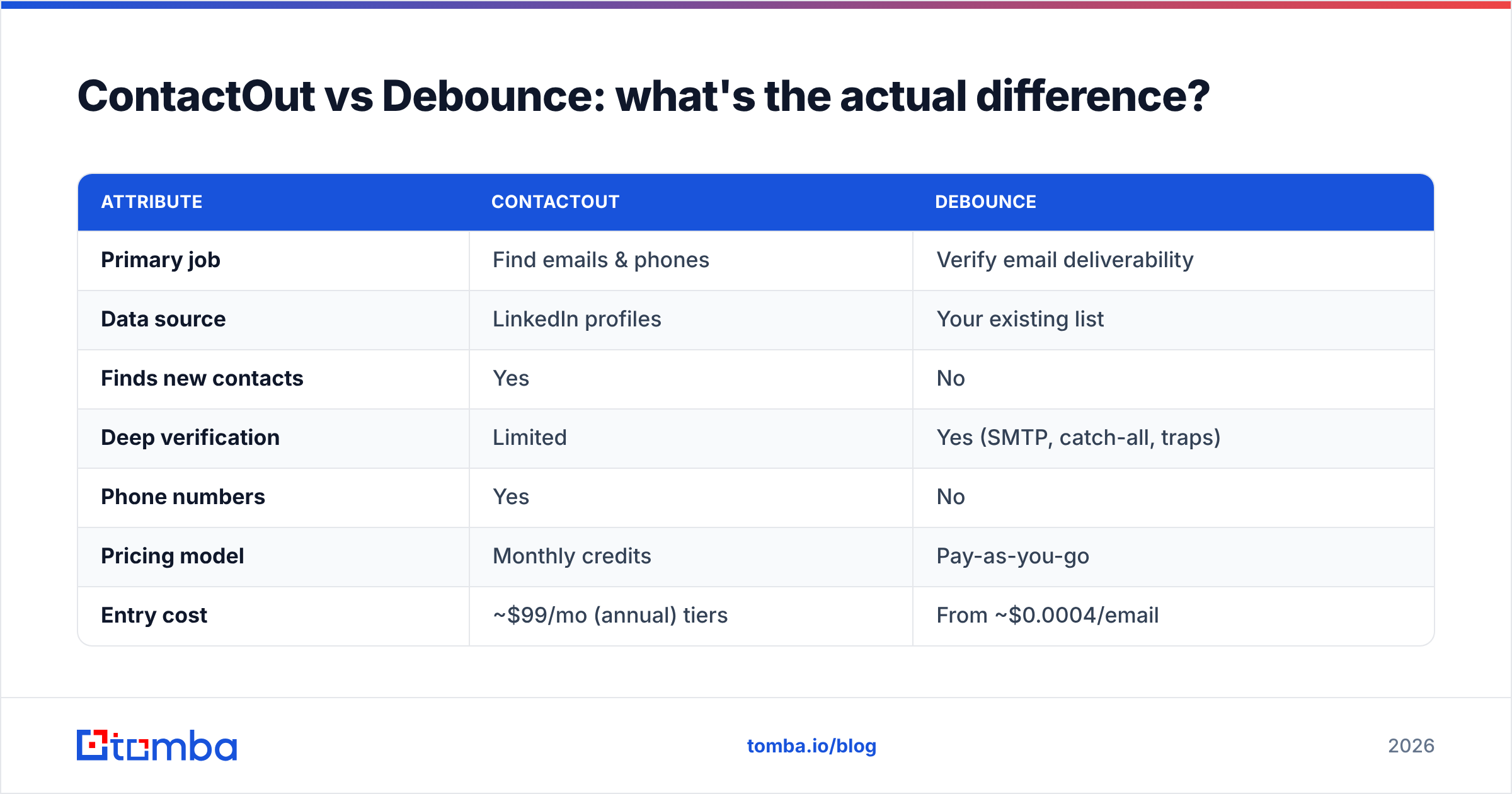
| Attribute | ContactOut | Debounce |
|---|---|---|
| Primary job | Find emails & phones | Verify email deliverability |
| Data source | LinkedIn profiles | Your existing list |
| Finds new contacts | Yes | No |
| Deep verification | Limited | Yes (SMTP, catch-all, traps) |
| Phone numbers | Yes | No |
| Pricing model | Monthly credits | Pay-as-you-go |
| Entry cost | ~$99/mo (annual) tiers | From ~$0.0004/email |
| Best for | Recruiters in LinkedIn | Cleaning lists before send |
| API access | Yes | Yes |
Notice the near-zero overlap. The only row where they even touch is verification, and ContactOut's is shallow by design—it's a finder that does a light validity pass, not a forensic deliverability engine.
Is ContactOut or Debounce better for cold email?#
For cold email specifically, you need both capabilities, and the order matters: find, then verify, then send.
A typical cold-email failure looks like this. You scrape 2,000 emails from a finder, load them straight into your sequencer, and blast. Fifteen percent bounce. Your email deliverability tanks, your domain reputation drops, and even your good emails start landing in spam. That's the exact disaster a verifier prevents—and the exact reason a finder alone isn't enough.
But running two separate tools has its own tax:
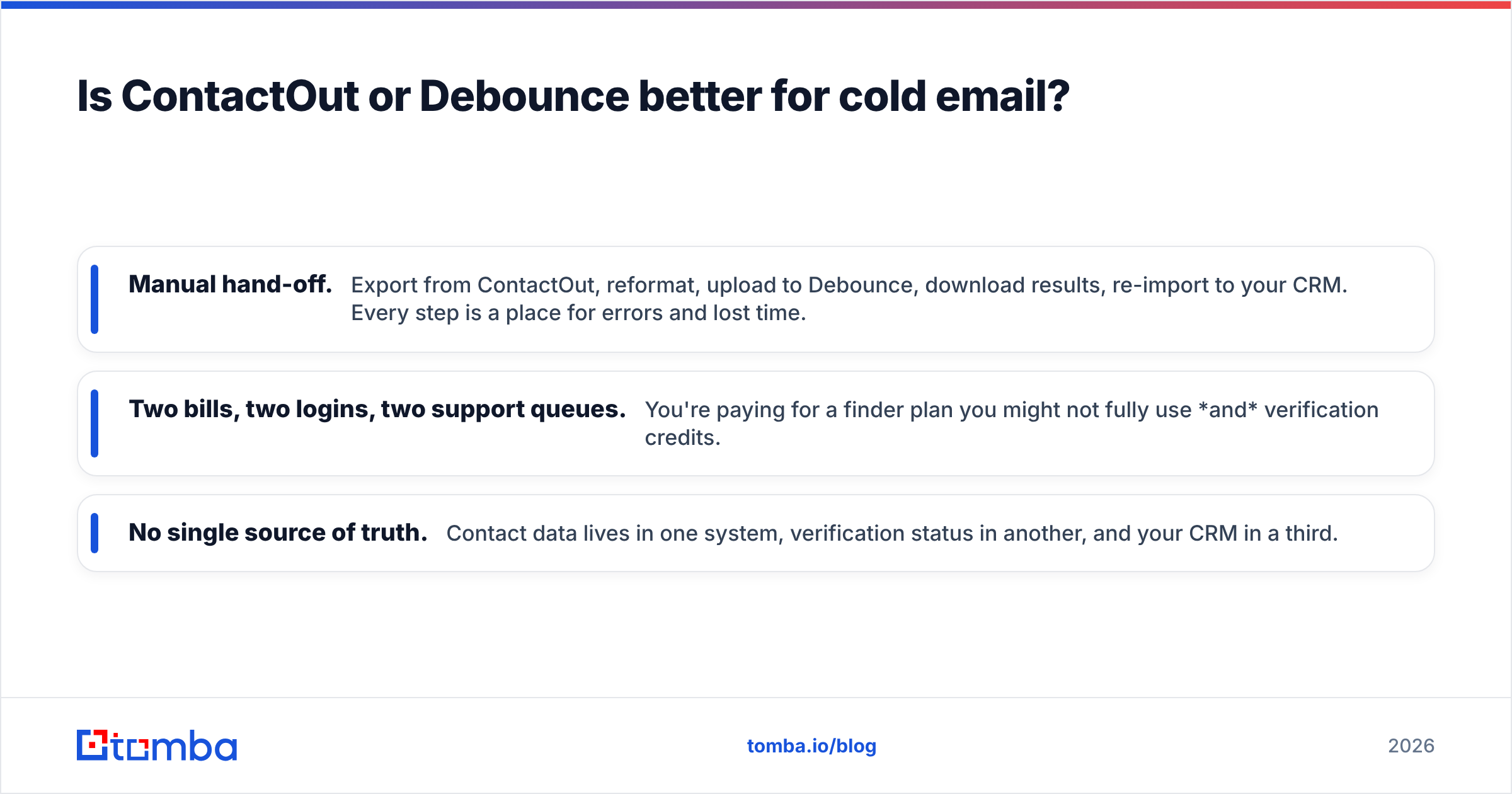
- Manual hand-off. Export from ContactOut, reformat, upload to Debounce, download results, re-import to your CRM. Every step is a place for errors and lost time.
- Two bills, two logins, two support queues. You're paying for a finder plan you might not fully use and verification credits.
- No single source of truth. Contact data lives in one system, verification status in another, and your CRM in a third.

This is where an all-in-one approach pulls ahead for outbound teams. A platform that finds an email and verifies it in the same call gives you a clean, send-ready address without the export-import shuffle.
Where does Tomba fit in this comparison?#
Tomba collapses both stages into one workflow. It's an email finder and an email verifier, so a single lookup returns an address with its deliverability status already attached. If you've been eyeing ContactOut for sourcing and Debounce for hygiene, Tomba covers both jobs under one subscription.
Concretely, Tomba gives you:
- Email finder — locate professional emails by name, company, or domain, not just LinkedIn.
- Domain search — pull every discoverable address at a company via domain search.
- Built-in verification — every result is checked, including catch-all detection through the catch-all verifier.
- LinkedIn coverage — find work emails from profiles with the LinkedIn finder, overlapping ContactOut's core use case.
- Phone finder & enrichment — round out records the way ContactOut does, plus data enrichment.
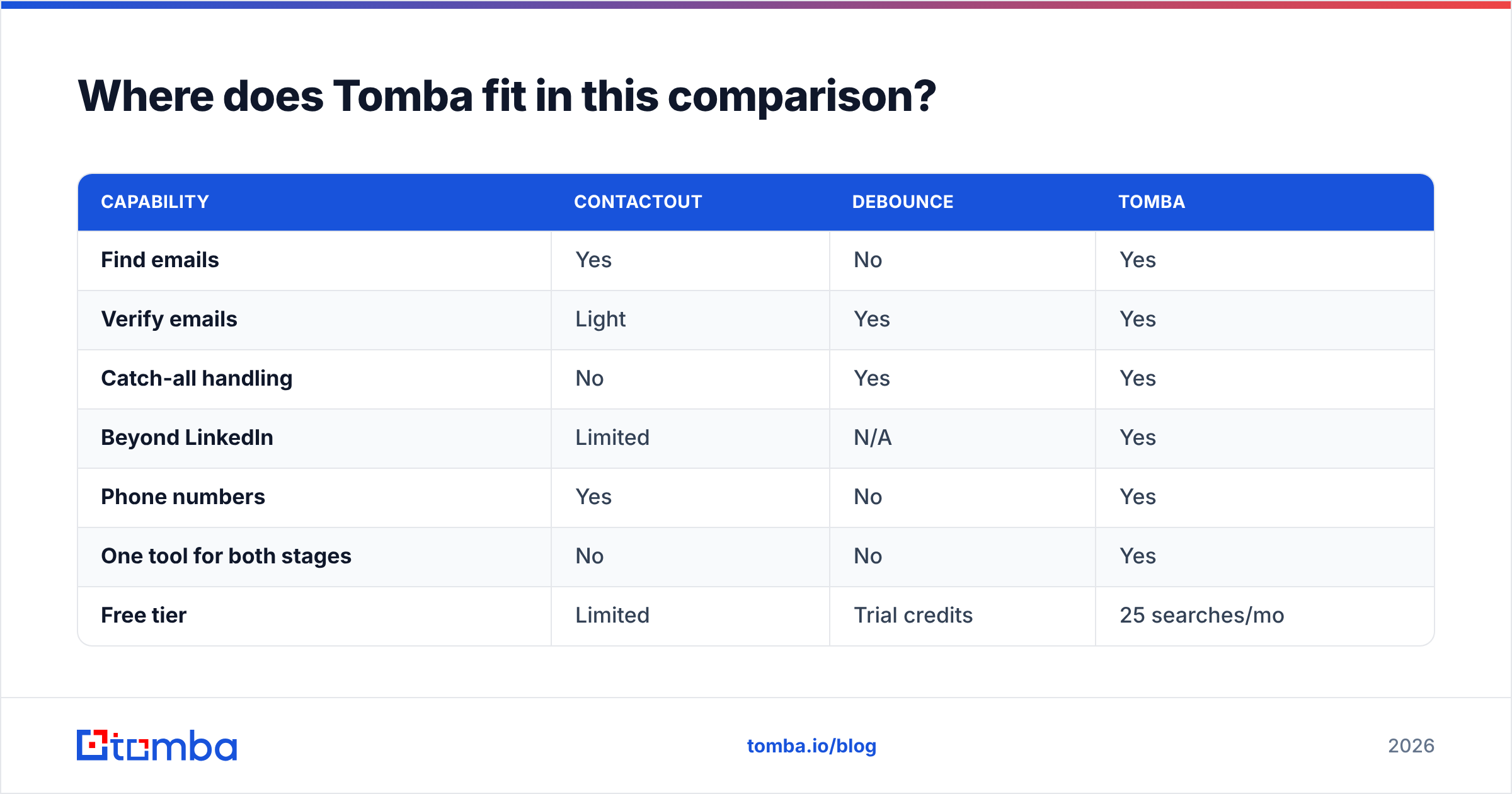
Here's how the three stack up for a team that needs the full find-and-verify loop.
| Capability | ContactOut | Debounce | Tomba |
|---|---|---|---|
| Find emails | Yes | No | Yes |
| Verify emails | Light | Yes | Yes |
| Catch-all handling | No | Yes | Yes |
| Beyond LinkedIn | Limited | N/A | Yes |
| Phone numbers | Yes | No | Yes |
| One tool for both stages | No | No | Yes |
| Free tier | Limited | Trial credits | 25 searches/mo |
| Starter price | ~$99/mo | Pay-as-you-go | $49/mo |
Tomba's pricing starts with a free tier of 25 searches a month, then Starter at $49/mo, Growth at $99/mo, and Pro at $249/mo. For most outbound teams, one Tomba plan replaces the cost of a ContactOut subscription plus Debounce credits—and removes the hand-off entirely.
To be fair to both tools: if you only verify lists you already own and never need to source anything, Debounce's pay-as-you-go model is genuinely economical and hard to beat on pure price. And if your entire motion lives inside LinkedIn Recruiter with a heavy need for personal emails and phones, ContactOut's depth there is a legitimate reason to keep it. The all-in-one argument is strongest when you need both halves.
How do the pricing models compare?#
The pricing philosophies are almost opposites, which is worth understanding before you commit.
Debounce is transactional. You buy verification credits and spend them whenever. Nothing recurring, nothing wasted. At roughly $0.0004 per email in higher tiers, a one-time cleanup of 50,000 addresses costs about $20. That's ideal for occasional list hygiene.
ContactOut is subscription-first. You commit monthly (cheaper annually) for a credit allotment aimed at steady LinkedIn sourcing. If your volume is spiky, you either overpay in quiet months or hit ceilings in busy ones.
Tomba is also subscription-based but bundles finding and verifying into the same credit, so you're not paying two vendors for one contact. Compare full Tomba plans against the combined cost of a finder plus a verifier and the math usually favors consolidation.
A quick decision guide:
- Only cleaning lists you already have? Debounce alone. It's cheap and does exactly that.
- Only sourcing inside LinkedIn Recruiter, personal emails and phones? ContactOut earns its place.
- Running real outbound—finding and sending cold email? A combined find-plus-verify tool like Tomba beats stitching two subscriptions together.
You can sanity-check any vendor's real-world reputation on third-party review sites like G2 before you buy.
Which should you choose?#
Stop framing it as ContactOut versus Debounce—they're not the same species. Frame it as: which stage of your pipeline is bleeding?
- Empty list, LinkedIn-heavy recruiting → you need a finder (ContactOut, or Tomba's broader finder).
- Full list that bounces → you need a verifier (Debounce, or Tomba's built-in check).
- Both problems at once → you need one tool that does both, so you stop paying twice and stop exporting spreadsheets between apps.
For most B2B sales and marketing teams, the third bucket is where you actually live. You're constantly sourcing new contacts and keeping lists clean enough to protect deliverability. That's the exact gap a unified platform fills.
If that's you, start with the Tomba Email Finder. It finds professional emails by name, company, or domain, verifies every result before it reaches your CRM, and covers LinkedIn, phone lookup, and enrichment alongside it—one login, one bill, one clean contact. Spin up the free tier's 25 monthly searches and run your next list through it before you commit to buying a separate finder and verifier.
Related guides#
Ready to find emails that actually work?
Join 150,000+ professionals who stopped guessing and started sending. Free credits on signup — no credit card required.
Get the Tomba newsletter
Practical outbound tactics and product updates — once every two weeks.
About the author