ContactOut vs Generect (2026): Which Lead Tool Wins?
ContactOut is the LinkedIn email king; Generect is the automation-friendly upstart. We break down accuracy, pricing, and data coverage—and show where a leaner tool beats both on cost per verified contact.
Choosing between ContactOut and Generect usually comes down to one question: do you live inside LinkedIn, or do you want contact data flowing straight into your outbound machine without a browser tab open? Both tools promise verified B2B emails and phone numbers, but they get there in very different ways—and they charge for it very differently.
This is a neutral, hands-on comparison. No vendor wrote it. By the end you will know which tool fits your workflow, where each one quietly costs more than the sticker price suggests, and why a lot of teams end up pairing either one with a cheaper, verification-first email finder.
TL;DR: ContactOut vs Generect at a glance#
- ContactOut is the better fit if your prospecting starts and ends on LinkedIn—its Chrome extension and personal-email coverage are its standout strengths.
- Generect is the better fit for automation-first teams that want lead lists and enrichment pushed into a sequencer or CRM via API, with less manual clicking.
- Accuracy is close on corporate emails; ContactOut leads on personal/consumer emails, Generect leans on real-time validation to cut bounces.
- Pricing is opaque on both—credit rollovers, seat minimums, and "contact reveal" math make the real cost-per-lead hard to predict.
- If you mainly need verified work emails at a predictable price, a focused email finder like Tomba often beats both on cost per usable contact.
What is ContactOut and who is it for?#
ContactOut is a contact-data platform built around a LinkedIn Chrome extension. You browse a profile, click the extension, and it surfaces work emails, personal emails, and phone numbers pulled from its cached database of hundreds of millions of profiles. It also offers a web-based search portal and an API, but the browser workflow is where most users spend their time.
Its reputation rests on two things: personal email coverage and LinkedIn-native speed. Recruiters love it because candidates often ignore a work address but answer a Gmail. If your motion is "find the human on LinkedIn, reach them anywhere," ContactOut is purpose-built for that. You can read more about the product on the official ContactOut site.
The trade-off: it is tightly coupled to LinkedIn. Pull ContactOut out of that context—say, you have a list of company domains but no LinkedIn URLs—and the workflow gets clunky fast.

What is Generect and who is it for?#
Generect is a lead-generation and data-enrichment platform aimed at teams that want to automate list building rather than click through profiles one at a time. It emphasizes real-time email validation, API-first delivery, and pushing enriched leads into sequencers and CRMs. Where ContactOut is a browser companion, Generect wants to be plumbing—part of an outbound pipeline that runs without a human babysitting a Chrome tab.
That positioning attracts founders and growth teams running high-volume cold outbound who care more about "leads landed in Instantly/Smartlead this morning" than about a polished manual UI. You can review its own claims on the Generect homepage.
The trade-off runs the other direction from ContactOut: Generect is less useful for the recruiter or AE who works one prospect at a time inside LinkedIn and wants a personal cell number on demand.
ContactOut vs Generect: the core comparison#
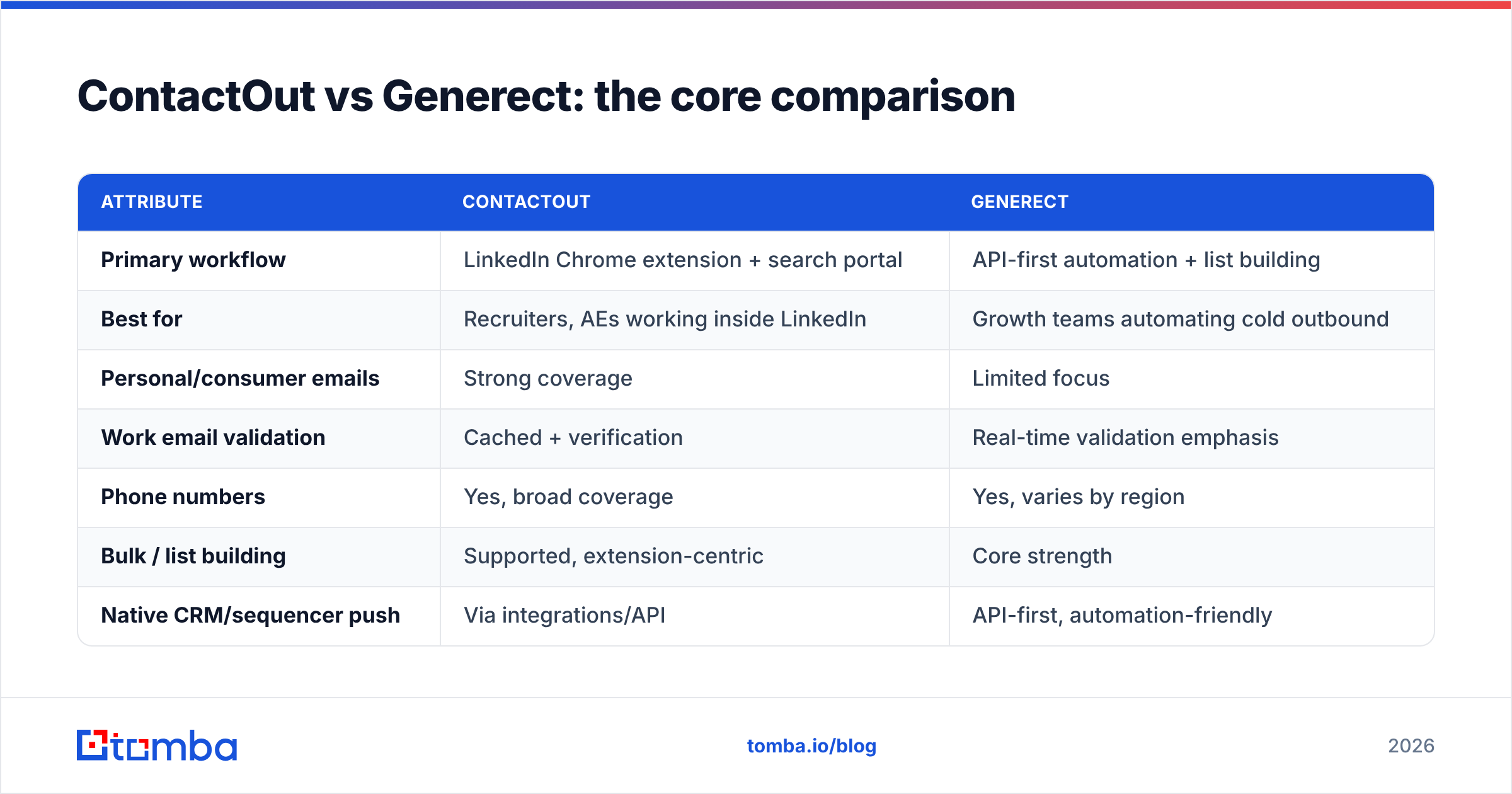
Here is the head-to-head on the attributes that actually change your results. Treat published accuracy numbers from any vendor as marketing until you test on your own list—but the shape of the difference below matches what most teams report.
| Attribute | ContactOut | Generect |
|---|---|---|
| Primary workflow | LinkedIn Chrome extension + search portal | API-first automation + list building |
| Best for | Recruiters, AEs working inside LinkedIn | Growth teams automating cold outbound |
| Personal/consumer emails | Strong coverage | Limited focus |
| Work email validation | Cached + verification | Real-time validation emphasis |
| Phone numbers | Yes, broad coverage | Yes, varies by region |
| Bulk / list building | Supported, extension-centric | Core strength |
| Native CRM/sequencer push | Via integrations/API | API-first, automation-friendly |
| Pricing transparency | Credit-based, quote for scale | Credit-based, quote for scale |
| Free trial | Limited credits | Limited/demo-gated |
The one-line read: ContactOut wins the manual, LinkedIn-first motion; Generect wins the automated, API-first motion. Neither is "better" in the abstract—they optimize for opposite users.
Is ContactOut or Generect more accurate?#
Accuracy splits by data type, so answer it in two parts.
Corporate (work) emails. Both are competitive here, and honestly the gap is small enough that your industry and target geography matter more than the vendor. The bigger risk with either tool is catch-all domains—company mail servers that accept every address, so a "valid" result may still bounce. Neither ContactOut nor Generect fully solves this, which is why serious senders run a second pass through a dedicated email verifier or a catch-all verifier before loading a list into a sequencer.
Personal emails and phone numbers. ContactOut generally leads on personal/consumer email coverage—that is its signature strength and the reason recruiters pick it. Generect leans harder on real-time validation to keep bounce rates down, which helps deliverability but is a different promise than "we found the person's Gmail."
The practical takeaway: if your success metric is "reach a candidate on their personal address," lean ContactOut. If it is "keep my domain reputation clean while sending thousands of cold emails," Generect's validation focus is more aligned—though you should still verify independently, since no provider's internal check is a substitute for a fresh SMTP validation at send time.

ContactOut vs Generect pricing: what does it really cost?#
Neither tool makes cost-per-lead easy to predict, and that is the single biggest complaint in reviews on sites like G2. Both use credit systems, both push you toward annual commitments for the good rates, and both reserve real volume pricing for a sales call.
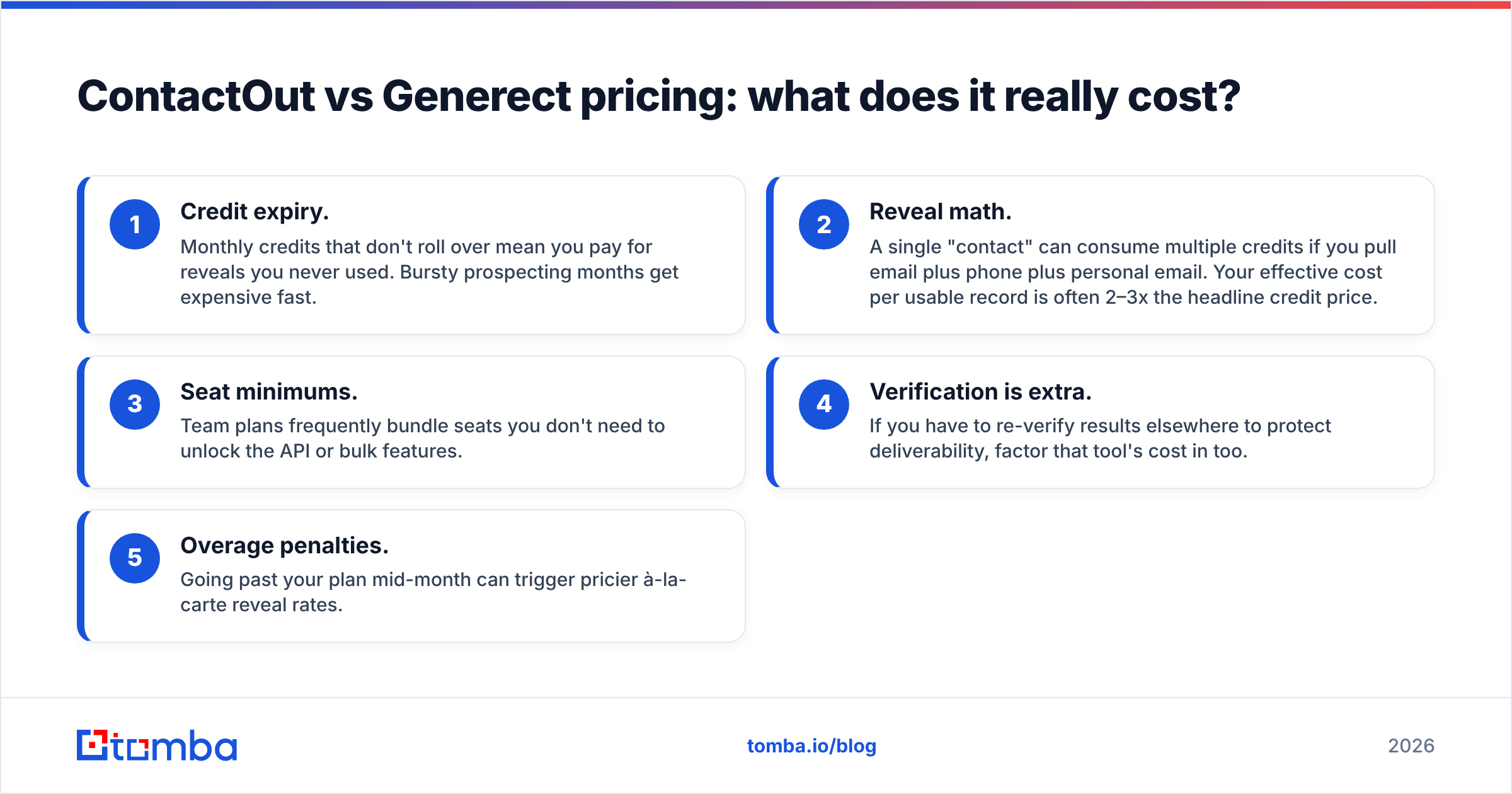
Watch for these cost traps with either vendor:
- Credit expiry. Monthly credits that don't roll over mean you pay for reveals you never used. Bursty prospecting months get expensive fast.
- Reveal math. A single "contact" can consume multiple credits if you pull email plus phone plus personal email. Your effective cost per usable record is often 2–3x the headline credit price.
- Seat minimums. Team plans frequently bundle seats you don't need to unlock the API or bulk features.
- Verification is extra. If you have to re-verify results elsewhere to protect deliverability, factor that tool's cost in too.
- Overage penalties. Going past your plan mid-month can trigger pricier à-la-carte reveal rates.
When you normalize all of that into cost per verified, usable work email, both ContactOut and Generect tend to land well above what a focused finder charges. That is the opening a leaner tool exploits.

Where does a leaner email finder beat both?#
If you strip the problem down to its most common job—"give me a verified work email for this person or this domain, at a price I can forecast"—a dedicated finder is hard to beat. This is where Tomba fits, and it is worth being specific about why.
- Predictable, published pricing. Tomba lists its plans openly: a Free tier with 25 searches/month, Starter at $49/mo, Growth at $99/mo, and Pro at $249/mo. No "book a demo to learn the price" wall. See the full Tomba pricing breakdown.
- Find and verify in one place. The email finder and built-in email verifier mean you are not paying a second vendor to keep bounces down.
- Domain-first workflows. If you start from company domains rather than LinkedIn URLs—the exact scenario where ContactOut gets awkward—domain search is built for it.
- API and integrations. For the automation use case Generect targets, Tomba ships a documented API, plus native connections to CRMs and sequencers.
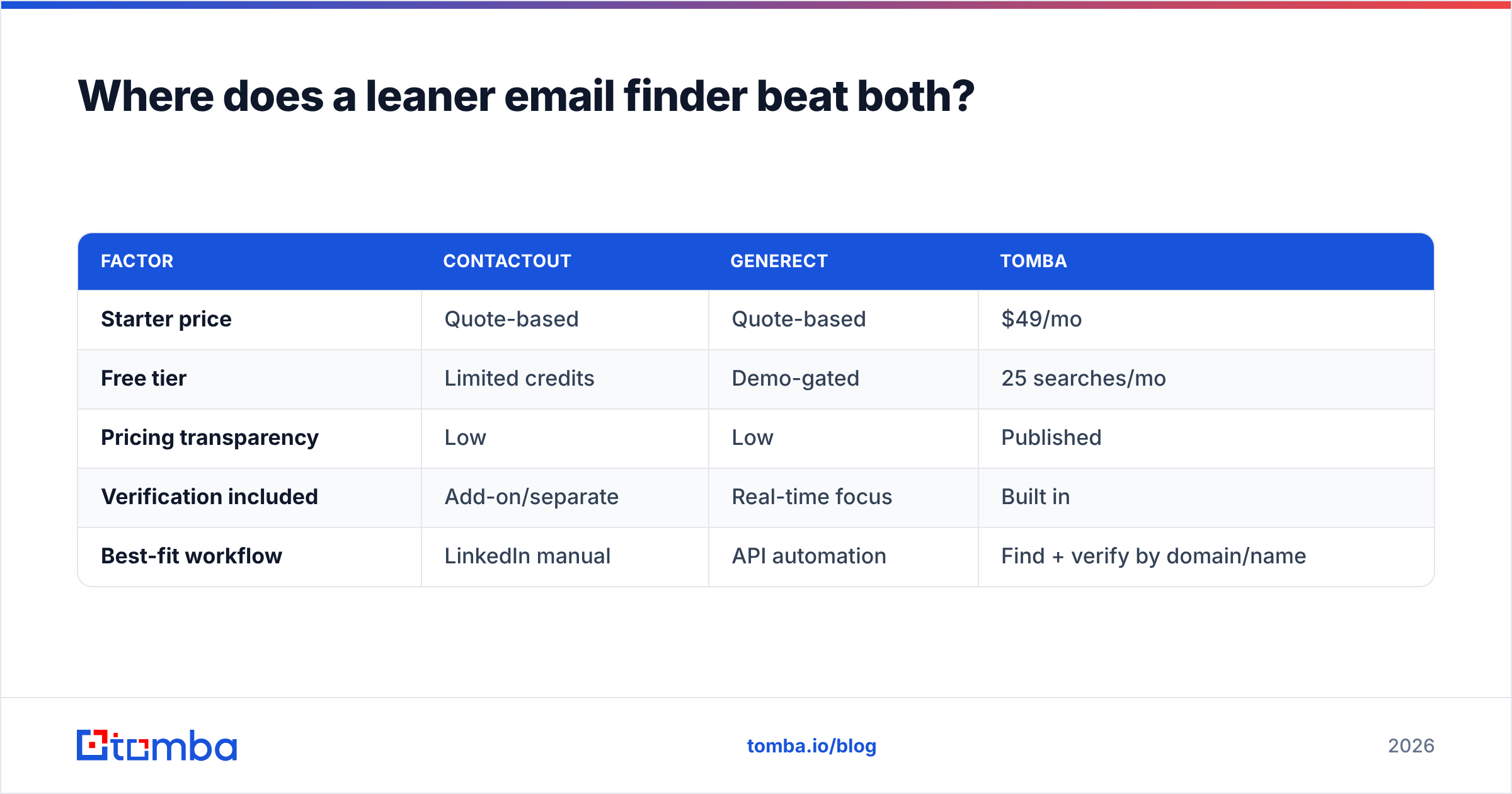
Here is how the three compare on the dimensions that drive cost-per-lead:
| Factor | ContactOut | Generect | Tomba |
|---|---|---|---|
| Starter price | Quote-based | Quote-based | $49/mo |
| Free tier | Limited credits | Demo-gated | 25 searches/mo |
| Pricing transparency | Low | Low | Published |
| Verification included | Add-on/separate | Real-time focus | Built in |
| Best-fit workflow | LinkedIn manual | API automation | Find + verify by domain/name |
None of this makes ContactOut or Generect a bad tool. It means that if your core need is verified work emails at a forecastable price, paying for LinkedIn-native personal-email coverage or a full automation suite may be spending on capabilities you won't use.
How do you choose between ContactOut and Generect?#
Match the tool to your motion, not to the feature list. Use these rules of thumb:
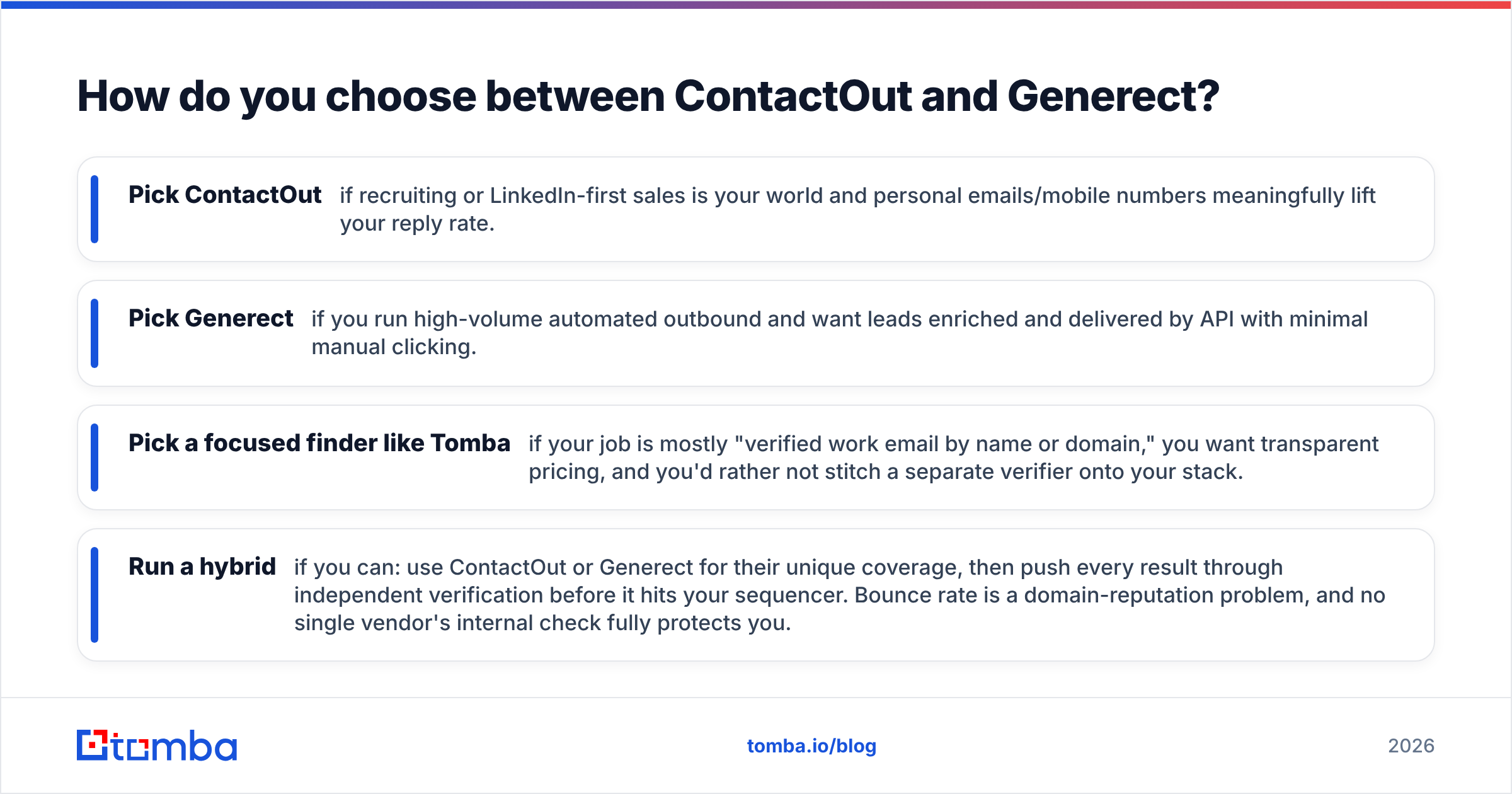
- Pick ContactOut if recruiting or LinkedIn-first sales is your world and personal emails/mobile numbers meaningfully lift your reply rate.
- Pick Generect if you run high-volume automated outbound and want leads enriched and delivered by API with minimal manual clicking.
- Pick a focused finder like Tomba if your job is mostly "verified work email by name or domain," you want transparent pricing, and you'd rather not stitch a separate verifier onto your stack.
- Run a hybrid if you can: use ContactOut or Generect for their unique coverage, then push every result through independent verification before it hits your sequencer. Bounce rate is a domain-reputation problem, and no single vendor's internal check fully protects you.
A quick self-test: look at your last exported lead list. Where did the wasted spend go—credits on contacts you never emailed, bounces that hurt deliverability, or a workflow that didn't match how your team actually prospects? Optimize the tool choice for whichever line item is bleeding.
Final verdict#
ContactOut and Generect solve adjacent but distinct problems. ContactOut is the specialist for LinkedIn-native, personal-contact prospecting. Generect is the automation layer for teams that want leads flowing without manual reveals. Their weakness is shared: opaque, credit-based pricing that makes true cost-per-verified-lead hard to pin down, and verification you often end up paying for twice.
If the bulk of your work is simply finding and confirming professional emails at a price you can plan around, the smarter move is a purpose-built, verification-first tool. Start with Tomba's email finder—the Free tier gives you 25 searches a month to test accuracy on your own list before you spend a dollar, and every plan builds verification in so your bounce rate stays low and your sender reputation stays intact. Test all three on the same 50 contacts, compare the verified-hit count against what you paid, and let the numbers pick your winner.
Related guides#
Ready to find emails that actually work?
Join 150,000+ professionals who stopped guessing and started sending. Free credits on signup — no credit card required.
Get the Tomba newsletter
Practical outbound tactics and product updates — once every two weeks.
About the author